
TL;DR
Network cable testers verify wiring and performance. Basic models check continuity, while advanced testers certify standards and diagnose faults. Choosing the right tester ensures reliable network performance and saves time.
Choose your cable tester based on the testing level needed—wire mapping, verification, qualification, or certification.
Inexpensive testers confirm wiring but don’t guarantee high-speed performance; certified testing measures actual standards compliance.
Always test both ends of a cable, especially in high-speed or PoE deployments, to avoid hidden faults.
Features like graphical fault location and removable remotes can save hours during large installations.
Regular calibration and proper testing procedures prevent costly mistakes and ensure reliable network performance.
What Exactly Is a Network Cable Tester and Why Does It Matter?
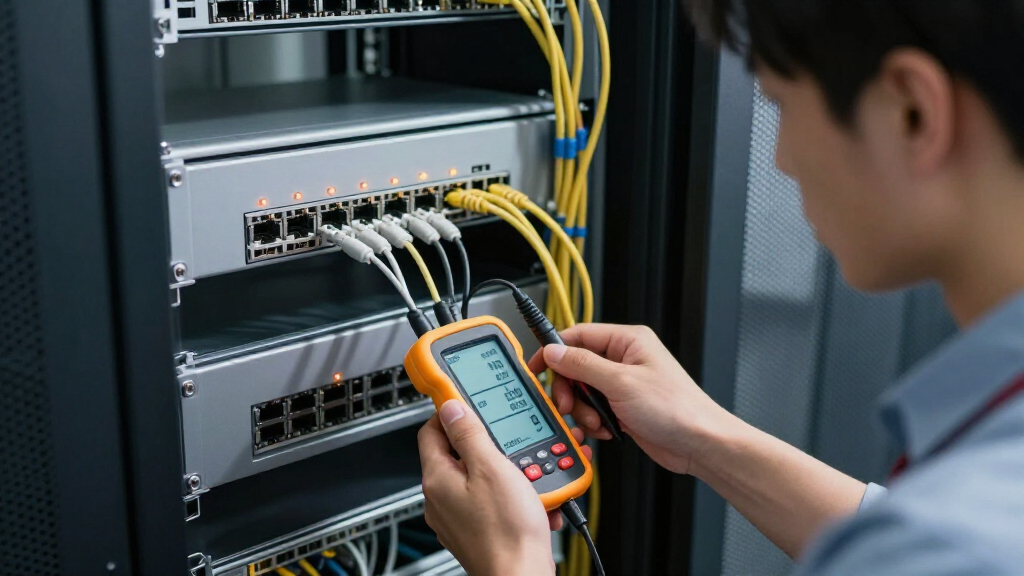
A network cable tester is a device that checks if your Ethernet or fiber cable is wired correctly and can support your network’s needs. It helps catch issues like open circuits, crossed wires, or split pairs before they cause chaos.
Imagine installing a new Cat6 cable for your office. You could assume it works because the lights turn on—but without testing, you might miss split pairs or crosstalk that crush your gigabit speeds. A cable tester spots these hidden problems, saving you time and frustration later.
Different testers serve different needs, from quick continuity checks to full certification. Using the right one keeps your network running smoothly and prevents costly rework.

TESMEN TLP-123A Network Cable Tester for RJ11 RJ45, Ethernet Wire Tool for CAT5/CAT5E/CAT6/CAT6A/CAT7/UTP&STP, LAN & TEL Continuity Test, Suitable for Cable Maintenance – Green
- Supports RJ45 and RJ11: Detects line connectivity and faults
- One-button operation: Simple and quick testing process
- LED indicator display: Clear test results at a glance
As an affiliate, we earn on qualifying purchases.
As an affiliate, we earn on qualifying purchases.
5 Types of Cable Testers—Which One Fits Your Job?
Choosing the right tester depends on what you need to accomplish. Here’s a quick rundown:
| Type | What It Checks | Ideal For |
|---|---|---|
| Wire-map & Continuity | Pin-to-pin wiring, open circuits, shorts | Basic troubleshooting, patch cable assembly |
| Verification | Wiring, cable length, PoE, link speed | Field techs, small installs |
| Qualification | Performance support for specific speeds | Reused cabling, upgrade projects |
| Certification | Standards compliance (ANSI/TIA, ISO) | Professional, certified installations |
| Fiber Testers | Optical loss, faults, power levels | Fiber optic cabling |
For example, a simple wire-map tester might just tell you if a cable is wired correctly. But a certification tester checks if it meets gigabit standards—crucial for high-speed networks.
network cable certification tester
As an affiliate, we earn on qualifying purchases.
As an affiliate, we earn on qualifying purchases.
How to Pick the Perfect Cable Tester for Your Needs
Before buying, ask yourself:
- What level of testing do I need? Do you just want to verify wiring or certify performance?
- What cable categories do I work with? Support for Cat5e, Cat6, or Cat6A matters.
- Will I test shielded cables? Confirm the tester checks shield continuity if needed.
- Do I need PoE testing? Basic voltage detection isn’t enough if you support PoE devices.
- Am I testing live networks? Only certain testers are safe for active cables.
Think about your typical projects. If you’re installing data centers with high-speed links, a certification-grade tool is worth the investment. For quick troubleshooting around the office, a verification or wire-map tester might suffice.

D YEDEMC Fiber Optic Cable Tester Portable Optical Fiber Power Meter FC/SC/ST Universal Interface Integrated OPM, VFL, and RJ45 Functions (OPM-VFL-1)
- Wavelength Measurement: Measures 8 standard wavelengths
- Testing Range: -70dBm to +6dBm
- Integrated Functions: OPM, VFL, and RJ45 support
As an affiliate, we earn on qualifying purchases.
As an affiliate, we earn on qualifying purchases.
Key Features That Make or Break a Good Network Cable Tester
Not all testers are created equal. Here are features to look for:
- Removable remotes: Speeds up identifying cables in patch panels.
- Graphical fault location: Visualizes faults and distance estimates, allowing technicians to quickly pinpoint issues. This feature reduces troubleshooting time significantly, especially in complex setups where multiple cables are involved.
- PoE measurement: Detects voltage, power class, and load conditions, which is crucial for ensuring PoE devices are powered correctly without damaging the equipment. A good tester will help prevent costly mistakes like overloading circuits or powering incompatible devices.
- Report exporting: Essential for documentation, especially in professional settings where records of testing and certification are required for compliance and troubleshooting history.
- Durability: Rugged construction with replaceable leads and long battery life ensures the tester can withstand field conditions, reducing downtime and repair costs.
For example, a tester with multiple remotes and a clear display can identify dozens of cables in minutes, drastically reducing setup time and minimizing human error.
As an affiliate, we earn on qualifying purchases.
Common Faults You’ll Spot and What They Really Mean
Understanding what the test results tell you can prevent misdiagnoses and unnecessary replacements. Here’s a quick cheat sheet with deeper insights:
| Result | Likely Issue |
|---|---|
| Open | Broken wire or loose connection, which could be caused by poor termination, physical damage, or connector failure. Identifying an open early prevents intermittent network issues that are hard to trace. |
| Short | Two conductors touching or crossed, often due to improper wiring or damage during installation. This can cause complete network failure or equipment damage if left uncorrected. |
| Reversal | Pairs wired to the wrong pins, which might not prevent connection but can severely degrade performance, especially at gigabit speeds where proper pairing is critical for signal integrity. |
| Split pair | Twisted pairs not maintained at termination, leading to crosstalk and reduced bandwidth. This fault often results from improper crimping or damage, impacting high-speed data transfer. |
| Excessive length | Long cable runs or incorrect velocity settings can cause signal degradation or timing issues, especially at gigabit speeds. Recognizing this helps in planning optimal cable lengths and settings. |
| PoE failure | Incorrect wiring, high resistance, or insufficient power support can cause devices to malfunction or not power on. Proper testing ensures PoE deployments are safe and effective, preventing costly troubleshooting later. |
For example, an open might be just a loose connector, but a high resistance reading could indicate damaged cable or poor termination, which affects gigabit speeds. Understanding these nuances helps in diagnosing the root cause correctly and choosing the right repair method.
Latest Trends: What’s New in Cable Testing?
The market is shifting towards smarter, more comprehensive tools. Now, testers often combine physical diagnostics with network analysis, like VLAN info, switch port details, and even Wi-Fi diagnostics. This integration helps clarify whether cable faults are real or just misconfigured devices.
Multigigabit Ethernet (2.5G/5G/10G) testing is gaining ground, especially with the rise of high-speed Wi-Fi and edge devices. Newer certification tools now support detailed performance measurements, not just wiring checks. Cloud platforms for test result management are also emerging, allowing teams to organize and review data remotely.
For instance, a recent model might scan a cable, then automatically generate a report with certification results, fault diagrams, and even PoE load data—all stored safely in the cloud. This integration minimizes human error, accelerates project timelines, and enhances compliance documentation.
How to Use a Basic Cable Tester Without Making Mistakes
Most errors come from skipping steps or misreading results. Here’s a simple checklist with deeper context to ensure accurate testing:
- Disconnect the cable from active equipment unless the tester explicitly supports live testing. Testing live cables without proper safeguards can damage the tester or give false results.
- Connect the main unit and remote properly, ensuring firm contact. Loose connections can produce unreliable readings, leading to misdiagnosis of faults.
- Select the appropriate test mode—wiring, length, or fault—based on your specific objective. Using the wrong mode might miss critical issues or provide incomplete information.
- Run the wire-map, then check for open, short, or crossed pairs. Take note of any anomalies and cross-reference with physical inspections for more accurate troubleshooting.
- If supported, measure cable length and look for faults. Keep in mind that environmental factors or incorrect settings can affect accuracy, so interpret results in context.
- Reinstall or reterminate if issues are found. Confirm the fix by retesting to ensure the problem has been resolved and that no new issues have been introduced.
- Retest to confirm the fix and save documentation if needed. Proper record-keeping helps in ongoing maintenance and compliance audits.
Remember, an inexpensive tester might not handle PoE or live voltage safely—always check the specs first. Using the right procedures minimizes errors and ensures reliable results, especially in high-stakes environments.
Your Top Questions About Network Cable Testers Answered
Q: Can a cheap tester verify Cat6 performance? Not really. It can check wiring, but certification requires specialized tools to measure against standards. Relying solely on inexpensive testers may give a false sense of security, leading to overlooked issues that affect network speed and reliability.
Q: Why does a cable pass testing but still fail on the network? The tester may only confirm wiring continuity. The cable might have split pairs, crosstalk, or attenuation issues affecting speed. This disconnect can cause frustration if not properly diagnosed with advanced testing methods.
Q: How accurately can a tester locate a fault? TDR-based tools give an estimate, but actual distance depends on correct settings and cable conditions. Proper interpretation of TDR results is essential to avoid misdiagnosis and unnecessary repairs.
Q: Do I need a professional certification tester for every job? Only if your project demands official compliance or warranty. For small or routine jobs, verification tools often suffice, but understanding their limitations is key to avoiding future issues.
Q: What’s the key difference between verification, qualification, and certification? Verification checks wiring correctness, qualification supports specific performance levels, and certification confirms compliance with standards. Knowing these distinctions helps select the appropriate tool for each task and ensures your work meets industry requirements.
Conclusion
Remember, a cable that looks fine on a basic tester might still underperform. Investing in the right testing tools and knowing how to use them turns guesswork into certainty. Clear, reliable network cabling starts with proper testing—so don’t skip this step.
Picture a quiet office, cables humming with gigabit speed, all verified and certified. That’s the power of smart testing—peace of mind that your network is ready for today’s demanding applications.