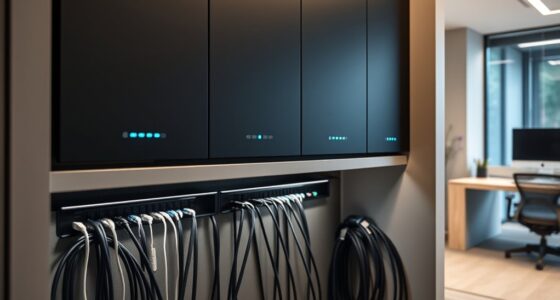

If you’ve ever stepped into a server room with tangled, unorganized cables, you know how quickly it can become a nightmare to manage. Without proper cable organization, airflow is compromised, and troubleshooting becomes more time-consuming. Addressing this mess might seem intimidating at first, but the benefits extend beyond just tidiness. Exploring effective cable management techniques can transform your server environment and prevent future issues—so, how exactly can you start making those improvements?
Key Takeaways
- Disconnect and label all cables before organizing to prevent disconnections and ensure easy identification.
- Use cable management accessories like trays, ties, and clips to route cables neatly along rack sides or designated paths.
- Remove unused or damaged cables promptly to reduce clutter and prevent potential issues.
- Maintain proper slack in cables to avoid strain and damage during cleaning or maintenance.
- Schedule regular reviews and cleanups to keep cables organized, improve airflow, and identify problems early.

A cluttered cable setup can hinder airflow, increase the risk of equipment failure, and make maintenance more difficult. When cables are tangled and unmanaged, it’s easy to overlook potential issues or accidentally disconnect vital connections. To prevent these problems, focusing on effective cable management is essential. Implementing proper rack organization not only streamlines your server room but also enhances overall system reliability.
Start by evaluating your current cable layout. Identify which cables serve critical functions and which ones can be rerouted or replaced. Use labels to clearly mark each cable, making future troubleshooting faster and less frustrating. This simple step helps you keep track of connections and prevents accidental disconnections during maintenance. When organizing cables, aim to keep them neat and separated, avoiding tangles that can restrict airflow or cause wear over time.
Label and organize cables to streamline troubleshooting and prevent disconnections.
Rack organization plays a fundamental role in maintaining a tidy server room. Invest in cable management accessories like cable trays, Velcro straps, or cable ties to secure cables along designated paths. Avoid over-tightening ties, as this can damage cables and impair performance. Instead, use adjustable straps to keep cables aligned and prevent sagging. Properly routed cables should run along the sides of server racks in neat, parallel lines, reducing clutter and improving airflow. This not only cools equipment more efficiently but also makes it easier to identify and troubleshoot issues quickly.
Regular maintenance is key to keeping your cables in check. Schedule periodic reviews of your cable setup, removing unused cables and replacing damaged ones. Keeping a clean, organized rack makes it easier to spot potential problems early—like frayed insulation or loose connections—before they escalate into more serious failures. When adding new equipment, plan your cable routes ahead of time, avoiding crossing cables unnecessarily and ensuring each connection has sufficient slack to prevent strain. Additionally, proper cable management can extend the lifespan of your cables and equipment, reducing replacement costs over time.
Lastly, educate your team on best practices for cable management and rack organization. Consistent procedures ensure everyone understands how to maintain order and prevent new messes from forming. A well-organized server room isn’t just about aesthetics; it’s about creating a reliable, efficient environment that minimizes downtime and simplifies maintenance tasks. Investing time in proper cable management now saves you headaches later, prolongs your hardware’s lifespan, and keeps your server room running smoothly.

QiaoYoubang 10 Pack of 1.7 x 2.7in Server Rack Cable Management D-Ring Hooks – Network Rack-Mount Cord Organizer Ring Set for Power Cords, Fiber Optic or Network Patch Cables (10DRing)
Each D-Ring Hook Size: 1U, W 1.73 x D 2.7x H 1.73 inches (44 x 68.5 x 44…
As an affiliate, we earn on qualifying purchases.
As an affiliate, we earn on qualifying purchases.
Frequently Asked Questions
What Are the Best Cable Management Tools for Server Rooms?
You should use cable management tools like cable labeling and cable routing kits to keep your server room organized. Labeling cables helps you quickly identify connections, saving time during maintenance. Cable routing accessories, such as cable trays, clips, and ties, keep cables neat and prevent tangling. These tools make your setup safer, improve airflow, and make troubleshooting easier, ensuring your server room stays efficient and well-organized.
How Often Should Server Room Cables Be Inspected?
You should inspect your server room cables at least quarterly to guarantee cable durability and prevent issues. Regular inspections help catch wear and tear early, reducing downtime. During each check, look for frayed or damaged cables, loose connections, and signs of overheating. Adjust your inspection frequency based on cable usage and environment, but a quarterly schedule provides a solid routine to maintain peak performance and safety.
Can Wireless Solutions Replace All Wired Connections?
Can wireless solutions replace all wired connections? While wireless offers flexibility and reduces cable clutter, you shouldn’t depend on it entirely. Wireless security remains a concern, and cable durability still matters for reliable connections. Think of it as a dance—wires provide steady footing, and wireless adds agility. For critical systems, a hybrid approach ensures security, stability, and efficiency, keeping your server room functioning smoothly without sacrificing performance.
What Safety Precautions Are Needed During Cable Organization?
You should prioritize electrical safety by turning off power before handling cables to prevent shocks. Use proper tools and wear insulated gloves to avoid fire hazards. Keep cables organized and secured to prevent tripping or damage, which could lead to short circuits. Avoid overloading power strips and ensure all connections are tight. Regularly inspect cables for wear or fraying, maintaining a safe environment and reducing fire risks during cable organization.
How to Train Staff on Maintaining Cable Organization?
Did you know that poorly organized cables can cause 70% of server downtime? To guarantee your staff maintains cable organization, implement extensive staff training programs focusing on proper cable labeling and handling. Regularly update training, use visual aids, and conduct hands-on exercises. Encourage a culture of accountability, so everyone understands the importance of organized cables, reducing errors, and improving system reliability. Consistent training keeps your server room efficient and safe.
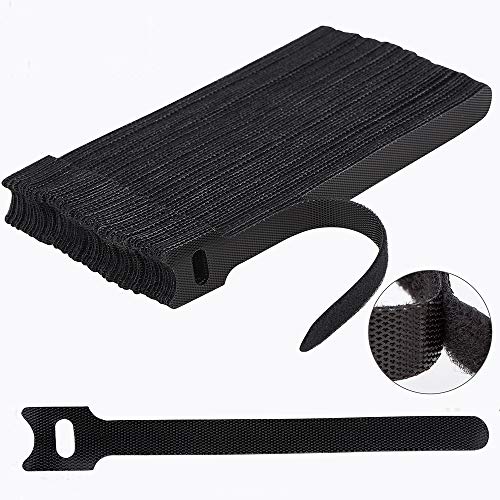
Nettbe 60 PCS 6 Inches Reusable Cable Ties, Adjustable Cord Straps Wire Organizer Cord Wrap and Hook Loop Cable Management
Reusable cable ties are made from premium nylon adhesive materials can be environmentally used multiple times
As an affiliate, we earn on qualifying purchases.
As an affiliate, we earn on qualifying purchases.
Conclusion
Just like a well-orchestrated symphony, a tidy server room ensures everything flows smoothly. By keeping your cables organized, you prevent chaos from disrupting your operations and maintain harmony within your system. Regular inspections, proper labeling, and thoughtful routing are your instruments for success. Remember, as in any masterpiece, attention to detail makes all the difference. Take control today—your equipment, your team, and your future will thank you for it.

Under Desk Cable Management Tray No Drill, Metal Mesh Cable Management Under Desk with Clamp Mount, 2 Hole Cable Tray with Wire Management and Cord Organizer for Home Office Standing Desk
【No Drill Mounted】Cable management tray can be assembled in as little as 3 minutes or less-simply. Side clips…
As an affiliate, we earn on qualifying purchases.
As an affiliate, we earn on qualifying purchases.

VolenGo Label Maker Machine with-Tape, Heat Shrink Label Maker Waterproof-Labels, Wire Cable label Maker, E1000 Labeler Machine with-Tape 12mm Laminated Handheld Labeling Machine for Industrial Office
𝗧𝗛𝗥𝗘𝗘 𝗖𝗔𝗕𝗟𝗘 𝗠𝗢𝗗𝗘𝗦: Efficient wire label maker with three cable modes; Ideal for quick and easy cable management
As an affiliate, we earn on qualifying purchases.
As an affiliate, we earn on qualifying purchases.