To make your small office network easier to scale, focus on selecting scalable hardware like switches and routers that support future upgrades, and use wireless solutions that expand seamlessly as your business grows. Segment your network into VLANs to improve security and performance, and keep detailed documentation of your current setup. Embrace cloud-managed tools for centralized control, and plan ahead for coverage and capacity needs. Staying proactive with these strategies can make expansion smooth—keep exploring for more insights.
Listen free for 30 days with Audible
Thousands of audiobooks and originals — cancel anytime.
As an affiliate, we earn on qualifying purchases.
Key Takeaways
- Implement scalable Wi-Fi solutions supporting multiple access points and future device additions.
- Use network segmentation (VLANs/subnets) to improve security, performance, and manageability during growth.
- Choose modular, upgradeable hardware like switches and routers for seamless future expansion.
- Maintain detailed documentation of current network setup to identify bottlenecks and plan upgrades effectively.
- Adopt centralized, cloud-managed management tools for simplified control and real-time network insights.

Scaling a small office network can seem intimidating, but with the right approach, it becomes much more manageable. As your business grows, so does your need for more devices, better connectivity, and enhanced security. To keep things smooth, focus on strategic planning from the start. Incorporating wireless expansion is essential; it allows you to add new devices without the hassle of running new cables everywhere. Modern Wi-Fi solutions offer scalability, so you can increase coverage and capacity as needed, ensuring your team stays connected without interruptions. When expanding wirelessly, choose equipment that supports multiple access points and the latest standards, making sure your network can handle increased traffic smoothly.
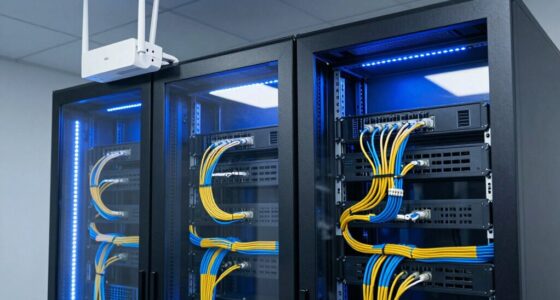
Scaling your office network with scalable Wi-Fi ensures seamless connectivity and easy growth.
Another vital aspect is network segmentation. It’s a simple yet powerful method to organize your network logically, dividing it into smaller, manageable sections. Segmentation improves security by isolating sensitive data and critical systems from general user access, reducing the risk of breaches. It also enhances performance by preventing network congestion. When you segment your network, you assign specific subnets or VLANs for different departments or functions, streamlining traffic flow and simplifying management as your network grows. This proactive approach guarantees that adding new users or devices doesn’t compromise overall stability. Incorporating scalable hardware is also crucial to ensure your infrastructure can support future growth without frequent replacements. Furthermore, selecting hardware that supports future upgrades can save you time and money as your network requirements evolve. Considering network management tools can also improve your ability to adapt quickly to changes in your network environment.
Implementing scalable network infrastructure requires thoughtful hardware choices. Invest in switches and routers that support future upgrades, and consider modular systems that can expand as your needs evolve. Cloud-managed networking solutions are particularly beneficial because they offer centralized control, making it easier to configure, monitor, and troubleshoot your network remotely. These tools simplify adding new access points or adjusting security policies, which is especially useful during expansion phases. Additionally, adopting automated network management tools can help streamline ongoing maintenance and reduce manual errors, facilitating smoother growth. Staying updated on technological advancements can empower you to integrate new features that enhance network scalability and security.
Planning for future growth also involves documenting your network architecture. Keep detailed records of your existing setup, including IP schemes, hardware inventory, and security policies. When you expand, this documentation helps you identify potential bottlenecks and plan upgrades efficiently. Additionally, consider integrating unified management platforms that provide visibility into your entire network, giving you real-time insights to address issues before they escalate. Taking these steps ensures that your network remains resilient as it scales. Staying informed about the latest technological advancements can also help you make smarter decisions about your network’s evolution.
Ultimately, making your small office network easier to scale hinges on foresight and the right technology. Emphasize wireless expansion to support mobility and flexibility, and utilize network segmentation to maintain security and performance. By choosing scalable hardware and implementing clear documentation, you set the foundation for smooth growth. With these strategies, expanding your network becomes less intimidating and more a part of your ongoing business evolution.
scalable office Wi-Fi access points
As an affiliate, we earn on qualifying purchases.
As an affiliate, we earn on qualifying purchases.
Frequently Asked Questions
What Are the Best Tools for Monitoring Network Growth?
You should use network monitoring tools like Nagios, PRTG, or SolarWinds, which help track network growth effectively. These tools analyze your network topology and monitor bandwidth management, giving you real-time insights into traffic patterns and device performance. By regularly reviewing this data, you can identify bottlenecks, plan capacity upgrades, and make certain your network scales smoothly as your office expands.
How Can I Budget for Future Network Expansion?
Your budget planning is the rocket fuel for smooth network expansion. Start by evaluating current infrastructure and projecting future needs based on growth trends. Allocate resources wisely, prioritizing scalable hardware and flexible solutions. Consider unexpected costs to avoid surprises. Regularly review and adjust your budget to stay ahead. With strategic resource allocation, you’ll guarantee your network can grow effortlessly—like a well-oiled machine—without breaking the bank.
What Security Measures Are Essential During Scaling?
During scaling, you should prioritize security measures like implementing access controls to restrict user permissions and prevent unauthorized access. Additionally, guarantee data encryption is in place to protect sensitive information both at rest and in transit. Regularly update security protocols and educate your team on best practices. These steps help maintain a secure network environment as your office grows, reducing vulnerabilities and safeguarding your business assets.
How Do I Train Staff for New Network Systems?
You might think staff training’s a breeze, but it’s really the backbone of your network’s success. Start with clear network documentation to guide your team and eliminate confusion. Conduct hands-on sessions, breaking down complex systems into simple steps. Encourage questions and provide ongoing support. Remember, a well-trained team adapts faster, making your scaling efforts smoother. Irony’s on you if neglecting training slows down your shiny new network!
What Are Common Mistakes to Avoid When Scaling Networks?
When scaling networks, avoid bandwidth bottlenecks by carefully analyzing your current usage and planning for growth. Don’t overlook the need for hardware upgrades; outdated equipment can hinder performance and limit expansion. Make sure you upgrade routers, switches, and cabling as necessary. Also, don’t neglect proper network segmentation—this prevents overloads and keeps your network running smoothly. Regular monitoring and proactive upgrades help you scale efficiently without disruptions.
As an affiliate, we earn on qualifying purchases.
Conclusion
By planning ahead and choosing flexible network solutions, you can make scaling your small office network as smooth as sailing on calm waters. Remember to prioritize your current needs while leaving room for growth, and don’t be afraid to leverage cloud services and modular hardware. With these strategies, expanding your network becomes less of a challenge and more of an exciting opportunity—like turning a small boat into a sturdy ship ready to explore new horizons.
As an affiliate, we earn on qualifying purchases.
As an affiliate, we earn on qualifying purchases.
Evergreen bestsellers Picks
bestsellers
As an affiliate, we earn on qualifying purchases.