
Wi-Fi 6 mesh routers are the go-to choice for expanding reliable, high-speed Wi-Fi across large homes and crowded environments. The TP-Link Deco X55 AX3000 stands out as the best overall pick thanks to its solid performance and ease of setup, while the eero 6 Mesh WiFi Router offers a user-friendly experience ideal for beginners. For those seeking maximum speed and advanced features, the Deco 7 Pro Tri-Band WiFi 7 delivers cutting-edge technology, but at a higher price. The main tradeoffs in this category revolve around coverage, speed, ease of use, and cost, making it crucial to match a router’s strengths to your specific needs. Continue reading for a detailed breakdown of each option and what to consider before buying.

Get business pricing on networking and server gear
- Business-only prices and quantity discounts
- Tax-exempt purchasing
- Multiple users, one account, clear invoices
Key Takeaways
- The best overall Wi-Fi 6 mesh router in this roundup is the TP-Link Deco X55 AX3000, offering a balanced mix of performance, coverage, and affordability.
- Tri-band systems like the Deco 7 Pro provide higher speeds and better network management but come at a significantly higher price and complexity.
- Coverage area varies widely; larger homes benefit from multi-pack systems, but these often increase total cost and setup complexity.
- Ease of setup and app controls are key for beginners, with options like eero 6 excelling in user-friendly design.
- Wi-Fi 6E and Wi-Fi 7 systems bring future-proofing and faster speeds but are more expensive and less mature in ecosystem support.
| TP-Link Deco X55 AX3000 Wi-Fi 6 Mesh System (2-Pack) |  | Best Overall for Large Homes with High Device Capacity | Wi-Fi Standard: Wi-Fi 6 | Speed Class: AX3000 | Wireless Speed: 2402 Mbps + 574 Mbps | VIEW LATEST PRICE | See Our Full Breakdown |
| TP-Link Deco X15 AX1500 Dual-Band WiFi 6 Mesh Wi-Fi System (3-Pack) |  | Best for Large Homes Seeking Affordable Wi-Fi 6 Coverage | WiFi Standard: WiFi 6 (AX1500) | Bands: Dual-Band | Wireless Speed: 1,201 Mbps on 5 GHz, 300 Mbps on 2.4 GHz | VIEW LATEST PRICE | See Our Full Breakdown |
| TP-Link AX1500 Wi-Fi 6 Dual-Band Mesh Router System, Indoor Coverage up to 3,900 sq. ft., 2-Pack (Renewed) |  | Best Budget-Friendly Wi-Fi 6 Mesh for Moderate Homes | Wi-Fi Standard: Wi-Fi 6 | Speed: 1500 Mbps | Coverage: Up to 3,900 sq ft | VIEW LATEST PRICE | See Our Full Breakdown |
| Deco 7 Pro Tri-Band WiFi 7 BE10000 Whole Home Mesh System 6-Stream 10 Gbps |  | Best for Future-Proof Ultra-Speed Home Networks | Wi-Fi Bands: Tri-band Wi-Fi 7 | Max Speed: 10 Gbps | Coverage: 7,600 sq ft | VIEW LATEST PRICE | See Our Full Breakdown |
| TP-Link Deco S4 Mesh AC1900 WiFi System (3-Pack) |  | Best for Large Homes on a Budget Needing Reliable Coverage | WiFi Standard: 802.11ac | Speed: AC1900 | Coverage: Up to 5,500 sq ft | VIEW LATEST PRICE | See Our Full Breakdown |
| TP-Link AX1800 WiFi 6 Router (Archer AX21 V5) |  | Best Overall Wi-Fi 6 Router for Versatile Home Use | Technology: Wi-Fi 6 (802.11ax) | Bands: Dual-band | Total Bandwidth: 1.8 Gbps | VIEW LATEST PRICE | See Our Full Breakdown |
| TP-Link Deco W4500 AX1500 Wi-Fi 6 Mesh Router System (Renewed) |  | Best Mesh System for Large Coverage at a Budget | Package Dimensions: 10 x 8.43 x 6.81 inches | Item Weight: 3.54 pounds | Model Number: Deco W4500 | VIEW LATEST PRICE | See Our Full Breakdown |
| TP-Link Deco XE75 AXE5400 Tri-Band WiFi 6E Mesh System, 3-Pack |  | Best for Future-Proofing with WiFi 6E and Large Coverage | Model: Deco XE75 | WiFi Class: AXE5400 | Bands: Tri-band (6 GHz, 5 GHz, 2.4 GHz) | VIEW LATEST PRICE | See Our Full Breakdown |
| TP-Link Deco X55 AX3000 WiFi 6 Mesh System (1-Pack) | 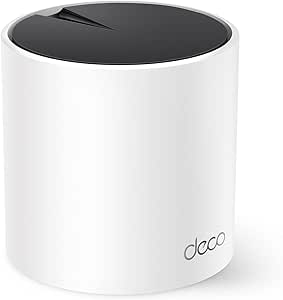 | Best Compact Mesh System for Small to Medium Homes | WiFi Standard: WiFi 6 (AX3000) | Coverage Area: 2500 sq ft | Number of Units: 1 | VIEW LATEST PRICE | See Our Full Breakdown |
| TP-Link Deco XE75 AXE5400 Tri-Band WiFi 6E Mesh System (2-Pack) |  | Best Dual-Node WiFi 6E Mesh for Large, Future-Ready Homes | Brand: TP-Link | Model: Deco XE75 | ASIN: B09VW5JHPH | VIEW LATEST PRICE | See Our Full Breakdown |
| eero 6 Mesh WiFi Router |  | Best for Simplicity and Smart Home Integration | Coverage: 1,500 sq. ft. | Wireless standard: Wi-Fi 6 (802.11ax) | Speed: Up to 900 Mbps | VIEW LATEST PRICE | See Our Full Breakdown |
| TP-Link Deco X15 Dual-Band AX1500 WiFi 6 Mesh Wi-Fi System, 2-Pack |  | Best for Large Coverage and Easy Management | Wi-Fi Standard: WiFi 6 (AX1500) | Coverage Area: up to 3,900 sq.ft. | Number of Units: 2 | VIEW LATEST PRICE | See Our Full Breakdown |
| TP-Link Deco X55 AX3000 WiFi 6 Mesh System (3-Pack) |  | Best for Extensive Whole-Home Coverage and High Device Capacity | Wi-Fi Standard: WiFi 6 (AX3000) | Coverage: 6500 sq ft | Number of Units: 3 | VIEW LATEST PRICE | See Our Full Breakdown |
| Netgear Nighthawk AX3000 Mesh WiFi 6 System (3-Pack, Certified Refurbished) |  | Best for Speed and Versatile Compatibility | Coverage: 4,500 sq ft | Speed: 3Gbps | WiFi Generation: Wi-Fi 6 | VIEW LATEST PRICE | See Our Full Breakdown |
| Wi-Fi 6 mesh router | Coverage |
|---|---|
| TP-Link Deco X55 AX3000 Wi-Fi | Up to 4,500 sq ft |
| TP-Link Deco X15 AX1500 Dual-B | Up to 5,600 sq ft |
| TP-Link AX1500 Wi-Fi 6 Dual-Ba | Up to 3,900 sq ft |
| Deco 7 Pro Tri-Band WiFi 7 BE1 | 7,600 sq ft |
| TP-Link Deco S4 Mesh AC1900 Wi | Up to 5,500 sq ft |
| TP-Link AX1800 WiFi 6 Router | — |
| TP-Link Deco W4500 AX1500 Wi-F | up to 5,600 sq. ft. |
| TP-Link Deco XE75 AXE5400 Tri- | Up to 7,200 sq. ft. |
| TP-Link Deco X55 AX3000 WiFi 6 | — |
| TP-Link Deco XE75 AXE5400 Tri- | Up to 5,500 sq ft |
| eero 6 Mesh WiFi Router | 1,500 sq. ft. |
| TP-Link Deco X15 Dual-Band AX1 | — |
| TP-Link Deco X55 AX3000 WiFi 6 | 6500 sq ft |
| Netgear Nighthawk AX3000 Mesh | 4,500 sq ft |
More Details on Our Top Picks
TP-Link Deco X55 AX3000 Wi-Fi 6 Mesh System (2-Pack)
The Deco X55 2-pack stands out for its ability to blanket homes up to 4,500 sq ft with reliable Wi-Fi 6 coverage, making it ideal for larger households needing seamless connectivity. Compared with the Deco X15, it offers faster AX3000 speeds and supports up to 150 devices, suiting busy environments. Its wired Ethernet backhaul and six gigabit ports ensure stable wired connections, a step up from some competitors that rely solely on wireless backhaul. The Deco app simplifies setup, and HomeShield adds security, though some features may incur extra costs. The main tradeoff is that a modem is needed for most ISPs, and performance is limited to internet plans up to 1G, which could be a constraint for ultra-fast plans.
Pros:- Covers up to 4,500 sq ft with seamless mesh
- Supports Wi-Fi 6 AX3000 speeds and 150 devices
- Includes six gigabit Ethernet ports and wired backhaul
Cons:- Requires a modem for most ISPs
- Some security features may need paid subscription
Best for: Large households needing extensive coverage and high device capacity
Not ideal for: Small apartments or users with modest internet plans, due to overkill and cost
- Wi-Fi Standard:Wi-Fi 6
- Speed Class:AX3000
- Wireless Speed:2402 Mbps + 574 Mbps
- Coverage:Up to 4,500 sq ft
- Device Capacity:Up to 150 devices
- Ethernet Ports:6 total, 3 per unit
- Backhaul:Wired Ethernet
- Setup:Deco app
Our verdict“This system is ideal for large homes seeking extensive coverage and high device support, provided your internet plan matches its capabilities.”
TP-Link Deco X15 AX1500 Dual-Band WiFi 6 Mesh Wi-Fi System (3-Pack)
The Deco X15 3-pack is designed to cover up to 5,600 sq ft, making it a smart choice for those wanting broad Wi-Fi 6 coverage without breaking the bank. It supports dual-band AX1500 speeds, which are sufficient for most streaming, gaming, and browsing. Compared to the Deco X55, the X15 offers slightly less speed but can connect up to 120 devices, making it suitable for busy households. Each unit provides two Gigabit Ethernet ports with wired backhaul support, and setup is straightforward via the Deco app. However, it requires a modem for most ISPs, and some advanced security features might require a subscription, which adds ongoing costs.
Pros:- Extensive coverage up to 5,600 sq ft
- Supports dual-band Wi-Fi 6 at AX1500 speeds
- Supports up to 120 devices with easy setup
Cons:- Requires a modem for most ISPs
- Advanced features may require subscriptions
Best for: Families in large homes looking for reliable Wi-Fi 6 without expensive extras
Not ideal for: Power users needing ultra-fast internet speeds or advanced security features
- WiFi Standard:WiFi 6 (AX1500)
- Bands:Dual-Band
- Wireless Speed:1,201 Mbps on 5 GHz, 300 Mbps on 2.4 GHz
- Coverage:Up to 5,600 sq ft
- Devices Supported:Up to 120
- Ethernet Ports:2 per unit
- Backhaul:Wireless and wired
- Setup:Deco app
Our verdict“This mesh system offers a balanced mix of coverage and affordability for large homes, but may fall short for ultra-fast internet needs.”
TP-Link AX1500 Wi-Fi 6 Dual-Band Mesh Router System, Indoor Coverage up to 3,900 sq. ft., 2-Pack (Renewed)
The AX1500 Mesh System offers dual-band Wi-Fi 6 with speeds up to 1.5 Gbps, supporting up to 120 devices, and covering roughly 3,900 sq ft. Its AI-driven mesh learns and adapts to optimize coverage, making it suitable for those who want reliable Wi-Fi with minimal fuss. Compared with higher-end systems like the Deco X55, it’s more budget-friendly but offers slightly less coverage and speed. The renewed status might raise concerns about warranty and condition, making it less appealing for those seeking brand-new hardware. Setup remains straightforward, and security features like parental controls are included, but the lack of specific details on device weight or antenna design leaves some questions about future expandability.
Pros:- Supports Wi-Fi 6 up to 1.5 Gbps speeds
- Covers up to 3,900 sq ft with mesh
- AI learning improves network performance
Cons:- Renewed product may have limited warranty
- Limited details on hardware build and future expandability
Best for: Budget-conscious households needing reliable Wi-Fi 6 coverage without premium extras
Not ideal for: Heavy users requiring maximum coverage or fastest speeds for gaming or 4K streaming
- Wi-Fi Standard:Wi-Fi 6
- Speed:1500 Mbps
- Coverage:Up to 3,900 sq ft
- Devices Supported:Up to 120
- Ethernet Ports:2 per unit
- Backhaul:Wireless and wired
- Setup:Deco app
Our verdict“A solid choice for budget-minded users seeking dependable Wi-Fi 6 coverage in moderate-sized homes, with some uncertainty due to its renewed status.”
Deco 7 Pro Tri-Band WiFi 7 BE10000 Whole Home Mesh System 6-Stream 10 Gbps
The Deco 7 Pro BE10000 redefines home mesh networking with tri-band Wi-Fi 7 speeds reaching 10 Gbps, supporting over 200 devices across up to 7,600 sq ft. It’s a clear choice for those aiming for cutting-edge performance, especially with multi-gig ports and advanced mesh features like AI-Roaming. Compared to Wi-Fi 6 systems like the Deco X55, this model offers vastly higher speed and capacity, but it comes at a significantly higher cost and requires a compatible modem. Its extensive coverage and high performance make it well-suited for tech enthusiasts or future-proofing large smart homes, yet the complexity and expense mean it’s not for casual users or those with limited budgets.
Pros:- Supports Wi-Fi 7 with speeds up to 10 Gbps
- Coverage up to 7,600 sq ft and over 200 devices
- Includes multi-gig ports and advanced security
Cons:- Requires a compatible modem
- High price point limiting accessibility
- Performance varies based on home layout
Best for: Tech-savvy users and households demanding ultra-fast speeds and maximum future-proofing
Not ideal for: Average users or small apartments, due to its high cost and complexity
- Wi-Fi Bands:Tri-band Wi-Fi 7
- Max Speed:10 Gbps
- Coverage:7,600 sq ft
- Devices Supported:Over 200
- Ports:Four 2.5G WAN/LAN
- Technology:AI-Roaming, Mesh Wi-Fi
- Setup:Deco app
Our verdict“This mesh system is perfect for users seeking the latest Wi-Fi technology and ultra-fast speeds at a premium price, with large coverage needs.”
TP-Link Deco S4 Mesh AC1900 WiFi System (3-Pack)
The Deco S4 3-pack offers reliable AC1900 speeds and coverage up to 5,500 sq ft, making it a practical choice for large homes on a budget. While it lacks Wi-Fi 6 support, its dual-band AC1900 provides sufficient speed for everyday tasks, and it supports up to 100 devices. Its straightforward setup via the Deco app and built-in parental controls make it accessible for non-technical users. However, the absence of Wi-Fi 6 means it won’t take advantage of the latest wireless standards, and its coverage might be less effective in homes with thick walls. Still, it’s a cost-effective solution for those who prioritize coverage and stability over the newest tech.
Pros:- Provides coverage up to 5,500 sq ft
- Supports AC1900 speeds for everyday use
- Easy setup with robust parental controls
Cons:- No Wi-Fi 6 support
- Limited future-proofing with older Wi-Fi standard
Best for: Budget-conscious large home users who need dependable Wi-Fi coverage
Not ideal for: Power users or those seeking the latest Wi-Fi 6 benefits for gaming or streaming
- WiFi Standard:802.11ac
- Speed:AC1900
- Coverage:Up to 5,500 sq ft
- Devices Supported:Up to 100
- Ethernet Ports:2 per unit
- Backhaul Support:Wired
- Setup:Deco app
Our verdict“A sensible option for large homes needing stable coverage without the expense of Wi-Fi 6, though it misses out on newer wireless benefits.”
TP-Link AX1800 WiFi 6 Router (Archer AX21 V5)
The TP-Link AX1800 (Archer AX21 V5) stands out for delivering solid dual-band Wi-Fi 6 speeds up to 1.8 Gbps in a straightforward setup. Unlike the Deco W4500, which emphasizes whole-home mesh coverage, this router excels in providing fast, reliable Wi-Fi for smaller or medium-sized spaces where simplicity is preferred. Its support for multiple devices with OFDMA and Beamforming boosts efficiency, but it falls short of the latest 6 GHz band, limiting future-proofing. Its compatibility with all major ISPs and security features make it a versatile choice, though it requires a separate modem in most cases. The tradeoff is that it offers high performance without the mesh system’s seamless roaming, making it better suited for individual coverage areas rather than large, multi-room setups.
Pros:- Fast dual-band Wi-Fi 6 speeds up to 1.8 Gbps
- Supports multiple devices efficiently with OFDMA
- Extensive coverage with multiple antennas and beamforming
- Compatible with all major ISPs
Cons:- Requires a separate modem for most ISPs
- No support for the 6 GHz band, limiting future device compatibility
Best for: Users seeking a high-speed, reliable Wi-Fi 6 router for a single home office or apartment, with straightforward setup.
Not ideal for: Large homes or those wanting mesh coverage with seamless roaming—this is a router, not a mesh system.
- Technology:Wi-Fi 6 (802.11ax)
- Bands:Dual-band
- Total Bandwidth:1.8 Gbps
- 5 GHz Speed:up to 1200 Mbps
- 2.4 GHz Speed:up to 574 Mbps
- Antennas:4 high-gain antennas
- Security:Advanced security, VPN server support
- Compatibility:Works with all major ISPs
Our verdict“This router offers a strong balance of speed and coverage for users who prefer a simple, high-performance single-router setup.”
TP-Link Deco W4500 AX1500 Wi-Fi 6 Mesh Router System (Renewed)
The TP-Link Deco W4500 provides a compelling mesh solution with speeds up to 1,500 Mbps and coverage up to 5,600 sq. ft., making it ideal for larger households. Compared with the Deco XE75, which benefits from WiFi 6E’s extra spectrum, this system sticks to Wi-Fi 6 but still offers reliable performance for streaming and gaming across multiple rooms. The setup involves connecting three units for seamless coverage, but some users report connectivity issues, and being a renewed product might limit warranty and support. Its support for many devices with MU-MIMO and OFDMA is notable, yet its complexity can challenge non-technical users. Overall, this makes the most sense for those wanting extensive coverage without needing the latest WiFi 6E technology.
Pros:- Extensive coverage up to 5,600 sq. ft.
- Supports multiple devices with MU-MIMO and OFDMA
- Creates a seamless, whole-home mesh network
- Affordable renewed option
Cons:- Renewed product may have limited warranty
- Setup can be complex for non-technical users
- Some connectivity issues reported in reviews
Best for: Large households that need extensive Wi-Fi coverage without the premium price of WiFi 6E devices.
Not ideal for: Users seeking the latest in Wi-Fi 6E or requiring plug-and-play simplicity—renewed units may introduce reliability concerns.
- Package Dimensions:10 x 8.43 x 6.81 inches
- Item Weight:3.54 pounds
- Model Number:Deco W4500
- Wi-Fi Standard:Wi-Fi 6
- Speed:AX1500
- Coverage:up to 5,600 sq. ft.
- Number of Units:3
- Device Connectivity:up to 120 devices
Our verdict“This mesh system is a practical choice for large homes needing broad coverage at an affordable price, despite some setup and reliability caveats.”
TP-Link Deco XE75 AXE5400 Tri-Band WiFi 6E Mesh System, 3-Pack
The TP-Link Deco XE75 excels in supporting WiFi 6E devices with a dedicated 6 GHz band, ideal for users seeking cutting-edge speeds and minimal interference. Compared to dual-band options like the Deco W4500, this system offers greater capacity and faster backhaul through its tri-band setup, covering up to 7,200 sq. ft. and supporting up to 200 devices. While the setup is straightforward via the Deco app, the need for WiFi 6E-compatible devices to fully utilize the 6 GHz band is a notable limitation. Its security features and parental controls add value, but some advanced functions, like HomeShield, may require subscriptions. This pick is best for tech-savvy users with future-proofing in mind who want a large, fast mesh network.
Pros:- Supports WiFi 6E with dedicated 6 GHz band
- Large coverage area up to 7,200 sq. ft.
- Supports up to 200 devices with efficient mesh technology
- Easy app setup with security features
Cons:- Requires WiFi 6E-compatible devices to access 6 GHz band
- Modem needed for most internet providers
- Some advanced security features may need a subscription
Best for: Tech enthusiasts with WiFi 6E-compatible devices and large homes needing future-proof, high-capacity coverage.
Not ideal for: Average users or those without WiFi 6E devices—6 GHz benefits are limited if devices aren’t compatible, and a modem is needed for most ISPs.
- Model:Deco XE75
- WiFi Class:AXE5400
- Bands:Tri-band (6 GHz, 5 GHz, 2.4 GHz)
- Maximum Speed:5,400 Mbps
- 6 GHz Speed:2,402 Mbps
- Coverage:Up to 7,200 sq. ft.
- Device Capacity:Up to 200 devices
- Support:TP-Link HomeShield, 24/7 support
Our verdict“This mesh system is ideal for early adopters wanting to leverage WiFi 6E’s advantages across a large, future-ready network.”
TP-Link Deco X55 AX3000 WiFi 6 Mesh System (1-Pack)
The TP-Link Deco X55 offers reliable WiFi 6 performance for smaller spaces, covering up to 2,500 sq. ft., with straightforward setup and multiple Ethernet ports. Compared with the Deco XE75, it omits WiFi 6E support but still provides solid speeds and security for typical households. Its ability to serve as a standalone router or as part of a mesh makes it flexible, but the single-unit configuration limits coverage unless additional units are added. It’s a practical choice for those wanting a compact, secure WiFi 6 system without the complexity of large mesh setups, though initial setup may challenge non-technical users.
Pros:- Provides up to 2,500 sq. ft. coverage
- Supports fast WiFi 6 speeds with multiple Ethernet ports
- Flexible setup as standalone or mesh
- Includes advanced security features
Cons:- Requires a modem for most ISPs
- Limited to a single unit in this listing, restricting coverage
- Setup can be complex for non-technical users
Best for: Small to medium homes or apartments needing reliable WiFi 6 coverage without extensive infrastructure.
Not ideal for: Large homes or users wanting WiFi 6E support—this is a single-unit system with limited coverage and no 6 GHz band.
- WiFi Standard:WiFi 6 (AX3000)
- Coverage Area:2500 sq ft
- Number of Units:1
- Ethernet Ports:3 per unit
- Supports Ethernet Backhaul:Yes
- Security:TP-Link HomeShield
Our verdict“This compact mesh system suits small to medium homes seeking reliable WiFi 6 without the complexity of larger systems.”
TP-Link Deco XE75 AXE5400 Tri-Band WiFi 6E Mesh System (2-Pack)
The TP-Link Deco XE75 2-pack leverages WiFi 6E’s advanced spectrum, providing fast, stable connections across up to 5,500 sq. ft. with minimal interference. Compared to the 3-pack, the 2-pack offers a more cost-effective setup for mid-sized homes, with the added benefit of a dedicated 6 GHz band supporting WiFi 6E devices. Its AI-driven mesh technology ensures seamless roaming, and the app simplifies management. However, WiFi 6E devices are still relatively scarce, and a modem is needed for most ISPs, which adds to setup complexity. This solution is best for users who want a future-proof network with high capacity and excellent coverage without overpaying for additional nodes.
Pros:- Supports WiFi 6E with a dedicated 6 GHz band
- Coverage up to 5,500 sq. ft. with 2 units
- Supports up to 200 devices with seamless mesh
- Easy app setup and Alexa compatibility
Cons:- Requires WiFi 6E-compatible devices to use 6 GHz band fully
- Modem needed for most internet providers
- Some advanced features may require subscriptions
Best for: Tech-savvy homeowners with WiFi 6E devices, seeking expansive, future-proof mesh coverage in a 2-node configuration.
Not ideal for: Average households or those without WiFi 6E devices—6 GHz benefits are limited unless devices are compatible, and a modem is required for internet access.
- Brand:TP-Link
- Model:Deco XE75
- ASIN:B09VW5JHPH
- Product Type:WiFi 6E Mesh System
- Pack Quantity:2-Pack
- Coverage:Up to 5,500 sq ft
- WiFi Standard:WiFi 6E
- Supported Devices:Up to 200
Our verdict“This mesh system offers a strong combination of future-proof WiFi 6E support and large coverage for tech-forward users.”
eero 6 Mesh WiFi Router
The eero 6 stands out for its straightforward setup and reliable Wi-Fi 6 support, making it ideal for users who want hassle-free whole-home coverage. Compared with the TP-Link Deco X15, which offers a larger coverage area and better device support, the eero 6 is more limited in expansion but excels at seamless smart home integration with its built-in Zigbee hub. While its two Ethernet ports may be a bottleneck for wired connections, its automatic updates keep security current. The compact design fits easily into most homes, but performance can vary depending on environmental factors. This pick makes the most sense for those prioritizing simplicity, smart home features, and a clean setup.
Pros:- Supports Wi-Fi 6 for faster, more reliable connections
- Covers up to 1,500 sq. ft. with ease
- Built-in Zigbee hub simplifies smart device management
Cons:- Limited to 2 Ethernet ports, restricting wired device connections
- Setup depends on an app and internet, which may cause initial delays
Best for: Homeowners seeking a simple, reliable mesh system with smart home capabilities and moderate coverage needs
Not ideal for: Large households requiring extensive wired connections or maximum device support, as it has only 2 Ethernet ports
- Coverage:1,500 sq. ft.
- Wireless standard:Wi-Fi 6 (802.11ax)
- Speed:Up to 900 Mbps
- Ethernet ports:2 gigabit
- Processor:1.2 GHz quad-core
- Compatibility:Alexa, Zigbee, Bluetooth Low Energy
Our verdict“This router is best suited for users wanting quick setup, smart home integration, and reliable Wi-Fi 6 coverage in small to medium homes.”
TP-Link Deco X15 Dual-Band AX1500 WiFi 6 Mesh Wi-Fi System, 2-Pack
The TP-Link Deco X15 2-pack offers extensive coverage up to 3,900 sq. ft., making it a strong choice for larger homes or those who want fewer dead zones. Its AI-driven mesh technology ensures seamless connectivity across multiple devices, supporting up to 120 gadgets without noticeable slowdowns. The Deco app simplifies setup and management, but users should be aware that this system requires a modem for internet access. While its ease of use is a big plus, adding more units for even larger spaces can increase costs, and some initial setup issues have been reported. Compared to the Deco X55, which supports more devices and has higher throughput, the X15 strikes a balance for broad coverage without overly complex features.
Pros:- Provides coverage up to 3,900 sq. ft.
- Supports up to 120 devices with high-speed WiFi 6
- Easy to set up and manage via the Deco app
Cons:- Requires a modem for internet connection
- Limited to 2 units, possibly requiring additional units for larger setups
Best for: Homeowners with large or multi-story houses seeking reliable, manageable Wi-Fi 6 coverage
Not ideal for: Small apartments or users with minimal device counts, as the extra coverage might be more than needed and costlier
- Wi-Fi Standard:WiFi 6 (AX1500)
- Coverage Area:up to 3,900 sq.ft.
- Number of Units:2
- Ethernet Ports per Unit:2 gigabit
- Supports Ethernet Backhaul:Yes
- Device Support:up to 120
Our verdict“This system makes the most sense for larger homes needing broad, managed Wi-Fi 6 coverage without complex configuration.”
TP-Link Deco X55 AX3000 WiFi 6 Mesh System (3-Pack)
The TP-Link Deco X55 3-pack is designed for large homes up to 6,500 sq. ft., supporting up to 150 devices with reliable WiFi 6 technology. Its three units each feature 3 gigabit Ethernet ports, making wired connections flexible and future-proof. The system supports Ethernet backhaul for maximum performance and is straightforward to set up via the Deco app. While its extensive coverage is appealing, some users may find the advanced features overwhelming or unnecessary for smaller spaces. Compared with the X15, the X55 offers higher device capacity and faster speeds, but at a higher price point. This setup is ideal for tech-savvy users who want robust, whole-home Wi-Fi with wired options.
Pros:- Provides coverage up to 6,500 sq. ft.
- Supports up to 150 devices simultaneously
- Includes 3 gigabit Ethernet ports per unit for wired connections
Cons:- Requires a modem for most internet providers
- Advanced features may be complex for non-technical users
Best for: Large households or small businesses needing extensive coverage and high device support
Not ideal for: Small apartments or less tech-inclined users who may find the system’s features too complex
- Wi-Fi Standard:WiFi 6 (AX3000)
- Coverage:6500 sq ft
- Number of Units:3
- Ethernet Ports per Unit:3
- Total Ethernet Ports:6
- Maximum Devices Supported:150
Our verdict“This system is best for users wanting maximum coverage, device support, and wired flexibility in larger homes.”
Netgear Nighthawk AX3000 Mesh WiFi 6 System (3-Pack, Certified Refurbished)
The Netgear Nighthawk AX3000 3-pack offers impressive speeds up to 3Gbps and wide coverage of 4,500 sq. ft., making it suitable for busy households with many devices. Its dual-band design and three antennas help deliver fast, stable connections across multiple gadgets, including streaming, gaming, and smart home devices. While the system supports any cable modem and internet provider, being refurbished means the warranty could be limited, and setup might be more complex for some users. Compared to the TP-Link Deco X55, which emphasizes ease of management, the Nighthawk prioritizes raw speed and compatibility with a broad range of devices. Its security features add an extra layer of protection, though WPA2-PSK is less advanced than some newer protocols.
Pros:- Supports speeds up to 3Gbps for demanding applications
- Covers up to 4,500 sq. ft. with mesh system
- Compatible with any cable modem and internet provider
Cons:- Requires power outlets for all units, increasing setup complexity
- Refurbished units may have limited warranty and potential wear
Best for: Power users needing high speeds, broad device support, and flexible compatibility with any cable provider
Not ideal for: Casual users or small households, since the system’s speed and coverage might be more than necessary and the refurbished status could limit warranty
- Coverage:4,500 sq ft
- Speed:3Gbps
- WiFi Generation:Wi-Fi 6
- Frequency Band:Dual-Band
- Number of Antennas:3
- Security Protocol:WPA2-PSK
Our verdict“This setup suits tech-savvy households seeking high-speed, versatile Wi-Fi 6 with broad compatibility and coverage.”
How We Picked
I evaluated these Wi-Fi 6 mesh routers based on a combination of performance benchmarks, ease of setup and management, build quality, coverage capacity, and value for the price. Devices with stable, high throughput and reliable coverage ranked higher, especially if they included intuitive app controls and future-proof features like Wi-Fi 6E or Wi-Fi 7. Price-to-performance ratios also played a key role, ensuring that the recommended options offer a meaningful benefit over less capable models. The ranking reflects a balance of these factors, prioritizing real-world usability for typical home environments while recognizing premium features for advanced users.Factors to Consider When Choosing Wi-Fi 6 Mesh Routers
Choosing the right Wi-Fi 6 mesh router depends on your home size, network demands, and budget. Beyond basic speeds, consider how easy the system is to set up and manage, as well as coverage and future-proofing features. Understanding these factors helps you avoid common pitfalls like underestimating coverage needs or overpaying for features you won’t use.Coverage Area and System Size
Assess your home’s size to determine how many nodes you’ll need. Smaller apartments might do well with a single pack, while larger homes benefit from 3-pack systems. Keep in mind that coverage estimates are often ideal, so it’s wise to choose a system with some headroom to account for walls, interference, and device density. Overestimating your needs can save you from needing to upgrade soon, but overspending on excessive coverage might not be cost-effective.
Speed and Performance
Look beyond advertised speeds—real-world performance depends on your internet plan and device capabilities. Wi-Fi 6 offers substantial improvements over previous standards, reducing latency and increasing throughput, especially in busy networks. For streaming, gaming, or multiple users, prioritize routers with higher throughput and better traffic management features. However, paying for the latest Wi-Fi 6E or Wi-Fi 7 options makes sense only if your devices can utilize those speeds.
Ease of Setup and Management
User-friendly apps and straightforward setup processes are critical, especially for less tech-savvy users. Some brands offer guided app setups and network management features like parental controls, device prioritization, and guest networks. Consider whether you prefer a simple, app-based experience or are comfortable with more advanced configuration options. A system that’s difficult to manage can lead to frustration and less reliable performance over time.
Price and Value
While higher-priced systems often include advanced features and better coverage, they aren’t always necessary for every user. Evaluate whether the extra cost delivers tangible benefits for your specific needs, such as faster speeds or more extensive coverage. Budget options can be quite capable for small to medium homes, but investing in a reputable, future-proof system could pay off if your demands increase or if you plan to upgrade devices.
Future-Proofing and Extra Features
Features like Wi-Fi 6E and Wi-Fi 7 are promising for future device compatibility and higher speeds, but they also come with higher costs and limited ecosystem maturity. Consider whether these features align with your long-term plans or if current Wi-Fi 6 systems suffice. Additional features such as multi-gig ports, mesh expandability, and advanced security can also impact your decision, especially for tech enthusiasts or power users.
Frequently Asked Questions
Will my older devices benefit from Wi-Fi 6 mesh routers?
Yes, most Wi-Fi 6 routers are backward compatible with older Wi-Fi standards, including Wi-Fi 5 and earlier. This means your existing devices will still connect, though they won’t experience the full benefits of Wi-Fi 6 speeds. Upgrading to a Wi-Fi 6 mesh system improves overall network efficiency, reduces congestion, and can enhance performance for compatible devices. If you have a mix of old and new gadgets, a Wi-Fi 6 system offers a good balance of future-proofing and backward compatibility.
How many nodes should I get for a large home?
The number of nodes you need depends on your home’s size and layout. For residences over 2,000 square feet, a 3-pack system is often recommended to ensure consistent coverage across multiple floors and thick walls. Larger properties or those with complex layouts might require additional nodes or a more powerful mesh system designed for extensive coverage. It’s wise to choose a scalable system that allows adding more nodes later if needed, rather than overinvesting upfront in excessive hardware.
Is Wi-Fi 6E worth it over Wi-Fi 6?
Wi-Fi 6E introduces the 6 GHz band, offering less interference and potentially faster speeds, especially in congested areas. However, the ecosystem for Wi-Fi 6E is still developing, and compatible devices are less common. If you have or plan to buy devices that support Wi-Fi 6E, investing in a Wi-Fi 6E mesh router makes sense. Otherwise, Wi-Fi 6 systems provide excellent performance and are more affordable, making them the smarter choice for most users at this stage.
Should I prioritize speed over coverage?
It depends on your primary needs. If you stream 4K videos, game online, or run multiple high-bandwidth devices, focusing on higher speeds and better traffic management is crucial. Conversely, if your main concern is covering a large area with reliable Wi-Fi, prioritize systems with greater coverage capacity. Many high-end mesh routers offer a balance, but understanding your specific environment helps prevent overpaying for unnecessary speed or coverage features.
Are mesh routers easier to manage than traditional routers?
Generally, yes—most mesh systems are designed with user-friendly apps that simplify setup and ongoing management. Features like automatic updates, device prioritization, and parental controls are typically integrated into intuitive interfaces. However, some advanced systems might require more technical knowledge, especially when customizing network settings. For most users, mesh routers provide a straightforward way to maintain a reliable, manageable home network without needing extensive technical skills.
Conclusion
For the average home user seeking reliable performance and straightforward setup, the TP-Link Deco X55 AX3000 offers excellent value and balanced features. Power users and tech enthusiasts who want the latest speeds and future-proofing should consider systems like the Deco 7 Pro Tri-Band WiFi 7, despite the higher cost. Budget-conscious buyers can find capable options among the more affordable TP-Link packages, especially for smaller spaces. Beginners will appreciate the simplicity of systems like eero 6, while those with larger homes or demanding networks should look at multi-node setups with extensive coverage. Clarifying your specific needs will help you select the best Wi-Fi 6 mesh router for your home in 2026.
Halloween Picks
halloween
As an affiliate, we earn on qualifying purchases.