AIThis post was created with the assistance of artificial intelligence (AI).

Choosing a hardware firewall for a small business means balancing security capacity, port layout, ongoing protection services, and the time your team can give network management. My leading picks are the Zyxel USGFLEX100H for its mix of throughput and layered defenses, the FortiGate 40F for compact, quiet deployment, and the Netgate 1100 for buyers who want a flexible pfSense+ gateway with support. They solve different problems: Zyxel lists higher IPS capacity and more ports, Fortinet offers a managed security ecosystem, and Netgate puts more configuration choice in the administrator’s hands.

Buying for a business?Offer from Amazon

Get business pricing on networking and server gear

  • Business-only prices and quantity discounts
  • Tax-exempt purchasing
  • Multiple users, one account, clear invoices
As an affiliate, we earn on qualifying purchases.

The tradeoffs are practical, not cosmetic. A higher throughput figure does not remove the need to check subscription terms, internet speed, VPN demand, and port requirements. The FortiGate 60F supplies the most listed wired interfaces here, while Firewalla Purple SE favors app-led visibility and simple household-style controls over heavier business traffic capacity. I rank these options by how well their stated capabilities fit common small-business needs, while accounting for setup demands and limitations.

5
compared
5
brands
Which hardware firewall for small business should you buy?
★ Top Pick
Zyxel USGFLEX100H Firewall wit
Best Overall for a Growing Small Office
Eight Gigabit Ethernet ports provide flexible wired connections.
See on Amazon →
Small businesses seeking a quiet, compact Fortinet firewall with a straightforward wired layout and moderate inspection needs.
FortiGate-40F Firewall Applian
Fanless desktop design is quiet and easy to place.
View on Amazon →
Small businesses with multiple wired segments, a DMZ or dual-WAN requirement, and an administrator able to manage FortiOS services.
FortiGate 60F Firewall Applian
Ten Gigabit RJ45 ports include dedicated WAN and DMZ connections.
View on Amazon →
Small businesses with a technically capable owner or IT administrator who values pfSense+ configuration options and VPN support.
Netgate 1100 pfSense+ Security
Ships with pfSense+ software for firewall, routing, and VPN functions.
View on Amazon →
Very small offices or owner-operated businesses that value app-led monitoring, basic filtering, and VPN features over high throughput or many ports.
Firewalla Purple SE Cyber Secu
Router or bridge modes give some flexibility in how it joins an existing network.
View on Amazon →
Pros & cons at a glance
Zyxel USGFLEX100H Firewall wit
✓ Eight Gigabit Ethernet ports provide flexible wired connections.
✗ The listed maximum of 25 users limits its fit as the business grows.
FortiGate-40F Firewall Applian
✓ Fanless desktop design is quiet and easy to place.
✗ Five ports offer less segmentation flexibility than the FortiGate 60F or Zyxel USGFLEX100H.
FortiGate 60F Firewall Applian
✓ Ten Gigabit RJ45 ports include dedicated WAN and DMZ connections.
✗ Appliance-only listing means ongoing protection subscriptions must be purchased separately.
Netgate 1100 pfSense+ Security
✓ Ships with pfSense+ software for firewall, routing, and VPN functions.
✗ Only 1 GB RAM, which may constrain demanding configurations.
Firewalla Purple SE Cyber Secu
✓ Router or bridge modes give some flexibility in how it joins an existing network.
✗ 500 Mbps IPS limit is the lowest stated inspection ceiling in this group.

Key Takeaways

  • Zyxel USGFLEX100H leads for businesses needing eight ports, VLAN support, and listed 1.5 Gbps IPS throughput, but its security services and Nebula management need careful subscription review.
  • FortiGate 40F is the compact, fanless Fortinet choice; confirm the cost and scope of protection subscriptions because none are included with the appliance.
  • FortiGate 60F has ten listed Gigabit RJ45 ports and the highest IPS figure among the Fortinet options here, making its extra connectivity useful for segmented office networks.
  • Netgate 1100 offers pfSense+ and VPN features in a three-port unit, but its 1 GB RAM and configuration demands make it a poor match for heavier or hands-off deployments.
  • Firewalla Purple SE is the simplest app-oriented fit for modest networks and monitoring, but its 500 Mbps IPS limit and single Ethernet port restrict business-scale growth.
2
FortiGate-40F Firewall Applian
Best Compact Fortinet Choice
1
Zyxel USGFLEX100H Firewall wit
Best Overall for a Growing Small Office
3
FortiGate 60F Firewall Applian
Best for Port Density and Segmentation

Our Top Hardware Firewall For Small Business Picks

Zyxel USGFLEX100H Firewall with 25 Users and Entry Defense PackZyxel USGFLEX100H Firewall with 25 Users and Entry Defense PackBest Overall for a Growing Small OfficePorts: 8 Gigabit EthernetFirewall throughput: 4 GbpsIPS throughput: 1.5 GbpsVIEW ON AMAZONSee Our Full Breakdown
FortiGate-40F Firewall Appliance – 5 Gigabit Ethernet RJ45 Ports, Ideal for Small BusinessesFortiGate-40F Firewall Appliance - 5 Gigabit Ethernet RJ45 Ports, Ideal for Small BusinessesBest Compact Fortinet ChoiceModel: FG-40FPorts: 5 Gigabit Ethernet RJ45Form factor: Desktop, fanlessVIEW ON AMAZONSee Our Full Breakdown
FortiGate 60F Firewall Appliance – 10 Gigabit Ethernet RJ45 Ports with DMZ, WAN & Internal Ports (Appliance Only, No Subscription)FortiGate 60F Firewall Appliance – 10 Gigabit Ethernet RJ45 Ports with DMZ, WAN & Internal Ports (Appliance Only, No Subscription)Best for Port Density and SegmentationPorts: 10 Gigabit Ethernet RJ45Port allocation: 2 WAN, 1 DMZ, 7 internalIPS throughput: Up to 1.4 GbpsVIEW ON AMAZONSee Our Full Breakdown
Netgate 1100 pfSense+ Security Gateway – Firewall, Router, VPNNetgate 1100 pfSense+ Security Gateway - Firewall, Router, VPNBest for Hands-On AdministratorsProcessor: Dual-core ARM Cortex-A53, 1.2 GHzRAM: 1 GBPorts: 3 x 1 GbE (WAN/LAN/OPT)VIEW ON AMAZONSee Our Full Breakdown
Firewalla Purple SE Cyber Security Firewall for Home & BusinessFirewalla Purple SE Cyber Security Firewall for Home & BusinessBest for App-Based Monitoring on a Modest NetworkIPS speed limit: 500 MbpsMode: Router or bridgePorts: 1 Ethernet portVIEW ON AMAZONSee Our Full Breakdown
Specs at a glance
hardware firewall for small businessPortsIPS throughput
Zyxel USGFLEX100H Firewall wit8 Gigabit Ethernet1.5 Gbps
FortiGate-40F Firewall Applian5 Gigabit Ethernet RJ45Up to 1 Gbps
FortiGate 60F Firewall Applian10 Gigabit Ethernet RJ45Up to 1.4 Gbps
Netgate 1100 pfSense+ Security3 x 1 GbE (WAN/LAN/OPT)—
Firewalla Purple SE Cyber Secu1 Ethernet port—

More Details on Our Top Picks

  1. Zyxel USGFLEX100H Firewall with 25 Users and Entry Defense Pack

    Zyxel USGFLEX100H Firewall with 25 Users and Entry Defense Pack

    Best Overall for a Growing Small Office

    View on Amazon

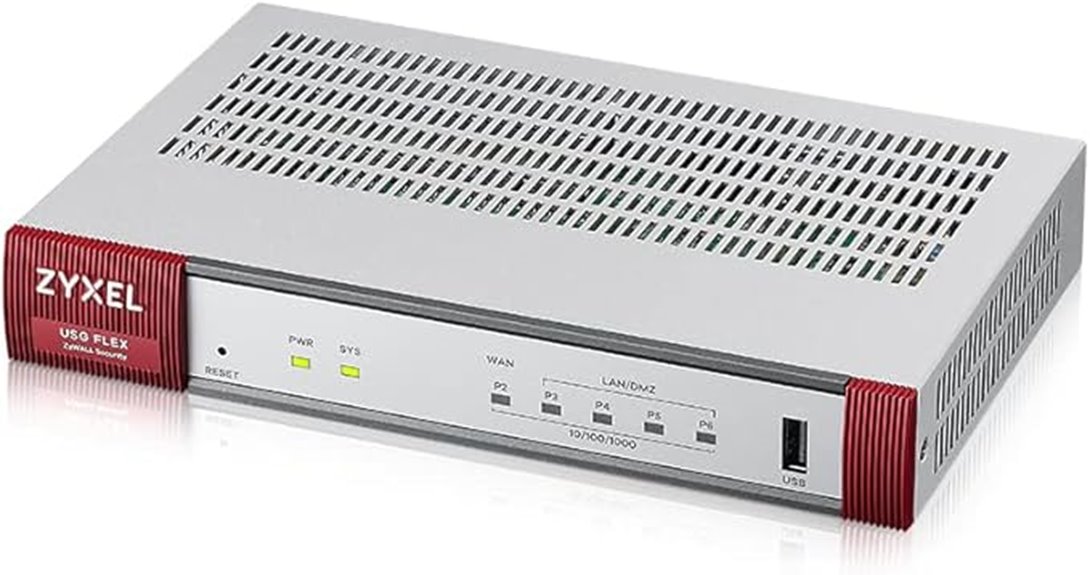
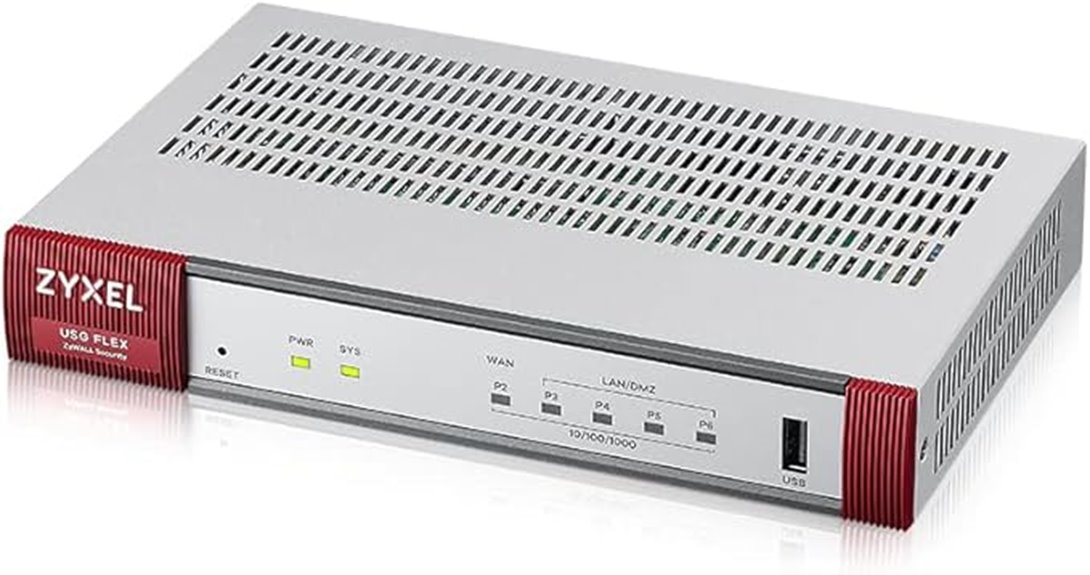
    The Zyxel USGFLEX100H takes the lead because its stated capacity and port layout are the best-balanced fit in this group for a wired small office. It lists eight Gigabit Ethernet ports, 4 Gbps firewall throughput, and 1.5 Gbps IPS throughput, plus support for 16 VLANs. That gives a business room to separate staff, guest, and device traffic without immediately needing a separate switch for every network boundary. The listed 25-user scope also makes its intended scale relatively clear.

    Compared with the FortiGate 40F, Zyxel offers more physical interfaces and higher listed IPS throughput; compared with the FortiGate 60F, it provides a clearer user limit and lists a 900 Mbps VPN figure. Its fanless design helps in a quiet office, and Nebula centralized management can suit an administrator overseeing more than one network. The tradeoff is that “Entry Defense Pack” and Nebula access need scrutiny: confirm what protection is active, how long it lasts, and what renewals or account requirements apply. Its 25-user ceiling also rules it out for a larger or rapidly expanding site.

    Pros:
    • Eight Gigabit Ethernet ports provide flexible wired connections.
    • Listed 1.5 Gbps IPS throughput suits a more demanding edge-security workload than the compact alternatives.
    • VLAN, VPN, reputation filtering, anti-malware, and web filtering support varied office policies.
    • Fanless construction and Nebula management can suit quiet offices and centralized administration.
    Cons:
    • The listed maximum of 25 users limits its fit as the business grows.
    • Full Nebula management depends on an account, and service duration or renewals should be checked.
    • The provided warranty and pack details do not fully explain ongoing support coverage.

    Best for: Small offices with up to about 25 users that need several wired connections, VLAN separation, and a broad set of stated security functions.

    Not ideal for: Businesses beyond the listed user capacity, teams that want to avoid cloud-account management, or buyers who have not confirmed ongoing security-service terms.

    • Ports:8 Gigabit Ethernet
    • Firewall throughput:4 Gbps
    • IPS throughput:1.5 Gbps
    • VPN throughput:900 Mbps
    • User capacity:Up to 25 users
    • Concurrent sessions:300,000
    • VLAN capacity:16 VLANs and 16 VLAN interfaces
    • Management:Nebula centralized management
    Our verdict
    “I rank the Zyxel first for its combination of ports, stated inspection capacity, and small-office features, provided its service terms match your needs.”
  2. FortiGate-40F Firewall Appliance – 5 Gigabit Ethernet RJ45 Ports, Ideal for Small Businesses

    FortiGate-40F Firewall Appliance - 5 Gigabit Ethernet RJ45 Ports, Ideal for Small Businesses

    Best Compact Fortinet Choice

    View on Amazon

    The FortiGate 40F is the more restrained Fortinet recommendation: five Gigabit RJ45 ports, a desktop footprint, and fanless operation make it easier to place in a small office without dedicating a rack or tolerating constant fan noise. Its listed 1 Gbps IPS throughput and 600 Mbps threat-protection throughput give buyers more useful context than a firewall-throughput figure alone. For a modest office that wants Fortinet’s security platform without the larger interface count of the 60F, this is the cleaner fit.

    Compared with the Zyxel USGFLEX100H, the 40F has fewer ports and lower stated IPS capacity, but it avoids Zyxel’s stated 25-user limit and may appeal to organizations already standardizing on Fortinet. Compared with the Netgate 1100, it presents a more appliance-oriented management experience rather than asking the administrator to shape the system around pfSense+. The main catch is ownership cost and planning: the listing says no subscription services are included, and the device has no Wi-Fi. Buyers should account for separate protection services and access-point hardware rather than treating the appliance as a complete network system.

    Pros:
    • Fanless desktop design is quiet and easy to place.
    • Five Gigabit ports support a simple WAN and LAN setup with room for additional connections.
    • Listed 1 Gbps IPS and 600 Mbps threat-protection figures suit many modest office links.
    • Fortinet’s management console and security ecosystem may fit businesses already using its products.
    Cons:
    • No subscription services are included, so ongoing protection requirements need a separate budget and plan.
    • Five ports offer less segmentation flexibility than the FortiGate 60F or Zyxel USGFLEX100H.
    • No built-in Wi-Fi; wireless access requires separate hardware.

    Best for: Small businesses seeking a quiet, compact Fortinet firewall with a straightforward wired layout and moderate inspection needs.

    Not ideal for: Teams needing built-in Wi-Fi, many directly connected network segments, or security services included with the appliance.

    • Model:FG-40F
    • Ports:5 Gigabit Ethernet RJ45
    • Form factor:Desktop, fanless
    • IPS throughput:Up to 1 Gbps
    • Threat-protection throughput:600 Mbps
    • Security processor:Fortinet security processor
    • Power:12V DC
    • Weight:1.58 kg
    Our verdict
    “I recommend the FortiGate 40F when compact, quiet Fortinet deployment matters more than maximum ports or bundled protection services.”
  3. FortiGate 60F Firewall Appliance – 10 Gigabit Ethernet RJ45 Ports with DMZ, WAN & Internal Ports (Appliance Only, No Subscription)

    FortiGate 60F Firewall Appliance – 10 Gigabit Ethernet RJ45 Ports with DMZ, WAN & Internal Ports (Appliance Only, No Subscription)

    Best for Port Density and Segmentation

    View on Amazon

    When a small business has several wired zones to connect, the FortiGate 60F is the most connectivity-focused pick here. Its ten Gigabit RJ45 ports are allocated across two WAN, one DMZ, and seven internal ports, which can simplify a layout with separate servers, staff networks, and internet connections. It lists 1.4 Gbps IPS throughput, 700 Mbps threat-protection throughput, SSL inspection, and SD-WAN support, giving it more room for advanced edge-routing plans than the 40F.

    This is not simply a larger 40F. Compared with the Zyxel USGFLEX100H, it offers more listed physical interfaces and explicit dual-WAN and DMZ roles, while Zyxel publishes more detail on VPN throughput, user capacity, and VLAN count. Compared with the Netgate 1100, the 60F is far better suited to a multi-zone wired layout, but its appliance-only listing means separate subscriptions are required for ongoing protection updates. Buyers who only need a basic office gateway may pay in complexity and unused capacity; businesses without a network administrator should also check whether its advanced inspection and SD-WAN features fit their operational skills.

    Pros:
    • Ten Gigabit RJ45 ports include dedicated WAN and DMZ connections.
    • Listed 1.4 Gbps IPS throughput provides more inspection headroom than the FortiGate 40F.
    • SD-WAN and SSL inspection support more involved network and security policies.
    • Zero Touch integration can simplify deployment in an existing Fortinet Security Fabric.
    Cons:
    • Appliance-only listing means ongoing protection subscriptions must be purchased separately.
    • No built-in wireless capability.
    • More ports and features can be unnecessary overhead for a small, simple network.

    Best for: Small businesses with multiple wired segments, a DMZ or dual-WAN requirement, and an administrator able to manage FortiOS services.

    Not ideal for: Very small offices needing a simple gateway, buyers who want subscriptions bundled, or teams that need wireless access built into the firewall.

    • Ports:10 Gigabit Ethernet RJ45
    • Port allocation:2 WAN, 1 DMZ, 7 internal
    • IPS throughput:Up to 1.4 Gbps
    • Threat-protection throughput:700 Mbps
    • SSL inspection:Supported; performance described as industry-leading
    • SD-WAN:Supported
    • Operating system:FortiOS
    • Security processor:Purpose-built for SSL inspection and threat mitigation
    Our verdict
    “I would choose the 60F over the 40F when its extra WAN, DMZ, and internal ports will be used, not merely for the higher headline capacity.”
  4. Netgate 1100 pfSense+ Security Gateway – Firewall, Router, VPN

    Netgate 1100 pfSense+ Security Gateway - Firewall, Router, VPN

    Best for Hands-On Administrators

    View on Amazon

    The Netgate 1100 stands apart because it arrives with pfSense+ and gives technically confident buyers a configurable firewall, router, and VPN gateway in a compact, silent unit. Its three 1 GbE ports are enough for a basic WAN, LAN, and optional network arrangement, and included technical support plus a one-year hardware warranty are useful points of distinction in this lineup. Rather than emphasizing a managed security bundle, this option appeals to people who want to configure policies and services themselves.

    Against the Firewalla Purple SE, Netgate offers three Ethernet interfaces rather than one and a more explicitly business-oriented wired gateway role. Against the FortiGate 40F, though, it has fewer ports and only 1 GB of RAM, with less evidence here of high-capacity inspection performance. Its listing gives a maximum data transfer rate of 940 Mbps, but real results depend on configuration and enabled functions. The tradeoff is the learning curve: pfSense+ flexibility is a benefit only if someone can maintain rules, VPN settings, and updates. I would not pick it for a team expecting a turnkey appliance with minimal network administration.

    Pros:
    • Ships with pfSense+ software for firewall, routing, and VPN functions.
    • Three Gigabit Ethernet ports support a basic WAN, LAN, and optional interface layout.
    • Compact, silent form factor suits a desk or small network cabinet.
    • Includes technical support and a one-year hardware warranty.
    Cons:
    • Only 1 GB RAM, which may constrain demanding configurations.
    • Three Ethernet ports limit direct connectivity and network segmentation.
    • Getting the most from pfSense+ requires technical configuration and ongoing administration.

    Best for: Small businesses with a technically capable owner or IT administrator who values pfSense+ configuration options and VPN support.

    Not ideal for: Teams seeking a polished, low-touch managed security service, businesses with many wired segments, or high-demand networks that may strain 1 GB of RAM.

    • Processor:Dual-core ARM Cortex-A53, 1.2 GHz
    • RAM:1 GB
    • Ports:3 x 1 GbE (WAN/LAN/OPT)
    • Operating system:pfSense+ (FreeBSD)
    • Maximum data transfer rate:940 Mbps listed
    • Connectivity:Ethernet, Micro USB, USB
    • Warranty:1 year hardware warranty
    • Form factor:Compact
    Our verdict
    “I favor the Netgate 1100 for a skilled administrator who wants configuration control, but not for an office that needs a hands-off security appliance.”
  5. Firewalla Purple SE Cyber Security Firewall for Home & Business

    Firewalla Purple SE Cyber Security Firewall for Home & Business

    Best for App-Based Monitoring on a Modest Network

    View on Amazon

    The Firewalla Purple SE is the approachable, app-managed option in this comparison. It can operate as a router or bridge and lists intrusion prevention, malware protection, content filtering, parental controls, VPN server functions, and network activity monitoring. That set of features may be useful to a small office that wants to see connected-device activity and apply straightforward controls without adopting the more involved management style of pfSense+ or a larger Fortinet appliance.

    Its limits are more consequential for business use than its feature list suggests. The supplied details list a 500 Mbps IPS speed limit and one Ethernet port, while the Zyxel USGFLEX100H lists 1.5 Gbps IPS and eight ports. Even the Netgate 1100 provides three Ethernet ports for a basic segmented layout. Firewalla can work as a router or bridge, but one port and app-based management make it a poor foundation for an office that needs several physical zones or expects traffic to grow. It also requires a smartphone app, and the listing’s wireless compatibility details should not be read as proof of built-in Wi-Fi access-point capability.

    Pros:
    • Router or bridge modes give some flexibility in how it joins an existing network.
    • App-based monitoring surfaces device activity and network insights.
    • Includes listed intrusion prevention, content filtering, and VPN server functions.
    • Parental controls can also support basic access policies for shared or mixed-use networks.
    Cons:
    • 500 Mbps IPS limit is the lowest stated inspection ceiling in this group.
    • One Ethernet port restricts direct wiring and physical segmentation.
    • Smartphone app management may not suit teams that prefer a desktop console or centralized IT workflow.

    Best for: Very small offices or owner-operated businesses that value app-led monitoring, basic filtering, and VPN features over high throughput or many ports.

    Not ideal for: Businesses with internet service or inspection needs above its 500 Mbps IPS limit, multiple wired segments, or a requirement for conventional enterprise management.

    • IPS speed limit:500 Mbps
    • Mode:Router or bridge
    • Ports:1 Ethernet port
    • Memory:3 GB RAM
    • VPN:VPN server
    • Management:Smartphone app
    • Wireless compatibility:802.11ac, dual-band listed
    • Data transfer rate:500 Mbps listed
    Our verdict
    “I see Purple SE as a convenient visibility tool for a modest network, not as the strongest choice for a growing business firewall.”
hardware firewall for small business
What makes a great hardware firewall for small business
1
Match inspection capacity to your internet link
Check the speed of your internet connection and the firewall’s stated capacity with inspection enabled.
2
Count ports before choosing an appliance
Port count shapes how easily you can connect and separate networks.
3
Check security-service and support terms
Hardware may be only one part of ownership.
4
Choose a management style your team can sustain
Management fit affects security quality over time.
How to choose your hardware firewall for small business
1
How we picked
I compared these five appliances against the needs implied by small-business edge security : enough capacity for the exp
2
Match inspection capacity to your internet link
Check the speed of your internet connection and the firewall’s stated capacity with inspection enabled.
3
Count ports before choosing an appliance
Port count shapes how easily you can connect and separate networks.
4
Check security-service and support terms
Hardware may be only one part of ownership.
5
Choose a management style your team can sustain
Management fit affects security quality over time.
Vetted hardware firewall for small business ·
The best hardware firewall for small business, compared
★ Winner Zyxel USGFLEX100H Firewall wit
Best Overall for a Growing Small Office
5compared

How We Picked

I compared these five appliances against the needs implied by small-business edge security: enough capacity for the expected internet connection and inspection load, practical wired connectivity, useful security and VPN functions, and a management approach that fits the person responsible for the network. The ranking reflects the supplied product specifications and descriptions, not hands-on testing. I treat throughput figures as vendor-provided claims, not guaranteed real-world performance; inspection settings, traffic mix, and enabled services can affect actual results.

I also looked at the ongoing ownership picture. Some listings explicitly say the appliance is sold without a subscription, while others describe included packs or support without enough detail to establish future renewal terms. That distinction affects how a buyer should compare them: hardware capability alone does not tell you which security updates or services remain active. I favor clear fit over a single headline number, giving credit to manageable port layouts, fanless operation, VPN and VLAN support, and a realistic match for the scale of a small office.

My order puts the Zyxel first for its combination of stated IPS throughput, port count, VLAN capacity, and security features. The FortiGate 40F follows as a more compact Fortinet option, while the 60F is the better fit when extra interfaces and SD-WAN matter more than simplicity. Netgate earns a place for buyers who value pfSense+ flexibility, and Firewalla rounds out the list as a lower-capacity, app-managed option. Buyers should verify current firmware support, service entitlements, and deployment requirements with the manufacturer or seller before purchase.

Everyday → specialist
Everyday & valuePremium & specialist
Which hardware firewall for small business fits you?
The everyday user
All-round, reliable
The enthusiast
Premium & high-performance
The gift-giver
Looks & craftsmanship

Factors to Consider When Choosing Hardware Firewall For Small Business

I would start with the network the firewall must protect, then match the appliance to that job. The most useful comparison is not a single maximum throughput number: it is the combination of inspection capacity, port layout, required subscriptions, and who will manage it.

Check the speed of your internet connection and the firewall’s stated capacity with inspection enabled. The Zyxel lists 1.5 Gbps IPS, the FortiGate 60F lists 1.4 Gbps, the FortiGate 40F lists 1 Gbps, and Firewalla Purple SE lists a 500 Mbps IPS limit. These figures help sort broad use cases, but they do not guarantee the same performance with every security feature enabled. I would leave operating headroom for VPN use, busy periods, and future service upgrades rather than buying exactly to the current line speed.

Count ports before choosing an appliance

Port count shapes how easily you can connect and separate networks. The FortiGate 60F has ten ports with defined WAN, DMZ, and internal roles; Zyxel offers eight ports and VLAN support; the FortiGate 40F has five. Netgate’s three ports suit a basic layout, while Firewalla’s single Ethernet port is a marked limitation for offices needing several direct connections. A managed switch can add capacity, but it does not replace the need to plan VLANs and firewall rules correctly.

Check security-service and support terms

Hardware may be only one part of ownership. The FortiGate 40F listing states that no subscription services are included, and the 60F is explicitly appliance-only with no subscription. Zyxel names an Entry Defense Pack, but the supplied details do not settle renewal timing or every included service. Before buying, confirm which threat updates and support services are active, their duration, and what happens when they expire. The Netgate listing includes technical support and a one-year hardware warranty, which is different from a bundled threat-intelligence subscription.

Choose a management style your team can sustain

Management fit affects security quality over time. FortiGate’s console and ecosystem suit organizations already using Fortinet products; Zyxel’s Nebula management can help centralize administration; Firewalla relies on a smartphone app. Netgate’s pfSense+ offers broad configuration control but asks more of the administrator. I would favor the interface and workflow your team can keep current, not the one with the longest feature list. A firewall that nobody can maintain is a poor fit regardless of its stated throughput.

Plan for growth, VPNs, and network separation

Think beyond today’s staff count. Zyxel specifies a maximum of 25 users, while the other supplied descriptions do not give a comparable user ceiling. If remote access matters, compare VPN support and capacity: Zyxel lists 900 Mbps VPN throughput and support for IPSec and SSL VPN tunnels, while Netgate and Firewalla list VPN functions without comparable throughput figures here. For guest, payment, camera, and staff traffic, look for enough ports and VLAN support, then confirm that the firewall’s policy controls support the separation you intend.

Frequently Asked Questions

Which firewall is the best fit for a typical small office?

I rank the Zyxel USGFLEX100H first for a typical wired office that needs multiple ports, VLANs, and substantial listed IPS capacity. It is designed around a stated limit of 25 users, so I would choose another option if your team is larger or expected to grow beyond that scale. The FortiGate 40F is a strong alternative for a smaller office already aligned with Fortinet, while the 60F makes more sense when its WAN, DMZ, and internal port layout will be put to use.

Do these hardware firewalls include ongoing security subscriptions?

Not all of them, and the supplied listings do not provide enough detail to assume that every security service is included for the same period. The FortiGate 40F has no subscription services included, and the FortiGate 60F is listed as appliance-only with no subscription. Zyxel names an Entry Defense Pack, but buyers should verify service duration and renewal requirements. I would confirm active threat updates, support coverage, and post-term behavior before treating any appliance as ready for long-term protection.

Can I use one of these firewalls for Wi-Fi?

Do not assume these appliances replace a wireless access point. The FortiGate 40F and 60F listings specify no built-in Wi-Fi, and Netgate is described as a wired gateway. Firewalla lists wireless compatibility, but its provided details do not establish that it functions as a Wi-Fi access point, and it has one Ethernet port. For a small business, I would plan separate access points and connect them to the firewall or a managed switch using an appropriate, segmented network design.

Is the Netgate 1100 suitable for someone without IT experience?

The Netgate 1100 can be a capable choice when someone is comfortable configuring pfSense+ and maintaining firewall rules, VPN settings, and updates. Its included technical support is a useful point, but it does not remove the need to understand the network being configured. If your priority is a lower-touch console or app, the FortiGate appliances or Firewalla may be easier to approach, though their subscriptions, capacity, and feature limits still need review.

How much throughput should a small business firewall have?

Start with your internet speed, then check the firewall’s inspection throughput rather than relying only on its basic firewall figure. Security inspection and VPN traffic can use more resources, and vendor figures may reflect particular test conditions. I would choose a model with headroom for busy periods and likely service upgrades. In this lineup, Firewalla’s 500 Mbps IPS limit is a clear constraint for faster links, while Zyxel and the FortiGate models list higher IPS figures; actual performance depends on enabled features and network conditions.

Conclusion

For most wired small offices, I would start with the Zyxel USGFLEX100H because its eight ports, VLAN support, and listed IPS capacity form the strongest overall mix here; verify its service pack and 25-user limit before committing. Choose the FortiGate 40F if you want a compact, quiet Fortinet appliance and can handle separate subscription services. The FortiGate 60F is my pick for a business that needs dual WAN, a DMZ, and more internal ports, while the Netgate 1100 suits a technically confident administrator who wants pfSense+ control. I would reserve Firewalla Purple SE for a modest network where app-based visibility matters more than high inspection capacity or port count. The right choice is the one your team can operate securely as the business grows.

HALLOWEEN

Halloween Picks

As an affiliate, we earn on qualifying purchases.

You May Also Like

13 Best 10 Gbe Switches With Sfp+ Modules for High-Speed Networking

Discover the top 10gbe switches with SFP modules in 2026. Our guide highlights the best options for performance, value, and ease of use to suit your needs.

10 Best Portable Label Printers for Cables That Make Organization Easy and Efficient

Compare portable cable label printers by wire-marking method, label durability, portability, and ease of use to find the right fit for your work.

13 Best Ethernet Cables for Gaming in 2026: Fast, Reliable Connections for Top Performance

Discover the best ethernet cables for gaming in 2026. Find top picks, key factors, and expert advice to boost your gaming setup today.

10 Best Power Distribution Units With Meters for Reliable Power Management

Compare 10 metered power distribution units for rack, workshop, outdoor, and event use. Find the right outlet mix, electrical rating, and monitoring style.