A high-end smart thermostat should do more than follow a schedule: it should help manage comfort across rooms, work with your heating and cooling system, and fit the way you control your home. My best overall pick is the ecobee Smart Thermostat Premium for its combination of a built-in voice assistant, included Smart Sensor, and broad smart-home features. The Google Nest Learning Thermostat (4th gen) stands out for adaptive scheduling, while the Aqara W200 is a compelling match for buyers invested in Apple’s smart-home ecosystem. The tradeoffs are real: advanced sensing and automation can add setup complexity, while simpler models may lack premium controls or room-by-room insight. Read on for the full comparison, including which models suit different homes and priorities.

Get business pricing on networking and server gear
- Business-only prices and quantity discounts
- Tax-exempt purchasing
- Multiple users, one account, clear invoices
Key Takeaways
- ecobee Premium leads on bundled functionality: its included Smart Sensor and built-in Siri and Alexa options make it the most feature-rich all-around choice here, though buyers should confirm ecosystem and system compatibility.
- Nest Learning Thermostat is the automation-first alternative: its learning approach and paired room sensor appeal to people who want adaptive comfort, while ecobee offers a more explicit sensor-and-assistant package.
- High-end features are not the only path to a good fit: Sensi ST55 and ecobee Essential focus on approachable control, so they may suit buyers who do not need built-in voice assistants or advanced sensing.
- Thermostat compatibility can outweigh the feature list: wiring, heating-system type, and power requirements can rule out a model before its app or smart-home features matter.
- The lineup spans distinct levels of control: color touchscreens, learning schedules, room sensors, and voice control serve different needs; buyers should pay for the features they will actually use.
| Amazon Smart Thermostat |  | Best for Alexa-Focused Homes | Dimensions: 3.56 x 3.56 x 0.84 in | Weight: 3.86 oz | HVAC compatibility: Most 24V HVAC systems | VIEW ON AMAZON | See Our Full Breakdown |
| Google Nest Learning Thermostat (4th gen) + Nest Temperature Sensor (2nd gen) – Obsidian |  | Best Premium Learning Bundle | Included sensor: Nest Temperature Sensor (2nd gen) | Temperature control: Heating and cooling | Connectivity: Wi-Fi | VIEW ON AMAZON | See Our Full Breakdown |
| Aqara Smart Thermostat W200 with Apple Adaptive Temperature |  | Best for Apple Home and Matter | Display: 4-inch full-color touchscreen | Connectivity: 2.4/5 GHz Wi-Fi, Zigbee, Thread, and Matter | Compatibility: Most HVAC systems | VIEW ON AMAZON | See Our Full Breakdown |
| Honeywell Wireless WiFi Thermostat, 7 Programmable |  | Best for Structured Weekly Scheduling | Model: TH9320WF5003 | Temperature control: Heating and cooling | Programming: 7-day programmable | VIEW ON AMAZON | See Our Full Breakdown |
| Honeywell Home RTH9600WF Smart Color Thermostat – ENERGY STAR Wi-Fi Programmable Touchscreen, Alexa Ready |  | Best for a Customizable Color Display | Display: Selectable color LCD touchscreen | Connectivity: Wi-Fi | Smart-home compatibility: Amazon Alexa, Google Assistant, and IFTTT | VIEW ON AMAZON | See Our Full Breakdown |
| Sensi Smart Thermostat, Wi-Fi, DIY, Alexa, Energy Star Certified, ST55 |  | Best for Straightforward DIY Installation | Connectivity: Wi-Fi | Voice and smart-home compatibility: Amazon Alexa, Apple HomeKit, Google Assistant, SmartThings, Vera | HVAC uses: Air conditioner, boiler, furnace, heat pump | VIEW ON AMAZON | See Our Full Breakdown |
| ecobee Smart Thermostat Premium – WiFi, Siri & Alexa Built-In, Smart Sensor |  | Best Premium Comfort and Air-Quality Package | HVAC compatibility: Works with 95% of HVAC systems, per product data | Included sensor: SmartSensor with occupancy detection | Air-quality monitoring: Built-in pollutant and humidity monitoring | VIEW ON AMAZON | See Our Full Breakdown |
| Google Nest Thermostat – Smart Thermostat for Home – Programmable Wi-Fi – Charcoal | 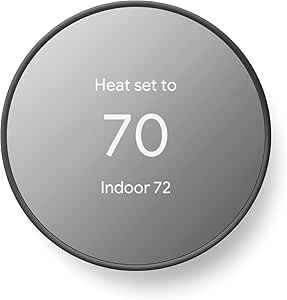 | Best for Simple Google Home Control | Connectivity: Wi-Fi and Bluetooth | Control methods: Remote control and voice control | Display: 2-inch LCD | VIEW ON AMAZON | See Our Full Breakdown |
| ecobee Smart Thermostat Enhanced, Programmable Wi-Fi Thermostat |  | Best for Flexible Smart-Home Integration | Connectivity: Wi-Fi | Smart-home compatibility: Amazon Alexa, Apple HomeKit, Google Assistant, Android, iOS | HVAC uses: Air conditioner, boiler, furnace, heat pump, humidifier | VIEW ON AMAZON | See Our Full Breakdown |
| ecobee Smart Thermostat Essential – WiFi Thermostat, Energy Star Certified |  | Best Entry Point to the ecobee Ecosystem | Connectivity: Wi-Fi | Smart-home compatibility: Amazon Alexa, Apple HomeKit, Google Assistant, Android, iOS | Display: 3.74-inch LCD touchscreen | VIEW ON AMAZON | See Our Full Breakdown |
| highend smart thermostat | Display | Connectivity | Power |
|---|---|---|---|
| Amazon Smart Thermostat | — | — | — |
| Google Nest Learning Thermosta | Touchscreen | Wi-Fi | Battery powered; one CR2 battery required and included |
| Aqara Smart Thermostat W200 wi | 4-inch full-color touchscreen | 2.4/5 GHz Wi-Fi, Zigbee, Thread, and Matter | C-wire required; adapter sold separately |
| Honeywell Wireless WiFi Thermo | 4.5-inch touchscreen | Wi-Fi | Hardwired, 24 volts |
| Honeywell Home RTH9600WF Smart | Selectable color LCD touchscreen | Wi-Fi | Battery powered; one AAA battery required |
| Sensi Smart Thermostat | 5-inch LED | Wi-Fi | 24 V AC; two AA batteries included |
| ecobee Smart Thermostat Premiu | Large, vibrant display with cinematic interface | — | — |
| Google Nest Thermostat | 2-inch LCD | Wi-Fi and Bluetooth | Battery powered; two AA batteries included |
| ecobee Smart Thermostat Enhanc | 4-inch LCD screen | Wi-Fi | 24 V; one lithium-ion battery included |
| ecobee Smart Thermostat Essent | 3.74-inch LCD touchscreen | Wi-Fi | Battery powered |
More Details on Our Top Picks
Amazon Smart Thermostat
I’d pick the Amazon Smart Thermostat for an Alexa-centered home where straightforward scheduling matters more than advanced room-by-room control. Its routines, presence-based adjustments, humidity sensing, and energy dashboard add useful automation without the learning features of the Google Nest Learning Thermostat (4th gen). Guided setup in the Alexa app also makes this a more approachable DIY choice than the Honeywell TH9320WF5003, though installation still depends on compatible wiring.
The tradeoff is a simpler control experience: it has three touch buttons, no built-in microphone, and works on 2.4 GHz Wi-Fi only. A C-wire or separate adapter is also needed. For buyers seeking a high-end thermostat with a large display, broad connectivity, or included room sensing, the Aqara W200 or Nest bundle offers more. This Amazon model makes better sense when Alexa integration and practical automation are the priorities.
Pros:- Alexa routines and presence detection can automate temperature changes around household activity.
- Guided Alexa app setup supports a DIY installation process.
- Humidity sensing, vacation mode, and an energy dashboard provide practical home-management tools.
- ENERGY STAR and ECOLOGO Gold certifications.
Cons:- Requires a C-wire or a separate power adapter.
- Supports 2.4 GHz Wi-Fi only.
- No built-in microphone for direct voice commands at the thermostat.
Best for: Alexa households with a compatible 24V HVAC system that want guided DIY setup, schedules, and presence-based temperature adjustments.
Not ideal for: Buyers who need 5 GHz Wi-Fi, built-in voice pickup, advanced room-by-room sensing, or a thermostat that works without a C-wire or adapter.
- Dimensions:3.56 x 3.56 x 0.84 in
- Weight:3.86 oz
- HVAC compatibility:Most 24V HVAC systems
- Wiring:C-wire required; separate power adapter may be used
- Wi-Fi:2.4 GHz, 802.11 b/g/n
- On-device controls:Three touch buttons
- App control:Alexa and Ring apps
- Features:Humidity sensing, schedules, emergency heat, vacation mode, energy dashboard, and automatic air filter ordering
Our verdict“Choose it for Alexa-driven schedules and approachable DIY control, but skip it if you want premium room sensing or broader connectivity.”
Google Nest Learning Thermostat (4th gen) + Nest Temperature Sensor (2nd gen) – Obsidian
The Nest Learning Thermostat (4th gen) bundle is my premium pick for buyers who want the thermostat to adapt to household routines and account for temperature differences between rooms. The included Nest Temperature Sensor (2nd gen) gives it a practical advantage over the Amazon Smart Thermostat, which lacks a supplied remote room sensor. Auto scheduling and Auto Away can reduce repetitive adjustments while keeping comfort tied to how the home is used.
Its polished display and support for major assistants make it a more feature-rich centerpiece than the Honeywell RTH9600WF, whose appeal leans more toward a customizable color screen and alerts. That added intelligence brings setup complexity, reliance on Wi-Fi for full functionality, and a battery that will eventually need replacement. Buyers who prefer explicit schedules and simpler controls may find the Nest’s learning approach less predictable than the Honeywell options.
Pros:- Learns household preferences and can adjust schedules automatically.
- Includes a second-generation Nest Temperature Sensor for room-focused comfort.
- Works with Alexa, Google Assistant, Apple HomeKit, Android, and iOS.
- Round aluminum design with a touchscreen and adjustable display brightness.
Cons:- Full functionality depends on a Wi-Fi connection.
- The included battery will need replacement over time.
- Setup may be more involved than a simpler programmable thermostat.
Best for: Households with uneven room temperatures that want adaptive scheduling, a supplied room sensor, and integration with multiple smart-home platforms.
Not ideal for: Buyers who prefer fixed manual schedules, want to avoid Wi-Fi dependence, or do not want eventual battery maintenance and a more involved setup.
- Included sensor:Nest Temperature Sensor (2nd gen)
- Temperature control:Heating and cooling
- Connectivity:Wi-Fi
- Smart-home control:Amazon Alexa, Android, Apple HomeKit, Google Assistant, and iOS
- Display:Touchscreen
- Power:Battery powered; one CR2 battery required and included
- Voltage:24 volts
- Mounting and finish:Wall mount; polished Obsidian aluminum
Our verdict“Choose this bundle for adaptive comfort across rooms; pick a Honeywell model instead if you want a more schedule-led, hands-on approach.”
Aqara Smart Thermostat W200 with Apple Adaptive Temperature
The Aqara Smart Thermostat W200 is the most connectivity-focused choice here, pairing a 4-inch touchscreen with Matter, Thread, and Zigbee support. That makes it a stronger fit for buyers building a mixed-brand smart home than the Amazon Smart Thermostat, which centers on Alexa and 2.4 GHz Wi-Fi. Its mmWave presence detection and built-in hub functions also give it a broader automation role than the Honeywell RTH9320WF5003, which focuses on Wi-Fi programming and remote control.
Apple users get the distinctive draw of Adaptive Temperature, but that feature requires an Apple TV or HomePod hub. The W200 also needs a C-wire unless a separate adapter is used, and some features, including Clean Energy Guidance, are limited by region. I’d choose it for smart-home integration, not for the least complicated installation or a thermostat experience centered on basic schedules.
Pros:- Matter, Thread, and Zigbee support enables integration across a range of smart-home devices.
- mmWave presence detection can support more responsive occupancy-based automation.
- Large 4-inch full-color touchscreen is designed for clear on-device control.
- Compatible with Apple Home, Google Home, Alexa, and SmartThings.
Cons:- Apple Adaptive Temperature requires an Apple TV or HomePod hub.
- Requires a C-wire unless a separately sold adapter is used.
- Some features, including Clean Energy Guidance, have U.S.-only availability.
Best for: Apple Home households with an Apple TV or HomePod that want presence-aware temperature automation and a Matter-capable hub for mixed-brand devices.
Not ideal for: Buyers without an Apple home hub, those seeking simple installation without C-wire planning, or households outside supported regions for selected features.
- Display:4-inch full-color touchscreen
- Connectivity:2.4/5 GHz Wi-Fi, Zigbee, Thread, and Matter
- Compatibility:Most HVAC systems
- Smart-home platforms:Apple Home, Google Home, Alexa, and SmartThings
- Presence detection:mmWave
- Additional functions:Adaptive Temperature, Clean Energy Guidance, smart display, and built-in hub
- Power:C-wire required; adapter sold separately
- Apple hub requirement:Apple TV or HomePod required for Adaptive Temperature features
Our verdict“Pick the W200 for Apple-aware automation and broad smart-home connectivity, provided you have the required hub and compatible wiring.”
Honeywell Wireless WiFi Thermostat, 7 Programmable
The Honeywell TH9320WF5003 suits buyers who want clear, repeatable 7-day programming instead of a thermostat that learns habits in the background. Its 4.5-inch touchscreen, app monitoring, alerts, and Alexa support provide a more traditional control style than the Nest Learning Thermostat (4th gen), which automates scheduling and includes a room sensor. That distinction matters if you want to set a weekly routine yourself and keep access to settings on the wall.
This Honeywell also fits residential and light commercial use, giving it a different role from the more smart-home-oriented Aqara W200. The compromises are meaningful: installation requires a C-wire, setup can be complex, and it is not suitable for dual-fuel heat pumps without a fossil-fuel kit. Its app and Wi-Fi functions also make it a less compelling choice for buyers seeking newer multi-protocol integration or adaptive room-level comfort.
Pros:- Seven-day programming supports distinct schedules for different days.
- Large 4.5-inch touchscreen keeps core settings accessible at the wall.
- Remote monitoring through the Total Connect Comfort app.
- Alexa compatibility and on-screen or app alerts.
Cons:- Requires a C-wire for installation.
- Not suitable for dual-fuel heat pumps without a fossil kit.
- Setup may be complex, and its Wi-Fi focus lacks the multi-protocol approach of the Aqara W200.
Best for: Homeowners or light-commercial users who want a large touchscreen and manually programmed heating and cooling schedules for each day of the week.
Not ideal for: Owners of dual-fuel heat pumps without a fossil kit, homes without a C-wire, or buyers who want Matter, Thread, or included room sensors.
- Model:TH9320WF5003
- Temperature control:Heating and cooling
- Programming:7-day programmable
- Connectivity:Wi-Fi
- Display:4.5-inch touchscreen
- Power:Hardwired, 24 volts
- App control:Total Connect Comfort
- Compatibility limitation:Not suitable for dual-fuel heat pumps without a fossil kit
Our verdict“Choose this Honeywell for hands-on weekly programming and a large display, but check wiring and dual-fuel compatibility before buying.”
Honeywell Home RTH9600WF Smart Color Thermostat – ENERGY STAR Wi-Fi Programmable Touchscreen, Alexa Ready
The Honeywell Home RTH9600WF stands out for buyers who want a color touchscreen that can be personalized, paired with flexible programming and alerts. Compared with the TH9320WF5003, it offers a more customizable display and support for Alexa, Google Assistant, and IFTTT; compared with the Nest Learning Thermostat, it puts more emphasis on visible controls and notifications than on learning household habits. Smart Response and air-filter or temperature alerts can help users manage comfort without relying on adaptive scheduling.
This is a practical high-end option for a household that values information at the thermostat, but it does not suit every heating system. It requires a C-wire and is not compatible with 120–240V electric baseboard heat. Its battery-powered listing also means periodic battery replacement, while buyers seeking room sensors or Matter and Thread support will find more advanced integration elsewhere in this roundup.
Pros:- Selectable color touchscreen makes settings and information easier to personalize.
- Works with Alexa, Google Assistant, and IFTTT.
- Smart alerts can report filter changes, temperature, and internet connection status.
- Smart Response and flexible programming support scheduled comfort.
Cons:- Requires a C-wire for installation.
- Does not support 120–240V electric baseboard heating.
- The listed battery power source requires periodic battery replacement.
Best for: Homeowners with compatible heat-and-cool systems who want a personalized color touchscreen, app access, and smart alerts for maintenance and temperature.
Not ideal for: Homes with 120–240V electric baseboard heating, installations without a C-wire, or buyers seeking learning schedules, room sensors, or Matter and Thread support.
- Display:Selectable color LCD touchscreen
- Connectivity:Wi-Fi
- Smart-home compatibility:Amazon Alexa, Google Assistant, and IFTTT
- Power:Battery powered; one AAA battery required
- Wiring:C-wire required
- Dimensions:1 in D x 4.75 in W x 3.5 in H
- Weight:11.2 oz
- System compatibility:Most heat/cool oil furnace systems; not compatible with 120–240V electric baseboard heat
Our verdict“Choose the RTH9600WF for customizable on-wall controls and useful alerts, but skip it for baseboard systems or advanced room-sensing automation.”
Sensi Smart Thermostat, Wi-Fi, DIY, Alexa, Energy Star Certified, ST55
The Sensi ST55 is the practical pick for buyers who want remote thermostat control and energy reports without paying for a more elaborate room-sensing setup. Its app-guided installation and compatibility with Alexa, Apple HomeKit, Google Assistant, SmartThings, and Vera give it broad smart-home reach. Compared with the ecobee Smart Thermostat Enhanced, it lacks the richer occupancy-based comfort options and included power accessories, but Sensi keeps the focus on core scheduling, maintenance alerts, and simple remote adjustments. That restraint suits a basic HVAC setup, though the glossy plastic design and LED display feel less premium than the larger, more feature-rich ecobee models. I’d skip it if you want advanced air-quality monitoring or room-by-room temperature balancing; Wi-Fi is also needed for its connected features.
Pros:- App instructions are designed to make DIY installation more approachable
- Works with Alexa, Apple HomeKit, Google Assistant, SmartThings, and Vera
- Usage reports and filter reminders support routine HVAC upkeep
- Programmable schedules and remote control help manage heating and cooling
Cons:- Connected controls and reports depend on a Wi-Fi connection
- Does not include room sensors or built-in air-quality monitoring
- Compatibility depends on having a supported HVAC system
Best for: Homeowners with a compatible 24-volt HVAC system who want app-guided DIY setup, voice control, and useful maintenance reminders.
Not ideal for: Buyers seeking room-by-room sensing, built-in air-quality monitoring, or premium display and smart-home features.
- Connectivity:Wi-Fi
- Voice and smart-home compatibility:Amazon Alexa, Apple HomeKit, Google Assistant, SmartThings, Vera
- HVAC uses:Air conditioner, boiler, furnace, heat pump
- Control methods:App, touch, voice
- Display:5-inch LED
- Power:24 V AC; two AA batteries included
- Mounting:Wall mount
- Features:Programmable scheduling, filter indicator, usage reports, maintenance alerts
Our verdict“Choose the Sensi ST55 for an accessible, broadly compatible DIY thermostat, but look to ecobee if you want room-level comfort features.”
ecobee Smart Thermostat Premium – WiFi, Siri & Alexa Built-In, Smart Sensor
The ecobee Smart Thermostat Premium earns its premium role by combining an included SmartSensor with built-in air-quality monitoring, so it can address uneven room temperatures and indoor conditions in one system. The sensor can help prioritize comfort in an occupied room rather than relying only on the thermostat’s location. That gives it a broader comfort brief than the ecobee Smart Thermostat Enhanced, which requires a separately purchased sensor for room-level control. Siri and Alexa are built in, although Siri requires an Apple home hub, and some security functions depend on an ecobee Smart Security subscription. The camera and security angle will appeal to connected-home buyers, but can feel like unnecessary complexity if all you need is reliable temperature scheduling. I’d choose this model for its bundled sensing and monitoring, not simply for app control.
Pros:- Includes a SmartSensor for occupancy detection and room-aware comfort
- Built-in monitor tracks air quality and humidity
- Siri and Alexa voice control are built in
- Power Extender Kit and trim kit support DIY installation
Cons:- Siri functionality requires an Apple home hub
- Some security features require an ecobee Smart Security subscription
- Room sensors and camera accessories can add complexity if purchased separately
Best for: Homeowners who want room-aware temperature control, indoor air-quality monitoring, and voice-assistant features in one thermostat.
Not ideal for: Buyers who only need basic scheduling or do not want subscription-dependent security features and additional connected-home functions.
- HVAC compatibility:Works with 95% of HVAC systems, per product data
- Included sensor:SmartSensor with occupancy detection
- Air-quality monitoring:Built-in pollutant and humidity monitoring
- Voice control:Siri and Alexa built in; Siri requires an Apple home hub
- Installation:DIY installation with Power Extender Kit and trim kit
- Energy savings claim:Up to 26% on energy bills
- Warranty:3 years
- Display:Large, vibrant display with cinematic interface
Our verdict“Pick the Premium if you want the most complete comfort and air-quality feature set here; choose the Enhanced for a simpler ecobee setup.”
Google Nest Thermostat – Smart Thermostat for Home – Programmable Wi-Fi – Charcoal
The Google Nest Thermostat is the approachable choice for households that want app control and automatic away adjustments without the extra sensors and monitoring found on the ecobee Smart Thermostat Premium. Its compact 2-inch LCD and remote control through the Google Home app keep the interface relatively simple, while compatible voice platforms add hands-free adjustments. Automatic changes when the home is empty can reduce unnecessary heating or cooling, but this model is less suited to buyers who want to manage temperature by room; the ecobee Premium includes a SmartSensor for that purpose. The tradeoff is a more limited control experience: the product data notes no lock feature, and remote functions rely on Wi-Fi and internet access. I’d shortlist it for a Google-oriented home, not for advanced HVAC zoning or security-minded controls.
Pros:- Automatic away adjustments can limit heating or cooling when the home is empty
- Remote control is available through the Google Home app
- Supports voice commands through compatible smart-home platforms
- Compact display and DIY installation suit buyers seeking a simpler setup
Cons:- Remote features require Wi-Fi and an internet connection
- Does not include a lock feature
- HVAC compatibility can vary, so system fit needs checking
Best for: Google Home households seeking a compact, programmable thermostat with app access and automatic away adjustments.
Not ideal for: Buyers who need a thermostat lock, room-by-room temperature sensing, or connected controls that do not depend on Wi-Fi.
- Connectivity:Wi-Fi and Bluetooth
- Control methods:Remote control and voice control
- Display:2-inch LCD
- Power:Battery powered; two AA batteries included
- Voltage:24 V
- HVAC use listed:Heat pump
- Mounting:Wall mount
- Color:Charcoal
Our verdict“Choose the Nest Thermostat for straightforward Google Home scheduling and away control, but select the ecobee Premium for room sensing.”
ecobee Smart Thermostat Enhanced, Programmable Wi-Fi Thermostat
The ecobee Smart Thermostat Enhanced is the more restrained ecobee option for buyers who want broad smart-home compatibility and occupancy-based adjustments without stepping up to the Premium model’s built-in air-quality monitoring and included SmartSensor. It supports Alexa, Siri, Google Assistant, Apple HomeKit, Android, and iOS, making it a flexible fit for mixed-device homes. The included Power Extender Kit can help with installation where a C-wire is unavailable, while the three-year warranty adds a clear ownership benefit. Compared with the Sensi ST55, the Enhanced offers a richer connected ecosystem and automatic occupancy response, but it still relies on Wi-Fi for remote features and its room sensors are sold separately. Choose it for adaptable app and voice control; skip it if you expect room-by-room sensing straight out of the box.
Pros:- Compatible with Alexa, Apple HomeKit, Google Assistant, Android, and iOS
- Occupancy and preference-based adjustments support automatic comfort changes
- Power Extender Kit is included for installation flexibility
- Three-year warranty
Cons:- SmartSensors are sold separately
- Remote control and connected features depend on Wi-Fi
- Setup may take more effort than a basic programmable thermostat
Best for: Smart-home households with mixed Apple, Google, or Alexa devices that want occupancy-aware scheduling and DIY installation support.
Not ideal for: Buyers who want an included room sensor or built-in air-quality monitoring without adding accessories.
- Connectivity:Wi-Fi
- Smart-home compatibility:Amazon Alexa, Apple HomeKit, Google Assistant, Android, iOS
- HVAC uses:Air conditioner, boiler, furnace, heat pump, humidifier
- Display:4-inch LCD screen
- Control method:App control
- Power:24 V; one lithium-ion battery included
- Installation accessory:Power Extender Kit included
- Warranty:3 years
Our verdict“Choose the Enhanced for broad ecosystem support and occupancy-based control, while the Premium is the better fit when an included sensor and air monitoring matter.”
ecobee Smart Thermostat Essential – WiFi Thermostat, Energy Star Certified
The ecobee Smart Thermostat Essential gives buyers a color touchscreen, scheduling, and compatibility with major voice ecosystems in a simpler package than the Premium or Enhanced. Its auto-away mode and auto-scheduling offer useful automation, while the product data cites savings of up to 23% on heating and cooling costs. Compared with the Google Nest Thermostat, the Essential lists Apple HomeKit compatibility and fan control, which can matter in a mixed-device home or when users want more direct HVAC adjustment. It does not match the Premium’s built-in air-quality monitoring or included SmartSensor, and the SmartSensor and Power Extender Kit are sold separately. Wi-Fi is its listed connection, so it is not the pick for buyers seeking other smart-home protocols. I’d consider it for a straightforward connected upgrade, after checking system compatibility.
Pros:- Color touchscreen provides direct on-device control
- Auto-away and auto-scheduling reduce the need for constant manual changes
- Compatible with Alexa, Apple HomeKit, and Google Assistant
- Fan control adds a useful adjustment beyond basic temperature scheduling
Cons:- SmartSensor and Power Extender Kit are sold separately
- Wi-Fi is the listed connectivity option
- HVAC compatibility should be checked before purchase
Best for: Homeowners seeking a color-touchscreen ecobee with scheduling, auto-away, and broad voice-assistant compatibility, without Premium-level monitoring.
Not ideal for: Buyers who need an included room sensor, built-in air-quality monitoring, or smart-home connectivity beyond Wi-Fi.
- Connectivity:Wi-Fi
- Smart-home compatibility:Amazon Alexa, Apple HomeKit, Google Assistant, Android, iOS
- Display:3.74-inch LCD touchscreen
- Control:Touchpad and touch control
- Features:Auto-away, auto-scheduling, fan control, programmable settings
- Listed HVAC uses:Air conditioner, electric baseboard heater, furnace
- Power:Battery powered
- Finish:Matte white
Our verdict“Choose the Essential for a simpler, touchscreen ecobee with broad assistant support; move up to the Premium for included room sensing and air-quality monitoring.”

How We Picked
I compared these thermostats through the needs behind a high-end purchase: comfort automation, room-level sensing, control options, system compatibility, and ease of setup. I also looked at how clearly each model serves a particular buyer, from someone who wants a premium sensor-and-assistant hub to someone who mainly needs app-based scheduling. The ranking favors a strong balance of useful features and day-to-day flexibility over a long feature list by itself.
The ecobee Premium ranks first for its bundled sensor and voice-assistant capabilities; the Nest Learning Thermostat follows for buyers who value adaptive scheduling and Nest integration. Other positions reflect more focused strengths: Apple-centered control, touchscreen usability, or simpler setup. Lower-ranked options are not automatically poor choices; they place below the leaders because they offer fewer premium capabilities or suit a narrower set of needs. Since wiring and HVAC support vary by home, I treat compatibility as a deciding filter rather than assuming every thermostat works with every system.
Factors to Consider When Choosing Highend Smart Thermostat
A premium thermostat is only a good purchase when its added controls solve a real comfort or convenience problem in your home. I would start with the HVAC system and household routine, then compare automation and ecosystem features. That order helps prevent paying for capabilities that cannot be installed or will sit unused.
Check HVAC compatibility before comparing smart features
Start by identifying your heating and cooling equipment, wiring, and whether the system uses a common wire or another power arrangement. A thermostat may support standard furnace and air-conditioning setups but not every heat pump, multi-stage system, boiler, or proprietary control. Do not assume that a matching wire label alone proves compatibility; terminal layouts and system configuration matter too. Read the manufacturer’s compatibility guidance and use its wiring checker where available before buying. If your setup is unusual, ask a qualified installer to confirm the match. This step can save you from choosing a feature-rich model that your home cannot use.
Decide whether room sensors solve your comfort problem
A thermostat placed in a hallway can misread the comfort needs of a bedroom, nursery, or sunlit living room. Remote sensors can help the system respond to selected rooms or give you a clearer picture of temperature differences, but they do not physically balance ductwork or fix insulation problems. Think about when and where discomfort happens before treating sensors as a must-have. For example, a bedroom that runs warm at night may benefit more from room-based scheduling than a single average temperature reading. Check whether sensors are included or sold separately, and learn how the thermostat uses their readings. Sensor behavior and placement can matter as much as the number of sensors.
Choose automation you will actually trust
Learning schedules, occupancy detection, geofencing, and manual programs can all reduce routine adjustments, but they do not work the same way. Learning systems can adapt over time, while programmable schedules give you more direct control over setpoints and timing. Consider how predictable your household’s daily routine is: frequent schedule changes may make a fixed timetable less useful. Also check what happens when someone overrides the thermostat and whether that change persists or expires. A good automation setup should be easy to understand and correct, not a mystery that leaves rooms uncomfortable. If you prefer clear control, prioritize an app and schedule interface you can adjust without relying on learning behavior.
Match the thermostat to your smart-home ecosystem
Voice control and connected-home support are most useful when they fit the devices and assistant your household already uses. Before choosing, check whether the thermostat works with your preferred platform and which functions remain available through that connection. A product may support a voice assistant without offering every app feature through voice commands. Households with mixed phone and assistant preferences should check whether each person can control the thermostat easily. Consider privacy settings as well, especially when the thermostat includes a microphone or occupancy features. Ecosystem compatibility should shape the shortlist, but it should not replace checking HVAC support.
Pay for a premium interface only if it improves daily use
A touchscreen, richer display, or built-in voice assistant can make thermostat control more convenient, particularly for people who adjust settings at the wall. Those features add less value if everyone in the household uses an app or schedules temperatures and rarely touches the device. Compare the clarity of the physical controls with the quality of the app, since one does not guarantee the other. A prominent screen may also draw more attention in a room than a minimalist design. Think about who will use the thermostat and how often before prioritizing display sophistication. Premium should mean a better fit for your routine, not simply more functions.
Plan for installation, power, and ongoing upkeep
Installation can be straightforward on common wiring, yet unfamiliar terminals or a system without a common wire can make a do-it-yourself job harder. Check whether the package includes the accessories needed for your setup and whether the manufacturer offers clear wiring instructions. Consider the placement of the thermostat and any room sensors before mounting them, since poor placement can undermine temperature readings. Keep app access, account setup, and Wi-Fi requirements in mind for everyone who will manage the system. If you expect to add sensors or other smart-home devices later, check how they pair and whether they require a separate hub. Paying for professional installation may make sense when wiring is unclear or your HVAC system is complex.
Frequently Asked Questions
Is the ecobee Smart Thermostat Premium worth choosing over the Nest Learning Thermostat?
I would choose the ecobee Premium if its included Smart Sensor and built-in voice-assistant features match how your household manages comfort. The Nest Learning Thermostat is a stronger fit if you prefer adaptive scheduling and already use Google’s smart-home ecosystem. Neither approach is automatically better: one emphasizes a bundled sensor-and-control package, while the other emphasizes learning routines. Check the assistant and app features you use most, then compare HVAC compatibility before deciding. Your home’s temperature patterns should guide whether remote sensing or schedule learning matters more.
Can I install a high-end smart thermostat without a C-wire?
Sometimes, but the answer depends on your HVAC system and the specific thermostat’s power requirements. Some models or installations can use an included adapter or another approved power arrangement, while others need a common wire for reliable operation. Do not rely on wire color alone; verify the connections at both the thermostat and HVAC control board. Check the manufacturer’s compatibility tool and installation instructions before purchasing. If the wiring is unclear or you have a complex system, an HVAC professional can confirm the safest option.
Will a smart thermostat fix rooms that are always too hot or too cold?
It can help the system respond to temperatures in a selected room when compatible remote sensors are part of the setup. That may improve comfort during specific periods, such as prioritizing a bedroom overnight. A sensor cannot repair restricted airflow, poor duct design, inadequate insulation, or an undersized HVAC system. If temperature differences are large or persistent, investigate those causes before expecting a thermostat to solve them. Think of sensors as a way to make control more responsive, not as a substitute for home or HVAC repairs.
Should I choose a learning thermostat or one with a programmable schedule?
A learning model may suit a household with routines it can recognize and people who want fewer manual schedule changes. A programmable model gives you clearer control over setpoints and timing, which can be preferable when schedules vary or you want predictable behavior. Check how each thermostat handles manual overrides and whether schedule changes are easy to review. If several people adjust temperatures, simple controls may matter more than automation that adapts in the background. Your tolerance for the thermostat making its own changes is a useful deciding factor.
Which features justify choosing a premium thermostat over a simpler model?
Paying for a premium model makes the most sense when you will use its room sensors, adaptive scheduling, voice controls, advanced display, or smart-home integrations. If your main goal is basic remote temperature changes and a weekly schedule, a simpler option such as the Sensi ST55 or ecobee Essential may cover the essentials. Check whether a standout feature is included or requires an add-on, since that changes the actual setup you will get. Consider who needs access and which app or voice assistant they already use. A feature that solves a recurring comfort problem is more valuable than one that merely expands the specification list.
Conclusion
For the strongest mix of connected control and room-aware comfort, I recommend the ecobee Smart Thermostat Premium as best overall; choose the Nest Learning Thermostat (4th gen) instead if adaptive scheduling and the Google ecosystem are your priorities. The ecobee Essential is my best value pick for buyers who want connected scheduling without a flagship feature set, while the Amazon Smart Thermostat is a simpler starting point for Alexa-centered homes. For beginners who want a straightforward DIY-oriented option, I would shortlist the Sensi ST55, after checking system compatibility. Apple-focused households should look closely at the Aqara W200, and buyers who want a color touchscreen should compare the Honeywell Home RTH9600WF. Before choosing any model, confirm wiring and HVAC support; the best thermostat is the one whose premium features fit both your system and your daily routine.