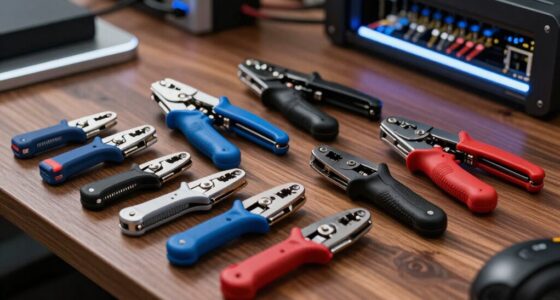

Network scanning tool hardware can mean anything from a simple continuity tester to a field unit that checks PoE cameras and network links. My best overall pick is the WANLUTECH E88 for its broad IP-camera and network diagnostics; the Cable Matters 7-in-1 is a more focused choice for routine cable work, while the Hi-Spec kit bundles common testing and termination tools for newer users. The main tradeoff is breadth versus simplicity: advanced testers do more, but basic kits are easier to carry and use for straightforward wiring jobs. These products also vary in how much they support crimping, punch-down work, and cable checks in one package. Read on for the full breakdown and a guide to choosing hardware that matches your jobs.

Get business pricing on networking and server gear
- Business-only prices and quantity discounts
- Tax-exempt purchasing
- Multiple users, one account, clear invoices
Key Takeaways
- WANLUTECH E88 stands apart from the cable kits: its touchscreen, PoE support, and camera-oriented connections suit IP surveillance diagnostics rather than basic cable termination.
- Cable Matters is the focused everyday pick: its 7-in-1 format centers on common network-tool tasks without the bulk of a larger tool assortment.
- Pass-through crimpers are a recurring theme: several kits pair crimping with testers, but buyers still need to confirm connector compatibility and test every finished cable.
- Kit size does not equal diagnostic depth: 14-in-1 and 15-in-1 bundles emphasize included tools, while the WANLUTECH offers a different class of field testing capability.
- The smallest tester has a narrower job: the RJ45/RJ11/RJ12 LAN tester can suit basic continuity checks, but it is not a substitute for crimping, punch-down, or PoE camera tools.
| Gaobige Network Tool Kit for Cat5, Cat5e, Cat6, 11-in-1 Ethernet Crimper Kit |  | Best All-in-One Starter Kit | Included tools: Ethernet crimper, cable tester, wire stripper, screwdrivers, punch-down tool, connectors | Cable compatibility: Cat5, Cat5e, Cat6 | Connector compatibility: RJ45, RJ11, RJ12 | VIEW ON AMAZON | See Our Full Breakdown |
| ZOERAX 14-in-1 Professional Network Tool Kit |  | Best for Versatile Installations | Model: 14-in-1 Network Tool Kit, part number YT-NTK-M11 | Included components: Cutter, network cable tester, punch-down tool, RJ45 crimp tool, stripper | Supported cable types: Cat5, Cat5e, Cat6, Cat6a | VIEW ON AMAZON | See Our Full Breakdown |
| Cable Matters 7-in-1 Network Toolkit with RJ45 Crimping Tool |  | Best for Organized Field Work | Model number: 180108 | Number of items: 1 | Weight: 0.88 kg | VIEW ON AMAZON | See Our Full Breakdown |
| Hi-Spec Network Cable Tester Tool Kit for CAT5 CAT6 RJ11 RJ45 Punchdown |  | Best for Long-Run Cable Testing | Cable types tested: Cat5, Cat5e, Cat6, Cat7, RJ45 Ethernet, RJ11 telephone | Maximum test length: 300 m / 1,000 ft | Tester components: Detachable tester box and remote unit | VIEW ON AMAZON | See Our Full Breakdown |
| RJ45 Crimp Tool Kit Pass Thru Ethernet Crimper for Cat5e, Cat6, Cat6a – All-in-One Crimping and Testing Tool |  | Best for Pass-Through Connector Work | Included tools: Pass-through RJ45 crimper, wire stripper, network cable tester | Included connectors: 20 Cat6 pass-through connectors and 20 connector covers | Compatibility: Cat5e, Cat6, Cat6a connectors, including shielded | VIEW ON AMAZON | See Our Full Breakdown |
| ZOERAX 11-in-1 Professional RJ45 Crimp Tool Kit |  | Best for Pass-Through Termination | Included tools: Pass-through RJ45 crimper, cable tester, punch-down tool, strippers, cutter, and wire cutters | Connector types: RJ11, RJ12, and RJ45 (4-, 6-, and 8-position modular) | Included connectors: 10 Cat6 pass-through connectors | VIEW ON AMAZON | See Our Full Breakdown |
| UbiGear Network/Phone Cable Tester and RJ11/RJ12/RJ45 Crimper Kit (Premium 568 Tool Kit) |  | Best for Mixed Network and Phone Wiring | Compatible connectors: RJ45, RJ11, and RJ12 | Included RJ45 plugs: 100 CAT5e standard plugs | Tester: LED cable tester | VIEW ON AMAZON | See Our Full Breakdown |
| WANLUTECH E88 4K 12MP IP Camera Tester with 90W PoE |  | Best for CCTV and PoE Network Diagnostics | Operating voltage: 15 V DC | PoE output: Up to 90 W | Display: 8-inch touchscreen | VIEW ON AMAZON | See Our Full Breakdown |
| RJ45 RJ11 RJ12 CAT5 CAT6 UTP Network LAN Cable Tester Test Tool |  | Best for Basic Cable Verification | Supported cable types: RJ11, RJ12, RJ45, CAT5, and CAT6 | Indicators: 9 LED indicators | Maximum stated test distance: Up to 1000 feet | VIEW ON AMAZON | See Our Full Breakdown |
| InstallerParts Professional Network Tool Kit 15-in-1 |  | Best All-Purpose Installation Kit | Set name: 15 In 1 | Included tools: Crimper, cable tester, punch-down tool, screwdriver, and utility knife | Storage: Durable, lightweight case | VIEW ON AMAZON | See Our Full Breakdown |
| AMPCOM 10-in-1 Ethernet Crimping Tool Kit, Model 728 |  | Best for Portable All-in-One Cable Work | Brand: AMPCOM | Model: 728 | Kit contents: 10-piece kit with crimper, network cable tester, punch-down tool, strippers, flush cutter, strap, screwdriver, extra blades, connectors, boots, and bag | VIEW ON AMAZON | See Our Full Breakdown |
More Details on Our Top Picks
Gaobige Network Tool Kit for Cat5, Cat5e, Cat6, 11-in-1 Ethernet Crimper Kit
Gaobige’s 11-in-1 kit brings crimping, basic cable testing, stripping, punch-down work, and screwdriving together in one portable bag. That breadth suits a home installer who wants to build and check ordinary Ethernet runs without buying each tool separately. Compared with the ZOERAX 14-in-1, it has a less specialized feature set and lacks a stated pass-through crimper, but its Cat5 through Cat6 and RJ45/RJ11/RJ12 compatibility covers common household and small-office jobs. The main constraint is connector choice: its crimper works with regular RJ45 connectors, not pass-through types, and the included RJ45 connectors are regular as well. The tester also needs a 9V battery, sold separately. I’d pick it for straightforward cable work, not a workflow built around pass-through terminations or advanced diagnostics.
Pros:- Combines crimping, cable testing, stripping, punch-down work, and screwdrivers in one kit
- Supports Cat5, Cat5e, and Cat6 cable work
- Works with RJ45, RJ11, and RJ12 connectors
- Portable bag keeps tools together for home or office jobs
Cons:- Crimper is limited to regular RJ45 connectors and does not support pass-through connectors
- The cable tester requires a 9V battery that is not included
- The listed kit features do not describe advanced wire-tracking functions
Best for: Home network DIYers who want crimping, testing, punch-down, and basic repair tools in one carry bag.
Not ideal for: Installers who rely on pass-through RJ45 connectors or need advanced cable tracing and diagnostics.
- Included tools:Ethernet crimper, cable tester, wire stripper, screwdrivers, punch-down tool, connectors
- Cable compatibility:Cat5, Cat5e, Cat6
- Connector compatibility:RJ45, RJ11, RJ12
- Tester power:9V battery required; not included
- Storage:Portable tool bag
- Crimper connector type:Regular RJ45 connectors; not pass-through
Our verdict“Choose Gaobige for a portable, broad-use starter set if regular RJ45 terminations meet your needs.”
ZOERAX 14-in-1 Professional Network Tool Kit
ZOERAX’s 14-in-1 kit is the most versatile termination-and-diagnostics set in this group: it pairs a pass-through crimper with a cable tester and smart wire tracker, plus a punch-down tool with interchangeable blades. Support for Cat5 through Cat6a gives it broader stated cable coverage than the Gaobige kit, which tops out at Cat6 and uses a regular-connector crimper. The tool-free crimper adjustments and ergonomic punch-down handle are useful when a job involves varied terminations rather than a single cable type. Its limits are practical: the kit includes only 10 Cat6 connectors, and the wire tracker may need an additional adapter for some cables. I’d choose it over the Cable Matters 7-in-1 when pass-through work and broader cable support matter, but skip it if a compact, minimal set is the priority.
Pros:- Pass-through crimper with tool-free adjustments
- Supports Cat5, Cat5e, Cat6, and Cat6a cable types
- Smart wire tracker and cable tester add diagnostic capability
- Interchangeable punch-down blades and a sturdy carrying case support varied jobs
Cons:- Includes only 10 Cat6 connectors
- Wire tracker may require an additional adapter for some cables
- Its breadth may be unnecessary for simple, occasional household repairs
Best for: Network installers and hands-on home or office technicians who handle mixed Cat5-to-Cat6a jobs and want pass-through termination plus wire tracking.
Not ideal for: Occasional users who need only a basic crimper and tester, or technicians who need a large supply of included connectors.
- Model:14-in-1 Network Tool Kit, part number YT-NTK-M11
- Included components:Cutter, network cable tester, punch-down tool, RJ45 crimp tool, stripper
- Supported cable types:Cat5, Cat5e, Cat6, Cat6a
- Connector types:RJ45, RJ11, RJ12
- Crimper:Pass-through crimper with tool-free adjustment
- Punch-down tool:Ergonomic handle with interchangeable blades
- Included connectors:10 Cat6 connectors
- Storage:Carrying case
Our verdict“Pick this ZOERAX kit when pass-through crimping, Cat6a support, and wire tracking justify a more capable tool set.”
Cable Matters 7-in-1 Network Toolkit with RJ45 Crimping Tool
Cable Matters’ 7-in-1 toolkit emphasizes a coherent set of cable-building and testing essentials: an RJ45 crimper, cable tester, punch-down device and stand, strippers, connectors, boots, and a carrying case. The stand and case make it a sensible option for technicians who want an organized kit that travels between work areas. At 0.88 kg, though, it is not the lightest choice for extended carrying; the smaller tool list also gives it less stated breadth than the ZOERAX 14-in-1, which adds pass-through crimping and wire tracking. Compared with Gaobige’s 11-in-1, Cable Matters highlights a punch-down stand and included RJ45 boots, but its listed data does not specify cable categories or a tester range. I’d favor it for a structured work kit, not for buyers who need the broadest documented compatibility.
Pros:- Combines crimping, testing, punch-down work, and wire stripping
- Includes a punch-down device and stand
- Carrying case helps organize tools and transport them between jobs
- Includes RJ45 connectors and boots
Cons:- Listed weight of 0.88 kg may be cumbersome for extended carrying
- The stated product data does not specify supported cable categories or tester range
- A seven-tool format offers fewer listed functions than the ZOERAX 14-in-1 kit
Best for: IT technicians and capable DIYers who want a case-organized kit with a punch-down device and stand for repeat cable installation work.
Not ideal for: Buyers who prioritize low carry weight, beginner simplicity, or clearly stated Cat6a and pass-through crimping support.
- Model number:180108
- Number of items:1
- Weight:0.88 kg
- Included items:Punch-down device and stand, cable tester, RJ45 connectors and boots, wire strippers, carrying case
- Crimping tool:RJ45 crimper
- Grip:Ergonomic
- Colors:Black and blue
Our verdict“Choose Cable Matters for an organized installation kit with a punch-down stand, but not if you need the broadest documented cable coverage.”
Hi-Spec Network Cable Tester Tool Kit for CAT5 CAT6 RJ11 RJ45 Punchdown
Hi-Spec’s kit stands out for cable testing reach: its tester is specified for runs up to 300 m (1,000 ft) and covers Cat5, Cat5e, Cat6, Cat7 Ethernet, and RJ11 telephone cable. That makes it a stronger fit for checking long installed runs than the Gaobige kit, whose description does not give a maximum test distance. The assortment also reaches beyond Ethernet, adding a Krone-style punch-down tool and a rotary coax stripper for RG59/RG58. That versatility comes with extra bulk, and the included crimper is described as a solid-build tool rather than a pass-through model like the ZOERAX 14-in-1. I’d put Hi-Spec ahead when long-run testing and mixed cable work are central; for a small home job limited to patch cables, its coax and long-distance tools may be more kit than needed.
Pros:- Tests supported cable runs up to 300 m (1,000 ft)
- Lists Cat5, Cat5e, Cat6, Cat7, RJ45 Ethernet, and RJ11 telephone coverage
- Includes a Krone-style punch-down tool and rotary RG59/RG58 coax stripper
- Splash-proof Oxford case keeps the tools and accessories organized
Cons:- Bulkier than needed for simple home networking tasks
- Pass-through crimping is not specified, unlike the ZOERAX 14-in-1
- The added coax tools may go unused by Ethernet-only buyers
Best for: Installers and maintenance technicians who need to test long Ethernet or telephone cable runs and also work with coax.
Not ideal for: Home users doing occasional short Ethernet runs who want a compact kit or specifically need pass-through crimping.
- Cable types tested:Cat5, Cat5e, Cat6, Cat7, RJ45 Ethernet, RJ11 telephone
- Maximum test length:300 m / 1,000 ft
- Tester components:Detachable tester box and remote unit
- Crimper:Crimper with mini-blades
- Punch-down tool:Krone-style
- Coax tool:Rotary stripper for RG59/RG58
- Other included tools:Full-length screwdrivers and spare connectors
- Case:Splash-proof Oxford weave cloth
Our verdict“Choose Hi-Spec when long cable runs and mixed Ethernet, telephone, and coax tasks matter more than keeping the kit compact.”
RJ45 Crimp Tool Kit Pass Thru Ethernet Crimper for Cat5e, Cat6, Cat6a – All-in-One Crimping and Testing Tool
This pass-through crimp kit focuses on the jobs around terminating and checking Ethernet cable: it includes a crimper, wire stripper, network tester, 20 Cat6 pass-through connectors, and 20 connector covers. Its steel construction and industrial blades are aimed at repeated manual cutting and crimping, while the described scanning function can help locate working wires behind walls. Compared with the ZOERAX 14-in-1, this kit provides a larger stated supply of pass-through connectors but fewer listed installation tools, with no punch-down tool included. It supports Cat5e, Cat6, and Cat6a connectors, including shielded types, but is not compatible with AMP connectors. The tester needs a 9V battery that is not included, and the manual operation may take practice. I’d choose it for pass-through terminations, not for a broad punch-down toolkit.
Pros:- Pass-through RJ45 crimper is supplied with 20 Cat6 pass-through connectors and 20 covers
- Supports Cat5e, Cat6, and Cat6a connectors, including shielded connectors
- Heavy-duty steel construction with a black oxide finish and industrial steel blades
- Includes a wire stripper and cable tester with a described scanning function
Cons:- Cable tester requires a 9V battery that is not included
- Not compatible with AMP connectors
- Manual operation may be challenging for beginners, and no punch-down tool is listed
Best for: Cable installers who regularly terminate Cat5e, Cat6, or Cat6a runs with pass-through connectors and want a tester in the same kit.
Not ideal for: Beginners who want guided or low-effort operation, technicians using AMP connectors, or buyers who need a punch-down tool.
- Included tools:Pass-through RJ45 crimper, wire stripper, network cable tester
- Included connectors:20 Cat6 pass-through connectors and 20 connector covers
- Compatibility:Cat5e, Cat6, Cat6a connectors, including shielded
- Material:Heavy-duty steel
- Finish:Black oxide
- Blade material:Industrial steel
- Handle material:Polypropylene
- Tester power:9V battery required; not included
Our verdict“Pick this kit for frequent pass-through Ethernet terminations, provided you do not need AMP compatibility or a punch-down tool.”
ZOERAX 11-in-1 Professional RJ45 Crimp Tool Kit
For installers who frequently terminate Ethernet runs, the pass-through RJ45 crimper is the key reason to choose this kit: it pairs with included Cat6 pass-through plugs and boots, while the bundled tester helps check completed cable wiring. The punch-down tool, strippers, and cutters also cover common jobs beyond crimping, so this is more versatile than the standalone RJ45/RJ11/RJ12 Cable Tester Test Tool, which only checks cables. Its portable case keeps the pieces together for home, office, or field work. The tradeoff is that the breadth may be unnecessary for occasional troubleshooting, and the tester needs a 9V battery that is not included. Two spare blades are useful, but regular use may call for replacements.
Pros:- Pass-through crimper is paired with 10 Cat6 pass-through connectors and 10 RJ45 boots.
- Includes a cable tester, punch-down tool, strippers, and cutters for varied installation tasks.
- Portable case with protective bubble pads organizes the tools for transport.
- Works with RJ11, RJ12, and RJ45 modular connector formats.
Cons:- Cable tester requires a 9V battery, which is not included.
- The broad tool selection can be excessive for basic cable checks.
- Only two spare blades are included, so frequent use may require replacements.
Best for: Home and field installers who make pass-through Cat6 terminations and want testing, punch-down, and stripping tools in one case.
Not ideal for: People who only need to verify existing cables, or installers who want a tester ready to use without sourcing a separate 9V battery.
- Included tools:Pass-through RJ45 crimper, cable tester, punch-down tool, strippers, cutter, and wire cutters
- Connector types:RJ11, RJ12, and RJ45 (4-, 6-, and 8-position modular)
- Included connectors:10 Cat6 pass-through connectors
- Included boots:10 RJ45 boots
- Spare blades:2
- Case:Portable case with protective bubble pads
Our verdict“Choose this kit if pass-through Cat6 termination and a broad set of field tools matter more than a minimal, ready-to-run cable tester.”
UbiGear Network/Phone Cable Tester and RJ11/RJ12/RJ45 Crimper Kit (Premium 568 Tool Kit)
The UbiGear kit earns its place for buyers handling both Ethernet and telephone wiring: its RJ11, RJ12, and RJ45 crimper and LED tester serve several common modular cable types. The included 100 CAT5e plugs, boots, punch-down tool, strippers, and screwdrivers make it a more supply-rich package than the ZOERAX 11-in-1, which instead emphasizes pass-through Cat6 connectors and crimping. That distinction matters: UbiGear suits conventional plug termination, while ZOERAX is the better match for pass-through work. UbiGear’s plugs are standard, not pass-through, and are not compatible with 23 AWG-and-larger wire, limiting its fit for some cable stock. Its tester also needs batteries that are not supplied, so the kit is not fully ready to verify cables straight from the case.
Pros:- Crimper supports RJ11, RJ12, and RJ45 connectors.
- Includes 100 CAT5e plugs along with connector boots.
- LED tester, punch-down tool, strippers, and screwdrivers cover several installation tasks.
- Carrying case keeps the tools and accessories together.
Cons:- Included RJ45 plugs are standard rather than pass-through.
- Plugs are not compatible with 23 AWG-and-larger wire.
- Tester batteries are not included.
Best for: DIYers and maintenance staff who terminate a mix of telephone and standard CAT5e network cables and want a large plug supply.
Not ideal for: Installers who need pass-through connectors or work with 23 AWG-and-larger wire, since the included plugs are standard type and have a stated gauge limitation.
- Compatible connectors:RJ45, RJ11, and RJ12
- Included RJ45 plugs:100 CAT5e standard plugs
- Tester:LED cable tester
- Other tools:Crimper, punch-down tool, wire strippers, and screwdrivers
- Power:Hand-tool kit; tester batteries not included
- Dimensions:10 x 7 x 2 inches
- Warranty:One-year limited warranty
Our verdict“Pick UbiGear for mixed phone and standard CAT5e work when its included plug supply is more useful than pass-through termination.”
WANLUTECH E88 4K 12MP IP Camera Tester with 90W PoE
Unlike the hand-tool kits in this roundup, the WANLUTECH E88 is an electronic field tester built for IP, PTZ, and analog camera systems. Its 90W PoE output can power demanding camera setups during checks, while the RJ45 TDR test helps locate cable faults and estimate length. The 8-inch touchscreen, WiFi analysis, SFP support, and HDMI/VGA inputs give it a much broader diagnostic role than the basic RJ45 RJ11 RJ12 cable tester, which focuses on wiring continuity. That capability comes with a different kind of tradeoff: this is not a portable crimping or punch-down kit, and it requires an external 15V DC power source rather than operating as a battery-powered handheld tool. Buyers who only need to trace ordinary Ethernet cable faults will likely find its camera-focused functions unnecessary.
Pros:- 90W PoE output supports testing power-hungry camera equipment.
- RJ45 TDR testing covers cable lengths up to 180 meters.
- Combines WiFi analysis, SFP support, and HDMI/VGA video inputs.
- Large 8-inch touchscreen provides an interface for its multiple diagnostic tools.
Cons:- Requires an external 15V DC power source and is not battery-operated.
- Camera-specific features may be unnecessary for general Ethernet cable troubleshooting.
- Does not replace a kit with physical crimping, punch-down, and cable-preparation tools.
Best for: CCTV installers and network technicians who need to power and diagnose IP cameras, inspect cable runs, and check WiFi or video inputs on site.
Not ideal for: Cable installers seeking a compact crimper-and-tester kit, or field workers who need a battery-operated tester without an external power source.
- Operating voltage:15 V DC
- PoE output:Up to 90 W
- Display:8-inch touchscreen
- RJ45 TDR test length:Up to 180 meters
- Maximum cable length test:Up to 3000 meters for BNC, RJ45, and RJ11
- Video inputs:HDMI and VGA
- Optical interface:Gigabit SFP port for optical fiber modules
- WiFi tools:Signal-strength and channel analysis
Our verdict“Choose the E88 for camera-system diagnostics and high-power PoE checks, not for routine cable termination or simple continuity testing.”
RJ45 RJ11 RJ12 CAT5 CAT6 UTP Network LAN Cable Tester Test Tool
If the job is simply to confirm whether a cable is wired correctly, this tester keeps the task focused. Its nine LED indicators show wiring status, and the detachable remote lets a technician check a run from the far end, with testing specified for distances up to 1000 feet. That makes it a simpler troubleshooting choice than the ZOERAX 11-in-1 kit, which adds crimping, punch-down, and cable-preparation tools for installation work. The narrow scope is also the main limitation: there is no crimper, punch-down tool, or advanced diagnostic feature, so it cannot prepare or repair a cable. The product data lists corded electric power, making it less flexible for work where a power source is unavailable. This is a cable-checking tool, not a general network installation kit.
Pros:- Nine LED indicators provide a simple visual check of wiring.
- Specified to test cables up to 1000 feet.
- Detachable remote supports testing runs from the far end.
- Supports RJ11, RJ12, RJ45, CAT5, and CAT6 cables.
Cons:- Limited to cable testing, without crimping or cable-preparation tools.
- Does not provide advanced diagnostics.
- Corded-electric power limits use where a suitable power source is unavailable.
Best for: Home technicians and small-office staff who need a straightforward way to check RJ11, RJ12, RJ45, CAT5, or CAT6 cable wiring over long runs.
Not ideal for: Installers who need to terminate connectors, punch down wires, or diagnose faults beyond basic wiring verification.
- Supported cable types:RJ11, RJ12, RJ45, CAT5, and CAT6
- Indicators:9 LED indicators
- Maximum stated test distance:Up to 1000 feet
- Remote:Detachable remote
- Measurement type:Ohmmeter
- Power source:Corded electric
- Weight:0.1 kg
Our verdict“Buy this tester for basic long-run wiring checks if you do not need the installation tools bundled with the ZOERAX or InstallerParts kits.”
InstallerParts Professional Network Tool Kit 15-in-1
The InstallerParts 15-in-1 is the broad, conventional toolkit choice for buyers who want core network installation gear gathered in one case. Its listed tools include a crimper, cable tester, punch-down tool, screwdriver, and utility knife, making it more suited to building and maintaining connections than the standalone RJ45 RJ11 RJ12 tester. Compared with the ZOERAX 11-in-1, the InstallerParts description emphasizes a general-purpose 15-tool set rather than pass-through termination and a specified batch of Cat6 connectors. That makes its exact connector workflow less clear from the listed product details. The lightweight case supports transport and organization, but the set may feel bulky for a quick cable check. The tester’s batteries are not included, and limited warranty information leaves less clarity on support than UbiGear’s stated one-year limited warranty.
Pros:- Includes a crimper and cable tester for termination and verification tasks.
- Punch-down tool, screwdriver, and utility knife extend its use beyond connector crimping.
- Durable, lightweight case helps keep tools organized and portable.
Cons:- Cable tester batteries are not included.
- The toolkit may be bulky for small, occasional cable-checking jobs.
- Warranty details are limited in the supplied product information.
Best for: DIY network installers and maintenance workers who want a general collection of termination, testing, and hand tools in a transportable case.
Not ideal for: People who only need a compact cable tester, or buyers who require clearly specified pass-through connectors and detailed warranty terms.
- Set name:15 In 1
- Included tools:Crimper, cable tester, punch-down tool, screwdriver, and utility knife
- Storage:Durable, lightweight case
- Model number:22811
- Number of items:1
- Tester battery:Not included
- Warranty information:Amazon.com Voluntary 30-Day Return Guarantee
Our verdict“Choose InstallerParts for a broad general-purpose installation set, but prefer a dedicated tester for simple checks or a specified pass-through kit for that workflow.”
AMPCOM 10-in-1 Ethernet Crimping Tool Kit, Model 728
I’d rank the AMPCOM Model 728 as a practical field kit for technicians who need to terminate and check network or phone cabling without assembling a separate tool set. Its pass-through RJ45 crimper, cable tester, punch-down tool, and wire strippers cover several common jobs, while the included CAT6 plugs and boots let buyers handle basic replacements on site. Compared with the Cable Matters 7-in-1 Network Toolkit, this kit supplies more accessory types and a waterproof carrying bag; it’s a better fit for a broader range of small installation tasks than for a minimal repair pouch. The tradeoff is that the multi-tool bundle takes more storage space, and the supplied tester is intended for cable checks—not the richer diagnostics available from an IP camera tester such as the WANLUTECH E88. I’d choose it for general termination work, not advanced network troubleshooting.
Pros:- Combines crimping, basic cable testing, punch-down, stripping, and cutting tools in one set.
- Includes 20 CAT6 pass-through RJ45 plugs and 20 RJ45 cover boots for common replacement jobs.
- Waterproof carrying bag supports transport between work sites.
- Two extra blades provide replacements for blade-wearing tasks.
Cons:- The collection of tools and accessories is bulkier to store than a small tester or single-purpose tool.
- The included tester is suited to basic cable checks, not advanced network or IP camera diagnostics.
- The kit’s stated compatibility spans several cable and connector types, but does not establish support for every specialized termination workflow.
Best for: Field technicians and DIY installers who need one portable kit for terminating, stripping, punch-down work, and basic RJ45 cable testing.
Not ideal for: Network administrators seeking advanced diagnostics, or users who only need a compact tester or single-purpose crimper and do not want to store a full kit.
- Brand:AMPCOM
- Model:728
- Kit contents:10-piece kit with crimper, network cable tester, punch-down tool, strippers, flush cutter, strap, screwdriver, extra blades, connectors, boots, and bag
- RJ45 compatibility:CAT5, CAT5E, CAT6, and CAT7; 8P8C
- Phone connector compatibility:RJ11/RJ12; 6P6C and 6P4C
- Crimper material:High-carbon steel
- Included connectors and boots:20 gold-plated CAT6 pass-through RJ45 plugs and 20 RJ45 cover boots
- Carrying bag:Waterproof bag with nylon and rubber wear-resistant materials
Our verdict“Choose the AMPCOM Model 728 if you want a portable, multi-task termination kit with basic testing, but skip it if you need advanced diagnostics or minimal storage space.”

How We Picked
I ranked these options by how well their hardware supports real network installation and fault-finding tasks: cable testing, connector termination, wire stripping and cutting, punch-down work, and—where applicable—PoE or IP-camera diagnostics. I also weighed the practical value of combining tools in one kit against portability, task focus, and the extra learning curve that comes with advanced equipment. A longer tool list does not automatically earn a higher place; the tools need to fit a coherent use case.
The WANLUTECH E88 ranks first for diagnostic breadth, especially for installers who work with IP cameras and PoE. For ordinary cable jobs, I give more weight to a useful, manageable tool set than to advanced functions a buyer may never use. The remaining kits rank by their apparent fit for everyday cabling, the breadth of included termination tools, and whether their simpler design matches a beginner or occasional user. Product descriptions do not establish accuracy, durability, or compatibility with every connector, so buyers should verify those details for their own work.
Factors to Consider When Choosing Network Scanning Tool Hardware
Before choosing a kit, I would start with the faults and installation tasks you actually need to handle. These products range from basic link checks to camera-focused diagnostics, and buying beyond your needs can mean extra bulk and complexity rather than better results.
Match the tester to the fault you need to find
A basic continuity tester can help identify opens, shorts, and incorrect wire order, which is often enough when checking a newly terminated patch cable. It cannot tell you everything about a live network or prove that a connection will perform at a target data rate. For troubleshooting, separate cable verification from network diagnostics: ask whether you need a wire-map check, link information, PoE checks, or camera-specific functions. A common mistake is expecting a compact cable tester to diagnose switches, network traffic, or internet service. Buy for the fault boundary you need to inspect, not the broad label “network tester.”
Check connector and cable compatibility before buying
RJ45, RJ11, and RJ12 support can be useful when jobs span Ethernet and phone wiring, but a tool’s connector list does not prove that every plug style will fit. Pass-through plugs, standard modular plugs, cable category, conductor type, and wire gauge can affect crimping results. Check the crimper’s stated compatibility against the exact connectors and cable you plan to use. Avoid assuming that a kit works with shielded or specialty cable just because it supports Cat6 or Cat6a. A small compatibility check can prevent wasted connectors and unreliable terminations.
Decide whether you need a complete kit or a focused tool
Bundled kits can reduce the number of separate tools to source, especially when they include a tester, crimper, stripper, and punch-down tool. Their tradeoff is that included accessories may not match the quality or ergonomics of tools bought for frequent professional use. A focused kit can be easier to store and carry, while a larger set may suit varied jobs where several termination methods are routine. Do not choose by the number of pieces alone; count the tools you will use and check whether the kit covers the tasks missing from your existing toolbox. For occasional repairs, a leaner set may be more practical than a large case.
Treat PoE and camera work as a separate requirement
Installers working with IP cameras may need more than a cable wire map: PoE capability, link checks, and interfaces for camera setup can change what is useful on site. A specialized field tester such as the WANLUTECH E88 addresses a different problem set from a crimping bundle. That extra capability brings more complexity and makes less sense if your work is limited to terminating short Ethernet leads. Confirm the tester supports the power and connection types used by your camera system. Do not assume a general-purpose cable tester can replace a camera or PoE diagnostic tool.
Plan for testing after every termination
A crimper makes the connection; it does not confirm that the cable is wired correctly. Testing each finished cable can catch reversed pairs, incomplete contacts, and other faults before the cable is installed or handed off. For longer runs, consider whether a basic tester’s remote unit and operating range suit your workflow. Keep spare connectors and a known-good patch cable available so you can distinguish a bad termination from a problem elsewhere in the network. The time spent testing is usually easier to manage than tracing an intermittent fault after installation.
Weigh portability against the features you will actually use
Small testers and compact kits are easier to carry between rooms or job sites, while a feature-rich camera tester needs more room and may demand more setup. If your work involves quick checks, a large touchscreen device may add little value; if you regularly commission cameras, leaving diagnostic functions behind can slow a job. Think about where the tools will be stored, how often you travel, and whether batteries or other upkeep apply. Compare the burden of carrying a tool with the cost of returning to a site without the right diagnostic capability. The best balance depends on your recurring jobs, not the most impressive feature list.
Frequently Asked Questions
Can a basic RJ45 cable tester tell me whether my network connection is fast enough?
Usually, a basic wire-map tester checks whether conductors connect in the correct order and can reveal some wiring faults. That does not establish the real throughput of a network link or confirm performance under load. If speed or link negotiation is the problem, you need equipment and a test method suited to those measurements, not just continuity checks. Use a simple tester to rule out cable wiring faults first, then check the network devices and link conditions separately. This distinction can keep you from replacing a good cable when the fault is elsewhere.
Should I choose a pass-through crimper if I am new to Ethernet cabling?
A pass-through crimper can make it easier to see that the conductors reach the end of the plug before crimping. That convenience does not remove the need to follow the connector maker’s instructions or inspect the finished termination. Confirm that the kit’s crimper supports the exact pass-through plugs you plan to use, since compatibility can vary. Beginners should also check that a tester is included or budget for a separate way to verify each cable. If you will only terminate a few cables, practice on spare wire before working on a permanent run.
Is the WANLUTECH E88 a sensible choice for ordinary home Ethernet repairs?
It can do more than a basic cable kit, but that extra capability is most relevant when IP cameras, PoE, or field diagnostics are part of the job. For simple home repairs such as replacing a plug or checking a short Ethernet cable, a compact kit with a crimper and basic tester may be easier to store and operate. The E88’s additional interfaces and touchscreen can add complexity you may rarely use. Choose it when those diagnostic functions solve recurring problems, not solely because it offers more features. For occasional cable work, match the tool to the simpler task.
Do I need a punch-down tool if I only make patch cables?
Not necessarily: patch cables with modular plugs are made with a compatible crimper, while punch-down tools are used to seat wires into terminals such as wall jacks and patch panels. If your work is limited to pre-made or self-terminated patch leads, the punch-down tool may stay unused. It becomes useful when installing structured cabling at outlets or in a rack. Before choosing a kit, think about whether you will work on fixed building wiring as well as loose cables. Buying for both jobs can save a separate tool purchase, but it adds little value if you never terminate jacks or panels.
What should I check before trusting a bundled tester with Cat6 or Cat6a cable?
Check the tester’s documented functions rather than relying only on the cable category named in a kit title. A basic wire-map check can verify conductor order, but it does not by itself certify a Cat6 or Cat6a channel to its performance requirements. Also verify connector compatibility, the tester’s supported wiring layouts, and whether its remote unit suits the cable lengths you handle. If a project requires formal certification or documented test results, confirm that the device supports that level of testing. For routine home or small-office repairs, a simpler check may be enough, but it should not be mistaken for certification.
Conclusion
For one recommendation across the widest range of diagnostic work, I would choose the WANLUTECH E88 as best overall, especially for IP-camera and PoE jobs. The Cable Matters 7-in-1 is my best value-style pick for buyers who want a focused set of common cable tools without moving into a specialized field tester. Beginners can start with the Hi-Spec kit for its mix of basic testing and termination tools, while buyers who prioritize a broad tool assortment can compare the ZOERAX 14-in-1 and InstallerParts 15-in-1. For specific needs, choose the E88 for camera diagnostics, a pass-through kit for compatible plug work, or the compact RJ45/RJ11/RJ12 tester for simple wiring checks. I would skip the advanced tester for occasional patch-cable repairs and skip a basic continuity tester if your work calls for PoE or network performance diagnostics.
Halloween Picks
halloween
As an affiliate, we earn on qualifying purchases.