A WiFi 6 router can help a busy home handle more connected devices, but the right choice depends on your broadband speed, layout, and need for extras. I’d make the TP-Link Archer AX73 my best overall pick for its higher AX5400 class, while the Archer AX21 stands out as a simpler, more accessible choice and the ASUS RT-AX3000S adds useful parental controls and VPN features. The tradeoff is straightforward: lower-tier models can cover everyday use without extra complexity, while faster or more feature-rich routers may suit heavier traffic and more demanding households. Mesh options can help with dead zones, but they bring different setup and expansion considerations. Read on for my full comparison and guidance on choosing the right WiFi 6 router.

Get business pricing on networking and server gear
- Business-only prices and quantity discounts
- Tax-exempt purchasing
- Multiple users, one account, clear invoices
Key Takeaways
- The Archer AX73 leads this lineup for buyers who want more capacity: its AX5400 class sets it apart from the AX1800 and AX3000 options, though many smaller households may not need that headroom.
- The AX21 is the straightforward value-oriented option: it covers core WiFi 6 needs without the higher speed class or feature set of the AX73 and AX80.
- AX3000-class routers occupy a useful middle ground: the TP-Link AX3000 and ASUS RT-AX3000S offer more stated wireless capacity than entry-level AX1800 models without moving to the higher AX5400 tier.
- Mesh support and a mesh kit are not the same thing: several routers offer extendability, while eero 6 is positioned around a mesh system approach; choose based on whether you need one router or coverage across multiple points.
- The Archer AXE75 is the only WiFi 6E model here: its 6 GHz band may benefit compatible devices nearby, but it is not a replacement for checking client support, home layout, and the router’s WiFi 6 performance on other bands.
| TP-Link AX1800 WiFi 6 Router (Archer AX21 V5) |  | Best for Straightforward Wi-Fi 6 Coverage | Wi-Fi standard: Wi-Fi 6 (802.11ax) | Bands: Dual-band | Maximum total bandwidth: 1.8 Gbps | VIEW ON AMAZON | See Our Full Breakdown |
| ASUS RT-AX3000S Dual Band WiFi 6 Extendable Router with Parental Control and VPN |  | Best for Expandable Family Networks | Wi-Fi standard: Wi-Fi 6 (802.11ax) | Bands: Dual-band | Maximum stated speed: 3,000 Mbps | VIEW ON AMAZON | See Our Full Breakdown |
| TP-Link Dual-Band AX3000 Wi-Fi 6 Wireless Gigabit Internet Router for Home |  | Best Value for Faster Dual-Band Wi-Fi | Wi-Fi generation: Wi-Fi 6 | Bands: Dual-band, 2.4 GHz and 5 GHz | Combined stated speed: 2,976 Mbps | VIEW ON AMAZON | See Our Full Breakdown |
| TP-Link AX6000 Wi-Fi 6 Dual Band Router (Archer AX80) |  | Best for Multi-Gig and High-Demand Homes | Wi-Fi standard: Wi-Fi 6 (802.11ax) | 5 GHz maximum speed: 4,804 Mbps | 2.4 GHz maximum speed: 1,148 Mbps | VIEW ON AMAZON | See Our Full Breakdown |
| TP-Link WiFi 6 Dual Band Router with 4 Gigabit LAN Ports |  | Best Entry-Level Wi-Fi 6 Pick | Wi-Fi standard: Wi-Fi 6 (802.11ax) | Bands: Dual-band, 2.4 GHz and 5 GHz | 5 GHz maximum speed: 1,201 Mbps | VIEW ON AMAZON | See Our Full Breakdown |
| TP-Link AX4400 Mesh Dual Band 6-Stream Router (Renewed) |  | Best for High Device Counts | Wi-Fi speed: Up to 4400 Mbps | Bands: Dual-band | Streams: 6-stream | VIEW ON AMAZON | See Our Full Breakdown |
| TP-Link Archer AX1450 WiFi 6 Dual-Band Wireless Router |  | Best for Straightforward Wi-Fi 6 | Wi-Fi standard: Wi-Fi 6 | Maximum speed: Up to 1.45 Gbps | Bands: Dual-band, 2.4 GHz and 5 GHz | VIEW ON AMAZON | See Our Full Breakdown |
| Cudy AX1500 Gigabit Mesh Wi-Fi 6 Router, 4X GbE, OFDMA, VPN, WR1500 | 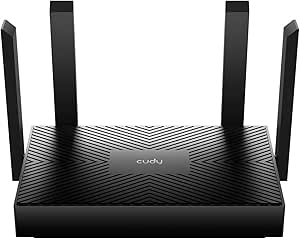 | Best for Built-In VPN and Wired Connections | Wi-Fi standard: Wi-Fi 6 | Total stated speed: Up to 1501 Mbps | Band speeds: 1201 Mbps on 5 GHz + 300 Mbps on 2.4 GHz | VIEW ON AMAZON | See Our Full Breakdown |
| ASUS RT-AX1800S Dual Band WiFi 6 Extendable Router |  | Best for Security and Wired Flexibility | Wi-Fi standard: Wi-Fi 6 (802.11ax) | Wi-Fi speed: Up to 1800 Mbps | Bands: Dual-band | VIEW ON AMAZON | See Our Full Breakdown |
| NETGEAR Nighthawk WiFi 6 Router R6700AX, Up to 1,500 sq ft, 1.8 Gbps |  | Best for Small Homes and Apartments | Wi-Fi standard: Wi-Fi 6 (802.11ax) | Maximum speed: Up to 1.8 Gbps | Bands: Dual-band, 2.4 GHz and 5 GHz | VIEW ON AMAZON | See Our Full Breakdown |
| TP-Link AX5400 WiFi 6 Router (Archer AX73) |  | Best Overall Wi-Fi 6 Router | Wi-Fi generation: Wi-Fi 6 | Advertised Wi-Fi speed: Up to 5400 Mbps | Frequency bands: Dual-band | VIEW ON AMAZON | See Our Full Breakdown |
| eero 6 Mesh Wi-Fi Router |  | Best for Easy Setup and Smart Homes | Wi-Fi standard: Wi-Fi 6 (802.11ax) | Listed Wi-Fi speed: Up to 900 Mbps | Listed coverage: Up to 1,500 sq. ft. | VIEW ON AMAZON | See Our Full Breakdown |
| TP-Link AXE5400 Tri-Band WiFi 6E Router (Archer AXE75) |  | Best for Wi-Fi 6E and Low-Latency Connections | Wi-Fi generation: Wi-Fi 6E | Advertised maximum data transfer rate: Up to 5400 Mbps | Frequency bands: Tri-band: 6 GHz, 5 GHz, 2.4 GHz | VIEW ON AMAZON | See Our Full Breakdown |
| wifi 6 router | Antennas | Wi-Fi standard | Bands |
|---|---|---|---|
| TP-Link AX1800 WiFi 6 Router | 4 | Wi-Fi 6 (802.11ax) | Dual-band |
| ASUS RT-AX3000S Dual Band WiFi | 4 | Wi-Fi 6 (802.11ax) | Dual-band |
| TP-Link Dual-Band AX3000 Wi-Fi | 4 external antennas | — | Dual-band, 2.4 GHz and 5 GHz |
| TP-Link AX6000 Wi-Fi 6 Dual Ba | 8 high-gain antennas | Wi-Fi 6 (802.11ax) | — |
| TP-Link WiFi 6 Dual Band Route | 4 fixed antennas | Wi-Fi 6 (802.11ax) | Dual-band, 2.4 GHz and 5 GHz |
| TP-Link AX4400 Mesh Dual Band | 6 | — | Dual-band |
| TP-Link Archer AX1450 WiFi 6 D | 4 | Wi-Fi 6 | Dual-band, 2.4 GHz and 5 GHz |
| Cudy AX1500 Gigabit Mesh Wi-Fi | 4 | Wi-Fi 6 | — |
| ASUS RT-AX1800S Dual Band WiFi | 4 external antennas | Wi-Fi 6 (802.11ax) | Dual-band |
| NETGEAR Nighthawk WiFi 6 Route | — | Wi-Fi 6 (802.11ax) | Dual-band, 2.4 GHz and 5 GHz |
| TP-Link AX5400 WiFi 6 Router | 6 | — | — |
| eero 6 Mesh Wi-Fi Router | — | Wi-Fi 6 (802.11ax) | — |
| TP-Link AXE5400 Tri-Band WiFi | 8 | — | — |
More Details on Our Top Picks
TP-Link AX1800 WiFi 6 Router (Archer AX21 V5)
I’d pick the Archer AX21 V5 for a household that wants the basic benefits of Wi-Fi 6 without paying for a higher-capacity router. Its dual-band connection, OFDMA support, and four high-gain antennas are suited to everyday browsing, streaming, and connecting several devices. Compared with the TP-Link AX3000 model in this roundup, it has a lower stated combined speed, so it makes more sense for routine use than heavier simultaneous traffic. The listed five Ethernet ports also give it flexibility for wired devices. There’s no 6 GHz band, and the router generally needs a separate modem, so it won’t replace all ISP equipment. I’d also expect setup to take more effort for someone unfamiliar with home networking than a simpler guided system.
Pros:- Wi-Fi 6 and OFDMA help manage connections from multiple devices.
- Beamforming and four high-gain antennas support broad home coverage.
- Five Ethernet ports offer wired connections for compatible devices.
- WPA3 support adds a newer wireless security option.
Cons:- No 6 GHz band.
- A separate modem is required for most ISP connections.
- Setup may be challenging for less technical users.
Best for: Households moving to Wi-Fi 6 for everyday streaming, browsing, and several connected devices, with a separate modem already in place.
Not ideal for: Buyers with multi-gig internet, a need for 6 GHz Wi-Fi, or little patience for hands-on network setup.
- Wi-Fi standard:Wi-Fi 6 (802.11ax)
- Bands:Dual-band
- Maximum total bandwidth:1.8 Gbps
- Frequencies:2.4 GHz and 5 GHz
- Antennas:4
- Ports:5 Ethernet ports
- Security:WPA/WPA2 and WPA3
- Control:App and Alexa voice control
Our verdict“Choose the Archer AX21 V5 for everyday Wi-Fi 6 coverage and wired flexibility, but step up to the TP-Link AX3000 if your household regularly pushes more data across the network.”
ASUS RT-AX3000S Dual Band WiFi 6 Extendable Router with Parental Control and VPN
The ASUS RT-AX3000S is the more flexible pick for buyers who want parental controls and room to extend their network later. Its AiMesh compatibility lets a compatible ASUS router join the network to improve coverage, rather than requiring a fixed one-router setup. The stated 3,000 Mbps speed places it above the TP-Link Archer AX21 V5 on paper, while both remain dual-band Wi-Fi 6 routers without 6 GHz. Built-in VPN and parental-control features give this model a more security- and family-focused role than the TP-Link AX3000, whose listed strengths lean toward speed and wired ports. The tradeoff is that the feature set and setup may feel less approachable to first-time router owners. Its stated 2,250-square-foot coverage is not a substitute for planning an extender or mesh node in a larger home.
Pros:- AiMesh compatibility allows expansion with compatible ASUS networking devices.
- Parental controls are included.
- Built-in VPN support adds a privacy-focused network option.
- Stated speed reaches 3,000 Mbps across dual bands.
Cons:- Setup may be complex for non-technical users.
- Coverage is specified at 2,250 square feet and may not suit larger homes on its own.
- No 6 GHz band.
Best for: Families who want parental controls and VPN features now, with the option to extend coverage through compatible ASUS AiMesh hardware.
Not ideal for: First-time network owners seeking the simplest setup, or people who need a single router to cover a large or multi-floor home.
- Wi-Fi standard:Wi-Fi 6 (802.11ax)
- Bands:Dual-band
- Maximum stated speed:3,000 Mbps
- Frequencies:2.4 GHz and 5 GHz
- Antennas:4
- Stated coverage:2,250 sq ft
- Security:WPA3, WPA2, and WPA
- Features:Parental controls, VPN, and AiMesh compatibility
Our verdict“Choose the RT-AX3000S if parental controls, VPN, and ASUS mesh expansion matter more than a beginner-friendly setup.”
TP-Link Dual-Band AX3000 Wi-Fi 6 Wireless Gigabit Internet Router for Home
I’d choose this TP-Link AX3000 when a home needs more wireless headroom than the AX1800 Archer AX21 V5, but not the high-end capacity of the Archer AX80. Its listed band speeds—2,402 Mbps on 5 GHz and 574 Mbps on 2.4 GHz—make it a stronger fit for busy streaming and gaming households, subject to device and internet limits. Four external antennas and Beamforming are intended to help maintain connections around the home, while five Ethernet ports support wired gear. Compared with the ASUS RT-AX3000S, this model lists more detailed band-speed figures and 512 MB of RAM, but it lacks the ASUS router’s stated AiMesh and VPN features. It also needs a separate modem for most ISP setups, and configuring its features may take more work than a basic router.
Pros:- Fast stated 5 GHz throughput of 2,402 Mbps.
- Four external antennas and Beamforming support home coverage.
- Five Ethernet ports provide wired connection options.
- WPA3 and TP-Link HomeShield are listed security features.
Cons:- Requires a separate modem for most ISP connections.
- Setup may be complex for non-technical users.
- No 6 GHz band or listed mesh-expansion feature.
Best for: Households with several active streamers or gamers seeking faster dual-band Wi-Fi 6 and multiple Ethernet connections without moving to a premium router.
Not ideal for: Buyers who prioritize built-in VPN or mesh-expansion features, or anyone expecting a router to replace a separate modem.
- Wi-Fi generation:Wi-Fi 6
- Bands:Dual-band, 2.4 GHz and 5 GHz
- Combined stated speed:2,976 Mbps
- 5 GHz speed:2,402 Mbps
- 2.4 GHz speed:574 Mbps
- Antennas:4 external antennas
- Ports:5 Ethernet ports
- RAM:512 MB
- Security:WPA2-Enterprise, WPA2-PSK, WPA3, and TP-Link HomeShield
Our verdict“Pick this TP-Link AX3000 for a busier dual-band network with wired devices, and choose the ASUS RT-AX3000S instead if VPN and AiMesh are higher priorities.”
TP-Link AX6000 Wi-Fi 6 Dual Band Router (Archer AX80)
The Archer AX80 is the performance-focused choice here, aimed at households with demanding traffic and compatible multi-gig equipment. It lists up to 4,804 Mbps on 5 GHz, eight high-gain antennas, and a 2.5 Gbps port—a meaningful step beyond the TP-Link AX3000’s gigabit-oriented setup for buyers whose internet service or wired hardware can use that faster port. OFDMA and MU-MIMO help serve multiple devices, while OneMesh offers a path to broader coverage with compatible equipment. Those capabilities add complexity: the multi-gig port only helps when the rest of the connection supports it, and the AX80 is more router than many modest homes need. Compared with the AX21 V5, it offers far more capacity and connectivity, but costs buyers in setup effort and requires compatible service to make full use of its standout port.
Pros:- High stated Wi-Fi 6 speeds across both bands.
- 2.5 Gbps multi-gig port supports compatible faster internet or wired equipment.
- Eight high-gain antennas and OneMesh support broader coverage options.
- Includes OFDMA, MU-MIMO, VPN client support, and parental controls.
Cons:- Complex setup may challenge non-technical users.
- Multi-gig capability depends on compatible ISP service and connected hardware.
- Its capacity may be unnecessary for lighter-use homes.
Best for: Households with multi-gig internet or wired equipment, several heavy network users, and enough home coverage demand to benefit from a higher-capacity router.
Not ideal for: Small households on standard-speed internet that mainly browse and stream, or buyers who want a simple, low-maintenance setup.
- Wi-Fi standard:Wi-Fi 6 (802.11ax)
- 5 GHz maximum speed:4,804 Mbps
- 2.4 GHz maximum speed:1,148 Mbps
- Antennas:8 high-gain antennas
- Ports:1 x 2.5 Gbps multi-gig port and 4 x Gigabit Ethernet ports
- Memory:512 MB RAM
- Network features:MU-MIMO, OFDMA, and OneMesh
- Security and controls:WPA3, WPA2, WPA, VPN client support, and parental controls
Our verdict“Choose the Archer AX80 for a demanding home that can use its 2.5 Gbps port and extra capacity; the TP-Link AX3000 is a better fit for ordinary gigabit networks.”
TP-Link WiFi 6 Dual Band Router with 4 Gigabit LAN Ports
The TP-Link Archer AX10 suits buyers who want core Wi-Fi 6 features for a modest home network and don’t need premium speed or ports. It combines OFDMA and MU-MIMO to handle multiple connected devices, with Beamforming to direct wireless coverage and four Gigabit LAN ports for wired gear. Its stated maximum of 1,201 Mbps on 5 GHz and 300 Mbps on 2.4 GHz is a step below the Archer AX21 V5’s 1.8 Gbps total and well below the TP-Link AX3000, so I’d reserve it for everyday use rather than a heavily loaded household. It also lacks the listed five-port count of those models. The feature set includes WPA3, guest mode, and parental controls, but some advanced options may require app setup. A separate modem is needed for most ISP connections.
Pros:- Wi-Fi 6 includes OFDMA and MU-MIMO for handling multiple devices.
- Beamforming and four fixed antennas support wireless coverage.
- Four Gigabit LAN ports provide wired connections.
- Includes WPA3, guest mode, parental controls, and Alexa compatibility.
Cons:- Stated speeds are lower than the Archer AX21 V5 and TP-Link AX3000.
- Only four Gigabit LAN ports are listed.
- Requires a separate modem for most ISP connections, and some features may need app setup.
Best for: Small households replacing an older router who want Wi-Fi 6, basic device-management features, and wired LAN ports for a few devices.
Not ideal for: Homes with heavy simultaneous streaming or gaming, multi-gig internet, or a need for more than four wired LAN connections.
- Wi-Fi standard:Wi-Fi 6 (802.11ax)
- Bands:Dual-band, 2.4 GHz and 5 GHz
- 5 GHz maximum speed:1,201 Mbps
- 2.4 GHz maximum speed:300 Mbps
- Ethernet ports:4 Gigabit LAN ports
- Processor:Dual-core 900 MHz
- Antennas:4 fixed antennas
- Features:Beamforming, MU-MIMO, OFDMA, parental controls, guest mode, and Alexa compatibility
- Security:WPA3, WPA2, and WPA-PSK
Our verdict“Choose the Archer AX10 for basic Wi-Fi 6 and a small set of wired devices, but move up to the Archer AX21 V5 or AX3000 for more network headroom.”
TP-Link AX4400 Mesh Dual Band 6-Stream Router (Renewed)
Among these five, this AX4400 model has the highest stated wireless speed and is the clearest fit for a busy home with many connected devices. Its six streams, MU-MIMO, and OFDMA are intended to help distribute Wi-Fi 6 capacity when devices are active at the same time, while six antennas and beamforming support broader coverage. Compared with the NETGEAR Nighthawk R6700AX, it offers a higher stated speed and support for more devices, but the Nighthawk provides a stated coverage area and WPA3 security that this listing does not specify. The Tether app and USB 3.0 port add useful flexibility, though the setup may feel involved. The biggest tradeoff is its renewed condition: warranty coverage may be more limited than with a new router.
Pros:- Stated combined Wi-Fi speed of up to 4400 Mbps
- Six streams with MU-MIMO and OFDMA for handling concurrent device traffic
- Six antennas and beamforming support wider wireless coverage
- USB 3.0 port and HomeShield security are included
Cons:- Renewed condition may come with limited warranty coverage
- Setup may be complex for some users despite Tether app support
- The listing does not specify a coverage area or detailed security protocol support
Best for: Households with many connected devices that want a higher-capacity dual-band Wi-Fi 6 router and are comfortable buying renewed equipment.
Not ideal for: Buyers who want a new router, clearly stated warranty terms, or a simple setup with minimal configuration.
- Wi-Fi speed:Up to 4400 Mbps
- Bands:Dual-band
- Streams:6-stream
- Antennas:6
- Wireless features:MU-MIMO, OFDMA, beamforming
- Security:HomeShield
- USB:1 USB 3.0 port
- Setup:TP-Link Tether app
Our verdict“Choose this renewed AX4400 if your home has many active devices and higher stated speed matters more than new-product warranty certainty.”
TP-Link Archer AX1450 WiFi 6 Dual-Band Wireless Router
The Archer AX1450 keeps the feature set focused: dual-band Wi-Fi 6, four antennas, beamforming, and the Tether app for setup. Its stated 1.45 Gbps speed is a step below the ASUS RT-AX1800S at 1.8 Gbps and the NETGEAR R6700AX at 1.8 Gbps, so I’d place it with everyday browsing, video streaming, and routine multi-device use rather than demanding high-throughput workloads. OFDMA and Target Wake Time are designed to manage device traffic efficiently, while backward compatibility lets older Wi-Fi devices remain on the network. The simpler specification list can suit buyers who do not need extensive extras, but it also leaves questions: the listing does not name advanced security tools or wired-port details. The product is identified as renewed, so warranty terms deserve attention.
Pros:- Wi-Fi 6 dual-band support with stated speeds up to 1.45 Gbps
- OFDMA and Target Wake Time support more efficient device communication
- Four antennas and beamforming support wireless coverage
- Tether app setup and backward compatibility are specified
Cons:- Stated speed is lower than the ASUS RT-AX1800S and NETGEAR R6700AX
- Advanced security features and Ethernet port details are not specified
- Renewed condition may mean limited warranty coverage
Best for: Apartment dwellers or smaller households seeking basic Wi-Fi 6 features, app-guided setup, and support for a mix of newer and older devices.
Not ideal for: Buyers needing advanced security details, a clearly specified wired-port layout, or higher stated speeds for demanding home networks.
- Wi-Fi standard:Wi-Fi 6
- Maximum speed:Up to 1.45 Gbps
- Bands:Dual-band, 2.4 GHz and 5 GHz
- Antennas:4
- Wireless features:Beamforming, OFDMA, Target Wake Time
- Compatibility:Backward compatible with previous Wi-Fi standards
- Setup:TP-Link Tether app
Our verdict“Pick the Archer AX1450 for a basic, app-managed Wi-Fi 6 setup, but choose a faster or more fully documented model if your network needs more headroom.”
Cudy AX1500 Gigabit Mesh Wi-Fi 6 Router, 4X GbE, OFDMA, VPN, WR1500
The Cudy WR1500 stands apart for combining a built-in WireGuard VPN client with four Gigabit Ethernet ports, making it a practical pick for buyers who care about wired devices or want VPN capability in the router. Its stated 1201 Mbps on 5 GHz plus 300 Mbps on 2.4 GHz puts it in the AX1500 class, below the AX4400 TP-Link and the 1.8 Gbps ASUS and NETGEAR models. That makes it better suited to modest homes than to buyers chasing the highest wireless capacity. OFDMA and beamforming support efficient traffic handling and coverage, while Cudy Mesh offers an expansion path if a single router is not enough. The stated coverage is up to 1100 square feet, so larger or multi-story homes may need compatible mesh hardware. Parental controls are not specified.
Pros:- WireGuard VPN client is built in
- Four Gigabit Ethernet ports, including one WAN and three LAN
- OFDMA and beamforming support Wi-Fi 6 traffic management and coverage
- Compatible with Cudy Mesh for expansion
Cons:- AX1500-class stated speed is lower than the AX4400 and 1.8 Gbps options in this group
- Coverage is specified at up to 1100 square feet
- Whole-home expansion requires compatible Cudy mesh devices, and parental controls are not specified
Best for: Buyers in a smaller home who want a router-based WireGuard VPN client and Gigabit connections for devices such as a desktop, TV, or console.
Not ideal for: Large-home households or buyers who want higher stated Wi-Fi speeds, named advanced parental controls, or mesh expansion without matching Cudy devices.
- Wi-Fi standard:Wi-Fi 6
- Total stated speed:Up to 1501 Mbps
- Band speeds:1201 Mbps on 5 GHz + 300 Mbps on 2.4 GHz
- Ethernet ports:1 Gigabit WAN + 3 Gigabit LAN
- Wireless features:OFDMA and beamforming
- VPN:WireGuard VPN client
- Coverage:Up to 1100 sq ft
- Antennas:4
Our verdict“Choose the Cudy WR1500 if its built-in WireGuard client and wired ports matter more to you than higher wireless speed or broad standalone coverage.”
ASUS RT-AX1800S Dual Band WiFi 6 Extendable Router
The RT-AX1800S pairs Wi-Fi 6 efficiency with a well-defined wired setup: one Gigabit WAN port and four Gigabit LAN ports. That layout gives desktop PCs, consoles, and smart TVs room to connect directly, while AiMesh compatibility lets owners add compatible ASUS routers later. Its 1.8 Gbps stated speed is higher than the TP-Link Archer AX1450’s 1.45 Gbps, though it trails the AX4400 model’s headline figure. ASUS also lists AiProtection Classic and VPN support, giving it a stronger security feature story than the Archer AX1450, whose listing does not name advanced security. The tradeoff is dual-band Wi-Fi rather than tri-band, and advanced control requires the app or web interface. Actual coverage and throughput can vary with the home layout and interference.
Pros:- Four Gigabit LAN ports plus a Gigabit WAN port
- AiProtection Classic and VPN support are listed
- AiMesh compatibility allows compatible ASUS router expansion
- MU-MIMO and OFDMA support more efficient Wi-Fi 6 connections
Cons:- Dual-band design rather than tri-band
- Actual throughput and coverage vary with placement and surroundings
- Advanced controls require app or web interface access
Best for: Households that want several wired connections, named security features, and the option to expand coverage with compatible ASUS AiMesh devices.
Not ideal for: Buyers who need tri-band Wi-Fi, a stated coverage area, or the highest headline speed available among these options.
- Wi-Fi standard:Wi-Fi 6 (802.11ax)
- Wi-Fi speed:Up to 1800 Mbps
- Bands:Dual-band
- Antennas:4 external antennas
- Processor:Dual-core
- Ports:1 Gigabit WAN and 4 Gigabit LAN
- Wireless features:MU-MIMO and OFDMA
- Security and expansion:AiProtection Classic, VPN support, and AiMesh compatibility
Our verdict“Choose the RT-AX1800S if wired ports, ASUS security features, and AiMesh expansion matter more than tri-band operation or maximum stated speed.”
NETGEAR Nighthawk WiFi 6 Router R6700AX, Up to 1,500 sq ft, 1.8 Gbps
Clear coverage and device guidance make the Nighthawk R6700AX an easy fit for a smaller home: NETGEAR states up to 1,500 square feet and up to 20 devices. Its 1.8 Gbps dual-band Wi-Fi 6 rating matches the ASUS RT-AX1800S on stated speed, while the ASUS lists four Gigabit LAN ports and AiMesh support. The Nighthawk instead calls out WPA3 alongside WPA2, plus app or web-browser setup. That balance suits everyday streaming, browsing, and connected-home use, but the stated 20-device limit and coverage figure make it less compelling for a packed household or a larger multi-story layout than the TP-Link AX4400. It also requires a separate modem or gateway for internet service, and some features may require a subscription after a free trial.
Pros:- Stated Wi-Fi 6 speed of up to 1.8 Gbps
- Coverage guidance of up to 1500 sq ft and support for up to 20 devices
- WPA3 and WPA2 security protocols are listed
- Setup is available through an app or web browser
Cons:- Requires a separate modem or gateway for internet service
- Coverage may not suit large or multi-story homes
- Some features may require a subscription after a free trial
Best for: Apartment residents or small-home households with up to 20 devices who want a stated coverage target, app setup, and WPA3 support.
Not ideal for: Large or multi-story homes, homes with more than 20 connected devices, or buyers who need a modem built into the router.
- Wi-Fi standard:Wi-Fi 6 (802.11ax)
- Maximum speed:Up to 1.8 Gbps
- Bands:Dual-band, 2.4 GHz and 5 GHz
- Coverage:Up to 1500 sq ft
- Supported devices:Up to 20
- Ethernet ports:4
- Security:WPA2 and WPA3
- Setup:App or push button
Our verdict“Pick the R6700AX for a small home that fits its stated coverage and device capacity, but look to the AX4400 for a busier network or the ASUS for more wired ports.”
TP-Link AX5400 WiFi 6 Router (Archer AX73)
The Archer AX73 is my strongest all-around choice here for households that want a capable Wi-Fi 6 router without moving to Wi-Fi 6E. Its advertised 5400 Mbps dual-band speed, six antennas, and OFDMA and MU-MIMO support suit busy networks with multiple phones, TVs, and computers sharing the connection. Compared with the eero 6, it offers a higher stated speed and a larger listed coverage area, but gives up eero’s notably simple app-led setup and built-in Zigbee hub.
The tradeoff is a less beginner-friendly setup, and the router needs a separate modem for internet service. Its listed coverage is up to 2,000 sq. ft., so unusually large or difficult layouts may still call for additional access points. I’d pick it over the AXE75 when broad Wi-Fi 6 capability matters more than adding a 6 GHz band.
Pros:- Advertised combined Wi-Fi speed of up to 5400 Mbps
- Six antennas and listed coverage up to 2,000 sq. ft.
- OFDMA and MU-MIMO support for networks with multiple devices
- WPA3 support and a USB 3.0 port
Cons:- Requires a separate modem for most internet connections
- Setup may be complex for less technical users
- Dual-band Wi-Fi lacks the 6 GHz band available on the Archer AXE75
Best for: Households with several active devices that want strong dual-band Wi-Fi 6 capacity and broad stated coverage without needing Wi-Fi 6E.
Not ideal for: Beginners seeking the simplest guided setup, or buyers who want a built-in smart-home hub or a 6 GHz band.
- Wi-Fi generation:Wi-Fi 6
- Advertised Wi-Fi speed:Up to 5400 Mbps
- Frequency bands:Dual-band
- Antennas:6
- Listed coverage:Up to 2,000 sq. ft.
- Ports:5, including Ethernet and USB 3.0
- Security protocols:WPA2, WPA3, WPA2-Enterprise
- Control method:Mobile app
Our verdict“Choose the Archer AX73 for a high-capacity, broad-coverage Wi-Fi 6 setup; choose the eero 6 instead if easier app-based setup is your priority.”
eero 6 Mesh Wi-Fi Router
The eero 6 suits buyers who value simple app-based setup and smart-home integration over headline throughput. It supports Wi-Fi 6 and is listed for coverage up to 1,500 sq. ft., with capacity for more than 75 connected devices. Its built-in Zigbee hub can also help compatible smart-home devices connect without requiring a separate hub. Compared with the Archer AX73, it has a lower stated maximum speed and smaller stated coverage, but its app-focused management and compact form make it a friendlier fit for less technical households.
The listed speed is up to 900 Mbps, so I wouldn’t choose it for a plan or local network that calls for the higher advertised speeds of the AX73 or Wi-Fi 6E AXE75. Each unit also has just two gigabit Ethernet ports. This is the convenience pick, not the strongest option for maximizing wired connections or fast Wi-Fi throughput.
Pros:- App-based setup and management
- Built-in Zigbee smart-home hub
- Supports more than 75 connected devices
- Compact design with two gigabit Ethernet ports
Cons:- Listed Wi-Fi speed is up to 900 Mbps, below the AX73 and AXE75 claims
- Coverage is listed at 1,500 sq. ft. per unit
- Only two Ethernet ports limit wired-device connections
Best for: Less technical households with compatible smart-home devices that want app-guided setup, Wi-Fi 6, and coverage for a modest-sized home.
Not ideal for: Buyers seeking the highest advertised speeds, more wired ports, or coverage beyond the listed 1,500 sq. ft. per unit.
- Wi-Fi standard:Wi-Fi 6 (802.11ax)
- Listed Wi-Fi speed:Up to 900 Mbps
- Listed coverage:Up to 1,500 sq. ft.
- Connected-device capacity:More than 75 devices
- Ethernet ports:2 gigabit Ethernet ports
- Processor:1.2 GHz quad-core
- Memory:512 MB RAM
- Dimensions:3.9 x 3.8 x 2.4 inches
Our verdict“Pick the eero 6 for straightforward management and a built-in Zigbee hub, but choose the Archer AX73 if speed and listed coverage matter more.”
TP-Link AXE5400 Tri-Band WiFi 6E Router (Archer AXE75)
The Archer AXE75 is the forward-looking pick for buyers who want Wi-Fi 6E and a 6 GHz band, rather than a conventional Wi-Fi 6 router alone. Its tri-band layout adds that newer band alongside 5 GHz and 2.4 GHz, giving compatible devices another route when the usual bands are busy. The advertised 5400 Mbps maximum and eight antennas make it a better fit than the eero 6 for buyers prioritizing speed and band choice, while the 2.5 Gbps WAN port offers a faster wired connection to a compatible modem or service.
That extra band only helps devices that support 6 GHz, and signal reach can vary with walls and layout; the supplied data gives no square-foot coverage figure. Compared with the Wi-Fi 6-only Archer AX73, the AXE75 brings more band flexibility but may be unnecessary for homes whose devices cannot use Wi-Fi 6E. It also requires a modem for most internet providers, and its feature set may feel excessive for casual browsing.
Pros:- Tri-band Wi-Fi includes the 6 GHz band
- Advertised maximum data transfer rate of up to 5400 Mbps
- 2.5 Gbps WAN port for compatible internet service
- WPA3 security and app-based control
Cons:- The 6 GHz band requires compatible client devices to be useful
- No square-foot coverage figure is provided in the product data
- Requires a separate modem for most internet providers and may be complex for casual users
Best for: Buyers with Wi-Fi 6E-compatible devices who want tri-band flexibility, a 6 GHz connection, and a 2.5 Gbps WAN port.
Not ideal for: Households with no 6 GHz-capable devices, or casual users who would rather have a simpler Wi-Fi 6 setup like the eero 6.
- Wi-Fi generation:Wi-Fi 6E
- Advertised maximum data transfer rate:Up to 5400 Mbps
- Frequency bands:Tri-band: 6 GHz, 5 GHz, 2.4 GHz
- Antennas:8
- Ports:5, including a 2.5 Gbps WAN port
- RAM:512 MB
- Security protocols:WPA2, WPA3, WPA2-Enterprise
- Warranty:2 years
Our verdict“Choose the AXE75 if you have Wi-Fi 6E devices and want tri-band flexibility; the AX73 is a more direct fit for homes that only need Wi-Fi 6.”

How We Picked
I compared these routers on buyer-relevant differences: stated WiFi class, band configuration, wired connectivity, mesh or extendability options, and features such as parental controls or VPN support. I also weighed setup expectations and the likely fit for different home sizes and device loads. A higher class can offer more wireless capacity, but it does not guarantee better coverage in every building or faster service than an internet plan can provide.
The order favors versatility and a useful balance of capacity and features, then distinguishes simpler value picks from specialized options. That puts the Archer AX73 first as a strong all-around fit, with the AX21 and AX3000-class models serving buyers who want less or need different tools. Mesh-focused, renewed, compact-class, and WiFi 6E options rank according to their narrower use cases and tradeoffs. I do not treat model labels alone as proof of real-world speed; device compatibility, placement, and home construction all affect results.
| wifi 6 router | Wi-Fi standard | Bands |
|---|---|---|
| TP-Link AX1800 WiFi 6 Router | Wi-Fi 6 (802.11ax) | Dual-band |
| ASUS RT-AX3000S Dual Band WiFi | Wi-Fi 6 (802.11ax) | Dual-band |
| TP-Link Dual-Band AX3000 Wi-Fi | — | Dual-band, 2.4 GHz and 5 GHz |
| TP-Link AX6000 Wi-Fi 6 Dual Ba | Wi-Fi 6 (802.11ax) | — |
| TP-Link WiFi 6 Dual Band Route | Wi-Fi 6 (802.11ax) | Dual-band, 2.4 GHz and 5 GHz |
| TP-Link AX4400 Mesh Dual Band | — | Dual-band |
| TP-Link Archer AX1450 WiFi 6 D | Wi-Fi 6 | Dual-band, 2.4 GHz and 5 GHz |
| Cudy AX1500 Gigabit Mesh Wi-Fi | Wi-Fi 6 | — |
| ASUS RT-AX1800S Dual Band WiFi | Wi-Fi 6 (802.11ax) | Dual-band |
| NETGEAR Nighthawk WiFi 6 Route | Wi-Fi 6 (802.11ax) | Dual-band, 2.4 GHz and 5 GHz |
| TP-Link AX5400 WiFi 6 Router | — | — |
| eero 6 Mesh Wi-Fi Router | Wi-Fi 6 (802.11ax) | — |
| TP-Link AXE5400 Tri-Band WiFi | — | — |
Factors to Consider When Choosing Wifi 6 Router
Before choosing a model, match the router to the network you actually have and the layout you need to cover. The listed speed class is only one part of the decision; compatibility, placement, wired ports, and management features can matter more day to day.
Match the Router Class to Your Internet Plan and Devices
Think of an AX class as a broad capacity label, not a promise that one device will reach that speed. A faster tier may help when several capable devices are active at once, but your broadband plan, client hardware, and network conditions still set limits. For ordinary browsing and streaming, jumping from an entry-level class to a much higher one may bring little visible benefit. Check the WiFi capabilities of the devices that matter most, especially computers, newer phones, and gaming hardware. Older clients can connect, but they will not gain newer WiFi 6 features just because the router supports them. A common mistake is buying for a theoretical maximum instead of the number and type of devices used at the same time.
Plan for Coverage Before Paying for More Speed
Coverage depends on router location, walls, floors, and interference, not just the speed class printed on the box. A centrally placed router can outperform a more powerful model tucked inside a cabinet or at one end of a home. If the problem is a distant room or another floor, a compatible mesh setup or additional access point may address it better than replacing a single router with a faster one. Check whether the router supports the expansion approach you are willing to manage, and confirm compatibility before adding equipment. Mesh can improve reach, but wireless links between nodes use some of the available network capacity. Avoid assuming that a router’s advertised coverage figure will match every building.
Choose WiFi 6E Only If Your Devices Can Use 6 GHz
WiFi 6E adds access to the 6 GHz band, which can provide more room for compatible devices in supported regions. That advantage is limited if most of your phones and computers only use 2.4 GHz and 5 GHz. The 6 GHz signal also tends to be less useful across walls and long distances than a nearby connection, so placement matters. Before paying for 6E, check the wireless specifications of the devices you expect to connect during the router’s useful life. A dual-band WiFi 6 model may be a better fit when your clients cannot take advantage of 6 GHz. Do not confuse WiFi 6E with a general guarantee of better reach or performance on every device.
Count Ethernet Ports and Check Your Wired Needs
Wireless performance gets most of the attention, but wired ports can make a noticeable difference to a home setup. A desktop, console, television, network storage device, or wired access point may benefit from a direct Ethernet connection. Count how many devices need a permanent connection and compare that with the router’s available LAN ports. Some households may need an Ethernet switch, which adds another device and cable but can solve a port shortage. Also check whether the router includes a multi-gig port if your internet plan or local network can use one. Buying only for wireless speed can leave you short on the connections you rely on most.
Treat Security and Family Controls as Ongoing Features
Router security is not a one-time setup task: firmware updates and continued vendor support affect how well a device can stay protected. Check how the manufacturer handles updates, whether administration is available through a web interface or app, and which controls require an account or subscription. Parental controls and VPN features vary in depth, so confirm that a named feature does what your household needs before relying on it. A VPN feature may refer to router-level VPN client or server functions, which are not interchangeable. Set a strong administrator password and change the default network credentials during setup. If you prefer minimal maintenance, favor a system with clear update and management options over a longer feature list you will not use.
Pay More for a Defined Need, Not a Bigger Number
A higher speed class, extra band, or broader feature set is worth paying for when it solves a real limitation, such as crowded simultaneous use, a compatible 6 GHz device, or a need for specific network controls. It is less compelling when your internet service is modest and your home has only a few active devices. Renewed hardware can be a way to access a higher class, but check the seller’s condition details, included accessories, and return coverage. App-led mesh systems can simplify multi-point setup, while traditional routers may offer more direct control over settings. List your actual needs first, then rule out options that do not meet them; this prevents a spec-sheet upgrade from becoming an unnecessary purchase.
Frequently Asked Questions
Should I replace my WiFi 5 router if my internet seems fast enough?
Not automatically. A WiFi 6 router is more likely to help when you have several compatible devices competing for network time, experience congestion, or need features your current router lacks. If your existing WiFi 5 setup reliably covers your home and handles your devices, a new router may not produce a noticeable change. Check whether slowdowns affect wired and wireless devices alike, since an internet plan or modem issue can resemble a Wi-Fi problem. Upgrade for a specific limitation rather than the generation number alone.
Will a WiFi 6 router make my older phone or laptop faster?
An older device can usually connect to a WiFi 6 router using the Wi-Fi standards it supports, but it will not gain WiFi 6 capabilities it lacks. The router may still help the network manage traffic when newer devices are active, depending on the router and client mix. Check the device’s wireless specifications before expecting a speed increase. If only one older device is slow, its hardware or signal conditions may be the limiting factor. A router upgrade is most compelling when several of your regular devices can benefit.
Should I buy a mesh system or one stronger router for a multi-floor home?
Start by identifying whether the problem is weak signal in distant rooms or limited capacity near the router. A centrally placed single router may cover a modest home well, while a mesh system can provide additional connection points across floors or around obstacles. Mesh is not automatically faster: node placement and the connection between nodes affect results. If you can run Ethernet between access points, a wired backhaul can avoid using wireless capacity for that link. Choose mesh when you need distributed coverage and are comfortable adding and managing nodes.
Is a WiFi 6E router worth choosing over a WiFi 6 model?
It can be worthwhile if you own or expect to use devices that support 6 GHz and want access to that additional band. The benefit is less clear when your devices are limited to WiFi 6 or earlier, because they cannot connect on 6 GHz. That band can be useful for nearby, compatible devices, but it is not a fix for weak coverage through walls. Compare the router’s WiFi 6 performance and wired features too, rather than choosing solely for the 6E label. If your client devices do not support 6E, a well-matched WiFi 6 router may make more sense.
What should I check before buying a renewed WiFi 6 router?
Read the listing for the device’s condition, included power supply and accessories, and the return or warranty terms. Confirm the exact model and hardware revision, since names within a product family can cover different specifications. Check that the router can receive firmware updates and that its management features still work with current apps or services. A renewed higher-class model may suit a buyer who wants more capacity, but condition uncertainty can outweigh that advantage. Compare it with a new, simpler model based on the support and setup experience you need.
Conclusion
For most households seeking a capable balance, I recommend the TP-Link Archer AX73 as best overall; its AX5400 class gives it more stated capacity than the entry-level picks. For a simpler, value-oriented WiFi 6 setup, the TP-Link Archer AX21 is the one to shortlist, while the ASUS RT-AX3000S is a better fit if parental controls and VPN features matter to you. Buyers who want a higher-tier option can compare the Archer AX80 and AX73 against their wired and wireless needs rather than assuming the larger class is always necessary. For beginners who prefer a mesh-led setup, consider eero 6; for specific needs, choose the Archer AXE75 for compatible 6E devices or a mesh-capable option when coverage is the main problem. I would base the final choice on your home layout, devices, and internet plan—not the model number alone.
Halloween Picks
halloween
As an affiliate, we earn on qualifying purchases.