Whether you’re setting up a new business network or upgrading your existing infrastructure, this 2026 checklist is designed to guide you through essential cloud and network gear essentials. From switches to cooling solutions, you’ll find the key components needed for a reliable, high-performance setup.

Get business pricing on networking and server gear
- Business-only prices and quantity discounts
- Tax-exempt purchasing
- Multiple users, one account, clear invoices
This article is organized into specific categories, each focusing on a critical piece of your network ecosystem. For each section, you’ll discover why the product matters, common pitfalls to avoid, and practical advice on sizing and compatibility. Use this as a quick reference to make informed purchasing decisions that align with your technical needs and future growth.
To maximize your investment, pay attention to the specifications and compatibility details, and consider your current setup’s requirements. Whether you’re a small business owner or an IT professional, this guide helps streamline your shopping process and ensures you select gear that will serve you well for years to come.
Networking Switches
The Ubiquiti Switch Enterprise XG 24 is a powerful choice for expanding your network’s capacity and performance. Switches like this are the backbone of any enterprise or high-performance environment, providing multiple ports for connecting servers, storage, and other network devices. When choosing a switch, consider the number of ports, speed capabilities, and management features to ensure it aligns with your current and future needs.
A common mistake is selecting a switch that either exceeds your current requirements or falls short of your expected growth. Proper sizing involves evaluating your number of devices, the need for PoE (Power over Ethernet), and compatibility with your existing network infrastructure. Look for features like VLAN support, manageable ports, and high throughput to get the most value.
Ensure the switch supports your network standards and is compatible with your existing hardware. Additionally, check if it offers management options that suit your technical expertise, whether it’s plug-and-play or advanced configuration capabilities.
What to look for:
- Gigabit or higher port speeds
- VLAN and management features
- PoE support if needed
- High throughput and low latency
- Compatibility with existing network standards
Ubiquiti Switch Enterprise XG 24

The Ubiquiti Switch Enterprise XG 24 is a Layer 3 switch designed for efficient network connectivity. It features 24 ports, 10 Gigabit Ethernet, rack mounting, and management capabilities for professional and flexible network setups.
Pros:
- High-speed 10 Gigabit Ethernet connectivity
- Supports Layer 3 switching for advanced network management
- Rack-mountable for organized installation
- Management capabilities for maximum control
Cons:
- No mention of PoE support
- Potentially complex setup for beginners
Best for: Growing business networks
Not ideal for: Basic home setups or minimal requirements
Bottom line: A robust switch is key for scalable, reliable networks.
Ethernet Cables
The Senetem Cat 8 Ethernet Cable 100FT is designed for high-speed, high-bandwidth network connections. With support for up to 40Gbps, this flat RJ45 LAN cable is ideal for data centers, server rooms, or any environment where fast, reliable connectivity is a priority. When shopping for Ethernet cables, pay attention to the category and specifications to ensure compatibility with your network hardware.
A common mistake is selecting cables that are too short or not rated for the speeds you need. Always verify that the cable’s specifications match your network’s capacity, especially if you’re running high-speed applications or large data transfers. Flat cables like this one are a practical choice for tight spaces or in-wall installations, but ensure they are durable enough for your environment.
Check for compatibility with your network devices, and confirm that the connector types are standard RJ45. Also, consider cable length to avoid unnecessary clutter or signal degradation, and look for shielding if your environment has high electromagnetic interference.
What to look for:
- Support for 40Gbps speeds
- Durable, high-quality connectors
- Flat design for easy installation
- Compatibility with RJ45 ports
- Shielding for interference-prone environments
Senetem Cat 8 Ethernet Cable 100FT, 40Gbps Flat RJ45 LAN Network Cable

This 100-foot Cat 8 Ethernet cable supports speeds up to 40Gbps and bandwidth of 2000MHz, ideal for high-speed data transfer, gaming, and streaming. Its flat, waterproof design allows easy installation indoors and outdoors, with excellent interference reduction for stable connections.
Pros:
- Supports high-speed data transfer up to 40Gbps
- Flat, flexible design for easy installation in tight spaces
- Waterproof and corrosion-resistant for indoor and outdoor use
- Excellent interference reduction for stable connections
Cons:
- Relatively thick cable may be less flexible in some setups
- No specific price information available
- Requires compatible devices with RJ45 ports
Best for: Data centers and high-bandwidth applications
Not ideal for: Basic home networks or low-speed needs
Bottom line: Choose quality cables to ensure optimal network performance.
Server Racks
The ECO-WORTHY 48V Home Backup Power System provides an essential foundation for any backup or off-grid power setup. With a substantial 30,720 Wh battery capacity, this rack is suitable for supporting servers, networking equipment, and other critical hardware during outages or in remote locations. When selecting server racks or power systems, consider the size, capacity, and compatibility with your existing hardware.
A common mistake is underestimating your power needs or choosing a rack that doesn’t fit your space or hardware. Always evaluate your total power consumption, including future growth, and ensure the rack or system supports the necessary voltage and connections. Proper ventilation and accessibility are also crucial for maintaining equipment health.
Match the rack’s capacity with your current hardware and planned expansion. Check for compatibility with your power sources and ensure it includes features like surge protection and easy integration with your existing infrastructure. Proper planning helps avoid costly upgrades or replacements later.
What to look for:
- Adequate capacity for future expansion
- Compatibility with existing hardware
- Surge protection features
- Ease of access and ventilation
- Support for necessary voltages and connections
ECO-WORTHY 48V Home Backup Power System with 30,720 Wh Battery and 10kW Inverter
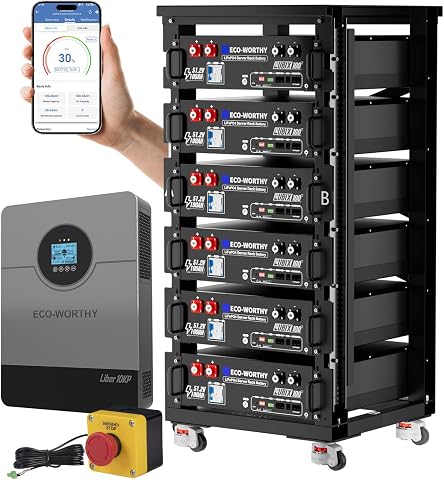
This off-grid power system includes six 51.2V 100Ah LiFePO4 batteries and a 10,000W pure sine wave inverter, capable of supporting high-power appliances like refrigerators and air conditioners. It is designed for reliable whole-home backup and off-grid living, with safety certifications and smart monitoring features.
Pros:
- Supports high-power appliances with a 10kW inverter
- Expandable system with parallel connection options
- Includes smart monitoring via Bluetooth and WiFi
Cons:
- Complex setup requiring technical knowledge
- Large physical size may require significant space
- Requires multiple shipments for complete kit
Best for: Off-grid or backup power needs
Not ideal for: Minimal power requirements or small setups
Bottom line: A reliable power system safeguards your hardware against outages.
Power Supplies
The GOLDENMATE 1500VA/1000W Lithium UPS Battery Backup is a vital component for protecting your network and server hardware. With a surge protector feature, it ensures your equipment remains safe during power fluctuations or outages. When selecting a UPS, consider the wattage capacity, runtime, and compatibility with your devices to ensure seamless operation and protection.
A common mistake is overestimating or underestimating the power needs, leading to insufficient backup time or unnecessary expense. To avoid this, calculate the total power draw of your connected equipment, including routers, switches, and servers. Look for units that offer enough runtime for safe shutdowns or continued operation during outages.
Ensure the UPS supports the voltage and plug types of your equipment. Also, check for features like surge protection, automatic shutdown, and remote management options. Proper sizing and feature selection help prolong equipment lifespan and maintain network reliability.
What to look for:
- Adequate wattage capacity
- Surge protection features
- Automatic shutdown capabilities
- Compatibility with existing equipment
- Reliable runtime during outages
GOLDENMATE 1500VA/1000W Lithium UPS Battery Backup & Surge Protector, White

The GOLDENMATE 1500VA/1000W Lithium UPS provides reliable power backup with a long-lasting LiFePO4 battery, supporting over 10 years of use and 3000+ charge cycles. It features pure sine wave output, multiple outlets, advanced cooling, and smart monitoring for safeguarding critical devices during outages.
Pros:
- Long-lasting LiFePO4 battery with over 10 years of reliable use
- Pure sine wave output ensures stable power for sensitive devices
- Multiple outlets and USB ports for versatile device connectivity
- Quiet cooling system and real-time monitoring via LCD display
Cons:
- Designed for standard utility AC power; may not support generator-supplied power
- Supports only 90–140V AC input, requiring voltage verification before use
Best for: Protecting network hardware during outages
Not ideal for: Minimal power needs or small setups
Bottom line: A well-chosen UPS safeguards your hardware investments.
Cooling Solutions
The AC Infinity AIRPLATE T7 Quiet Cooling Fan System with thermostat control is a smart addition to any server room or network closet. Proper cooling prevents overheating, which can lead to hardware failures or reduced performance. When choosing cooling solutions, focus on noise levels, airflow capacity, and ease of installation.
Many buyers overlook the importance of adequate cooling, especially in densely packed environments. Investing in a quiet, efficient fan system ensures your equipment stays within optimal temperature ranges without creating disruptive noise. Verify that the fan’s airflow capacity matches your space’s needs and that it supports thermostat control for automatic operation.
Ensure compatibility with your existing setup and consider additional features like filters or adjustable speed settings. Proper placement and ventilation are also critical—position fans to maximize airflow and prevent hot spots. Well-designed cooling solutions extend hardware lifespan and maintain reliable operation.
What to look for:
- Quiet operation
- Adequate airflow capacity
- Thermostat control for automatic adjustment
- Ease of installation
- Compatibility with existing setup
AC Infinity AIRPLATE T7 Quiet Cooling Fan System with Thermostat Control

The AC Infinity AIRPLATE T7 is a quiet, UL-certified cooling fan designed for cabinets, featuring thermostat control, fan speed adjustment, and energy-saving modes. It has a modern brushed black aluminum frame and provides efficient airflow with minimal noise.
Pros:
- Ultra-quiet operation with only 19 dBA noise level
- Includes thermostat and fan speed control for customizable cooling
- Modern brushed black aluminum design
Cons:
- Limited to cabinet cooling applications
- Requires installation in compatible cabinets
- No mention of remote control functionality
Best for: Server rooms and network closets
Not ideal for: Minimal cooling needs or small setups
Bottom line: Effective cooling prevents overheating and extends hardware life.
Network Accessories
While specific products are not listed here, selecting the right network accessories is crucial for a seamless and efficient setup. Items like cable management, patch panels, and connector tools help keep your network organized and accessible. Good cable management reduces clutter and makes troubleshooting easier, saving you time and effort in the long run.
When shopping for accessories, focus on durability, compatibility, and ease of use. Quality connectors and adapters ensure stable connections, while organized routing minimizes interference and signal degradation. Investing in reliable accessories helps maintain network performance and simplifies future upgrades or maintenance tasks.
Remember that the right accessories complement your core hardware, making your entire setup more efficient and professional. Proper planning and selection of these supplementary items can significantly improve your network’s reliability and ease of management.
What to look for:
- Durable connectors and tools
- Compatibility with existing hardware
- Cable management solutions
- Ease of installation and use
- Support for high-speed connections
For budget-conscious buyers, start by identifying your most critical needs and prioritize essential components that deliver the best value. Upgrading in stages allows you to spread out costs while gradually building a robust network.
Remember, thorough research and careful planning are your best tools for a successful setup. With the right gear, your cloud and network infrastructure will be ready to support your business’s growth and innovation for years to come. Happy shopping!