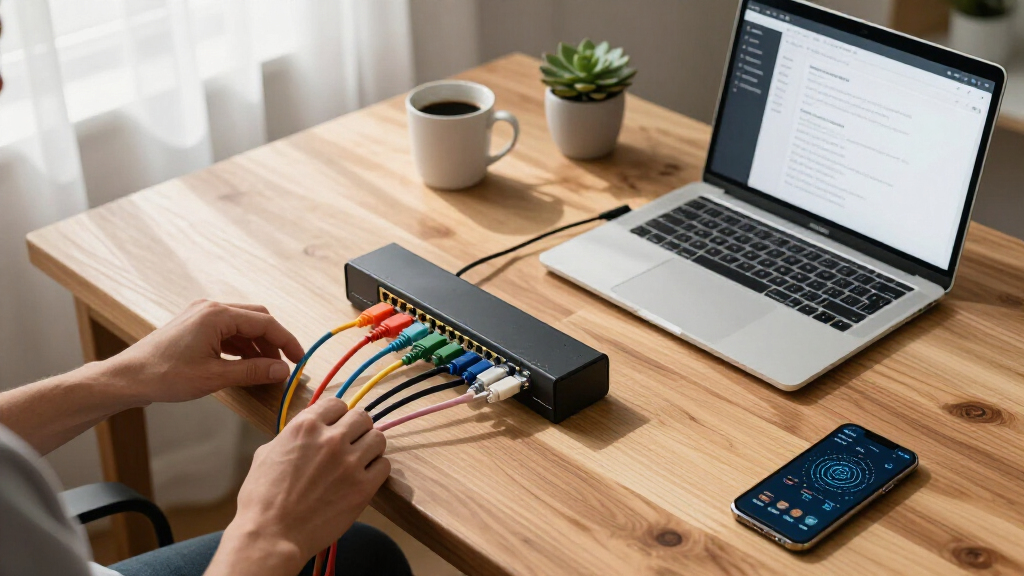

The best network patch panels make cable changes easier while keeping a rack or wall installation organized. I rank the Cable Matters 1U 24 Port Keystone Patch Panel with Cable Management as the best overall pick because its modular layout and rear cable support suit both new builds and later upgrades. The Rapink 12-Port Cat6 Network Patch Panel is a better fit for compact installations, while the Rapink 24 Port Cat6A Shielded Patch Panel stands out for shielded 10-gigabit projects. The main choices are modular versus fixed ports, 12 versus 24 or 48 ports, punch-down versus inline connections, and unshielded versus shielded cabling. Continue reading for my full breakdown of which configuration fits each buyer.
Key Takeaways
- The Cable Matters 1U 24 Port Keystone model offers the best balance of modularity, rack efficiency, and built-in cable support in this lineup.
- No-punch-down models from Sokqovt and Rapink reduce installation work, but their inline couplers add more connection points than a conventional termination panel.
- Twelve-port panels from Cable Matters and Rapink make more sense for small wall-mounted networks than leaving most of a 24-port rack panel unused.
- Cat6A shielding separates the Rapink and Cable Matters premium picks from the many Cat6 panels, though buyers only gain the full benefit when the rest of the channel matches.
- Forty-eight-port Cable Matters and Jadaol panels deliver the highest density here, but their 2U format and larger cable bundle demand more planning behind the rack.


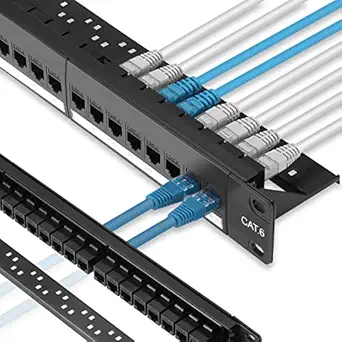


More Details on Our Top Picks
Cable Matters 1U 24 Port Keystone Patch Panel with Cable Management
I rank the Cable Matters 24-Port Keystone Patch Panel as the most flexible choice here because its open keystone slots can accommodate Ethernet, HDMI, coaxial, USB, audio, and fiber connections. That makes it better suited to AV rooms and multipurpose wiring closets than the Ethernet-focused Cable Matters 24-Port Cat6 Patch Panel. The removable rear support bar also gives cables strain relief, while numbered labels make later troubleshooting less tedious. Flexibility comes with added purchasing and planning, however: the jacks are not listed as included, and buyers must confirm that each selected insert fits the standard openings. A preconfigured panel such as the Sokqovt model can be faster for a straightforward Cat6 network. I would choose this panel when port-by-port customization matters more than getting every connection ready immediately.
Pros:- Accepts several standard keystone formats for mixed data and AV installations
- Removable rear support bar improves cable routing and strain relief
- Heavy-duty flame-retardant steel suits permanent structured cabling
- Fits standard 19-inch racks as well as compatible wall brackets
Cons:- Keystone jacks and cables are not listed as included
- Mixed insert sizes may require careful compatibility checks
- Provides no built-in Cat6 termination or specified Ethernet performance rating
Best for: Home-lab builders, AV installers, and small offices combining Ethernet with HDMI, coaxial, USB, audio, or fiber in one 19-inch panel
Not ideal for: Buyers who want a ready-to-connect Ethernet panel, since compatible keystone inserts must be selected and installed separately
- Port Count:24
- Rack Height:1U (1.75 inches)
- Mounting:Rackmount or wall mount
- Material:Flame-retardant powder-coated steel
- Supported Inserts:RJ45, RG6 coaxial, HDMI, banana jack, 3.5 mm, USB, and fiber keystones
- Cable Management:Removable rear support bar
- Labeling:Port labels
- Color:Black
Our verdict“I recommend this panel for buyers who need one customizable frame for several connection types and do not mind sourcing every keystone separately.”
Sokqovt 24 Port Cat6 Patch Panel with Keystone Couplers
The Sokqovt 24-Port Cat6 Patch Panel earns its place by removing punch-down work from a full 24-port installation. Its inline keystone couplers let buyers connect terminated RJ45 cables at the front and rear, which can make setup and individual-port replacement easier than with the punch-down Cable Matters 24-Port Cat6 Patch Panel. It also combines 10Gbps support, a sturdy 1.5 mm steel frame, and a rear bar in a standard 1U footprint. I see the main tradeoff in cable density: using terminated cables behind the panel can create more bulk and bend-management work than neatly punched-down horizontal cabling. Its Cat6 and RJ45 focus also offers less media flexibility than the blank Cable Matters keystone panel. This pick makes the most sense when fast installation and simple servicing outweigh the tidiest possible permanent termination.
Pros:- Inline coupler design avoids punch-down termination
- Supports network links rated up to 10Gbps
- Modular jacks can be replaced or color-coded individually
- 1.5 mm steel frame and rear bar provide firm cable support
Cons:- Rear RJ45 plugs can consume more depth and create bulkier cable runs
- Requires 1U of standard 19-inch rack space
- RJ45 Cat6 design is less flexible than a mixed-media blank keystone panel
Best for: DIY rack builders and small-office administrators who already use terminated Cat6 cables and want replaceable ports without punch-down work
Not ideal for: Dense professional closets where compact rear cable bundles or permanent punch-down terminations are preferred
- Port Count:24
- Cable Category:Cat6
- Maximum Data Rate:10Gbps
- Connector Type:RJ45 keystone couplers
- Termination Style:No punch down
- Form Factor:1U, 19-inch rackmount
- Material:1.5 mm steel
- Cable Management:Rear support bar
Our verdict“I would buy this model for a quick, serviceable 24-port Cat6 rack where avoiding a punch-down tool is the main priority.”
Cable Matters 24 Port 10Gbps Cat6 Patch Panel, 1U
I place the Cable Matters 24-Port Cat6 Patch Panel first for conventional structured Ethernet because it balances 24-port capacity, 10Gbps capability, PoE support, and UL listing in a familiar 1U format. Unlike the Sokqovt coupler panel, this model uses permanent cable termination, producing a cleaner fixed installation without rows of rear RJ45 plugs. Gold-plated contacts support dependable connections, while rack and wall-mount compatibility broadens placement options. That cleaner layout demands more installation effort: buyers need suitable termination tools and must wire each port correctly. It is also less adaptable than the Cable Matters blank keystone panel because its ports are dedicated to RJ45 networking rather than mixed media. For a home rack or small-business closet expected to remain in place, I think its strong balance of safety credentials and network performance justifies the extra setup work.
Pros:- Supports Cat6 links up to 10Gbps and PoE applications
- UL listing adds a documented safety credential
- Gold-plated contacts support reliable long-term connectivity
- Fits standard racks or compatible wall-mount brackets
Cons:- Permanent termination requires more skill and installation time than a coupler panel
- Patch cables are not included
- Dedicated RJ45 layout cannot host HDMI, coaxial, or other keystone formats
Best for: Home-lab owners and small-business installers building a permanent 24-port Cat6 network with 10Gbps or PoE requirements
Not ideal for: Renters, frequent reconfigurers, and tool-free DIY buyers who would benefit more from replaceable inline couplers
- Port Count:24
- Cable Category:Cat6
- Maximum Data Rate:10Gbps
- Connector Type:RJ45
- Rack Height:1U (1.75 inches)
- Mounting:Rackmount or wall mount
- Safety Standard:UL Listed
- Weight:16 ounces
Our verdict“I see this as the strongest all-around choice for a permanent 24-port Cat6 installation where tidy cabling and documented safety matter.”
Cable Matters UL Listed Mini 10Gbps 12-Port Vertical Patch Panel
The Cable Matters Mini 12-Port Vertical Patch Panel is my compact pick for networks that do not justify a full-width 24-port rack panel. Its vertical format can fit a small wiring area, while 10Gbps support and PoE+ compatibility keep the smaller footprint from limiting network capability. Compared with the Cable Matters 24-Port Cat6 model, it sacrifices half the port capacity but is easier to place in a cramped closet or utility room. Steel construction, gold-plated contacts, and clear labeling suit a permanent installation rather than a temporary cable junction. The limitations are practical: it accepts only 22–26 AWG Ethernet cabling, requires an impact tool, and does not list mounting hardware as included. Buyers expecting expansion may outgrow 12 ports quickly. I favor it when space savings matter more than spare capacity.
Pros:- Compact vertical design fits tighter wiring spaces than a 24-port rack panel
- Supports Ethernet speeds up to 10Gbps
- PoE+ support suits access points, cameras, and compatible phones
- Steel body and gold-plated contacts suit permanent installations
Cons:- Twelve ports leave little expansion room for larger networks
- Installation requires an impact tool
- Mounting hardware is not listed as included
Best for: Apartment residents, small-home network builders, and satellite-closet installers who need no more than 12 Ethernet drops
Not ideal for: Growing offices or buyers using cable outside the supported 22–26 AWG range, since capacity and conductor compatibility are restricted
- Port Count:12
- Maximum Data Rate:10Gbps
- Connector Type:RJ45
- Mounting Orientation:Vertical
- Supported Cable Gauge:22–26 AWG
- Power Support:PoE+ up to 25 watts
- Outer Material:Steel
- Weight:13.6 ounces
Our verdict“I recommend this panel for a permanent 12-drop network where wall space is scarce and future expansion is unlikely.”
TRENDnet 24-Port Blank Keystone 1U Patch Panel, TC-KP24
I see the TRENDnet TC-KP24 as a sensible blank-panel choice for buyers already standardizing on TRENDnet Cat6 keystone jacks. Its numbered ports and writable labels simplify cable identification, and the SPCC steel frame places 24 connections into one rack unit. Like the broader Cable Matters blank keystone panel, it lets individual jacks be replaced instead of discarding the whole panel. The difference is scope: Cable Matters explicitly supports numerous AV and data insert types, while this model’s supplied compatibility information centers on TRENDnet Cat6 jacks and gigabit or 10G Ethernet. That narrower match can reduce guesswork inside a single-brand installation, but it is less appealing for mixed-media layouts or buyers who already own another jack system. Since jacks and cables require separate purchases, its finished cost and setup time extend beyond the bare panel.
Pros:- Pre-numbered ports and labels make cable identification straightforward
- SPCC steel construction provides a rigid rackmount frame
- Blank modular layout permits individual jack replacement
- Supports Cat6 gigabit and 10G Ethernet applications
Cons:- Keystone jacks and patch cables must be purchased separately
- Stated compatibility is narrower than the multi-format Cable Matters blank panel
- A 19-inch rack or suitable mounting arrangement is required
Best for: IT installers and small businesses standardizing a 19-inch rack around TRENDnet Cat6 keystone jacks
Not ideal for: Mixed-media installers or buyers with third-party keystones, because stated compatibility focuses on TRENDnet Cat6 inserts
- Port Count:24
- Panel Type:Blank keystone
- Form Factor:1U rackmount
- Material:SPCC steel
- Jack Compatibility:TRENDnet Cat6 keystone jacks
- Network Applications:Gigabit and 10G Ethernet
- Compliance:NDAA compliant
- Manufacturer Support:2 years
Our verdict“I would choose the TC-KP24 for a labeled, modular 24-port build based on TRENDnet Cat6 jacks, but not for a mixed-brand or mixed-media project.”
Rapink 12-Port Cat6 Network Patch Panel Support 10G, Wallmount 1U Ethernet Patch Panel
I rank the Rapink 12-Port Cat6 Patch Panel as the compact pick because its 10-inch chassis suits apartments, small offices, and wall-mounted cabinets where a full-width panel wastes space. It carries up to 10G Ethernet, so choosing fewer ports does not mean accepting slower links. Compared with the Rapink 24 Port Cat6 Patch Panel, this model is easier to place and manage, but it provides little room for a network that may grow past 12 runs. Compatibility with Cat6, Cat5e, and Cat5 also makes mixed-cable upgrades less disruptive. I value the included cable ties and gold-plated contacts for cleaner, steadier connections. Its main limitation is the nonstandard 10-inch width, which may need an adapter or shelf in a conventional 19-inch rack.
Pros:- Compact 10-inch chassis fits small wall cabinets and restricted installation areas
- Supports Ethernet connections up to 10G
- Works with Cat6, Cat5e, and Cat5 cabling
- Gold-plated contacts and included cable ties support dependable, orderly wiring
Cons:- Twelve ports leave limited capacity for network expansion
- The 10-inch width may require an adapter or shelf in a standard 19-inch rack
- Designed for indoor installations only
Best for: Apartment owners, home-office users, and small-business installers managing no more than 12 permanent Ethernet runs
Not ideal for: Growing offices or standard 19-inch rack builds that need direct mounting and capacity beyond 12 ports
- Number of ports:12
- Supported speed:Up to 10G
- Cable compatibility:Cat6, Cat5e, Cat5
- Form factor:1U, 10-inch width
- Connector type:RJ45
- Contact finish:Gold-plated pins
- Mounting type:Wall mount
- Cable management:Cable ties included
Our verdict“This is my compact choice for buyers who need 10G capability across a modest number of indoor Ethernet runs.”
iwillink 24 Port Cat6 Patch Panel UTP 19-Inch with Back Bar
I place the iwillink 24 Port Cat6 Patch Panel ahead of punch-down designs for buyers who want a faster, less specialized installation. Its RJ45 coupler-based termination lets pre-terminated cables connect without a punch-down tool, while removable keystones make a damaged port easier to replace. That serviceability gives it an advantage over the Rapink 24 Port Cat6 Patch Panel, which is a better fit for conventional permanent cabling and includes more setup accessories. The iwillink panel supports 10G and 500 MHz operation, but the stated 35-to-55-meter performance range deserves attention in longer buildings. I also find its steel chassis and rear bar useful for controlling cable strain. Buyers must supply cables and accessories, and the full 19-inch footprint is awkward in compact cabinets.
Pros:- Toolless RJ45 couplers simplify initial installation
- Removable keystones allow individual ports to be replaced or upgraded
- Supports 10G Ethernet and frequencies up to 500 MHz
- Steel construction and a rear bar provide firm cable support
Cons:- Stated high-speed performance is tied to a 35-to-55-meter cable range
- Cables and installation accessories are not included
- The 19-inch chassis is poorly suited to compact network boxes
Best for: Small IT teams and DIY rack builders who prefer replaceable RJ45 couplers over punch-down termination
Not ideal for: Installers running long cable routes or working in compact enclosures that cannot accommodate a 19-inch panel
- Number of ports:24
- Cable category:Cat6
- Maximum data rate:10 Gbps
- Frequency:500 MHz
- Connector type:RJ45 coupler
- Mounting options:Rack mount or wall mount
- Rack width:19 inches
- Construction:Cold-rolled steel with painted ABS surface
- Keystone design:Removable
Our verdict“I recommend this panel to buyers who value quick assembly and replaceable ports more than bundled accessories or compact dimensions.”
Rapink 24 Port Cat6 Patch Panel with 10G Support, Wallmount/Rackmount Ethernet Network Panel
I rate the Rapink 24 Port Cat6 Patch Panel as the value choice for a conventional 19-inch network rack. It balances 24-port capacity and 10G support without moving into the higher cost and installation demands of shielded Cat6A hardware. Compared with the Rapink 12-Port Cat6 model, it doubles connection capacity and mounts directly in a standard rack, though it consumes more wall or cabinet space. It is also less resistant to electrical interference than the shielded Rapink Cat6A panel. Compatibility with Cat5 and Cat5e helps buyers retain older cable runs during staged upgrades. I like the quick-reference labeling, supplied screws, and zip ties for keeping installation work orderly. The compromise is traditional cable preparation: no punch-down tool is listed, and 24 rear cables require disciplined routing.
Pros:- Provides 24 ports and up to 10G support at a practical rack density
- Accepts Cat6, Cat5e, and Cat5 cabling for staged network upgrades
- Supports both wall and rack installation
- Includes screws, zip ties, and reference labeling for a tidier setup
Cons:- No punch-down tool is listed among the included accessories
- Unshielded Cat6 construction is less suitable for electrically noisy locations
- Rear cable routing can become crowded when all 24 ports are populated
Best for: Home-lab owners and small-office administrators filling a standard 19-inch rack with up to 24 mixed-generation Ethernet runs
Not ideal for: Buyers who want toolless couplers or need shielded cabling near motors, power lines, or other interference sources
- Number of ports:24
- Speed support:Up to 10G
- Cable compatibility:Cat6, Cat5e, Cat5
- Mounting options:Wall mount or rack mount
- Form factor:1U, 19-inch width
- Pin type:Gold-plated 8P8C
- Maximum voltage:10V DC
- Supported cable gauge:23 AWG
- Included accessories:Screws and zip ties
Our verdict“This is my value pick for standard racks that need 24 dependable Cat6 ports without the cost of shielded Cat6A hardware.”
Rapink 24 Port Cat6A Patch Panel with Inline Keystone and 10G Support, Shielded 19-Inch Wall Mount Network Panel
I give the Rapink 24 Port Cat6A Patch Panel the shielded-network role because it pairs 10G support with protection against interference. That makes it better suited to workshops, equipment rooms, and cable routes near electrical hardware than the unshielded Rapink 24 Port Cat6 panel. Its inline RJ45 keystones avoid punch-down work, and the removable rear bar supports cleaner repairs when one connection needs attention. Compared with the iwillink 24 Port panel, it adds Cat6A shielding, but both occupy a full 19-inch span and provide replaceable connection hardware. I would choose it when signal protection matters more than minimum cost. The drawbacks are a wall-mount listing that offers less placement flexibility and keystones that need careful handling. Buyers also need compatible shielded cabling practices to receive the intended interference benefit.
Pros:- Shielded Cat6A design helps reduce electromagnetic interference
- Supports 10G Ethernet across 24 ports
- Inline RJ45 keystones permit toolless cable connections
- Removable back bar simplifies cable support and individual repairs
Cons:- Listed wall-mount installation is less flexible than dual wall-and-rack designs
- Inline keystones can be damaged if handled roughly during changes
- Full shielding benefits depend on compatible shielded cabling and proper installation
Best for: Installers building 24-port 10G networks in workshops, equipment rooms, or electrically noisy commercial spaces
Not ideal for: Budget home networks using unshielded cable, since the added shielding brings little benefit without matching installation practices
- Number of ports:24
- Cable category:Cat6A
- Speed support:Up to 10G
- Connector type:RJ45 inline keystone
- Shielding:Shielded
- Mounting type:Wall mount
- Material:Steel
- Width:19 inches
- Back bar:Removable
Our verdict“I favor this panel for interference-prone 10G installations where Cat6A shielding justifies the added setup demands.”
Cable Matters 2U 48 Port Keystone Patch Panel with Cable Management
I choose the Cable Matters 2U 48 Port Keystone Patch Panel for installations that combine Ethernet with HDMI, coaxial, USB, fiber, or audio connections. Its 48 interchangeable openings let a rack serve as a central structured-wiring hub rather than a network-only termination point. Compared with the Cable Matters 1U 24 Port Keystone Patch Panel, this version doubles capacity while preserving the same modular idea, but it also consumes twice the rack height. The integrated cable-management hardware gives it an organizational advantage over bare blank panels such as the TRENDnet TC-KP24. I see the heavy-duty steel frame as a good match for densely populated racks. Still, buyers must plan and source the correct keystones, create their own labeling system, and obtain mounting screws. That makes the initial setup more involved than a preloaded Cat6 panel.
Pros:- Accepts numerous keystone formats for mixed-data and AV installations
- Fits 48 modular ports into a durable 2U steel frame
- Integrated cable management helps control dense rear wiring
- Individual keystones can be selected, rearranged, or replaced as requirements change
Cons:- Keystone selection and mixed-media planning add setup complexity
- Mounting screws are not included
- No port labels are supplied, increasing documentation work
Best for: AV installers, structured-cabling professionals, and rack owners combining up to 48 Ethernet, video, fiber, coaxial, USB, or audio connections
Not ideal for: First-time home-network builders who want preinstalled Ethernet ports, included labels, and mounting hardware
- Number of ports:48
- Rack height:2U (3.5 inches)
- Mounting options:Rack mount or wall mount
- Material:Heavy-duty steel
- Finish:Black powder coating
- Supported keystones:RJ45, HDMI, coaxial, USB, fiber, and 3.5mm
- Connector format:Male-to-female
- Listed cable category:Cat6
- Cable management:Integrated
Our verdict“This is my choice for high-capacity mixed-media racks, provided the buyer is comfortable sourcing keystones and planning every port.”
Rapink 24 Port Cat6 Patch Panel with Inline Keystone and 10G Support
I rank the Rapink 24 Port Cat6 Patch Panel highly because it balances installation speed, serviceability, and capacity without occupying 2U. Its 24 preloaded pass-through jacks remove punch-down work, making network changes faster while still supporting 10G connections. Compared with the Jadaol 24 Port Patch Panel, Rapink’s removable back bar provides better control over cable routing and makes later repairs less awkward. It is also more sensible for a medium-sized network than the 48-port Cable Matters model, which demands twice the panel height. The compromise is that this indoor panel still requires thoughtful rear-cable organization, and buyers needing shielded Cat6A protection should favor the Cable Matters 24-Port Cat6A panel. I see this as the most balanced choice for a growing home lab or small office.
Pros:- Preloaded pass-through jacks avoid punch-down termination work
- Removable back bar simplifies cable routing and future repairs
- Supports 10G Ethernet while retaining Cat5e and Cat5 compatibility
- Fits 24 connections into a compact 1U format
Cons:- Designed for indoor installations only
- Rear cabling can become untidy without careful bundling and strain management
- Does not provide the shielding of a Cat6A STP panel
Best for: Home-lab builders and small-office administrators who want 24 tool-free 10G-capable connections with accessible rear cable management
Not ideal for: Installations exposed to moisture or electrical interference, since this is an indoor Cat6 panel without Cat6A shielding
- Number of Ports:24
- Cable Compatibility:Cat6, Cat5e, Cat5
- Maximum Speed:10Gbps
- Panel Height:1U
- Panel Width:19 inches
- Mounting Type:Wall-mount
- Termination Style:Pass-through inline keystone jacks
- Back Bar:Removable
- Frame Material:Steel
Our verdict“This is my pick for buyers seeking the best balance of 24-port capacity, tool-free installation, and maintainable cable routing.”
Cable Matters 48 Port 10Gbps Cat6 Patch Panel, 2U
I place the Cable Matters 48 Port Cat6 Patch Panel near the front of the field for offices, camera systems, and access-point deployments that need many powered connections. Its defining advantage is explicit PoE, PoE+, and PoE++ support, paired with 48 ports and UL listing. Unlike the tool-free Jadaol 48-Port panel, this model uses color-coded T568A/T568B wiring, which better suits permanent structured cabling but takes more time and skill to terminate. The heavy-duty metal construction is reassuring for crowded racks, while universal rack or wall mounting adds placement flexibility. Buyers pay for that capability with a full 2U footprint, added installation labor, and no supplied patch cables. I rank it above feed-through alternatives when documented power delivery support matters more than plug-and-play convenience.
Pros:- Handles 48 connections in one panel
- Explicitly supports PoE, PoE+, and PoE++ equipment
- UL-listed heavy-duty metal construction suits equipment rooms
- Color-coded T568A and T568B diagrams guide structured-cable termination
Cons:- Punch-down wiring requires more time and skill than a feed-through panel
- The 2U format consumes substantial rack space
- Patch cables are not included
Best for: IT teams wiring dense PoE camera, wireless access-point, or VoIP deployments with permanent Cat6 cable runs
Not ideal for: Small home networks or buyers wanting tool-free connections, since 48 punch-down ports occupy 2U and require termination work
- Number of Ports:48
- Cable Category:Cat6; compatible with Cat5e and Cat5
- Maximum Speed:10Gbps
- Panel Height:2U
- Mounting:Universal 19-inch rack or wall mount
- PoE Support:PoE, PoE+, and PoE++
- Wiring Standards:T568A and T568B
- Safety Listing:UL Listed
- Construction:Heavy-duty metal with gold-plated contacts
Our verdict“I recommend this panel for high-density permanent networks where certified construction and broad PoE support outweigh tool-free convenience.”
Cable Matters 10Gbps 24-Port Cat6A Ethernet Patch Panel
I assign the Cable Matters 24-Port Cat6A Patch Panel the shielded-network role because its Cat6A STP design targets 10G links in electrically noisy spaces. Compared with the Rapink 24 Port Cat6 feed-through panel, its EMI/RFI shielding provides a stronger foundation near power equipment, dense cable bundles, or other interference sources. Standard keystone sockets and included RJ45 couplers preserve modularity, while the rear bar’s C-shaped keyholes and sequential labels make moves and troubleshooting easier. It also supports PoE through PoE++, giving it broader powered-device credentials than basic panels. That capability brings higher deployment complexity: a properly planned shielded cabling system costs more than ordinary Cat6, and a 24-port 10G layout is excessive for a modest router-and-switch setup. I favor it when signal protection and modular servicing justify the extra expense.
Pros:- Cat6A STP construction helps protect 10G links from EMI and RFI
- Supports PoE, PoE+, and PoE++ devices
- Standard keystone sockets allow individual couplers to be changed
- Labeled management bar improves cable identification and routing
Cons:- A shielded Cat6A deployment is more expensive and involved than standard Cat6
- Requires 1U of rack or wall space
- Its 24-port capacity and 10G capability are excessive for small basic networks
Best for: Network installers building 24-port 10GbE or high-power PoE systems in offices, workshops, and equipment rooms with interference concerns
Not ideal for: Basic home networks using unshielded Cat5e or Cat6 cabling, where the Cat6A shielding and modular design add unnecessary cost and complexity
- Number of Ports:24
- Cable Standard:Cat6A STP
- Maximum Data Rate:10Gbps
- Interface:RJ45
- Panel Height:1U
- Mounting Options:Rackmount or wall mount
- PoE Support:PoE, PoE+, and PoE++
- Cable Management:Rear bar with C-shaped keyholes and sequential labels
- Keystone Configuration:Standard sockets with included RJ45 couplers
Our verdict“This is my choice for buyers who need shielded 10GbE performance and modular 24-port management rather than the lowest-cost Cat6 installation.”
Jadaol 24 Port Patch Panel Rackmount or Wall Mount 19-Inch 1U
I see the Jadaol 24 Port Patch Panel as the easiest starting point for buyers who already own terminated Ethernet cables. Connections plug into RJ45 couplers on both sides, so its tool-free feed-through layout avoids punch-down blocks, wiring codes, and specialized tools. Compared with the Cable Matters 48 Port Cat6 panel, Jadaol is faster to deploy and occupies only 1U; compared with the Rapink 24 Port inline model, it emphasizes straightforward replacement by including an extra removable module. The same design creates its main limitation: bare horizontal cable cannot terminate directly, and pre-terminated leads can add bulk behind a shallow rack. Performance reaches 10Gbps with suitable Cat6 cabling, but cable quality still shapes the result. I would choose this for a first rack build where simple installation matters more than custom cable termination.
Pros:- Front-and-rear RJ45 couplers make installation tool-free
- Supports up to 10Gbps with suitable Cat6 cables
- Fits standard 19-inch racks or wall-mount installations in 1U
- Includes a spare removable module for quick replacement
Cons:- Cannot directly terminate bare Ethernet cable
- Pre-terminated cables can create excess length and bulk behind the panel
- Limited to compatible RJ45-ended connections
Best for: First-time rack builders and small-office owners organizing 24 pre-terminated Cat6 cables without punch-down tools
Not ideal for: Structured-cabling installers working with bare bulk cable, because every connection must arrive on a compatible RJ45 plug
- Number of Ports:24
- Panel Size:19-inch, 1U
- Mounting Options:Rackmount or wall mount
- Termination Style:RJ45 feed-through
- Cable Requirement:Pre-terminated Ethernet cables
- Maximum Performance:Up to 10Gbps with Cat6
- Coupler Design:Removable keystone-style modules
Our verdict“I recommend this panel to newcomers who value quick, mistake-resistant setup and already have pre-terminated Ethernet cables.”
Jadaol 48-Port Cat6 Patch Panel, 2U Rackmount or Wall Mount, UL Listed, Tool-Free Installation
I give the Jadaol 48-Port Cat6 Patch Panel a distinct place for large networks that need feed-through convenience rather than punch-down termination. Its 48 preloaded RJ45 couplers let an installer connect terminated cables from both sides, while two spare modules make failed-port replacement less disruptive. Compared with the Cable Matters 48 Port Cat6 panel, Jadaol is quicker to populate and easier to reconfigure; Cable Matters remains the stronger choice when explicit PoE++ support and color-coded permanent wiring are priorities. The supplied screws, cage nuts, and zip ties also reduce the list of installation extras. Tradeoffs include a 2U space requirement and a stated 10G reach of only 55 meters, with real performance tied to cable quality and the surrounding network. I rank it as the best tool-free density option, not the best long-run panel.
Pros:- Forty-eight preloaded couplers provide high capacity without punch-down work
- Removable modular couplers simplify repair and later upgrades
- Steel frame provides a sturdy base for dense cabling
- Includes mounting hardware, zip ties, and two spare couplers
Cons:- 10Gbps performance is specified only to 55 meters
- Results depend on cable quality and network conditions
- The 2U frame takes twice the vertical space of a 24-port 1U panel
Best for: Growing offices, labs, and AV installations that need 48 removable feed-through connections and want to avoid terminating bulk cable
Not ideal for: Long-distance 10GbE runs or compact racks, since 10G support is rated to 55 meters and the panel occupies 2U
- Number of Ports:48
- Cable Compatibility:Cat6, Cat5e, Cat5
- Maximum Performance:10Gbps up to 55 meters
- Panel Height:2U
- Mounting Options:Rackmount or wall mount
- Termination Style:Preloaded RJ45 feed-through couplers
- Construction:Steel frame with ABS keystone couplers
- Safety Listing:UL Listed
- Included Accessories:Screws, cage nuts, zip ties, and two spare couplers
Our verdict“This is my pick for buyers who need 48 tool-free ports and easy module replacement within a 55-meter 10GbE cabling plan.”
How We Picked
I ranked these panels by installation flexibility, termination method, port density, cable support, mounting options, and the network category each model is designed to serve. A panel moved higher when its configuration could accommodate common changes without forcing the buyer to replace the whole unit. I also gave weight to rear support bars, cable-management features, clear port organization, and practical use of rack space because those details affect maintenance long after installation.
My ordering favors the 24-port 1U format for broad usefulness, while still recognizing that a 12-port wall build or a 48-port rack has different priorities. Modular keystone panels score well for mixed-media flexibility, fixed Cat6 panels gain points for a more direct installation plan, and inline coupler models rank highly for accessibility. I treat advertised 10Gbps support as one part of the cabling channel rather than a stand-alone promise. Price alone does not define value here: included couplers or jacks, labor demands, rack space, and future replacement costs all shape the final ranking.
Factors to Consider When Choosing Network Patch Panels
I would choose a patch panel by working backward from the cable type, port count, mounting location, and expected frequency of changes. The cheapest panel can become an expensive choice if it creates crowded terminations or must be replaced during the next expansion.
Choose Modular or Fixed Ports
A blank keystone panel lets me select each jack individually, which is useful when a rack combines copper data, fiber adapters, coax, or pass-through connections. It also lets a damaged jack be replaced without disturbing every other port. A fixed-port panel gives the build a more uniform layout and may reduce the number of separate parts I need to order. The tradeoff is that its category, shielding type, and termination style are set for the life of the panel. I favor modular panels for labs, home racks, and changing business networks, while fixed panels suit standardized installations with a settled cable plan. A common mistake is comparing panel prices without adding the cost of the keystones required to populate a blank model.
Match Port Count to Realistic Growth
I would count active cable runs, planned additions, and a modest spare allowance before choosing between 12, 24, and 48 ports. A 12-port panel keeps a small wall enclosure tidy, but it can become restrictive when cameras, access points, and wired rooms are added. Twenty-four ports occupy only 1U in most of this lineup and provide a practical middle ground for home and small-office racks. A 48-port 2U panel concentrates a larger installation, although the rear bundle can be harder to route and service. Buying twice the needed capacity is not always smart when the extra panel depth, patch cords, and rack hardware create clutter. For phased expansion, I often prefer two clearly labeled 24-port panels over one fully packed 48-port unit because each cable group remains easier to trace.
Understand Punch-Down and Inline Connections
Punch-down termination places each conductor into an insulation-displacement contact and produces a conventional permanent-cabling layout. It requires the right tool, careful pair handling, and enough working room behind the panel. Inline couplers accept terminated plugs on both sides, making them friendlier for buyers who already have finished cables or want faster component swaps. Their convenience comes with extra plug-and-jack interfaces, more depth behind the panel, and another place where a poor connector can affect a link. I would not choose an inline model merely to avoid learning basic termination if the project contains many permanent in-wall runs. For a small retrofit or frequently rearranged bench network, however, its easier service access may outweigh those limits.
Keep the Entire Cabling Category Consistent
A Cat6 or Cat6A label on the panel does not raise the performance of lower-category cable, connectors, or patch leads. I treat the installed channel as a system whose result is limited by its weakest component and by termination quality. Cat6 can serve many 10-gigabit links at restricted channel lengths, while Cat6A is the safer choice for full-length 10-gigabit structured cabling. Shielded Cat6A can help in electrically noisy locations, but it calls for compatible shielded cable, jacks, patch leads, and proper bonding practices. Mixing shielded and unshielded parts may add expense without delivering the intended protection. For ordinary short residential runs, a well-installed unshielded Cat6 system can be more sensible than paying for shielding that the rest of the installation cannot support.
Plan Rack Space and Cable Support Together
The front of a panel may consume only 1U or 2U, yet the rear connections can require much more usable depth. I would check the enclosure, bend radius, door clearance, and access to mounting screws before ordering. Rear bars and integrated cable support keep cable weight away from terminations, which matters more as port count rises. A vertical or wall-mount panel can serve a utility room without a full rack, though its cable path and cover clearance need advance planning. Another common mistake is filling every port and then discovering that horizontal managers or switch patch cords need adjacent rack units. Paying more for better support hardware is worthwhile when the rack will be serviced often or when a heavy 48-cable bundle enters from one side.
Frequently Asked Questions
Should I Buy a Blank Keystone Panel or a Preconfigured Cat6 Panel?
I would buy a blank keystone panel when future changes, mixed connector types, or individual jack replacement matter most. A preconfigured Cat6 panel is easier to specify for a uniform copper installation and avoids ordering compatible jacks separately. Blank panels can cost more after every insert is added, and keystones from different brands may not fit equally well side by side. Fixed panels demand more commitment because their port type cannot be changed later. For a growing home lab or multipurpose rack, modularity usually carries more value; for a stable office build, the fixed design can be simpler.
Is a No-Punch-Down Patch Panel Reliable Enough for 10-Gigabit Ethernet?
A well-made inline coupler panel can be part of a 10-gigabit channel when every component meets the required category and the total channel stays within its length limits. The speed claim still depends on cable construction, plug quality, pair geometry, and installation workmanship. Inline designs add connector interfaces compared with a direct punch-down termination, so I would avoid unnecessary joins in a demanding permanent link. They are most appealing when the cables are already terminated or frequent swaps justify easier access. For new in-wall cabling, I generally favor punch-down jacks because they match the usual structured-cabling layout.
Do I Need Cat6A Instead of Cat6 for a Home Network?
I would choose Cat6A for long 10-gigabit runs, a new build expected to remain unchanged for years, or an environment where the extra performance margin justifies thicker cable. Cat6 remains practical for gigabit networks and can carry 10-gigabit Ethernet over shorter compliant channels. The panel alone does not create that capability; the permanent cable, jacks, patch leads, and workmanship must match. Cat6A hardware may occupy more space and require greater care with bend radius. For a compact home rack with short runs, Cat6 often offers better value unless full-length 10-gigabit service is part of the plan.
Is a 48-Port Panel Better Than Two 24-Port Panels?
A 48-port panel groups many runs into a single 2U component, which can simplify purchasing and numbering in a dense rack. Two 24-port panels provide more freedom to place switches or horizontal cable managers between cable groups. They also let me expand in stages rather than terminate every run around one crowded rear bundle. The 48-port format makes sense when rack layout and incoming cable paths have already been planned. For easier maintenance or separate floor and department groupings, two 24-port panels can produce a clearer installation even when they use the same total rack height.
When Is a Shielded Patch Panel Worth the Extra Cost?
I would pay for a shielded patch panel when the cable runs pass near motors, industrial equipment, fluorescent ballasts, or other persistent sources of electromagnetic noise. Shielding also belongs in projects whose specification already calls for a bonded shielded cabling system. Buying only a shielded panel while keeping unshielded cable and patch leads does not create a complete shielded channel. The installation must follow the manufacturer’s grounding and bonding requirements, which may call for professional guidance. In a normal residence or quiet office, unshielded Cat6 is usually easier to install and less expensive without sacrificing the performance the network actually needs.
Conclusion
For most buyers, I recommend the Cable Matters 1U 24 Port Keystone Patch Panel with Cable Management as the best overall choice because it combines a flexible modular layout with useful rear cable support. My best-value pick is the Rapink 12-Port Cat6 Network Patch Panel for smaller installations that do not need 24 empty positions, while the Sokqovt 24 Port Cat6 No-Punch-Down Panel is the friendliest starting point for beginners who prefer plug-in connections. Buyers building a shielded 10-gigabit channel should choose the Rapink 24 Port Cat6A Shielded Panel as the premium option. For high-density racks, the Cable Matters 2U 48 Port Keystone Patch Panel offers more long-term flexibility than a fixed 48-port design; for compact wall installations, the Cable Matters 12-Port Vertical Panel is the more space-conscious match. I would make the final choice by matching the panel to the full cabling category, available rack depth, and realistic port growth rather than buying on advertised speed alone.