Some might think network loops are rare or easy to spot, but they can cause serious disruptions if overlooked. When troubleshooting, it’s not enough to just check cables; you need to verify that your switches have proper Spanning Tree Protocol (STP) configurations in place. Understanding how to identify and resolve these issues can prevent downtime and improve network stability. Curious about the best strategies to detect and eliminate loops effectively?
Key Takeaways
- Verify that Spanning Tree Protocol (STP) is enabled and properly configured on all network devices.
- Check root bridge election and ensure port states (designated/blocking) are correctly established.
- Look for signs like high broadcast traffic, topology changes, or switch logs indicating potential loops.
- Temporarily disable suspect links to isolate and confirm the source of broadcast storms or loops.
- Update device firmware or reconfigure misbehaving switches to prevent STP incompatibilities or failures.

Have you ever experienced a sudden network slowdown or widespread connectivity issues? If so, chances are you’re dealing with a network loop. These loops can cause severe disruptions, overwhelming your switches and routers with broadcast traffic, leading to degraded performance or complete network outages. To troubleshoot effectively, understanding how network loops form and how to prevent them is vital. One of the key tools in your arsenal is the Spanning Tree Protocol (STP), designed specifically for loop prevention. STP works by creating a logical, loop-free topology within a redundant network, ensuring that only one active path exists between any two points. When a loop occurs, STP detects the redundant links and disables the unnecessary ones, preventing broadcast storms and packet duplication that can clog your network.
Loop prevention with Spanning Tree is vital because it automates the process of identifying and shutting down redundant links that could cause loops. Imagine having multiple physical connections between switches; without a protocol like STP, these connections could create a loop, causing broadcast storms that flood the network with traffic. This flood not only bogs down your network devices but also makes it impossible for legitimate data to pass through efficiently. With STP enabled, the switches communicate using Bridge Protocol Data Units (BPDUs) to elect a root bridge and determine the shortest path to it. They then block the redundant links that could form loops, effectively creating a loop-free topology. Additionally, understanding network topology is crucial for designing and troubleshooting efficient and reliable network setups.
STP automates redundant link shutdowns, preventing broadcast storms and ensuring a loop-free, efficient network topology.
When troubleshooting, start by checking if STP is active and properly configured on your network devices. Confirm that the root bridge is correctly elected and that ports designated as blocking are in the correct state. If you notice persistent loops despite STP, it might be due to misconfigurations, such as incorrect port priorities or BPDU filters. In such cases, review the switch logs and topology diagrams to identify any misbehaving devices or links. Sometimes, the issue stems from devices that aren’t compatible with STP or have it disabled. Updating firmware or reconfiguring these devices can restore proper loop prevention.
Also, monitor for signs like unusual broadcast traffic or frequent topology changes, which indicate potential loops. If a loop is detected, disable or disconnect suspect links temporarily, then re-enable them after verifying the topology is stable. Remember, while STP is a powerful tool, it’s not foolproof. Combining it with proper network design, regular audits, and good cabling practices guarantees your network stays resilient against loops. Ultimately, understanding how Spanning Tree and loop prevention work allows you to diagnose issues quickly and maintain a healthy, efficient network environment.

NETGEAR 8 Port PoE Gigabit Ethernet Easy Smart Managed Essentials Switch (GS308EP) – with 8 x PoE+ @ 62W, Desktop or Wall Mount
GIGABIT ETHERNET PORTS: Features 8 x 1.0Gbps Ethernet ports for high-speed connectivity. Auto-negotiating ports detect the optimal speed…
As an affiliate, we earn on qualifying purchases.
As an affiliate, we earn on qualifying purchases.
Frequently Asked Questions
How Do Network Loops Affect Voip Quality?
Network loops can seriously impact your VoIP quality by causing packet loss and jitter. When loops occur, spanning tree protocol helps prevent them by blocking redundant paths, but if loop detection fails or isn’t configured properly, your VoIP calls may drop or sound choppy. To maintain clear communication, make certain spanning tree is active and correctly configured, and regularly check for loop detection issues that could disrupt your voice traffic.
Can Network Loops Cause Hardware Damage?
Yes, network loops can cause hardware damage. When a loop occurs, it can overload your switches and routers, especially if they lack proper power supply management. This overload may lead to overheating or even failure. Additionally, firmware updates might not prevent damage if the hardware gets overwhelmed. To protect your equipment, make certain your network has loop prevention features like STP enabled, and regularly update firmware to improve stability and safety.
How Do I Prevent Loops in Wireless Networks?
Imagine you’re a network wizard in a castle. To prevent wireless loops, enable wireless redundancy features like Rapid Spanning Tree Protocol on your access points. Proper access point configuration is key—disable bridging loops and make sure each device connects to a single, well-defined path. Regularly update firmware and monitor network topology. These steps help you avoid loops, keep your wireless network stable, and prevent potential disruptions or hardware damage.
What Are the Signs of a Network Loop?
You’ll notice signs of a network loop when your network experiences frequent broadcast storms, causing slow or unresponsive devices. Spanning Tree Protocol (STP) helps prevent these loops by blocking redundant paths. If STP malfunctions or isn’t configured correctly, loops can form, leading to excessive broadcast traffic and network instability. Keep an eye on network performance and monitor for unusual traffic patterns to catch these issues early.
Do All Switches Support Loop Prevention Features?
Like a vigilant guardian, not all switches support loop prevention features. You need to check each device’s specifications because some older or basic models may lack this essential capability. Switch support for loop prevention varies, so make certain your switches have features like Spanning Tree Protocol (STP) enabled. Without these protections, your network becomes vulnerable to loops, risking outages and data loss. Always verify switch capabilities before deployment.

LAN and Switching Troubleshooting: The Complete Guide to Ethernet, VLANs, Trunks, Spanning Tree Protocol, and Switching Failures (NETWORK TROUBLESHOOTING BIBLE Book 2)
As an affiliate, we earn on qualifying purchases.
As an affiliate, we earn on qualifying purchases.
Conclusion
To keep your network running smoothly, always verify that STP is active and properly configured on all switches. Regularly check logs, port states, and physical connections to spot potential loops before they cause chaos. Remember, an ounce of prevention is worth a pound of cure—stay proactive and vigilant. By staying on top of these practices, you’ll prevent network issues from snowballing and ensure your network stays stable and secure.
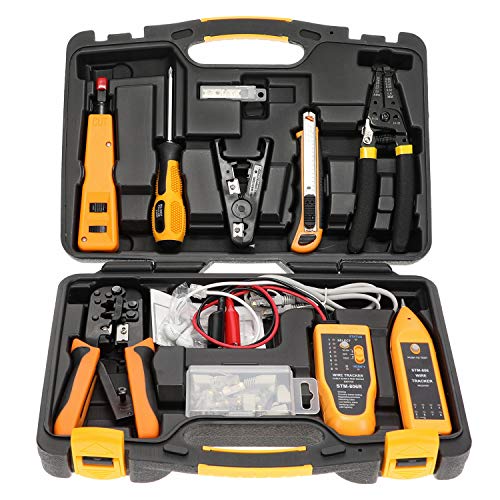
InstallerParts Professional Network Tool Kit 15 In 1 – RJ45 Crimper Tool Cat 5 Cat6 Cable Tester, Gauge Wire Stripper Cutting Twisting Tool, Ethernet Punch Down Tool, Screwdriver, Knife
Lightweight Hard Case : The tools are conveniently secured in place in a lightweight yet durable, high-quality portable…
As an affiliate, we earn on qualifying purchases.
As an affiliate, we earn on qualifying purchases.

LANProbe 10/100/1000 Gigabit Ethernet/USB Bypass Network Tap
(10/100/1G) Gigabit Bypass network tap / sniffer equivalent to port mirror on a switch.
As an affiliate, we earn on qualifying purchases.
As an affiliate, we earn on qualifying purchases.