A network storage backup solution can range from a simple personal cloud device to a multi-bay NAS with room to grow. My best overall pick is the UGREEN NAS DXP4800 Plus, which balances four-bay flexibility with the needs of families, creators, and small teams. The Synology DS425+ is a strong alternative for buyers prioritizing a mature private-cloud ecosystem, while the UGREEN DH2300 suits beginners who want a simpler personal-storage setup. The main tradeoffs are ease of setup versus control, upfront drive planning versus expansion, and local access versus reliable off-site protection. Read on for the full breakdown and guidance on choosing a system that matches your backup habits.

Get business pricing on networking and server gear
- Business-only prices and quantity discounts
- Tax-exempt purchasing
- Multiple users, one account, clear invoices
Key Takeaways
- The UGREEN DXP4800 Plus leads for flexible growth: its four-bay layout gives families and small teams more room to plan storage than the two-bay systems.
- The Synology DS425+ and DS225+ stand out for private-cloud workflows: choose the four-bay DS425+ for more drive capacity options, or the two-bay DS225+ when a smaller footprint and hardware transcoding matter.
- Simple devices trade control for convenience: the Synology BeeStation and UGREEN DH2300 are aimed at personal users who want a less involved setup than a full NAS.
- Included storage changes the buying decision: the Buffalo LinkStation 210 comes with a drive, while most NAS models here are diskless and require a separate drive budget and setup.
- A NAS is not a complete backup by itself: these products differ in storage management and access, but buyers still need a separate copy away from the device for protection against theft, damage, or accidental deletion.
| UGREEN NAS DXP4800 GT 4-Bay for Creators, Tech Enthusiasts and Office Teams |  | Best for High-Throughput Team Backups | Processor: AMD Ryzen Embedded R2514, 4 cores, up to 3.70GHz | Memory: 8GB DDR4, expandable to 64GB | Drive bays: 4 SATA bays | VIEW ON AMAZON | See Our Full Breakdown |
| UGREEN NAS DXP2800 2-Bay for Advanced Home Users, Remote Workers & Creators |  | Best Compact NAS for Advanced Home Backups | Drive bays: 2 | Stated storage capacity: Up to 80TB | Processor: Intel N100 quad-core | VIEW ON AMAZON | See Our Full Breakdown |
| QNAP TS-233-US 2-Bay Desktop NAS with ARM Cortex-A55 Quad-core Processor and 2GB RAM |  | Best for Basic Personal Backups | Processor: ARM Cortex-A55 quad-core | Memory: 2GB | Drive bays: 2 | VIEW ON AMAZON | See Our Full Breakdown |
| Synology 2-Bay DiskStation DS223j (Diskless) |  | Best for Automated Home Backups | Drive bays: 2 | Disk configuration: Diskless | Primary functions: Private cloud, file sharing, and automated backup | VIEW ON AMAZON | See Our Full Breakdown |
| Synology DS425+ Private Cloud Media Server – 4-Bay Diskless NAS |  | Best for Growing Home and Office Archives | Model: DS425+ | Drive bays: 4 | Disk configuration: Diskless | VIEW ON AMAZON | See Our Full Breakdown |
| Yxk Zero1 2-Bay Desktop NAS for Home & Personal Storage (Diskless) |  | Best for a Simple Private Cloud | Drive bays: 2 | Drive configuration: Diskless; drives sold separately | Network connectivity: 2.5GbE | VIEW ON AMAZON | See Our Full Breakdown |
| UGREEN DXP4800 Plus 4-Bay NAS for Families, Creators & Small Teams |  | Best for Advanced Workloads and Large Backups | Drive bays: 4 | Maximum stated storage: Up to 144TB | Drive interface: Serial ATA | VIEW ON AMAZON | See Our Full Breakdown |
| Synology DS225+ Private Cloud Media Server – 2-Bay Diskless NAS with Intel CPU for Hardware Transcoding | 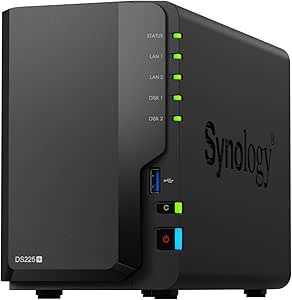 | Best for Media Backups and Surveillance | Drive bays: 2 | Maximum storage: 40TB | Drive configuration: Diskless | VIEW ON AMAZON | See Our Full Breakdown |
| Buffalo LinkStation 210 2TB 1-Bay NAS Network Attached Storage with Hard Drives Included |  | Best Ready-to-Use Starter NAS | Storage capacity: 2TB | Drive bays: 1 | Hard drive included: Yes | VIEW ON AMAZON | See Our Full Breakdown |
| UGREEN NAS DH2300 2-Bay Personal Storage for Beginners & Personal Users |  | Best Beginner-Friendly Two-Bay NAS | Drive bays: 2 | Maximum stated capacity: Up to 64TB | Processor: High-performance processor | VIEW ON AMAZON | See Our Full Breakdown |
| Synology BeeDrive 2TB Portable SSD with Wireless Backup and AI File Discovery |  | Best Compact Wireless Backup | Capacity: 2 TB | Interface: USB 3.2 | Connectivity: Wi-Fi, USB-A, USB-C, cellular | VIEW ON AMAZON | See Our Full Breakdown |
| Synology BeeStation 4TB Personal Cloud Storage Device |  | Best for Beginners | Capacity: 4 TB | Network connection: Ethernet | Connectivity: Wired | VIEW ON AMAZON | See Our Full Breakdown |
| Synology DS223 Home & Office Backup Hub – 2-Bay Diskless NAS | 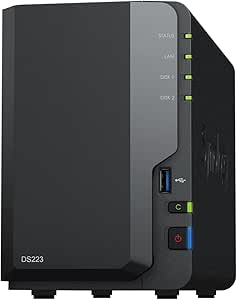 | Best for Expandable Home and Office Backups | Model: DS223 | Drive bays: 2 | Drive inclusion: Diskless | VIEW ON AMAZON | See Our Full Breakdown |
More Details on Our Top Picks
UGREEN NAS DXP4800 GT 4-Bay for Creators, Tech Enthusiasts and Office Teams
I’d put the DXP4800 GT first for buyers whose backup workload includes large project files, several users, or frequent network transfers. Its dual 10GbE ports and Ryzen Embedded processor give it more headroom for concurrent work than the 2-bay UGREEN DXP2800, while four SATA bays and NVMe options allow storage and cache to grow with a team’s needs. The tradeoff is that this capacity and speed come with a more involved setup, and the included 8GB non-ECC RAM may not suit buyers prioritizing memory error protection. Drives are not included, either. I’d choose it over the Synology DS425+ when network throughput and expansion options matter more than a simpler, lower-bandwidth backup setup.
Pros:- Dual 10GbE ports support high-speed transfers and link aggregation
- Four SATA bays plus NVMe slots provide substantial storage and expansion flexibility
- Ryzen Embedded R2514 and expandable memory suit concurrent workloads
- Built-in surveillance features can combine camera recording with file backups
Cons:- Diskless setup requires separate drive purchases
- Setup and configuration may be challenging for first-time NAS owners
- Supplied RAM is non-ECC; ECC requires a compatible upgrade
Best for: Small creative teams and technically confident home users backing up large files across multiple workstations
Not ideal for: Beginners seeking a plug-in backup appliance, or buyers who need included drives or ECC memory as standard
- Processor:AMD Ryzen Embedded R2514, 4 cores, up to 3.70GHz
- Memory:8GB DDR4, expandable to 64GB
- Drive bays:4 SATA bays
- Storage expansion:Up to 144TB; 2 U.2 NVMe slots and 2 M.2 SSD slots
- Network:Dual 10GbE ports with link aggregation support
- Connectivity:USB 3.2, USB-C, HDMI, and SD card slot
- Security:TLS/SSL, RSA, AES, and RAID support
Our verdict“Choose the DXP4800 GT for fast, expandable team backups if you can handle a more technical setup and supply your own drives.”
UGREEN NAS DXP2800 2-Bay for Advanced Home Users, Remote Workers & Creators
The UGREEN DXP2800 suits buyers who want a capable home backup hub without moving to a four-bay enclosure. Its two drive bays support up to 80TB according to the supplied product data, and the Intel N100 platform is positioned for heavier home tasks, including media management and AI-powered surveillance. Compared with the QNAP TS-233, this model is aimed at more demanding users and offers much greater stated capacity; the QNAP is a simpler fit for modest personal backups. The DXP2800’s limits are its two-bay ceiling and diskless configuration, which mean less room for future expansion and separate drive purchases. I’d favor it for a remote worker or creator who wants flexible storage in a smaller NAS, but not for a household expecting fast, beginner-friendly setup.
Pros:- Two-bay design supports up to 80TB of stated storage capacity
- Intel N100 quad-core processor is suited to demanding home workloads
- AI-powered surveillance includes face, people, and pet recognition
- Works with Windows, macOS, Android, and iOS devices
Cons:- Drives are not included, adding a separate hardware requirement
- Two bays limit expansion compared with four-bay options such as the Synology DS425+
- Advanced setup may be less approachable than a simpler home backup device
Best for: Advanced home users, remote workers, and solo creators who need centralized backups and surveillance features in a two-bay NAS
Not ideal for: NAS newcomers who want a guided, low-configuration setup, or households planning to expand beyond two drive bays
- Drive bays:2
- Stated storage capacity:Up to 80TB
- Processor:Intel N100 quad-core
- Drive interface:Serial ATA
- Connectivity:Ethernet, SATA 6.0 Gb/s, and USB
- Surveillance:AI-powered recognition for faces, people, and pets
- Warranty:2 years
Our verdict“Pick the DXP2800 for flexible, high-capacity home backups in a two-bay format if you are comfortable configuring a NAS and buying drives separately.”
QNAP TS-233-US 2-Bay Desktop NAS with ARM Cortex-A55 Quad-core Processor and 2GB RAM
I see the QNAP TS-233 as a practical starting point for personal backups, shared home files, and a modest media library. Its snapshot protection adds a recovery point if files are altered or hit by ransomware, while remote access and image recognition give it more utility than a basic network drive. Compared with the UGREEN DXP2800, though, the TS-233 has just 2GB of RAM and an ARM Cortex-A55 processor, so it is better matched to routine storage tasks than heavier multitasking or demanding media workloads. The compact two-bay design also limits future capacity, and drives are not included. I’d choose this QNAP for straightforward household backup needs, but the Synology DS223j may appeal more to buyers who put ecosystem-led private cloud and automated backup features first.
Pros:- Snapshot protection can help recover files after unwanted changes or ransomware
- AI-powered image recognition supports easier photo organization
- Remote access features support file use away from home
- Compact two-bay format fits personal and home backup setups
Cons:- 2GB of RAM limits headroom for intensive tasks
- Drives must be purchased separately
- Basic ARM hardware is less suited to advanced business workloads than the UGREEN DXP2800
Best for: Individuals and small households seeking shared files, remote access, and snapshot-based recovery for everyday data
Not ideal for: Creators running demanding applications, large multi-user workloads, or buyers who need substantial memory and storage expansion
- Processor:ARM Cortex-A55 quad-core
- Memory:2GB
- Drive bays:2
- Drive interface:Serial ATA-600
- Transfer rate:Up to 125 MB/s stated media speed
- Additional features:AI-powered image recognition and hardware-accelerated transcoding
- Form factors:2.5-inch and 3.5-inch drives
Our verdict“Choose the TS-233 for everyday household backups and recovery features, not for demanding workloads or long-term expansion.”
Synology 2-Bay DiskStation DS223j (Diskless)
The Synology DS223j is the straightforward choice here for buyers focused on private cloud storage and automated backups rather than high transfer speeds or complex workloads. It supports file sharing, access across platforms, and home security monitoring, giving it a broader home role than a simple backup target. Compared with the QNAP TS-233, the supplied details emphasize Synology’s private cloud and backup workflow; the QNAP lists snapshots, image recognition, and hardware-accelerated transcoding. The DS223j’s main limitation is its two-bay capacity, which offers less room to grow than the four-bay DS425+ or UGREEN DXP4800 GT. It also ships diskless, and the setup may take some technical confidence. I’d shortlist it for routine multi-device backups, not large libraries or performance-heavy office use.
Pros:- Designed for private cloud storage and file sharing across platforms
- Automated backup support helps consolidate device protection
- Home security monitoring adds a use beyond file storage
- Includes a 2-year warranty
Cons:- Diskless purchase requires separate drive selection and installation
- Two bays offer less capacity growth than the Synology DS425+
- Setup may require some technical knowledge
Best for: Households that want a private cloud and automated backups for computers and mobile devices
Not ideal for: Creative teams with large files, buyers who need more than two bays, or users seeking a high-throughput NAS
- Drive bays:2
- Disk configuration:Diskless
- Primary functions:Private cloud, file sharing, and automated backup
- Security support:Home security monitoring with IP cameras
- Device access:Multi-platform access
- Warranty:2 years
Our verdict“Choose the DS223j for a compact Synology-based home backup and private cloud, provided two bays meet your storage plans.”
Synology DS425+ Private Cloud Media Server – 4-Bay Diskless NAS
The Synology DS425+ balances expandable backup storage with a compact footprint, making it a sensible fit for homes or small offices building a shared archive. Four bays and stated support for up to 80TB give it more room to grow than the two-bay DS223j, while 2.5GbE networking and a stated 278 MB/s network speed support quicker file movement than a basic home NAS. It also combines backup, file sharing, and surveillance functions. Compared with the UGREEN DXP4800 GT, however, it has slower network connectivity on paper and fewer listed expansion details; the UGREEN is the stronger match for very high-throughput workloads. The DS425+ is diskless, and four bays may still fall short for very large archives. I’d choose it for a Synology-centered setup where measured growth matters more than 10GbE speeds.
Pros:- Four bays provide more room to expand than the two-bay Synology DS223j
- 2.5GbE networking and stated 278 MB/s network speed support faster file transfers
- Combines backup, file sharing, and surveillance functions
- Compact dimensions suit a desk or small office shelf
Cons:- Diskless configuration requires a separate drive purchase
- 2.5GbE is slower on paper than the dual 10GbE ports on the UGREEN DXP4800 GT
- Four bays may not meet the needs of very large or rapidly growing archives
Best for: Small offices and households building a shared backup archive that needs four bays, multi-user access, and surveillance support
Not ideal for: Users needing dual 10GbE transfers, more than four drive bays, or a ready-to-use system with drives included
- Model:DS425+
- Drive bays:4
- Disk configuration:Diskless
- Stated storage capacity:Up to 80TB
- Network interface:2.5GbE
- Stated network speed:278 MB/s
- Dimensions:8.78 × 7.83 × 6.54 inches
- Weight:2,180 g
Our verdict“Choose the DS425+ for a compact, expandable Synology backup hub if four bays and 2.5GbE fit your workload.”
Yxk Zero1 2-Bay Desktop NAS for Home & Personal Storage (Diskless)
The Yxk Zero1 is a straightforward fit for home users who want shared network storage without paying for a hosted cloud service. Its two drive bays give it more room to grow than the Buffalo LinkStation 210’s single-bay, 2TB setup, while 2.5GbE can make large local file transfers quicker when the rest of the network supports it. Encryption, permissions, and remote access add useful privacy controls for household backups and file sharing. The tradeoff is that this is a diskless unit: you must choose and buy drives before it can store anything, and the listed features position it for personal use rather than demanding office workloads. I’d choose it over the more feature-heavy UGREEN DXP4800 Plus when simplicity matters more than advanced server tools.
Pros:- Two bays provide more storage flexibility than a single-bay NAS.
- 2.5GbE supports faster local transfers than standard 1GbE when the network is compatible.
- Encryption, permissions, and remote access support private file sharing.
- Local storage avoids ongoing cloud subscription fees.
Cons:- Diskless design means separate drive selection and purchase are required.
- Personal and home focus makes it a weaker fit for enterprise workloads.
- Setup cost depends on the drives selected.
Best for: Home users who want a private shared space for photos, videos, and backups, and are comfortable choosing drives separately.
Not ideal for: Small teams that need business-focused workloads, advanced server applications, or a ready-to-use system with drives included.
- Drive bays:2
- Drive configuration:Diskless; drives sold separately
- Network connectivity:2.5GbE
- Supported platforms:Windows, macOS, iOS, Android
- Weight:2 kg
- Intended use:Personal and home storage
- Access and security:Remote access, encryption, and permissions
Our verdict“Choose the Yxk Zero1 for a simple, private two-bay home backup hub with faster-than-gigabit networking, but not for a turnkey or business-oriented NAS.”
UGREEN DXP4800 Plus 4-Bay NAS for Families, Creators & Small Teams
For households or small teams with large archives and plans beyond basic file backup, the DXP4800 Plus brings a broader toolkit than the two-bay Yxk Zero1 or UGREEN DH2300. Its four bays and stated capacity up to 144TB leave room for a substantial media library, while the 10GbE and 2.5GbE ports offer faster network options when paired with compatible equipment. Docker, virtual machines, and photo organization can turn the NAS into more than a backup destination. That flexibility comes with a real learning curve: setup and administration may ask more of users than simpler personal models, and drives are not included. This is the most capable fit in this batch for expanding storage and running extra services, but it is excessive for someone who only wants automatic household backups.
Pros:- Four drive bays and stated support for up to 144TB suit large, expandable archives.
- 10GbE and 2.5GbE ports provide high-speed wired network options.
- Docker and virtual machine support extend its use beyond file storage.
- 8GB DDR5 RAM and a five-core Intel CPU support more demanding tasks.
Cons:- Drives must be purchased separately, adding a separate planning step.
- Advanced functions can make setup and ongoing administration more involved.
- Wired Ethernet only; Wi-Fi is not built in.
Best for: Creators, technically confident families, and small teams managing large media collections or running NAS applications alongside backups.
Not ideal for: Beginners seeking simple backup setup, or households with modest storage needs that do not need multiple bays or server features.
- Drive bays:4
- Maximum stated storage:Up to 144TB
- Drive interface:Serial ATA
- Processor:5-core Intel CPU
- Memory:8GB DDR5
- Network ports:1 × 10GbE, 1 × 2.5GbE
- Internal SSD:128GB
- Video output:4K HDMI
- Warranty:2 years
Our verdict“Pick the DXP4800 Plus when you need expandable high-capacity backup plus server features, and skip it if basic, low-maintenance storage is the goal.”
Synology DS225+ Private Cloud Media Server – 2-Bay Diskless NAS with Intel CPU for Hardware Transcoding
The DS225+ is a compact two-bay choice for buyers who want backups to sit alongside media streaming and camera recording. RAID and snapshots add layers of protection against some drive failures and unwanted file changes, while its hardware transcoding focus helps it serve media to compatible devices. Synology lists support for up to 30 IP cameras, giving this model a broader home-security role than the Yxk Zero1, which is aimed more squarely at personal storage and sharing. Its two-bay design and 40TB maximum storage are less expandable than the four-bay UGREEN DXP4800 Plus, so large or rapidly growing collections may outgrow it sooner. Drives are sold separately, and setup may take more effort for NAS newcomers. I’d favor it when media and surveillance matter as much as backup.
Pros:- RAID and snapshots provide multiple data-protection tools.
- Hardware transcoding supports media streaming use.
- Support for up to 30 IP cameras adds a surveillance role.
- Compact tabletop dimensions suit a home or small-office workspace.
Cons:- Two bays offer less expansion than the four-bay UGREEN DXP4800 Plus.
- Diskless configuration requires separate drive purchases.
- NAS setup can be challenging for first-time users.
Best for: Home media collectors and small businesses that want a compact NAS for backups, streaming, and a modest IP-camera setup.
Not ideal for: Buyers planning very large storage pools, easy drive expansion, or a plug-and-play setup with drives already included.
- Drive bays:2
- Maximum storage:40TB
- Drive configuration:Diskless
- Processor:Intel CPU
- Media feature:Hardware transcoding; supports 4K media streaming
- Surveillance support:Up to 30 IP cameras
- Dimensions:9.14 × 4.25 × 6.5 inches
- Weight:1,300 g
- Warranty:3 years
Our verdict“Choose the DS225+ if media streaming and surveillance belong alongside your backup plan, but look to a four-bay NAS for more room to expand.”
Buffalo LinkStation 210 2TB 1-Bay NAS Network Attached Storage with Hard Drives Included
The LinkStation 210 is the clearest choice here for someone who wants to get a small network backup running without selecting drives first. Its included 2TB drive makes it more ready to use than the diskless Yxk Zero1, Synology DS225+, and UGREEN models in this batch. That simplicity is also its limit: the single bay and fixed 2TB capacity offer far less room to grow than either two-bay personal NAS, and the listing describes more basic functions than the UGREEN DXP4800 Plus. Ethernet connectivity suits a wired home network, while access restrictions support straightforward file sharing across Windows and macOS systems. I’d treat this as a modest starter destination for household copies, not as the foundation for a large media archive or a more advanced backup strategy.
Pros:- Included 2TB hard drive avoids separate drive selection.
- Ready-to-use approach lowers the setup burden compared with diskless NAS models.
- Access restrictions support controlled file sharing.
- Compatible with Windows and macOS.
Cons:- Single bay limits expansion and storage flexibility.
- 2TB capacity may be restrictive for large media libraries or multiple backups.
- Feature set is basic compared with the UGREEN DXP4800 Plus.
Best for: Windows or macOS users who want a simple, preconfigured network location for a modest set of household files.
Not ideal for: Families with growing photo and video archives, buyers who need multiple drive bays, or users seeking advanced NAS applications.
- Storage capacity:2TB
- Drive bays:1
- Hard drive included:Yes
- Connectivity:Ethernet
- Compatibility:Windows, macOS
- Power:AC adapter
- Warranty:2 years
Our verdict“Choose the LinkStation 210 for a simple, included-drive home backup destination, but select a two-bay NAS if capacity and growth matter.”
UGREEN NAS DH2300 2-Bay Personal Storage for Beginners & Personal Users
The DH2300 is aimed at personal backups without the server-oriented complexity of the UGREEN DXP4800 Plus. Its two bays and stated capacity up to 64TB give users more room to build a photo and file archive than the Buffalo LinkStation 210’s included 2TB single-bay setup. Beginner-focused setup, AI photo organization, and security tools such as RAID modes, two-factor authentication, and encrypted transfers make it a practical step into local storage. The main compromise is network speed: its 1GbE port is less capable than the Yxk Zero1’s 2.5GbE, and large transfers may take longer. Wi-Fi is not built in and requires an external USB adapter. It also lacks Docker and virtual-machine support, so I’d pick it for personal backup rather than a home server project.
Pros:- Beginner-oriented setup suits first-time NAS owners.
- Two bays and stated support for up to 64TB offer room to grow.
- AI photo organization can help manage personal image libraries.
- RAID modes, two-factor authentication, and encrypted transfers add protection options.
Cons:- 1GbE is slower than the 2.5GbE connection on the Yxk Zero1.
- Wi-Fi requires a separately connected USB adapter.
- No Docker or virtual-machine support for users seeking server features.
Best for: First-time NAS buyers who want private two-bay storage for household photos, videos, and computer backups without advanced server administration.
Not ideal for: Creators moving very large files over the network, users who need built-in Wi-Fi, or buyers planning Docker and virtual-machine workloads.
- Drive bays:2
- Maximum stated capacity:Up to 64TB
- Processor:High-performance processor
- Memory:4GB
- Network interface:1GbE
- Listed transfer speed:125MB/s
- Security features:RAID modes, two-factor authentication, encrypted transfers
- Wi-Fi:Requires external USB adapter
- Compatible platforms:Windows, macOS, iOS, Android
Our verdict“Choose the DH2300 for approachable personal backups and photo organization, but pick a faster or more expandable NAS for heavy transfers or advanced applications.”
Synology BeeDrive 2TB Portable SSD with Wireless Backup and AI File Discovery
I’d choose the BeeDrive when backup needs to move with me: it can sync files from compatible phones and computers over Wi-Fi, or connect by USB, in a package weighing just 43 g. Its local AI search, including OCR, can help locate content without sending those searches to a cloud service. That makes it a different kind of backup option from the BeeStation 4TB, which is better suited to a wired, shared home archive, and the DS223, which supports a more expandable NAS setup.
The tradeoff is capacity and role: 2TB is less room than the BeeStation offers, and this portable drive is not a multi-bay network server. The listed specs also give no ruggedness or water-resistance rating, so I wouldn’t treat it as a protected travel drive. Check OS compatibility before buying.
Pros:- Wireless backup and synchronization across compatible devices
- Local AI search features include OCR and image description generation
- Compact 43 g portable design
- USB-A, USB-C, and Wi-Fi connectivity
Cons:- 2TB capacity may be restrictive for large media libraries
- Compatibility depends on supported operating system versions
- No ruggedness or water-resistance rating is listed
Best for: People who want a lightweight way to back up and search photos and documents from compatible phones and computers while traveling.
Not ideal for: Households that need a large shared network archive, buyers who want expandable multi-drive storage, or anyone needing a stated rugged or water-resistant enclosure.
- Capacity:2 TB
- Interface:USB 3.2
- Connectivity:Wi-Fi, USB-A, USB-C, cellular
- Listed read speed:1050 MB/s
- Form factor:Portable
- Weight:43 g
- Dimensions:2.56 × 0.59 × 2.56 in
- Compatible systems:Android 10 or later; iOS 15 or later; Windows 10 64-bit (1809 or later) and Windows 11; macOS 12 or later
Our verdict“Choose the BeeDrive for portable, wireless backups and local file search, but choose the BeeStation or DS223 for a shared home network-storage setup.”
Synology BeeStation 4TB Personal Cloud Storage Device
For a home that needs a simple shared backup destination, I’d rank the BeeStation ahead of the BeeDrive: its 4TB capacity and Ethernet connection suit a stationary personal cloud for photos, videos, and shared files. Automatic backups and included Mac backup software make it approachable for people who don’t want to assemble a NAS or manage a subscription-based cloud plan. Compared with the DS223, it is the simpler choice for routine household backups rather than a platform for adding drives and configuring a broader set of NAS services.
That simplicity comes with limits. The listed connection is wired Ethernet, so placement depends on access to a network cable, and this model’s 4TB capacity is fixed in the supplied product information. Buyers who need more control or room to grow may prefer the diskless two-bay DS223, while travelers are better served by the portable BeeDrive.
Pros:- Automatic photo and video backups for multiple devices
- 4TB capacity for a shared personal cloud
- Included backup software supports dedicated Mac backup storage
- Designed for file sharing without ongoing subscription fees
Cons:- Requires a wired Ethernet connection for network use
- The listed model provides only 4TB of storage
- Offers less expansion flexibility than the diskless DS223
Best for: Households and Mac users who want straightforward automatic photo, video, and computer backups in one wired home device.
Not ideal for: People who need portable storage, wireless placement, or a NAS they can expand with additional drives and services.
- Capacity:4 TB
- Network connection:Ethernet
- Connectivity:Wired
- Drive form factor:3.5 in
- Listed speed:559 megabits per second
- Listed data transfer rate:600 megabytes per second
- Compatible devices:Laptop, smartphone, tablet
- Enclosure material:Metal
Our verdict“Pick the BeeStation for uncomplicated, wired household backups; choose the DS223 if you want a more configurable NAS with drive-bay flexibility.”
Synology DS223 Home & Office Backup Hub – 2-Bay Diskless NAS
I’d choose the DS223 when backup means more than keeping copies of files: its two bays and Synology’s DSM tools support a shared storage hub for home or office devices, with private-cloud access, collaboration, and surveillance features. Because it is diskless, I can select drives to suit the planned capacity rather than being limited to a prefilled unit such as the BeeStation 4TB. It also offers a more capable NAS path than the simpler BeeStation, while the BeeDrive remains the easier fit for portable, device-to-device backup.
The flexibility asks more of the buyer. Drives are not included, and advanced setup can require technical knowledge. With only two bays, it is not the right foundation for someone planning a large multi-drive array. I’d shortlist it for buyers willing to configure a NAS, not for anyone seeking an appliance-like setup with storage ready out of the box.
Pros:- Two bays allow buyers to choose and configure their own drives
- DSM tools support centralized storage and private-cloud access
- Supports backup, collaboration, and surveillance use cases
- Compatible with desktop computers, laptops, servers, and smartphones
Cons:- Diskless package requires a separate drive purchase
- Advanced features may take technical knowledge to configure
- Two bays limit expansion compared with larger NAS models
Best for: Home-office users or technically comfortable households who want a configurable two-drive NAS for shared backups, private-cloud access, and additional DSM tools.
Not ideal for: Beginners who want storage ready to use immediately, or teams that need more than two drive bays for larger storage plans.
- Model:DS223
- Drive bays:2
- Drive inclusion:Diskless
- Dimensions:9.15 × 4.25 × 6.5 in
- Weight:1280 g
- Mounting type:Tabletop
- Compatible devices:Desktop, laptop, server, smartphone
- Warranty:2 years
Our verdict“Choose the DS223 if you want a configurable NAS for shared backups and can supply and set up the drives; choose the BeeStation for a simpler home-cloud experience.”

How We Picked
I compared these products as backup destinations and storage systems, not as interchangeable boxes. The ranking weighs bay count and room to expand, ease of setup and ongoing management, the likely fit for shared or personal files, and whether storage is included. I also considered how each product’s stated positioning serves different workloads, from basic file copies to creator and office use, media access, or portable backup.
The four-bay UGREEN DXP4800 Plus ranks first because it offers a useful middle ground between capacity planning and broad household or small-team use. The Synology DS425+ and UGREEN DXP4800 GT follow as stronger fits for buyers with more specific performance or platform priorities; compact two-bay models rank higher for focused use and lower setup complexity, not maximum growth. Single-purpose personal-cloud and portable options, along with the drive-included Buffalo, can make sense for narrower needs, but offer less of the flexibility expected from a general-purpose NAS. Product details supplied for this roundup do not establish transfer speeds or backup features beyond their stated specifications, so I avoid treating those as proven performance advantages.
Factors to Consider When Choosing Network Storage Backup Solution
Choosing a network backup device starts with your recovery needs, not the largest capacity number on the box. I would first decide what must be recoverable, how often files change, who needs access, and what happens if the storage device itself is lost. These broader questions can rule out an otherwise appealing NAS before you compare individual models.
Separate storage capacity from backup protection
A NAS keeps files available on your network, but availability and backup are different jobs. Drive redundancy can help a system stay accessible after a drive failure, yet it does not necessarily protect against accidental deletion, ransomware, theft, or fire. Plan a second copy on an external drive or a separate location, and check that your backup software can retain earlier file versions. A common mistake is filling every bay immediately without leaving space for growth or a recovery copy. Pick a usable capacity target based on current files plus expected growth, then account for the space used by redundancy and snapshots. If losing a folder would cause serious disruption, test restoring it before trusting the setup.
Choose bay count for your growth plan
Two-bay NAS devices suit smaller libraries and straightforward home or office needs, but they give you fewer drive-layout choices as storage demands change. Four bays can make capacity planning more flexible and may reduce the need to replace an entire setup when your files grow. More bays do not automatically mean better protection: the drive configuration determines usable capacity, and a failed unit still calls for a separate backup. Before buying, estimate how much data you expect to add over the next few years and whether replacing drives one at a time fits your plan. Avoid choosing solely by the number of drive slots if your workload is modest and you do not want added management. The DS425+ and DXP4800 family are the larger-bay options here; the many two-bay picks fit more contained libraries.
Match setup complexity to the person maintaining it
The person who sets up storage may not be the person who needs to recover files later. A more configurable NAS can support varied workflows, but it also asks someone to manage accounts, updates, drive health, and backup jobs. Simpler personal-cloud products can reduce the number of decisions at setup, which may matter more than advanced controls for a single user. Ask who will respond to a failed drive or a full storage pool before settling on a product. Shared household or team storage also calls for clear user permissions and a recovery process that does not depend on one person’s memory. If no one wants to administer a NAS, favor a simpler system and pair it with a separate backup copy.
Check compatibility before buying drives
Most NAS products in this roundup are sold without drives, so the enclosure is only part of the purchase and setup. Confirm the drive type and capacity supported by the specific model, then check the manufacturer’s compatibility guidance before ordering. Drives built for continuous use can suit always-on storage better than a spare desktop drive, but model compatibility and workload ratings still matter. Plan for the cost and effort of installing drives, creating a storage pool, and setting a replacement schedule. The Buffalo LinkStation 210 includes a drive, which reduces setup steps, but its single-bay design gives a different expansion and failure tradeoff from a multi-bay NAS. Do not assume a diskless system is ready for backups as soon as it comes out of the box.
Decide whether you need remote access or local-only backup
Remote access can make a private cloud useful for travel and distributed work, but it adds account security and network configuration to your responsibilities. If backups only need to run at home or in an office, local network access may be enough and can keep the setup simpler. For remote use, check how users sign in, how access can be limited, and whether two-factor authentication is available. Avoid exposing storage services directly to the internet without understanding the security settings and update process. A portable device such as the BeeDrive addresses a different need from an always-on NAS: it can suit individual backup workflows, while a NAS is better aligned with shared network storage. Choose the access pattern you will actually use rather than paying for capabilities that complicate maintenance.
Budget for recovery, not just the storage device
The enclosure or personal-cloud device is not the full cost of a dependable backup plan. Diskless NAS models need compatible drives, and a second copy may call for another drive or a cloud backup service. Include replacement drives, power protection, and time spent checking backup jobs in your planning. The drive-included LinkStation 210 simplifies the first purchase, while diskless two- and four-bay devices offer more choice over capacity and drive configuration. A premium system can make sense when its flexibility matches a real workload, such as shared team files or a growing media library. When the need is one person’s documents and photos, a simpler product plus an independent copy can be a better fit than a more elaborate NAS.
Frequently Asked Questions
Can a two-bay NAS protect my files if one drive fails?
It depends on the drive arrangement you choose. A mirrored setup can keep a copy on the second drive if one drive fails, but it reduces usable capacity and does not protect against accidental deletion, malware, theft, or damage to the whole device. If your files matter, keep another backup outside the NAS, such as an external drive stored separately or an off-site copy. Check the model’s storage options and recovery process before setting up the drives. Run a restore test so you know how to retrieve files when something goes wrong.
Should I choose a four-bay NAS if my current files fit on one drive?
Choose four bays when you expect your library to grow, need several storage pools, or want more flexibility in drive planning. If your data needs are stable and relatively small, a two-bay model may be easier to manage and leave more of your budget for a separate backup copy. Bay count alone does not tell you how much usable capacity you will have, since redundancy and the selected drive arrangement affect the result. Estimate growth over the next few years and decide whether adding drives later is preferable to replacing existing ones. The DXP4800 Plus and DS425+ fit a growth-oriented plan better than the compact two-bay choices.
Is a personal-cloud device enough, or do I need a full NAS?
A personal-cloud device can be enough when one person or a small household wants a straightforward place for files and does not need extensive storage management. A full NAS is a better match when several people need separate access, you want more control over drive configuration, or your storage needs may expand. Simplicity can reduce setup and maintenance demands, but it may also limit flexibility compared with a multi-bay system. Think about who will administer the device and whether you need shared folders, multiple user accounts, or a clear growth path. Whatever you choose, keep a second copy that is not dependent on the same device.
Is a NAS a substitute for cloud backup?
No. A NAS can provide local storage and a convenient place for devices on your network to back up, but a local-only copy remains exposed to events that affect the whole location. Cloud backup can add an off-site copy, while an external drive kept elsewhere is another option. The right plan depends on how quickly you need to recover, how much data you can afford to lose, and whether you are comfortable managing remote access. If you use cloud backup, check version retention, restore options, and how long a large recovery could take. Treat the NAS as one part of a backup plan rather than the only copy.
What should I do if I want storage ready to use without installing drives?
Look for a product that includes storage, such as the Buffalo LinkStation 210 in this roundup, or consider a personal-storage device with its own built-in capacity, such as Synology BeeStation. That can cut down on drive selection and installation steps, but it also means less choice over drive models and capacity planning. Check whether the included storage can be expanded or replaced and what happens if the internal drive fails. A diskless NAS gives you more control over drive selection but takes more setup and planning. In either case, arrange a separate backup copy before storing files that would be difficult to replace.
Conclusion
For most households and small teams seeking room to grow, I recommend the UGREEN DXP4800 Plus as the best overall: its four-bay layout gives it broader storage-planning flexibility than the two-bay options. My best value pick for a focused personal setup is the UGREEN DH2300, especially for buyers who prefer a beginner-oriented device over a more involved NAS. For a best premium, private-cloud choice, consider the Synology DS425+; choose the Synology DS225+ instead if you want a smaller system with hardware transcoding. The Synology BeeStation is my beginner-friendly option for personal storage, while the BeeDrive is better suited to portable, individual backup needs and the Buffalo LinkStation 210 is the drive-included pick for buyers who value a simpler start. Whichever route fits, pair it with a separate backup copy so a device failure does not become a data loss event.