
Designing effective cable pathways in racks is crucial for maintaining organized and reliable network operations. Proper planning helps you guarantee airflow, simplify maintenance, and prevent issues caused by tangled or unmanaged cables. By considering your equipment layout and future growth, you can create pathways that keep everything accessible and safe. But knowing how to balance these factors requires careful thought—so, understanding best practices can make all the difference.
Key Takeaways
- Plan pathways to ensure proper airflow and prevent hotspots, supporting optimal hardware performance.
- Use cable management accessories like trays, ducts, and Velcro straps to keep cables organized and separated.
- Route cables along defined paths for easy access, troubleshooting, and future expansion.
- Label cables and incorporate removable panels to facilitate quick maintenance and minimize disruption.
- Regularly review and adjust cable pathways to maintain airflow efficiency and accommodate network growth.

Effective cable management begins with well-designed cable pathways in racks. When you plan your cable pathways thoughtfully, you create a foundation that not only keeps your setup organized but also enhances overall system performance. Properly designed pathways make it easier to identify and access cables, reducing maintenance time and minimizing the risk of accidental disconnections. But beyond organization, cable pathways play a crucial role in airflow optimization, which is essential for maintaining the health and efficiency of your equipment. If cables are haphazardly placed or tangled, airflow becomes obstructed, leading to hotspots that can cause hardware failures or reduce lifespan. By integrating structured pathways, you guarantee that cool air can circulate freely around your equipment, helping to maintain ideal operating temperatures.
Structured cable pathways improve organization and airflow, enhancing system performance and equipment longevity.
When designing cable pathways, consider using cable management accessories like cable trays, ducts, and Velcro straps. These tools help you route cables neatly along defined paths, preventing clutter that can impede airflow. Keeping cables aligned and separated allows hot air to escape more easily and cool air to reach devices efficiently. You should also plan for sufficient space within your racks to accommodate future expansions; overcrowded pathways not only complicate management but also compromise airflow. Positioning cables away from airflow vents or fans ensures that the cooling system functions effectively, reducing the risk of overheating. Additionally, understanding the importance of airflow management can significantly improve your rack’s thermal performance.
Another key aspect of designing effective cable pathways is prioritizing accessibility. You want to create routes that make it straightforward to add, remove, or troubleshoot cables without disturbing other connections. This can be achieved by labeling cables and using removable panels or cable management arms. When cables are easy to trace and manipulate, you minimize the chance of accidental disconnections or damage, which can compromise airflow and system reliability. Remember, the goal is to establish a clear, organized route that keeps cables out of the way of airflow paths while still allowing quick access when needed.
Finally, regularly reviewing and updating your cable pathways is imperative. As your network grows or changes, what once was an efficient routing plan might become cluttered or inefficient. Periodic audits help you identify areas where airflow may be restricted or cables are tangled. Re-routing or upgrading pathways ensures your rack maintains superior cable management and airflow, safeguarding your equipment’s performance. By paying attention to these details, you create a resilient, efficient environment that maximizes your hardware’s lifespan and operational uptime.
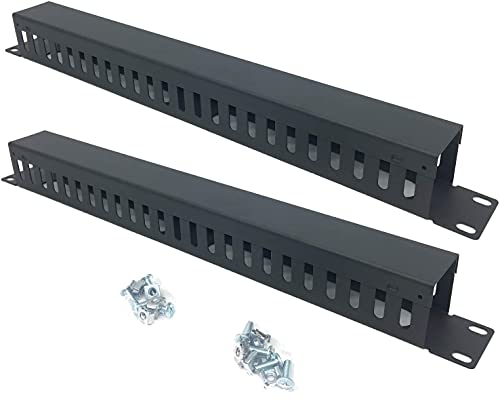
QiaoYoubang 2 Pack 1U 19 Inch Cable Manager Horizontal Rack Mount 24 Slot Metal Finger Duct Wire Organizer with Cover and Mounting Screws for Server Rack, Black(24S2P)
Product Size: H 1.75 * D1.85 * W 19 inch, 24 Slots, Each slot width: 0.28"; Fits in…
As an affiliate, we earn on qualifying purchases.
As an affiliate, we earn on qualifying purchases.
Frequently Asked Questions
How Do I Prevent Cable Interference in Densely Packed Racks?
To prevent cable interference in densely packed racks, you should use cable shielding to minimize electromagnetic interference and keep cables separate based on their function. Label your cables clearly to avoid confusion during maintenance or troubleshooting. Route data and power cables on different sides, and use cable ties or management panels to keep everything organized. Proper shielding and labeling help guarantee signals stay clear and reduce interference issues.
What Are the Best Practices for Future Cable Expansion?
Thinking ahead is key to future cable expansion. You should plan your pathways carefully, leaving room for growth and avoiding bottlenecks. Use clear cable labeling to easily identify and manage new connections later. Incorporate modular components and flexible pathways to adapt as your system evolves. By anticipating needs and keeping your infrastructure organized, you’ll stay ahead of the curve and prevent headaches down the line.
How Can I Improve Airflow With Cable Management?
You can improve airflow by organizing cables with proper cable insulation and avoiding tight bundling. Use color coding to quickly identify and separate different cables, reducing clutter and making maintenance easier. Keep cables elevated from airflow paths and route them along designated pathways to prevent obstruction. Regularly inspect and adjust cable arrangements, ensuring that airflow channels remain clear, which helps maintain ideal cooling and system performance.
What Tools Are Recommended for Organizing Cables?
You should use cable labeling to easily identify and manage cables, reducing clutter and improving airflow. Cable support systems like cable trays or rings help keep cables organized and prevent tangling. These tools make maintenance easier and enhance cooling efficiency. Investing in high-quality cable ties, Velcro straps, and cable management panels also helps keep cables neat, supporting better airflow and simplifying future upgrades or troubleshooting.
How Do I Handle Cable Routing in Irregular Rack Sizes?
When handling cable routing in irregular rack sizes, you should use flexible solutions like modular panels to optimize space. Label your cables clearly to avoid confusion, especially in tight or uneven racks. Position cables neatly along the rack’s edges, securing them with Velcro straps or cable ties. This approach keeps your setup organized, makes maintenance easier, and guarantees airflow isn’t obstructed, even in irregularly sized racks.

ZhiYo 2x2in Cable Raceway, Server Rack Cable Management Under Desk Cord Organizer, Electrical Safe PVC Cable Hider Open Slot Wire Raceway for Network/PC/TVs, Wire Duct Black
Easily Manage Your Network and Data Cables: Designed with parallel openings on both sidewalls, making it convenient for…
As an affiliate, we earn on qualifying purchases.
As an affiliate, we earn on qualifying purchases.
Conclusion
Think of your cable pathways as the veins of your rack’s heartbeat. When you design them with care, airflow flows like a gentle breeze, and cables dance neatly in harmony. Keep them organized, label them clearly, and review regularly—like tending a garden. A well-planned pathway isn’t just neat; it’s the backbone of a resilient, scalable network that keeps your system thriving and ready for whatever comes next.

VELCRO Brand ONE-WRAP Cable Ties | 60Pk | 8 x 1/2" Straps, Multicolor | Strong Reusable Wire Management | Cord Bundling for Home Office and Data Centers
WIRE ORGANIZING SELF BUNDLING STRAPS – Secure large cords and bulky cables with ease; get organized fast with…
As an affiliate, we earn on qualifying purchases.
As an affiliate, we earn on qualifying purchases.

Rapink Patch Panel 24 Port Cat6 with Inline Keystone 10G Support, Pass-Thru Coupler Patch Panel UTP 19-Inch with Removable Back Bar, 1U Network Panel for Cat6, Cat5e, Cat5 Cabling
Toolless termination: This home networking panel does not require puch down tools. Pass through 24 port patch panel…
As an affiliate, we earn on qualifying purchases.
As an affiliate, we earn on qualifying purchases.