Many believe that simply plugging in patch cords is enough to keep a network running smoothly, but in reality, proper management makes all the difference. If you don’t organize and maintain your cables carefully, you risk performance issues and damage. Small steps like keeping cords short and labeled can prevent big problems down the line. To truly optimize your setup, understanding best practices for patch cord use is essential—so, what are those key strategies?
Key Takeaways
- Choose high-quality, properly shielded patch cords suited to your network needs.
- Keep cables organized and labeled to simplify maintenance and troubleshooting.
- Route cables to minimize crossing, sharp bends, and electrical noise sources.
- Regularly inspect and replace damaged or worn cords to maintain signal integrity.
- Use appropriate cable lengths to avoid excess slack and reduce stress on connectors.

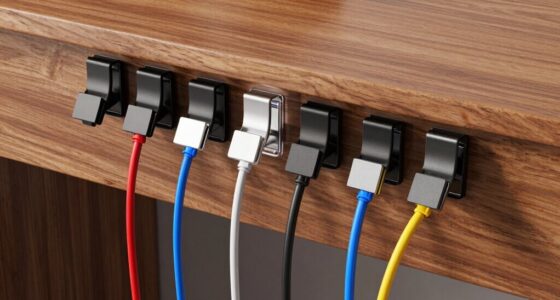
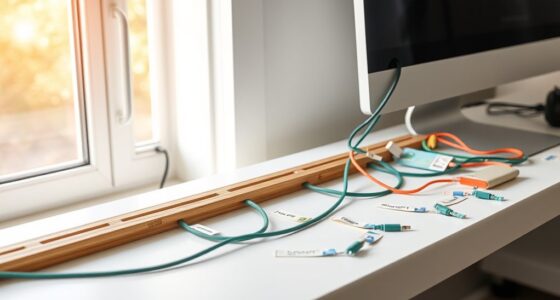
Patch cords are essential tools for connecting network devices quickly and reliably. They streamline your setup, make troubleshooting easier, and ensure your network runs smoothly. But to truly maximize their effectiveness, you need to pay attention to proper cable management and maintaining signal integrity. Good cable management isn’t just about keeping things tidy; it prevents tangles, reduces stress on connectors, and minimizes interference. When you organize your patch cords neatly using cable ties, Velcro straps, or cable organizers, you reduce the risk of accidental disconnections or damage. Proper routing also improves airflow and cooling, which helps your equipment stay in ideal condition.
Proper cable management prevents tangles, reduces connector stress, and improves airflow for a reliable network setup.
When managing your cables, keep runs as short as possible without sacrificing flexibility or accessibility. Longer cables tend to introduce more signal loss and interference, which can degrade network performance. Use labeled cords to easily identify connections, especially in complex setups, saving you time during maintenance or troubleshooting. Avoid crossing cables unnecessarily or creating sharp bends, as these can impair both cable longevity and signal quality. Position patch cords away from sources of electrical noise, such as power strips or fluorescent lights, to protect your network from interference that could cause data errors or slowdowns.
Signal integrity is another critical aspect when using patch cords. High-quality cables with proper shielding and good connectors help preserve data quality by reducing electromagnetic interference and crosstalk. When selecting patch cords, opt for those that match your network’s specifications—Cat5e, Cat6, or higher—depending on your speed requirements. Always check that connectors are securely attached and free of damage, as loose or worn connectors can cause intermittent connections or data loss. When plugging in or unplugging cords, do so gently to avoid damaging the connectors or ports. Additionally, choosing high-performance patch cords designed for your specific network needs can further enhance overall reliability.
Regularly inspecting your patch cords is a smart move. Look for signs of wear, such as frayed or cracked insulation, and replace damaged cables promptly. Clean connectors periodically with appropriate tools to ensure a good connection. Remember, even the best patch cords won’t perform at their best if they’re not properly managed or if their signal isn’t maintained. By combining good cable management practices with attention to signal integrity, you ensure your network remains fast, reliable, and easy to troubleshoot. Effective patch cord use ultimately means fewer disruptions, less downtime, and a more organized, professional setup. So take the time to plan your cable layout, choose quality cables, and keep everything well-maintained—you’ll notice the difference in your network’s performance and longevity.

UGREEN Cat 8 Ethernet Cable 10FT, High Speed Braided 40Gbps 2000Mhz Network Cord Cat8 RJ45 Shielded Indoor Heavy Duty LAN Cables Compatible with Gaming PC PS5 PS4 PS3 Xbox Modem Router 10FT
40 Gbps 2000 Mhz High Speed: The Cat 8 ethernet cable support max. 40 Gbps data transfer and...
As an affiliate, we earn on qualifying purchases.
Frequently Asked Questions
How Do I Determine the Right Length of Patch Cord Needed?
To determine the right length of patch cord, start by measuring the distance between your devices, accounting for cable management and routing paths. Avoid overly long cords to reduce clutter and signal interference, but guarantee enough slack for easy connections. Use a measuring tape or a flexible ruler to get accurate measurements, then select a patch cord that fits snugly without excess slack, ensuring a tidy and efficient setup.
Can Patch Cords Be Reused After Disconnecting?
A stitch in time saves nine, so yes, you can reuse patch cords after disconnecting, but only if they’re maintained properly. Regular patch cord maintenance ensures they stay in good condition, preventing damage that could affect performance. Good cable management also helps avoid unnecessary stress on connectors, extending their lifespan. Always inspect cables for wear and tear before reuse to guarantee ideal network performance and prevent potential issues.
What Are the Signs of a Damaged Patch Cord?
You can tell a patch cord is damaged through visual inspection for bent or broken connectors, frayed or exposed wires, and cracks in the outer jacket. Additionally, perform testing procedures like continuity tests or fiber optic testers to guarantee proper signal transmission. If you notice any irregularities during these checks, it’s best to replace the patch cord to maintain network reliability and avoid connectivity issues.
Are There Different Types of Connectors for Patch Cords?
You bet there are different types of connectors for patch cords! From RJ45 to LC, SC, and ST, each has its unique shape and purpose, ensuring connectors compatibility with various devices. When you do connector installation, make sure you choose the right type to avoid connection issues. Mixing connectors can cause network failures or reduced performance, so double-check compatibility before plugging in. Picking the right connector makes your setup smooth and reliable!
How Do Environmental Factors Affect Patch Cord Performance?
Environmental factors like electromagnetic interference and temperature sensitivity can ensure your patch cord performance. Electromagnetic interference from nearby electronic devices can cause signal disruptions, leading to data loss or degradation. Temperature fluctuations may cause the cable’s materials to expand or contract, affecting connectivity and signal quality. To optimal performance, keep patch cords away from sources of EMI and avoid extreme temperatures, using shielded or weatherproof cables if necessary.

DbillionDa Cat 8 Ethernet Cable 40Gbps 2000MHz, 6FT Supports Cat7 Cat6 Cat5e Cat5, High-Speed RJ45 Cable, Heavy-Duty Indoor/Outdoor, Gold-Plated, Weatherproof & UV-Resistant for Gaming, PC, Router
Designed for Outdoor & Direct Burial Installations – Heavy-duty double-shielded Cat8 Ethernet cable minimizes EMI/RFI interference and delivers...
As an affiliate, we earn on qualifying purchases.
Conclusion
By managing your patch cords carefully, you keep your network running smoothly like a well-oiled machine. Remember to keep cords short, organized, and labeled, and regularly check for damage. Properly maintained patch cords prevent downtime and extend equipment life. Think of your cables as the veins of your network—clear, healthy, and well-maintained for peak performance. When you follow these tips, your setup will be more reliable and efficient, just like a finely tuned engine.

Dacrown Cat 8 Ethernet Cable 50 ft Shielded, Indoor&Outdoor, Heavy Duty High Speed Direct Burial 26AWG Network Wire, 40Gbps 2000Mhz SFTP Patch Cord, in Wall&Weatherproof RJ45 Cable for Router/Modem
✅【Ultra Internet speed】Cat8 precision twisted SFTP ethernet cable operates at a frequency of 2 GHz (2000 MHz), which...
As an affiliate, we earn on qualifying purchases.
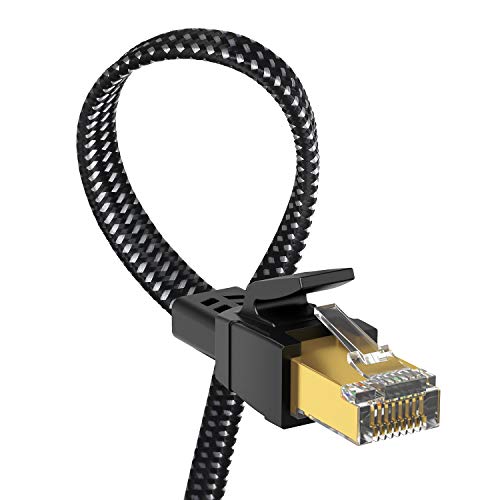
Orbram Cat 8 Ethernet Cable 50 ft, Nylon Braided High Speed Heavy Duty Network LAN Patch Cord, 40Gbps 2000Mhz SFTP RJ45 Flat Internet Cable Shielded in Wall, Indoor&Outdoor for Modem/Router/Gaming/PC
🔌【Higher Speed】Cat 8 Shielded Ethernet Cable provides performance of up to 40000 Mbps (or to 40 Gigabit per...
As an affiliate, we earn on qualifying purchases.