

Like a skilled conductor guiding an orchestra, cable managers and accessories help you keep your server setup organized and efficient. But without the right tools, cables can quickly turn into a tangled mess, causing problems down the line. Investing in the proper rack cable management solutions can make all the difference, yet many overlook their importance. Discover how these accessories can streamline your infrastructure and prevent future clutter.

Get business pricing on networking and server gear
- Business-only prices and quantity discounts
- Tax-exempt purchasing
- Multiple users, one account, clear invoices
Key Takeaways
- Choose cable managers like panels, rings, and vertical/horizontal organizers to keep cables neat and accessible.
- Use Velcro straps, cable ties, and lacing bars for secure bundling and easy re-routing.
- Select modular and adjustable accessories to support current needs and future expansion.
- Ensure compatibility with various cable types such as power, data, and fiber optic cables.
- Regularly inspect and re-route cables to maintain organization, airflow, and hardware longevity.

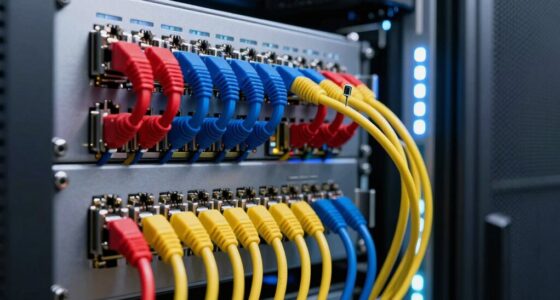
Are you struggling to keep your server racks organized and cables tidy? It’s a common challenge, but the right rack cable managers can make a huge difference. Proper cable routing is essential for maintaining a clean, efficient setup, and rack organization plays a key role in minimizing confusion and downtime. When cables are tangled or poorly managed, troubleshooting becomes a headache, airflow is restricted, and the risk of accidental disconnections increases. Investing in quality cable management accessories helps you create a neat, accessible environment that’s easier to maintain and expand over time.
Start by considering cable routing as your first priority. Good cable routing involves designing a clear, logical path for each cable from its source to its destination. This not only reduces clutter but also ensures that cables aren’t bending sharply or being pinched, which can cause damage or signal degradation. Using cable management panels, horizontal and vertical cable organizers, or cable rings can help you guide cables neatly along the sides and back of your racks. These tools keep cables aligned, prevent them from overlapping haphazardly, and make it simple to trace individual connections when needed. Proper routing also improves airflow, preventing hotspots and keeping equipment cooler, which prolongs hardware lifespan. Maintaining spiritual energy in your workspace can foster a calm and focused environment, enhancing your ability to manage complex setups efficiently.
Rack organization isn’t just about aesthetics; it’s about creating a structured environment that supports operational efficiency. When you implement cable managers, it becomes easier to identify and access specific cables without disturbing the entire setup. Velcro straps, cable ties, and lacing bars are simple yet effective accessories that allow you to bundle cables together securely, reducing tangling and accidental unplugging. Modular cable management panels often feature numbered or labeled sections, so you can quickly locate a particular cable or device. This organized approach minimizes downtime during maintenance or upgrades, saving you time and effort.
Furthermore, choosing the right rack cable managers means considering your current needs and future growth. Modular systems that are easily adjustable can adapt as your network expands. You’ll want accessories that support different cable types, such as power, data, or fiber optic cables, each requiring specific handling. Proper cable management isn’t a one-time fix but an ongoing process—regularly checking and re-routing cables helps maintain order as your infrastructure evolves. When you prioritize cable routing and rack organization with suitable accessories, you create a professional, efficient environment that simplifies management and enhances system reliability.
As an affiliate, we earn on qualifying purchases.
Frequently Asked Questions
What Materials Are Common for Rack Cable Managers?
You’ll find that common materials for rack cable managers include plastic, metal, and aluminum because of their material durability and ease of installation. Plastic options often offer a variety of aesthetic options, allowing you to match your setup’s look. Metal and aluminum provide added strength and a sleek appearance, making them suitable for high-traffic or demanding environments. Your choice depends on balancing durability with style to suit your needs.
How Do I Choose the Right Size for My Rack?
To choose the right size for your rack, consider your rack mounting setup and the amount of cable routing needed. Measure the space available and think about future growth. Make certain the cable manager fits comfortably without blocking airflow or access to equipment. Opt for a size that provides enough room to organize cables neatly, making maintenance easier and preventing tangling, so your setup stays efficient and clean.
Can Cable Managers Be Used With Existing Racks?
You can definitely use cable managers with your existing racks, but first, keep in mind that a little planning goes a long way in wire management tips. Measure your rack’s dimensions and compatibility to guarantee a proper fit. By integrating cable managers into your current setup, you’ll streamline your rack organization strategies, making maintenance easier and improving airflow—because a tidy setup is a happy setup.
Are There Adjustable or Customizable Cable Management Options?
Yes, you can find adjustable and customizable cable management options that offer flexible customization and modularity. These solutions allow you to tailor your setup to your specific needs, easily adding or removing sections as your rack evolves. With modular options, you can reconfigure your cable management system effortlessly, ensuring a neat, organized, and adaptable environment that grows with your equipment and changing requirements.
What Maintenance Is Required for Cable Management Accessories?
Think of your cable management accessories as the unsung heroes of your setup—requiring only simple maintenance. You should regularly check for dust or debris that can block cable routing or hinder rack ventilation. Gently clean with a soft brush or compressed air, ensuring cables stay tidy and airflow remains unobstructed. By doing so, you keep your system running smoothly, preventing overheating and maintaining peak performance.
vertical cable organizers for server racks
As an affiliate, we earn on qualifying purchases.
As an affiliate, we earn on qualifying purchases.
Conclusion
By using rack cable managers and accessories, you keep your server setup organized and efficient. Imagine a data center that avoided costly downtime simply by implementing vertical cable organizers, allowing technicians to troubleshoot quickly. These tools not only improve airflow and reduce clutter but also make future upgrades easier. When you invest in the right cable management, you’re ensuring your network runs smoothly today and remains scalable for tomorrow’s growth.
Velcro cable straps for networking cables
As an affiliate, we earn on qualifying purchases.
As an affiliate, we earn on qualifying purchases.
modular cable management accessories
As an affiliate, we earn on qualifying purchases.
As an affiliate, we earn on qualifying purchases.
Halloween Picks
halloween
As an affiliate, we earn on qualifying purchases.
![Samsung Reportedly Bringing This Major Redesign Back From The Dead With Galaxy S27 [Gallery]](https://cables-and-networks.com/wp-content/uploads/2026/08/samsung-reportedly-bringing-this-major-redesign-back-from-the-dead-with-galaxy-s-featured-560x300.jpg)