The best cloud backup storage services depend on whether you want simple file access, automatic PC backups, or a network storage system you control. My best overall pick is the Synology DS225+, which offers a flexible NAS foundation for buyers who want room to build a backup setup around their needs. The Synology BeeStation is a simpler personal-cloud option, while the UGREEN NAS DH4300 Plus suits people who want a multi-drive system with more capacity flexibility. The main tradeoffs are setup effort, included versus separately purchased storage, and whether you need remote access or just a second copy of files. Read on for the full breakdown and help matching each option to your backup plan.

Get business pricing on networking and server gear
- Business-only prices and quantity discounts
- Tax-exempt purchasing
- Multiple users, one account, clear invoices
Key Takeaways
- The DS225+ leads for flexibility: its diskless design lets buyers choose drives and grow a NAS-based backup setup, but it requires more planning than an all-in-one personal-cloud device.
- BeeStation favors simplicity over customization: it is a more approachable route to personal cloud storage than a traditional NAS, while advanced users may prefer a configurable Synology or UGREEN system.
- Included-drive models reduce setup decisions: Buffalo LinkStation options arrive with storage, while diskless Synology and UGREEN enclosures leave drive choice and initial setup to the buyer.
- Drive count changes the backup conversation: a one-bay LinkStation is a straightforward local storage target, whereas two- and four-bay NAS units offer more room for drive arrangements and future capacity planning.
- Not every listed option is cloud storage hardware: NTI Backup Now 6 is PC backup software, and the PocketCloud is a portable NAS-style device; each fits a narrower job than a home network storage system.
| WD My Cloud 2TB Personal Network Attached Storage |  | Best for Simple Home Backups | Storage capacity: 2 TB | Connectivity: Ethernet, USB 3.0 | Compatible platforms: Windows, Mac | VIEW LATEST PRICE | See Our Full Breakdown |
| BUFFALO LinkStation SoHo 720 8TB 2-Bay NAS with Hard Drives |  | Best for High-Capacity Mirrored Backups | Total capacity: 8 TB | Drive bays: 2 | Included drives: 2 × 4 TB | VIEW LATEST PRICE | See Our Full Breakdown |
| Synology BeeStation 4TB Personal Cloud Storage Device |  | Best for Beginners | Storage capacity: 4 TB | Model: BST150-4T | Connectivity: Wired Ethernet | VIEW LATEST PRICE | See Our Full Breakdown |
| Synology DS225+ 2-Bay Diskless NAS | 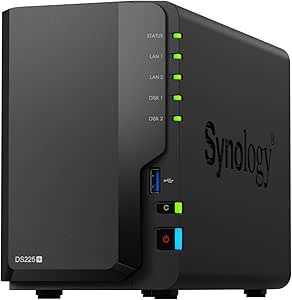 | Best for Customizable Backup and Media Setups | Drive bays: 2 | Drive status: Diskless | Storage volume: Up to 40 TB | VIEW LATEST PRICE | See Our Full Breakdown |
| Buffalo LinkStation 210 4TB 1-Bay NAS with Hard Drive |  | Best for Straightforward Single-Drive Backups | Storage capacity: 4 TB | Drive bays: 1 | Hard drive: Included | VIEW LATEST PRICE | See Our Full Breakdown |
| STATIONPC PocketCloud Portable NAS with M.2 NVMe and SD Card Slots |  | Best for On-the-Go Camera Backups | Storage capacity: Up to 8 TB; up to 16 TB with matching Dock | Drive interface: M.2 NVMe, PCIe 3.0 x4 | Connectivity: USB, Wi-Fi 6, SD card; Ethernet with Dock | VIEW LATEST PRICE | See Our Full Breakdown |
| AMBER X Personal Cloud Storage Device with 512GB SSD |  | Best for a Compact Personal Cloud | Built-in storage: 512 GB SSD | Expandable storage: USB storage | Connectivity: Ethernet, Wi-Fi, USB 3.0 | VIEW LATEST PRICE | See Our Full Breakdown |
| BUFFALO LinkStation SoHo 220 2-Bay NAS, 12TB (2 × 6TB) |  | Best for Drive-Included Home and Small-Office Backup | Total capacity: 12 TB | Drive configuration: 2 × 6 TB, 3.5-inch drives | RAID 1 usable capacity: 6 TB | VIEW LATEST PRICE | See Our Full Breakdown |
| Synology DiskStation DS223j 2-Bay NAS Enclosure (Diskless) |  | Best for Customizable Private-Cloud Backups | Drive bays: 2 | Storage drives included: No | Backup support: Mac, PC, and mobile devices | VIEW LATEST PRICE | See Our Full Breakdown |
| UGREEN NAS DH4300 Plus 4-Bay Network Attached Storage |  | Best for High-Capacity Photo and Media Archives | Drive bays: 4 | Maximum digital storage capacity: 128 TB | Included drives: None; HDDs or SSDs sold separately | VIEW LATEST PRICE | See Our Full Breakdown |
| UGREEN NAS DXP2800 2-Bay Network Attached Storage |  | Best for Power Users | Processor: Intel N100 quad-core | Memory: 8GB DDR5 RAM | Drive bays: 2 HDD bays | VIEW LATEST PRICE | See Our Full Breakdown |
| NTI Backup Now 6 Backup Software for 1 PC |  | Best for Single-PC Cloud Backup | License: 1 PC | Backup types: File, complete system, cloud, continuous, and incremental backup | Cloud service: Windows Azure | VIEW LATEST PRICE | See Our Full Breakdown |
| UGREEN NAS DH2300 2-Bay Network Attached Storage |  | Best for Straightforward Home Backups | Drive bays: 2 | Maximum capacity: Up to 64TB | Memory: 4GB RAM | VIEW LATEST PRICE | See Our Full Breakdown |
| BUFFALO LinkStation 210 2TB 1-Bay NAS with Included Hard Drive | | Best Simple NAS with Included Storage | Model: LS210D0201 | Storage capacity: 2TB | Drive bays: 1 | VIEW LATEST PRICE | See Our Full Breakdown |
| BUFFALO LinkStation 220 8TB 2-Bay NAS with Hard Drives | | Best for Higher-Capacity Home Storage | Model: LS220D0802 | Total capacity: 8TB | Drive bays: 2 | VIEW LATEST PRICE | See Our Full Breakdown |
| cloud backup storage service | Drive bays | Warranty |
|---|---|---|
| WD My Cloud 2TB Personal Netwo | — | — |
| BUFFALO LinkStation SoHo 720 8 | 2 | 3 years, including hard drives |
| Synology BeeStation 4TB Person | — | — |
| Synology DS225+ 2-Bay Diskless | 2 | 3 years |
| Buffalo LinkStation 210 4TB 1- | 1 | 2 years, including hard drive |
| STATIONPC PocketCloud Portable | — | — |
| AMBER X Personal Cloud Storage | — | One-year limited warranty |
| BUFFALO LinkStation SoHo 220 2 | — | 3 years, including hard drives |
| Synology DiskStation DS223j 2- | 2 | 2 years |
| UGREEN NAS DH4300 Plus 4-Bay N | 4 | — |
| UGREEN NAS DXP2800 2-Bay Netwo | 2 HDD bays | 2 years |
| NTI Backup Now 6 Backup Softwa | — | — |
| UGREEN NAS DH2300 2-Bay Networ | 2 | — |
| BUFFALO LinkStation 210 2TB 1- | 1 | 2 years, including hard drive |
| BUFFALO LinkStation 220 8TB 2- | 2 | 2 years, including hard drives |
More Details on Our Top Picks
WD My Cloud 2TB Personal Network Attached Storage
The WD My Cloud gives Windows and Mac households a straightforward way to keep files in one network location, with automatic computer backup and remote access for files on the go. Its 2TB capacity is more modest than the Buffalo LinkStation SoHo 720’s 8TB, but that smaller footprint suits buyers who want a personal backup destination rather than a larger shared archive. Mobile photo and video uploads and streaming on compatible networks add useful roles beyond computer backup, while the USB 3.0 expansion port offers a way to add storage. The tradeoff is that remote access depends on a router and internet connection, and stated compatibility is limited to particular operating-system versions. Choose it for simple home coverage; skip it if you need substantial capacity or a more robust multi-drive setup.
Pros:- Centralizes automatic backups from Windows and Mac computers
- Remote access and mobile photo and video uploads extend access beyond a desktop
- USB 3.0 port allows storage expansion
- Can stream media on compatible networks
Cons:- Remote access requires a router and internet connection
- 2TB capacity is limited beside higher-capacity options such as the Buffalo LinkStation SoHo 720
- Operating-system compatibility is specified for particular versions
Best for: Windows and Mac households seeking a modest-capacity network hub for computer backups, mobile uploads, and home media.
Not ideal for: Households with large media libraries or buyers who want drive redundancy, since this is a 2TB device without stated multi-bay protection.
- Storage capacity:2 TB
- Connectivity:Ethernet, USB 3.0
- Compatible platforms:Windows, Mac
- Compatible devices:Desktop, smartphone, tablet
- Drive speed:5400 rpm
- Installation type:External
- Enclosure material:Plastic
Our verdict“Pick the WD My Cloud for approachable home backups and media access, but choose a higher-capacity multi-bay NAS if your library is growing.”
BUFFALO LinkStation SoHo 720 8TB 2-Bay NAS with Hard Drives
For buyers who want included drives and room for a growing household or small office backup library, the LinkStation SoHo 720 is the strongest capacity-focused pick here. Its two 4TB drives can run in RAID 1 for 4TB of mirrored usable storage, or RAID 0 for the full 8TB when capacity takes priority over mirroring. That choice makes it more adaptable than the single-bay Buffalo LinkStation 210, though RAID mirroring still does not replace a separate backup. The 2.5 GbE connection, automated computer backups, USB direct copy, and SSL encryption support a more involved shared-storage setup. In return, buyers must connect it to a router and choose between usable capacity and drive mirroring. Its warranty includes the drives, with 24/7 US-based support.
Pros:- Includes two drives for 8TB total capacity
- RAID 1 mirroring or RAID 0 full-capacity configuration
- Automated computer backups and USB direct copy
- SSL encryption, 3-year drive warranty, and 24/7 US-based support
Cons:- RAID 1 leaves 4TB usable from the included drives
- Requires a router connection for network storage
- RAID 0 uses full capacity but gives up the protection of mirroring
Best for: Households and small offices backing up several computers that want included drives and a choice between mirrored protection and maximum capacity.
Not ideal for: Buyers seeking plug-and-play storage without a router, or those who need all 8TB usable while also mirroring both drives.
- Total capacity:8 TB
- Drive bays:2
- Included drives:2 × 4 TB
- RAID 1 usable capacity:4 TB
- RAID 0 usable capacity:8 TB
- Connectivity:Ethernet, 2.5 GbE; USB direct copy
- Compatible operating systems:Windows, macOS 10.13 or later
- Warranty:3 years, including hard drives
Our verdict“Choose the SoHo 720 when you want included multi-drive storage and can accept the capacity tradeoff that comes with RAID 1.”
Synology BeeStation 4TB Personal Cloud Storage Device
The BeeStation is aimed at people who want network backup without taking on the setup decisions of a traditional NAS. Guided setup and a no-subscription personal cloud make it a simpler starting point than the diskless Synology DS225+, which requires buyers to source drives separately. With 4TB built in, it can store and share files, photos, and videos across computers and mobile devices, and it can also back up content from cloud services and external drives. Mac users can assign up to 2TB to Time Machine, so the full capacity is not available for that use alone. Compared with the WD My Cloud, the BeeStation also calls out cloud-service and external-drive backups, but it connects through wired Ethernet. It suits buyers prioritizing guided setup over advanced NAS configuration.
Pros:- Guided setup is designed for buyers without storage or network expertise
- Backs up and syncs files across computers and mobile devices
- Can collect backups from cloud services and external drives
- No subscription required
Cons:- Time Machine storage is limited to 2TB on the 4TB model
- Wired Ethernet is the listed connectivity
- Less suited to buyers who want to select and install their own drives, unlike the diskless Synology DS225+
Best for: First-time personal-cloud buyers who want guided setup, cross-device file access, and a place to collect backups from cloud services or external drives.
Not ideal for: Mac households that need more than 2TB dedicated to Time Machine, or NAS enthusiasts seeking a configurable diskless system.
- Storage capacity:4 TB
- Model:BST150-4T
- Connectivity:Wired Ethernet
- Compatible devices:Laptop, smartphone, tablet
- Time Machine storage:Up to 2 TB
- Included backup software:3 years of Acronis True Image for one Mac, PC, or Windows device
- Enclosure material:Metal
Our verdict“Choose the BeeStation if you want a guided, subscription-free personal cloud with backups beyond your computers, but check the Time Machine capacity limit first.”
Synology DS225+ 2-Bay Diskless NAS
The DS225+ is the choice for buyers who want to build a more capable network-storage system around drives they select themselves. Its two-bay, diskless design means the listed storage volume of up to 40TB depends on separately purchased drives, unlike the ready-to-use Buffalo LinkStation SoHo 720, which includes two disks. In return, Synology lists automated backups and snapshot-based data protection, giving users more ways to protect and manage a growing file collection. Support for 4K streaming and up to 30 IP cameras also makes this more than a basic backup box, though those functions matter less to someone seeking only a simple personal cloud. The 3-year warranty adds reassurance, but buyers should plan for drive selection and setup before counting on its capacity or backup role.
Pros:- Two drive bays let buyers choose and install their own storage
- Automated backups and snapshot-based data protection
- Supports 4K media streaming
- Can support up to 30 IP cameras and includes a 3-year warranty
Cons:- Diskless, so drives must be purchased separately
- Requires more drive-selection and setup decisions than the BeeStation
- The stated transfer speed and storage volume depend on the completed configuration
Best for: Technically confident households or small offices that want to choose their own drives and combine backups with media streaming or surveillance storage.
Not ideal for: Beginners who want storage ready to use with drives included; the Synology BeeStation is a more guided alternative.
- Drive bays:2
- Drive status:Diskless
- Storage volume:Up to 40 TB
- Transfer speed:Up to 282 MB/s
- Surveillance camera support:Up to 30 IP cameras
- Dimensions:9.14 × 4.25 × 6.5 inches
- Weight:1300 g
- Warranty:3 years
Our verdict“Pick the DS225+ if you want a configurable NAS that can serve backups, media, and surveillance, and are prepared to supply the drives.”
Buffalo LinkStation 210 4TB 1-Bay NAS with Hard Drive
The LinkStation 210 offers a simple path to 4TB of network storage because the hard drive is included and the device adds automated backups, folder access controls, and SSL-encrypted transfers. It is less involved than the two-bay LinkStation SoHo 720: there is no RAID choice to configure, but also no second drive for mirrored storage. That makes this a reasonable fit for buyers who want a shared backup destination rather than a system designed around drive redundancy. It connects through a router and supports compatible Windows and macOS devices, with 24/7 US-based support and a two-year warranty covering the drive. The single bay limits expansion and protection options, while the stated Mac support ends at macOS 15. Choose it for basic centralized storage; consider the SoHo 720 if mirroring matters.
Pros:- Includes a 4TB hard drive
- Supports automated backups for multiple computers
- Folder access restrictions and SSL-encrypted file transfers
- Two-year warranty covering the drive and 24/7 US-based support
Cons:- Single drive bay does not provide RAID mirroring
- Network storage requires a router connection
- Listed macOS compatibility is limited to version 15 and earlier
Best for: Households with compatible Windows or macOS computers that want an included 4TB drive for centralized backups and controlled file sharing.
Not ideal for: Buyers who need mirrored drive protection, multiple drive bays, or macOS versions beyond 15.
- Storage capacity:4 TB
- Drive bays:1
- Hard drive:Included
- Connectivity:Network connection via router
- Compatibility:Windows and macOS 15 and earlier
- Security:SSL encryption and folder access restrictions
- Warranty:2 years, including hard drive
- Support:24/7 US-based support
Our verdict“Choose the LinkStation 210 for uncomplicated 4TB shared backups, but move to a two-bay option such as the SoHo 720 if drive mirroring is a priority.”
STATIONPC PocketCloud Portable NAS with M.2 NVMe and SD Card Slots
The STATIONPC PocketCloud is the most mobile-minded choice here: it can copy files from SD cards, USB drives, Wi-Fi, or its companion app, making it useful when a laptop is not part of a camera workflow. Its display and one-click backup make file transfers more approachable than setting up a conventional NAS such as the Synology DiskStation DS223j. The tradeoff is that PocketCloud is a local backup hub, not a turnkey, drive-included cloud appliance: the M.2 NVMe drive is sold separately, and its capacity depends on what you install. Dual replaceable batteries support field use, but up to six hours of continuous operation is not a substitute for an always-on home server. Ethernet also requires the matching Dock, limiting wired-network use without that add-on.
Pros:- Accepts backups from SD cards, USB drives, Wi-Fi, and the companion app
- Dual replaceable batteries support portable use
- LCD and one-click backup simplify field transfers
- Local account storage and encryption support privacy
Cons:- M.2 NVMe drive is not included, so storage must be purchased separately
- Ethernet connectivity requires the matching Dock
- Up to six hours of continuous use is less suited to always-on backup
Best for: Photographers and travelers who want to copy camera-card files to local storage without carrying a laptop.
Not ideal for: Households seeking a ready-to-use, always-on wired NAS, since the NVMe drive is separate and Ethernet requires the Dock.
- Storage capacity:Up to 8 TB; up to 16 TB with matching Dock
- Drive interface:M.2 NVMe, PCIe 3.0 x4
- Connectivity:USB, Wi-Fi 6, SD card; Ethernet with Dock
- Battery:Dual replaceable 3200 mAh batteries
- Continuous use:Up to 6 hours
- Display:LCD
- Enclosure and weight:Aluminum alloy; 722 g
- Dimensions:6 × 3.6 × 1 in
Our verdict“Choose PocketCloud for flexible camera and travel backups, but choose a drive-included NAS if you want a simpler home setup.”
AMBER X Personal Cloud Storage Device with 512GB SSD
The AMBER X suits buyers who want a small personal cloud device with storage already installed. Its 512 GB SSD avoids the separate-drive purchase required by the Synology DiskStation DS223j, while remote file access, sharing, and support for multiple users give it a broader role than a simple external backup drive. USB expansion can add room as a library grows, and video streaming plus one-click Plex and Home Assistant installation make it useful beyond backups. The limitation is scale: 512 GB is a modest starting point for large photo and video collections, so USB storage may become necessary. Setup across devices can also take more attention than a basic single-computer backup, and the product data does not specify a warranty longer than one year.
Pros:- Built-in 512 GB SSD means storage is included
- USB storage expansion can extend capacity
- Remote access and file sharing support multiple devices
- Plex and Home Assistant installation broaden its home-server uses
Cons:- 512 GB built-in capacity may be limiting for large media libraries
- Some features require setup across multiple devices
- One-year limited warranty is shorter than the Buffalo LinkStation SoHo 220’s three-year coverage
Best for: Individuals or small households who want a compact shared cloud for documents, phone files, and a modest media library.
Not ideal for: Video-heavy households or large archival collections that need high built-in capacity without adding USB storage.
- Built-in storage:512 GB SSD
- Expandable storage:USB storage
- Connectivity:Ethernet, Wi-Fi, USB 3.0
- Media speed:500–600 MB/s
- Hardware platform:Linux
- Additional features:Video streaming with smart transcoding; multi-user support
- Dimensions:4.9 × 4.9 × 1.5 in
- Warranty:One-year limited warranty
Our verdict“Pick AMBER X for a compact personal cloud with included SSD storage, but plan on expansion if your media collection is large.”
BUFFALO LinkStation SoHo 220 2-Bay NAS, 12TB (2 × 6TB)
The BUFFALO LinkStation SoHo 220 is a practical fit for buyers who want a conventional network backup appliance with drives included. Its two 6 TB disks can run as RAID 1 for 6 TB of usable mirrored storage or RAID 0 for the full 12 TB, making the choice between a second copy of data and maximum capacity explicit. Unlike the diskless Synology DiskStation DS223j, it can be put to work without sourcing drives first, and it adds automated computer backups, USB direct copy, and subscription-free personal cloud access. The main compromise is that mirroring cuts usable capacity in half; RAID 0 restores capacity but gives up that mirror. Its macOS support is listed only through version 15, so newer-system compatibility deserves a check before buying.
Pros:- Includes two 6 TB hard drives
- Offers RAID 1 mirroring or full-capacity RAID 0
- Automated computer backups and USB direct copy support
- Subscription-free cloud access with SSL-encrypted transfers
Cons:- RAID 1 leaves 6 TB usable from 12 TB of installed storage
- RAID 0 provides full capacity without mirrored protection
- Listed macOS compatibility ends at version 15
Best for: Small offices and households that want included drives, automated computer backups, and remote access without a storage subscription.
Not ideal for: Buyers who need more than 6 TB while retaining RAID 1 mirroring, or who require confirmed compatibility with macOS versions newer than 15.
- Total capacity:12 TB
- Drive configuration:2 × 6 TB, 3.5-inch drives
- RAID 1 usable capacity:6 TB
- RAID 0 usable capacity:12 TB
- Connectivity:Ethernet, USB
- Media speed:375 MB/s
- Dimensions and weight:9 × 10 × 5 in; 5.5 lb
- Warranty:3 years, including hard drives
Our verdict“Choose the SoHo 220 for a drive-included, subscription-free network backup setup if 6 TB of mirrored capacity meets your needs.”
Synology DiskStation DS223j 2-Bay NAS Enclosure (Diskless)
The Synology DiskStation DS223j makes sense for buyers who want to build a private cloud around their own drives rather than receive a fixed-capacity system. Its two bays support storage tailored to a growing backup library, with automated backups for computers and mobile devices, plus file sharing and syncing across devices. Compared with the drive-included BUFFALO LinkStation SoHo 220, the DS223j asks the buyer to source and install drives, but it avoids locking the purchase to the Buffalo’s supplied drive configuration. IP camera monitoring adds a useful home-surveillance role. That flexibility brings extra setup and upfront component decisions, and the product data does not list capacity, networking speeds, or a drive-included option. Buyers seeking a ready-to-run appliance should favor the Buffalo instead.
Pros:- Two drive bays allow storage to be configured around the buyer’s needs
- Supports automated backups for Mac, PC, and mobile devices
- Provides private-cloud access, file sharing, and syncing
- Compatible IP camera monitoring adds a surveillance use
Cons:- No storage drives are included
- Drive selection and installation add setup work
- The supplied product data does not specify capacity or network speed
Best for: Tech-comfortable households that want a two-bay private cloud with automated backups and the freedom to choose their own drives.
Not ideal for: Buyers who want storage included and minimal setup; this enclosure ships without drives.
- Drive bays:2
- Storage drives included:No
- Backup support:Mac, PC, and mobile devices
- IP camera support:Yes
- Warranty:2 years
- Primary use:Private cloud storage, file sharing, and syncing
Our verdict“Choose the DS223j if you want to select your own drives for a private backup cloud, rather than buy a ready-filled NAS like the Buffalo SoHo 220.”
UGREEN NAS DH4300 Plus 4-Bay Network Attached Storage
The UGREEN NAS DH4300 Plus is the capacity-first choice in this group, with four bays supporting up to 128 TB of local storage. That gives large media libraries and multi-device backup collections more room to grow than the two-bay Synology DiskStation DS223j, though the UGREEN also leaves drive selection and installation to the buyer. Automatic photo and video backup with AI albums can make a large visual archive easier to browse, while 2.5GbE, 8 GB of memory, Docker support, and 4K HDMI broaden its home-server and media roles. Its network connection is wired only: there is no Wi-Fi. It also does not support virtual machines, so buyers planning a more flexible server environment should look elsewhere. The quoted maximum capacity is not included storage.
Pros:- Four bays support up to 128 TB of storage
- Automatic photo and video backup includes AI-powered albums
- 2.5GbE supports a faster wired network connection
- 4K HDMI and Docker support add media and app options
Cons:- HDDs or SSDs are sold separately
- Wired Ethernet only; Wi-Fi is not supported
- Virtual machines are not supported
Best for: Households with large photo, video, or media archives that want a four-bay local cloud and are comfortable supplying their own drives.
Not ideal for: Buyers who need Wi-Fi or virtual machines, or who want a complete storage system with drives already installed.
- Drive bays:4
- Maximum digital storage capacity:128 TB
- Included drives:None; HDDs or SSDs sold separately
- Memory:8 GB LPDDR4X
- Network connectivity:Ethernet, 2.5GbE; no Wi-Fi
- Video output:4K HDMI
- Supported applications:Docker; virtual machines not supported
- Read speed:312 MB/s
Our verdict“Choose the DH4300 Plus for a large, expandable wired backup and media archive, but skip it if you need Wi-Fi or virtual machines.”
UGREEN NAS DXP2800 2-Bay Network Attached Storage
For buyers who want a flexible home backup hub they can expand and build on, the UGREEN NAS DXP2800 offers more computing headroom than the simpler DH2300. Its Intel N100 processor, 8GB DDR5 RAM, and Docker and virtual machine support suit households that want to run more than basic file storage, while two NVMe slots can add fast storage or caching. The 2.5GbE connection also gives compatible wired networks more bandwidth than the DH2300’s 1GbE port. The tradeoff is setup and cost beyond the NAS itself: this model is diskless, so buyers choose and purchase drives separately, and its advanced features may go unused in a straightforward backup setup. Pick it for flexibility; choose the DH2300 for simpler personal backups.
Pros:- Supports up to 80TB across its two HDD bays
- 2.5GbE networking and two M.2 NVMe slots offer more speed and expansion options than the DH2300
- Supports Docker, virtual machines, and media server applications
- Works with Windows, macOS, Android, and iOS, with AI photo organization and surveillance features
Cons:- HDDs and SSDs are sold separately, adding setup decisions and additional purchases
- Advanced configuration and server features may be excessive for basic file backups
- A wired 2.5GbE connection only delivers its full benefit on a compatible network
Best for: Technically confident home users who want a scalable backup hub for multiple devices, media services, or Docker workloads.
Not ideal for: Beginners seeking a ready-to-use backup appliance, or anyone who does not need advanced server features and would rather avoid buying and installing drives.
- Processor:Intel N100 quad-core
- Memory:8GB DDR5 RAM
- Drive bays:2 HDD bays
- M.2 slots:2 M.2 NVMe SSD slots
- Maximum storage capacity:Up to 80TB
- Networking:2.5GbE
- Drive compatibility:HDDs and SSDs sold separately
- Warranty:2 years
Our verdict“Choose the DXP2800 if you want a configurable, high-capacity NAS that can handle more than backups and are comfortable supplying and setting up the drives.”
NTI Backup Now 6 Backup Software for 1 PC
Unlike the NAS devices in this roundup, NTI Backup Now 6 is software for one Windows PC rather than a network storage box for several devices. Its mix of file, continuous, and incremental backups lets buyers protect selected documents and media without managing a NAS, while a complete system backup can include the operating system, programs, data, and settings for local recovery after a drive failure. The software also offers cloud backup powered by Windows Azure for off-site protection of files. That distinction matters: the description does not say that complete system images are stored in the cloud. Compared with the BUFFALO LinkStation 210, this is a narrower, PC-specific option, but it avoids NAS hardware and drive setup.
Pros:- Backs up photos, music, videos, documents, and email
- Complete system backup can include the operating system, programs, data, and settings
- Continuous and incremental backup options support ongoing protection
- Windows Azure-powered cloud backup provides off-site protection for files
Cons:- License covers only one PC
- Cloud backup is described for files, not complete system backups
- Unlike a NAS such as the BUFFALO LinkStation 210, it does not provide shared network storage
Best for: A Windows PC owner who wants file-level cloud protection plus a complete system backup option for local disaster recovery.
Not ideal for: Households needing shared storage or automatic backups across multiple computers and mobile devices, or buyers who require cloud storage for full system images.
- License:1 PC
- Backup types:File, complete system, cloud, continuous, and incremental backup
- Cloud service:Windows Azure
- Format:Download
- File coverage:Photos, music, videos, documents, and email
- System backup coverage:Operating system, programs, data, and settings
Our verdict“Choose NTI Backup Now 6 if you need backup software for one PC and are comfortable treating cloud file protection separately from full-system recovery.”
UGREEN NAS DH2300 2-Bay Network Attached Storage
The UGREEN NAS DH2300 is the simpler choice for buyers who want shared storage, device backups, and photo organization without the server features of the DXP2800. It supports automatic backups across phones, computers, and tablets on multiple operating systems, and its AI photo tagging and duplicate detection can make a growing photo library easier to sort. Its 1GbE port is less capable than the DXP2800’s 2.5GbE connection, but fits a basic wired home network. The DH2300 also gives up Docker, virtual machines, and business server applications, so it is not the right pick for users who want to run extra services. Drives are not included, and there is no built-in Wi-Fi, so plan on a wired connection and a separate drive purchase.
Pros:- Automatic backups support phones, computers, and tablets across multiple operating systems
- AI photo tagging and duplicate detection help organize personal photo libraries
- Two bays support up to 64TB with compatible drives
- Includes two-factor authentication, permission controls, and encrypted transfers
Cons:- Drives are sold separately
- Wired 1GbE networking only; Wi-Fi is not supported without an external USB adapter
- Does not support Docker, virtual machines, or business server applications
Best for: Households seeking a shared, wired backup and photo-storage hub for phones, tablets, and computers without advanced server needs.
Not ideal for: Users who need Wi-Fi built in, Docker or virtual machines, business server functions, or higher network throughput than 1GbE.
- Drive bays:2
- Maximum capacity:Up to 64TB
- Memory:4GB RAM
- Network:1GbE Ethernet; wired connection only
- Maximum transfer speed:Up to 125MB/s
- Drive support:HDDs or SSDs; not included
- Security features:RAID modes, two-factor authentication, permission controls, and encrypted transfers
- Unsupported features:Docker, virtual machines, and SAN Manager
Our verdict“Choose the DH2300 for everyday multi-device backups and photo organization, but step up to the DXP2800 if you need faster networking or server features.”
BUFFALO LinkStation 210 2TB 1-Bay NAS with Included Hard Drive
The BUFFALO LinkStation 210 suits buyers who want an uncomplicated network backup device with storage already installed. Its included 2TB hard drive avoids the drive-selection step required by the diskless UGREEN DH2300 and DXP2800, while shared storage and automated backups can serve compatible Windows and macOS devices. Folder access controls and SSL-encrypted transfers add basic safeguards for shared files. The main limitation is capacity and redundancy: this is a single-bay NAS, so it offers less room to grow and no second drive for a mirrored setup. The LinkStation 220 starts with more capacity and two bays, making it a better fit for larger libraries or buyers who want RAID options. Also check OS compatibility: macOS support is listed only through version 15.
Pros:- Includes a 2TB hard drive, so it is ready for storage without a separate drive purchase
- Centralizes files and supports automated backups across compatible devices
- Folder access restrictions and SSL-encrypted file transfers add sharing controls
- Includes a two-year warranty and 24/7 US-based support
Cons:- Single drive bay limits capacity and does not provide a second drive for RAID protection
- Compatibility is limited to Windows and macOS 15 and earlier
- The LinkStation 220 offers more included capacity and two-bay RAID options
Best for: Windows and macOS households with modest storage needs that want a basic NAS with a hard drive included and no drive installation.
Not ideal for: Buyers with large media libraries, a need for two-drive redundancy, or Macs running macOS 26.
- Model:LS210D0201
- Storage capacity:2TB
- Drive bays:1
- Hard drive:Included
- Compatibility:Windows and macOS 15 and earlier
- Warranty:2 years, including hard drive
- File transfer security:SSL-encrypted transfers
Our verdict“Choose the LinkStation 210 for modest, centralized home backups with storage included, but pick the LinkStation 220 for more capacity and two-drive flexibility.”
BUFFALO LinkStation 220 8TB 2-Bay NAS with Hard Drives
For buyers who want more room than the 2TB LinkStation 210 provides, the BUFFALO LinkStation 220 includes two drives and supports centralized storage, automated backups, and personal cloud access without a subscription. Its clearest choice is between RAID 1 with 4TB usable, which mirrors data across the drives, and RAID 0 with all 8TB usable, which does not provide that same drive-level redundancy. That flexibility makes it better suited to larger household libraries than the single-bay LinkStation 210, though its listed operating-system compatibility still stops at macOS 15. Compared with the diskless UGREEN DH2300, the LinkStation 220 comes with drives and avoids buying them separately, but offers fewer advanced server features. It is a practical home-storage option, not a general-purpose server platform.
Pros:- Includes two drives with up to 8TB usable capacity in RAID 0
- RAID 1 offers 4TB usable capacity with mirrored storage
- Supports centralized storage, automated backups, and subscription-free personal cloud access
- Includes folder access restrictions, SSL encryption, a two-year warranty, and 24/7 US-based support
Cons:- RAID 1 reduces the included 8TB to 4TB usable capacity
- macOS compatibility is limited to version 15 and earlier
- Compared with the diskless UGREEN DH2300, it offers fewer advanced NAS features
Best for: Households with larger file or media collections that want included drives, automated backups, and a choice between mirrored or full-capacity storage.
Not ideal for: Mac users on macOS 26, buyers who need more than 4TB usable with RAID 1, or users seeking advanced NAS applications such as Docker and virtual machines.
- Model:LS220D0802
- Total capacity:8TB
- Drive bays:2
- RAID modes:RAID 1 (4TB usable) or RAID 0 (8TB usable)
- Included drives:Two hard drives
- Compatibility:Windows and macOS 15 and earlier
- Warranty:2 years, including hard drives
- Included items:Setup CD-ROM, quick setup guide, Ethernet cable, and AC adapter
Our verdict“Choose the LinkStation 220 if you want a ready-to-use, higher-capacity home NAS and can accept 4TB usable storage when using RAID 1.”

How We Picked
I ranked these options by how well they serve the central job behind cloud backup storage: keeping useful copies of files accessible and manageable. I weighed ease of setup, storage included, expansion potential, drive-bay count, portability, and how clearly each product fits a home or small-office backup plan. A ready-to-use personal cloud can be a better fit for someone who wants a simple start, while a diskless NAS earns its place through choice and room to configure.
The order favors useful balance over headline capacity. Products that provide a credible path from backup storage to a broader personal-cloud setup rank ahead of narrower tools, while simpler appliances remain strong choices for buyers who value fewer setup decisions. I also account for important limits: a NAS is not automatically an off-site backup, a one-bay unit offers less hardware flexibility than multi-bay models, and backup software alone does not provide network storage. Product names and stated configurations guide the comparison; I do not assume unlisted service features, backup speeds, or drive behavior.
Factors to Consider When Choosing Cloud Backup Storage Services
Choosing among these devices starts with the backup job, not the product label. Decide what needs copying, where the original files live, and whether you need access away from home. These points help avoid buying more hardware than your workflow needs—or mistaking a convenient network drive for a complete backup plan.
Decide Whether You Need a NAS, Personal Cloud, or Backup Software
These categories solve related but different problems. A NAS provides storage on your network and can serve as a destination for backups; a personal-cloud device aims to make file storage and access simpler; backup software manages copies from a computer to a chosen destination. Before buying, list the devices and folders you need to protect, then check that your planned source and destination work together. A software license for one PC is not a substitute for storage hardware, and a NAS does not automatically copy every computer without a configured backup process. Choose the simplest product type that covers the whole path from source files to a recoverable copy.
Plan for a Second Copy Outside the NAS
Network storage can protect against a failed laptop drive, but it remains vulnerable to events that affect the whole home or office, such as theft, fire, or a destructive mistake that syncs across devices. A safer plan keeps another copy somewhere separate, such as an external drive stored elsewhere or a suitable remote backup service. Do not assume that remote file access means the files are backed up off-site; access and redundancy are different jobs. Test restoring a few files before relying on a setup for important records. The extra copy adds work, but it is what makes a local NAS part of a broader backup plan rather than the only point of failure.
Choose Drive Bays for Growth and Failure Planning
Drive-bay count affects more than how much storage fits in the box: it shapes expansion options and the way you can plan around a drive problem. A one-bay system is simpler, but it gives you fewer hardware choices than a multi-bay NAS. More bays can allow a more flexible setup, though usable capacity depends on the drives and storage arrangement you select, not just the number printed on the enclosure. Buyers often confuse a mirrored arrangement with a separate backup; mirroring may help maintain access after a drive failure, but it does not protect against deletion or damage that affects both copies. Pick a bay count based on expected growth and your backup plan, rather than buying the largest enclosure by default.
Compare Included Drives With Diskless Flexibility
An included-drive system reduces the number of purchasing and installation decisions, making it appealing when you want storage ready as part of one appliance. A diskless enclosure gives you more control over drive selection and capacity, but you must budget time for choosing compatible drives and configuring the system. Check what is actually included instead of inferring capacity from a model family name. Also think about future replacement: a diskless unit may make it easier to tailor the initial setup, but it does not remove the need to monitor and replace aging drives. Favor convenience if you want a straightforward start; favor drive choice if you have a clear storage plan.
Match Setup Complexity to the Person Who Will Maintain It
A backup system only helps if someone can keep it running and recover files when needed. A simpler personal-cloud appliance may suit a household that wants fewer configuration tasks, while a NAS can reward buyers willing to manage drive choices, settings, and ongoing checks. Before choosing advanced hardware, decide who will install it, confirm that backups are completing, and help other users retrieve files. A capable device can become a poor fit if routine maintenance is ignored. If several people depend on the files, prioritize clear access and a restore process that someone else in the household can follow.
Check Remote Access, Privacy, and Internet Dependence
“Cloud” can describe a personal storage device reachable over the internet, an online backup service, or storage hosted by a provider; these are not identical. If you need files while away, check how a product supports remote access, what account or network setup it requires, and how access is protected. A home NAS also depends on your internet connection for remote use, even if local backups continue within the home network. Think about who should have access and what happens if your router or internet service is unavailable. Buyers focused on local copies may not need remote access at all, and avoiding unused features can keep the setup easier to manage.
Frequently Asked Questions
Is a home NAS enough to count as a complete cloud backup?
Usually, a home NAS is best treated as a local backup destination and personal file server, not a complete backup plan on its own. It can help preserve copies when a computer drive fails, but the NAS may still be affected by theft, fire, malware, or accidental deletion. Keep another copy in a separate location if the files would be difficult to replace. Also confirm that the NAS is actually receiving scheduled backups rather than merely storing files you manually copied. A restore test is the clearest way to check whether your plan works.
Should I choose a NAS with drives included or a diskless enclosure?
Choose a model with included drives if reducing setup decisions matters more than selecting every storage component yourself. A diskless enclosure is a better fit when you have a capacity plan, want to choose drives, or are comfortable with installation and configuration. Compare the complete system you will end up with, including the drives, rather than comparing enclosure names alone. Also consider what replacing a drive will involve and who will handle it. The right choice is the one you can set up and maintain, not simply the one with the most flexibility.
Will a one-bay NAS protect my files if its drive fails?
A one-bay NAS can provide a convenient destination for computer backups, but a single drive does not provide a second drive inside the device if that drive fails. Your files may remain recoverable if another backup copy exists elsewhere, but the NAS itself should not be treated as the only copy. Buyers choosing a one-bay model should plan a separate destination, such as an external drive or off-site backup. Multi-bay hardware can offer more storage arrangements, though it still does not replace an independent copy. Think about both drive failure and disasters that affect the entire device.
Can backup software replace a personal-cloud device or NAS?
Backup software can manage copies from a computer, but it needs a destination such as a local drive, NAS, or supported online storage. A PC backup program does not automatically create a network storage hub for multiple devices or provide a personal-cloud appliance. Check how many computers the software covers and what destination options it supports before relying on it. It can be a sensible fit when the goal is protecting one PC and you already have somewhere to store the backup. If you need shared storage or access across several devices, hardware or a cloud storage service may also be needed.
What should I prioritize if I want files available while away from home?
Start by confirming that the product supports the kind of remote access you need, rather than assuming every network storage device includes the same cloud features. Check the account setup, access controls, and whether file access depends on your home internet connection and router. Remote access is useful for retrieving files, but it does not mean a separate off-site backup exists. If your goal is disaster recovery as well as convenience, plan an additional copy stored away from the device. For occasional access, a simple setup may be preferable to a more elaborate NAS configuration.
Conclusion
For most buyers who want a configurable foundation, I recommend the Synology DS225+ as the best overall choice, provided they are comfortable supplying drives and managing a NAS. The Synology BeeStation is my pick for beginners who want a simpler personal-cloud route, while the Buffalo LinkStation 210 2TB is a straightforward value-oriented option for buyers with modest storage needs and a preference for included storage. For a more expandable, multi-drive setup, the UGREEN NAS DH4300 Plus is the premium-style choice in this lineup. Choose the STATIONPC PocketCloud for a portable storage use case, or NTI Backup Now 6 if your specific need is backup software for one PC. Whichever path you choose, plan a second copy outside the device for files you cannot afford to lose.