

The best USB hub overall in this roundup is the intpw 9-Port Powered USB Hub, which pairs broad connectivity with a 65W adapter for devices that need more than a simple port splitter. For a compact setup, the UGREEN 4-Port USB-C 3.2 Hub offers 10Gbps data transfer, while the Anker Nano 8-in-1 adds dual HDMI for multi-display setups. The main tradeoffs are port count versus desk space, USB-A versus USB-C, and whether you need external power or video outputs. A small, bus-powered hub suits basic peripherals; larger powered models better fit multiple devices. Read on for the full breakdown and help matching a hub to your setup.

Get business pricing on networking and server gear
- Business-only prices and quantity discounts
- Tax-exempt purchasing
- Multiple users, one account, clear invoices
Key Takeaways
- Powered hubs suit larger device collections: The intpw, TP-Link, Wenter, and ACASIS models add external power, while simpler four-port hubs are better suited to modest peripheral needs.
- USB-C data hubs and USB-C docks serve different jobs: The UGREEN 4-Port USB-C 3.2 Hub prioritizes 10Gbps data, while Anker’s 5-in-1, 7-in-1, and Nano 8-in-1 add display or card-reader functions.
- Port count alone does not tell the whole story: The 16-port ACASIS offers many USB-A and USB-C connections, but buyers should match its larger footprint to a genuinely busy workstation.
- Longer cables improve placement: The 7-Port hub’s 4-foot cable and Acer’s 2-foot cable give more flexibility than short, travel-oriented designs.
- Older USB 2.0 is a deliberate compromise: The Belkin travel hub favors a slim, simple form over the faster data transfer offered by the USB 3.x choices in this lineup.
| StarTech 4-Port USB-C and USB-A Hub with 36W Adapter |  | Best for Mixed USB-A and USB-C Devices | Ports: 4 total: 1 USB-C and 3 USB-A 3.0 | Maximum data rate: Up to 5 Gbps | Power adapter: 36W included | VIEW LATEST PRICE | See Our Full Breakdown |
| UGREEN 4-Port USB 3.0 Hub, 0.5 ft |  | Best Compact USB-A Hub | Interface: USB 3.0 | Ports: 4 USB-A | Maximum data rate: Up to 5 Gbps | VIEW LATEST PRICE | See Our Full Breakdown |
| Anker 7-in-1 USB-C Hub with 4K HDMI, USB-A, USB-C, and SD/TF Card Reader |  | Best for Laptop Display and Card Access | Ports: 7 | USB-A: 2 USB 3.0 ports | USB-C data: 1 port, up to 5Gbps; data only | VIEW LATEST PRICE | See Our Full Breakdown |
| intpw 9-Port Powered USB Hub with 10Gbps Data Transfer and 65W Adapter |  | Best for a Powered Desktop Setup | Total ports: 9 | 10Gbps data ports: 1 USB-C 3.2 and 2 USB-A 3.2 | 5Gbps data ports: 4 USB-A 3.0 | VIEW LATEST PRICE | See Our Full Breakdown |
| Anker 4-Port USB 3.0 Hub with 5Gbps Data Transfer |  | Best for Simple USB-A Data Expansion | Ports: 4 USB-A | Interface: USB 3.0 | Maximum data rate: Up to 5Gbps | VIEW LATEST PRICE | See Our Full Breakdown |
| 7-Port USB 3.0 Hub with 4 ft Cable |  | Best for Long-Cable Desktop Expansion | Ports: 7 USB-A ports | Interface: USB 3.0 | Maximum data transfer rate: Up to 5 Gbps | VIEW LATEST PRICE | See Our Full Breakdown |
| ACASIS 16-Port Powered USB 3.2 Hub with 8 USB-A and 8 USB-C Ports |  | Best for Maximum Port Variety | Ports: 16 total: 8 USB-A 3.2 and 8 USB-C 3.2 | Maximum data transfer rate: Up to 10 Gbps | Power adapter: 96 W | VIEW LATEST PRICE | See Our Full Breakdown |
| Wenter 11-Port Powered USB 3.0 Hub with Individual Switches |  | Best for Switched Ports and Dedicated Charging | Total ports: 11 | Data ports: 10 USB 3.0 | Dedicated charging ports: 1; up to 2.4A per port | VIEW LATEST PRICE | See Our Full Breakdown |
| Anker Nano 8-in-1 USB-C Hub with Dual HDMI |  | Best for Windows Multi-Monitor Setups | Total ports: 8 | USB data ports: 2 USB-A and 2 USB-C, up to 10 Gbps | Video output: 2 HDMI ports, up to 4K at 60 Hz | VIEW LATEST PRICE | See Our Full Breakdown |
| Belkin F4U042BT Ultra-Slim 4-Port USB 2.0 Travel Hub, Black |  | Best for Simple, Low-Bandwidth Travel | Model: F4U042BT | Ports: 4 USB 2.0 | Maximum data transfer rate: Up to 480 Mbps | VIEW LATEST PRICE | See Our Full Breakdown |
| UGREEN 4-Port USB-C 3.2 Hub, 10Gbps Data Transfer |  | Best for USB-C Data Expansion | Ports: 4 USB-C data ports | Maximum data rate: Up to 10Gbps | Host interface: USB-C | VIEW LATEST PRICE | See Our Full Breakdown |
| Anker 332 5-in-1 USB-C Hub with 4K HDMI | 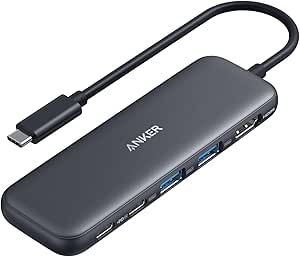 | Best for Everyday Laptop Setups | Ports: 4K HDMI, 1 USB-C data, 2 USB-A data, 1 USB-C PD-IN | Maximum data rate: Up to 5Gbps | Maximum pass-through charging: Up to 85W | VIEW LATEST PRICE | See Our Full Breakdown |
| USB C Hub 9-in-1, 28° Ergonomic Aluminum Hub, 4K@60Hz HDMI, PD 100W |  | Best for a Full Desk Setup | Total functions: 9-in-1 | HDMI: Up to 4K at 60Hz | PD pass-through: Up to 100W | VIEW LATEST PRICE | See Our Full Breakdown |
| Acer 4-Port USB 3.0 Hub with 2 ft Cable and USB-C Power Input |  | Best for Simple USB-A Peripherals | USB-A ports: 4 USB 3.0 | Maximum data rate: Up to 5Gbps | Cable length: 2 ft | VIEW LATEST PRICE | See Our Full Breakdown |
| TP-Link UH720 9-Port Powered USB 3.0 Hub |  | Best for Powered USB-A Expansion | Data ports: 7 USB 3.0 Type-A | Charging ports: 2 USB ports, 5V/2.4A | Upstream interface: USB 3.0 Micro-B | VIEW LATEST PRICE | See Our Full Breakdown |
| USB hub | Ports | Compatibility |
|---|---|---|
| StarTech 4-Port USB-C and USB- | 4 total: 1 USB-C and 3 USB-A 3.0 | — |
| UGREEN 4-Port USB 3.0 Hub | 4 USB-A | — |
| Anker 7-in-1 USB-C Hub with 4K | 7 | Windows and macOS computers with USB-C DP Alt Mode and Power Delivery; USB4 and Thunderbolt 3/4/5 ports |
| intpw 9-Port Powered USB Hub w | — | — |
| Anker 4-Port USB 3.0 Hub with | 4 USB-A | Desktops, laptops, keyboards, mice, and USB flash drives |
| 7-Port USB 3.0 Hub with 4 ft C | 7 USB-A ports | — |
| ACASIS 16-Port Powered USB 3.2 | 16 total: 8 USB-A 3.2 and 8 USB-C 3.2 | Windows XP through Windows 11, macOS, and Linux |
| Wenter 11-Port Powered USB 3.0 | — | — |
| Anker Nano 8-in-1 USB-C Hub wi | — | Windows 10/11, ChromeOS, and compatible USB-C, USB4, or Thunderbolt laptops; not compatible with Linux |
| Belkin F4U042BT Ultra-Slim 4-P | 4 USB 2.0 | — |
| UGREEN 4-Port USB-C 3.2 Hub | 4 USB-C data ports | Windows, macOS, Linux, iPadOS, iOS, Android, and Chrome OS |
| Anker 332 5-in-1 USB-C Hub wit | 4K HDMI, 1 USB-C data, 2 USB-A data, 1 USB-C PD-IN | USB-C, USB4, and Thunderbolt; macOS 12 and newer, Windows 10 and 11, ChromeOS |
| USB C Hub 9-in-1 | — | — |
| Acer 4-Port USB 3.0 Hub with 2 | — | Chrome OS, Linux, Windows 11, and macOS |
| TP-Link UH720 9-Port Powered U | — | Windows, macOS, Linux, and Chrome OS |
More Details on Our Top Picks
StarTech 4-Port USB-C and USB-A Hub with 36W Adapter
I’d choose the StarTech when a desk setup needs both USB-A data ports and USB-C charging without relying on the computer to power everything. Its included 36W adapter lets it operate independently, while the removable two-in-one host cable accommodates USB-C and USB-A computers—a useful flexibility the UGREEN 4-Port USB 3.0 Hub lacks. The tradeoff is that 36W is shared across all ports, so charging several devices at once can divide that capacity; only one USB-A port supports BC 1.2 charging, too. This isn’t the pick for the most ports or fastest transfers: the intpw 9-Port offers more connections and select 10Gbps ports. I’d favor StarTech for a smaller mixed-device setup where powered operation and connection flexibility matter more than maximum throughput.
Pros:- Combines one USB-C and three USB-A data ports.
- Includes a 36W adapter for powered operation, even without a computer connection.
- Removable USB-C/USB-A host cable supports modern and legacy systems.
- Offers USB-C charging up to 15W and BC 1.2 USB-A charging up to 7.5W.
Cons:- The 36W total power budget is shared across all ports.
- Only one USB-A port is specified for BC 1.2 charging.
Best for: People with a mix of USB-A and USB-C peripherals who want a powered desktop hub that can connect to either type of host port.
Not ideal for: Buyers who need high-speed 10Gbps transfers, many simultaneous connections, or substantial charging capacity shared across several devices.
- Ports:4 total: 1 USB-C and 3 USB-A 3.0
- Maximum data rate:Up to 5 Gbps
- Power adapter:36W included
- USB-C charging:Up to 15W
- USB-A charging:Up to 7.5W on one BC 1.2 port
- Host cable:Removable USB-C/USB-A 2-in-1
- Dimensions:4 × 2 × 0.6 in
- Enclosure:Plastic with 70% post-consumer recycled content
Our verdict“Choose the StarTech if you want a powered four-port hub with flexible host connections and a mix of USB-A and USB-C; skip it if you need faster-than-5Gbps data or more charging capacity.”
UGREEN 4-Port USB 3.0 Hub, 0.5 ft
The UGREEN is a straightforward way to turn one USB-A connection into four USB-A data ports, with a short 0.5-foot cable that keeps the hub close to a laptop or desktop. Its plug-and-play setup and support for several operating systems make it a simpler choice than the powered StarTech when a user only needs to attach peripherals such as a mouse, keyboard, or flash drive. It also supports transfers up to 5Gbps, matching the StarTech’s stated data rate without adding a power adapter. That simplicity sets limits: there’s no USB-C port or separate power input, and it’s a data hub rather than a charging solution. Compared with the Anker 4-Port USB 3.0 Hub, the UGREEN’s shorter cable suits a tidy, close-by setup, but offers less reach.
Pros:- Expands one USB-A connection into four USB-A ports.
- Supports data transfers up to 5Gbps.
- Plug-and-play operation requires no additional drivers.
- Compact, lightweight build is easy to carry.
Cons:- Has no USB-C ports.
- No separate power input or charging capability is specified.
- The 0.5-foot cable limits placement away from the computer.
Best for: Laptop users with a USB-A port who want a compact, driver-free way to connect several USB-A peripherals nearby.
Not ideal for: People with a USB-C-only computer, devices that need hub-powered charging, or a workspace where the hub must sit farther from the host.
- Interface:USB 3.0
- Ports:4 USB-A
- Maximum data rate:Up to 5 Gbps
- Cable length:0.5 ft
- Dimensions:3.1 × 0.8 × 0.3 in
- Weight:33 g
- Compatible operating systems:Chrome OS, Linux, Windows 10, and macOS
- Enclosure:Plastic
Our verdict“Pick the UGREEN for a portable, no-fuss expansion of a USB-A computer; choose a powered or USB-C hub if your devices or host require either.”
Anker 7-in-1 USB-C Hub with 4K HDMI, USB-A, USB-C, and SD/TF Card Reader
I’d put the Anker 7-in-1 on a shortlist when one USB-C connection needs to handle an external display, card imports, and everyday peripherals. Its HDMI output supports 4K at 60Hz, while SD and TF slots save space compared with carrying separate readers. That makes it more versatile for a camera workflow than either the UGREEN or Anker four-port USB-A hubs, which focus on peripheral expansion. The distinction between its USB-C ports matters: one accepts power, but the USB-C data port does not output video, so HDMI is the sole display connection. The hub can pass up to 85W to a laptop from a compatible PD charger, but the charger isn’t included. Compared with the powered intpw 9-Port, this Anker trades a large number of desktop connections for video and card access in a compact metal hub.
Pros:- Combines HDMI, USB-A, USB-C data, and SD/TF card slots.
- HDMI supports resolutions up to 4K at 60Hz.
- Passes up to 85W of laptop charging from a compatible PD input.
- Compact metal enclosure brings multiple connection types into one hub.
Cons:- The USB-C data port does not support video output.
- A charger is not included for the PD input.
- Laptop charging output is limited to 85W.
Best for: USB-C laptop owners who connect a 4K display and regularly transfer files from SD or microSD cards.
Not ideal for: Buyers who need multiple video outputs, a hub with an included power adapter, or several high-speed data ports beyond its listed connections.
- Ports:7
- USB-A:2 USB 3.0 ports
- USB-C data:1 port, up to 5Gbps; data only
- HDMI:Up to 4K at 60Hz
- Card slots:SD and TF
- PD input:Up to 100W
- Laptop charging output:Up to 85W
- Compatibility:Windows and macOS computers with USB-C DP Alt Mode and Power Delivery; USB4 and Thunderbolt 3/4/5 ports
- Material and dimensions:Metal; 5.17 × 1.46 × 0.47 in
Our verdict“Choose this Anker if display output and SD/TF card access matter more than a large port count or an included charger.”
intpw 9-Port Powered USB Hub with 10Gbps Data Transfer and 65W Adapter
For a desk with many wired accessories, the intpw stands apart from the four-port hubs by offering nine connections and an included 65W adapter. Its mix includes three 10Gbps data ports, four more USB-A data ports at up to 5Gbps, and two USB-C charging ports rated up to 45W. The angled aluminum body gives this larger hub a desktop role, rather than the grab-and-go appeal of the UGREEN 4-Port. There are important limits behind the port count: the two USB-C charging ports don’t transfer data, the hub offers no video output, and its product guidance advises against charging computers or using multiple SSDs or removable drives at once. I’d choose it over the StarTech when more connections are the priority, but not for a display dock or heavy simultaneous drive workload.
Pros:- Provides nine total ports, including three data ports rated up to 10Gbps.
- Includes a 65W power adapter and a 3.3-foot USB-C cable.
- Two USB-C ports provide up to 45W charging each.
- Angled aluminum design is suited to a stationary desktop setup.
Cons:- Does not support video output.
- USB-C charging ports do not transfer data.
- Not recommended for computer charging or simultaneous use of multiple SSDs or removable drives.
Best for: Desktop users who need numerous USB connections for a mix of peripherals and moderate charging, with a few devices benefiting from 10Gbps data.
Not ideal for: Buyers seeking video output, laptop charging, or reliable simultaneous use of multiple SSDs and removable drives.
- Total ports:9
- 10Gbps data ports:1 USB-C 3.2 and 2 USB-A 3.2
- 5Gbps data ports:4 USB-A 3.0
- USB-C charging ports:2, up to 45W
- Power adapter:65W (20V/3.25A)
- Included cable:3.3 ft USB-C to USB-C
- Enclosure:Aluminum
- Dimensions and weight:2.5 × 1 × 7 in; 0.57 kg
- Operating system compatibility:Linux, macOS, Windows, and iPadOS
Our verdict“Choose the intpw for a powered desktop setup with many peripherals, but skip it if you need display support or demanding multi-drive use.”
Anker 4-Port USB 3.0 Hub with 5Gbps Data Transfer
The Anker 4-Port is a focused pick for adding four USB-A data connections without bringing a power adapter or extra connection types to the desk. It supports transfers up to 5Gbps and has a two-foot cable, giving it more placement flexibility than the short-cabled UGREEN 4-Port. Like that UGREEN model, it suits keyboards, mice, and flash drives; unlike the powered StarTech, it is not designed to charge devices and does not add USB-C ports. The heat-resistant plastic enclosure and light build keep the design simple, though the stated compatibility centers on conventional USB peripherals and computers rather than a broad docking setup. I’d pick it over a feature-rich hub when the need is just USB-A data expansion, but move to the Anker 7-in-1 for HDMI or card slots.
Pros:- Adds four USB-A ports through one computer connection.
- Supports data transfers up to 5Gbps.
- Two-foot cable allows more flexible placement than the UGREEN 4-Port.
- Lightweight plastic enclosure is easy to carry.
Cons:- Not designed to charge connected devices.
- Has USB-A ports only.
- Does not add HDMI or card-reader connections.
Best for: Users with a USB-A computer who need a lightweight hub for keyboards, mice, flash drives, and other data peripherals.
Not ideal for: People who need device charging, USB-C connections, video output, or card-reader slots in the same hub.
- Ports:4 USB-A
- Interface:USB 3.0
- Maximum data rate:Up to 5Gbps
- Cable length:2 ft
- Dimensions:4.23 × 1.23 × 0.39 in
- Weight:1.28 oz
- Compatibility:Desktops, laptops, keyboards, mice, and USB flash drives
- Operating systems:Linux, Windows, and Mac OS X
Our verdict“Choose this Anker for lightweight, longer-reach USB-A data expansion; pick a powered or multi-function hub if you need charging, video, or USB-C.”
7-Port USB 3.0 Hub with 4 ft Cable
I’d choose this hub for a desk setup that needs seven USB-A connections without placing the hub right beside the computer. Its 4 ft cable gives it more placement flexibility than the Wenter 11-Port Powered USB 3.0 Hub’s 3.3 ft computer cable, while USB 3.0 supports transfers up to 5 Gbps. The aluminum enclosure is a sturdier-feeling choice than Wenter’s plastic housing, and the listed operating-system support spans Windows, macOS, Linux, Chrome OS, and Unix.
The tradeoff is power: despite a Type-C port listed at 5V/3A, the product information says the hub does not support charging, so I wouldn’t pick it to power a phone or other device. The listing also gives conflicting operating-system requirements and compatibility details. Choose it for extra peripheral connections and reach, not for charging or a fully clear compatibility specification.
Pros:- Seven USB-A ports add capacity for multiple peripherals.
- Four-foot cable offers flexible placement on a desk.
- Aluminum enclosure is designed to help dissipate heat.
- Plug-and-play compatibility is listed for several operating systems.
Cons:- Does not support charging, limiting its usefulness for powering connected devices.
- Product information conflicts on operating-system requirements and compatibility details.
Best for: Desktop users who need several USB-A peripherals and want extra cable length to position a hub away from the computer.
Not ideal for: Buyers who need device charging, USB-C data ports, or unambiguous operating-system requirements.
- Ports:7 USB-A ports
- Interface:USB 3.0
- Maximum data transfer rate:Up to 5 Gbps
- Cable length:4 ft
- Enclosure:Aluminum, silver
- Type-C port:5V/3A listed
- Charging support:Does not support charging
- Listed compatibility:Windows, Chrome OS, Linux, macOS, Unix; product information contains conflicting requirements and compatibility details
- Dimensions:1.2 × 0.66 × 5.3 in
Our verdict“Pick this for a long-reach, seven-port USB-A desktop setup, but skip it if charging or clear compatibility details matter.”
ACASIS 16-Port Powered USB 3.2 Hub with 8 USB-A and 8 USB-C Ports
For a workstation with a mix of older peripherals and newer USB-C accessories, this ACASIS hub stands apart with 16 ports split evenly between USB-A and USB-C. Its USB 3.2 connections support up to 10 Gbps, twice the stated ceiling of the Wenter 11-Port Powered USB 3.0 Hub. The included 96W power adapter and individual port switches also make it easier to manage a crowded, permanently connected setup without unplugging devices one by one.
That capacity comes with limits. Each device is listed for up to 5V/1.5A, so the adapter should not be mistaken for high-power charging, and the hub does not output video. At 727 g, it is better suited to a fixed desk than travel. I’d choose it over Wenter when USB-C port count and faster data connections matter more than a dedicated charging port; Wenter is the more relevant alternative for that specific need.
Pros:- Sixteen ports provide an even mix of USB-A and USB-C.
- Up to 10 Gbps data transfer is faster than the listed USB 3.0 alternatives.
- Individual switches let users control connected devices without unplugging them.
- Includes a 96W power adapter and an aluminum alloy housing.
Cons:- No video output for connecting an external display.
- Per-device output is limited to up to 5V/1.5A, despite the high-wattage adapter.
- Its 727 g weight and 8.7-inch length make it a desk-focused option.
Best for: Desktop users with many USB-A and USB-C peripherals who want individual port controls and fast data connections.
Not ideal for: Laptop users seeking HDMI display output, high-power device charging, or a lightweight travel hub.
- Ports:16 total: 8 USB-A 3.2 and 8 USB-C 3.2
- Maximum data transfer rate:Up to 10 Gbps
- Power adapter:96 W
- Maximum per-device power:Up to 5V/1.5A
- Port controls:Individual switches
- Video output:Not supported
- Cable:3.3 ft USB-A to USB-C/A
- Compatibility:Windows XP through Windows 11, macOS, and Linux
- Dimensions and weight:8.7 × 2.09 × 0.75 in; 727 g
Our verdict“Choose ACASIS when your priority is a large mix of fast USB-A and USB-C ports, not display output or substantial charging power.”
Wenter 11-Port Powered USB 3.0 Hub with Individual Switches
The Wenter’s main distinction is its combination of 10 USB 3.0 data ports, a separate charging port, and individual switches with LED indicators. That layout suits a desk where peripherals stay connected but are not always in use: I can see each port’s status and switch devices off without reaching for their plugs. Compared with the ACASIS 16-Port Hub, Wenter offers fewer total connections and a lower 5 Gbps data ceiling, but it includes a dedicated charging port rated up to 2.4A per port.
The compromises are its plastic enclosure and a listing that gives two different power-cable lengths, 120 cm and 150 cm. The computer cable is listed as 100 cm, so check whether that reach fits your setup. This is a more practical pick than the seven-port aluminum hub when switched connections and charging matter, but it is less suited to buyers seeking premium housing or 10 Gbps transfers.
Pros:- Combines 10 data ports with one dedicated charging port.
- Individual switches and LED indicators help manage connected devices.
- Supports data transfers up to 5 Gbps.
- Includes a power adapter and a 100 cm computer cable.
Cons:- Plastic enclosure is less substantial than the aluminum housings on the ACASIS and seven-port hubs.
- Power-cable length is inconsistent in the product information.
- Its USB 3.0 data rate is lower than the ACASIS hub’s stated 10 Gbps.
Best for: Home-office users who keep several USB peripherals connected and want individual switches plus a dedicated charging port.
Not ideal for: Buyers who want an aluminum enclosure, USB-C data ports, 10 Gbps transfers, or precise power-cable length information.
- Total ports:11
- Data ports:10 USB 3.0
- Dedicated charging ports:1; up to 2.4A per port
- Maximum data transfer rate:Up to 5 Gbps
- Power adapter:12V/3A
- Port controls:Individual on/off switches with LED indicators
- USB cable length:100 cm (3.3 ft)
- Power cable length:Conflicting details: 120 cm (4 ft) or 150 cm (5 ft)
- Enclosure and compatibility:Plastic; Windows XP and later, Mac OS, Linux 9 and later
Our verdict“Choose Wenter for a powered desk hub with switched data ports and dedicated charging, but not for faster USB 3.2 transfers or premium construction.”
Anker Nano 8-in-1 USB-C Hub with Dual HDMI
This Anker is a different kind of hub from the port-expansion models in this list: it combines dual HDMI, USB-A and USB-C data, SD and TF card readers, and laptop pass-through charging. Its strongest case is a compatible Windows laptop setup that needs two external displays, with support for up to 4K at 60 Hz on both HDMI outputs. The ACASIS 16-Port Hub offers far more USB connections, but no video output; this Anker trades raw port count for display and card-reader flexibility.
Compatibility is the deciding catch. On macOS, the external displays mirror the same content, and Linux is not supported. Full 85W laptop pass-through also requires a separate 100W PD charger and cable, neither included. I’d choose it for a supported Windows laptop and a compact workstation workflow, but skip it if you need independent Mac displays, Linux support, or an all-in-one charging package.
Pros:- Combines two HDMI ports, USB-A and USB-C data ports, and SD and TF readers.
- Supports dual 4K at 60 Hz displays on compatible Windows systems.
- Provides up to 85W laptop pass-through charging with a suitable power setup.
- Aluminum enclosure keeps the multi-function hub relatively light at 3.84 oz.
Cons:- External displays mirror the same content on macOS.
- Not compatible with Linux.
- Full 85W pass-through requires a separate 100W PD charger and cable.
Best for: Windows 10 or 11 laptop users who need two external displays, card readers, USB data ports, and pass-through charging from one hub.
Not ideal for: Linux users, Mac users who need separate content on multiple external displays, or buyers without a compatible USB-C laptop and separate PD charger.
- Total ports:8
- USB data ports:2 USB-A and 2 USB-C, up to 10 Gbps
- Video output:2 HDMI ports, up to 4K at 60 Hz
- Card slots:SD and TF 3.0, up to 104 MB/s
- Laptop charging:Up to 85W pass-through; 100W PD input
- Compatibility:Windows 10/11, ChromeOS, and compatible USB-C, USB4, or Thunderbolt laptops; not compatible with Linux
- macOS display behavior:External monitors mirror the same content
- Enclosure and weight:Aluminum; 3.84 oz
- Dimensions:7.87 × 4.13 × 0.79 in
Our verdict“Pick this Anker for a compatible Windows laptop that needs dual 4K displays and varied connections, but skip it for Linux or extended Mac displays.”
Belkin F4U042BT Ultra-Slim 4-Port USB 2.0 Travel Hub, Black
The Belkin’s appeal is uncomplicated: it adds four USB-A ports in a slim, lightweight form and connects through plug-and-play USB without drivers. For a traveler carrying a keyboard, mouse, or other modest-bandwidth accessories, that can be enough without the extra bulk and feature set of the powered Wenter hub. It also keeps its job narrower than the Anker Nano, which is aimed at USB-C laptops needing display outputs, card readers, and pass-through charging.
The limitation is the USB 2.0 ceiling of 480 Mbps. That is a substantial step down from the 5 Gbps USB 3.0 hubs in this roundup, so large file transfers and faster storage are a poor fit. Its listing names PC and Mac compatibility but also gives a Windows 2000 Professional minimum, so buyers with newer or less common systems may want clearer compatibility information. I’d pick it for basic peripherals, not as a general-purpose high-speed hub.
Pros:- Adds four USB-A ports in a slim travel-oriented design.
- Plug-and-play connection requires no drivers.
- Compatible devices are listed as PC and Mac.
- Lightweight at 0.06 kg.
Cons:- USB 2.0 tops out at 480 Mbps, well below the USB 3.0 and USB 3.2 options in this roundup.
- Product information lists a Windows 2000 Professional minimum requirement, leaving newer-system details unclear.
Best for: PC or Mac users who travel with basic USB-A accessories and want a compact, driver-free way to add four ports.
Not ideal for: Users transferring large files, connecting high-speed storage, or looking for USB-C, charging, or display features.
- Model:F4U042BT
- Ports:4 USB 2.0
- Maximum data transfer rate:Up to 480 Mbps
- Compatible devices:PC and Mac
- Enclosure:Composite
- Color:Black
- Dimensions:5.1 × 4.1 × 1.1 in
- Weight:0.06 kg
- Warranty:2-year manufacturer warranty
Our verdict“Choose the Belkin for lightweight travel and basic USB-A accessories, but pick a USB 3.0 hub for fast storage or frequent file transfers.”
UGREEN 4-Port USB-C 3.2 Hub, 10Gbps Data Transfer
I’d pick the UGREEN CM806 when the main problem is running out of USB-C data ports, not missing HDMI or USB-A connections. Its four USB-C ports support up to 10Gbps, making it a better match for fast USB-C drives and accessories than hubs limited to 5Gbps, such as the Anker 332. Setup is plug-and-play, and the aluminum body is compact enough for a mobile kit. The tradeoff is strict: these ports handle data only, so they cannot charge devices or send video to a display. Buyers who need a more general-purpose laptop dock should look at the Anker 332 or the larger 9-in-1 ergonomic hub instead. I’d also treat the listed size and weight cautiously because they conflict with the description’s measurements.
Pros:- Adds four USB-C data ports through one host connection.
- Supports data transfer up to 10Gbps.
- Plug-and-play operation across a broad range of listed operating systems.
- Compact aluminum enclosure.
Cons:- USB-C ports do not support video output or charging.
- Provides no USB-A ports for older peripherals.
- Product dimensions and weight conflict between the description and listed item measurements.
Best for: Laptop and tablet users who need several fast USB-C data connections for drives and peripherals.
Not ideal for: Anyone who needs HDMI output, USB-A ports, or charging through the hub; its USB-C ports are data-only.
- Ports:4 USB-C data ports
- Maximum data rate:Up to 10Gbps
- Host interface:USB-C
- Cable length:0.3 ft
- Enclosure:Aluminum
- Compatibility:Windows, macOS, Linux, iPadOS, iOS, Android, and Chrome OS
Our verdict“Choose the UGREEN CM806 for fast USB-C data expansion, but skip it if you need a display connection or charging.”
Anker 332 5-in-1 USB-C Hub with 4K HDMI
The Anker 332 is the more balanced choice for a laptop user who needs a display, legacy USB accessories, and power passthrough in one compact hub. It combines HDMI up to 4K at 30Hz with two USB-A data ports, a USB-C data port, and a separate PD-IN charging connection that passes through up to 85W. That makes it more versatile for a desk setup than the data-only UGREEN CM806, though it offers fewer ports and tops out at 5Gbps for data. The HDMI refresh rate is best suited to productivity and video rather than high-refresh gaming. I’d also rule it out for Linux systems, and its USB-C PD-IN port cannot transfer data or output video.
Pros:- Combines HDMI, USB-C data, two USB-A data ports, and charging passthrough.
- Supports HDMI output up to 4K at 30Hz.
- Passes through up to 85W of charging power.
- Works with USB-C, USB4, and Thunderbolt connections.
Cons:- Not compatible with Linux.
- Data transfer is limited to 5Gbps, below the UGREEN CM806’s 10Gbps.
- The USB-C PD-IN port is for charging only, and the USB-C ports do not provide video output.
Best for: Windows, macOS, or ChromeOS laptop owners who want HDMI, USB-A peripherals, USB-C data, and charging passthrough in one hub.
Not ideal for: Linux users, high-refresh display users, and anyone who needs the PD-IN port to carry data.
- Ports:4K HDMI, 1 USB-C data, 2 USB-A data, 1 USB-C PD-IN
- Maximum data rate:Up to 5Gbps
- Maximum pass-through charging:Up to 85W
- HDMI output:Up to 4K at 30Hz
- Compatibility:USB-C, USB4, and Thunderbolt; macOS 12 and newer, Windows 10 and 11, ChromeOS
- Linux support:Not compatible
- Dimensions and weight:4.78 x 1.59 x 0.45 in; 1.44 oz
Our verdict“Choose the Anker 332 for a practical laptop mix of HDMI, USB-A, USB-C data, and passthrough charging if you do not use Linux.”
USB C Hub 9-in-1, 28° Ergonomic Aluminum Hub, 4K@60Hz HDMI, PD 100W
For a workstation where card readers, multiple USB-A devices, an external display, and laptop charging all need to coexist, this 9-in-1 aluminum hub offers the broadest mix among these five picks. Its 4K at 60Hz HDMI output is a step up from the Anker 332’s 4K at 30Hz, while SD/TF slots and five USB-A ports add flexibility the Anker does not provide. The 28-degree angled design is intended to make its connections easier to reach, but this is a desk-oriented unit rather than a pocket hub: its listed footprint is notably larger than the Anker 332’s. USB-C data is limited to 5Gbps, and the 100W PD connection is for charging passthrough, not data or video. Video also depends on a compatible USB-C DP Alt Mode or Thunderbolt host, and no power adapter is included.
Pros:- Provides HDMI, multiple USB ports, SD/TF slots, and power passthrough in one hub.
- Supports 4K HDMI output at 60Hz.
- Offers up to 100W PD pass-through charging.
- Aluminum unibody and angled layout suit a fixed desk setup.
Cons:- Larger and heavier than compact options such as the Anker 332.
- PD port does not support data transfer or video output.
- Power adapter is not included, and HDMI requires DP Alt Mode or Thunderbolt support from the host.
Best for: Laptop-based desk users who regularly connect a 4K display, USB-A accessories, memory cards, and a charger.
Not ideal for: Travelers seeking a small hub, or users whose USB-C device lacks DP Alt Mode or Thunderbolt video support.
- Total functions:9-in-1
- HDMI:Up to 4K at 60Hz
- PD pass-through:Up to 100W
- USB-C data:Up to 5Gbps
- USB-A ports:3 USB 3.0 and 2 USB 2.0
- SD/TF slots:Up to 104MB/s
- Cable length:19.7 in
- Dimensions and weight:8.27 x 4.72 x 2.2 in; 0.25 kg
- Material:Aluminum
Our verdict“Pick this 9-in-1 hub for a feature-rich desk setup with 4K at 60Hz and card readers, not for lightweight travel.”
Acer 4-Port USB 3.0 Hub with 2 ft Cable and USB-C Power Input
The Acer 4-Port USB 3.0 Hub keeps the job straightforward: it adds four USB-A connections for a keyboard, mouse, printer, or flash drive without turning into a charging or display dock. Its two-foot cable gives more placement flexibility than the short-cabled UGREEN CM806, especially when a laptop sits off to the side of a desk. Data runs up to 5Gbps, which is enough for everyday peripherals but slower than the UGREEN’s 10Gbps USB-C ports. A USB-C input can help stabilize hard-drive transfers, but it supplies power only; the adapter and cable are not included. I’d choose the Acer for a simple, lightweight USB-A setup, not for charging phones or expanding USB-C connectivity.
Pros:- Adds four USB-A 3.0 data ports.
- Supports transfer speeds up to 5Gbps.
- Two-foot cable offers more placement range than short-cable hubs.
- Lightweight, plug-and-play design with an indicator light.
Cons:- USB-C port is power input only and cannot transfer data or charge connected devices.
- A separate 5V USB-C power source may be needed for steadier hard-drive transfers.
- Power adapter and cable are not included.
Best for: Users with a laptop or desktop who need four USB-A ports for everyday peripherals and want a longer cable for placement.
Not ideal for: Anyone who needs USB-C data, video output, device charging, or a powered setup ready to use without sourcing an additional power supply.
- USB-A ports:4 USB 3.0
- Maximum data rate:Up to 5Gbps
- Cable length:2 ft
- Power input:5V USB-C
- USB-C port function:Power input only
- Dimensions and weight:4.13 x 1.18 x 0.35 in; 1.6 oz
- Compatibility:Chrome OS, Linux, Windows 11, and macOS
Our verdict“Choose the Acer for straightforward USB-A peripheral expansion and a longer cable, but not for charging or USB-C features.”
TP-Link UH720 9-Port Powered USB 3.0 Hub
When a desktop setup needs many USB-A connections and separate device charging, the TP-Link UH720 is the strongest fit here: it provides seven data ports plus two dedicated 5V/2.4A charging ports. Unlike the Acer hub, it includes its power adapter, so it is designed to stay in place and supply external power rather than travel light. The power button and listed electrical protections add useful control for a busy peripheral setup. Its 5Gbps data ceiling matches the Acer’s, not the UGREEN CM806’s 10Gbps, and the charging ports cannot sync data. The hub also uses a USB 3.0 Micro-B upstream connection, so check that this works with your host and cable needs. Some 2.4GHz wireless adapters may also behave poorly near USB 3.0 devices.
Pros:- Seven USB 3.0 data ports plus two dedicated charging ports.
- Includes a 12V/4A power adapter and a physical power button.
- Plug-and-play support for Windows, macOS, Linux, and Chrome OS.
- Listed protection against overheating, overload, overvoltage, short circuits, and surges.
Cons:- Requires the included power adapter and is less suited to travel than the Acer hub.
- Charging ports do not transfer data, while data ports are intended for data rather than charging.
- Some 2.4GHz wireless adapters may not work reliably near USB 3.0 devices.
Best for: Desktop users with several USB-A data devices and separate phones or accessories to charge from a powered hub.
Not ideal for: Travelers, USB-C-only laptop owners, and users who need charging and data transfer through the same ports.
- Data ports:7 USB 3.0 Type-A
- Charging ports:2 USB ports, 5V/2.4A
- Upstream interface:USB 3.0 Micro-B
- Maximum data rate:Up to 5Gbps
- Power adapter:12V/4A included
- Compatibility:Windows, macOS, Linux, and Chrome OS
- Dimensions and weight:7.8 x 5.8 x 2.8 in; 500 g
- Warranty:2 years
Our verdict“Choose the TP-Link UH720 for a stationary setup that needs numerous powered USB-A connections and separate charging ports.”

How We Picked
I compared these hubs by the jobs they can handle, rather than ranking them by port count alone. The main criteria were connection types and data speed, whether the hub needs or includes external power, cable reach, and added functions such as HDMI, SD card readers, or individual switches. I also weighed practical fit: a travel hub should be compact and easy to place, while a desk hub should offer the ports and power arrangement a multi-device setup needs.
The ranking gives priority to useful flexibility for the widest range of buyers, then recognizes models that serve a narrower need particularly well. A powered hub can rank above a basic splitter for a busy desk, but it is not automatically the better pick for someone carrying a laptop. Likewise, USB-C docks with video outputs are judged as multifunction adapters, not as direct substitutes for high-port-count USB-A hubs. Every choice has a tradeoff, including speed limits, format, power requirements, or fewer connections.
Factors to Consider When Choosing Best USB Hubs
Before choosing from these hubs, I’d start with the devices you need to connect and the job each connection must do. That prevents a common mismatch: buying a hub with plenty of ports that lack the right connector, speed, power, or video support.
Count the ports you need by type, not just total
Make a short list of the devices you connect at the same time, then separate them into USB-A, USB-C, display, and card-reader needs. A hub advertising many ports may still leave you short if most connections are the wrong type for your accessories. Allow some room for a new peripheral, but avoid paying in space and complexity for ports that will sit unused. USB-A remains common for mice, keyboards, and many storage devices; USB-C can be useful for newer accessories but does not automatically provide video or charging. Check whether a USB-C port is for data, power input, or both. That distinction matters more than the connector’s shape.
Match data speed to the devices that use it
A hub’s stated speed describes its connection standard, not a promise that every attached device will transfer data at that rate. The host computer, cable, device, and other activity on the hub can all affect throughput. For keyboards and basic office peripherals, a slower connection is rarely a practical problem. For external storage or frequent large file transfers, USB 3.x and higher-speed USB-C hubs are a better starting point. Check the exact port specification rather than assuming all ports on a hub share the same speed. Also remember that a hub’s connected devices may share its link to the computer.
Decide whether external power fits your setup
Bus-powered hubs draw power from the computer, which keeps a small setup tidy and portable. That arrangement may not suit several power-hungry devices connected at once, particularly if the computer’s port has limited output. A powered hub uses an adapter to supply power independently, making it a stronger fit for a stationary setup with many connected devices. External power adds another cable and takes up outlet space, so it is not an automatic upgrade. Check whether the included adapter powers the hub’s ports or also supports laptop charging; those are different functions. Do not assume a hub can charge a laptop just because it has a USB-C power input.
Treat HDMI and charging as separate compatibility checks
USB-C hubs with HDMI can reduce the number of adapters needed, but display output depends on the laptop’s USB-C capabilities and the hub’s specifications. Confirm the supported resolution and refresh rate for the display you plan to use, especially if smooth motion or a high-resolution monitor matters. Multiple HDMI ports do not guarantee that a laptop can drive multiple independent displays; operating system and hardware limits can restrict that. Power delivery figures describe a maximum input or pass-through capability, not necessarily the power that reaches the laptop after the hub uses some. Check your laptop’s charging needs and the hub’s own power requirements together. If you only need extra data ports, paying for video functions may add bulk without helping your setup.
Choose cable length and layout for where the hub will sit
A short cable can keep a travel hub close to a laptop, but it may leave a desk hub dangling from a port or awkwardly placed among peripherals. Longer cables help position connections within reach, though they can add clutter when the computer and accessories sit side by side. Consider where the host computer’s ports are and whether nearby cables will block neighboring connections. A compact body is useful in a laptop bag, while a larger powered unit may be easier to manage as a permanent desk fixture. If you regularly plug and unplug devices, access to the hub’s ports matters as much as its total count. Plan for the actual desk or travel layout, not just the product’s size on paper.
Pay for control features only when they solve a real problem
Individual switches can make it easier to disconnect accessories without pulling cables, which may help in a setup with devices that stay attached. They also add controls and potential clutter that a simple keyboard-and-mouse setup does not need. Card readers are useful when your workflow includes camera or removable media; otherwise, they take space that could go to data ports. A hub with several functions can simplify a laptop bag, but a specialized dock may be a better match if video and charging are central to your routine. The best value is not the hub with the longest feature list. It is the one that replaces adapters or solves a connection problem you actually have.
Frequently Asked Questions
Will any USB-C hub work with my laptop’s USB-C port?
No. USB-C describes the connector, but laptop ports can support different data, charging, and video capabilities. A basic USB-C data hub may work for peripherals without supporting an HDMI display or laptop charging. Check your laptop’s specifications for USB data speed, DisplayPort video support, and power delivery, then compare them with the hub’s stated functions. If the port’s capabilities are limited, a feature-rich hub cannot add functions the laptop does not provide.
Should I get a powered hub for an external hard drive?
It depends on the drive and what else you plan to connect. A small, bus-powered drive may work through a simple hub, but several attached devices can compete for power from the computer. A powered hub is a safer fit for a stationary setup with multiple devices or accessories that draw more power. Check the drive maker’s power requirements and the hub’s adapter specifications rather than relying on port count. If you only connect one low-power drive at a time, an adapter-powered model may be more equipment than you need.
Can I use a USB hub to connect two monitors?
Only if both the hub and computer support the required display arrangement. Dual HDMI connectors by themselves do not guarantee two independent displays; the computer’s graphics hardware, USB-C video support, and operating system can affect what works. Look for the hub’s supported display modes and check whether its outputs can run simultaneously at the resolution and refresh rate you need. Some hubs mirror the same image rather than extending the desktop. Confirm compatibility before choosing a hub mainly for multiple screens.
Does a USB hub reduce the speed of connected devices?
A hub shares its connection to the computer among attached devices, so simultaneous transfers can affect each other. A hub with a higher stated data rate offers more bandwidth for compatible devices, but the computer port, cables, and peripherals must support that rate too. Everyday accessories such as a mouse or keyboard use little bandwidth, so sharing is unlikely to matter for them. Large file transfers from multiple drives are more likely to expose the limit. For that kind of workload, check the speed of each port and the hub’s upstream connection.
Is an older USB 2.0 travel hub enough for a laptop bag?
It can be enough if you mainly connect low-bandwidth accessories such as a mouse, keyboard, or basic printer. It is a poor match for regular large-file transfers or high-speed external storage, where USB 3.x hubs are a better fit. Also check whether its ports match your devices and whether the hub’s cable and layout work with your laptop. A slim travel model may be more convenient than a powered desk hub, but convenience does not compensate for a speed limit that conflicts with your routine. Choose based on the devices you carry, not travel use alone.
Conclusion
For the broadest mix of ports and independent power, I’d choose the intpw 9-Port Powered USB Hub as the best overall pick. The UGREEN 4-Port USB 3.0 Hub is my best value-style choice for a straightforward USB-A expansion, while the Anker Nano 8-in-1 is the premium fit for laptop users who need dual HDMI and a wider mix of connections. Beginners with a few standard peripherals can start with the Anker 4-Port USB 3.0 Hub for a simple setup. For specific needs, choose the ACASIS 16-Port for a high-count desk arrangement, the Belkin USB 2.0 Travel Hub for basic travel peripherals, or the UGREEN 4-Port USB-C 3.2 Hub when fast USB-C data matters more than video features. Match the hub to your devices and placement first; more ports only help when they are the right ports.