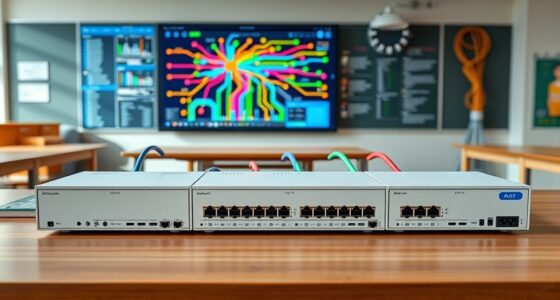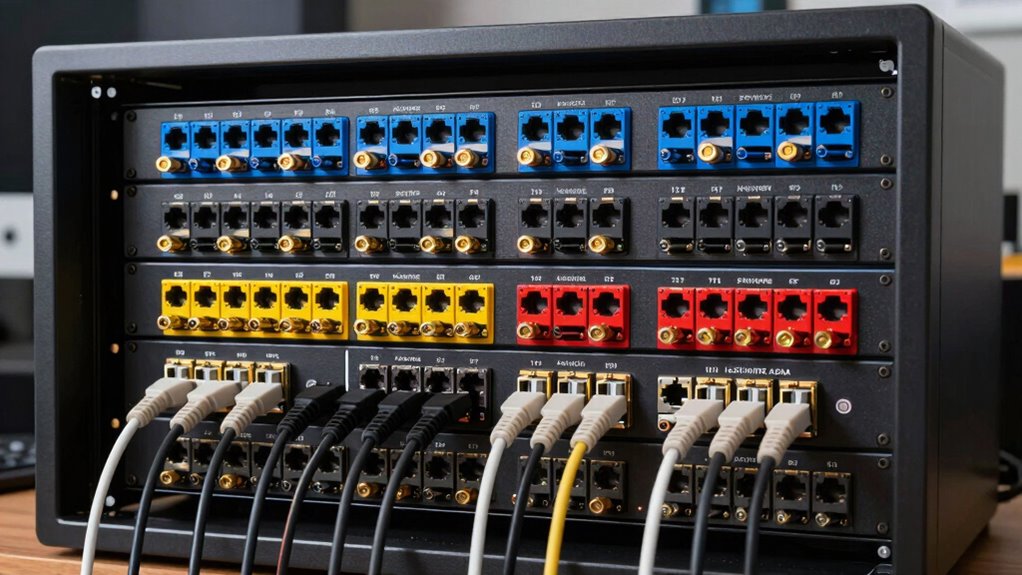

For most home racks, I’d start with the Cable Matters 1U 24-Port Keystone Patch Panel with Cable Management: its 24-port format and included management features suit a typical full-width rack. The Jadaol 1U 24-Port Blank Panel is a strong alternative if a back bar matters, while the Tecmojo 0.5U 12-Port Panel suits a compact 10-inch cabinet. The main tradeoffs are rack width and height, whether you want a blank panel with separate keystone jacks or a panel with inline couplers, and how much cable support you need behind it. Match the panel to your rack and chosen cabling before deciding by port count alone. Read on for the full comparison and guidance by setup.

Get business pricing on networking and server gear
- Business-only prices and quantity discounts
- Tax-exempt purchasing
- Multiple users, one account, clear invoices
Key Takeaways
- 24-port, 1U panels dominate the full-width rack options, but the Cable Matters model’s cable management and the Jadaol model’s back bar offer different approaches to supporting cable runs.
- Blank keystone panels let you choose compatible jacks, while inline-coupler panels such as the Rapink and Tecmojo reduce the need to buy and install individual keystones.
- Half-width and 0.5U panels address a different constraint than standard 19-inch 1U designs: the Tecmojo targets 10-inch cabinets, and the GeeekPi is aimed at DeskPi RackMate and other 10-inch racks.
- Port count is not the same as usable capacity; a 12-port panel can be a better fit than a 24-port panel when rack width, cable routing, or future expansion space is limited.
- Cat6A and 10Gbps labels do not make every part of a network 10Gbps-ready; the connected cable, keystones or couplers, switch ports, and installation quality also affect the result.
| Cable Matters 1U 24 Port Keystone Patch Panel with Cable Management |  | Best Overall for Flexible Home-Rack Builds | Ports: 24 | Height: 1U | Mounting: Rackmount or wall mount | VIEW ON AMAZON | See Our Full Breakdown |
| 1U Hinged 16 Port Blank Keystone Patch Panel, Steel |  | Best for Rear Access and Maintenance | Ports: 16 | Rack format: 19-inch, 1U | Port opening: 0.768 in high × 0.57 in wide | VIEW ON AMAZON | See Our Full Breakdown |
| Jadaol 24 Port Patch Panel Rackmount or Wall Mount 19-Inch 1U |  | Best Plug-and-Play Pass-Through Panel | Ports: 24 | Mounting: Rack mount or wall mount | Rack format: 19-inch, 1U | VIEW ON AMAZON | See Our Full Breakdown |
| iwillink 12 Port Keystone Patch Panel with Wall Mount Bracket |  | Best for Small Wall-Mounted AV and Network Setups | Ports: 12 | Mounting: Wall mount; also described as suitable for standard 10-inch racks | Material: Metal | VIEW ON AMAZON | See Our Full Breakdown |
| Tecmojo 12-Port Cat6 Patch Panel, 0.5U Rack Mount Modular Panel with Keystone Coupler, for 10″ Server Rack & Network Cabinet, Black |  | Best for 10-Inch Home Racks | Ports: 12 | Rack height: 0.5U | Rack compatibility: 10-inch racks and network cabinets | VIEW ON AMAZON | See Our Full Breakdown |
| Rapink 24 Port Cat6 Patch Panel with Inline Keystone and 10G Support, 19-Inch UTP Network Panel | 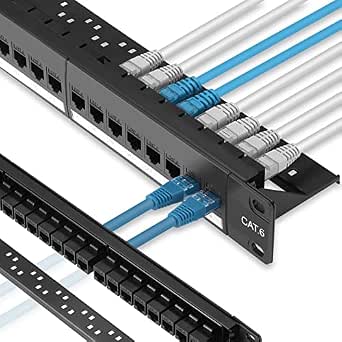 | Best for Tool-Less Setup | Ports: 24 | Cable category: Cat6 | Listed speed support: 10G | VIEW ON AMAZON | See Our Full Breakdown |
| Jadaol 1U 24 Port 10Gbps Blank Patch Panel with Cable Management & Back Bar |  | Best for Mixed-Media Custom Builds | Ports: 24 | Rack size: 1U | Compatible inserts: Standard keystone jacks, including Cat6A, Cat6, Cat5e, HDMI, USB, fiber, coax, and audio | VIEW ON AMAZON | See Our Full Breakdown |
| Cable Matters 10Gbps 1U 24-Port Cat6A Ethernet Patch Panel |  | Best Shielded Cat6A Pick | Ports: 24 | Rack size: 1U | Cable category and shielding: Cat6A STP | VIEW ON AMAZON | See Our Full Breakdown |
| TRENDnet 24-Port Blank Keystone 1U Patch Panel, TC-KP24 |  | Best for a Simple, Branded Ethernet Build | Ports: 24 | Rack format: 19-inch, 1U metal rackmount | Material: SPCC steel | VIEW ON AMAZON | See Our Full Breakdown |
| GeeekPi 12 Port CAT6 Network Patch Panel, 10-inch 0.5U for DeskPi RackMate and 10 Inch Server Racks |  | Best Compact 10-Inch Rack Pick | Ports: 12 | Rack size: 10 inches, 0.5U | Cable type: Cat6 | VIEW ON AMAZON | See Our Full Breakdown |
| keystone patch panels for home rack | Ports | Mounting | Material | Weight |
|---|---|---|---|---|
| Cable Matters 1U 24 Port Keyst | 24 | Rackmount or wall mount | Heavy-duty, flame-retardant powder-coated steel | — |
| 1U Hinged 16 Port Blank Keysto | 16 | Rack mount | Cold-rolled steel with powder coating | 0.32 kg |
| Jadaol 24 Port Patch Panel Rac | 24 | Rack mount or wall mount | — | 16 ounces |
| iwillink 12 Port Keystone Patc | 12 | Wall mount; also described as suitable for standard 10-inch racks | Metal | 0.28 kg |
| Tecmojo 12-Port Cat6 Patch Pan | 12 | — | Alloy steel | 4.8 ounces |
| Rapink 24 Port Cat6 Patch Pane | 24 | Wall mount | Steel | — |
| Jadaol 1U 24 Port 10Gbps Blank | 24 | Rack mount or wall mount | Heavy-duty steel | — |
| Cable Matters 10Gbps 1U 24-Por | 24 | Rack mount or wall mount | — | 1.9 pounds |
| TRENDnet 24-Port Blank Keyston | 24 | — | SPCC steel | — |
| GeeekPi 12 Port CAT6 Network P | 12 | — | — | 5.9 ounces |
More Details on Our Top Picks
Cable Matters 1U 24 Port Keystone Patch Panel with Cable Management
I’d put this panel first for a home rack that may carry more than Ethernet. Its 24 keystone openings accept a broad mix of listed connector types, including RJ45, coax, HDMI, USB, and fiber, so one rack space can organize network and AV runs together. The removable cable support bar also gives incoming wiring a place to sit rather than leaving the connectors to bear the strain. Unlike the Jadaol 24-port pass-through panel, this is a blank panel: you choose the jacks, but you also need to install them and terminate or connect them as appropriate. Rack or wall mounting adds flexibility, though the product details don’t specify the included mounting hardware. Its steel construction makes it a sensible central panel, but buyers should check individual jack fit before committing to a mixed-connector layout.
Pros:- 24 openings provide more capacity than the 12-port iwillink and Tecmojo panels.
- Supports a broad range of listed keystone connector types, beyond Ethernet alone.
- Removable cable support bar helps organize and support the rear cabling.
- Can be mounted in a rack or on a wall.
Cons:- Keystone jacks are not listed as included, so the finished panel requires separate parts.
- Blank-panel installation calls for more setup than the Jadaol pass-through option.
- Specific fit details for individual keystone jacks are not provided.
Best for: Home-rack owners who want one 24-port panel for a mix of Ethernet, AV, coax, or other keystone-based connections.
Not ideal for: Buyers who want a ready-to-connect Ethernet panel or do not want to source and fit keystone jacks separately.
- Ports:24
- Height:1U
- Mounting:Rackmount or wall mount
- Material:Heavy-duty, flame-retardant powder-coated steel
- Compatible keystone types:RJ45, RG6 coaxial, HDMI, banana jack, 3.5 mm, USB, and fiber
- Cable management:Removable cable support bar with port labels
- Color:Black
Our verdict“Choose this panel if you want 24 flexible keystone positions and cable support for a mixed-use home rack.”
1U Hinged 16 Port Blank Keystone Patch Panel, Steel
The distinguishing feature here is access: hinged sides are intended to make maintenance and cable management easier than on a fixed blank panel. That can be useful in a home rack where the panel sits close to a wall or where you expect to rearrange connections. Its 16 openings split the difference between the 12-port compact panels and the 24-port Cable Matters panel, while the 19-inch, 1U format suits a standard full-width rack. This is a blank keystone panel, not a preloaded Ethernet solution, so you supply the jacks and handle their installation. The cold-rolled, powder-coated steel construction favors a straightforward rack component, but the listed mounting is rack-only. I’d choose it over the Cable Matters option when hinged access matters more than wall-mount flexibility or maximum port count.
Pros:- Hinged sides are designed to ease access for maintenance.
- 16 openings offer more room than the 12-port iwillink and Tecmojo panels.
- Standard 19-inch, 1U rack format suits full-width racks.
- Powder-coated cold-rolled steel construction.
Cons:- Rack mounting only; it does not offer the wall-mount option listed for the Cable Matters panel.
- Keystone jacks are not included.
- Its 16-port capacity is below the 24-port Cable Matters and Jadaol panels.
Best for: Home-rack owners with a standard 19-inch rack who expect to access or rearrange the panel’s cabling after installation.
Not ideal for: Wall-mounted network setups, buyers needing more than 16 ports, or anyone seeking included Ethernet jacks.
- Ports:16
- Rack format:19-inch, 1U
- Port opening:0.768 in high × 0.57 in wide
- Mounting:Rack mount
- Material:Cold-rolled steel with powder coating
- Color:Black
- Weight:0.32 kg
Our verdict“Pick this blank panel if hinged service access in a 19-inch rack matters more than port count or wall-mount flexibility.”
Jadaol 24 Port Patch Panel Rackmount or Wall Mount 19-Inch 1U
This Jadaol suits buyers who prefer connecting pre-terminated Ethernet cables over fitting and wiring individual keystone jacks. Its 24 RJ45 pass-through couplers provide a simple front-to-back connection path, and the listed support for up to 10Gbps with Cat6 gives a clear performance target for a home network. Compared with the Cable Matters blank panel, there is less jack selection and installation work; compared with the 16-port hinged panel, it offers more ports but not the same described hinged access. The tradeoff is fundamental: this is not a punch-down panel, so it won’t accept bare cable terminations directly. Rack and wall mounting broaden placement options, but the supplied details don’t give a rack depth or cable-management hardware specifics. I’d favor it for a patch-cable-based setup, not a structured-wiring job ending in unterminated cable.
Pros:- 24 RJ45 pass-through connections suit a larger home network.
- Tool-free connections work with pre-terminated Ethernet cables.
- Listed support for up to 10Gbps with Cat6.
- Can be rack-mounted or wall-mounted.
Cons:- Does not provide punch-down connections for bare cable.
- Less adaptable to mixed AV or non-RJ45 jacks than the Cable Matters blank panel.
- Requires pre-terminated Ethernet cables for its intended connection method.
Best for: Home network owners using pre-terminated Ethernet patch cables who want 24 ports and a pass-through connection style.
Not ideal for: Installers terminating bare in-wall cable at the panel or anyone who needs a blank panel for mixed keystone types.
- Ports:24
- Mounting:Rack mount or wall mount
- Rack format:19-inch, 1U
- Connection type:RJ45 pass-through couplers
- Listed performance:Up to 10Gbps with Cat6 cables
- Frame and panel materials:Cold-rolled steel frame, ABS panel, and polycarbonate
- Weight:16 ounces
Our verdict“Choose this Jadaol when you want 24 ready-to-use Ethernet pass-through ports and already use pre-terminated patch cables.”
iwillink 12 Port Keystone Patch Panel with Wall Mount Bracket
For a modest home network or a room-level AV installation, 12 ports can be a better fit than filling a 1U, 24-port panel. This iwillink panel accepts listed HDMI, USB, and Ethernet keystone types, with a snap-in design that keeps setup simpler than wiring a bare-cable punch-down panel. The included six blank inserts can cover openings you leave unused, a practical detail for a partially populated installation. Unlike the rack-focused 16-port hinged panel, this model is described for a wall-mount setup and is also suited to standard 10-inch racks; its smaller capacity is the tradeoff. The product information does not specify a 19-inch rack fit, so owners of full-width racks should check dimensions and mounting compatibility before buying. I’d shortlist it when a compact, mixed-connection wall panel matters more than expansion headroom.
Pros:- Accepts listed HDMI, USB, CAT6A, CAT6, and CAT5e keystone types.
- Snap-in design avoids a more involved panel assembly process.
- Six blank inserts cover unused openings.
- Numbered ports support basic cable organization.
Cons:- 12-port capacity leaves less room to expand than the 16- and 24-port options.
- The supplied details do not establish compatibility with a standard 19-inch rack.
- Keystone jacks are not listed as included.
Best for: Homeowners organizing up to 12 network or AV runs near a media area, especially in a wall-mounted or 10-inch-rack setup.
Not ideal for: Owners of expanding 19-inch racks or anyone who needs 16 or more connections in one panel.
- Ports:12
- Mounting:Wall mount; also described as suitable for standard 10-inch racks
- Material:Metal
- Compatible keystone types:HDMI, CAT6A, CAT6, CAT5e, and USB
- Included inserts:6 blank keystone inserts
- Weight:0.28 kg
- Color:Black
Our verdict“Choose the iwillink for a compact wall-mounted or 10-inch-rack installation with a small mix of network and AV connections.”
Tecmojo 12-Port Cat6 Patch Panel, 0.5U Rack Mount Modular Panel with Keystone Coupler, for 10″ Server Rack & Network Cabinet, Black
Most of the larger panels here target standard 19-inch racks; Tecmojo is the purpose-built choice for a 10-inch rack or network cabinet. Its 12 Cat6 ports fit a compact setup, while the modular design allows individual ports to be replaced rather than treating the whole panel as a single fixed unit. Clear labeling also helps when tracing connections in a small cabinet where ports sit close together. Compared with the iwillink, this is more specifically described for 10-inch racks and Ethernet, while the iwillink offers a broader listed mix of AV keystone types. The compact 0.5U format conserves rack space, but its 12-port capacity and stated 10-inch compatibility make it a poor match for a growing 19-inch rack. The supplied data lists Cat6 and gigabit connectivity, not a 10Gbps claim.
Pros:- Designed for 10-inch racks and network cabinets.
- 0.5U height conserves space in a compact rack.
- Modular ports can be replaced individually.
- Clear labeling aids cable identification.
Cons:- Not suitable for 19-inch racks, unlike the 16- and 24-port rack panels.
- 12-port capacity may limit expansion.
- Ethernet-focused design is less flexible for AV connectors than the iwillink.
Best for: Owners of 10-inch home racks or network cabinets who need a compact, labeled 12-port Cat6 panel with replaceable ports.
Not ideal for: Buyers with standard 19-inch racks, mixed AV connections, or a need for more than 12 Ethernet ports.
- Ports:12
- Rack height:0.5U
- Rack compatibility:10-inch racks and network cabinets
- Network type:Cat6 Ethernet
- Material:Alloy steel
- Dimensions:1.2 in deep × 9.92 in wide × 0.86 in high
- Weight:4.8 ounces
- Warranty:3 years
Our verdict“Choose Tecmojo if your home rack is 10 inches wide and you want a compact, labeled Cat6 panel with modular ports.”
Rapink 24 Port Cat6 Patch Panel with Inline Keystone and 10G Support, 19-Inch UTP Network Panel
The Rapink is a practical fit for a home rack owner who wants 24 populated RJ45 connections without sourcing keystone inserts separately. Its tool-less, pass-through design can simplify initial setup compared with the blank Jadaol 1U 24 Port panel, which requires you to buy compatible jacks. The removable back bar gives cable runs a support point and leaves room to reorganize as the rack grows. Rapink lists 10G support, but this is a Cat6 UTP panel, not the shielded Cat6A option offered by Cable Matters; buyers planning a noise-prone or especially demanding installation should compare those approaches carefully. The tradeoff is a more specialized, indoor-focused setup and less flexibility for mixing in HDMI, coax, or other keystone types. It also assumes some networking know-how for tidy termination and configuration.
Pros:- 24 RJ45 ports provide capacity for a larger home network.
- Tool-less, pass-through design can make connections simpler than a blank panel that needs separate keystones.
- Removable back bar supports cable organization and later changes.
- Steel construction and gold-plated contacts are specified.
Cons:- Cat6 UTP construction is less suited than a shielded Cat6A panel to installations where shielding is a priority.
- Indoor-use limitation rules it out for exposed or outdoor placements.
- Optimal setup may require networking knowledge.
Best for: Home rack owners who need 24 RJ45 ports, prefer tool-less connections, and want a removable bar to manage cable runs.
Not ideal for: Buyers building a mixed media panel or seeking a shielded Cat6A design; the Rapink is an indoor Cat6 UTP option centered on RJ45 connections.
- Ports:24
- Cable category:Cat6
- Listed speed support:10G
- Connector type:RJ45
- Length:19 inches
- Mounting:Wall mount
- Material:Steel
- Back bar:Removable
Our verdict“Choose the Rapink if you want a 24-port RJ45 panel with tool-less connections and a removable cable bar, rather than a blank, mix-and-match keystone panel.”
Jadaol 1U 24 Port 10Gbps Blank Patch Panel with Cable Management & Back Bar
For a home rack that carries more than Ethernet, this blank Jadaol gives you 24 standard keystone openings for a custom mix of network, audio, and video connections. That flexibility sets it apart from the RJ45-focused Rapink 24 Port Cat6 panel, which is more ready to connect but less adaptable to other connector types. Jadaol also includes numbered ports, writable labels, cable management, and a removable rear support bar—useful details when a rack has many runs to trace. The main tradeoff is that keystone jacks are not included, so the panel is not a complete patching solution out of the box. A beginner who wants to connect cables right away may find the Rapink or Cable Matters Cat6A panel a more direct route. Buyers also need to choose inserts that fit their wiring plan.
Pros:- Accepts a broad range of standard keystone types, including Cat6A, HDMI, coax, fiber, USB, and audio.
- Numbered ports and writable labels help identify home network runs.
- Integrated cable management and removable rear support bar aid rack organization.
- Heavy-duty steel construction and rack or wall mounting are specified.
Cons:- Keystone jacks are not included, adding a separate compatibility and sourcing step.
- A blank panel requires more planning and assembly than an RJ45 panel with connections already fitted.
- Its 1U, 24-port layout may be more capacity than a small home network needs.
Best for: Home lab builders combining Ethernet with HDMI, coax, fiber, USB, or audio connections in one 1U rack space.
Not ideal for: First-time rack owners seeking a ready-to-connect RJ45 panel, since keystone jacks must be selected and purchased separately.
- Ports:24
- Rack size:1U
- Compatible inserts:Standard keystone jacks, including Cat6A, Cat6, Cat5e, HDMI, USB, fiber, coax, and audio
- Mounting:Rack mount or wall mount
- Material:Heavy-duty steel
- Cable management:Integrated; removable rear support bar
- Port identification:Numbered ports and writable labels
- Warranty:1 year
Our verdict“Pick the Jadaol when you want to customize 24 ports across several connection types and are prepared to supply the keystone inserts.”
Cable Matters 10Gbps 1U 24-Port Cat6A Ethernet Patch Panel
The Cable Matters panel is the strongest fit here for a home rack where shielding and PoE capability matter more than plug-and-play simplicity. It combines a 24-port, 1U layout with Cat6A STP support, EMI/RFI shielding, and compatibility with PoE, PoE+, and PoE++. That makes it a different choice from Rapink’s Cat6 UTP panel: Cable Matters emphasizes a shielded installation, while Rapink offers tool-less, pass-through RJ45 connections. Its keystone sockets also leave room to customize the panel, unlike a fixed RJ45-focused setup. The tradeoff is a more involved installation, particularly for someone new to rack wiring, and the provided data does not establish that keystone inserts are included. Compared with the blank Jadaol, this model has a clearer Cat6A Ethernet focus but less stated variety for non-network media.
Pros:- Cat6A STP design includes EMI/RFI shielding.
- Supports PoE, PoE+, and PoE++ for powered network devices.
- 24 ports fit a larger home rack installation in 1U.
- Cable management bar and rack or wall mounting are specified.
Cons:- Professional-oriented features can make installation more involved for beginners.
- The supplied data does not specify included keystone inserts, so buyers should verify what is in the package.
- Its Ethernet-focused design is less explicitly versatile for mixed media than the blank Jadaol panel.
Best for: Home rack builders using Cat6A shielded cabling, PoE-powered devices, or network gear in an environment where EMI/RFI shielding matters.
Not ideal for: Beginners seeking the simplest pre-fitted RJ45 setup, or buyers who want a blank panel for a broad mix of audio and video inserts.
- Ports:24
- Rack size:1U
- Cable category and shielding:Cat6A STP
- Listed data rate:Up to 10Gbps
- PoE support:PoE, PoE+, and PoE++
- Mounting:Rack mount or wall mount
- Case material:Metal
- Weight:1.9 pounds
Our verdict“Choose Cable Matters for a shielded Cat6A, PoE-capable 24-port rack panel when you are comfortable handling a more involved installation.”
TRENDnet 24-Port Blank Keystone 1U Patch Panel, TC-KP24
The TRENDnet TC-KP24 keeps a 19-inch home rack build straightforward: it is a steel 1U blank panel with 24 numbered openings, ready for compatible keystone jacks. That makes it a sensible alternative to the more feature-rich Jadaol blank panel if your priority is a basic Ethernet layout rather than writable labels and a stated cable-management bar. It can support gigabit and 10G copper applications when paired with compatible Cat6 jacks, but the panel itself does not include those inserts. The result is a flexible starting point, not a complete patch panel ready to wire. Unlike Cable Matters’ Cat6A STP option, the listed TRENDnet specs do not establish shielding or PoE support. Its port count also makes more sense for a full-size rack than a compact 10-inch build such as the GeeekPi.
Pros:- 24 numbered ports help keep cable runs identifiable.
- Steel 1U, 19-inch format fits standard full-width rack builds.
- Blank openings allow the buyer to select compatible keystone jacks.
- Can support gigabit and 10G copper applications with compatible Cat6 jacks.
Cons:- Keystone jacks and cables are not included.
- Less suited to buyers seeking a ready-to-connect panel than the Rapink.
- The listed data does not specify Cat6A shielding, PoE support, or an included cable-management bar.
Best for: Home rack owners building a 19-inch, 24-port Ethernet panel who already plan to choose compatible keystone jacks.
Not ideal for: Buyers who need included jacks, stated Cat6A shielding or PoE support, or a compact 10-inch rack panel.
- Ports:24
- Rack format:19-inch, 1U metal rackmount
- Material:SPCC steel
- Compatible use:Gigabit and 10G copper Ethernet with compatible Cat6 keystone jacks
- Port identification:Pre-numbered ports
- Maximum voltage:50 volts DC
- NDAA compliance:Yes
- Use environment:Indoor and outdoor listed
Our verdict“The TC-KP24 suits a standard 19-inch rack builder who wants a durable blank Ethernet panel and is comfortable sourcing compatible keystones separately.”
GeeekPi 12 Port CAT6 Network Patch Panel, 10-inch 0.5U for DeskPi RackMate and 10 Inch Server Racks
The GeeekPi earns a distinct place in a roundup aimed at home racks because it fits the 10-inch, 0.5U format used by DeskPi RackMate models and other small server racks. Its 12 numbered Cat6 ports suit a compact network cabinet where a full-width 24-port panel, such as the TRENDnet TC-KP24, would not fit at all. Included screws and washers also spare buyers a separate hunt for mounting hardware. This is a focused solution, not the most adaptable one: the specified compatibility centers on 10-inch racks, and the half-width layout provides only 12 ports. A growing home network may outgrow it sooner than the 24-port Rapink or Jadaol. Choose it for a small rack with a known fit, not as a general replacement for standard 19-inch panels.
Pros:- 10-inch width and 0.5U height suit compact rack builds.
- 12 pre-numbered ports make cable identification easier.
- Compatibility is listed for several DeskPi RackMate models and 10-inch server racks.
- Mounting screws and washers are included.
Cons:- 12 ports may be limiting as a home network expands.
- 10-inch rack compatibility makes it unsuitable for standard 19-inch racks.
- The supplied specs identify Cat6 but do not state a specific 10G support rating.
Best for: Owners of a DeskPi RackMate or another compatible 10-inch rack who need a compact panel for up to 12 Cat6 runs.
Not ideal for: Home network builders using a standard 19-inch rack or planning more than 12 connections; this panel is compact and format-specific.
- Ports:12
- Rack size:10 inches, 0.5U
- Cable type:Cat6
- Compatibility:DeskPi RackMate T1, T0, T2, T1 Plus, T0 Plus, TL1, and 10-inch server racks
- Package contents:Patch panel, 2 screws, and 2 washers
- Weight:5.9 ounces
- Package dimensions:10.47 × 2.28 × 1.06 inches
Our verdict“Choose the GeeekPi when rack width is your main constraint and 12 Cat6 ports are enough; pick a 19-inch panel for a larger or more expandable build.”

How We Picked
I ranked these panels around the decisions that matter in a home rack: fit, port layout, connection style, and cable support. Rack width and height come first because even a well-featured panel is the wrong choice if it does not fit the cabinet. I then compared whether each option is blank or uses inline couplers, its stated port and network category, and whether it provides features such as a management bar or wall bracket. Those details affect setup effort, flexibility, and how easily the panel fits an existing cabling plan.
The ranking favors products that suit a broad range of home-rack layouts without requiring a specialized cabinet, while giving distinct placements to compact, wall-mount, and higher-spec options. A 19-inch 1U 24-port panel ranks well for a conventional rack, but it will not outrank a 10-inch or 0.5U model for someone with a small cabinet. I treat advertised speed support as a compatibility point, not a promise of network performance, and weigh the convenience of pre-fitted couplers against the customization of blank keystone openings. Since the listed products vary in format and design, the order reflects practical fit and flexibility rather than assuming one panel suits every installation.
| keystone patch panels for home rack | Mounting |
|---|---|
| Cable Matters 1U 24 Port Keyst | Rackmount or wall mount |
| 1U Hinged 16 Port Blank Keysto | Rack mount |
| Jadaol 24 Port Patch Panel Rac | Rack mount or wall mount |
| iwillink 12 Port Keystone Patc | Wall mount; also described as suitable for standard 10-inch racks |
| Tecmojo 12-Port Cat6 Patch Pan | — |
| Rapink 24 Port Cat6 Patch Pane | Wall mount |
| Jadaol 1U 24 Port 10Gbps Blank | Rack mount or wall mount |
| Cable Matters 10Gbps 1U 24-Por | Rack mount or wall mount |
| TRENDnet 24-Port Blank Keyston | — |
| GeeekPi 12 Port CAT6 Network P | — |
Factors to Consider When Choosing Keystone Patch Panels For Home Racks
Before choosing a panel, I’d map out the cabinet and the cable plan rather than starting with the biggest port count. A small mismatch in width, height, or connector type can create more work than a modest difference in features. These checks help narrow the options before you buy.
Match Rack Width and Panel Height
Check the rack’s usable width and mounting standard, not just its outside dimensions. A 19-inch 1U panel is intended for standard full-width racks; compact 10-inch cabinets need a panel designed for that narrower format. Height matters too: a 0.5U panel can preserve space in a short cabinet, but it may not be interchangeable with ordinary 1U mounting positions. Measure available front clearance and account for neighboring equipment, especially if ports or patch leads project outward. Avoid choosing a panel based only on its advertised port count, since a 24-port design that does not fit your rack has no practical advantage.
Choose Blank Keystones or Inline Couplers
A blank keystone panel gives you control over which jacks go into each opening, which helps when you need specific connector types or want to mix functions. That flexibility also means sourcing compatible keystones, checking fit, and doing more assembly. An inline-coupler panel can simplify a straightforward Ethernet installation, but it ties the panel’s connection style to its installed couplers and may offer less freedom to change the layout later. Before buying, identify whether your cables terminate in punch-down jacks or whether you need couplers to join patch leads and pre-terminated cables. Do not assume every keystone fits every panel opening; confirm compatibility when the panel or jack has a particular form factor.
Plan Ports Around Current and Future Runs
Count the actual cable runs that will terminate at the panel, then leave room for likely additions such as access points, cameras, or another room connection. Extra ports are useful only if the rack has enough space for the panel and the cables can be routed cleanly behind it. A 12-port panel can be a sensible choice for a small home network, while a 24-port panel provides more room for expansion in a standard rack. Avoid filling every opening simply because it is available; unused ports can be labeled and kept clear for later. If two smaller panels would make cable grouping easier, compare that layout with a single high-density panel before committing.
Treat Speed Ratings as One Link in the Chain
Panel labels such as Cat6A or 10Gbps describe a capability claim, not the speed your network will automatically deliver. The installed cabling, termination quality, connected keystones or couplers, switch ports, and device network interfaces all contribute to the link. For a new 10Gbps-capable installation, check that the panel’s stated category fits the cable and hardware you plan to use, then verify that each component supports the intended link. For an existing 1Gbps home network, paying for a higher category panel may not improve current performance, though it could suit a planned upgrade. Avoid mixing parts without checking their specifications, since the weakest or incompatible component can limit the connection.
Account for Cable Support and Service Access
A panel’s front ports are only part of the installation; the cable bundle behind it needs a path that does not strain terminations. Cable management features and back bars can help organize or support runs, but they also take up space and may affect access behind the panel. Check cabinet depth, the direction cables approach from, and whether the rear of the panel will remain reachable after installation. Leave enough slack for servicing without pulling on jack terminations, and label both ends of each run while the layout is still easy to follow. A simpler panel can work well when a separate management system already handles support, while a built-in feature may reduce clutter in a tighter build.
Decide How Much Flexibility Your Setup Needs
Think about whether the cabling layout is settled or likely to change. A blank panel gives you more choice over keystone types and makes it easier to plan a mixed-use layout, but it adds parts to source and install. A panel with pre-fitted couplers can be quicker for a defined Ethernet setup, though it is less adaptable if your connection requirements change. Wall-mount brackets also suit locations where a rack is not practical, but they should not be mistaken for a substitute for checking mounting surface and cable access. Paying more or selecting a more feature-rich design makes sense when its specific flexibility or support solves a real constraint, not simply because the specification sounds higher.
Frequently Asked Questions
Will a 19-inch patch panel fit my 10-inch home rack?
No, a standard 19-inch panel is wider than a 10-inch rack’s intended mounting format. Choose a panel explicitly made for 10-inch cabinets, such as the compact-format options in this roundup, and verify the rack’s mounting depth and hole arrangement too. A rack’s external width can be misleading because the usable rail spacing is narrower. If your cabinet is a DeskPi RackMate, check that the panel’s stated compatibility matches your rack generation and layout. Do not plan to adapt a full-width panel unless the rack maker provides a suitable mounting solution.
Should I buy a blank keystone panel or one with inline couplers?
Choose a blank panel if you want to select individual jacks, mix connector types, or retain flexibility for future changes. Choose an inline-coupler panel if your use is straightforward and you prefer a panel with its connection points already fitted. The blank design usually means more parts and assembly, while an integrated design can limit later changes to the supplied connection format. Check how your horizontal cable is terminated before deciding; punch-down cabling and pre-terminated connections call for different approaches. Also confirm that any keystones you buy fit the panel’s openings.
Do I need Cat6A or 10Gbps support for a home network?
Not automatically. If your switch, devices, and installed cabling use lower-speed links, a higher-rated panel may not change current network performance. Cat6A or stated 10Gbps support can make sense when you are building a new network around compatible equipment or planning an upgrade, provided the cable and terminations match. Check the specifications for every component in the link rather than relying on the panel label alone. Also consider whether the higher capability is useful to your actual devices and cable runs, rather than treating it as a requirement for every home rack.
How many ports should I leave spare on a home-rack patch panel?
Start with a count of every cable run that will terminate at the panel, then add capacity for changes you can reasonably expect. Future access points, cameras, or newly wired rooms may justify spare ports, but the right amount depends on rack space and how soon you expect to expand. A 24-port panel offers more headroom than a 12-port model, but unused capacity takes up space and does not improve an existing connection. If your rack is compact, a smaller panel can leave room for other equipment. Label planned spare ports so they do not get confused with active connections.
Is cable management built into the panel worth choosing over a simpler panel?
It is useful when the panel’s cable bundle needs support or your rack lacks a separate way to organize the rear connections. A management feature or back bar may make routing neater, but it can also occupy space and make access harder in a shallow or crowded cabinet. Check whether your installation has enough depth and whether a separate cable manager already performs the same job. If the rack is spacious and the cable runs are handled elsewhere, a simpler panel may be easier to service. Prioritize strain relief and access over adding another feature that does not solve a real layout problem.
Conclusion
For a conventional 19-inch home rack, I’d make the Cable Matters 1U 24-Port Keystone Patch Panel with Cable Management my best overall pick because it pairs a standard 24-port layout with cable-management support. For value-minded buyers, the Jadaol 1U 24-Port Blank Panel is the practical direction when you want a back bar and are comfortable selecting keystones separately. The Cable Matters Cat6A 24-Port Panel is my premium-oriented choice for shoppers building around higher-capability Ethernet components, while the Tecmojo 0.5U 12-Port Panel is the clearest beginner-friendly option for a compact 10-inch cabinet with a straightforward setup. Choose the iwillink 12-Port Panel when a wall-mount bracket matches your location, or the GeeekPi 0.5U Panel when you need a 10-inch format suited to a DeskPi RackMate. Match the rack format first, then choose between blank flexibility and fitted coupler convenience.