For a small business that needs shared files, local backups, and control over its data, the Synology DS925+ is my best overall pick for its four-bay format and business-ready flexibility. The UGREEN DXP6800 Pro stands out for teams that need more drive capacity, while the Buffalo TeraStation Essentials 4-Bay is a simpler route for buyers who want drives included. The central tradeoff is between ease of setup, room to grow, and how much control you want over storage and services. Two-bay models can suit lean offices, but leave less room for expansion and drive-failure protection choices. Read on for the full breakdown of which NAS fits your team, workload, and growth plans.

Get business pricing on networking and server gear
- Business-only prices and quantity discounts
- Tax-exempt purchasing
- Multiple users, one account, clear invoices
Key Takeaways
- The four-bay Synology DS925+ is the strongest all-around balance in this group for a small office that wants room to grow without stepping up to a six-bay chassis.
- The UGREEN DXP6800 Pro is the capacity-first choice: its six bays make it a better fit for larger shared archives and teams with rising storage needs than the compact two-bay models.
- The Buffalo TeraStation Essentials bundle separates itself by including four hard drives, which can simplify setup planning compared with the diskless NAS options.
- Two-bay models trade expansion flexibility for a smaller footprint. The DS223, DS225+, DXP2800, DS725+, and DS223j suit lighter workloads, but buyers should plan for capacity limits before filling both bays.
- Brand and software fit matter alongside bay count. Synology models offer a consistent family of options, while UGREEN provides several capacity tiers; buyers should compare administration needs and supported services before committing.
| Synology 4-Bay DiskStation DS925+ (Diskless) |  | Best Overall for Growing Small Businesses | Model: DS925+ | Drive bays: 4 | Maximum drives with expansion: 9 | VIEW ON AMAZON | See Our Full Breakdown |
| Buffalo TeraStation Essentials 2025 4-Bay Desktop NAS, 16 TB (4×4 TB) with Hard Drives Included | 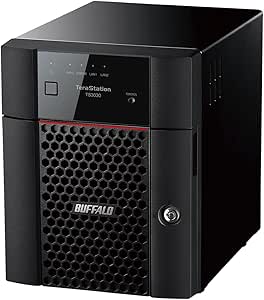 | Best Ready-to-Use Value | Included storage: 16 TB total (4 × 4 TB drives) | Usable capacity in RAID 5: 12 TB | Drive interface: Serial ATA-600 | VIEW ON AMAZON | See Our Full Breakdown |
| UGREEN NAS DXP6800 Pro 6-Bay File Server for Teams & Small Businesses |  | Best for High-Capacity, High-Speed Workloads | Processor: 12th-generation Intel Core i5, 10-core/12-thread | Drive bays: 6 SATA and 2 M.2 NVMe | Maximum capacity: 208 TB | VIEW ON AMAZON | See Our Full Breakdown |
| Synology DS223 Home & Office Backup Hub – 2-Bay Diskless NAS | 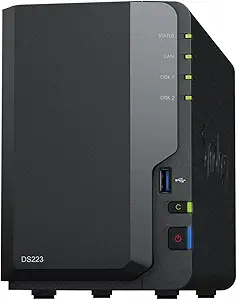 | Best for Small Offices Starting with Shared Storage | Model: DS223 | Drive bays: 2 | Diskless: Yes | VIEW ON AMAZON | See Our Full Breakdown |
| UGREEN NAS DXP2800 2-Bay for Advanced Home Users, Remote Workers & Creators |  | Best Compact Pick for a Technical Two-Person Office | Drive bays: 2 | Maximum stated capacity: 80 TB | Processor: Intel N100 quad-core | VIEW ON AMAZON | See Our Full Breakdown |
| Synology DS225+ 2-Bay Diskless NAS Private Cloud Media Server |  | Best for Small Offices That Also Need Media and Surveillance | Model: DS225+ | Drive bays: 2 | Processor: Intel CPU | VIEW ON AMAZON | See Our Full Breakdown |
| UGREEN DH4300 Plus 4-Bay NAS |  | Best for Easy Setup and Photo Backups | Drive bays: 4 | Processor: High-performance processor; model unspecified | Memory: 8 GB LPDDR4X | VIEW ON AMAZON | See Our Full Breakdown |
| Synology DS423 4-Bay Diskless NAS for Backup, File Sharing, and Video Surveillance |  | Best for Synology-Centered File Sharing and Backup | Model: DS423 | Drive bays: 4 | Storage configuration: Diskless | VIEW ON AMAZON | See Our Full Breakdown |
| UGREEN DXP4800 Plus 4-Bay NAS |  | Best for Fast Office Workloads and Virtualization | Drive bays: 4; supports 3.5-inch and 2.5-inch drives | Processor: Intel five-core CPU | Memory: 8 GB DDR5 | VIEW ON AMAZON | See Our Full Breakdown |
| Synology DS725+ Expandable NAS Storage – 2-Bay Diskless Private Cloud for Home and Small Business |  | Best for Expandable Synology Storage | Model: DS725+ | Initial drive bays: 2 | Expandable bays: Up to 7 with DX525 | VIEW ON AMAZON | See Our Full Breakdown |
| Synology DiskStation DS223j (Diskless) 2-Bay NAS |  | Best for Lean Teams Starting a Private Cloud | Brand: Synology | Model: DS223j | Drive bays: 2 | VIEW ON AMAZON | See Our Full Breakdown |
| Synology DS425+ 4-Bay Diskless NAS Private Cloud Media Server |  | Best for Multi-User Offices Needing More Headroom | Drive bays: 4 | Drive configuration: Diskless | Maximum speed: 278 MB/s | VIEW ON AMAZON | See Our Full Breakdown |
| nas for small business | Drive bays | Warranty | Model |
|---|---|---|---|
| Synology 4-Bay DiskStation DS9 | 4 | 3 years | DS925+ |
| Buffalo TeraStation Essentials | — | 3 years, including hard-drive coverage | — |
| UGREEN NAS DXP6800 Pro 6-Bay F | 6 SATA and 2 M.2 NVMe | — | — |
| Synology DS223 Home & Office B | 2 | 2 years | DS223 |
| UGREEN NAS DXP2800 2-Bay for A | 2 | 2 years | — |
| Synology DS225+ 2-Bay Diskless | 2 | 3 years | DS225+ |
| UGREEN DH4300 Plus 4-Bay NAS | 4 | — | — |
| Synology DS423 4-Bay Diskless | 4 | 2 years | DS423 |
| UGREEN DXP4800 Plus 4-Bay NAS | 4; supports 3.5-inch and 2.5-inch drives | 2 years | — |
| Synology DS725+ Expandable NAS | — | 3 years | DS725+ |
| Synology DiskStation DS223j | 2 | 2 years | DS223j |
| Synology DS425+ 4-Bay Diskless | 4 | 3 years | — |
More Details on Our Top Picks
Synology 4-Bay DiskStation DS925+ (Diskless)
The DS925+ is my strongest fit for a small business that needs shared files, backups, and room to expand without jumping straight to a larger server. Its four drive bays offer more capacity and storage-layout flexibility than the two-bay Synology DS223, while dual 2.5GbE ports give a busy office faster wired access than a basic gigabit setup. Synology also brings file sharing, backup, virtualization, and surveillance tools into one system, making this more adaptable than the preconfigured Buffalo TeraStation Essentials 2025. The tradeoff is that it ships without drives, and Synology’s broader feature set can take more setup and administration than a ready-to-use bundle. I’d choose it for a team that expects its storage needs to grow and has someone comfortable managing a NAS.
Pros:- Four bays provide more capacity and drive-configuration flexibility than two-bay options such as the Synology DS223.
- Dual 2.5GbE ports support faster wired transfers for teams moving large files.
- Two M.2 NVMe cache slots can help improve storage responsiveness for supported workloads.
- Supports expansion to a maximum of nine drives and combines file sharing, backup, virtualization, and surveillance functions.
Cons:- Diskless configuration requires a separate drive purchase and setup before the NAS can store business data.
- The range of management features may demand more setup time and NAS experience than a preconfigured system.
- Drive compatibility is limited to Synology’s official compatibility list.
Best for: Small businesses that want room to expand, faster-than-gigabit networking, and one platform for team files, backups, and surveillance.
Not ideal for: New NAS owners who want included drives and a preconfigured setup, or very small teams that only need straightforward two-bay backup.
- Model:DS925+
- Drive bays:4
- Maximum drives with expansion:9
- Network ports:2 × 2.5GbE
- M.2 cache slots:2 × M.2 NVMe
- Sequential read/write speed:522/565 MB/s
- Drive compatibility:Drives on the official compatibility list
- Warranty:3 years
Our verdict“Choose the DS925+ if your growing team needs expandable, multi-purpose storage and can handle a diskless setup.”
Buffalo TeraStation Essentials 2025 4-Bay Desktop NAS, 16 TB (4×4 TB) with Hard Drives Included
The Buffalo TeraStation Essentials 2025 stands out for businesses that want usable shared storage without sourcing and installing drives themselves. It arrives with four pre-tested 4 TB drives configured in RAID 5, providing 12 TB of usable space, while the diskless Synology DS925+ and UGREEN DXP6800 Pro require a separate drive purchase. Its 2.5GbE connection suits offices moving files over a wired network, and built-in sync for Amazon S3, Dropbox, Azure, and OneDrive gives teams a straightforward route to off-site copies. The compromise is less freedom to choose the initial drives, and the listed 5400 rpm disks may not match the performance of faster-drive configurations. It also offers less detail on processor and memory upgrades than the more configurable UGREEN models. I’d favor it when simple deployment matters more than tailoring the hardware.
Pros:- Includes four pre-tested 4 TB drives, avoiding separate drive selection and installation.
- Preconfigured RAID 5 provides 12 TB of usable storage.
- Native 2.5GbE and cloud sync support for Amazon S3, Dropbox, Azure, and OneDrive.
- Three-year warranty covers both the NAS unit and its hard drives.
Cons:- The included 5400 rpm drives may limit peak performance compared with configurations using faster disks.
- Preinstalled drives offer less choice than the diskless Synology DS925+ or UGREEN DXP6800 Pro.
- Available information gives limited detail about processor and memory upgrade options.
Best for: Small offices that need a four-bay shared-storage system with drives, RAID 5, and cloud-sync options included.
Not ideal for: Businesses that want to select every drive themselves, need high-end processing headroom, or prefer a diskless system they can build around existing drives.
- Included storage:16 TB total (4 × 4 TB drives)
- Usable capacity in RAID 5:12 TB
- Drive interface:Serial ATA-600
- Network:2.5GbE; supports 1.0GbE
- Drive speed:5400 rpm
- RAID configurations:RAID 5 preconfigured; convertible to RAID 6 or RAID 0
- Encryption:256-bit drive encryption
- Cloud integration:Amazon S3, Dropbox, Azure, and OneDrive
- Warranty:3 years, including hard-drive coverage
Our verdict“Pick the Buffalo when you want a four-bay office NAS with drives and RAID already configured rather than a build-your-own system.”
UGREEN NAS DXP6800 Pro 6-Bay File Server for Teams & Small Businesses
For a small business with large project files or several people working from shared storage, the DXP6800 Pro offers a level of capacity and network bandwidth the four-bay Synology DS925+ does not match on paper. Its six SATA bays and two M.2 NVMe bays support a stated maximum of 208 TB, while the dual 10GbE ports can be aggregated for up to 20 Gbps of bandwidth. A 12th-generation Intel Core i5 and broad RAID support also give it more hardware headroom than the simpler two-bay UGREEN DXP2800. That capability comes with a real setup burden: the unit is diskless, and fast networking only helps if the rest of the office network and installed drives can keep pace. I’d reserve it for teams with high-throughput needs and the technical support to configure it well.
Pros:- Six SATA bays plus two M.2 NVMe bays offer substantial storage and configuration flexibility.
- Dual 10GbE ports can be aggregated for up to 20 Gbps of bandwidth.
- The 12th-generation Intel Core i5 provides more processing headroom than the two-bay UGREEN DXP2800.
- Supports JBOD, Basic, RAID 0, 1, 5, 6, and 10 with drives from multiple manufacturers.
Cons:- Drives are not included, adding drive selection, installation, and RAID setup to deployment.
- Real transfer rates depend on the drives, network, and other system components; 10GbE ports alone do not guarantee those speeds.
- Its capacity and networking features may be unnecessary overhead for offices with modest storage and file-sharing demands.
Best for: Small creative, engineering, or media teams handling large shared files and equipped to support 10GbE networking.
Not ideal for: Small offices with ordinary document-storage needs, limited networking infrastructure, or no staff prepared to install drives and manage RAID.
- Processor:12th-generation Intel Core i5, 10-core/12-thread
- Drive bays:6 SATA and 2 M.2 NVMe
- Maximum capacity:208 TB
- Network ports:2 × 10GbE
- Aggregated network bandwidth:Up to 20 Gbps
- RAID support:JBOD, Basic, RAID 0, RAID 1, RAID 5, RAID 6, and RAID 10
- Drive compatibility:Western Digital, Seagate, Toshiba, and other third-party drives
Our verdict“Choose the DXP6800 Pro when your team can use six-bay capacity and 10GbE performance—and has the network and expertise to support them.”
Synology DS223 Home & Office Backup Hub – 2-Bay Diskless NAS
The DS223 is the more approachable choice for a small office that needs a central place for documents and device backups but does not need the extra bays or faster networking of the Synology DS925+. Its two-bay layout keeps the system focused on everyday file sharing, collaboration, backups, and optional IP-camera surveillance. Synology’s broader software offering can make it a more flexible office hub than a basic external drive, though this listing provides fewer hardware details than the DS925+ and does not include disks. That diskless design leaves the drive choice to you, but it also means setup is not complete when the box arrives. I’d pick it for a compact team with modest storage demands and someone available to handle initial NAS configuration; businesses expecting fast growth or larger shared datasets should look at a four-bay option instead.
Pros:- Centralizes files from multiple devices for shared access.
- Supports professional file sharing, collaboration, and automated backups.
- Can also serve as storage for an IP-camera surveillance setup.
- Two-bay format suits offices with more modest capacity needs than the four-bay Synology DS925+.
Cons:- Diskless configuration requires separate drive purchases before it can provide storage.
- Two bays offer less capacity and room for expansion than four-bay options such as the Synology DS925+.
- Setup and ongoing management may challenge buyers new to NAS systems.
Best for: Small teams that want centralized file sharing and automated backups in a two-bay system, with optional surveillance use.
Not ideal for: Growing businesses that need multiple drive bays, specified high-speed networking, or a complete storage bundle with drives included.
- Model:DS223
- Drive bays:2
- Diskless:Yes
- Primary uses:File sharing, collaboration, automated backups, and surveillance
- Warranty:2 years
- Brand:Synology
Our verdict“Choose the DS223 for straightforward shared files and backups in a small office that can work within two bays and supply its own drives.”
UGREEN NAS DXP2800 2-Bay for Advanced Home Users, Remote Workers & Creators
The DXP2800 suits a remote worker, creator, or very small business that wants more application flexibility than a basic backup box while keeping the system to two drive bays. Its listed Intel N100 quad-core processor and support for NAS applications give it a broader role than the Synology DS223’s office-and-backup positioning, while its stated capacity of up to 80 TB is substantial for a two-bay system. It also supports AI-powered surveillance, which may appeal to a business combining file storage with camera management. The tradeoffs are that it ships without drives, requires hands-on installation and setup, and offers less drive-bay flexibility than the four-bay Synology DS925+. The supplied specifications do not list a network speed, so businesses planning large team transfers should verify that detail before choosing it.
Pros:- Listed Intel N100 quad-core processor supports a range of NAS applications.
- Stated maximum capacity of up to 80 TB gives a two-bay system room for substantial data libraries.
- AI-powered surveillance features add a use beyond file storage and backup.
- Ethernet, SATA 6.0 Gb/s, and USB connectivity support a range of wired connections.
Cons:- Drives are sold separately, and installation and technical setup are required.
- Two bays provide less drive-layout flexibility than the Synology DS925+ or UGREEN DXP6800 Pro.
- The supplied specifications do not state Ethernet speed, making it harder to judge suitability for high-throughput office transfers.
Best for: Technically confident remote workers, creators, and microbusinesses that want a two-bay NAS for files, applications, and surveillance.
Not ideal for: Teams needing clear, specified network throughput, included drives, or the expansion flexibility of a four- or six-bay NAS.
- Drive bays:2
- Maximum stated capacity:80 TB
- Processor:Intel N100 quad-core
- Hardware platform:x86
- Drive interface:SATA
- Connectivity:Ethernet, SATA 6.0 Gb/s, and USB
- Surveillance:AI-powered surveillance features
- Drive form factor:3.5 inches
- Warranty:2 years
Our verdict“Pick the DXP2800 if you want a feature-rich two-bay NAS and can manage its diskless setup, but verify network speed for team-heavy workloads.”
Synology DS225+ 2-Bay Diskless NAS Private Cloud Media Server
The DS225+ suits a small office that wants shared files and backups alongside media streaming or camera storage, without moving to a four-bay chassis. Its Intel hardware transcoding can help deliver 4K video to compatible devices, while snapshots and RAID add recovery options beyond a basic shared drive. Compared with the Synology DS423, it has fewer bays for growing storage pools, but its listed transfer speed of up to 282 MB/s and 4K media focus make it a more targeted fit for mixed office and media use. Surveillance support for up to 30 IP cameras gives it room to serve a substantial camera setup, though camera needs and licensing should be checked before purchase. The tradeoffs are its two-bay limit, separate drive purchases, and setup that may challenge less technical owners.
Pros:- Hardware transcoding supports 4K media streaming to compatible devices
- Up to 282 MB/s listed transfer speed
- RAID, snapshots, and backup tools add several layers of data protection
- Supports surveillance setups of up to 30 IP cameras
Cons:- Diskless design means drives must be selected and purchased separately
- Two bays limit capacity and storage-layout flexibility compared with four-bay models
- Initial setup and configuration may be difficult for non-technical owners
Best for: Small offices that need shared files, automated backups, 4K media streaming, and a modest-to-medium IP camera system in one device.
Not ideal for: Businesses expecting rapid storage growth or wanting more drive bays from day one; the four-bay DS423 offers more room to configure storage.
- Model:DS225+
- Drive bays:2
- Processor:Intel CPU
- Listed transfer speed:Up to 282 MB/s
- Surveillance support:Up to 30 IP cameras
- Storage configuration:Diskless
- Warranty:3 years
Our verdict“Choose the DS225+ if a compact two-bay system for office files, backups, 4K media, and surveillance matters more than room for a larger drive pool.”
UGREEN DH4300 Plus 4-Bay NAS
The UGREEN DH4300 Plus is the approachable pick for a small team or remote worker who wants four drive bays without starting with a complex server project. Its NFC-assisted setup and mobile app lower the barrier to getting a private file and photo backup system running, while AI tools can sort photos, find duplicates, and support semantic search. Four bays give it more storage-layout flexibility than the two-bay Synology DS225+, and 2.5GbE can help transfers on a matching wired network. That makes it a practical fit for shared documents and growing media libraries, though the processor is not identified in the supplied specifications, so buyers have less clarity when planning heavier workloads. It supports Docker but not virtual machines, and the wired-only connection means it needs an Ethernet link rather than Wi-Fi.
Pros:- NFC and mobile-app setup simplify initial configuration
- Four bays offer more storage flexibility than two-bay options such as the DS225+
- AI photo tools support backup, organization, search, and duplicate removal
- 2.5GbE networking and 8 GB LPDDR4X RAM provide a useful hardware baseline
Cons:- Drives are not included, adding setup decisions and separate purchases
- No Wi-Fi; the NAS must connect over Ethernet
- Docker is supported, but virtual machines are not
Best for: Small teams and remote workers who want a four-bay file and photo backup system with guided mobile setup and straightforward day-to-day use.
Not ideal for: Businesses that need virtual machines, wireless placement, or a clearly specified processor for heavier server workloads.
- Drive bays:4
- Processor:High-performance processor; model unspecified
- Memory:8 GB LPDDR4X
- Network:2.5GbE Ethernet
- HDMI output:4K
- Maximum capacity:Up to 128 TB; drives not included
- App support:Docker; no virtual machines
- Setup:NFC and mobile app
Our verdict“Pick the DH4300 Plus if simple setup, four bays, and photo management matter more than virtual-machine support or detailed processor specifications.”
Synology DS423 4-Bay Diskless NAS for Backup, File Sharing, and Video Surveillance
The Synology DS423 makes sense for a small business that wants four bays and a broad set of tools for shared files, synchronization, backups, photos, and surveillance. Its main distinction from the UGREEN DH4300 Plus is less about advertised raw hardware and more about Synology’s established emphasis on integrated storage and file-management software. Four bays give a business more room to organize capacity and redundancy than the two-bay DS225+, which can matter as shared data accumulates. The product information does not specify its processor, network speed, or maximum capacity, so I would not choose it on a performance target that depends on those figures. It is also sold without drives, and surveillance use may require separately purchased camera licenses. For owners prepared to configure the system, it is a flexible office storage hub rather than a ready-to-run bundle.
Pros:- Four bays allow more storage and drive-configuration flexibility than the DS225+
- Built-in tools cover file synchronization, backup, and sharing
- Includes photo organization and video surveillance features
- Suitable for combining several small-office storage tasks in one device
Cons:- Diskless configuration requires separate drive purchases
- Surveillance may require additional camera licenses
- Advanced setup can take technical knowledge, and key performance specifications are not supplied
Best for: Small offices already comfortable with Synology software that need four-bay storage for shared files, synchronization, backups, and surveillance.
Not ideal for: Buyers seeking included drives, simple out-of-box surveillance licensing, or clearly stated processor and network performance figures.
- Model:DS423
- Drive bays:4
- Storage configuration:Diskless
- Warranty:2 years
- Core uses:Backup, file sharing, synchronization, media management, and surveillance
- Photo tools:Built-in photo organization
- Surveillance licensing:Camera licenses may need to be purchased separately
Our verdict“Choose the DS423 if four-bay capacity and Synology’s integrated backup and file tools suit your office better than simplified setup or specified high-speed hardware.”
UGREEN DXP4800 Plus 4-Bay NAS
For a small office moving large project files or running extra services, the UGREEN DXP4800 Plus is the performance-led option here. Its Intel five-core CPU, 8 GB DDR5 RAM, 10GbE port, and virtual-machine support give it more headroom for mixed workloads than the entry-level DH4300 Plus, which does not support virtual machines. Four bays and up to 144 TB of raw capacity also make it a stronger fit for a growing shared archive than the two-bay Synology DS725+. Docker, encryption, and AI photo organization widen its role beyond basic file storage. The tradeoff is that faster networking only helps when the rest of the office network supports it; drives are also sold separately, and real transfer rates depend on the disks and workload. Buyers who need basic backups rather than compute flexibility may not use what sets this model apart.
Pros:- 10GbE and 2.5GbE ports offer fast wired-network options
- Intel five-core CPU and 8 GB DDR5 memory support multitasking
- Docker and virtual-machine support exceed the DH4300 Plus’s app scope
- Four bays provide up to 144 TB of stated raw capacity
Cons:- Drives are sold separately, so capacity requires additional hardware purchases
- Real transfer speeds depend on the network, drives, and workload
- Wired-only connectivity offers no built-in Wi-Fi option
Best for: Small offices, creative teams, and technically capable owners who transfer large files or want Docker and virtual machines alongside shared storage.
Not ideal for: Businesses with basic backup needs, no 10GbE-capable network, or limited interest in configuring server-style software.
- Drive bays:4; supports 3.5-inch and 2.5-inch drives
- Processor:Intel five-core CPU
- Memory:8 GB DDR5
- Maximum raw capacity:Up to 144 TB
- Ethernet:1 × 10GbE and 1 × 2.5GbE
- USB:10 Gbps USB ports
- HDMI:4K output
- Software features:Docker, virtual machines, AI photo organization, and encryption
- Warranty:2 years
Our verdict“Choose the DXP4800 Plus if your office can use its 10GbE connection and virtualization features; for basic file backup, a simpler NAS may be a better fit.”
Synology DS725+ Expandable NAS Storage – 2-Bay Diskless Private Cloud for Home and Small Business
The Synology DS725+ is the most sensible choice here for a small business that wants to start with two drives but keep a route to a larger system. It supports expansion to seven bays with the DX525 unit and up to 140 TB of stated capacity, unlike the fixed two-bay DS225+. M.2 SSD caching may help repeated access patterns, while RAID, snapshots, and automated backups address everyday data-protection needs. Compared with the four-bay DS423, the DS725+ takes a smaller initial footprint but makes future growth depend on buying an expansion unit. That is a meaningful distinction: expansion offers flexibility, but it is not the same as having four bays ready at installation. Its diskless setup and more involved configuration also mean extra planning, so this model suits owners who expect growth and are comfortable managing storage.
Pros:- Can expand from two bays to seven with the DX525 unit
- Supports up to 140 TB of stated capacity with additional drives
- RAID, automated backups, and snapshots support data protection
- M.2 slots allow SSD caching for suitable access patterns
Cons:- Expansion to seven bays requires a separate DX525 unit
- Only two bays are available at the start, fewer than the DS423 or DXP4800 Plus
- Diskless setup and complex configuration add work for new NAS owners
Best for: Small businesses that prefer Synology’s backup and snapshot tools, need a two-bay start, and expect to expand storage as their data grows.
Not ideal for: Teams that need four or more bays immediately, want included drives, or prefer a beginner-focused setup with minimal configuration.
- Model:DS725+
- Initial drive bays:2
- Expandable bays:Up to 7 with DX525
- Maximum capacity:Up to 140 TB
- Supported drives:HDDs and SSDs
- Data protection:RAID redundancy, automated backups, and snapshot technology
- SSD caching:M.2 slots
- Storage configuration:Diskless
- Warranty:3 years
Our verdict“Pick the DS725+ if you want a compact two-bay Synology now and are willing to add an expansion unit when your business needs more storage.”
Synology DiskStation DS223j (Diskless) 2-Bay NAS
The DS223j is a sensible starting point for a small office that needs shared files, automated backups, and surveillance storage without moving to a larger four-bay system. Its two drive bays keep the unit compact and energy-efficient, while Synology’s multi-platform access supports staff working across different devices. Compared with the Synology DS425+, it offers less room for storage growth and is not positioned for the same larger-user workload; its appeal is a smaller footprint and simpler capacity needs. The tradeoff is that two bays leave less flexibility as files accumulate, and buyers must supply drives and learn Synology DSM setup. Surveillance tools add value for offices with cameras, though businesses needing broader camera capacity should look to a model with stated higher support. I’d choose this for a small team prioritizing basic shared storage over headroom.
Pros:- Compact, energy-efficient design suits a small office with limited equipment space.
- Private-cloud features support file access across multiple platforms.
- Automated backup functions help centralize routine data protection.
- Surveillance tools allow the NAS to store security footage.
Cons:- Two bays limit capacity and storage-layout flexibility as business data grows.
- Diskless configuration requires separate drive purchases before use.
- Setup requires familiarity with Synology DSM, which may challenge first-time NAS owners.
Best for: Small offices and solo operators who want shared private-cloud storage, device-to-device file access, and backups in a compact two-drive system.
Not ideal for: Growing teams with expanding file archives or heavy surveillance needs; two bays offer less storage flexibility than the DS425+ and drives are not included.
- Brand:Synology
- Model:DS223j
- Drive bays:2
- Drive configuration:Diskless
- Supported uses:Private cloud storage, data sharing, and security camera surveillance
- Access:Multi-platform file access
- Warranty:2 years
Our verdict“Choose the DS223j for a small team that wants compact shared storage and backups, but pick a four-bay model like the DS425+ if capacity growth matters more.”
Synology DS425+ 4-Bay Diskless NAS Private Cloud Media Server
The DS425+ suits a small business that has outgrown entry-level storage and needs a central home for shared files, media, backups, and camera footage. Its four bays provide more room to build storage capacity than the two-bay DS223j, while the listed support for 10+ users better matches a team with concurrent access needs. The stated transfer speed of up to 278 MB/s is useful for moving larger files, though real-world performance depends on drives, network setup, and workload. Surveillance support for up to 30 IP cameras also gives it a broader monitoring role than a basic file server. Compared with the Synology DS925+, this model is a four-bay option without stated expansion capability, so its capacity ceiling matters. It ships without drives, and setup may be demanding for beginners; the payoff is a more capable business and media hub.
Pros:- Four bays provide more storage capacity options than the DS223j’s two-bay layout.
- Listed support for 10+ users suits concurrent access in a small team.
- Stated transfer speed of up to 278 MB/s supports faster movement of larger files.
- Surveillance support for up to 30 IP cameras broadens its use beyond file sharing.
Cons:- Diskless configuration requires separate drive purchases before the NAS can store data.
- Setup complexity may be a hurdle for beginners without NAS administration experience.
- Four bays are the stated limit, with no expansion option listed.
Best for: Small businesses with multiple staff sharing large files, maintaining backups, or storing footage from a multi-camera security system.
Not ideal for: New NAS owners seeking a simple plug-in setup, or businesses expecting storage needs to exceed a four-bay system without expansion.
- Drive bays:4
- Drive configuration:Diskless
- Maximum speed:278 MB/s
- Supported users:10+
- Surveillance support:Up to 30 IP cameras
- Supported uses:Private cloud, media server, file sharing, and data protection
- Warranty:3 years
Our verdict“Pick the DS425+ for a growing small team that needs four-bay shared storage and substantial camera support, provided it can handle setup and a fixed bay limit.”

How We Picked
I ranked these NAS devices around small-business needs rather than headline specifications alone: shared-folder use, backup suitability, drive-bay capacity, potential to grow, and the practical demands of setup and ongoing administration. I also weighed whether a system arrives diskless or with drives included, since that affects how much planning a buyer must do before deployment. A NAS for a business should match its file volume and staff workflow, not simply offer the most bays.
The order favors balanced systems that can serve as a central office store without forcing a small team into an unnecessarily large setup. That puts the Synology DS925+ first, with the six-bay UGREEN DXP6800 Pro ranked for capacity-heavy needs and Buffalo’s drive-included TeraStation noted for simpler procurement. Smaller two-bay and entry-level choices rank lower for broad business use, though they can be sensible for a single office, light file sharing, or a limited backup role. I treat specific performance and compatibility claims cautiously where they are not established by the product names alone; buyers should verify drive support, networking, software features, and warranty terms for their deployment.
Factors to Consider When Choosing Nas For Small Business
Picking a business NAS is a storage-planning decision as much as a hardware choice. I would start with the people, files, and recovery needs it must support, then weigh the convenience of a ready-to-use bundle against control over drive selection and future expansion.
Choose Bay Count Around Growth, Not Just Today’s Files
Estimate how much usable space the business needs after accounting for redundancy, snapshots, and backup copies; raw drive capacity is not the same as usable storage. A two-bay unit may be enough for a small team with modest files, but both bays can be occupied early, leaving fewer upgrade paths. Four bays give more flexibility to add capacity or adjust the storage layout without replacing the whole system. Six bays make sense when shared media, project archives, or multiple teams create sustained growth. A common mistake is buying for the current file total alone and forgetting that retention policies and backups also consume space. If storage growth is uncertain, choosing more bays can cost less disruption than migrating to a larger NAS later.
Treat Redundancy and Backup as Separate Jobs
Drive redundancy can keep files accessible after a drive failure, but it does not protect against accidental deletion, ransomware, theft, fire, or a failed NAS. Plan a separate backup copy, ideally one that is off-site or otherwise isolated from routine access. Before buying, decide how often the business can tolerate losing recent work and how quickly it must restore files. Those targets determine backup frequency, destination capacity, and whether a second NAS or cloud service belongs in the plan. Avoid relying on a mirrored pair as the only copy; mirroring can replicate deletions and damage as readily as valid changes. A smaller NAS with a clear backup plan can be safer than a larger one with no recovery process.
Match Administration to the Team’s Skills
NAS software affects daily work: account setup, shared-folder permissions, remote access, alerts, and updates all take staff time. A feature-rich system can help an administrator tailor services, yet extra options also create more decisions and maintenance. Before choosing a platform, list who will manage accounts and what happens when that person is unavailable. Check whether the interface supports the access controls and backup routines the business actually needs, rather than assuming every feature will be used. Small offices without dedicated IT support may prefer a simpler routine over extensive customization. If outside IT support manages the network, confirm that the provider can support the selected platform and its update process.
Check Network Fit Before Buying Storage
A NAS can have ample drive space and still feel slow if the office network or client devices are the bottleneck. Count how many people will work with large files at the same time, and identify whether they need to edit files directly from the NAS or mainly retrieve documents. Check the NAS ports, switch capacity, cabling, and workstation connections as one system. Faster networking helps only when the rest of the path can use it, so do not pay for capabilities that the office infrastructure cannot support. Remote workers also need a secure access plan; opening services directly to the internet is not a substitute for proper access controls. For demanding creative workloads, test the full workflow before moving all active projects onto shared storage.
Compare Diskless Flexibility With Bundled Convenience
Diskless models let a business select drive capacity and type, and may make it easier to standardize drives across an existing fleet. They also require a separate compatibility check and add procurement steps before the NAS can be put to work. A bundle with drives included simplifies purchasing, but the included capacity may not match the organization’s long-term retention needs. Check supported drive lists, warranty terms, and replacement availability rather than choosing a drive only by capacity. Plan to keep a compatible spare if downtime would interrupt business operations. The right choice depends on whether your team values control over the build or a simpler path to deployment.
Budget for the Whole Storage System
The NAS enclosure is only one part of the project: drives, backup destinations, network upgrades, power protection, and setup time can all affect the final plan. A larger chassis may seem excessive until migration labor and downtime are included in the cost of replacing an undersized unit. At the same time, buying more bays than the workload can use ties up budget that could go toward an off-site backup or better network equipment. Write down the required capacity, recovery target, and likely growth over the next few years before comparing configurations. Include ongoing work such as monitoring alerts, applying updates, and testing restores. This fuller view often changes which model looks like the better value.
Frequently Asked Questions
Is a two-bay NAS enough for a small business?
It can be enough for a small office that shares documents and keeps a modest local file archive. The main limit is flexibility: with only two bays, capacity planning and future drive changes are more constrained than on a four-bay system. A two-bay NAS also does not replace a separate backup, regardless of how the drives are configured. Estimate usable capacity after redundancy and leave room for growth rather than buying to match today’s file total exactly. If several staff members depend on large files or the business expects rapid growth, a four-bay model is a safer starting point.
Should I buy a NAS with drives included or choose a diskless model?
A drive-included system can reduce setup work and make the initial order more straightforward, which is useful when the business wants a ready-to-deploy package. A diskless NAS offers more control over drive capacity and selection, but you must verify compatibility and account for the extra purchasing and setup steps. In either case, confirm the included or selected drives suit the NAS and the intended workload. Also plan for replacement drives and a separate backup destination; neither package type handles those needs by itself. The Buffalo TeraStation bundle is the clear included-drive option in this roundup, while most other listed models are diskless.
Can a NAS replace cloud storage for a small company?
A NAS can provide local shared storage and give a business direct control over its files, but it does not automatically replace every cloud service. Staff working off-site need a secure remote-access method, and collaboration tools may depend on features beyond basic file storage. Local hardware also needs its own backup plan to cover theft, site damage, and major device failure. Many businesses use a NAS for the primary file store while keeping a separate off-site or cloud copy for recovery. Decide based on where employees work, how they share documents, and how much downtime the business can accept.
How many NAS bays should I choose if our storage needs may grow?
Start with projected usable capacity over the next few years, not just the amount of data currently on computers. A four-bay unit gives a small business more room to adjust capacity than a two-bay model, while six bays suit larger archives or workloads expected to expand quickly. More bays do not automatically mean a better fit: the drives, redundancy setup, and backup target all affect usable space. If growth is hard to predict, ask whether the NAS can expand through supported methods and what that expansion requires. Choosing extra capacity is most useful when it prevents disruptive migration, not when it leaves budget short for backups.
What should I check before giving employees remote access to a business NAS?
First confirm the NAS supports individual user accounts, appropriate permissions, and a secure remote-access method that your IT support can maintain. Give employees access only to the folders their roles require, and remove accounts promptly when staff leave. Keep system software updated and test remote access from the devices employees actually use. Do not treat remote access as a backup plan or expose services directly without reviewing the security setup. For sensitive business files, check whether access logs, multifactor authentication, and recovery procedures meet company policy before rollout.
Conclusion
For the broadest small-business fit, I recommend the Synology DS925+ as best overall: its four-bay format balances capacity planning with a manageable footprint. The UGREEN DXP6800 Pro is my best premium-style choice for teams that need six bays and expect a larger storage pool, while the Buffalo TeraStation Essentials is the best value-minded pick for buyers who want drives included and a simpler procurement path. For beginners with a modest office workload, the Synology DS223 is the more approachable small-footprint option; the DS223j is better reserved for basic storage needs. For a specific need, choose the UGREEN DXP2800 or a Synology two-bay model when space and a lighter workload take priority, and look to the four-bay DS423, DXP4800 Plus, DS425+, or DH4300 Plus when capacity matters more. Whichever model you choose, set aside budget and time for a separate backup and a tested restore process.