

The 14 best enterprise cloud storage solutions in this roundup span shared-storage SAN systems, business NAS appliances, and simpler personal-cloud devices. My best overall pick is the Synology RackStation RS2821RP+, which combines rackmount capacity, redundant power, and Synology’s DSM platform for organizations needing a capable central storage system. The Synology UC3400 stands out for teams that need active-active dual-controller architecture, while the BUFFALO TeraStation Essentials 2025 offers a more approachable four-bay desktop option with drives included. The main tradeoffs are capacity and performance versus setup effort, expansion needs, and how much storage administration your team can support. Read on for the full breakdown, buying advice, and recommendations by business type.

Get business pricing on networking and server gear
- Business-only prices and quantity discounts
- Tax-exempt purchasing
- Multiple users, one account, clear invoices
Key Takeaways
- The lineup divides into distinct classes: JetStor and Synology UC3400 target SAN and shared-workload needs, while most RackStation, DiskStation, and TeraStation models are NAS appliances.
- The RS2821RP+ is the strongest general-purpose enterprise pick here because its rack format, redundant power, and bundled DSM platform make it a balanced choice for centralized business storage.
- Capacity alone does not determine fit: the 24-bay JetStor systems and 16-bay JetStor 816iX suit different capacity and deployment plans, so buyers should compare the exact configuration rather than bay count alone.
- Drive-included TeraStations lower the setup burden for organizations wanting a ready-to-populate solution, while diskless Synology systems allow more control over drive selection and storage planning.
- The BeeStation models are outliers for enterprise use: their simpler personal-cloud positioning may work for a small team or a narrow file-sharing task, but they do not replace a rackmount NAS or SAN for shared business workloads.



| enterprise cloud storage solution | Warranty |
|---|---|
| Synology RackStation RS2821RP+ | — |
| BUFFALO TeraStation Essentials | 3 years with hard drive coverage |
| JetStor 816iX | 1 year manufacturer warranty |
| JetStor 824iX | 1 year manufacturer warranty |
| Synology DS1825+ Enterprise NA | 3 years |
| Synology DiskStation DS2422+ 1 | — |
| JetStor 812iX | 1 year |
| Synology 12-Bay Active-Active | 5 years |
| JetStor 824iX | 1 year |
| BUFFALO TeraStation 51220RH 12 | 3 years, with optional extended coverage |
| Synology 12-bay NAS RackStatio | — |
| Buffalo TeraStation 5420RN 4-B | — |
| Synology BeeStation 4TB Person | — |
| Synology BeeStation 4TB Person | — |
More Details on Our Top Picks
Synology RackStation RS2821RP+ NAS Server with Ryzen 2.2GHz CPU, 32GB Memory, 352TB Storage, Redundant Power, DSM Operating System Bundle with Rail Kit
The Synology RackStation RS2821RP+ is the strongest fit here for organizations that need a large, rack-mounted storage pool with NAS features for collaboration and virtualization. Its 16 drive bays support up to 352TB, while redundant power supplies reduce the chance that a single power-supply failure takes storage offline. Compared with the desktop Synology DS1825+, it offers twice as many bays and a rack-oriented design, but the DS1825+ lists 25GbE networking while this model has four 1GbE ports. That makes the RS2821RP+ more compelling for capacity and centralized file services than for high-bandwidth editing workloads. The package also needs careful planning: storage media and memory upgrades are not included, and rack installation takes more infrastructure than a desktop NAS.
Pros:- Sixteen SATA bays support up to 352TB of configured storage
- Redundant power supplies provide resilience against a power-supply failure
- 32GB DDR4 ECC memory is specified for the bundle
- DSM, Btrfs, and virtualization support suit shared and protected business data
Cons:- Drives and memory upgrades may need separate purchase and installation
- Four 1GbE ports are a weaker fit for high-throughput workloads than the DS1825+ with listed 25GbE
- Requires rack space and a suitable rack-mount setup
Best for: IT teams needing a rack-mounted, high-capacity NAS for shared files, backups, and virtualization workloads
Not ideal for: Small offices without rack space, or media teams whose primary need is high-speed networking rather than large capacity
- Processor:Ryzen V1500B, 2.2GHz, 4-core
- Memory:32GB DDR4 ECC UDIMM
- Maximum storage:352TB (16 x 22TB drives)
- Drive bays:16 SATA 3.5-inch HDD bays
- Network ports:4 x 1GbE LAN with link aggregation and failover
- File systems:EXT4, Btrfs
- Power:Redundant power supplies
- Operating system:Synology DSM
- Form factor:Rack-mounted NAS
Our verdict“Choose the RS2821RP+ if you need rack-based capacity and redundant power more than high-speed Ethernet.”
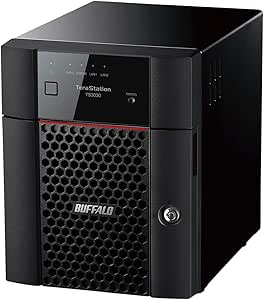
BUFFALO TeraStation Essentials 2025 4-Bay Desktop NAS 16TB with Hard Drives Included
The BUFFALO TeraStation Essentials 2025 is the practical choice for a small office that wants a working NAS without sourcing and installing drives first. Its 16TB capacity includes hard drives, and RAID support gives teams a path to protect shared files without building a rack-based system. A 2.5GbE connection can speed up transfers on a compatible network compared with the 1GbE ports listed for the Synology RS2821RP+, although the Synology offers far more expansion headroom and enterprise-oriented virtualization support. Buffalo also lists cloud sync with services such as Amazon S3, Dropbox, Azure, and OneDrive, making it useful for off-site copies. The tradeoff is scale: four bays and 16TB suit departmental storage, not a growing data center, and the included drives run at 5400 rpm.
Pros:- Includes pre-tested hard drives for a simpler initial setup
- 2.5GbE connectivity supports faster transfers on compatible networks
- Cloud sync options include Amazon S3, Dropbox, Azure, and OneDrive
- 256-bit drive encryption and RAID support add data-protection options
Cons:- 16TB total capacity and four bays limit room for substantial growth
- 5400 rpm drives may constrain workloads with frequent disk access
- Less suited to advanced enterprise deployments than the RS2821RP+ or JetStor SAN systems
Best for: Small-office administrators who need a four-bay shared-storage and backup system with drives already installed
Not ideal for: Large organizations, high-growth teams, or performance-intensive workloads that need extensive capacity expansion or advanced SAN features
- Storage capacity:16TB
- Drive bays:4
- Hard drive interface:Serial ATA-600
- Drive form factor:3.5-inch
- Drive speed:5400 rpm
- Network transfer rate:2.5Gbps
- RAID:Supported
- Warranty:3 years with hard drive coverage
Our verdict“Pick the TeraStation Essentials when a small office values included drives and straightforward shared storage over large-scale expansion.”
JetStor 816iX – High-Performance 16-Bay iSCSI SAN (224TB) for Enterprise & Cloud Storage
The JetStor 816iX is aimed at IT teams that need block storage for enterprise applications, not a simple shared-folder NAS. Its 16-bay iSCSI design, listed support for over 300K IOPS, and features such as thin provisioning and snapshots point toward virtualized environments where storage responsiveness and space management matter. The product description also cites scalability up to 4.4PB, giving it a different growth path from the NAS-focused BUFFALO TeraStation Essentials 2025, which is easier to approach but much smaller in scope. That capability comes with operational overhead: SAN setup and tuning call for experienced storage administrators, and the listed manufacturer warranty is one year. Buyers should also verify the exact configuration and connectivity before deployment, since the supplied specifications provide less hardware detail than the JetStor 824iX listing.
Pros:- 16-bay iSCSI architecture targets enterprise block-storage workloads
- Product description cites performance above 300K IOPS
- Thin provisioning and snapshots support storage management and recovery workflows
- Listed scalability reaches up to 4.4PB
Cons:- Configuration and management are likely to require SAN expertise
- A complex enterprise platform can be excessive for small deployments
- The listed manufacturer warranty is one year, and detailed hardware specifications are limited
Best for: Enterprise infrastructure teams provisioning iSCSI storage for virtualization, databases, or other I/O-intensive applications
Not ideal for: Small businesses seeking a simple file-sharing NAS or teams without staff experienced in SAN configuration and administration
- Model:816iX
- Storage system:16-bay iSCSI SAN
- Listed built-in media capacity:224TB
- Scalability:Up to 4.4PB, according to the product description
- Performance:Over 300K IOPS, according to the product description
- Data management:Thin provisioning and snapshots
- Warranty:1 year manufacturer warranty
Our verdict“Choose the 816iX for demanding iSCSI workloads when your team can manage a SAN; skip it for straightforward office file sharing.”
JetStor 824iX – 24-Bay iSCSI SAN Storage System (144TB) for Enterprise & Cloud Deployments
The JetStor 824iX makes the most sense for organizations prioritizing controller resilience and high-density SAN capacity. Its dual-active architecture is designed to keep storage services available through a controller issue, while 24 bays and listed 144TB raw capacity provide a substantial starting footprint. Compared with the 16-bay JetStor 816iX, the 824iX gives buyers more drive slots and specifies eight 10G SFP+ ports, but the 816iX description emphasizes performance above 300K IOPS and names thin provisioning and snapshots. The 824iX instead foregrounds disaster recovery and controller redundancy. Its dual-core Intel D1500 processor and one-year warranty are worth weighing for a long-lived deployment, and setup may call for specialist storage skills.
Pros:- Dual-active controller architecture supports resilient storage service
- Twenty-four bays accommodate a dense storage configuration
- Eight 10G SFP+ ports are specified for high-speed connectivity
- Product description cites expansion up to 4.4PB and local or remote disaster recovery
Cons:- SAN setup and ongoing management may require experienced administrators
- The listed processor is dual-core, which may not suit every demanding configuration
- Listed manufacturer warranty is one year
Best for: Enterprise storage teams that need dual-active controller architecture, multiple high-speed I/O connections, and a 24-bay SAN
Not ideal for: Small offices or teams that need an easy NAS rather than a SAN requiring specialist deployment and administration
- Storage capacity:144TB raw
- Drive bays:24
- Controller architecture:Dual-active (active/active)
- Processor:Intel D1500 dual-core
- Maximum RAM:64GB per controller
- I/O options:8 x 10G SFP+ ports
- Scalability:Up to 4.4PB, according to the product description
- Warranty:1 year manufacturer warranty
Our verdict“Choose the 824iX when dual-active controllers and a 24-bay design matter more than a simpler NAS setup.”
Synology DS1825+ Enterprise NAS – 8-Bay Diskless Storage, 360TB Capacity, 25GbE Speed, Mission-Critical Reliability
The Synology DS1825+ stands apart as a compact, high-speed NAS for teams that need fast access to shared media and project files without moving to a rack-mounted system. Its listed 25GbE networking is a major differentiator from the four 1GbE ports on the rack-oriented Synology RS2821RP+, making the DS1825+ a stronger fit for bandwidth-heavy workflows when the rest of the network can support it. It also lists an eight-bay chassis, 360TB maximum capacity, and high-availability clustering for teams seeking a resilient shared-storage setup. The tradeoff is a diskless configuration: buyers must supply drives, and the eight-bay design offers fewer slots than the RS2821RP+ or the 24-bay JetStor 824iX. Its substantial size and weight also call for dedicated placement.
Pros:- Listed 25GbE networking supports high-bandwidth file transfers on compatible infrastructure
- Eight bays and up to 360TB provide room for substantial NAS storage
- High-availability clustering targets mission-critical data protection
- Three-year warranty is listed
Cons:- Diskless design requires separate drive selection and installation
- Eight bays provide less physical expansion room than the RS2821RP+ or JetStor 824iX
- Large, heavy enclosure needs dedicated space
Best for: Video production teams and small-to-mid-sized organizations with a 25GbE network that need fast shared files and high-availability features
Not ideal for: Buyers who need drives included, a rack-mounted chassis, or the larger bay count of an enterprise SAN
- Model:DS1825+
- Drive bays:8
- Maximum storage capacity:360TB
- Network speed:25GbE
- Warranty:3 years
- Dimensions:9.57 in D x 13.5 in W x 6.54 in H
- Weight:6000 g
- Enclosure material:Metal, plastic
Our verdict“Choose the DS1825+ for high-speed shared NAS storage when 25GbE matters and you are prepared to source the drives.”
Synology DiskStation DS2422+ 12-Bay NAS with Quad Core CPU and 4GB RAM (Diskless)
The DS2422+ is the most flexible fit here for organizations that want one system for shared files, backup, surveillance, and virtualization rather than a dedicated SAN. Its 12 bays expand to 24, giving IT teams room to add capacity without replacing the initial chassis, while memory can grow from 4GB to 32GB as workloads develop. Compared with the Synology UC3400, this is a general-purpose NAS rather than an active-active SAN built around high availability; that distinction matters when continuous service across controller failures is the priority. The tradeoff is a diskless configuration, so deployment requires a separate drive purchase and setup. Its large, heavy enclosure also calls for planned rack or equipment-room space, and the listed 10/25GbE support makes network planning part of the build.
Pros:- Twelve bays with expansion support up to 24 drives
- Memory is upgradeable from 4GB to 32GB
- Supports business file sharing, backup, surveillance, and virtualization use cases
- 10/25GbE networking supports high-throughput data access
Cons:- Diskless configuration requires separate drive selection and installation
- Large, heavy chassis needs dedicated equipment space
- General-purpose NAS design is a different fit from a dual-controller high-availability SAN
Best for: Business IT teams consolidating file sharing, backup, surveillance, and virtualization workloads with a staged capacity-growth plan.
Not ideal for: Organizations that need a ready-to-run system with drives included or active-active controller availability as a core requirement.
- Bays:12, expandable to 24
- Processor:Quad-core
- Memory:4GB DDR4, upgradeable to 32GB
- Networking:10/25GbE
- Drive support:HDD and SSD
- Dimensions:18.5 x 17 x 16.5 inches
- Weight:9.5 kg
- Enclosure:Metal, black
Our verdict“Choose the DS2422+ if you want an expandable Synology platform for several business storage tasks and can plan the drives and rack space yourself.”
JetStor 812iX – High-Performance 12-Bay iSCSI SAN (168TB) for Enterprise & Cloud Storage
The JetStor 812iX is aimed at teams that need shared block storage for demanding enterprise or cloud workloads, not a straightforward file-serving NAS. Its dual-active controllers, 64GB of RAM per controller, and stated performance above 300K IOPS are designed for sustained, multi-workload access. Compared with the Synology DS2422+, it offers a more specialized iSCSI SAN architecture and a much larger stated expansion ceiling, up to 4.4PB; the DS2422+ is the more versatile choice for file sharing and mixed NAS applications. The 812iX’s 12-bay starting point can suit a controlled initial deployment, but scaling and operating it require SAN expertise. Buyers should also clarify what support services accompany the listed one-year warranty, since the product details provide limited service information.
Pros:- Dual-active controller architecture supports high availability
- 64GB RAM per controller
- Expandable from 168TB to a stated maximum of 4.4PB
- Designed for high-throughput workloads, with more than 300K IOPS stated
Cons:- SAN setup and ongoing management may require specialist expertise
- One-year warranty is listed, while support-service details are limited
- Enterprise-scale architecture can be more than a small business needs
Best for: Enterprise storage and virtualization teams that need dual-controller iSCSI storage with a path to multi-petabyte expansion.
Not ideal for: Small businesses without SAN administration skills or buyers who need a simple file-sharing NAS rather than block storage.
- Bays:12
- Stated capacity:168TB
- Maximum expansion:Up to 4.4PB
- Controllers:Dual-active, active/active
- Processor:Intel D1500 dual-core
- Memory:64GB per controller
- Connectivity:10GbE iSCSI
- RAID support:RAID 5EE, 6EE, 50EE, 60EE
- Warranty:1 year
Our verdict“Pick the 812iX when your team can manage iSCSI SAN infrastructure and needs high availability with substantial expansion headroom.”
Synology 12-Bay Active-Active Dual Controller SAN UC3400 (Diskless)
The Synology UC3400 puts service continuity ahead of all-purpose NAS flexibility. Its active-active dual-controller design is intended to keep SAN services available through controller-level disruption, making it a stronger match for virtualization environments than the single-system DS2422+. It supports VMware, Hyper-V, and OpenStack, and can expand from 12 to 36 drive bays, with capacity listed up to 576TB. That gives administrators a defined growth path without shifting to the much larger expansion ceiling claimed for the JetStor 812iX. The tradeoffs are practical: this is a rack-mount system, weighs 50.5 pounds, and arrives diskless, so it needs both rack capacity and a planned drive configuration. Its five-year warranty is a useful differentiator, but the enterprise SAN role and deployment needs make it excessive for basic shared folders and backup.
Pros:- Active-active dual-controller architecture targets continuous service
- Compatible with VMware, Hyper-V, and OpenStack
- Expansion support increases the system to 36 drive bays
- Five-year warranty
Cons:- Diskless configuration adds drive selection and deployment work
- Heavy rack-mount enclosure requires dedicated rack space
- Enterprise SAN capabilities are unnecessary for basic file storage
Best for: Organizations running virtualized workloads on Synology-compatible infrastructure that require active-active SAN availability and a five-year warranty.
Not ideal for: Teams seeking an inexpensive, compact, drive-included NAS for routine file sharing or backup.
- Model:UC3400
- Bays:12, expandable to 36 drive bays
- Maximum capacity:Up to 576TB
- Architecture:Active-active dual controller
- Form factor:Rack mount
- Supported platforms:VMware, Hyper-V, and OpenStack
- Dimensions:3.5 x 19 x 28.5 inches
- Weight:50.5 pounds
- Warranty:5 years
Our verdict“Choose the UC3400 when Synology-based virtualization storage needs active-active availability and your rack and drive plan are ready.”
JetStor 824iX – High-Performance 24-Bay iSCSI SAN for Enterprise & Cloud Storage
Where the JetStor 812iX starts with 12 bays and leaves room to expand, the 824iX begins with 24, making it the more direct choice for teams that need dense SAN capacity from the outset. It pairs dual-active controllers and 64GB RAM per controller with stated performance above 300K IOPS, while snapshots, auto-tiering, and disaster-recovery support help administrators manage changing workload demands. The listed capacity is 336TB, with raw storage expansion stated at more than 4.4PB. That scale is attractive for data centers, but it also makes this a poor match for smaller teams that mainly need shared folders; the BUFFALO TeraStation 51220RH is a more turnkey NAS option with drives included. The 824iX demands SAN knowledge, and its one-year warranty is a shorter listed coverage period than the Synology UC3400’s five years.
Pros:- Twenty-four bays provide higher starting drive density than the JetStor 812iX
- Dual-active controllers and hot-swappable components support availability
- Snapshots, auto-tiering, and disaster-recovery features support workload management
- Stated expansion capacity exceeds 4.4PB raw
Cons:- Complex SAN setup and management may call for specialist staff
- One-year warranty is shorter than the Synology UC3400’s listed five-year coverage
- Enterprise capacity and feature set can be excessive for basic business storage
Best for: Data-center and cloud infrastructure teams that need a 24-bay iSCSI platform with high availability and advanced storage management.
Not ideal for: Small offices or teams without SAN administrators, especially those wanting a drive-included NAS for simpler file and backup tasks.
- Bays:24
- Stated capacity:336TB
- Maximum raw storage:Over 4.4PB
- Controllers:Dual-active
- Processor:Intel D1500 dual-core
- Memory:64GB per controller
- Connectivity:10GbE iSCSI
- RAID support:RAID 5EE, 6EE, 50EE, 60EE
- Warranty:1 year
Our verdict“Choose the 824iX over the 812iX when you need 24 bays immediately and have the staff to run an enterprise iSCSI SAN.”
BUFFALO TeraStation 51220RH 12-Bay Business Rackmount NAS with 144TB Storage and Hard Drives Included
The BUFFALO TeraStation 51220RH is the most deployment-ready option in this group: its 144TB of included storage avoids the separate drive-planning step required by the diskless Synology DS2422+ and UC3400. A native 10GbE port, encryption, two-factor authentication, and cloud integration suit businesses building a rack-based file-sharing or hybrid-cloud setup. Compared with the SAN-focused JetStor 824iX, the TeraStation is positioned as a NAS for business storage, sharing, and backup rather than a high-IOPS block-storage platform with dual-active controllers. That makes it a more approachable fit for routine data services, but not the pick for teams whose primary need is SAN-level availability or advanced workload tuning. The 55.4-pound rackmount chassis still needs planned space, and its 12-bay configuration offers less drive density than the 24-bay JetStor.
Pros:- Includes 144TB of storage and enterprise-grade hard drives
- Native 10GbE connectivity supports fast network transfers
- 256-bit encryption and two-factor authentication support data security
- Cloud integration supports hybrid-cloud workflows
Cons:- Large, heavy rackmount chassis needs dedicated equipment space
- NAS design lacks the stated dual-active SAN architecture of the JetStor models
- Twelve bays offer less starting drive density than the 24-bay JetStor 824iX
Best for: IT teams that want a rackmount business NAS with substantial storage installed, 10GbE connectivity, and cloud integration.
Not ideal for: Organizations that need a dual-active iSCSI SAN, dense 24-bay storage, or a compact system for a small office.
- Storage capacity:144TB
- Bays:12
- Drive interface:Serial ATA-600
- Drive form factor:3.5 inches
- Connectivity:Ethernet, including native 10GbE
- Form factor:Rackmount
- Dimensions:29 x 3.4 x 18.9 inches
- Weight:55.4 pounds
- Warranty:3 years, with optional extended coverage
Our verdict“Pick the TeraStation 51220RH if you want a business NAS with drives included and do not need a specialist high-availability SAN.”
Synology 12-bay NAS RackStation RS3618xs (Diskless)
The RS3618xs suits businesses that need room to expand without moving to a separate SAN platform. Its 12 bays can scale to 36 drives with expansion, while the listed read performance and iSCSI capability support demanding shared-storage and virtualization workloads. Unlike the Buffalo TeraStation 5420RN, it ships diskless, so buyers can choose drive capacity and configuration but must plan and procure the storage separately. Optional 10GbE or 40GbE networking also gives IT teams a path to faster connectivity, though those network cards are optional rather than built in. The tradeoff is a substantial rack-mounted system that needs suitable space, mounting, and an enterprise budget; for a smaller, ready-to-use installation, the four-bay Buffalo is the simpler choice.
Pros:- Scales from 12 bays to as many as 36 drives with expansion
- Listed sequential read performance exceeds 3,900 MB/s, with 143,500 iSCSI IOPS
- Optional 10GbE and 40GbE networking supports higher-bandwidth deployments
- 8GB ECC memory is upgradeable to 64GB
Cons:- Diskless configuration requires a separate drive purchase and deployment plan
- Rack-mount form factor and 32-pound weight call for appropriate infrastructure
- Optional high-speed networking can add configuration and procurement work
Best for: IT teams that need expandable rack storage for virtualization, shared business data, and growth beyond a fixed 12-drive setup.
Not ideal for: Small offices without rack infrastructure or buyers who want included drives and a ready-to-deploy capacity configuration.
- Model:RS3618xs
- Drive bays:12
- Expansion capacity:Up to 36 drives with expansion
- Processor:Quad-core CPU with AES-NI
- Memory:8GB DDR4 ECC UDIMM, upgradable to 64GB
- Performance:Over 3,900 MB/s sequential read; 143,500 iSCSI IOPS
- Network options:Optional 10GbE or 40GbE NICs
- Form factor and weight:Rack mount; 32 pounds
Our verdict“Choose the RS3618xs if you need expandable, performance-focused rack storage and can supply drives and suitable networking.”
Buffalo TeraStation 5420RN 4-Bay Business Rackmount NAS 16TB with Hard Drives Included
The TeraStation 5420RN is the practical pick for a business that wants a defined storage bundle rather than the drive-selection work required by the diskless Synology RS3618xs. It includes 16TB across four NAS-grade drives, with RAID options, encryption, and snapshots to support day-to-day file sharing and backup. Its 10GbE connection is aimed at faster transfers, and cloud integration with Dropbox, Amazon S3, and Azure can fit existing backup routines. This is a much smaller capacity platform than the RS3618xs, which can expand to 36 drives, so it is better for a bounded departmental deployment than a growing enterprise storage tier. The rack-mount design still calls for a rack, and its business-oriented configuration may take more setup than a desktop NAS.
Pros:- Includes four pre-tested NAS-grade drives totaling 16TB
- 10GbE connectivity supports fast network transfers
- Encryption and snapshots add data-protection options
- Integrates with Dropbox, Amazon S3, and Azure
Cons:- Four bays offer far less expansion headroom than the 12-bay RS3618xs
- Rack-mount installation requires suitable infrastructure
- Business-focused setup may be more involved than a desktop NAS
Best for: Small and midsize business IT teams that want a four-drive rack NAS with storage included, RAID options, and cloud backup integration.
Not ideal for: Enterprises planning large-scale capacity growth or offices without rack space and staff to configure business storage.
- Storage capacity:16TB
- Drive bays:4
- Hard disk interface:Serial ATA-600
- Drive form factor:3.5 inches
- Connectivity:Ethernet; 10GbE listed
- Data protection:RAID options, encryption, and snapshots
- Cloud integration:Dropbox, Amazon S3, and Azure
- Form factor and warranty:Rack-mountable; 3-year warranty
Our verdict“Choose the TeraStation 5420RN if you want included storage and business backup features in a compact rack NAS, not a large expansion platform.”
Synology BeeStation 4TB Personal Cloud Storage Device (BST150-4T)
The BeeStation BST150-4T makes this list as an uncomplicated way for a small team or household to keep files on a shared device, rather than as a substitute for enterprise NAS capacity. Setup and automatic photo and video backup are its strengths, and its 4TB of onboard storage avoids a monthly storage subscription. Compared with the Buffalo TeraStation 5420RN, it is much easier to approach but lacks the listed business protections, rack-oriented deployment, and 10GbE connection. Its wired Ethernet connection also means placement depends on a network port, and 4TB can fill quickly when several people store media or work files. I would choose it for straightforward personal-cloud sharing, not for virtualization, high-concurrency business workloads, or long-term capacity growth.
Pros:- Beginner-friendly setup and sharing across devices
- Automatic backup for photos and videos
- 4TB onboard storage with no monthly subscription fee
- Works with laptops, smartphones, and tablets
Cons:- 4TB capacity is limited for growing teams or large media libraries
- Wired connectivity restricts placement to locations near Ethernet
- Basic feature set is not a replacement for enterprise NAS platforms such as the TeraStation 5420RN
Best for: Individuals, families, or very small teams seeking simple shared storage and automatic media backup without a monthly cloud-storage plan.
Not ideal for: Enterprise IT teams needing expandable capacity, business-grade workload features, or rack deployment and high-speed networking.
- Model:BST150-4T
- Storage capacity:4TB
- Connectivity:Wired Ethernet
- Compatible devices:Laptop, smartphone, and tablet
- Drive form factor:3.5 inches
- Listed speed:559 megabits per second
- Listed data transfer rate:600 megabytes per second
- Enclosure:Metal
Our verdict“Choose the BeeStation BST150-4T for easy personal or family file sharing, not for business workloads that need expansion and advanced storage controls.”
Synology BeeStation 4TB Personal Cloud Storage Device BST151-4T
The BeeStation BST151-4T is the more media-focused BeeStation in this batch: its listed onboard AI photo recognition adds a way to organize a home photo collection alongside automatic photo and video backup. Remote access and file synchronization make it useful for people who want their files available across devices without a recurring storage subscription. It shares the same 4TB limit as the BST150-4T, so the choice between them is about the stated photo-organization features, not added capacity or enterprise performance. Both are far removed from the rack-scale Synology RS3618xs, which is built for business expansion and heavier workloads. The BST151-4T is a tabletop personal cloud device, and its storage ceiling and basic AI features make it a poor fit for teams with large, fast-growing datasets.
Pros:- Onboard AI photo recognition helps organize stored images
- Automatic photo and video backup without monthly subscription fees
- Remote access and file synchronization support use across devices
- Compact 1.8-pound tabletop design
Cons:- 4TB capacity may not suit heavy users or growing collections
- AI photo features may be basic for users seeking advanced organization
- Personal-cloud design lacks the expansion and workload focus of the RS3618xs
Best for: Households and individuals who want automatic media backup, remote file access, and AI-assisted organization of a modest photo library.
Not ideal for: Businesses or heavy media users who need multi-bay expansion, high-capacity storage, or advanced enterprise workload support.
- Model:BST151-4T
- Storage capacity:4TB
- Dimensions:7.73 × 2.46 × 5.83 inches
- Weight:1.8 pounds
- Mounting type:Tabletop
- Compatible devices:Laptop, smartphone, and tablet
- Photo features:Onboard AI photo recognition
- Enclosure:Metal
Our verdict“Choose the BST151-4T for simple home media backup with AI photo organization, and skip it if your priority is enterprise storage capacity.”

How We Picked
I ranked these options by how well each product’s form factor, storage architecture, and included configuration match common business workloads. I gave more weight to enterprise-oriented capabilities such as rackmount deployment, drive-bay capacity, redundant power or controllers where specified, and suitability for centralized, multi-user storage. I also considered how much setup work buyers may face: drive-included appliances can simplify initial deployment, while diskless systems offer flexibility but require a separate drive plan. Product descriptions vary in the level of technical detail provided, so I avoid treating stated maximum capacity as a guarantee of usable storage or performance.
The ranking favors products with a clearer fit for business infrastructure and a stronger balance of deployment practicality, scalability, and operational resilience. That places the RS2821RP+ first as a broadly capable rackmount NAS, while the UC3400 ranks higher for buyers whose priority is dual-controller SAN architecture. JetStor models serve more specialized iSCSI SAN needs, and business TeraStations offer more accessible preconfigured NAS options. The BeeStation devices rank last for this enterprise-focused roundup because their personal-cloud positioning is a narrower fit than the other products here.
Factors to Consider When Choosing 14 Best Enterprise Cloud Storage Solutions
Choosing enterprise storage is less about picking the biggest number on a product page and more about fitting the system to your data, users, and operating model. I would start by deciding how applications will access storage, who will manage it, and what failure or growth scenarios the system must handle.
Match NAS, SAN, and personal cloud to the workload
NAS and SAN describe different ways for systems to access shared storage, so the distinction affects deployment more than a feature checklist does. NAS is often a natural fit for shared folders, team files, and backup targets, while iSCSI SAN systems are aimed at block-storage use cases that need to connect with servers or virtualization environments. A personal-cloud device can simplify access for a very small group, but that does not make it a substitute for a multi-user business storage platform. Before comparing capacity, ask your IT team which protocols and applications must connect to the system. A mismatch can force extra infrastructure or leave useful capabilities unused. If your needs include both file sharing and server storage, verify that the specific model and software support the required workflows rather than assuming every NAS or SAN does both equally well.
Plan usable capacity, growth, and drive replacement
Bay count and advertised maximum capacity are starting points, not a storage plan. Usable capacity depends on drive sizes, redundancy choices, formatting, and the amount of free space your organization needs for growth and recovery. A system with many bays may give you more room to expand, but filling every bay at purchase can leave little flexibility for later growth. Drive-included products reduce the work of sourcing compatible disks, while diskless products let buyers select drives to match workload, endurance, and replacement policies. Common mistakes include planning only for current files and forgetting retained backups, snapshots, or future team growth. Estimate storage over the intended service life and decide how much capacity must remain available after protection and operational headroom are accounted for.
Treat resilience as a whole-system requirement
Redundant power supplies or dual controllers can reduce specific hardware failure risks, but neither replaces a backup plan. Buyers should map the failures they need to withstand: a failed drive, a controller issue, accidental deletion, ransomware, a site outage, or an administrator mistake. Each calls for a different safeguard, and not every storage appliance covers all of them. Ask how the system handles component failure, whether maintenance can happen without disrupting access, and what recovery procedures your team can actually run. A resilient appliance that has no separate, tested copy of important data remains exposed to many common incidents. Include power, network paths, backup destinations, and recovery ownership in the same planning conversation.
Check connectivity against real traffic patterns
Fast interfaces matter only when the rest of the environment can use them. A high-speed port will not help much if servers, switches, cabling, or client devices are slower, and many users accessing small files behave differently from a few servers moving large data sets. Estimate how many concurrent users and applications will share the storage, then check the network path from end to end. For SAN deployments, confirm that host connectivity and management skills are available before selecting an iSCSI system. For NAS, consider whether file access, backup traffic, and replication will compete for the same links. A practical network plan can prevent paying for throughput that the rest of the infrastructure cannot deliver.
Budget for administration, not just installation
Storage remains an operational responsibility after the initial setup. Someone must monitor drive health, apply software updates, manage permissions, review capacity, and test recovery. A preconfigured unit may shorten deployment, but it still needs an owner and a documented maintenance routine. A more configurable or specialized system can better suit demanding workloads while asking more from administrators who understand its protocols and management tools. Before purchase, identify who will respond to alerts and how the system will fit into existing identity, backup, and monitoring processes. If that work has no clear owner, a simpler platform or managed service may be a better business decision than a more capable appliance.
Compare total deployment effort, not just the device
The appliance is only one part of the cost and effort of an enterprise storage deployment. Diskless models require drive selection and installation, while rack systems may also call for rack space, compatible networking, power planning, and possible installation support. Drive-included configurations can make initial setup more straightforward, but they may offer less freedom to choose components or standardize replacements. Include migration time, backup changes, support arrangements, and staff training when comparing options. A lower-effort fit can be more valuable than extra capacity or a specialized interface your organization will not use. Ask vendors or resellers to confirm exactly what is included in the configuration and what your team must provide.
Frequently Asked Questions
Which of these products makes the most sense for a business buying its first shared storage appliance?
I would start with the BUFFALO TeraStation Essentials 2025 if a desktop, four-bay NAS with drives included matches the workload and the business wants to avoid sourcing disks separately. It is a more approachable starting point than the rackmount systems or iSCSI SAN options in this lineup. The right choice still depends on user count, required capacity, backup needs, and whether the appliance supports the applications your team relies on. A growing organization with rack infrastructure or stricter resilience needs may be better served by a RackStation or a higher-end system from the outset. Confirm deployment and support requirements before treating a simpler setup as a long-term enterprise platform.
Should I choose a JetStor iSCSI SAN or a Synology NAS for virtual machines?
Start with the requirements of the virtualization platform and the way its hosts connect to storage. The JetStor products are explicitly positioned as iSCSI SAN systems, making them the more direct match when a deployment calls for block storage over iSCSI. A Synology NAS may suit a different role, such as shared files or backup, but buyers should verify its exact protocol support and performance for their applications. Do not decide from bay count or capacity alone: host networking, expected concurrency, redundancy, and management experience all affect the fit. Have the infrastructure team confirm interoperability before selecting a storage architecture.
Does a drive-included system provide better business value than a diskless model?
It depends on whether convenience or component control matters more to your team. Drive-included TeraStation configurations can reduce sourcing and initial setup work, which may help organizations without dedicated storage staff. Diskless Synology models let buyers select drives and capacity to fit existing standards, but require compatibility checks and additional installation planning. Compare the full configuration, including the intended drive layout, support terms, and replacement process, rather than judging the appliance alone. Either approach can be a poor fit if the organization has no plan for backup, drive monitoring, or capacity growth.
Is the Synology BeeStation suitable for an enterprise department?
The BeeStation may fit a small group with a limited, straightforward personal-cloud or file-access need, but its positioning differs from the rackmount NAS and SAN systems in this roundup. I would not choose it as the default for a department that needs substantial shared capacity, formal storage administration, or infrastructure-level resilience. Before using it at work, check account management, access control, backup options, and compatibility with company policies. It may be a useful narrow-purpose device where simplicity matters more than scale. For business-critical shared data, compare it with a NAS designed for team workloads and confirm recovery procedures.
When is a dual-controller SAN worth choosing over a redundant-power NAS?
A dual-controller system is worth evaluating when the workload and availability plan call for controller-level resilience and the organization can manage a SAN deployment. The Synology UC3400 is the lineup’s clearest match for that architecture, while the RS2821RP+ offers a rackmount NAS configuration with redundant power. These features address different failure points, so they are not interchangeable measures of protection. Consider the application’s downtime tolerance, server connectivity, maintenance process, and staff expertise before moving to a dual-controller platform. Keep independent backups in place either way, since controller redundancy does not protect against every data-loss event.
Conclusion
For most organizations seeking centralized rackmount storage, I would choose the Synology RackStation RS2821RP+ as the best overall balance in this group. The BUFFALO TeraStation Essentials 2025 is my best value-oriented pick for teams that want a simpler four-bay desktop NAS with drives included, while the Synology UC3400 is the best premium fit for buyers specifically seeking active-active dual-controller SAN architecture. For beginners, the same TeraStation Essentials model is the most approachable starting point, provided its capacity and business features match the workload. For specialized iSCSI deployments, compare the JetStor 812iX, 816iX, and 824iX against host, capacity, and networking requirements; for a narrower personal-cloud task, consider a BeeStation only after checking company policies and recovery needs. The best choice is the one your team can deploy, protect, and operate—not simply the model with the largest capacity figure.
Evergreen bestsellers Picks
bestsellers
As an affiliate, we earn on qualifying purchases.