TL;DR

Get business pricing on networking and server gear
- Business-only prices and quantity discounts
- Tax-exempt purchasing
- Multiple users, one account, clear invoices
An XDA Developers test of aluminum foil placed behind a Wi-Fi router found higher average local-network throughput in three runs, but internet speed results were mixed. The single-router experiment does not establish a reliable speed boost, and the article’s supplied source ends before reporting results for connections from behind the router.
An XDA Developers test of aluminum foil placed behind a Wi-Fi router found higher average throughput in a local-network test, but internet speed results varied across devices and locations. The experiment, published Oct. 27, does not show that foil is a dependable way to improve home internet speeds: it involved one router, a small number of runs and measurements affected by factors beyond the Wi-Fi signal.
The writer tested a GL.iNet Flint 2 Wi-Fi 6 router with a home internet plan advertised at up to 1 gigabit per second. Before adding foil, they ran three Fast.com tests on each of three devices in different rooms. Average download speeds were 320 megabits per second for Device 1, 200 Mbps for Device 2 and about 677 Mbps for Device 3. The writer also tested two nearby laptops with iperf3, a local-network test: average sender throughput was about 647 Mbps and receiver throughput was 644 Mbps.
With foil covering the area directly behind the router, the Fast.com averages did not improve across the board. Device 1 averaged about 195 Mbps download, down from 320 Mbps; Device 2 averaged 140 Mbps, down from 200 Mbps. Device 3, tested close to the router, averaged about 707 Mbps download, up from about 677 Mbps. Its average upload rate also rose slightly, from about 847 Mbps to 857 Mbps. These are results from three runs in each condition, not a controlled finding that would apply to other homes.
The local iperf3 results were more favorable in the foil condition: average sender throughput rose to about 711 Mbps, from 647 Mbps, while receiver throughput rose to about 709 Mbps, from 644 Mbps. The article’s writer described those results as faster and more consistent, but the supplied report does not include repeated testing on other routers or a detailed account of controls such as test order, interference or device positioning.
WI-FI FIELD NOTE · XDA DEVELOPERS · OCT 27, 2026
I Put Aluminum Foil Behind My Wi-Fi Router to Test a Bizarre Internet Trick
One router, three runs per condition, and a split verdict: local-network throughput rose, while internet speed results varied by device. The test offers a clue, not a dependable home Wi-Fi fix.
01 / Results at a glance
Two tests, two different stories
The writer tested a GL.iNet Flint 2 Wi-Fi 6 router. Fast.com measured internet access from three devices in different rooms; iperf3 measured traffic between two laptops on the local network.
Average download, Mbps. Lower with foil.
Average download, Mbps. Lower with foil.
Nearby download average, Mbps. Higher with foil.
Average sender throughput, Mbps. Higher with foil.
02 / The measured change
Internet readings fell for two devices
Bars compare the reported average download or throughput before and after foil. Each condition used three runs; the values are a small snapshot, not a controlled estimate of typical performance.
Internet download · Fast.com
Mbps average · scale shown to 750 Mbps
Local throughput · iperf3
Mbps average · scale shown to 750 Mbps
03 / How to read it
Internet speed is not the same as local Wi-Fi throughput
Wi-Fi plus everything beyond it
Results depend on the wireless link, the internet connection, test servers, and changing network conditions. A shift in the reading cannot be attributed to the Wi-Fi signal alone.
Device-to-device traffic
This test keeps the external internet connection out of the measurement. It still reflects only the router, laptops, placement, and conditions used in this one setup.
04 / What the experiment can tell us
A plausible idea, with open questions
A reflective sheet behind a router could redirect some radio energy toward other areas. The result depends on antenna design, room materials, layout, and where devices are used.
One router
GL.iNet Flint 2, with foil covering the area directly behind it.
Three runs
Fast.com across three devices; iperf3 between nearby laptops.
Mixed pattern
Local averages rose; distant internet averages fell while the nearby one rose.
More evidence needed
No independent replication or broad comparison across homes and routers.
05 / Limits & next steps
What remains unknown
Behind the router
The supplied article cuts off before reporting results for connections from behind the router. That effect is unknown.
Cause is not isolated
The report gives no uncertainty range or detailed controls for test order, interference, and device positioning.
One setup only
No other routers, foil shapes, homes, or longer-term measurements are reported.
A stronger test would repeat measurements across more runs, router models, and device locations; keep positioning and conditions consistent; and measure both in front of and behind the router.
06 / Key questions
What readers should take away
Did foil improve internet speed?
Not consistently. The nearby device averaged 707 Mbps versus 677 Mbps, while the two farther devices averaged less with foil.
What changed in the local test?
Sender throughput rose from about 647 to 711 Mbps; receiver throughput rose from 644 to 709 Mbps.
Could foil change coverage?
It may redirect some radio energy, but the test does not show how the effect varies by router or room.
Is this a proven Wi-Fi fix?
No. Treat it as one small experiment, not evidence of a reliable improvement for other homes.
Foil May Redirect Nearby Wi-Fi
The test illustrates why a change in a Wi-Fi setup can appear helpful in one measurement and unhelpful in another. Local network throughput measures data moving between devices on the home network, while internet speed tests also depend on the internet connection, test servers and other network conditions. A higher local result does not by itself mean faster browsing, streaming or downloads from the wider internet.
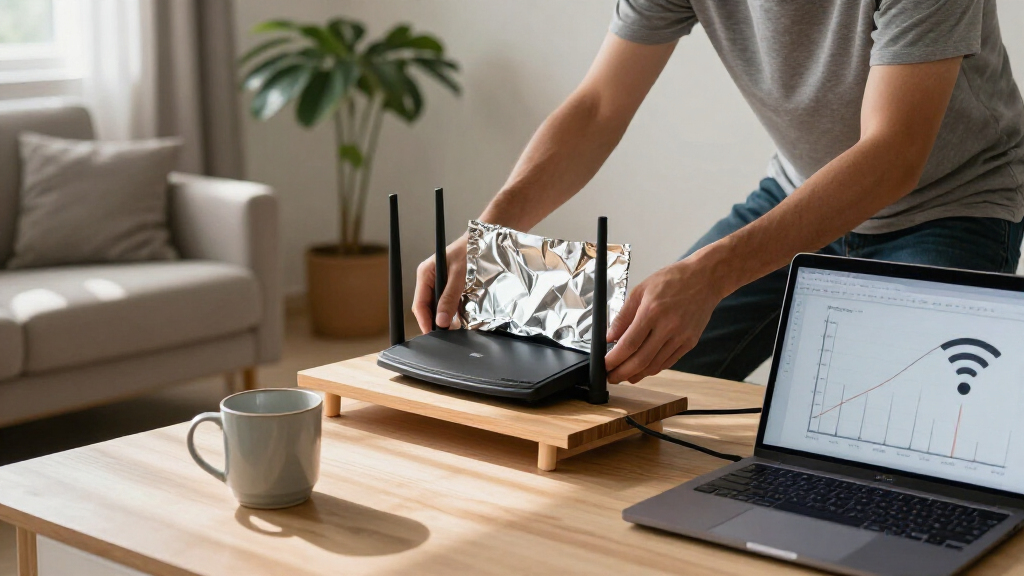
The idea behind the trick is that a reflective sheet behind a router could redirect some radio energy toward areas where devices are used. But performance depends on the router’s antennas, room layout, materials and where users sit. Foil could also alter coverage in unwanted directions. For readers, the practical takeaway is that this one test suggests a possible change in a nearby local measurement, not a general fix for weak Wi-Fi or a proven way to increase an internet plan’s speed.
Products Worth Considering

Amazon Kindle Paperwhite (12th Generation, 2024), 16 GB, 7-inch Display, Jade

DJI Osmo Mobile 8 3-Axis Smartphone Gimbal Stabilizer

Anker SOLIX C200 DC Portable Power Station, 192Wh, 200W
As an affiliate, we earn on qualifying purchases.
How the Two Tests Differ
The writer compared results with and without foil using two methods. Fast.com measures a device’s connection to the internet, so its readings can vary for reasons beyond the wireless link to the router. The test plan included three runs per device, with devices in different rooms. That setup offered a small snapshot of coverage around one home, rather than a broad evaluation of foil as a router accessory.
iperf3 was used to measure traffic between two laptops on the local network, first near the router and then again with foil in place. That removes the external internet connection from the measurement, but it still tests only the particular router, laptops and placement used in the experiment. The report says the foil was cut to cover the area directly behind the router; it does not provide a repeatable design or measurements of signal strength and direction.
One Router, Several Open Questions
The supplied article material does not establish whether foil caused the observed differences. It reports only three runs per condition on one router and gives no uncertainty range or independent replication. Fast.com results can shift with internet-side conditions, and the two distant devices’ averages fell in the foil tests while the nearby device’s average rose.
The supplied source also cuts off as the writer begins discussing access from behind the router. It does not include that test’s results, so the effect on coverage behind the router is unknown. The material does not say whether the foil affected other rooms, how results changed over longer periods, or whether a different foil shape or router would produce similar readings.
More Testing Would Be Needed
The report provides no announced follow-up test or broader study. To determine whether the result is repeatable, further testing would need to compare foil and no-foil conditions across more runs, router models and device locations, while keeping positioning and test conditions consistent. Measurements in front of and behind the router would help show whether any apparent gain in one direction comes with reduced coverage elsewhere.
For now, the reported figures support a limited conclusion: the local test was faster in the foil condition, but the internet measurements were mixed. Readers should treat the result as a single experiment, not evidence that foil will improve Wi-Fi in a typical home.
Key Questions
Did the aluminum foil improve internet speed in the test?
Not consistently. The nearby device’s average download speed rose from about 677 Mbps to 707 Mbps, while the two farther devices recorded lower averages with foil. Those readings came from three runs per condition.
What happened in the local-network test?
Using iperf3 between two nearby laptops, average sender throughput rose from about 647 Mbps without foil to about 711 Mbps with foil. Receiver throughput rose from 644 Mbps to about 709 Mbps. The test involved one router and setup.
Why might foil affect Wi-Fi coverage?
The report describes the theory that foil could reflect some radio energy away from the area behind the router and toward other areas. The test does not establish how that effect varies by router, antenna design or room layout.
Does the test prove foil is a useful Wi-Fi fix?
No. It is a small, single-router experiment with mixed internet speed results and no reported replication on other equipment. The measurements do not establish a reliable improvement for other homes.
Source: XDA Developers