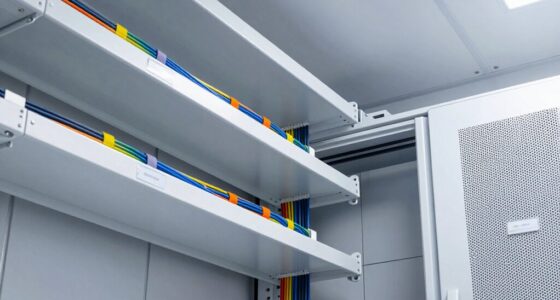
To keep your network closet organized for years, plan carefully by allocating enough space for current and future equipment, placing racks centrally for easy access, and out of high traffic zones. Use quality cable management tools like labels, ties, and trays to prevent clutter, and route cables neatly to improve airflow. Install proper ventilation and cooling, and use surge protectors or UPS units for power safety. Keep detailed diagrams and update them regularly to simplify maintenance and upgrades—if you stick with these tips, you’ll set a solid foundation for long-term organization.

Get business pricing on networking and server gear
- Business-only prices and quantity discounts
- Tax-exempt purchasing
- Multiple users, one account, clear invoices
Key Takeaways
- Allocate ample space for current and future equipment, positioning centrally for easy access and maintenance.
- Implement structured cable management with labels, ties, and trays to prevent tangling and facilitate troubleshooting.
- Ensure proper ventilation with passive and active cooling methods to maintain optimal temperatures.
- Use surge protectors, UPS units, and organized power strips to safeguard equipment and reduce cable clutter.
- Maintain detailed documentation of hardware, cables, and layout, and review organization strategies periodically.

Have you ever wondered how to set up a network closet that’s both efficient and organized? The key lies in thoughtful planning from the start. First, consider the layout: you want enough space to accommodate current equipment and future expansion. Position your rack or cabinet in a central location that’s easily accessible yet out of the way of daily traffic. Keep in mind that a well-placed closet minimizes cable clutter and simplifies maintenance. Incorporate cable management strategies to keep everything tidy and accessible.
Cable management is critical for long-term organization. Invest in high-quality cable organizers, such as cable ties, velcro straps, and cable trays, to route wires neatly along the sides of your rack. Label each cable clearly; this makes troubleshooting and upgrades much easier down the line. Avoid tangling or crossing cables unnecessarily, which can lead to confusion and potential damage. Remember, tidy cables also improve airflow and reduce the risk of overheating. Proper cable routing helps prevent accidental disconnections and maintains a cleaner overall setup.
Ventilation solutions are equally important. A cramped, poorly ventilated closet can cause equipment to overheat, leading to failures and costly downtime. Install exhaust fans or ventilation panels that promote continuous airflow. Consider using vented doors or panels with mesh sections to enhance passive cooling. If your equipment generates significant heat, supplement passive ventilation with active cooling devices like fans or air conditioning units designed for small spaces. Proper airflow not only prolongs the lifespan of your gear but also maintains ideal performance.
Planning for power management is another crucial aspect. Use surge protectors and uninterruptible power supplies (UPS) to safeguard your equipment from power surges and outages. Position power strips strategically to minimize cable clutter and ensure easy access. Keep electrical cords organized and away from airflow paths to prevent accidental disconnection or overheating. Regularly inspecting your power setup can help identify potential issues before they cause downtime.
Finally, document your setup thoroughly. Maintain diagrams and inventories of all hardware, cables, and connections. This documentation speeds up troubleshooting and future upgrades, keeping your network running smoothly for years. Regularly review and update your organization and cooling strategies as your network grows. Staying proactive with maintenance and planning ensures your network closet remains efficient and organized over time.
network rack cable management kit
As an affiliate, we earn on qualifying purchases.
As an affiliate, we earn on qualifying purchases.
Frequently Asked Questions
What Are the Best Storage Solutions for Small Network Closets?
Think of your network closet as a well-tended garden. To keep it thriving, you need the right tools: cable management solutions like Velcro straps and cable organizers to prevent tangles, along with vertical racks and storage bins to maximize space. These storage solutions optimize your closet’s layout, making maintenance easier, reducing clutter, and ensuring everything stays organized for years to come. Proper planning keeps your network garden flourishing.
How Often Should Network Equipment Be Upgraded or Replaced?
You should upgrade or replace your network equipment every 3 to 5 years to maintain ideal performance, especially since wireless security standards evolve rapidly. Regular upgrades guarantee you’re protected against vulnerabilities and improve speeds. Incorporate power redundancy in your planning to prevent outages during replacements. By staying proactive, you guarantee your network remains secure, reliable, and ready to handle future demands, reducing downtime and security risks over the years.
What Safety Precautions Are Necessary for Electrical Safety?
You prioritize fire safety and electrical grounding to guarantee safety in your network closet. You install smoke detectors, keep fire extinguishers nearby, and avoid overloading circuits. You verify proper electrical grounding, check for damaged cords, and disconnect equipment during storms. You wear protective gear, keep exits clear, and follow electrical codes. You stay alert to hazards, prevent fires, and protect your equipment by maintaining these safety precautions diligently.
How to Manage Cable Clutter Over Time?
To manage cable clutter over time, focus on effective cable management and organized power distribution. Use cable ties, Velcro straps, and cable management panels to keep cables neat and easily accessible. Label each cable clearly for quick identification. Regularly inspect and reorganize your power distribution setup to prevent tangling and guarantee safety. This proactive approach keeps your network closet tidy, making maintenance smoother and extending its organization’s longevity.
Can a Network Closet Be Environmentally Controlled?
Yes, a network closet can be environmentally controlled. You might think it’s unnecessary, but humidity control and temperature regulation are crucial to prevent equipment failure. Installing a dedicated HVAC system or dehumidifier ensures ideal conditions, reducing risks of overheating or corrosion. Keeping your network closet environmentally controlled prolongs equipment life and maintains reliability, saving you money and headaches in the long run. Proper climate management is a smart investment for your network’s health.
As an affiliate, we earn on qualifying purchases.
Conclusion
By following these planning tips, your network closet will stay organized for years to come. Remember, a well-designed space isn’t just neat—it’s the backbone of your entire network, keeping everything running smoothly like a finely tuned engine. With careful planning, you’ll prevent chaos from taking over and turn your closet into a fortress of order. Stay proactive, and your network will thank you with seamless performance for decades—a true marvel of modern organization.
surge protector power strip for network closet
As an affiliate, we earn on qualifying purchases.
As an affiliate, we earn on qualifying purchases.
UPS uninterruptible power supply for network equipment
As an affiliate, we earn on qualifying purchases.
As an affiliate, we earn on qualifying purchases.
Halloween Picks
halloween
As an affiliate, we earn on qualifying purchases.