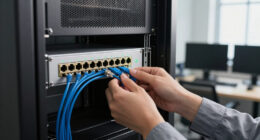

Using NAS over Ethernet provides you with a fast, secure, and reliable way to manage and share data across your network. It acts as a centralized hub, simplifying access for multiple devices while boosting organization. Ethernet connections ensure high speeds and low latency, especially with quality cables and switches. Proper security measures, like encryption and access controls, safeguard your data. To discover how to optimize your setup further, explore this guide for additional insights.

Get business pricing on networking and server gear
- Business-only prices and quantity discounts
- Tax-exempt purchasing
- Multiple users, one account, clear invoices
Key Takeaways
- Connect NAS devices to a wired Ethernet network for faster, more reliable data transfer and reduced latency.
- Use high-quality Ethernet cables and gigabit switches to optimize network speed and performance.
- Configure network protocols like SMB, NFS, or AFP based on device compatibility for seamless data sharing.
- Enable network segmentation to enhance security and prevent congestion, ensuring efficient NAS operation.
- Keep firmware updated to improve stability, security, and compatibility with Ethernet-connected NAS systems.

Network Attached Storage (NAS) has become an indispensable solution for managing and sharing data across multiple devices efficiently. When you use NAS over Ethernet, you gain a centralized hub that simplifies data access while keeping your information organized. However, safeguarding data security is paramount, especially when your NAS is accessible over the network. To protect sensitive files, you need to implement robust security measures such as encryption, user authentication, and access controls. Many NAS devices support advanced data security features, allowing you to set permissions that restrict access to authorized users only. This way, even if someone gains unauthorized network access, they won’t be able to view or tamper with protected data.
Network protocols play an essential role when connecting your NAS over Ethernet. Protocols like SMB (Server Message Block), NFS (Network File System), and AFP (Apple Filing Protocol) facilitate seamless communication between your NAS and other devices, whether they run on Windows, Linux, or macOS. Choosing the right network protocol depends on your specific needs and the devices you’re connecting. SMB is widely used for Windows environments, offering reliable file sharing and integration. NFS is preferred in Linux setups, providing fast and efficient access to shared files. AFP, though less common today, is still relevant for Apple devices. Properly configuring these protocols ensures smooth data transfer and minimizes latency, making your network interactions more efficient.
Connecting your NAS over Ethernet also means you need to consider network performance. A wired connection typically offers faster speeds and lower latency compared to Wi-Fi, which is essential when transferring large files or working with real-time data. To optimize performance, use high-quality Ethernet cables and a gigabit or faster switch. Proper network segmentation can also safeguard your data by isolating your NAS from other network traffic, reducing the risk of congestion or cyberattacks. Regular firmware updates for your NAS device enhance compatibility, fix security vulnerabilities, and improve overall stability, giving you peace of mind that your data remains protected and accessible.
As an affiliate, we earn on qualifying purchases.
Frequently Asked Questions
How Secure Is Data Transfer Over Ethernet With NAS?
Data transfer over Ethernet with NAS can be quite secure if you implement data encryption and network isolation. Encryption protects your data from interception, ensuring it remains confidential during transit. Network isolation, like using VLANs or dedicated connections, limits access to authorized users only. By combining these measures, you considerably enhance your data’s security, making it difficult for unauthorized parties to access or tamper with your information during transfer.
Can NAS Be Integrated With Smart Home Systems?
Yes, you can integrate your NAS with smart home systems. Many NAS devices offer smart home compatibility, allowing you to access and manage your files through voice control integration with platforms like Alexa or Google Assistant. This setup enables seamless access to your media, security footage, or backups via voice commands, making your smart home more convenient and efficient. Just confirm your NAS supports the specific smart home ecosystem you use.
What Are the Energy Consumption Implications of NAS?
Think of your NAS as a steady lighthouse, illuminating data without draining your energy. Its power consumption varies with usage, but modern models emphasize energy efficiency, reducing unnecessary power draw during idle times. While it does add to your overall energy footprint, choosing energy-efficient NAS devices helps minimize environmental impact and electricity costs, making them a smart choice for sustainable data storage.
How Does NAS Performance Vary With Different Ethernet Standards?
Your NAS performance depends heavily on Ethernet standards, affecting your data throughput and overall speed. With Gigabit Ethernet, you’ll experience good performance for everyday tasks, but upgrading to 10-Gigabit Ethernet boosts your data throughput markedly, ideal for large files or multiple users. Keep in mind, the network hardware and cabling also influence performance, so make certain your setup supports the Ethernet speed you need for best NAS operation.
Is It Possible to Use Wireless Ethernet for NAS Access?
Yes, you can use wireless connectivity for NAS access, but be aware it may affect network reliability and performance. Wireless connections are convenient and flexible, but they often experience interference and slower speeds compared to wired Ethernet. For maximum performance, especially with large files or multiple users, a stable wireless network with strong signal strength is essential. If reliability is critical, consider a wired Ethernet connection instead.
High-quality Ethernet cables for NAS
As an affiliate, we earn on qualifying purchases.
As an affiliate, we earn on qualifying purchases.
Conclusion
Now that you’ve set up your NAS over Ethernet, you’re ready to enjoy fast, reliable storage like a modern-day data wizard. Just remember, even in this digital age, keeping your network secure is as important as protecting your treasure chest. Think of your NAS as your own personal Holodeck—full of endless possibilities. With a bit of maintenance and some old-school caution, you’ll have a storage solution that stands the test of time, just like your trusty floppy disk.
Network Attached Storage (NAS) enclosure
As an affiliate, we earn on qualifying purchases.
As an affiliate, we earn on qualifying purchases.
As an affiliate, we earn on qualifying purchases.
Halloween Picks
halloween
As an affiliate, we earn on qualifying purchases.