
Did you know that properly installing Modular Plug Terminated Links (MPTL) can considerably improve your rack’s network reliability? Many technicians overlook the importance of following industry standards like TIA/EIA-568 or ISO/IEC 11801 during installation. A small mistake can lead to signal issues or difficult troubleshooting later. Understanding best practices for planning, installing, and testing your MPTL setup can save you time and guarantee peak performance—something worth paying attention to.
Key Takeaways
- Ensure MPTL components comply with industry standards like TIA/EIA-568 for compatibility and reliable performance.
- Plan cable routing within racks to prevent strain, interference, and maintain proper airflow.
- Clearly label each MPTL link for easy identification, troubleshooting, and future upgrades.
- Use proper tools and follow manufacturer instructions during termination to guarantee secure, high-quality connections.
- Test all connections with certified equipment and document setups for network integrity and efficient maintenance.

Modular Plug Terminated Links (MPTL) are increasingly popular in rack installations because they simplify cabling and enhance flexibility. When you’re considering deploying MPTLs, understanding the relevant connectivity standards is crucial. These standards ensure that your links are compatible with existing infrastructure, promote reliable data transmission, and prevent future compatibility issues. Familiarize yourself with standards such as TIA/EIA-568, ISO/IEC 11801, and ANSI/TIA-568-C to select MPTL components that meet industry benchmarks. This knowledge helps you choose the right connectors, cables, and patch panels, reducing troubleshooting time and ensuring consistent performance. Additionally, adhering to these standards can help ensure compliance with industry regulations and best practices.
Implementing installation best practices is just as critical as understanding connectivity standards. Start by planning your cabling layout carefully. Map out the rack space, identify the number of connections needed, and determine the ideal routing to minimize cable strain and interference. When terminating cables into MPTLs, always follow manufacturer instructions meticulously. Proper termination techniques, such as maintaining correct pinouts and avoiding over-bending cables, are key to achieving peak signal quality. Use the right tools—crimpers, testers, and strain reliefs—to guarantee secure and dependable terminations.
Plan cabling carefully, follow manufacturer instructions, and use proper tools for secure, high-quality MPTL terminations.
Labeling is another crucial aspect of installation best practices. Clearly mark each MPTL link with information about its purpose, port number, and destination. This step simplifies troubleshooting and future upgrades, saving you time and reducing errors. Keep cables organized using cable management accessories like ties and rack mounts, which help prevent accidental disconnections and reduce clutter. Proper airflow management should also be a priority. Avoid blocking vents or fans with cables to maintain ideal equipment cooling, which prolongs device lifespan and maintains system stability.
Testing your MPTL connections before finalizing the installation is a must. Use certified testing equipment to verify continuity, signal integrity, and adherence to connectivity standards. This process helps identify issues early, so you can rectify them before they impact your network’s performance. Document your installation thoroughly, including cable routes, connection points, and test results. Proper documentation facilitates future maintenance and scalability, especially as your network grows or evolves. Following industry standards ensures that your network infrastructure remains reliable and efficient over time.

Cable Matters 100-Pack Cat 6 Pass Through RJ45 Connectors, 50µ Gold Plated (Cat 6 Ends / Cat6 Connector /RJ45 Modular Plugs/Ethernet Plugs/Network Connector) for Solid or Stranded UTP Ethernet Cable
Reliable RJ45 Connector for Custom Cabling: These Cat 6 pass through RJ45 connectors are ideal for building custom-length…
As an affiliate, we earn on qualifying purchases.
As an affiliate, we earn on qualifying purchases.
Frequently Asked Questions
What Are the Compatibility Considerations for Different Rack Types?
You need to check rack compatibility by guaranteeing your rack supports the modular standards your MPTL uses. Different rack types may have varying sizes, mounting styles, and port configurations, so verify that the rack accommodates the connectors and modules you’re installing. Compatibility considerations also include weight capacity and space. By matching these factors, you ensure your MPTL setup functions smoothly and maintains reliable connections within your rack system.
How Do MPTL Connections Impact Network Troubleshooting?
MPTL connections streamline network troubleshooting by simplifying diagnostic procedures and fault isolation. Since MPTLs are modular and easy to replace, you can quickly identify and swap faulty links without disrupting the entire system. This reduces downtime and makes pinpointing issues faster. As a result, your troubleshooting becomes more efficient, and maintaining network reliability improves because you can swiftly address faults with minimal impact on overall performance.
Are There Specific Safety Standards for MPTL Installation?
Think of safety standards for MPTL installation as your guiding compass—without it, you’re lost in a maze. You must follow specific installation guidelines to ensure safe, reliable connections. These standards cover proper grounding, strain relief, and cable management, reducing risks of electrical hazards and network failures. Adhering to these protocols not only protects equipment but also keeps you safe, transforming complexity into confidence in your setup.
What Is the Typical Lifespan of an MPTL Link?
You can expect an MPTL link to last around 10 to 15 years, depending on fiber durability and connection stability. High-quality materials and proper installation help maintain peak performance over time. Environmental factors like temperature fluctuations and physical stress may shorten its lifespan. Regular inspections and timely replacements ensure sustained fiber durability, preventing signal loss or connection issues, and keeping your rack system reliable for the long term.
Can MPTL Be Used in Outdoor or Harsh Environments?
You can definitely use MPTLs outdoors or in harsh environments. Over 80% of outdoor installations require weather-resistant solutions, and MPTLs designed for such conditions feature UV protection and weather resistance. These enhancements help prevent damage from sun, rain, and temperature fluctuations. With the right specifications, MPTLs deliver reliable performance, ensuring your network stays connected even in extreme weather, making them a smart choice for outdoor or harsh environment applications.
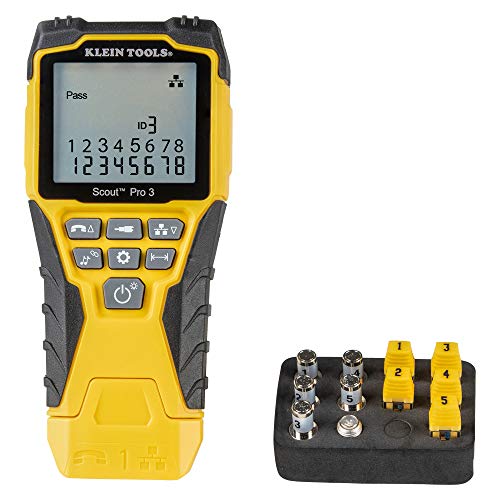
Klein Tools VDV501-851 Cable Tester Kit with Scout Pro 3 for Ethernet / Data, Coax / Video and Phone Cables, 5 Locator Remotes
VERSATILE CABLE TESTING: Cable tester tests voice (RJ11/12), data (RJ45), and video (coax F-connector) terminated cables, providing clear…
As an affiliate, we earn on qualifying purchases.
As an affiliate, we earn on qualifying purchases.
Conclusion
By properly planning, precisely installing, and thoroughly labeling your MPTLs, you create a clean, consistent, and compliant cabling environment. Adopting these best practices boosts your network’s reliability, reduces troubleshooting time, and promotes scalability. Remember, meticulous management maximizes performance and minimizes mishaps. Mastering modular plug terminated links makes your data center more dynamic, dependable, and ultimately, a model of modern network management. Keep these concepts coherent to guarantee a seamless, secure, and scalable system.
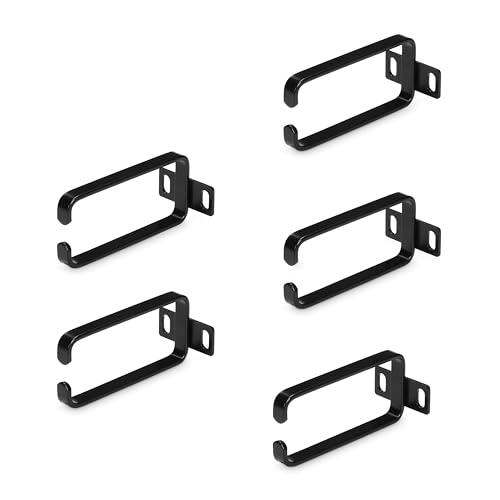
StarTech 5-Pack 1U Vertical 1.8 x 3.9in (4.5 x 10cm) Server Rack Cable Management D-Ring Hook; Network Rack-Mount Cord Organizer; Cable Manager for 19" and 10" Cabinets
CONTROL VERTICAL CABLE RUNS: Mounts vertically to 2-post and 4-post racks and supports both 10-inch and 19-inch rack…
As an affiliate, we earn on qualifying purchases.
As an affiliate, we earn on qualifying purchases.

Klein Tools VDV226-110 Ratcheting Modular Data Cable Crimper / Wire Stripper / Wire Cutter for RJ11/RJ12 Standard, RJ45 Pass-Thru Connectors
EFFICIENT INSTALLATION: Modular crimp-connector tool with Pass-Thru RJ45 plugs for voice and data applications, streamlining installation process
As an affiliate, we earn on qualifying purchases.
As an affiliate, we earn on qualifying purchases.