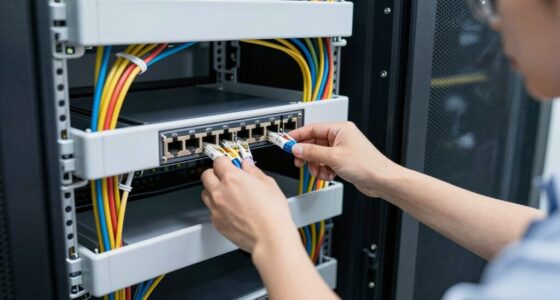
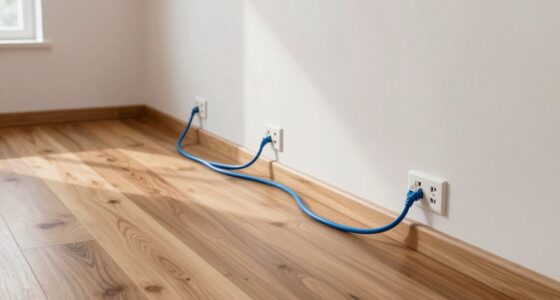
Using Power over Ethernet for security cameras can simplify your setup by combining power and data into a single cable, reducing clutter and installation time. However, ensuring system reliability requires attention to surge protection, proper grounding, and cable quality. These factors can make or break your network’s effectiveness, prompting questions about best practices and equipment choices that you might want to explore further.
Key Takeaways
- PoE simplifies security camera installation by combining power and data transfer through a single cable.
- Built-in surge protection in PoE switches enhances system reliability and safeguards against electrical surges.
- External surge suppressors can be added to protect cameras and network equipment during electrical storms.
- Proper grounding strategies complement PoE surge protection, reducing the risk of damage from voltage spikes.
- Using high-quality, shielded cables and connectors ensures optimal performance and longevity of PoE-enabled security systems.

Power over Ethernet (PoE) has become a game-changer for security camera installations, offering a simpler and more reliable way to connect cameras to your network. Instead of juggling separate power supplies and Ethernet cables, PoE combines both functions into a single cable, reducing clutter and making setup easier. This streamlined approach not only saves time but also minimizes potential points of failure, ensuring your security system remains operational. As you implement PoE, it’s essential to consider the importance of surge protection, especially since power over Ethernet lines can be vulnerable to power surges caused by lightning strikes or electrical faults. Proper surge protection devices shield your cameras and network equipment, preventing damage and extending their lifespan.
PoE simplifies security camera setups but requires surge protection to guard against electrical surges and ensure system longevity.
When you’re deploying PoE-powered security cameras, choosing equipment with integrated surge protection is a smart move. Many PoE switches and injectors come equipped with built-in surge protection, which acts as a buffer against voltage spikes. This means that if a lightning strike hits nearby or there’s a sudden fluctuation in power, the surge protection kicks in to divert the excess voltage away from your cameras, safeguarding your investment. If your system doesn’t have built-in surge protection, you should consider installing external surge suppressors on your Ethernet lines. These devices are designed specifically for PoE setups, ensuring that any unexpected electrical surges won’t fry your cameras or network equipment.
You also want to ensure that your installation environment is as protected as possible. Using surge protection in combination with proper grounding can considerably reduce the risk of damage. Grounding provides a safe pathway for excess electrical energy to dissipate into the earth, adding an extra layer of security against electrical surges. When setting up your security cameras, pay attention to the quality of your cabling and connectors as well. Using shielded Ethernet cables and high-quality connectors can further reduce susceptibility to electrical interference and surges.
In addition to hardware protections, it’s wise to have an emergency plan in place. Regularly inspecting your surge protection devices and replacing them when they show signs of wear can keep your system resilient. Power over, combined with reliable surge protection, ensures your security cameras operate consistently and remain protected against unexpected electrical events. This proactive approach not only preserves your investment but also guarantees the security footage you rely on remains uninterrupted, even during electrical storms or power fluctuations. Incorporating crochet styles for locs and other protective styling options can also help reduce physical strain on your cables and connectors, enhancing overall system durability.

Tupavco Ethernet Surge Protector Gigabit High PoE++ Class 8 (154W/3.2A) TP302
- Ethernet Surge Protection: Supports Gigabit PoE++ 1000 Mbps
- Gas Discharge Tubes: Provides lightning and surge suppression
- Durable Aluminum Case: Enhanced protection and durability
As an affiliate, we earn on qualifying purchases.
As an affiliate, we earn on qualifying purchases.
Frequently Asked Questions
Can Poe Be Used With Existing Security Camera Systems?
Yes, you can use PoE with your existing security camera systems. It often involves simple retrofit solutions that utilize your current infrastructure, making installation easier and more cost-effective. You just need to guarantee your cameras support PoE or use compatible adapters. This way, you can power and connect your cameras through a single Ethernet cable, streamlining maintenance and reducing clutter without replacing your entire system.
What Are the Cost Advantages of Poe Over Traditional Power Methods?
Using PoE can cut your costs dramatically—it’s like slashing through expenses with a sword. You’ll experience significant cost savings because PoE reduces the need for separate power supplies and complex wiring. It also simplifies infrastructure, making installation faster and more affordable. This streamlined approach means you spend less on equipment and labor, giving you a smarter, more efficient security setup that saves money at every turn.
How Does Poe Improve Security Camera Installation Flexibility?
PoE enhances your security camera installation flexibility by enabling wireless integration and remote monitoring. With PoE, you don’t need separate power sources, so you can place cameras almost anywhere, even in hard-to-reach spots. This setup allows easy adjustments and expansions, giving you greater control over your surveillance system. Plus, remote monitoring ensures you stay connected and keep an eye on your cameras from anywhere, enhancing your security management.
Are There Compatibility Issues With Certain Security Camera Brands?
Did you know that over 80% of security camera installations face compatibility issues? When using Poe, you might encounter brand compatibility challenges, especially with certain brands that need specific adapter requirements. Always check your camera’s suitability with Poe switches or injectors beforehand. This ensures smooth operation, avoiding the need for costly upgrades or replacements, and guarantees your security system works seamlessly with your preferred camera brand.
What Are the Potential Risks of Using Poe for Security Cameras?
Using PoE for security cameras can expose you to risks like power surges, which might damage devices if proper surge protection isn’t in place. You also face potential network vulnerabilities, as insecure PoE setups could be exploited by hackers to access your network. To minimize these risks, make certain you use quality PoE switches with surge protection and implement strong network security measures.

TP-Link TL-SG1005P, 5 Port Gigabit PoE Switch, 4 PoE+ Ports @65W, Desktop, Plug & Play, Sturdy Metal w/ Shielded Ports, Fanless, QoS & IGMP Snooping
- Gigabit PoE+ Ports: 4 PoE+ ports with 65W total power
- High-Speed Non-PoE Port: 1 Gigabit non-PoE port for fast connections
- Plug & Play Setup: Easy installation without software
As an affiliate, we earn on qualifying purchases.
As an affiliate, we earn on qualifying purchases.
Conclusion
By leveraging PoE for your security cameras, you simplify your setup and boost reliability. Did you know that installations using PoE reduce wiring costs by up to 50%? With proper surge protection, grounding, and quality cables, your system becomes more resilient against electrical surges and failures. Embrace PoE today to enjoy a cleaner, more dependable security solution that keeps your property protected around the clock.

GEARit Cat7 Outdoor Ethernet Cable (25ft) SFTP Shielded Foil Twisted Pair, Pure Copper, LLDPE, Waterproof, Direct Burial, In-Ground, UV Resistant, POE, Network, LAN, Internet, Cat 7-25 Feet
- Outdoor-Grade Design: Waterproof, UV resistant, and direct burial
- High-Speed Data Transfer: Supports Gigabit and 10GBASE-T networks
- Enhanced Shielding: SFTP shielding reduces interference and signal loss
As an affiliate, we earn on qualifying purchases.
As an affiliate, we earn on qualifying purchases.
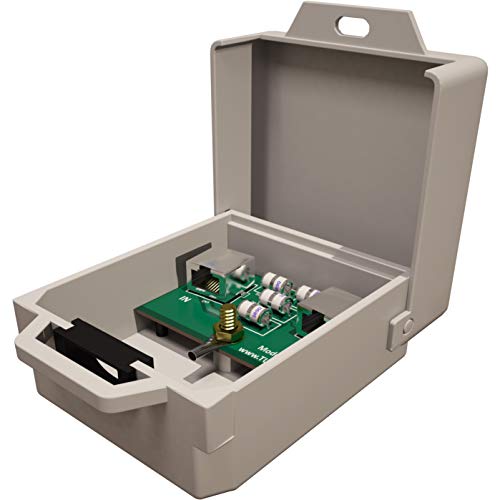
Tupavco TP303 Ethernet Surge Protector Outdoor for PoE+ Gigabit 1000Mbs – LAN Network Thunder Lightning Surge Protection Suppressor/Arrester
- Application: Outdoor Ethernet Surge Protector
- Compatibility: Supports PoE+ and Gigabit LAN
- Protection Type: Gas Discharge Tubes for Lightning
As an affiliate, we earn on qualifying purchases.
As an affiliate, we earn on qualifying purchases.