
The best overall 10GbE network card in this roundup is the Sonnet Twin10G, which pairs two RJ45 ports with broad Mac, Windows, and Linux support. The TP-Link TX401 is a simpler single-port RJ45 choice, while the QNAP QXG-10G2T-X710 stands out for two ports and server-oriented features such as SR-IOV and iSCSI. Your main decision is between familiar copper cabling and SFP+ connections, then between one port and two, with compatibility and cooling also affecting the fit. A fast card cannot compensate for a slower switch, cable, storage device, or PCIe slot. Continue reading for the full breakdown of all 13 10GbE network cards and the tradeoffs that separate them.

Get business pricing on networking and server gear
- Business-only prices and quantity discounts
- Tax-exempt purchasing
- Multiple users, one account, clear invoices
Key Takeaways
- Sonnet Twin10G is the most versatile pick for buyers who need two RJ45 ports and support across Mac, Windows, and Linux; its dual-port design is more than a basic desktop upgrade requires.
- TP-Link TX401 favors straightforward single-port copper, while the X540-based 10Gtek cards offer dual RJ45 connectivity for server and workstation setups that need two links.
- SFP+ cards make sense when the network already uses SFP+ switches or fiber; the 10Gtek 82599ES dual-port card and single-port 82599EN models serve different port-count needs.
- The QNAP QXG-10G2T-X710 is the server-feature pick for buyers who can use its two ports, SR-IOV, and iSCSI support, rather than a default choice for every home PC.
- Check host fit before choosing a low-profile or small-slot card: PCIe generation, slot availability, operating-system support, transceiver or cable needs, and airflow can matter as much as the advertised link speed.






| 10GbE network card | Interface |
|---|---|
| Sonnet Twin10G PCIe Dual 10GbE | PCIe x4 |
| 10Gtek 10Gb Dual RJ45 Port Net | PCIe 2.1 x8 |
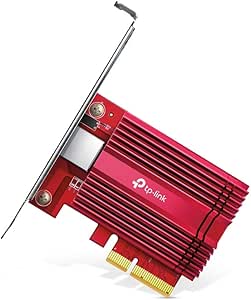
| TP-Link 10Gb PCIe Network Card | PCIe 3.0 |
| 2X 10Gb/s SFP+ Fiber Ports Con | PCIe x8 |
| 10Gb PCIe Network Card | PCIe 4.0 x1 |
| 10Gtek 10Gb PCI-E NIC Network | PCI Express x8 |
| 10G Dual RJ45 Port PCIe Networ | PCIe x16 |
| Cudy 10G PCIe Ethernet Network | PCIe x1 |
| Asus Network Card NADACA0140 1 | — |
| 10Gb PCIe NIC Network Card | PCIe x4, x8, or x16 |
| QNAP QXG-10G2T-X710 Two Port 1 | PCIe Gen 3 |
| SABRENT 10Gb PCIe Network Card | PCIe 3.0 x4 |
| 10Gtek 10Gb PCI-E NIC Network | PCIe x8 |
More Details on Our Top Picks
Sonnet Twin10G PCIe Dual 10GbE RJ45 Ethernet Network Card for Mac, Windows, Linux
The Sonnet Twin10G is the clearest fit here for buyers who need two copper 10GbE ports across Mac, Windows, and Linux systems. Its link aggregation and transparent failover give those ports a role beyond adding bandwidth: they can support aggregated links or a backup path, depending on the network setup. Like the 10Gtek X540 dual-RJ45 card, it uses familiar copper cabling and has two ports, but Sonnet’s stated compatibility with Thunderbolt expansion systems makes it a stronger match for some Mac workstations. CAT-6 or CAT-6A runs can reach up to 100 meters, avoiding the short-reach limits often associated with direct-attach links. The tradeoff is setup work: drivers and network configuration are required, and the one-year warranty is shorter than the TX401’s two years.
Pros:- Two-port 10GbE card supports link aggregation and transparent failover
- Compatible with Mac, Windows, and Linux
- Works with computers and Thunderbolt expansion systems
- Includes full-height and low-profile brackets
Cons:- Requires driver installation and network configuration
- One-year limited warranty is shorter than the TP-Link TX401’s two-year warranty
Best for: Mac workstation owners and mixed-OS teams that need dual copper 10GbE, link aggregation, or failover.
Not ideal for: Buyers seeking a simple single-port upgrade or a longer warranty; the two-port design may be unnecessary, and its warranty is one year.
- Interface:PCIe x4
- Data transfer rate:10240 Mbps
- Ports:Dual 10GbE RJ45
- Operating systems:Mac, Windows, Linux
- Compatible devices:Computers and Thunderbolt expansion systems
- Cable support:CAT-6 or CAT-6A, up to 100 meters
- Form factor:Full-height and low-profile brackets
- Warranty:1 year limited warranty
Our verdict“Choose the Sonnet Twin10G for dual-port copper 10GbE with broad Mac and mixed-OS compatibility, provided you are comfortable configuring drivers and links.”
10Gtek 10Gb Dual RJ45 Port Network Card with X540 Controller, PCIe Ethernet LAN Adapter for Windows/Linux/ESX Servers
This 10Gtek X540 card is aimed at server operators who want two RJ45 ports plus features for segmented or virtualized networks. Support for VLANs, Data Center Bridging, and jumbo frames up to 15.5 KB gives administrators more room to tune traffic than a basic desktop adapter such as the TP-Link TX401. It also handles both 10GbE and 1GbE connections, which can help when integrating with mixed-speed equipment. Its PCIe 2.1 x8 interface and compatibility with Windows, Linux, and ESX/ESXi make it a practical fit for older server environments. The tradeoffs are its less current operating-system list—Windows 11 requires manual setup—and the lack of hot-swap support. Buyers wanting a straightforward newer-PC upgrade may find the TX401 easier to place.
Pros:- Dual RJ45 ports support 10GbE and 1GbE connections
- VLAN, Data Center Bridging, and jumbo frames up to 15.5 KB
- Listed support for Windows Server, Linux, and ESX/ESXi
- Includes a low-profile bracket for smaller server cases
Cons:- Windows 11 compatibility may require manual setup
- Not hot-swappable
- PCIe 2.1 x8 requirement may not suit systems with limited slot availability
Best for: Administrators maintaining Windows Server, Linux, or ESX/ESXi machines who need dual copper ports and VLAN or jumbo-frame support.
Not ideal for: Windows 11 users seeking a plug-in-and-go installation, or server operators who require hot-swappable network adapters.
- Controller:Intel X540
- Ports:2 x RJ45, 10GbE/1GbE
- Interface:PCIe 2.1 x8
- Maximum jumbo frame:15.5 KB
- Supported operating systems:Windows Server 2003/2008/2012, Windows 7/8/10, Linux, ESX/ESXi
- Networking features:VLAN and Data Center Bridging (DCB)
- Operating temperature:0–55°C
- Supported bus widths:x1, x2, x4, x8
Our verdict“Pick this 10Gtek card for a configurable dual-port server adapter, especially when legacy OS or ESX support matters more than a simple desktop setup.”
TP-Link 10Gb PCIe Network Card (TX401) – PCIe to 10 Gigabit Ethernet Adapter
The TP-Link TX401 is the most approachable pick in this group for a Windows or Linux PC that needs one 10GbE connection. Its broad speed negotiation—from 100 Mbps through 10 Gbps—helps it connect to networks that have not yet been upgraded end to end, while the included CAT6A cable removes one shopping decision. Compared with the Sonnet Twin10G, the TX401 gives up the second port, aggregation, and failover, but its single-adapter focus suits a typical desktop upgrade better. It also carries a two-year warranty, longer than Sonnet’s. The main limits are the need for a suitable PCIe 3.0 slot and possible driver or compatibility friction; this is a less appealing choice for older computers or buyers who only need ordinary gigabit networking.
Pros:- Supports 10 Gbps and backward-compatible speeds down to 100 Mbps
- Includes a 1.5 m CAT6A Ethernet cable
- Supports Windows, Windows Server, and Linux
- Two-year warranty
Cons:- Requires an available PCIe 3.0 slot
- Driver or compatibility issues may require troubleshooting
- Single-port design lacks the aggregation and failover options of the Sonnet Twin10G
Best for: Windows or Linux PC owners with a PCIe 3.0 slot who want one 10GbE link and a compatible cable included.
Not ideal for: Owners of older systems without a suitable PCIe 3.0 slot, or buyers who need dual ports, link aggregation, or failover.
- Model:TX401
- Interface:PCIe 3.0
- Maximum speed:10 Gbps
- Supported speeds:10 Gbps, 5 Gbps, 2.5 Gbps, 1 Gbps, 100 Mbps
- Included cable:1.5 m CAT6A Ethernet cable
- Supported operating systems:Windows 10/8.1/8/7, Windows Server 2019/2016/2012 R2, Linux
- Warranty:2 years
Our verdict“Choose the TX401 for a single-port 10GbE PC upgrade with a cable included, if your system has a suitable PCIe slot and driver support.”
2X 10Gb/s SFP+ Fiber Ports Converged Ethernet Adapter for Servers and Desktop PCs
This dual-SFP+ adapter suits buyers whose network already uses fiber or compatible SFP+ modules, rather than copper RJ45. Its two 10Gb/s ports can serve LAN and SAN connections, and the listed Windows, Linux, and FreeBSD support gives it a wider server focus than the copper-only TX401. The Intel 82599ES chipset and PCIe x8 interface also put it closer to the server-oriented 10Gtek X540 in purpose, though the X540 uses RJ45 and can connect over copper cabling. That difference affects the whole setup: this card needs compatible transceivers and cables, so it is not a complete link on its own. It also requires an x8 or x16 slot, making it a poor fit for compact systems with limited expansion room.
Pros:- Two 10Gb/s SFP+ ports support separate network or SAN links
- Intel 82599ES chipset
- Supports Windows, Linux, and FreeBSD
- Includes full-height and low-profile brackets
Cons:- Requires compatible SFP+ transceivers and cables
- Needs a PCIe x8 or x16 slot
- Driver setup may be needed on some operating systems
Best for: Server, NAS, and desktop owners with existing SFP+ switches or SAN infrastructure who need two 10GbE links.
Not ideal for: Buyers with RJ45-only network equipment, no compatible SFP+ modules and cabling, or no free PCIe x8 or x16 slot.
- Model:X520 DA2
- Ports:2 x 10Gb/s SFP+
- Interface:PCIe x8
- Chipset:Intel 82599ES
- Bandwidth:40 Gbps
- Supported operating systems:Windows Server 2022/2019/2016/2012 R2/2012, Windows 7/8.x/10/11, Linux, FreeBSD
- Slot compatibility:PCIe x8 or x16
- Bracket options:Full-height and low-profile
Our verdict“Choose this adapter for dual 10GbE SFP+ links in a server or SAN setup, but skip it if your network is built around RJ45.”
10Gb PCIe Network Card, VunLink 10GbE RJ45 Ethernet Card with Realtek RTL8127AT, Multi-Gig 10G/5G/2.5G/1G NIC Adapter for PC, NAS & Server, PCIe 4.0 x1, Windows 10/11/Linux
The VunLink RTL8127AT stands out for pairing an RJ45 10GbE port with a PCIe 4.0 x1 interface, a narrower connection than the x8 slot used by the 10Gtek X540 or the SFP+ adapter. That can make it easier to fit into a system where larger slots are occupied, while multi-gig auto-negotiation supports 10, 5, 2.5, 1, and 0.1 Gbps links. For a PC or NAS moving between network generations, that flexibility is useful. Unlike the TP-Link TX401, the supplied details do not list an included cable or warranty, so those should not be assumed. Driver installation may also be needed, and the card’s throughput depends on the switch, cabling, and other network hardware matching its capabilities.
Pros:- PCIe 4.0 x1 interface can fit systems with limited expansion-slot bandwidth
- Supports 10, 5, 2.5, 1, and 0.1 Gbps connections
- RJ45 connectivity suits copper Ethernet networks
- Includes full-height and low-profile brackets
Cons:- Driver installation may be required for some operating systems
- Actual link performance depends on compatible switches and cabling
- Product data does not specify an included cable or warranty
Best for: PC, NAS, and server owners who need an RJ45 multi-gig adapter but have a PCIe 4.0 x1 slot available.
Not ideal for: Buyers who need dual ports, SFP+ connectivity, a supplied cable, or a more fully documented platform and warranty package.
- Chipset:Realtek RTL8127AT
- Interface:PCIe 4.0 x1
- Supported speeds:10 Gbps, 5 Gbps, 2.5 Gbps, 1 Gbps, 100 Mbps
- Connector:RJ45 Ethernet
- Operating systems:Windows 10/11, Windows Server, Linux
- Form factor:Full-height and low-profile brackets
Our verdict“Pick the VunLink for a compact-slot, multi-gig RJ45 upgrade, but choose a dual-port card if you need aggregation or separate links.”
10Gtek 10Gb PCI-E NIC Network Card with Dual SFP+ Ports and Intel 82599ES Controller
I’d choose this card when a system needs two 10GbE SFP+ links rather than a single copper port. Its Intel 82599ES controller and PCIe x8 interface suit server and virtualization setups, while the included full-height and low-profile brackets make it easier to fit different chassis. Compared with the Cudy PE10G, this 10Gtek is focused on SFP+ connectivity, not multi-speed RJ45; that means the network gear and cabling must match. The tradeoff is practical: it offers two ports for separate links or compatible network configurations, but does not support hot swapping and is specified for 10Gb speeds rather than lower Ethernet rates. I’d also check driver support before choosing it for a Windows 11 system.
Pros:- Two SFP+ ports provide 10GbE connectivity for compatible fiber or direct-attach setups.
- Intel 82599ES controller supports Windows Server, Linux, and ESX/ESXi environments listed in the product data.
- Includes both full-height and low-profile brackets for different chassis.
- PCIe x8 interface suits systems with an available compatible slot.
Cons:- Does not support hot swapping.
- Windows 11 compatibility may require driver setup.
- The listed speed support is 10Gbps, with no lower-speed modes specified.
Best for: Server and virtualization builders who need two SFP+ ports and can confirm compatible drivers and network equipment.
Not ideal for: Desktop users who want a straightforward RJ45 connection, lower-speed link compatibility, or hot-swappable hardware.
- Controller:Intel 82599ES
- Ports:2 x SFP+
- Speed:10Gbps
- Interface:PCI Express x8
- Operating system compatibility:Windows Server 2003/2008/2012, Windows 7/8/10, Linux, ESX/ESXi
- Brackets:Full height and low profile included
- Hot swapping:Not supported
Our verdict“Choose this 10Gtek when you need two SFP+ ports for a server or virtualized system and can accommodate its driver and speed limitations.”
10G Dual RJ45 Port PCIe Network Card with X540 Controller – Supports Windows, Linux, ESX Servers
For a server that needs two RJ45 10GbE ports, this X540-based card avoids the SFP+ modules or direct-attach links required by the 10Gtek dual-SFP+ option. That makes it a better match for buyers building around copper Ethernet, though the product data does not specify lower-speed link support. It lists Windows, Linux, VMware, and ESX compatibility, plus standard and low-profile brackets, so it can serve in varied server and workstation chassis. The main constraint is its PCIe x16 interface: compared with the Cudy PE10G’s x1 interface, it needs a larger slot and may be harder to place in a crowded system. Driver downloads are required, and installation may take more setup than a basic desktop NIC.
Pros:- Two RJ45 ports provide dual-port 10GbE connectivity over copper Ethernet.
- X540 controller and listed support for Windows, Linux, VMware, and ESX suit server use.
- Includes standard and low-profile brackets.
- Lifetime technical support is listed among the product advantages.
Cons:- Requires a PCIe x16 slot, limiting compatibility with systems that have only smaller slots available.
- Drivers must be downloaded because no driver CD is included.
- Installation may be challenging for less experienced users.
Best for: Server administrators and workstation builders who need two copper 10GbE ports and have an available PCIe x16 slot.
Not ideal for: Small-form-factor PC owners or users with only a PCIe x1 slot, and buyers who want a simple plug-in setup without sourcing drivers.
- Controller:X540
- Ports:2
- Port type:RJ45
- Data transfer rate:10Gbps
- Interface:PCIe x16
- Operating system compatibility:Windows, Linux, VMware, ESX
- Brackets:Standard and low-profile included
- Warranty:1 year
Our verdict“Pick this card for a dual-port copper 10GbE server when your system has a free PCIe x16 slot and you are prepared to install drivers.”
Cudy 10G PCIe Ethernet Network Card PE10G
The Cudy PE10G is the flexible pick for buyers whose network may run at different speeds across devices. Unlike the 10Gtek dual-SFP+ card, it uses 10GBASE-T RJ45 and supports listed rates from 100Mbps through 10Gbps, including 2.5G and 5G. That range helps when connecting to a multi-gig switch or a network that has not reached 10GbE everywhere yet. Its PCIe x1 interface can also leave larger slots available for other expansion cards, though a compatible x1 slot still needs to be free. Wake-on-LAN and stated plug-and-play support add convenience for desktop or HTPC use. Compared with the Asus NADACA0140, Cudy’s listed bracket options and two-year warranty are clear practical points; the product data does not specify an included cable.
Pros:- Supports 10/100/1000/2500/5000/10000 Mbps link rates.
- PCIe x1 interface can preserve larger slots for other expansion cards.
- Wake-on-LAN supports remote wake-up use cases.
- Includes standard and low-profile brackets and lists a two-year warranty.
Cons:- Requires an available PCIe x1 slot, which may be absent or obstructed in some systems.
- No Ethernet cable is listed as included.
- Single-port RJ45 design does not offer the dual-link capacity of the 10Gtek SFP+ card.
Best for: Desktop, HTPC, and small-server owners who want RJ45 multi-gig support across 1GbE, 2.5GbE, 5GbE, and 10GbE networks.
Not ideal for: Buyers who need SFP+ connections, multiple ports, or a bundled Ethernet cable.
- Model:PE10G
- Interface:PCIe x1
- Supported speeds:10/100/1000/2500/5000/10000 Mbps
- Standards:10GBASE-T and NBASE-T
- Port type:RJ45
- Compatibility:Windows, Linux, macOS
- Features:Wake-on-LAN; plug-and-play installation
- Brackets:Low-profile and standard included
- Warranty:2 years
Our verdict“Choose the Cudy PE10G for a single RJ45 port that can adapt to multi-gig network speeds without occupying a larger PCIe slot.”
Asus Network Card NADACA0140 100 Mbps – 10 Gbps
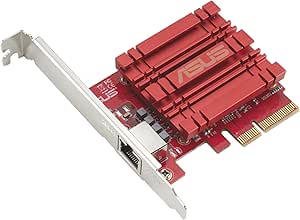
I’d shortlist the Asus NADACA0140 for a buyer who wants one RJ45 port with a broad range of supported link speeds, rather than the dual-port layout of the X540 card. Its listed range runs from 100Mbps to 10Gbps, so it can connect to slower existing Ethernet equipment as well as a suitable 10GbE network. That makes it more adaptable than the 10Gtek dual-SFP+ card, which is specified for 10Gbps and requires SFP+ infrastructure. Asus also lists QoS technology for bandwidth prioritization, although the product data does not explain its configuration or behavior. The tradeoff is limited detail: no PCIe interface, port count beyond the RJ45 connection, or bracket information is supplied here. Buyers should also match cables and connected hardware to the speed they want.
Pros:- RJ45 port works with standard copper Ethernet cabling.
- Supports listed link speeds from 100Mbps through 10Gbps.
- Windows and Linux compatibility is specified.
- QoS technology is listed for bandwidth prioritization.
Cons:- Product data does not specify the PCIe interface or bracket options.
- Single RJ45 connection does not match the two-port capacity of the X540 card.
- Achieving 10Gbps depends on compatible network hardware and cabling.
Best for: Windows or Linux desktop users upgrading to one copper 10GbE connection while retaining compatibility with slower Ethernet links.
Not ideal for: Server builders who need multiple ports, detailed slot-compatibility information, or SFP+ connectivity.
- Model:NADACA0140
- Port:RJ45
- Speed range:100Mbps to 10Gbps
- Supported link rates:100Mbps, 1Gbps, 2.5Gbps, 5Gbps, 10Gbps
- Technology:QoS
- Windows compatibility:Windows 7/8/8.1/10
- Linux compatibility:Linux Kernel 3.2/3.6/4.2/4.4
Our verdict“Choose the Asus when you need one adaptable RJ45 port and value broad link-speed support over dual-port or SFP+ features.”
10Gb PCIe NIC Network Card, Intel 82599EN SFP+, X520-DA1 Compatible
This 82599EN-based SFP+ card is the most adaptable single-port option here for buyers building around a NAS, hypervisor, or mixed-speed network. Its listed support for 10Gbps, 2.5G, 1G, and 100M gives it more flexibility than the dual-SFP+ 10Gtek card, whose supplied specs list only 10Gbps. Compatibility extends across platforms such as TrueNAS, Proxmox, Unraid, ESXi, and several Linux distributions, while support for different SFP+ modules helps avoid a vendor-locked setup. The PCIe x4, x8, or x16 compatibility also offers more slot choices than the Cudy’s x1 requirement, though it may consume a larger slot. Its passive heatsink keeps the design simple, but good airflow matters, especially inside a compact or densely packed server.
Pros:- Intel 82599EN silicon supports 10Gbps, 2.5G, 1G, and 100M speeds as listed.
- Compatible with a broad set of NAS, virtualization, and Linux platforms.
- Supports SFP+ modules without a stated vendor lock.
- Includes full-height and low-profile brackets and fits PCIe x4, x8, or x16 slots.
Cons:- Passive heatsink may need strong system airflow or additional cooling.
- Requires an SFP+ module or suitable direct-attach connection rather than a direct RJ45 port.
- Single-port design offers less link capacity than the dual-port 10Gtek SFP+ card.
Best for: NAS and hypervisor builders who need a single SFP+ port, broad operating-system support, and compatibility with several Ethernet speeds.
Not ideal for: Systems with limited airflow or buyers who need dual ports or a simple RJ45 connection without SFP+ modules or cabling.
- Controller:Intel 82599EN
- Interface:PCIe x4, x8, or x16
- Port type:SFP+
- Supported speeds:10Gbps, 2.5G, 1G, 100M
- Compatibility:Proxmox, TrueNAS, Unraid, ESXi, QNAP, Synology, Ubuntu, Debian, CentOS
- Brackets:Full-height and low-profile included
- Heatsink:Passive
- Module compatibility:No vendor lock on SFP+ modules
Our verdict“Choose this card for a NAS or virtualization host that needs a flexible single SFP+ connection and has adequate airflow.”
QNAP QXG-10G2T-X710 Two Port 10GbE Network Card with SR-IOV and iSCSI
The QNAP QXG-10G2T-X710 is the specialist pick here: its two 10GbE ports can serve separate networks or be teamed for up to 20Gbps of aggregate throughput when the rest of the setup supports it. SR-IOV and iSCSI make it a stronger fit for virtualization and storage workloads than a basic single-port card such as the SABRENT NT-10PE. Its support for QTS, QuTS hero, Windows, and Linux also gives it room to move between a NAS and a server. The tradeoff is added setup complexity, and the PCIe Gen 3 card still needs a compatible slot and a network capable of taking advantage of both ports. Choose it for multi-port flexibility, not a simple one-cable upgrade.
Pros:- Two 10GbE ports allow separate links or supported port trunking.
- SR-IOV and iSCSI support suit virtualization and storage workloads.
- Compatibility spans QTS, QuTS hero, Windows, and Linux.
- Supports 10G, 5G, 2.5G, 1G, and 100M network speeds.
Cons:- Requires a compatible PCIe slot and host system.
- Setup may be more involved than with a basic single-port card.
- Provides network connectivity only, with no Wi-Fi or Bluetooth.
Best for: NAS and virtualization administrators who need two 10GbE ports, SR-IOV, or iSCSI support across QNAP and other compatible systems.
Not ideal for: Desktop users seeking a straightforward single-port upgrade, or owners of systems without a compatible PCIe slot.
- Ports:2
- Network speed:10GbE per port
- Supported speeds:10G, 5G, 2.5G, 1G, 100M
- Interface:PCIe Gen 3
- Controller:Intel X710
- Features:SR-IOV, iSCSI, port trunking
- Compatibility:QTS, QuTS hero, Windows, Linux
- Weight:8 ounces
Our verdict“Choose the QXG-10G2T-X710 when two 10GbE links and virtualization features matter more than simple installation.”
SABRENT 10Gb PCIe Network Card, 10GBASE-T, Multi-Gig NIC (NT-10PE)
The SABRENT NT-10PE suits buyers who want a single 10GBASE-T connection for a workstation, NAS, or server without stepping up to the QNAP card’s dual-port design. Its oversized aluminum heatsink is aimed at managing heat during sustained transfers, while backward compatibility with lower Ethernet speeds helps it fit into a gradual network upgrade. Support for Windows, Linux, Unraid, QNAP, and Proxmox makes it useful across varied home-lab setups. Against the 10Gtek Intel 82599EN SFP+ card, the SABRENT uses an RJ45 connection rather than SFP+, so buyers should match it to their cabling and switch. It requires a full-height PCIe x4 slot, and manufacturer-driver installation adds a step that simpler setups may not need.
Pros:- Provides a single 10GbE 10GBASE-T connection.
- Oversized aluminum heatsink is designed for heat management under load.
- Works with Windows, Linux, Unraid, QNAP, and Proxmox.
- Backward compatibility supports lower Ethernet speeds.
Cons:- Full-height form factor rules out many compact systems.
- Requires an available PCIe 3.0 x4 slot.
- Manufacturer-driver installation may add setup work.
Best for: Workstation, NAS, and home-lab owners who need one 10GbE RJ45 port and have a full-height PCIe x4 slot.
Not ideal for: Small-form-factor PC owners or buyers whose network uses SFP+ rather than RJ45 connections.
- Network speed:10GbE
- Connection:10GBASE-T
- Interface:PCIe 3.0 x4
- Form factor:Full-height PCIe card
- Heatsink:Aluminum, oversized
- Indicators:Link and activity LEDs
- Compatibility:Windows, Linux, Unraid, QNAP, Proxmox
Our verdict“Pick the SABRENT NT-10PE for a cooled, single-port RJ45 upgrade if your case and PCIe slot can accommodate it.”
10Gtek 10Gb PCI-E NIC Network Card with Intel 82599EN Controller, Single SFP+ Port
This 10Gtek Intel 82599EN card is the compact-build choice for systems that already use SFP+ networking. Its single 10G SFP+ port and included low-profile bracket make it a practical fit for many server and compact PC installations, while I/O virtualization support gives it a role beyond basic desktop connectivity. Compared with the SABRENT NT-10PE, it uses SFP+ rather than RJ45, so it makes sense when the switch and cabling match that interface—not when a buyer wants to connect directly to ordinary copper Ethernet. The card is limited to 10G and does not support hot swapping. Windows users should also check driver compatibility, particularly on Windows 11; it is better suited to planned server builds than plug-and-play upgrades.
Pros:- Intel 82599EN controller supports a 10G SFP+ connection.
- Low-profile bracket helps fit compact cases.
- Supports I/O virtualization.
- Compatibility includes Windows Server, Linux, and VMware ESX/ESXi.
Cons:- Single SFP+ port does not provide RJ45 connectivity.
- Limited to 10G rather than supporting 1G, 2.5G, or 5G speeds.
- Does not support hot swapping, and Windows 11 may require careful driver setup.
Best for: Server builders and virtualization users with an SFP+ switch or link who need a low-profile single-port 10GbE card.
Not ideal for: Buyers needing RJ45 connectivity, multi-gig fallback speeds, hot swapping, or an uncomplicated Windows 11 setup.
- Controller:Intel 82599EN
- Port:1 × SFP+
- Speed:10G
- Interface:PCIe x8
- Form factor:Low-profile bracket included
- Virtualization:I/O virtualization support
- Compatibility:Windows Server, Windows 7/8/10, Linux, ESX/ESXi
- Hot swapping:Not supported
Our verdict“Choose this 10Gtek card for a low-profile server with an SFP+ network; skip it if you need RJ45 or broad speed fallback.”

How We Picked
I compared these 13 cards by how well their stated specifications match common 10GbE upgrades: desktop PCs, NAS systems, workstations, and servers. My ranking gives weight to port type and count, controller information, stated operating-system support, PCIe requirements, and useful server features. A dual-port card ranks higher when its added flexibility is paired with a clear use case; extra ports alone do not make it a better fit for a single-link home network.
I also separated familiar RJ45 options from SFP+ models because they involve different cabling, switch compatibility, and setup decisions. Products with clearer compatibility details or a more distinctive use case rise above cards with sparse specifications. The list is not a performance benchmark: actual throughput depends on the whole network path, system configuration, drivers, and workload. I treat unclear model details as a reason for buyers to verify fit before ordering, not as proof of a defect.
Factors to Consider When Choosing 10GbE Network Cards
Choosing a 10GbE card starts with the network it must join, not the headline speed. I would confirm the host computer, switch, cabling, operating system, and workload together before deciding between these options.
Choose RJ45 or SFP+ Around Your Existing Network
RJ45 cards connect to copper Ethernet ports and are usually the straightforward match for a 10GBASE-T switch or suitable multi-gig equipment. SFP+ cards connect through compatible modules or direct-attach cables, so check the switch port and supported transceiver types before buying. Fiber can suit longer links or electrically noisy locations, while a short direct-attach cable can suit nearby devices. Do not assume an SFP+ port accepts every module or that a copper SFP+ module will work at the same speeds as a dedicated RJ45 card. Matching the card to existing infrastructure can avoid buying extra adapters, modules, or a different switch.
Count Ports for a Real Job, Not Just Future Possibilities
A single port is usually enough when the goal is to connect one PC or NAS to a switch. Dual-port cards can support separate network paths, more connected devices, or particular server configurations, but those benefits depend on software and network setup. Link aggregation does not automatically double the speed of one transfer; the switch, protocols, and traffic pattern must support the intended arrangement. A second port also uses more system resources and may add heat or driver complexity. Pay for two ports when you can name the second connection or feature you plan to use.
Verify PCIe Slot Fit and Host Support
Check the card’s physical connector and required PCIe bandwidth against an available motherboard slot. A card may fit mechanically yet share lanes with another device or run through a slot with less bandwidth than the card expects. Review operating-system and driver support for the exact controller, especially on NAS appliances, older systems, and virtualization hosts. Server features such as SR-IOV are useful only when the hardware, firmware, operating system, and virtualization stack all support them. Treat model-specific documentation as more reliable than assuming that cards with similar names share identical requirements.
Plan the Full Network Path
10GbE is a link rate, not a guarantee that every file copy will run at that speed. The switch port, cable or optical link, remote device, storage media, CPU, and application all affect throughput. A hard drive or small NAS may become the bottleneck before the network card does. For a direct connection between two devices, confirm that both ends support compatible speeds and settings; a switch is not always required, but setup requirements vary. Decide which workload you want to improve, then check whether it can use the extra bandwidth.
Account for Heat, Power, and Case Airflow
10GbE controllers and copper PHYs can produce more heat than basic gigabit adapters, particularly under sustained traffic. Small cases, tightly packed add-in cards, and fanless systems may have less airflow around the NIC. Check the card’s cooling design and leave room for nearby components rather than treating the PCIe slot as the only fit question. A card that runs reliably in a ventilated workstation may be a less comfortable choice in a compact NAS enclosure. If the system operates continuously, include cooling and driver stability in the decision, not only peak link speed.
Compare Total Setup Needs, Not Just the Card
The purchase may also require a compatible switch, SFP+ module, fiber patch cable, or direct-attach cable. RJ45 may reuse existing copper infrastructure, but the cable category, length, and switch capability still matter for the target link. SFP+ can be a compact option for short links, yet it introduces module compatibility checks. On a server, factor in driver support and whether features such as iSCSI or SR-IOV match the planned software stack. A lower-complexity setup can be a better value than a feature-rich card whose supporting network hardware you do not own.
Frequently Asked Questions
Should I choose an RJ45 10GbE card or an SFP+ card?
Choose RJ45 when your switch has compatible 10GBASE-T ports or when you want to use supported copper Ethernet cabling without adding a transceiver. Choose SFP+ when your switch already has SFP+ ports and you can confirm module or direct-attach cable compatibility. SFP+ is not automatically cheaper or simpler once accessories are included. Compare the full link on both ends, including port type and supported speed, before selecting a card. In this roundup, the Sonnet, TP-Link, and X540-based picks use RJ45, while several 10Gtek models use SFP+.
Will a 10GbE card make my file transfers ten times faster?
Not by itself. The card raises the available network link rate, but the switch, other device, storage, CPU, software, and file size all influence real transfer speed. Small files can be limited by processing and storage overhead rather than bandwidth. A fast NAS with suitable disks or SSDs is more likely to benefit from a 10GbE link than a slow single-drive setup. Check the slowest part of the path before upgrading the NIC.
Can I install one of these cards in a NAS or server?
Possibly, but confirm the exact system supports the card’s controller, PCIe slot, operating system, and driver. A desktop PCIe card is not automatically compatible with every NAS appliance, and some appliances restrict supported hardware. Server buyers should check whether desired features, such as SR-IOV or iSCSI support, work with their software and configuration. Also check card dimensions and airflow in compact chassis. The QNAP QXG-10G2T-X710 is the most explicitly server-feature-oriented option in this list, but host compatibility still needs checking.
Do I need a dual-port card if I want link aggregation?
Only if your intended network design needs two physical connections and the switch and software support the chosen aggregation setup. Link aggregation can add capacity across multiple flows or provide redundancy, but it generally does not make one individual transfer run at twice the speed. A single 10GbE port may already meet the needs of one workstation or NAS. Dual-port models such as the Sonnet Twin10G and QNAP QXG-10G2T-X710 are more compelling when both ports have a defined purpose. Check your switch configuration and workload before paying for the second port.
What should I check if my computer has an available PCIe slot?
Check more than whether the connector physically fits: review the slot’s available PCIe lanes, generation, and any lane sharing with graphics or storage devices. Confirm the card’s operating-system drivers and controller support, then verify clearance around the card and adequate airflow. On a compact PC, the bracket size and neighboring expansion cards can affect installation. For a NAS or server, consult the system vendor’s supported-card information where available. An open slot is a starting point, not a guarantee of full compatibility or link performance.
Conclusion
For most buyers seeking a flexible copper upgrade, I would start with the Sonnet Twin10G as the best overall, particularly when two RJ45 ports or cross-platform support matter. The TP-Link TX401 is my best value-style choice for a simple single-port setup, while the QNAP QXG-10G2T-X710 is the best premium fit for server users who can use its added features. Beginners with an ordinary desktop and a compatible copper switch should favor a straightforward single-port option such as the TX401 rather than buying unused server features. For SFP+ networks, choose among the 10Gtek cards by port count and controller details; for a two-port SFP+ setup, the 82599ES model is the clearest match in this lineup. Before ordering, verify PCIe, driver, switch, and cabling compatibility so the card fits the network you already have.