Shopping for 4K KVM switches means balancing three things that rarely come together cheaply: true 4K resolution at high refresh rates, the number of monitors you need to drive, and how many computers you’re switching between. The Dual-Monitor DisplayPort KVM Switch for 2 Computers at 4K 144Hz earns the top spot here because it handles enthusiast-grade refresh rates and a two-screen workflow without compromises, while the Hearvo USB 3.0 HDMI KVM Switch stands out as the simplest, most affordable entry point for a basic two-computer, one-monitor desk. Multi-monitor power users with three screens will want to look closely at the UGREEN Triple-Monitor KVM Switch, though triple-head switching brings its own quirks I cover below. The main tradeoff in this category is that high-refresh 4K and multi-monitor support push prices and cabling complexity up fast, while budget single-monitor units cap out at 60Hz. Read on for the full breakdown of all 15 models and which one fits your desk.

Get business pricing on networking and server gear
- Business-only prices and quantity discounts
- Tax-exempt purchasing
- Multiple users, one account, clear invoices
Key Takeaways
- Refresh rate is the biggest divider in this lineup: most HDMI models top out at 4K@60Hz, while the two DisplayPort dual-monitor switches push 4K@144Hz for gaming and high-motion workloads.
- Dual-monitor support costs noticeably more than single-monitor switching, and models 4, 7, 9, 11, and 12 all solve the two-screen problem differently — some with MST quirks, some with clean extended/dedicated output modes.
- Four-port switches (models 1, 6, 8, 15) are ideal for server racks and multi-PC workstations, but hotkey behavior and remote switching methods vary enough to matter for daily use.
- UGREEN dominates the mid-range with three entries (2, 9, 14), offering the most polished cable ecosystems, while niche brands like Hearvo and DGODRT win on price or features like wired remotes.
- Model 11’s 8K@60Hz and 4K@120Hz support with extended/copy modes makes it the most future-proofed pick, but only if your GPUs and monitors can actually feed it that signal.
| 4-Port HDMI KVM Switch with 4K at 60Hz and USB 3.0 |  | Best All-Inclusive Kit | Number of computers: 4 | Maximum resolution: 3840 × 2160 at 60Hz | USB ports: 3 USB 3.0 and 1 USB-C | VIEW LATEST PRICE | See Our Full Breakdown |
| UGREEN 4-Computer HDMI KVM Switch with 6 USB Ports |  | Best for Peripheral-Heavy Setups | Computer inputs: 4 | Monitor outputs: 1 | Maximum resolution: 4K at 60 Hz | VIEW LATEST PRICE | See Our Full Breakdown |
| Hearvo USB 3.0 HDMI KVM Switch for 2 Computers and 1 Monitor, 4K at 60 Hz |  | Best Simple Two-PC Solution | Computers supported: 2 | Monitors supported: 1 | Maximum resolution: 4K at 60 Hz | VIEW LATEST PRICE | See Our Full Breakdown |
| Dual-Monitor DisplayPort KVM Switch for 2 Computers, 4K at 144 Hz, with 4 USB 3.0 Ports |  | Best for High-Refresh Gaming Rigs | Computer inputs: 2 | Monitor outputs: 2 DisplayPort | Maximum resolution: 3840 × 2160 at 144 Hz | VIEW LATEST PRICE | See Our Full Breakdown |
| Triple-Monitor HDMI KVM Switch for 2 Computers, 4K@60Hz, 4 USB 3.0 Ports |  | Best for Triple-Screen Battlestations | Computer inputs: 2 | Monitor outputs: 3 HDMI | Maximum resolution: 4K at 60Hz | VIEW LATEST PRICE | See Our Full Breakdown |
| 4-Port HDMI KVM Switch for 4 Computers, 1 Monitor, and 4 USB 3.0 Devices |  | Best for Four-PC Setups | Computer Inputs: 4 | Display Outputs: 1 HDMI monitor | Maximum Resolution: 4K at 60Hz | VIEW LATEST PRICE | See Our Full Breakdown |
| 4-Computer, Dual-Monitor HDMI KVM Switch with 4 USB 3.0 Ports | 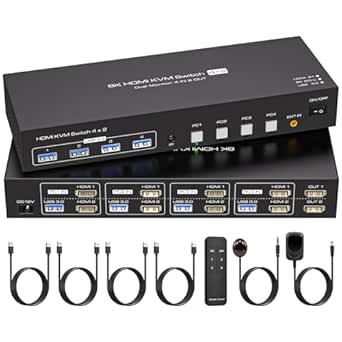 | Best High-Resolution Pick | Computer Inputs: 4 computers | Monitor Outputs: 2 HDMI monitors | Maximum Resolution: 8K at 60 Hz | VIEW LATEST PRICE | See Our Full Breakdown |
| DGODRT 4-Port 4K HDMI KVM Switch with Wired Remote |  | Best Budget Starter Kit | Ports: 4 computers, 1 monitor, 3 USB devices | Maximum Resolution: 4K × 2K at 30Hz | Switching Methods: Panel buttons and wired remote | VIEW LATEST PRICE | See Our Full Breakdown |
| UGREEN Dual-Monitor HDMI KVM Switch for 2 Computers, 4K@60Hz, 4 USB 3.0 Ports |  | Best Dual-Monitor Two-PC Solution | Computer Inputs: 2 | Monitor Outputs: 2 | Maximum Resolution: 4K at 60Hz | VIEW LATEST PRICE | See Our Full Breakdown |
| 2-Port HDMI KVM Switch for Sharing One 4K Monitor Between Two Computers |  | Best Basic Two-PC Pick | Ports: 2 computers, 1 monitor | Maximum Resolution: 4K at 60 Hz | USB Ports: 2 USB 2.0 ports | VIEW LATEST PRICE | See Our Full Breakdown |
| HDMI KVM Switch Dual Monitor – 2 Computers, 4K@120Hz/8K@60Hz, 4 USB 3.0 Devices |  | Best for High-Refresh Gaming Setups | Max Resolution: 4K@120Hz (3840×2160) | Computers Supported: 2 | Monitors Supported: 2 | VIEW LATEST PRICE | See Our Full Breakdown |
| Dual-Monitor DisplayPort KVM Switch for 2 Computers, 4K 144Hz, USB 3.0 |  | Best for High-Refresh Productivity | Max Resolution: 4K at 144Hz / 8K at 60Hz | Computers Supported: 2 | Monitors Supported: 2 DisplayPort monitors | VIEW LATEST PRICE | See Our Full Breakdown |
| Hearvo USB 3.0 HDMI KVM Switch for 2 Computers and 1 Monitor, 4K at 60 Hz (S7232H) |  | Best Plug-and-Play Value | Max Resolution: 4K at 60Hz | Computers Supported: 2 | Monitors Supported: 1 | VIEW LATEST PRICE | See Our Full Breakdown |
| UGREEN Triple-Monitor KVM Switch for 2 Computers |  | Best for Maximum Screen Real Estate | Max Resolution: 8K at 60Hz / 4K at 240Hz | Computers Supported: 2 | Monitors Supported: 3 (2 DisplayPort, 1 HDMI) | VIEW LATEST PRICE | See Our Full Breakdown |
| 4-Port HDMI KVM Switch for 4 Computers, 4K@60Hz |  | Best for Multi-PC Workstations | Max Resolution: 3840 x 2160 at 60Hz (HDMI 2.0) | Computers Supported: 4 | Monitors Supported: 1 | VIEW LATEST PRICE | See Our Full Breakdown |
| 4K KVM switch | Switching methods | USB ports | Maximum resolution |
|---|---|---|---|
| 4-Port HDMI KVM Switch with 4K | Front-panel buttons and wired remote | 3 USB 3.0 and 1 USB-C | 3840 × 2160 at 60Hz |
| UGREEN 4-Computer HDMI KVM Swi | Button or wired desktop controller | 4 USB 3.0 and 2 USB 2.0 | 4K at 60 Hz |
| Hearvo USB 3.0 HDMI KVM Switch | Device button and wired remote | 3 USB-A and 1 USB-C | 4K at 60 Hz |
| Dual-Monitor DisplayPort KVM S | Panel button and wired desktop controller | 4 USB 3.0 | 3840 × 2160 at 144 Hz |
| Triple-Monitor HDMI KVM Switch | Panel button or wired controller | 4 USB 3.0 | 4K at 60Hz |
| 4-Port HDMI KVM Switch for 4 C | Remote control or push buttons | 4 USB 3.0 ports | 4K at 60Hz |
| 4-Computer | Panel button and infrared remote | 4 USB 3.0 ports | 8K at 60 Hz |
| DGODRT 4-Port 4K HDMI KVM Swit | Panel buttons and wired remote | — | 4K × 2K at 30Hz |
| UGREEN Dual-Monitor HDMI KVM S | Button and desktop controller | 4 (3 USB-A and 1 USB-C) | 4K at 60Hz |
| 2-Port HDMI KVM Switch for Sha | Unit button or wired desktop controller | 2 USB 2.0 ports | 4K at 60 Hz |
| HDMI KVM Switch Dual Monitor | Panel button, wired external controller | 4 x USB 3.0 (5Gbps) | — |
| Dual-Monitor DisplayPort KVM S | Push button and desktop controller | 4 shared USB 3.0 ports (5Gbps) | — |
| Hearvo USB 3.0 HDMI KVM Switch | On-unit button and wired remote | 4 (3 USB-A, 1 USB-C), USB 3.0 at 5Gbps | — |
| UGREEN Triple-Monitor KVM Swit | Push button and desktop controller | 4 x USB 3.0 | — |
| 4-Port HDMI KVM Switch for 4 C | Front-panel buttons or wired remote | 3 x USB-A 3.0, 1 x USB-C (5Gbps) | — |
More Details on Our Top Picks
4-Port HDMI KVM Switch with 4K at 60Hz and USB 3.0
Most KVM switches in this category leave you shopping for cables after checkout, but this option ships with nearly everything: an HDMI cable, four USB 3.0 cables, a power cable, and a wired desktop controller. That bundled approach is what separates it from the UGREEN 4-Computer KVM Switch, which requires you to source HDMI cables and a power adapter separately. With four computer inputs at 4K 60Hz across three USB 3.0 ports plus USB-C, this pick suits a multi-machine desk without a shopping trip. The tradeoff is real, though: there is no hotkey switching, so you’ll reach for the button or remote every time. Compared with the Hearvo 2-computer model, it trades simplicity for scale, and buyers with only two machines will find it overbuilt.
Pros:- Includes HDMI, USB, and power cables plus a wired desktop controller in the box
- Supports full 4K at 60Hz across four computer inputs
- Three USB 3.0 ports plus USB-C for peripherals
- True plug-and-play installation with no drivers
Cons:- No hotkey switching — you must use the button or wired remote
- Requires every computer to have HDMI output and USB ports
Best for: Owners of three or four computers who want a complete out-of-the-box setup with no extra cable purchases
Not ideal for: Two-PC users or anyone who wants keyboard hotkey switching from their chair
- Number of computers:4
- Maximum resolution:3840 × 2160 at 60Hz
- USB ports:3 USB 3.0 and 1 USB-C
- Switching methods:Front-panel buttons and wired remote
- Hotkey switching:Not supported
- Installation:Plug and play
- Included accessories:HDMI cable, 4 USB 3.0 cables, power cable, USB controller cable, wired desktop controller
Our verdict“This is the pick for multi-computer workstations that value a complete, ready-to-run kit over advanced switching features.”
UGREEN 4-Computer HDMI KVM Switch with 6 USB Ports
Where most switches in this roundup offer three or four USB ports, this model goes to six — four USB 3.0 plus two USB 2.0 — which matters if you keep a webcam, audio interface, card reader, and printer attached alongside your keyboard and mouse. EDID emulation keeps monitor settings consistent after switching, a nicety the 4-Port HDMI KVM Switch doesn’t advertise, and it handles HDR and HDCP 2.2 content across Windows, macOS, and Linux. The cost of that flexibility shows up at setup: no HDMI cables or power adapter are included, so budget for four HDMI runs and a USB-C power supply. It’s also explicit about not working with docking stations, which rules out many laptop-centric desks. For pure cable-box value, the 4-Port model wins; for peripheral capacity, this one leads.
Pros:- Six USB ports (four USB 3.0, two USB 2.0) handle peripheral-heavy desks
- EDID emulation preserves display settings between switches
- Cross-platform support for Windows, macOS, and Linux
- Handles HDR, 3D, and HDCP 2.2/1.4 content at 4K 60Hz
Cons:- HDMI cables and the recommended power adapter are not included
- Incompatible with docking stations
- Requires a USB-A-to-USB-C data cable for every computer
Best for: Power users running four computers with more than four USB peripherals and mixed operating systems
Not ideal for: Laptop users relying on docking stations, or anyone expecting a complete cable kit in the box
- Computer inputs:4
- Monitor outputs:1
- Maximum resolution:4K at 60 Hz
- USB ports:4 USB 3.0 and 2 USB 2.0
- USB 3.0 transfer speed:Up to 5 Gbps
- Switching methods:Button or wired desktop controller
- Features:EDID emulation, HDMI 2.0, HDCP 2.2/1.4, 3D, HDR
- Supported operating systems:Windows, macOS, Linux
Our verdict“Choose this when six USB ports and EDID emulation matter more than an all-inclusive cable bundle.”
Hearvo USB 3.0 HDMI KVM Switch for 2 Computers and 1 Monitor, 4K at 60 Hz
If your desk holds just a work laptop and a personal desktop, a four-port switch is wasted hardware. This Hearvo model trims the setup to two computers and one monitor and rewards that simplicity with a driver-free, power-free installation — no adapter, no software, just USB 3.0 cables (two of which are included). Its adaptive EDID keeps the display behaving when you flip machines, matching the UGREEN’s display intelligence at a fraction of the complexity. Compared with the Triple-Monitor KVM Switch, it obviously can’t drive multiple screens, and unlike the 4-Port model it doesn’t include an HDMI cable, so that’s one extra purchase. Switching happens via the device button or a wired remote, which is fine for a two-machine desk where you’re never far from either control.
Pros:- No power adapter or drivers needed — runs entirely off USB
- Four USB 3.0 ports including USB-C at up to 5 Gbps
- Adaptive EDID prevents display glitches when switching
- Two USB 3.0 cables and anti-slip pads included
Cons:- Limited to a single monitor
- No HDMI cables included in the box
Best for: Anyone alternating between exactly two computers on a single monitor who wants a plug-in-and-forget setup
Not ideal for: Multi-monitor users or anyone managing more than two machines
- Computers supported:2
- Monitors supported:1
- Maximum resolution:4K at 60 Hz
- USB ports:3 USB-A and 1 USB-C
- USB data transfer speed:Up to 5 Gbps
- Switching methods:Device button and wired remote
- HDCP:2.2
- Included in package:KVM switch, 2 USB 3.0 cables, user manual, protection plan card, 4 anti-slip pads
Our verdict“The right choice when two computers and one screen cover your needs and you want nothing to configure or plug into the wall.”
Dual-Monitor DisplayPort KVM Switch for 2 Computers, 4K at 144 Hz, with 4 USB 3.0 Ports
Every other switch here tops out at 60Hz, which is fine for office work and punishing for a gaming setup. This model pushes 4K at 144 Hz over DisplayPort with up to 48 Gbps of bandwidth, letting two machines share two high-refresh monitors without dropping frames — the HDMI-based Dual-Monitor 4K@60Hz models simply can’t match it. It supports extended and mirrored layouts, four USB 3.0 ports, and includes the 12 V power adapter and desktop controller, unlike the UGREEN 4-computer switch that leaves the adapter to you. The friction is cabling: each computer needs two DisplayPort cables, none of which are in the box, so a full setup means six DisplayPort runs total. There’s also no hotkey support. For productivity-only desks, the 60Hz HDMI alternatives are cheaper and simpler; for refresh-rate-sensitive users, this is the only path in this batch.
Pros:- 4K at 144 Hz with up to 48 Gbps bandwidth for high-refresh displays
- Drives two DisplayPort monitors in extended or mirrored mode
- 12 V power adapter and desktop controller included
- Four USB 3.0 ports at up to 5 Gbps
Cons:- No DisplayPort cables included — each PC needs two
- No keyboard hotkey switching
- Requires DisplayPort outputs on every connected computer
Best for: Gamers and enthusiasts sharing two high-refresh DisplayPort monitors between a gaming PC and a second machine
Not ideal for: Productivity users with HDMI-only monitors, or anyone unwilling to buy six DisplayPort cables
- Computer inputs:2
- Monitor outputs:2 DisplayPort
- Maximum resolution:3840 × 2160 at 144 Hz
- Video bandwidth:Up to 48 Gbps
- USB ports:4 USB 3.0
- Switching methods:Panel button and wired desktop controller
- Power adapter:12 V DC (included)
- Warranty:Return or replacement for malfunctions within 12 months
Our verdict“The clear choice when 144 Hz matters; skip it if your monitors and GPUs are HDMI-based.”
Triple-Monitor HDMI KVM Switch for 2 Computers, 4K@60Hz, 4 USB 3.0 Ports
Three monitors is the ceiling of this entire roundup, and this switch owns that position: two computers, three HDMI outputs, extended or duplicated, all at 4K 60Hz. Stock traders, developers, and simulation enthusiasts who already run a triple-array will appreciate that it includes the 12 V power adapter for stable USB power, something the cable-stingier UGREEN 4-computer model omits. Compared with the Dual-Monitor DisplayPort switch, you sacrifice the 144 Hz refresh rate but gain a third screen and broader OS support spanning Windows, macOS, Linux, and even Unix. The demands are steep: each computer must output three HDMI streams and you’ll supply all cables yourself. It also skips hotkey switching like its siblings. If your machines can’t drive three displays natively, drop down to a dual-monitor model instead.
Pros:- Drives three HDMI monitors in extended or duplicated mode at 4K 60Hz
- Includes 12 V power adapter for stable USB device operation
- Broad OS support including Windows, macOS, Linux, and Unix
- Four USB 3.0 ports at up to 5 Gbps
Cons:- Each computer needs three HDMI cables and native three-screen output support
- No keyboard hotkey switching
Best for: Traders, developers, and sim-rig builders running three 4K screens across two machines
Not ideal for: Anyone whose computers can’t output three simultaneous HDMI streams, or who wants high-refresh gaming
- Computer inputs:2
- Monitor outputs:3 HDMI
- Maximum resolution:4K at 60Hz
- USB ports:4 USB 3.0
- USB transfer rate:Up to 5 Gbps
- Switching methods:Panel button or wired controller
- Power adapter:12V DC (included)
- Supported operating systems:Windows, Vista, XP, Mac OS, Linux, Unix
Our verdict“Buy it only if a triple-monitor desk is your reality — for one or two screens, cheaper models here do the job better.”
4-Port HDMI KVM Switch for 4 Computers, 1 Monitor, and 4 USB 3.0 Devices
This model stands out for scaling a single-monitor setup across four computers without giving up full 4K at 60Hz, which immediately separates it from the DGODRT 4-Port switch that caps out at 30Hz at 4K. Four shared USB 3.0 ports at up to 5 Gbps mean a fast external drive or dock stays usable no matter which machine is active, something the 2-Port HDMI KVM Switch can’t match with its USB 2.0 speeds. Switching works through panel buttons or an included remote, so this pick makes the most sense for a desk or server rack where the machines sit out of arm’s reach. The tradeoff is control: there’s no hotkey switching, so anyone who flips between systems dozens of times a day will miss keyboard shortcuts, and hitting 4K at 60Hz depends on quality cables and source support.
Pros:- Full 4K at 60Hz support across four computers
- Four USB 3.0 ports at up to 5 Gbps for fast peripherals
- Remote control plus panel buttons for flexible switching
- Plug-and-play with broad OS compatibility and sturdy metal housing
Cons:- No hotkey switching from the keyboard
- 4K at 60Hz requires compatible sources and cables to achieve
Best for: IT admins and workstation users juggling four machines on one 4K display who want fast shared USB 3.0 peripherals
Not ideal for: Users who switch constantly throughout the day — the absence of hotkey support makes rapid toggling tedious
- Computer Inputs:4
- Display Outputs:1 HDMI monitor
- Maximum Resolution:4K at 60Hz
- USB Ports:4 USB 3.0 ports
- USB Transfer Speed:Up to 5 Gbps
- Switching Methods:Remote control or push buttons
- Compatibility:Windows, Vista, XP, Mac OS, Linux, Unix
- Material:Metal housing
Our verdict“This is the pick for anyone who needs genuine 4K/60 quality while commanding four computers from one screen and one set of USB 3.0 peripherals.”
4-Computer, Dual-Monitor HDMI KVM Switch with 4 USB 3.0 Ports
For buyers thinking ahead, this switch’s 8K at 60Hz ceiling is the headline — even if most users run it at 4K, the headroom means a future monitor upgrade won’t strand the hardware. Compared with the 4-Port HDMI KVM Switch for 4 Computers, this option doubles your screen real estate across the same four machines and adds EDID emulation, which keeps window positions and display settings intact when you toggle — a genuinely time-saving difference for multi-monitor workflows. The demands are real, though: every computer needs two HDMI outputs, and the unit requires an external 12V/1A power brick rather than drawing from the hosts. Like most entries here, hotkey switching is absent, so the infrared remote carries the convenience load. This model is better suited to a permanent, well-planned desk than a casual or portable setup.
Pros:- Supports resolutions up to 8K at 60Hz for future-proofing
- EDID emulation preserves monitor settings and window positions
- Drives two monitors and four USB 3.0 devices across four computers
- Button and infrared remote switching options
Cons:- Each computer requires two HDMI outputs
- Needs an external 12V/1A power supply
- No hotkey switching support
Best for: Power users with four dual-HDMI computers who want 8K-ready bandwidth and preserved window layouts across two screens
Not ideal for: Laptop owners — most laptops can’t feed two HDMI outputs, and the required external power supply limits portability
- Computer Inputs:4 computers
- Monitor Outputs:2 HDMI monitors
- Maximum Resolution:8K at 60 Hz
- USB Ports:4 USB 3.0 ports
- USB Transfer Rate:Up to 5 Gbps
- Switching Methods:Panel button and infrared remote
- Power Requirement:12V/1A external power supply
- Compatibility:Windows, Mac OS, Linux, Unix
Our verdict“Choose this if you want the most resolution headroom and dual-screen workflow across four machines — provided every computer has two HDMI ports to spare.”
DGODRT 4-Port 4K HDMI KVM Switch with Wired Remote
What makes this DGODRT model appealing for first-time buyers is what’s in the box: four bundled two-in-one KVM cables cover the entire setup, whereas the 2-Port HDMI KVM Switch ships without HDMI cables at all, adding hidden cost. It also needs no external power supply, drawing everything through the host connections — one less brick behind the desk. The compromise is resolution: it tops out at 4K at 30Hz, a full refresh rate below the 4-Port switch for four computers, which means motion in video and games looks noticeably less smooth. For document work, browsing, and server administration, that limitation barely registers. LED indicators showing the active computer are a practical touch that budget switches often skip. Anyone doing media playback or gaming on a 4K panel should pay the extra for 60Hz elsewhere in this lineup.
Pros:- Includes all four two-in-one KVM cables needed for setup
- No external power supply required
- Wired remote and LED indicators show and control the active computer
- Driver-free plug-and-play installation
Cons:- Limited to 4K at 30Hz, half the refresh rate of similarly sized rivals
- Only three shared USB device ports
Best for: First-time KVM buyers or server admins who want a complete four-computer kit with included cables and simple plug-and-play setup
Not ideal for: Anyone watching video or gaming at 4K — the 30Hz refresh ceiling makes motion noticeably choppy
- Ports:4 computers, 1 monitor, 3 USB devices
- Maximum Resolution:4K × 2K at 30Hz
- Switching Methods:Panel buttons and wired remote
- Included Cables:4 two-in-one KVM cables
- Power:No additional power supply required
- Compatibility:Windows 10/8/8.1/7, Mac OS, Unix, DOS
Our verdict“A sensible entry point if you want everything in the box for four computers and can live with 30Hz motion at 4K.”
UGREEN Dual-Monitor HDMI KVM Switch for 2 Computers, 4K@60Hz, 4 USB 3.0 Ports
For the classic two-computer desk — say, a work laptop and a personal desktop — this UGREEN switch delivers the complete package: four HDMI cables, two USB-A cables, power adapters, and a desktop controller all ship in the box, a level of completeness the 4-Computer Dual-Monitor switch doesn’t offer. It runs 4K at 60Hz in extend or mirror mode, and its mix of three USB-A plus one USB-C port is friendlier to modern peripherals than the all-USB-A layouts elsewhere in this roundup. Two omissions shape the experience, though: no hotkey switching and no EDID emulation, so displays renegotiate on every toggle and windows can reshuffle — a daily annoyance the 8K four-computer model avoids. It also needs the power adapter connected for USB devices to behave reliably, and each machine requires two HDMI cables plus one USB-A connection.
Pros:- Full 4K at 60Hz with extend and mirror display modes
- Complete accessory bundle: cables, power adapters, and desktop controller
- Four USB 3.0 ports including one USB-C
- Simple plug-and-play operation across Windows, macOS, and Linux
Cons:- No hotkey switching or EDID emulation, so windows may reshuffle on toggle
- Requires two HDMI cables plus one USB-A cable per computer
- Power adapter must be connected for reliable USB device operation
Best for: Owners of a two-PC, dual-monitor desk who want a complete bundled kit with a modern USB-C port included
Not ideal for: Mac users with single-HDMI laptops, since every computer needs two HDMI outputs plus a USB-A connection
- Computer Inputs:2
- Monitor Outputs:2
- Maximum Resolution:4K at 60Hz
- USB Ports:4 (3 USB-A and 1 USB-C)
- USB Transfer Speed:Up to 5 Gbps
- Switching Methods:Button and desktop controller
- Compatibility:Windows, macOS, and Linux
- Included Accessories:4 HDMI cables, 2 USB-A cables, 3 power adapters, desktop controller, user guide
Our verdict“The most convenient all-in-one choice for a two-computer, two-monitor desk — as long as you can accept repositioned windows when switching.”
2-Port HDMI KVM Switch for Sharing One 4K Monitor Between Two Computers
Simplicity is the argument here. This 2-port switch does one job — one monitor, keyboard, and mouse between two computers — and does it at 4K at 60Hz with no external power supply, running on 5V DC drawn through the hosts. Compared with the DGODRT four-port switch, this option trades computer capacity for a smoother 60Hz picture; compared with the UGREEN dual-monitor switch, it trades screen count and bundled cables for a lower cost of entry. The wired desktop controller is the switching highlight, sitting within reach instead of forcing you to tap a box under the desk. Buyers should note the friction points: HDMI cables aren’t included, the two USB 2.0 ports top out at 480 Mbps — fine for input devices, sluggish for drives — and the manufacturer explicitly doesn’t recommend it for Mac hardware.
Pros:- Supports full 4K at 60Hz on a single shared monitor
- Wired desktop controller keeps switching within reach
- No external power supply needed
- Plug-and-play setup with included USB 2.0 cables
Cons:- HDMI cables are not included
- USB 2.0 ports limited to 480 Mbps transfer speeds
- Not recommended for Mac devices
Best for: Windows or Linux users with two computers and a single 4K monitor who want a minimal, self-powered switch
Not ideal for: Mac owners — the manufacturer doesn’t recommend it — and anyone needing fast USB transfers from shared drives
- Ports:2 computers, 1 monitor
- Maximum Resolution:4K at 60 Hz
- USB Ports:2 USB 2.0 ports
- USB Transfer Speed:Up to 480 Mbps
- Switching Methods:Unit button or wired desktop controller
- Power:No external power supply required (5V DC)
- Included Items:KVM switch, desktop controller, 2 USB 2.0 cables, service card, user manual
Our verdict“A no-frills, self-powered way to share one 4K screen and peripherals between two PCs — just budget for HDMI cables and skip it if you run a Mac.”
HDMI KVM Switch Dual Monitor – 2 Computers, 4K@120Hz/8K@60Hz, 4 USB 3.0 Devices
This model stands out for its 4K at 120Hz support, which is rare among dual-monitor HDMI KVMs in this lineup. If you run a high-refresh gaming rig alongside a second PC, this pick keeps frames smooth where the standard Hearvo S7232H tops out at 60Hz. Compared with the DisplayPort dual-monitor switch, it trades a little refresh headroom (120Hz versus 144Hz) for broader monitor compatibility, since HDMI displays are far more common. The wired desktop controller is a practical touch for desks where the unit itself ends up under a monitor arm. The tradeoffs are real: each computer needs two HDMI outputs, there’s no hotkey switching, and the external 12V adapter adds another cable to manage.
Pros:- Supports 4K at 120Hz with backward compatibility down to 1080p
- Four USB 3.0 ports at 5Gbps for sharing peripherals
- Both panel button and wired external controller for switching
- Broad OS support including Windows, Mac, Linux, and Unix
Cons:- Requires two HDMI ports on each computer for dual monitors
- No keyboard hotkey switching
- Needs an external 12V power adapter
Best for: Gamers and power users with two high-refresh HDMI monitors who want 120Hz passthrough without dropping frames
Not ideal for: Users with older graphics cards that only have a single HDMI output per machine, or anyone who relies on keyboard hotkeys to switch
- Max Resolution:4K@120Hz (3840×2160)
- Computers Supported:2
- Monitors Supported:2
- USB Ports:4 x USB 3.0 (5Gbps)
- Switching Methods:Panel button, wired external controller
- Power:12V/1A DC adapter
- OS Compatibility:Windows, Mac OS, Linux, Unix
Our verdict“The right choice if 120Hz gaming clarity across two HDMI monitors matters more to you than hotkey switching.”
Dual-Monitor DisplayPort KVM Switch for 2 Computers, 4K 144Hz, USB 3.0
For buyers whose monitors connect over DisplayPort, this switch makes more sense than the HDMI-based dual-monitor option above it — it pushes 4K at 144Hz and even 8K at 60Hz, making it the strongest fit for 1440p ultrawide or high-refresh workstations. Compared with the UGREEN triple-monitor switch, it covers two displays instead of three, but with the same USB 3.0 sharing and a desktop controller for one-touch switching. Extended and mirror modes mean both monitors can behave independently per machine. The main friction is cabling: each computer needs two DisplayPort cables plus one USB-A cable, and none of the DisplayPort cables ship in the box, so budget for them before setup day.
Pros:- Shares two DisplayPort monitors and four USB devices between two computers
- Supports up to 4K at 144Hz and 8K at 60Hz
- Includes an accessible desktop controller
- Supports both extended and mirror display modes
Cons:- DisplayPort cables are not included
- Requires two DisplayPort cables and one USB-A cable per computer
- No hotkey switching; webcam compatibility should be verified first
Best for: Workstation users with two DisplayPort monitors running 144Hz or high-resolution panels who want clean peripheral sharing
Not ideal for: Buyers expecting everything in the box — the missing DisplayPort cables add cost and a second order
- Max Resolution:4K at 144Hz / 8K at 60Hz
- Computers Supported:2
- Monitors Supported:2 DisplayPort monitors
- USB Ports:4 shared USB 3.0 ports (5Gbps)
- Switching Methods:Push button and desktop controller
- Power:12V DC adapter
- Display Modes:Extended and mirror
Our verdict“The strongest pick here for DisplayPort-native, high-refresh dual-monitor setups, provided you already own the cables.”
Hearvo USB 3.0 HDMI KVM Switch for 2 Computers and 1 Monitor, 4K at 60 Hz (S7232H)
This is the simplest entry point in the batch: two computers, one monitor, and no power adapter or drivers required. That bus-powered design makes it a better fit for tidy desks and laptop-dock setups than the triple-monitor UGREEN switch, which demands its own 12V supply. You still get 4K at 60Hz, four USB 3.0 ports including one USB-C — a thoughtful mix the 4-port HDMI switch in this roundup matches but doesn’t exceed — plus Adaptive EDID, which helps avoid resolution glitches when switching sources. The obvious ceiling is capacity: one monitor only, and 60Hz means gamers chasing 120Hz+ should look at the HDMI dual-monitor model instead.
Pros:- No power supply or drivers needed — true plug-and-play
- 4K at 60Hz with HDCP 2.2 support
- Four USB 3.0 ports including both USB-A and USB-C
- Adaptive EDID prevents display re-detection issues when switching
Cons:- Supports only a single monitor
- Bus power may struggle with high-draw USB peripherals
Best for: Laptop-plus-desktop owners with a single 4K monitor who want a driver-free, cable-free setup
Not ideal for: Multi-monitor users or anyone needing bus-powered switching with power-hungry USB devices like external drives
- Max Resolution:4K at 60Hz
- Computers Supported:2
- Monitors Supported:1
- USB Ports:4 (3 USB-A, 1 USB-C), USB 3.0 at 5Gbps
- Switching Methods:On-unit button and wired remote
- Power:Bus-powered, no adapter required
- OS Compatibility:Windows, Linux, Mac
Our verdict“The low-hassle choice for a two-PC, one-screen desk where simplicity beats expandability.”
UGREEN Triple-Monitor KVM Switch for 2 Computers
Nothing else in this lineup drives three monitors from two computers, and that alone defines this pick. With DisplayPort 1.4 and HDMI 2.1 supporting 8K at 60Hz and 4K at 240Hz, it outclasses the dual-monitor DisplayPort switch on pure throughput. Unlike most competitors here, UGREEN includes all the cables — four DisplayPort, two HDMI, two USB-A — which removes the surprise second purchase that the DisplayPort dual-monitor model imposes. The catch is hardware demand: both machines need triple-display capability with matching video outputs, and the lack of EDID emulation means monitors can briefly re-handshake on every switch, shifting windows around. It’s also limited to Windows and Linux, leaving Mac users out.
Pros:- Drives three monitors between two computers — unique in this lineup
- Supports 8K at 60Hz and 4K at 240Hz via DisplayPort 1.4 and HDMI 2.1
- All required cables included in the box
- Desktop controller plus push-button switching with mirror and extend modes
Cons:- Both computers must support three displays with the specified outputs
- No EDID emulation, so window positions can shift when switching
- Windows and Linux only
Best for: Traders, developers, and sim-racing enthusiasts with three-monitor rigs and two capable PCs
Not ideal for: Mac users, or machines with only one or two video outputs — three displays simply won’t work
- Max Resolution:8K at 60Hz / 4K at 240Hz
- Computers Supported:2
- Monitors Supported:3 (2 DisplayPort, 1 HDMI)
- USB Ports:4 x USB 3.0
- Switching Methods:Push button and desktop controller
- Power:12V DC, 2A adapter
- OS Compatibility:Windows and Linux
Our verdict“The only option here for full triple-monitor sharing, as long as both machines can actually drive three screens.”
4-Port HDMI KVM Switch for 4 Computers, 4K@60Hz
Most switches in this roundup stop at two computers; this one manages four PCs on a single monitor and peripheral set, which makes it the natural fit for test benches, home labs, and IT desks juggling multiple machines. It matches the Hearvo S7232H on resolution — 4K at 60Hz over HDMI 2.0 — and offers a similar USB-A plus USB-C port mix, but adds mounting brackets so it can live under a desk or on a rack shelf rather than occupying desktop space. Front-panel buttons and a wired remote cover switching across all four sources. The single-monitor limitation and absence of hotkey switching are the constraints to weigh; compared with a dual-monitor model, you give up a second display to gain two extra machines.
Pros:- Controls four computers from one monitor and shared peripherals
- 4K at 60Hz over HDMI 2.0
- Includes both USB-A 3.0 and USB-C data ports
- Ships with mounting brackets, cables, and a wired remote
Cons:- No hotkey switching
- Single monitor only, so multi-display setups are out
Best for: IT admins and home-lab owners running three or four computers who want one keyboard, mouse, and monitor for all of them
Not ideal for: Dual-monitor users or anyone who switches constantly and wants keyboard hotkeys instead of reaching for a button
- Max Resolution:3840 x 2160 at 60Hz (HDMI 2.0)
- Computers Supported:4
- Monitors Supported:1
- USB Ports:3 x USB-A 3.0, 1 x USB-C (5Gbps)
- Switching Methods:Front-panel buttons or wired remote
- Power:5V
- Included Accessories:HDMI cable, 4 USB 3.0 cables, power cable, remote, mounting brackets
Our verdict“The pick when machine count matters more than monitor count — four PCs, one desk, no clutter.”

How We Picked
I evaluated these 15 switches against the criteria that actually decide whether a KVM works on a real desk: verified 4K signal integrity at the advertised refresh rate, monitor count support, USB peripheral switching behavior, and switching convenience (hotkeys, physical buttons, wired remotes). Bandwidth was the first filter — a switch claiming 4K@60Hz over HDMI needs roughly 18Gbps of clean throughput, and 144Hz DisplayPort models demand far more headroom, which is why the DisplayPort units rank higher for performance-focused buyers. I then weighed versatility: how many computers, how many screens, and whether USB 3.0 hubs carry peripherals reliably during switches without re-enumeration lag.
The ranking reflects a simple logic: multi-monitor, high-refresh models lead because they solve the hardest engineering problems, while single-monitor 60Hz units earn their places on value, ease of setup, and reliability. Within each tier, I favored models with better cabling ecosystems, dedicated remote triggers, and switching modes that avoid flicker or dropped USB devices. Every pick also had to show a meaningful drawback — no KVM in this category is perfect, and the writeups make those tradeoffs explicit so the ranking order is transparent.
Factors to Consider When Choosing 4K KVM Switches
Before locking in a pick, it helps to understand the broader landscape of 4K KVM switching — the category is full of spec-sheet traps and compatibility pitfalls that reviews of individual units can’t fully explain.HDMI vs. DisplayPort at 4K
The cable standard on your KVM must match what your most demanding device outputs. HDMI switches dominate the budget and mid-range but almost universally cap at 4K@60Hz because of HDMI 2.0 bandwidth limits, while DisplayPort models reach 4K@144Hz and suit gaming rigs and high-refresh workstations. A common mistake is buying an HDMI KVM rated 4K@60Hz and expecting it to pass 120Hz from a gaming PC — it won’t, and you’ll get a downscaled or black signal. Check your GPU outputs before anything else; if you only have one DisplayPort and three HDMI ports, a hybrid setup with adapters often introduces its own failures, so a native matching KVM is the safer route.
Single vs. Multi-Monitor Switching
Dual- and triple-monitor KVMs are engineering-heavy products, and price reflects that. A single-monitor switch just routes one video feed, but dual-monitor models must keep both displays mapped correctly across computers, and triple-monitor units add EDID management complexity that can confuse Windows or macOS display arrangements. Buyers frequently underestimate this: a cheap dual-monitor KVM may swap which screen is ‘primary’ between computers, forcing manual rearrangement every time you switch. If you run a two- or three-screen workflow, pay attention to whether the switch supports extended mode versus mirrored/copy mode — the difference determines whether your second monitor is usable workspace or just a duplicate.
USB Hub Quality and Peripheral Switching
The ‘KM’ in KVM covers keyboard and mouse, but modern switches carry USB 3.0 hubs for drives, webcams, and audio interfaces — and quality varies wildly. The real question is whether peripherals re-enumerate on every switch, which can cause a keyboard to drop keystrokes for two or three seconds or a USB audio device to disconnect and reconnect audibly. Models with proper USB 3.0 hubs and good firmware hold the device handoff stable, which matters enormously if you use a hardware security key or external SSD. Gamers should also note that high-polling-rate mice sometimes misbehave on budget KVM hubs, so check whether the switch passes full USB bandwidth or throttles it.
Switching Methods: Hotkeys, Buttons, and Remotes
How you trigger a switch sounds trivial until you do it fifty times a day. Hotkey sequences are fastest but vary by brand and occasionally conflict with keyboard shortcuts in editing or coding software. Physical front-panel buttons are reliable but require reaching over, which is awkward with a tower under the desk. A wired remote trigger, like the one on the DGODRT four-port model, sits on your desktop and gives you a one-tap switch — an underrated feature for anyone who toggles machines constantly. If you switch rarely, this factor matters little; if you switch hourly, it should influence your choice as much as resolution does.
EDID Management and Display Handshake Issues
EDID — the handshake protocol that tells computers what monitor is attached — is the hidden failure point of budget KVMs. When you switch away, some computers see the monitor ‘disappear,’ causing windows to collapse onto a phantom display or the resolution to reset when you switch back. Better switches hold a persistent EDID profile so each computer always thinks the monitor is connected, keeping your window layouts intact. This is rarely printed on the box, so look for terms like ‘EDID emulation’ or ‘display retention’ in specs. Multi-monitor setups amplify the problem, which is one reason the premium dual-screen models cost more — they’re doing real EDID work under the hood.
When to Pay More (and When Not To)
Spending more in this category buys three concrete things: higher refresh rates, more simultaneous monitors, and stable USB/EDID behavior. If you have a basic two-PC office setup with one 4K@60Hz monitor, a simple two-port switch does everything you need and paying for 144Hz or dual-head support is wasted money. But if you’re merging a work laptop and gaming PC onto one high-refresh display, or running a three-screen trading or editing station, the premium models exist precisely because cheap ones fail at these jobs. A good rule: buy for the most demanding device you’ll attach, not the average one — underbuying refresh rate or monitor count is the most common and most expensive mistake in this category.
Frequently Asked Questions
Will a 4K@60Hz KVM switch work with my 144Hz monitor?
It will pass a signal, but not at 144Hz — the switch itself becomes the bottleneck and will cap output at its rated 60Hz. That’s fine for productivity, but gamers will immediately notice the difference in smoothness and input latency. If you own a high-refresh monitor, choose one of the DisplayPort 144Hz models in this roundup or the 4K@120Hz HDMI model instead. Feeding a 144Hz panel through a 60Hz KVM also wastes the money you spent on the monitor, which is why I recommend matching KVM bandwidth to your display’s capabilities from day one.
Can I use adapters to connect a DisplayPort computer to an HDMI KVM switch?
Active adapters usually work for basic 4K@60Hz signals, but they add a failure point and occasionally cause handshake drops or flicker during switching. Passive adapters and cheap active units often can’t carry full 4K bandwidth reliably, resulting in a black screen or downgraded resolution. If all your computers use DisplayPort, buying a native DisplayPort KVM like the dual-monitor 144Hz models here is far more dependable than chaining adapters. Reserve adapters for mixed setups where only one machine needs the conversion, and buy a well-reviewed active adapter rather than the cheapest option.
Do dual-monitor KVM switches support extended desktops, or only mirrored displays?
It depends entirely on the model — and this is one of the most misunderstood specs in the category. Some budget dual-monitor switches only mirror the same image to both outputs, which makes a second monitor nearly useless for real work. Models like the 8K-capable HDMI switch in this lineup explicitly offer extended and copy modes, letting each computer treat the two screens as separate workspaces. Before buying, confirm the spec sheet says ‘extended mode’ or ‘independent outputs’; if it only mentions mirroring, assume your second display will be a duplicate, not extra workspace.
Will my keyboard and mouse glitch every time I switch computers?
On well-designed switches, the interruption lasts under a second; on cheap ones, peripherals fully re-enumerate and can drop input for several seconds or lose custom profiles. Mechanical keyboards with onboard memory usually survive switching fine, but RGB software, high-polling gaming mice, and USB audio interfaces are the most common troublemakers. If you use a USB headset or DAC, plug it directly into the computer rather than the KVM hub, because audible disconnect/reconnect loops get old fast. The USB 3.0 models in this roundup with dedicated hub chipsets handle handoffs more gracefully than older USB 2.0 designs.
Do I need a 4-port KVM, or is 2 ports enough?
Two ports cover the classic laptop-plus-desktop or home-and-work pairing, and two-port switches are simpler, cheaper, and switch faster because there’s only one other machine to jump to. Four-port models make sense for server management, multi-PC streaming or testing setups, and desks with three or four machines in regular rotation. The hidden cost of four-port switching is navigation — you’ll rely on hotkey sequences or a remote like the DGODRT’s wired trigger to reach machine three or four without cycling through everything. A practical middle path: if you think you might add a third machine within a couple of years, buy the four-port now rather than replacing a two-port later.
Conclusion
Matching the right 4K KVM to your desk comes down to what you’re actually switching. For best overall, the Dual-Monitor DisplayPort KVM Switch at 4K 144Hz leads this lineup because it solves the hardest combination — two screens, high refresh, stable USB — in one box. The best premium pick is the 8K-capable HDMI dual-monitor model with extended/copy modes, which future-proofs your setup as displays and GPUs get faster. For best value, the Hearvo 2-computer switches deliver reliable 4K@60Hz switching at the lowest complexity, and they double as the best beginner option thanks to plug-and-play setup with no configuration. Multi-monitor power users should compare the UGREEN dual- and triple-monitor models, which offer the cleanest cabling and the most scalable screen counts. Finally, anyone running three or four machines — server admins, streamers, test benches — will get the most from the DGODRT four-port with its wired remote or the UGREEN 4-computer switch with its six USB ports. Buy for your most demanding machine and monitor, not your average one, and you won’t outgrow the switch a year later.
Fall Picks
fall essentials
As an affiliate, we earn on qualifying purchases.