
For most digital signage systems, I would start with the AV Access AV Over IP Encoder, which pairs video-wall support with long-distance distribution. The StarTech 4K HDMI Over IP Extender Kit is a stronger fit for 4K installations built around a matched kit, while the ToVi 4K Encoder stands out when control features such as USB KVM and RS-232 matter. The main tradeoffs are resolution, compatibility with your network and receivers, and whether you need a simple point-to-point link or a scalable signage system. Lower-cost, simpler options can suit basic 1080p displays, but may leave less room for video walls or integrated control. Read on for the full breakdown and help matching a transmitter to your signage layout.

Get business pricing on networking and server gear
- Business-only prices and quantity discounts
- Tax-exempt purchasing
- Multiple users, one account, clear invoices
Key Takeaways
- The AV Access encoder is the most balanced signage choice: its support for video walls up to 8×8 and a 395-foot reach suit installations that may expand beyond one screen.
- 4K capability does not tell the whole story: the MT-VIKI encoder lists 4K at 60Hz with 4:4:4, while the ToVi 4K model adds USB KVM, PoE, serial, and audio-control features for more integrated installations.
- Matched kits simplify compatibility: the StarTech 1080p and 4K kits pair transmitter and receiver hardware, while encoder-only products require buyers to verify the receiving endpoint and network design separately.
- 1080p models can be a sensible signage fit: the Darwin H.265 and ToVi H.265/H.264 transmitters target HD workflows, avoiding a 4K-first setup when display content and screens do not need it.
- Network wording needs close scrutiny: PWAY‘s 1-to-many description and the other products’ IP features do not by themselves establish compatibility with the same switches, receivers, or multicast setup.
| StarTech HDMI Over IP Kit, 1080p, Compression, TAA |  | Best for Straightforward 1080p Signage | Maximum resolution: 1920 x 1080 at 60Hz | Connectivity: HDMI, LAN, USB | Transmission distance: Up to 100 meters (330 feet), per product description | VIEW ON AMAZON | See Our Full Breakdown |
| StarTech 4K HDMI Over IP Extender Kit, AVoIP Video Wall, TAA (ST12MHDLAN4K) |  | Best for 4K Video Walls | Video resolution: 4K at 30Hz | Network compatibility: Gigabit Ethernet; IGMP support recommended | Maximum cable length: 100 meters (330 feet) | VIEW ON AMAZON | See Our Full Breakdown |
| MT-VIKI 4K AV Over IP Transmitter, Encoder Only, 4K@60Hz 4:4:4 |  | Best for High-Fidelity 4K Sources | Video resolution: 4K at 60Hz, 4:4:4 | Interfaces: HDMI, RJ45 | Maximum transmission distance: 100 meters (328 feet) | VIEW ON AMAZON | See Our Full Breakdown |
| Darwin HD H.265 HDMI 1080p60 4:4:4 AV-over-IP Transmitter |  | Best for Secure 1080p Video Walls | Video resolution: 1080p60, 4:4:4 | Compression: H.265 | Network: Gigabit Ethernet | VIEW ON AMAZON | See Our Full Breakdown |
| PWAY HDMI Extender 500ft No Delay Over Cat5e/6 HDMI Balun IP Kit Over Ethernet Long Distance Video, 1 to Many Over Gigabit Switch | 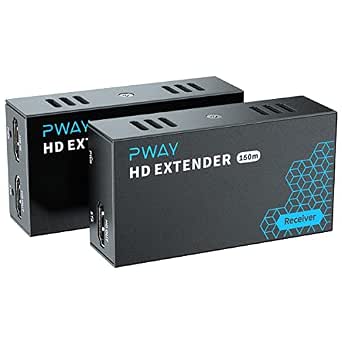 | Best for Long 1080p Runs | Video resolution: 1080p at 60Hz | Transmission distance: Up to 500 feet, per product description | Cable type: Cat5e/6 Ethernet and HDMI | VIEW ON AMAZON | See Our Full Breakdown |
| AV Access AV Over IP Encoder with Video Wall up to 8×8, 395ft (120m) |  | Best for Large 4K Video Walls | Model: 4KIP200E | Resolution support: 4K | Maximum video wall: 8×8 | VIEW ON AMAZON | See Our Full Breakdown |
| ToVi 4K HDMI Over IP Encoder, USB KVM, PoE, RS-232, IR, CEC, ARC/eARC, CAT6 |  | Best for Interactive 4K Signage Systems | Model: X4UH-KVM-ETX | Resolution: 4K@60Hz | Latency: Zero latency, as stated in the product data | VIEW ON AMAZON | See Our Full Breakdown |
| ToVi 1080p HDMI Over IP Transmitter, H.265/H.264, PoE, RS-232, 100m CAT6 AV |  | Best for Scalable 1080p Signage | Resolution: 1920×1200@60Hz 4:4:4 | Compression: H.265/H.264 | Transmission distance: Up to 100 meters | VIEW ON AMAZON | See Our Full Breakdown |
| av over ip transmitters for digital signage | Transmission distance | Model | Video resolution |
|---|---|---|---|
| StarTech HDMI Over IP Kit | Up to 100 meters (330 feet), per product description | ST12MHDLNHK | — |
| StarTech 4K HDMI Over IP Exten | — | ST12MHDLAN4K | 4K at 30Hz |
| MT-VIKI 4K AV Over IP Transmit | — | — | 4K at 60Hz, 4:4:4 |
| Darwin HD H.265 HDMI 1080p60 4 | — | — | 1080p60, 4:4:4 |
| PWAY HDMI Extender 500ft No De | Up to 500 feet, per product description | — | 1080p at 60Hz |
| AV Access AV Over IP Encoder w | — | 4KIP200E | — |
| ToVi 4K HDMI Over IP Encoder | Up to 100 meters | X4UH-KVM-ETX | — |
| ToVi 1080p HDMI Over IP Transm | Up to 100 meters | — | — |
More Details on Our Top Picks
StarTech HDMI Over IP Kit, 1080p, Compression, TAA
For signage built around Full HD displays, I’d choose this complete transmitter-and-receiver kit over encoder-only options such as the MT-VIKI 4K AV Over IP Transmitter, which needs separate receiving hardware. Its compression and stated reach of up to 100 meters suit a source feeding a remotely placed screen, while support for video-wall configurations leaves room to expand beyond a single display. The tradeoff is its 1080p ceiling: buyers planning 4K panels should look at the StarTech ST12MHDLAN4K instead. This kit also depends on network infrastructure for IP distribution and offers no wireless path, so it fits planned wired installations rather than temporary or cable-free setups. TAA compliance may also matter to institutional buyers, though it does not replace checking the network requirements for a specific deployment.
Pros:- Includes both transmitter and receiver for a more direct installation than encoder-only products.
- Supports 1920 x 1080 at 60Hz for Full HD signage.
- Compression and stated transmission reach up to 100 meters suit long cable runs over a local network.
- Supports scalable signage and video-wall configurations.
Cons:- Limited to 1080p, unlike the StarTech ST12MHDLAN4K and MT-VIKI 4K transmitter.
- Depends on network infrastructure for IP distribution.
- No built-in Wi-Fi or wireless transmission.
Best for: Schools, offices, and public venues installing wired Full HD signage that need a matched transmitter and receiver in one kit.
Not ideal for: Venues deploying 4K displays or buyers seeking wireless signage distribution; this kit tops out at 1080p and has no Wi-Fi.
- Maximum resolution:1920 x 1080 at 60Hz
- Connectivity:HDMI, LAN, USB
- Transmission distance:Up to 100 meters (330 feet), per product description
- Power input:100–240 V AC
- Output:5 V DC, 1 A
- Power source:AC adapter included
- Model:ST12MHDLNHK
- Certifications:CE, FCC, TAA
- Warranty:2 years
Our verdict“Choose this kit for wired Full HD signage when a matched transmitter and receiver matter more than 4K support.”
StarTech 4K HDMI Over IP Extender Kit, AVoIP Video Wall, TAA (ST12MHDLAN4K)
I’d rank this StarTech kit above the 1080p StarTech HDMI Over IP Kit when the signage content and displays call for 4K at 30Hz. Its one-to-many and many-to-many configurations suit installations that may grow from a few screens into a larger video wall, and mobile-app control offers a management route beyond local hardware controls. That flexibility comes with a network requirement: StarTech recommends Gigabit Ethernet with IGMP support, and non-managed switches may affect performance. Compared with the MT-VIKI encoder, which specifies 4K at 60Hz 4:4:4, this kit’s stated 4K refresh rate is lower. Large deployments may also take more planning to configure. It makes the most sense when resolution and scaling matter, and the installer can manage the network side.
Pros:- Supports 4K video at 30Hz over IP.
- One-to-many and many-to-many configurations support scalable signage layouts.
- Mobile-app control provides a remote management option.
- Supports transmission over cable runs up to 100 meters.
Cons:- Gigabit Ethernet with IGMP support is recommended for reliable network operation.
- Performance may be affected when used with non-managed switches.
- Large deployments can require substantial configuration planning.
Best for: AV integrators and facilities teams building 4K signage networks or video walls across multiple displays with managed Gigabit Ethernet available.
Not ideal for: Small sites with basic unmanaged switches, or buyers who need 4K at 60Hz; network setup and the stated 30Hz limit may not fit.
- Video resolution:4K at 30Hz
- Network compatibility:Gigabit Ethernet; IGMP support recommended
- Maximum cable length:100 meters (330 feet)
- Configurations:One-to-many and many-to-many
- Control:Mobile app control
- Model:ST12MHDLAN4K
- Dimensions:5.1 x 4.6 x 1.2 inches
- Weight:1.3 pounds
Our verdict“Pick this kit for scalable 4K signage and video walls when your network can support its managed-switch requirements.”
MT-VIKI 4K AV Over IP Transmitter, Encoder Only, 4K@60Hz 4:4:4
When signage carries fine text, detailed graphics, or other content that benefits from faithful color, the MT-VIKI’s 4K at 60Hz with 4:4:4 chroma is its clearest distinction. It also lists USB KVM, IR, RS232, CEC, and an HDMI loop-out, giving an integrator more options for control and local monitoring than the basic StarTech 1080p kit. This is an encoder only, though, not a ready-to-run extender: a decoder, control box, and network switch are needed for a complete system. PoE can simplify power at the transmitter, but it does not remove that extra equipment or configuration work. Compared with the StarTech ST12MHDLAN4K, MT-VIKI specifies 60Hz 4:4:4 rather than 30Hz, making it a stronger fit for demanding source quality but a less turnkey choice.
Pros:- Supports 4K at 60Hz with 4:4:4 chroma.
- PoE can simplify power delivery at the encoder.
- Includes HDMI loop-out and USB KVM support.
- Lists IR, RS232, CEC, video-wall, and matrix-switching capabilities.
Cons:- Encoder-only product; a separate decoder is required to receive the signal.
- A control box and network switch are also needed for a full system.
- Complex setup and limited compatibility information may challenge buyers without AV integration experience.
Best for: AV integrators building a custom 4K signage matrix who need 60Hz 4:4:4 video plus control connections and can supply the decoder and network hardware.
Not ideal for: First-time installers or buyers seeking a complete transmitter-receiver kit; this encoder requires separate system components and configuration.
- Video resolution:4K at 60Hz, 4:4:4
- Interfaces:HDMI, RJ45
- Maximum transmission distance:100 meters (328 feet)
- HDCP:HDCP 2.2
- Power:PoE
- Video output feature:HDMI loop-out
- Control and peripheral features:USB KVM, IR, RS232, CEC
- System features:Video wall and matrix switching
Our verdict“Choose the MT-VIKI for custom signage systems needing 4K60 4:4:4, provided you can source and configure the rest of the AV-over-IP chain.”
Darwin HD H.265 HDMI 1080p60 4:4:4 AV-over-IP Transmitter
The Darwin HD is a specialist choice for installations where 1080p video-wall scale and network security matter more than 4K resolution. Its support for arrangements up to 9 x 9 displays goes beyond the simpler Full HD distribution focus of the StarTech HDMI Over IP Kit, while AES 256 encryption, HTTPS, and SSH add network safeguards suited to managed professional environments. PoE or the included power supply gives installers two power options, and the compact all-metal chassis is practical where equipment space is tight. The main compromise is clear: this remains a 1080p transmitter, while the StarTech ST12MHDLAN4K and MT-VIKI offer 4K paths. It also needs a compatible receiver, so buyers wanting a complete kit or an easy plug-in setup should choose accordingly.
Pros:- Supports 1080p60 with 4:4:4 chroma for detailed Full HD content.
- Video-wall support scales up to 9 x 9 displays.
- AES 256 encryption, HTTPS, and SSH provide listed security features.
- Can be powered by PoE or the included power supply.
Cons:- Limited to 1080p, unlike the StarTech ST12MHDLAN4K and MT-VIKI 4K encoder.
- Requires a compatible receiver for a functioning end-to-end link.
- Setup may be complex for buyers new to AV-over-IP.
Best for: Professional AV teams creating secured Full HD video walls up to 9 x 9 displays, especially where PoE and remote network administration are useful.
Not ideal for: Buyers planning 4K signage or seeking a self-contained extender kit; this transmitter is limited to 1080p and needs a compatible receiver.
- Video resolution:1080p60, 4:4:4
- Compression:H.265
- Network:Gigabit Ethernet
- Video-wall support:Up to 9 x 9 displays
- Security:AES 256 encryption, HTTPS, SSH
- Power:PoE or included power supply
- Audio:Analog L/R input and output
- HDCP compatibility:HDCP 1.4
- Chassis:Compact, all-metal
Our verdict“Choose this transmitter for secured, expandable 1080p video walls when you already have a compatible receiver and do not need 4K.”
PWAY HDMI Extender 500ft No Delay Over Cat5e/6 HDMI Balun IP Kit Over Ethernet Long Distance Video, 1 to Many Over Gigabit Switch
The PWAY’s standout claim is up to 500 feet over Cat5e/6, giving it more stated reach than the 100-meter StarTech kits and a useful role in large buildings with distant screens. It also supports one-to-many distribution over a Gigabit switch, and its built-in loop-out lets an installer monitor the source locally while sending video onward. The product description emphasizes plug-and-play setup, which may suit a straightforward signage link better than the MT-VIKI encoder’s multi-component system. The tradeoff is a 1080p ceiling, so it is not the right path for 4K panels. Buyers should also confirm the exact power and network requirements before planning an installation: the supplied data does not specify included power-supply details, and Ethernet cabling and a switch are required.
Pros:- States transmission reach up to 500 feet over Cat5e/6.
- Supports 1080p at 60Hz with audio.
- Allows one-to-many distribution over a Gigabit switch.
- Built-in loop-out supports local source monitoring.
Cons:- Limited to 1080p rather than 4K.
- Requires Ethernet cabling and a network switch.
- Product data does not specify power-supply details.
Best for: Small-business and venue installers distributing Full HD signage over long Cat5e/6 runs, including one source feeding multiple displays over a Gigabit switch.
Not ideal for: 4K deployments or buyers who need clearly documented power-supply details and a complete managed AV-over-IP system.
- Video resolution:1080p at 60Hz
- Transmission distance:Up to 500 feet, per product description
- Cable type:Cat5e/6 Ethernet and HDMI
- Distribution:One-to-many over a Gigabit switch
- Monitoring:Built-in loop-out
- Ports:6
- Compatible devices:DVD players, projectors, monitors, TVs, gaming consoles, laptops, PCs, Blu-ray players, satellite receivers
- Dimensions:3.2 x 1.7 x 0.9 inches
Our verdict“Pick the PWAY for long-distance Full HD signage when its 500-foot reach is more useful than 4K support or fuller setup documentation.”
AV Access AV Over IP Encoder with Video Wall up to 8×8, 395ft (120m)
For signage projects where screen layout matters more than extensive control features, the AV Access 4KIP200E stands out with support for an 8×8 video wall and transmission up to 394 feet. That gives installers room to serve a sizable display array across a venue without placing the source beside the screens. Its plug-and-play setup and app-based visual control also make it a simpler fit than the more control-heavy ToVi X4 Series, which adds KVM and broader connectivity but may demand more setup work. The tradeoff is that the AV Access unit is an encoder, not a complete distribution system: you’ll need compatible decoders, and the supplied details do not spell out compatibility with other AV equipment. I’d choose it when wall scale and straightforward operation are the priorities.
Pros:- Supports 4K video walls as large as 8×8.
- Extends signals up to 394 feet (120 meters).
- Plug-and-play setup can reduce configuration work.
- Visual control is available through a smartphone, tablet, or computer.
Cons:- Decoder hardware is required and sold separately.
- Compatibility details for other AV equipment are limited.
Best for: Commercial signage installers building a 4K video wall of up to 8×8 displays across a large room or venue.
Not ideal for: Buyers seeking a complete ready-to-run kit or detailed assurance of compatibility with existing AV equipment; the encoder and decoder bundles are purchased separately.
- Model:4KIP200E
- Resolution support:4K
- Maximum video wall:8×8
- Maximum distance:394 feet (120 meters)
- Connector type:HDMI
- Weight:0.48 kg
- Warranty:3 years for business partners; 1 year for end users
Our verdict“Choose the AV Access encoder for a large 4K signage wall when long reach and simple control matter more than an all-in-one bundle.”
ToVi 4K HDMI Over IP Encoder, USB KVM, PoE, RS-232, IR, CEC, ARC/eARC, CAT6
The ToVi X4 Series is the most control-oriented option in this group: alongside 4K@60Hz video, it supports remote KVM, matrix switching, and connections including USB, RS-232, IR, and CEC. Those features suit signage systems that share sources or need remote service and control, rather than a screen network that only plays scheduled content. Its stated 100-meter reach is close to the AV Access encoder’s 120 meters, while its 9×9 video wall support accommodates a larger array. PoE can simplify power at the endpoint, but this is not a plug-in-and-play system for most buyers: decoders, network switches, and potentially a separate control box add planning and hardware. Compared with the ToVi X1, the X4 is the stronger fit for 4K and remote interaction, not a lower-complexity HD rollout.
Pros:- Supports 4K@60Hz video with stated zero latency.
- Combines matrix switching with video walls up to 9×9.
- Remote KVM and multiple control connections suit managed installations.
- PoE and a five-year warranty support fixed commercial deployments.
Cons:- Decoders and network switches are required for a complete setup.
- The more extensive configuration can be difficult for beginners.
- A control box may be an additional purchase.
Best for: AV integrators and enterprise signage teams managing 4K sources, remote KVM access, and multi-display routing over a network.
Not ideal for: Small businesses or first-time installers who need a basic signage link; the system requires additional components and can be challenging to configure.
- Model:X4UH-KVM-ETX
- Resolution:4K@60Hz
- Latency:Zero latency, as stated in the product data
- Video wall support:Up to 9×9
- Transmission distance:Up to 100 meters
- Connectivity:RJ45, fiber, USB, IR, RS-232, CEC, ARC/eARC
- Power:PoE
- Warranty:5 years
Our verdict“Pick the ToVi X4 when a managed signage network needs 4K60, remote KVM, and broad routing controls, and you have an integrator to configure it.”
ToVi 1080p HDMI Over IP Transmitter, H.265/H.264, PoE, RS-232, 100m CAT6 AV
For a signage network that does not need 4K, the ToVi X1 Series offers a more focused feature set than the 4K-capable ToVi X4. It distributes up to 1920×1200@60Hz 4:4:4 over 1G Ethernet, with H.265/H.264 compression, multicast, and support for video walls up to 9×9. That combination is aimed at multi-room deployments where network distribution and display count matter more than 4K detail. PoE can reduce separate power runs at supported endpoints, while audio embedding and extraction and RS-232 control add useful installation flexibility. In contrast with the AV Access encoder, the X1 specifies CAT6 and gigabit network support, but its 100-meter range is shorter than AV Access’s stated 120 meters. You’ll still need compatible network gear, receivers, and potentially management hardware.
Pros:- Supports 1920×1200@60Hz 4:4:4 with H.265/H.264 compression.
- PoE and 1G Ethernet support fit network-based multi-room distribution.
- Scales to video walls up to 9×9 and supports multicast.
- Audio embedding and extraction plus RS-232 add system flexibility.
Cons:- Does not provide 4K resolution like the ToVi X4 or AV Access encoder.
- Compatible network switches and infrastructure are required.
- Receivers and management boxes are sold separately, and setup may need technical expertise.
Best for: Facilities teams distributing 1080p or 1920×1200 signage to multiple rooms or a large video wall over managed 1G Ethernet.
Not ideal for: Buyers needing 4K playback, a self-contained kit, or a simple point-to-point setup without compatible switches and receivers.
- Resolution:1920×1200@60Hz 4:4:4
- Compression:H.265/H.264
- Transmission distance:Up to 100 meters
- Network support:PoE, 1G Ethernet
- Audio:Embedding and extraction supported
- Control:RS-232
- Video wall support:Up to 9×9
- Cable and connector:CAT6; HDMI
Our verdict“Choose the ToVi X1 for a scalable networked signage system capped at 1920×1200, but step up to the X4 if your displays need 4K.”

How We Picked
I ranked these products around the needs of digital signage deployments: dependable signal distribution, fit for the intended resolution, support for multiple displays or video walls, installation reach, and practical control and integration features. I also separated complete extender kits from encoder-only units, since a transmitter without a compatible receiver can require more planning and additional hardware. For signage teams, usability and system fit matter as much as headline resolution.
The order favors products with a useful balance of signage-focused capability and a clear installation role. The AV Access encoder leads for its stated video-wall capacity and reach; StarTech’s 4K kit follows for buyers who value a matched kit, while ToVi’s 4K encoder earns attention for its control connections. More specialized or 1080p-focused choices rank lower not because they are inherently unsuitable, but because they serve narrower needs. Before buying, verify receiver compatibility, switch requirements, supported formats, and the exact distance limits for your planned network.
| av over ip transmitters for digital signage | Transmission distance |
|---|---|
| StarTech HDMI Over IP Kit | Up to 100 meters (330 feet), per product description |
| StarTech 4K HDMI Over IP Exten | — |
| MT-VIKI 4K AV Over IP Transmit | — |
| Darwin HD H.265 HDMI 1080p60 4 | — |
| PWAY HDMI Extender 500ft No De | Up to 500 feet, per product description |
| AV Access AV Over IP Encoder w | — |
| ToVi 4K HDMI Over IP Encoder | Up to 100 meters |
| ToVi 1080p HDMI Over IP Transm | Up to 100 meters |
Factors to Consider When Choosing Av Over Ip Transmitters For Digital Signage
Choosing an AV over IP transmitter starts with the signage system around it, not just the box. I would map the source, displays, network, control plan, and likely expansion before comparing feature lists.
Match Resolution and Chroma to the Content
Choose a signal format based on what viewers will actually see, rather than treating the highest resolution as an automatic win. Fine text, detailed maps, and computer-generated layouts can benefit from 4K and 4:4:4, while many motion-heavy or simpler signage loops work well at 1080p. Check that the transmitter, receiver, source, display, and any processing devices all support the same format. A single incompatible link can force the whole chain into a lower mode. Also verify refresh rate and chroma requirements for small text or color-critical graphics. Spending on 4K makes less sense if the displays or content pipeline remain HD.
Plan the Network Before Scaling Displays
AV over IP places video traffic on a network, so a switch that handles ordinary office data may not suit a signage deployment without configuration. Confirm required bandwidth, multicast behavior, IGMP support, VLAN needs, and whether the system expects a dedicated network. Avoid assuming that products described as IP-based will interoperate simply because they use Ethernet. Ask the manufacturer which switches and receiver models are supported, and whether management software is required. For a small point-to-point setup, a matched kit may reduce setup uncertainty. A multi-display rollout benefits from a network plan that accounts for traffic, monitoring, and future endpoints.
Choose a Kit or Encoder Based on Your System
A transmitter-and-receiver kit offers a defined pairing, which can make a straightforward source-to-display installation easier to specify. An encoder-only product may be more flexible when a site already uses compatible decoders or a larger AV-over-IP platform. The tradeoff is that you must confirm endpoint compatibility and source-to-screen routing before purchase. Count every display location and identify whether each needs its own receiver. Do not mistake a transmitter’s ability to send over a network for a complete distribution system. If you are replacing only one part of an established installation, matching the installed platform may matter more than a broader feature list.
Treat Video Walls as a System Requirement
Video-wall support can change both the transmitter choice and the network design. Confirm the maximum wall layout, how screens are addressed, and whether wall processing happens in the encoder, decoder, or a separate controller. Check that the display bezels, orientation, and source resolution work with the planned layout. A stated grid capacity is useful, but it does not answer whether the system can manage several independent walls or mixed signage zones. For a single display or a few unrelated screens, wall features may add complexity without helping viewers. For a venue that needs coordinated canvases, plan control and commissioning along with the hardware.
Measure the Full Route, Not Just the Advertised Distance
Distance claims usually describe a particular cable type and configuration, not every route through a building. Measure the real path, include patch panels and intermediate equipment, and confirm whether the stated reach depends on Cat5e, Cat6, or a specific network topology. Long runs across floors may call for fiber or active network infrastructure instead of a single copper link. PoE can reduce local power needs, but the switch must supply the required standard and total power budget. Leave room for service access and ventilation around installed endpoints. A marginal cable plan can cause more disruption than choosing an encoder with fewer features.
Decide Which Control Features Reduce Installation Work
IR, RS-232, CEC, USB KVM, and ARC/eARC can help integrate displays, sources, and operator stations, but only when the signage workflow uses them. A centrally managed screen network may benefit from serial control for power and input selection. USB KVM is more relevant when staff need to operate a remote source than when the displays simply loop scheduled content. Check which control signals pass end to end and whether they need separate cabling or configuration. Extra ports can reduce the need for add-on equipment, yet unused features still add setup decisions. Prioritize the controls that support daily operation and maintenance at your site.
Frequently Asked Questions
Can I connect an AV over IP transmitter directly to an ordinary network switch?
Sometimes, but the switch must meet the transmitter system’s traffic and management requirements. Ask whether the setup uses multicast and whether the switch needs IGMP snooping, VLAN configuration, or a dedicated AV network. Check bandwidth per stream and account for all simultaneous sources, not just one transmitter. A basic unmanaged switch may work for a small supported configuration, but should not be assumed suitable for a multi-screen deployment. Confirm the exact switch requirements with the product documentation before installation.
Do I need a receiver for every signage display?
In many AV-over-IP systems, each display needs a compatible decoder or receiver to turn the network stream back into HDMI. Some kits include a paired receiver, while encoder-only products generally require a separate compatible endpoint. Verify whether one encoder can feed multiple receivers and whether the system supports simultaneous display or video-wall output. The transmitter, receiver, and management platform should be confirmed as compatible before ordering. Counting endpoints early helps avoid a rollout with more screens than decoding hardware.
Is a 1080p transmitter enough for a 4K signage screen?
A 1080p transmitter can send a picture to a 4K screen, but the delivered signal will not provide native 4K detail. That may be acceptable for distant displays, large text, or content authored at HD. For fine interface text, detailed product imagery, or close-viewed screens, a 4K path can preserve more source detail. Check the full chain, including source output, receiver, cabling, and display input, since one HD component can limit the result. Match resolution to viewing distance and content rather than the screen label alone.
When should I choose a matched extender kit instead of an encoder-only model?
A matched kit is a practical choice when you need a defined transmitter-and-receiver pair for a direct installation and want fewer compatibility decisions. An encoder-only unit is more suitable when the site already has compatible decoders or belongs to a larger managed AV-over-IP system. Before choosing an encoder, verify supported stream formats, control behavior, and receiver models. Also determine whether you need one display, several independent displays, or a video wall. The simpler purchase is not always the simpler deployment if it does not fit the existing system.
What should I verify before using PoE for a multi-display signage installation?
Confirm the PoE standard and power draw of each endpoint, then compare the total against the switch’s available power budget. A switch can support PoE yet still lack enough capacity for all connected transmitters or receivers at once. Check cable length, cable quality, and whether local power is recommended for any endpoint. Also distinguish powering the AV device from carrying video traffic: PoE does not remove the need for a correctly configured network. Document switch ports and power allocation so future additions do not overload the setup.
Conclusion
For most signage projects that may grow into coordinated displays, I would choose the AV Access encoder as the best overall for its stated 8×8 wall support and 395-foot reach. The StarTech 1080p kit is my best value-style pick for buyers who want a matched HD link without building around an encoder-only platform. For premium 4K and integrated control, the ToVi 4K encoder makes the most sense when USB KVM, PoE, RS-232, and audio-control features will be used; the MT-VIKI is another 4K encoder option for buyers prioritizing 4K60 4:4:4. Beginners should look first at a matched kit such as StarTech’s, while buyers planning a 4K video wall should compare the StarTech 4K kit with the AV Access model and verify the required receivers and network design. Choose Darwin or ToVi’s 1080p transmitter when HD content and a longer-distance IP workflow are the actual brief, and consider PWAY when its 1-to-many arrangement matches a confirmed switch and receiver setup.
Halloween Picks
halloween
As an affiliate, we earn on qualifying purchases.