For most buyers, I’d start with the Silkland 80Gbps DisplayPort 2.1 cable: its listed bandwidth and VESA certification make it the strongest all-around fit for newer high-refresh displays. The UGREEN 80Gbps DP 2.1 cable is another standout for buyers seeking a certified 16K-rated option, while the Amazon Basics DP 1.4 cable is a simpler match for systems that do not need DP 2.1 bandwidth. The main tradeoff is paying for newer bandwidth you may not use versus choosing a DP 1.4 cable that better fits an existing setup. Your graphics card, monitor, resolution, refresh rate, and cable length all affect the right choice. Read on for the full breakdown and help matching a cable to your hardware.

Get business pricing on networking and server gear
- Business-only prices and quantity discounts
- Tax-exempt purchasing
- Multiple users, one account, clear invoices
Key Takeaways
- The DP 2.1 group leads on stated bandwidth: Several picks list 80Gbps, while the Silkland 54Gbps model sits between that group and the DP 1.4 options.
- VESA certification is a useful differentiator: It is listed for many DP 2.1 picks, including Silkland, IVANKY, UGREEN, and Capshi, but not for every cable in the lineup.
- DP 1.4 remains a sensible fit for many existing systems: Capshi, Acer, IVANKY, and Amazon Basics list DP 1.4 support and specified high-resolution modes.
- Headline resolution claims do not settle compatibility: A cable’s advertised 16K or 8K support does not mean a connected GPU and display can deliver those modes together.
- The strongest choice depends on the whole setup: Buyers with current DP 2.1 hardware have more reason to choose an 80Gbps cable; users with DP 1.4 equipment can focus on verified mode support and a suitable length.
| Silkland 54Gbps 16K DisplayPort Cable 2.1, VESA Certified, 6.6FT |  | Best for a Certified 16K-Ready Cable | DisplayPort version: DisplayPort 2.1/2.0 | Bandwidth: 54Gbps | Length: 6.6 feet | VIEW ON AMAZON | See Our Full Breakdown |
| Capshi 8K 4K DisplayPort Cable 1.4, VESA Certified, 6.6ft |  | Best Value for DP 1.4 Setups | DisplayPort version: DisplayPort 1.4 | Bandwidth: 32.4Gbps | Length: 6.6 feet | VIEW ON AMAZON | See Our Full Breakdown |
| Silkland DisplayPort 2.1 Cable (80Gbps, VESA Certified, 6.6ft) |  | Best Overall for High-Refresh Gaming | DisplayPort version: DisplayPort 2.1; backward compatible with 2.0 and 1.4 | Bandwidth: 80Gbps | Length: 6.6 feet | VIEW ON AMAZON | See Our Full Breakdown |
| Acer 8K DisplayPort Cable 6.6FT, DP 1.4 for 8K@60Hz, 4K@144Hz/240Hz |  | Best for Multi-Monitor DP 1.4 Setups | DisplayPort version: DisplayPort 1.4 | Bandwidth: 32.4Gbps | Length: 6.6 feet | VIEW ON AMAZON | See Our Full Breakdown |
| IVANKY VESA Certified 80Gbps DisplayPort 2.1 Cable, 6.6FT |  | Best for Broad Feature Compatibility | DisplayPort version: DisplayPort 2.1 | Bandwidth: 80Gbps | Length: 6.6 feet | VIEW ON AMAZON | See Our Full Breakdown |
| 80Gbps DisplayPort Cable 2.1, 6.6FT, Supports 16K, 8K, 4K Resolutions, HDR10, HDCP 2.3, DSC 1.2a |  | Best for High-Resolution Headroom | Bandwidth: 80Gbps | Length: 6.6 feet | Resolution support: 16K@60Hz, 8K@120Hz, 4K@240Hz | VIEW ON AMAZON | See Our Full Breakdown |
| Silkland 80Gbps DisplayPort Cable 2.1, 6.6FT/2M, VESA Certified, HDR |  | Best for VESA-Certified High-Refresh Setups | Standard: DisplayPort 2.1 | Bandwidth: 80Gbps | Length: 6.6 feet / 2 meters | VIEW ON AMAZON | See Our Full Breakdown |
| UGREEN 80Gbps DisplayPort 2.1 Cable, 16K@60Hz, 6.6FT, VESA Certified | 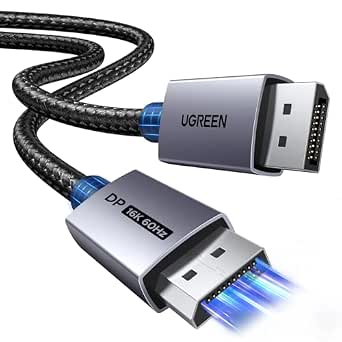 | Best for Durable Multi-Monitor Desks | Bandwidth: 80Gbps | Length: 6.6 feet | Resolution support: 16K@60Hz, 8K@240Hz, 4K@240Hz, 1080p@540Hz | VIEW ON AMAZON | See Our Full Breakdown |
| Highwings 80Gbps DisplayPort 2.1 Cable, 6.6FT, 16K@60Hz, 8K@120Hz, 4K@240Hz |  | Best for a Reinforced Gaming Cable | Bandwidth: 80Gbps | Length: 6.6 feet | Resolution support: 16K@60Hz, 8K@120Hz, 4K@240Hz | VIEW ON AMAZON | See Our Full Breakdown |
| IVANKY VESA Certified 8K DisplayPort Cable 1.4, 6.6ft DP Cable Supports HDR |  | Best for DP 1.4 Systems | Standard: DisplayPort 1.4 | Bandwidth: 32.4Gbps | Length: 6.6 feet | VIEW ON AMAZON | See Our Full Breakdown |
| Amazon Basics DisplayPort 1.4 Cable, 6 Feet, 8K@60Hz, 4K@120Hz, High-Speed, Gold-Plated |  | Best for Straightforward DisplayPort 1.4 Setups | Length: 6 feet | DisplayPort version: DisplayPort 1.4 | Bandwidth: 32.4 Gbps | VIEW ON AMAZON | See Our Full Breakdown |
| highspeed displayport cable | Bandwidth | Length | Certification | DisplayPort version |
|---|---|---|---|---|
| Silkland 54Gbps 16K DisplayPor | 54Gbps | 6.6 feet | VESA certified | DisplayPort 2.1/2.0 |
| Capshi 8K 4K DisplayPort Cable | 32.4Gbps | 6.6 feet | VESA certified | DisplayPort 1.4 |
| Silkland DisplayPort 2.1 Cable | 80Gbps | 6.6 feet | VESA certified | DisplayPort 2.1; backward compatible with 2.0 and 1.4 |
| Acer 8K DisplayPort Cable 6.6F | 32.4Gbps | 6.6 feet | — | DisplayPort 1.4 |
| IVANKY VESA Certified 80Gbps D | 80Gbps | 6.6 feet | VESA certified | DisplayPort 2.1 |
| 80Gbps DisplayPort Cable 2.1 | 80Gbps | 6.6 feet | — | — |
| Silkland 80Gbps DisplayPort Ca | 80Gbps | 6.6 feet / 2 meters | VESA certified | — |
| UGREEN 80Gbps DisplayPort 2.1 | 80Gbps | 6.6 feet | VESA certified | — |
| Highwings 80Gbps DisplayPort 2 | 80Gbps | 6.6 feet | — | — |
| IVANKY VESA Certified 8K Displ | 32.4Gbps | 6.6 feet | VESA certified | — |
| Amazon Basics DisplayPort 1.4 | 32.4 Gbps | 6 feet | — | DisplayPort 1.4 |
More Details on Our Top Picks
Silkland 54Gbps 16K DisplayPort Cable 2.1, VESA Certified, 6.6FT
The Silkland 54Gbps is a sensible choice for buyers who want a VESA-certified DP 2.1 cable without stepping up to the 80Gbps models in this roundup. Its listed support for 16K at 60Hz, 8K at 120Hz, and 4K at 240Hz targets demanding displays, while the braided jacket and triple shielding add protection against wear and signal interference. Compared with the Silkland 80Gbps DisplayPort Cable 2.1, this version has less stated bandwidth headroom, so the newer high-refresh setups should favor the faster model. The 6.6-foot length suits a typical desk, and gold-plated connectors plus an ergonomic design make connections easier to handle. Its main limitation is practical: the headline modes require compatible graphics hardware and a display, so many standard setups will not benefit from its capacity.
Pros:- VESA certified, with stated 54Gbps bandwidth
- Lists support for 16K at 60Hz, 8K at 120Hz, and 4K at 240Hz
- Braided construction and triple shielding support durability and signal protection
- Ergonomic connectors and 24-month warranty
Cons:- Offers less bandwidth than the 80Gbps DP 2.1 options in this roundup
- High-resolution and refresh-rate modes depend on compatible source and display hardware
- Its premium construction may be unnecessary for basic monitor connections
Best for: PC gamers or display owners seeking a VESA-certified DP 2.1 cable for a compatible high-resolution, high-refresh setup.
Not ideal for: Buyers with ordinary 1080p or 4K displays who do not need DP 2.1 bandwidth, or anyone without matching graphics and monitor ports.
- DisplayPort version:DisplayPort 2.1/2.0
- Bandwidth:54Gbps
- Length:6.6 feet
- Listed resolution support:Up to 16K at 60Hz
- Other listed modes:8K at 120Hz; 4K at 240Hz
- Certification:VESA certified
- Cable construction:Braided, triple-shielded; 28 AWG
- Warranty:24 months
Our verdict“Choose this Silkland when VESA certification and high-resolution support matter, but the 80Gbps models offer more headroom for future upgrades.”
Capshi 8K 4K DisplayPort Cable 1.4, VESA Certified, 6.6ft
The Capshi DP 1.4 is the practical pick for buyers whose graphics card and monitor already use DP 1.4 and who do not need the extra bandwidth of a DP 2.1 cable. Its VESA certification and listed support for 8K at 60Hz or 4K at 144Hz make it a clear step above a basic connection, while the 6.6-foot braided cable fits common desk layouts. Compared with the Acer 8K DisplayPort Cable, Capshi has a similar DP 1.4 bandwidth ceiling but a simpler feature set; Acer adds MST support and a reinforced aluminum shell. Capshi’s appeal is that it sticks to core high-speed display use without claiming newer-generation bandwidth. It is less suitable for cutting-edge 4K high-refresh setups, and the manufacturer advises against extensions or adapters, which limits flexible routing.
Pros:- VESA certified for DP 1.4 use
- Lists support for 8K at 60Hz and 4K at 144Hz
- Braided cable construction
- HDCP 2.2 support and compatibility with AMD and NVIDIA graphics cards
Cons:- DP 1.4 bandwidth is below the 80Gbps DP 2.1 cables in this roundup
- Full modes require compatible DP 1.4 source and display hardware
- Extensions or adapters are discouraged to protect signal quality
Best for: Owners of DP 1.4 graphics cards and monitors who need a certified cable for 8K 60Hz or 4K 144Hz use.
Not ideal for: Buyers building a DP 2.1 system, seeking higher listed 4K refresh rates, or needing an adapter or extension to reach the display.
- DisplayPort version:DisplayPort 1.4
- Bandwidth:32.4Gbps
- Length:6.6 feet
- Maximum listed resolution:8K at 60Hz
- Additional listed mode:4K at 144Hz
- Certification:VESA certified
- HDCP:2.2
- Construction:Braided cable with multiple shielding layers
Our verdict“Pick Capshi for a straightforward certified DP 1.4 connection; choose a DP 2.1 option if your system needs more bandwidth.”
Silkland DisplayPort 2.1 Cable (80Gbps, VESA Certified, 6.6ft)
For a high-speed DisplayPort cable with clear bandwidth credentials, this 80Gbps Silkland DP 2.1 is the strongest all-round fit in this group. VESA certification and backward compatibility with DP 2.0 and 1.4 make it useful across both current and older setups, while its listed support for 4K at 240Hz suits high-refresh gaming systems. Compared with the 54Gbps Silkland, it provides more stated bandwidth; unlike the IVANKY 80Gbps DP 2.1, its product data specifies a locking latch and 24K gold-plated connectors. The double-braided jacket and triple shielding are reassuring for a cable that may be routed around a gaming desk. That latch helps prevent accidental disconnects, but it also adds a release step when moving equipment. Its capabilities still depend on compatible source and display ports.
Pros:- VESA-certified 80Gbps DP 2.1 bandwidth
- Lists support for 4K at 240Hz and 8K at 60Hz
- Backward compatible with DP 2.0 and 1.4
- Locking latch, triple shielding, and double-braided nylon jacket
Cons:- Latch needs to be released deliberately, which slows frequent unplugging
- DisplayPort-to-DisplayPort only; it does not provide HDMI or USB connectivity
- Listed high-end modes require compatible graphics and monitor hardware
Best for: PC gamers with a DP 2.1-capable graphics card and high-refresh monitor who want certified bandwidth and a secure connection.
Not ideal for: People who frequently unplug their monitor, need HDMI or USB connectivity, or have hardware that cannot use DP 2.1 features.
- DisplayPort version:DisplayPort 2.1; backward compatible with 2.0 and 1.4
- Bandwidth:80Gbps
- Length:6.6 feet
- Listed resolution support:Up to 16K at 60Hz with DSC
- Listed gaming mode:4K at 240Hz
- Certification:VESA certified
- Connectors:24K gold-plated, with locking latch
- Cable construction:Triple shielding and double-braided nylon jacket
Our verdict“Choose this Silkland for a certified, secure 80Gbps connection to a high-refresh gaming display, unless frequent unplugging makes its latch inconvenient.”
Acer 8K DisplayPort Cable 6.6FT, DP 1.4 for 8K@60Hz, 4K@144Hz/240Hz
The Acer DP 1.4 stands out among the older-generation options for buyers planning a multi-monitor desk. Its MST multi-stream support can help compatible systems drive daisy-chained displays from one DisplayPort output, while HDR and HDCP 2.2 address common display and protected-content needs. Like the Capshi DP 1.4 cable, it lists 32.4Gbps bandwidth and 8K at 60Hz; Acer’s reinforced aluminum shell and braided nylon jacket give it a more substantial build. Its product data also lists 4K at 144Hz/240Hz, but the exact refresh capability depends on the connected hardware and configuration. Compared with the 80Gbps Silkland, Acer has less bandwidth headroom and is not the pick for a DP 2.1 upgrade. The 6.6-foot reach may also be limiting for a spread-out setup.
Pros:- MST support for compatible multi-monitor daisy-chain setups
- Lists 8K at 60Hz and 4K high-refresh support
- Braided nylon jacket and reinforced aluminum shell
- HDR, HDCP 2.2, FreeSync, and G-Sync support listed
Cons:- 32.4Gbps DP 1.4 bandwidth is below the DP 2.1 options
- MST and maximum refresh modes depend on source and monitor support
- 6.6-foot length may not reach displays in larger setups
Best for: Desktop users with compatible MST-capable hardware who want to connect or daisy-chain multiple DisplayPort monitors using DP 1.4.
Not ideal for: Buyers who need DP 2.1 bandwidth, have a large room between PC and display, or lack hardware that supports MST.
- DisplayPort version:DisplayPort 1.4
- Bandwidth:32.4Gbps
- Length:6.6 feet
- Maximum listed resolution:8K at 60Hz
- Other listed display modes:4K at 144Hz/240Hz; 5K at 240Hz
- Multi-display feature:MST multi-stream support
- Build:Nylon braided jacket and reinforced aluminum shell
- Additional features:HDR, HDCP 2.2, backward compatibility
Our verdict“Choose Acer over the simpler Capshi if MST daisy-chaining and reinforced construction matter more than DP 2.1 bandwidth.”
IVANKY VESA Certified 80Gbps DisplayPort 2.1 Cable, 6.6FT
The IVANKY 80Gbps DP 2.1 is a strong match for buyers who want high bandwidth alongside a broad set of listed display and gaming features. It supports up to 16K at 60Hz and lists HDR, HDCP 2.3, FreeSync, and G-Sync, with a braided jacket and triple shielding for a durable run. Compared with the Silkland 80Gbps DP 2.1, IVANKY uses a latch-free design, making it easier to unplug when rearranging a desk; Silkland’s latch instead prioritizes keeping the connection secured. The listed 8K at 240Hz and 4K at 960Hz are ambitious modes, so buyers should check that both their GPU and monitor support the required signal path. This cable is limited to DisplayPort connections, and its 80Gbps capacity may be more than casual or older systems can use.
Pros:- VESA-certified 80Gbps DP 2.1 bandwidth
- Lists support up to 16K at 60Hz, plus 8K at 240Hz and 4K at 960Hz
- Supports HDR, HDCP 2.3, FreeSync, and G-Sync
- Latch-free connectors, triple shielding, and braided nylon jacket
Cons:- DisplayPort-to-DisplayPort only, with no HDMI connection support
- Headline resolution and refresh modes require compatible source and display hardware
- 80Gbps capacity may be unnecessary for casual or older setups
Best for: Enthusiast PC builders with compatible DisplayPort graphics cards and displays who want 80Gbps bandwidth, broad gaming-feature support, and easy unplugging.
Not ideal for: Casual users with standard-refresh displays, buyers needing HDMI connections, or anyone whose devices cannot use DP 2.1 bandwidth.
- DisplayPort version:DisplayPort 2.1
- Bandwidth:80Gbps
- Length:6.6 feet
- Listed resolution support:Up to 16K at 60Hz
- Other listed modes:8K at 240Hz; 4K at 960Hz
- Certification:VESA certified
- Display features:HDR, HDCP 2.3, FreeSync, G-Sync
- Construction:Triple shielding, tinned copper, alumalloy housing, nylon braid
Our verdict“Pick IVANKY for a latch-free, feature-rich 80Gbps cable when your display chain can use DP 2.1; otherwise, a DP 1.4 option is a better fit.”
80Gbps DisplayPort Cable 2.1, 6.6FT, Supports 16K, 8K, 4K Resolutions, HDR10, HDCP 2.3, DSC 1.2a
For a DisplayPort 2.1 setup where resolution headroom matters more than certification details, this cable offers a straightforward 80Gbps link and support up to 16K at 60Hz, 8K at 120Hz, or 4K at 240Hz. HDR10, HDCP 2.3, and DSC 1.2a cover key display features, but the host and monitor still need to support the modes you want. Compared with the Silkland 80Gbps DisplayPort Cable 2.1, which lists VESA certification and higher claimed refresh rates at some resolutions, this model’s published performance figures are more restrained. Its 6.6-foot run suits a nearby PC and monitor, while its DisplayPort-only connectors rule out HDMI displays without a suitable adapter. I’d pick it for a high-bandwidth setup with conventional refresh-rate targets, not for the broadest documented certification or longer cable routing.
Pros:- 80Gbps bandwidth with support listed up to 16K at 60Hz
- Supports HDR10, HDCP 2.3, and DSC 1.2a
- Male-to-male DisplayPort connectors suit direct PC-to-monitor connections
- 6.6-foot length fits many desk setups
Cons:- Only connects DisplayPort-equipped devices; HDMI is not supported directly
- Full resolution and refresh-rate modes depend on both connected devices
- 6.6 feet may not reach across larger rooms or around complex desk layouts
Best for: PC gamers and workstation users with DisplayPort 2.1-capable graphics cards and monitors who want 80Gbps bandwidth for 4K high-refresh or 8K output.
Not ideal for: Buyers connecting HDMI-only displays, people routing a cable across a room, or users who need the higher listed refresh-rate modes and VESA certification found on the Silkland model.
- Bandwidth:80Gbps
- Length:6.6 feet
- Resolution support:16K@60Hz, 8K@120Hz, 4K@240Hz
- HDR:HDR10
- Copy protection:HDCP 2.3
- Compression:DSC 1.2a
- Connectors:DisplayPort male-to-male
- Pins:20
Our verdict“Choose this cable for a direct DisplayPort 2.1 desk setup seeking 80Gbps headroom, but choose the VESA-certified Silkland if its higher listed refresh modes matter more.”
Silkland 80Gbps DisplayPort Cable 2.1, 6.6FT/2M, VESA Certified, HDR
The Silkland stands out for pairing 80Gbps bandwidth with VESA certification, giving buyers a clearer compliance signal than the other 80Gbps cables in this group. Its listed modes—up to 8K at 240Hz and 4K at 540Hz—make it the most ambitious high-refresh pick here, though those figures require compatible graphics hardware, display, and settings; they are not a promise that every setup will reach them. Compared with the UGREEN 80Gbps DisplayPort 2.1 Cable, Silkland emphasizes certification and extreme refresh-rate claims, while UGREEN spells out shielding and housing materials in greater detail. The nylon exterior and gold-plated connectors add physical protection, but the 6.6-foot length and DisplayPort-only connection keep it focused on desk systems. Choose it when documented certification and high refresh targets lead your priorities; skip it if your equipment is limited to DP 1.4 or HDMI.
Pros:- VESA certified with 80Gbps bandwidth
- Lists support up to 8K@240Hz and 4K@540Hz
- Nylon exterior and gold-plated connectors
- Supports HDR, DSC, HDCP 2.3, G-Sync, and FreeSync
Cons:- Listed maximum modes require compatible source and display hardware
- DisplayPort-only connection does not directly serve HDMI devices
- 6.6-foot cable may constrain distant or less typical desk layouts
Best for: Competitive PC gamers and display professionals with DP 2.1 equipment who want a VESA-certified cable and are targeting high refresh rates.
Not ideal for: Owners of HDMI-only or older DisplayPort setups who cannot use the listed high-bandwidth modes, or buyers who need a longer run.
- Standard:DisplayPort 2.1
- Bandwidth:80Gbps
- Length:6.6 feet / 2 meters
- Resolution support:16K@60Hz, 8K@240Hz, 4K@540Hz
- Certification:VESA certified
- Features:HDR, DSC, HDCP 2.3
- Compatibility:DisplayPort 2.1, 2.0, and 1.4; G-Sync and FreeSync
- Connectors:DisplayPort male-to-male
Our verdict“Pick Silkland when VESA certification and the lineup’s highest listed refresh-rate modes matter more than extra length or a simpler specification set.”
UGREEN 80Gbps DisplayPort 2.1 Cable, 16K@60Hz, 6.6FT, VESA Certified
UGREEN is the most convincing fit here for a desk that needs both high bandwidth and a cable built for regular handling. Its 80Gbps specification and VESA certification sit alongside a nylon braid, triple shielding, and aluminum-alloy housing; those construction details matter more if the cable is moved or routed around a busy workspace than if it stays untouched behind a monitor. It also lists MST and daisy-chain support, which can help with compatible multi-display arrangements. Compared with the Silkland 80Gbps, UGREEN gives more detail on shielding and materials, while Silkland lists higher maximum refresh modes. UGREEN’s listed modes reach 8K at 240Hz and 4K at 240Hz, with 1080p at 540Hz. The 6.6-foot length and DisplayPort-only plugs remain limits, and no cable can add MST support to hardware that lacks it.
Pros:- 80Gbps bandwidth and VESA certification
- Nylon braid, triple shielding, and aluminum-alloy housing
- Lists MST and daisy-chain support for compatible multi-monitor systems
- Supports HDR, HDCP 2.3, DSC 1.2a, FreeSync, and G-Sync
Cons:- DisplayPort-only connectors do not directly connect HDMI or Mini DisplayPort devices
- Full 80Gbps performance requires compatible DisplayPort 2.1 hardware
- 6.6-foot length can be restrictive for wide or distant installations
Best for: Users building a DisplayPort-based multi-monitor desk who value a rugged braided cable, VESA certification, and listed MST support.
Not ideal for: People with HDMI or Mini DisplayPort devices, long-distance routing needs, or a priority on the highest listed 4K refresh mode over construction details.
- Bandwidth:80Gbps
- Length:6.6 feet
- Resolution support:16K@60Hz, 8K@240Hz, 4K@240Hz, 1080p@540Hz
- Certification:VESA certified
- Construction:28AWG tinned copper, triple shielding, nylon braid, aluminum-alloy housing
- Multi-display features:MST and daisy-chain support
- Video features:HDR, HDCP 2.3, DSC 1.2a, FreeSync, G-Sync
- Compatibility:DisplayPort 1.4 and 1.2 backward compatible
Our verdict“Choose UGREEN for a durable, VESA-certified cable in a compatible multi-monitor DisplayPort setup; choose Silkland if its higher listed refresh targets take priority.”
Highwings 80Gbps DisplayPort 2.1 Cable, 6.6FT, 16K@60Hz, 8K@120Hz, 4K@240Hz
Highwings makes sense for a gaming desk where cable protection and variable refresh support matter alongside bandwidth. It lists 80Gbps, HDR10, DSC 1.2a, G-Sync, and FreeSync, with support up to 4K at 240Hz and 8K at 120Hz. Its triple-layer shielding and nylon braid offer a more rugged construction story than the simpler descriptions of some competitors, though UGREEN provides more specific material details and lists VESA certification. Highwings’ published resolution ceiling is also more restrained than Silkland’s claim of 8K at 240Hz, so it is better matched to common high-refresh gaming targets than to chasing the highest listed modes. The 6.6-foot length suits nearby components, but the product data notes that 16K performance may require manual adjustments. Buyers should also check their equipment before expecting any maximum mode.
Pros:- 80Gbps bandwidth with support listed up to 4K@240Hz
- Triple-layer shielding and nylon braiding
- Supports HDR10, DSC 1.2a, G-Sync, and FreeSync
- Male-to-male DisplayPort connection for direct PC and monitor links
Cons:- Maximum modes depend on compatible source, display, and configuration
- No VESA certification is listed in the supplied product data
- 6.6-foot length may not suit larger or more complex installations
Best for: PC gamers with DisplayPort-equipped desktops and monitors who want a braided, shielded cable with VRR feature support for a standard desk setup.
Not ideal for: Buyers who need VESA certification, longer cable routing, or the higher listed 8K refresh modes offered by the Silkland cable.
- Bandwidth:80Gbps
- Length:6.6 feet
- Resolution support:16K@60Hz, 8K@120Hz, 4K@240Hz
- Construction:Triple-layer shielding, tinned copper conductors, nylon braid
- HDR:HDR10
- Display features:DSC 1.2a, G-Sync, FreeSync
- Connectors:DisplayPort male-to-male
- Pins:20
Our verdict“Choose Highwings for a reinforced-feeling cable aimed at 4K high-refresh gaming, but favor UGREEN for listed VESA certification and more detailed construction specifications.”
IVANKY VESA Certified 8K DisplayPort Cable 1.4, 6.6ft DP Cable Supports HDR
Not every high-speed DisplayPort setup needs an 80Gbps DP 2.1 cable. This IVANKY is the practical choice for buyers whose equipment is built around DisplayPort 1.4: its VESA certification, 32.4Gbps bandwidth, and support up to 8K at 60Hz or 4K at 240Hz align with a more established class of displays. It also lists HDR, HDCP 2.2, FreeSync, and G-Sync. Compared with UGREEN and Silkland, it gives up the newer DP 2.1 bandwidth and their higher listed 8K modes, but that extra capacity is of little use if a graphics card or monitor cannot take advantage of it. The braided jacket and gold-plated connectors add durable construction, while the 6.6-foot reach and direct DisplayPort connection limit placement. This is a sensible match for a DP 1.4 system, not a future-maximum pick.
Pros:- VESA-certified DisplayPort 1.4 cable
- Supports up to 8K@60Hz and 4K@240Hz
- Braided construction and gold-plated connectors
- Lists HDR, HDCP 2.2, FreeSync, and G-Sync
Cons:- 32.4Gbps bandwidth is below the 80Gbps DP 2.1 options
- Does not list the higher 8K refresh modes claimed by newer cables
- 6.6-foot length and DisplayPort-only connection may limit placement
Best for: Owners of DisplayPort 1.4 graphics cards and monitors who want a VESA-certified cable for HDR, 8K@60Hz, or high-refresh 4K output.
Not ideal for: Buyers assembling a DP 2.1 system who want 80Gbps bandwidth or higher listed 8K refresh rates, such as those offered by Silkland or UGREEN.
- Standard:DisplayPort 1.4
- Bandwidth:32.4Gbps
- Length:6.6 feet
- Resolution support:8K@60Hz, 4K@240Hz, 2K@240Hz
- Certification:VESA certified
- Features:HDR, HDCP 2.2, FreeSync, G-Sync
- Construction:Braided cable, gold-plated connectors
- Connectors:DisplayPort male-to-male
Our verdict“Pick IVANKY for a VESA-certified DP 1.4 setup that needs up to 8K@60Hz, but choose an 80Gbps model if your devices support DisplayPort 2.1.”
Amazon Basics DisplayPort 1.4 Cable, 6 Feet, 8K@60Hz, 4K@120Hz, High-Speed, Gold-Plated
I’d choose this 6-foot DisplayPort 1.4 cable for a standard desk setup that needs high-resolution support without stepping up to a newer DisplayPort 2.1 model. Its listed 32.4 Gbps bandwidth supports up to 8K at 60Hz or 4K at 120Hz, with Dynamic HDR and multichannel digital audio. That makes it a practical match for compatible monitors and graphics hardware, though those devices must support the stated modes too.
Compared with the Silkland 54Gbps DisplayPort 2.1 cable in this roundup, this Amazon Basics option has less bandwidth headroom and a shorter reach than the listed 6.6-foot alternatives. Its appeal is a clear DP 1.4 feature set, backward compatibility, and gold-plated plugs with foil-braid shielding. The tradeoff is that the fixed six-foot length may constrain placement, and the product details don’t specify a flexible or tangle-resistant jacket.
Pros:- Supports up to 8K at 60Hz and 4K at 120Hz on compatible equipment
- 32.4 Gbps bandwidth with HBR3, DSC 1.2, and FEC support
- Gold-plated plugs and foil-braid shielding
- Carries Dynamic HDR and uncompressed multichannel digital audio
Cons:- Six-foot length can limit monitor placement compared with the 6.6-foot options
- DP 1.4 bandwidth offers less headroom than the roundup’s DisplayPort 2.1 cables
- Cable flexibility and tangle resistance are not specified
Best for: PC owners with a DisplayPort 1.4-compatible graphics card and monitor who need a six-foot cable for 4K at 120Hz or 8K at 60Hz.
Not ideal for: Buyers building around DisplayPort 2.1 bandwidth, or anyone who needs more than six feet of reach or confirmed cable flexibility.
- Length:6 feet
- DisplayPort version:DisplayPort 1.4
- Bandwidth:32.4 Gbps
- Resolution support:Up to 8K at 60Hz; 4K at 120Hz
- HDR:Dynamic HDR
- Audio:Uncompressed digital 7.1, 5.1, or 2-channel sound
- Compatibility:HBR3, DSC 1.2, FEC; backward compatible with DisplayPort 1.3, 1.2, and 1.1
- Connector material:Gold-plated plugs
Our verdict“Choose this for a simple, compatible DisplayPort 1.4 desk setup; pick a DisplayPort 2.1 alternative if you need greater bandwidth headroom.”

How We Picked
I compared the 11 cables by the information provided for each: DisplayPort version, stated bandwidth, VESA certification, supported resolution and refresh-rate claims, and listed extras such as HDR or HDCP. I gave more weight to clear, relevant specifications than to a high resolution claim on its own, since the connected graphics card and monitor also determine the usable mode. Length and the role each cable can play in a current or older setup also informed the order.
The ranking favors a strong balance of stated capability and confidence signals, not the biggest number in a product name. VESA-certified 80Gbps DP 2.1 models rank well for newer systems, while the 54Gbps Silkland offers a middle ground. DP 1.4 options remain in the roundup for buyers who do not need DP 2.1, but they rank lower for future-facing bandwidth. Where the supplied details are similar, I distinguish picks by their stated features and avoid treating unlisted claims as proven advantages.
| highspeed displayport cable | DisplayPort version |
|---|---|
| Silkland 54Gbps 16K DisplayPor | DisplayPort 2.1/2.0 |
| Capshi 8K 4K DisplayPort Cable | DisplayPort 1.4 |
| Silkland DisplayPort 2.1 Cable | DisplayPort 2.1; backward compatible with 2.0 and 1.4 |
| Acer 8K DisplayPort Cable 6.6F | DisplayPort 1.4 |
| IVANKY VESA Certified 80Gbps D | DisplayPort 2.1 |
| 80Gbps DisplayPort Cable 2.1 | — |
| Silkland 80Gbps DisplayPort Ca | — |
| UGREEN 80Gbps DisplayPort 2.1 | — |
| Highwings 80Gbps DisplayPort 2 | — |
| IVANKY VESA Certified 8K Displ | — |
| Amazon Basics DisplayPort 1.4 | DisplayPort 1.4 |
Factors to Consider When Choosing Highspeed Displayport Cable
Before choosing a cable, match its claims to the display mode you actually plan to use. I’d check the graphics card and monitor specifications first, then use the cable as the link between them—not as a way to add capabilities either device lacks.
Match DisplayPort Versions Across Your Devices
A DP 2.1 cable can connect to older DisplayPort equipment, but the link is limited by the capabilities of the connected devices. That makes a newer cable a possible forward-looking choice, not an automatic upgrade to frame rate or resolution. Check the ports and supported modes on both the graphics card and monitor before paying extra for higher bandwidth. If both are DP 1.4, a well-specified DP 1.4 cable may suit the setup without chasing 80Gbps claims. A common mistake is to read the cable’s version as a promise that the whole system supports that version. I’d choose DP 2.1 when a device in the current setup can use it or when keeping the cable for a planned hardware upgrade matters to me.
Read Bandwidth Alongside Resolution and Refresh Rate
Resolution alone does not describe the workload a cable must carry; refresh rate, color depth, and display features also affect the signal. This is why a claim such as 8K support does not tell me whether the cable can support a particular high-refresh 4K mode on my hardware. Look for the exact resolution-and-refresh combination that matches your monitor, and check whether the manufacturer specifies conditions such as DSC. Display Stream Compression can help a system deliver demanding modes, but the source and display must support it too. Avoid assuming every headline mode works at once with HDR and maximum refresh. When product details do not state the combination you need, verify it against the manufacturers’ device specifications before buying.
Treat VESA Certification as a Confidence Signal, Not a Compatibility Guarantee
VESA certification can help distinguish a cable that has been tested against relevant DisplayPort requirements from one that relies mainly on its own marketing claims. Several DP 2.1 options in this roundup list certification, which gives buyers a useful point of comparison beyond bandwidth. Certification still cannot confirm that your particular monitor and graphics card support the same mode. Check that the product listing names the standard and the specific cable variant you intend to purchase. Do not assume that an unlisted certification means a cable cannot work, but recognize that it leaves you with less information to compare. I’d give certification more weight when buying for a demanding high-refresh setup than for a basic connection.
Choose Length for Your Desk, Not for the Biggest Spec
Most cables here are listed at roughly 6.6 feet, a practical length for a tower beside or under a desk and a nearby monitor. Measure the route from the port to the display, including slack for moving a monitor arm, rather than measuring only the straight-line gap. A cable that is too short can strain connectors, while extra slack can make a desk harder to manage. Longer runs can also be more demanding for reliable signal transmission, so do not assume a longer cable will behave exactly like a short one at every high-bandwidth mode. If your setup needs more reach, check the manufacturer’s support details for that exact length. I’d avoid buying a longer version just in case unless the route calls for it.
Pay for Headroom Only When Your Setup Can Use It
Higher bandwidth is most useful when the devices at both ends can take advantage of it or when you expect to upgrade soon. If your current monitor and GPU are DP 1.4, a DP 2.1 cable may offer little immediate benefit, even though it can be a reasonable choice for a planned replacement. Conversely, buyers with DP 2.1 hardware should not select a lower-bandwidth cable solely because its resolution headline sounds sufficient. Compare the exact mode requirements and certification details before deciding where extra capability matters. A cable’s price is not a dependable shortcut for performance, so weigh its listed specifications and your upgrade plans instead. The right balance is enough headroom for your use without treating every advertised maximum as a requirement.
Check the Full Signal Path Before Troubleshooting
A display connection includes the graphics output, cable, monitor input, and the settings used by the operating system or game. If a high refresh rate is missing, first confirm that the monitor is connected to the intended port and that the desired mode is enabled in display settings. Then verify that the GPU and display both support the selected resolution, refresh rate, HDR, and any required compression. A cable swap cannot fix a limitation elsewhere in the signal path. Keep the packaging or product details available so you can confirm the cable’s listed standard if a mode does not appear. This check can prevent buyers from replacing a working cable when the actual limit is a device setting or port capability.
Frequently Asked Questions
Should I buy a DP 2.1 cable if my monitor and graphics card are DP 1.4?
You can use a DP 2.1 cable with older DisplayPort devices, but the connection will operate within the limits of the monitor and graphics card. That means the cable alone will not add support for higher resolution or refresh rates. If an upgrade is likely and the cable’s extra bandwidth is useful to you later, choosing DP 2.1 may make sense. If your hardware will stay the same, a DP 1.4 option with suitable mode specifications may be a more practical match. I’d base the decision on both your current setup and realistic upgrade plans.
Is an 80Gbps cable necessary for 4K gaming?
Not for every 4K setup. The needed link capability depends on refresh rate, color settings, HDR, and support for technologies such as DSC, as well as the ports on your GPU and monitor. A DP 1.4 cable may suit some 4K configurations, while demanding high-refresh modes can call for more bandwidth. Check the exact mode listed for your devices instead of treating “4K” as one fixed requirement. The 80Gbps models in this roundup make the most sense when your hardware can use their DP 2.1 capability or you want headroom for a compatible upgrade.
Does VESA certification guarantee that a cable will support my monitor’s maximum refresh rate?
No. Certification is a useful signal about the cable’s compliance with a DisplayPort standard, but your GPU, monitor, and selected settings still determine which modes work. Confirm that both devices support the specific resolution and refresh rate you want, and check any conditions involving HDR or DSC. Also make sure you are looking at the certified version and length of the cable being sold. If a mode is not clearly listed, checking the device makers’ specifications is safer than relying on a broad resolution claim.
Can I rely on a cable advertised for 16K to run 4K at a high refresh rate?
A 16K headline does not by itself confirm support for every 4K high-refresh combination. Product listings may describe a maximum resolution under particular conditions, while refresh rate, color depth, HDR, and compression affect other modes. Match the cable’s detailed specifications against the exact mode supported by your graphics card and display. The 80Gbps DP 2.1 options here advertise substantial bandwidth, but that still does not override device limits. If you cannot find a clear mode specification, verify it with the manufacturer before relying on the claim.
When should I choose a DP 1.4 cable instead of one of the 80Gbps DP 2.1 models?
A DP 1.4 cable is a sensible choice when your monitor and GPU use DP 1.4 and their supported modes fit the cable’s stated capabilities. It may also be the straightforward option for a buyer who wants a standard connection without paying for bandwidth their current hardware cannot use. The DP 2.1 models are a stronger fit for compatible newer equipment or a planned upgrade where extra bandwidth is relevant. Compare exact resolution and refresh-rate support rather than assuming the newer version is always necessary. In this lineup, Amazon Basics, Capshi, Acer, and IVANKY offer DP 1.4 alternatives, while several Silkland, IVANKY, UGREEN, and Highwings picks list DP 2.1.
Conclusion
For a strong all-around choice, I’d pick the Silkland 80Gbps DisplayPort 2.1 cable, which pairs a high-bandwidth claim with VESA certification. Buyers looking for a value-oriented fit for DP 1.4 hardware can compare the Amazon Basics model with the Capshi, Acer, and IVANKY DP 1.4 options, choosing by the exact mode support they need. For a premium, future-facing setup, the certified 80Gbps options from UGREEN, IVANKY, and Silkland deserve a closer look; the listed details do not establish a single winner among them, so let your preferred specifications guide the choice. For beginners, I’d favor a clearly specified, certified cable that matches the ports already on both devices rather than buying based on the largest resolution claim. If your specific need is an intermediate bandwidth option, Silkland’s 54Gbps cable stands apart from both the 80Gbps group and the DP 1.4 picks. Match the cable to your GPU, monitor, and intended display mode, and you can avoid paying for capability your setup cannot use.
Evergreen bestsellers Picks

Dyson Airwrap i.d. Multi-Styler with Bluetooth Connectivity

TCL 85-Inch QM6K QLED Mini LED 4K HDR Smart Google TV, 144Hz

iRobot Roomba 105 Combo Robot Vacuum and Mop with AutoEmpty Dock
As an affiliate, we earn on qualifying purchases.