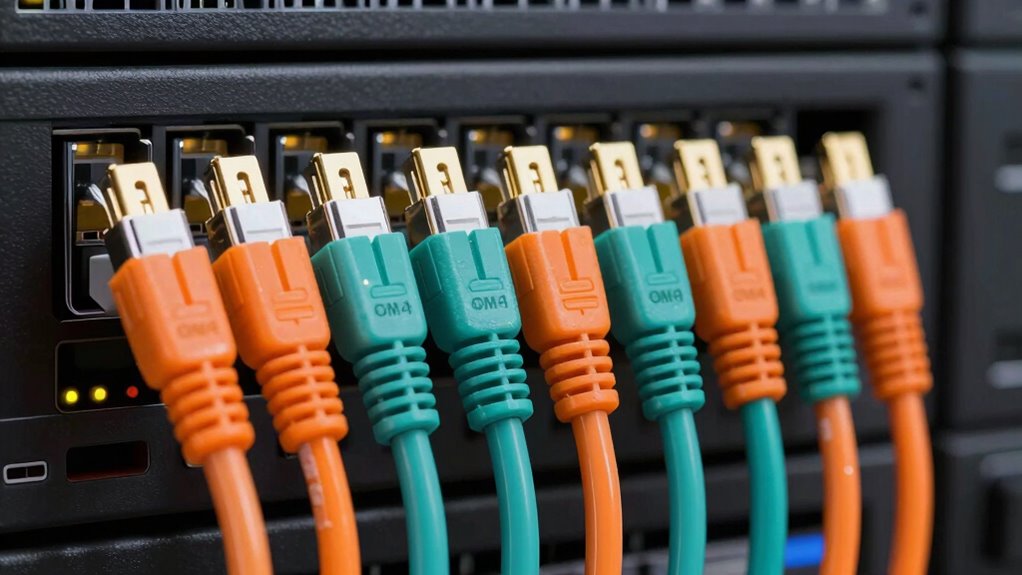

For a versatile indoor 10Gb or 40Gb link, my best overall pick is the Cable Matters 40/100Gb OM4 LC to LC Plenum Cable, which pairs an OM4 designation with stated support for higher-speed links and a plenum jacket. The 50ft Armored OM4 stands out for longer, more exposed indoor routes, while the OM4 4 Pack suits buyers who need several short LC-to-LC jumpers. The main tradeoffs are connector type, cable length, jacket and armor needs, and whether the stated fiber category matches the equipment and link design. One listing is OM3 rather than OM4, so I would not treat every cable in this roundup as interchangeable. Read on for the full breakdown and guidance on matching a patch cable to your actual installation.

Get business pricing on networking and server gear
- Business-only prices and quantity discounts
- Tax-exempt purchasing
- Multiple users, one account, clear invoices
Key Takeaways
- Cable Matters is the clearest speed-focused indoor pick: its listing specifies OM4 and 40/100Gb support, while the other indoor listings vary in how clearly they state application speeds.
- Armor serves different installation needs: the 50ft armored cable favors a longer indoor route, the 15ft version a shorter protected link, and the ERSTICKT outdoor model is specified for harsher routes and direct burial.
- Connector compatibility can outweigh cable category: the 8ternityFiber LC-to-SC option fits a different port pairing from the LC-to-LC majority.
- The 4 Pack favors multi-link convenience, not custom lengths: it can suit several short connections, while a single cable is easier to match to one exact route.
- Check the OM designation carefully: FLYPROFiber is listed as OM3 despite its 10Gb/40Gb wording, so buyers seeking OM4 should verify the specification before choosing it.


| om4 fiber patch cables for 10gb and 40gb | Fiber type | Length | Connectors | Core diameter |
|---|---|---|---|---|
| 50ft Armored OM4 LC to LC Fibe | OM4 multimode | 15 meters / 50 feet | LC UPC to LC UPC | 50/125 μm |
| 8ternityFiber OM4 LC to SC Mul | — | 3 meters / 10 feet | LC to SC | 50/125 μm |
| OM4 Multimode LC to LC Fiber P | OM4 multimode | — | LC to LC | — |
| FLYPROFiber LC to LC Fiber Pat | OM3 multimode | 0.2 meters / 7 inches | LC-to-LC duplex | — |
| Cable Matters 40/100Gb OM4 LC | OM4 multimode | 23 feet / 7 meters | LC to LC | — |
| FCD LC-LC OM4 Fiber Patch Cabl | OM4 multimode | 1 meter | — | 50/125µm |
| ERSTICKT 10M/33FT Outdoor Armo | OM3/OM4 multimode | 10 meters (33 feet) | — | 50/125μm |
| 15ft/5m Armored OM4 LC to LC F | OM4 multimode | 5 meters (15 feet) | — | 50/125μm |
More Details on Our Top Picks
50ft Armored OM4 LC to LC Fiber Patch Cable Multimode Duplex, LSZH Black
For a longer OM4 link that may face physical hazards, this 50-foot cable’s stainless steel armor is its defining advantage. It is specified for indoor and outdoor use, and its pre-terminated LC connectors simplify installation compared with building a link from loose fiber components. The listing specifies 10 Gbps, so I would choose it for a protected 10G connection rather than assume it supports 40G just because it is OM4. Compared with the 15-foot armored OM4 LC-to-LC cable elsewhere in this roundup, this one covers a longer span; compared with the Cable Matters plenum cable, it prioritizes physical protection over plenum-rated routing. The tradeoff is added bulk and reduced flexibility, and the listing gives no 40G distance specification.
Pros:- Stainless steel armor adds protection against crushing and rodents.
- 15-meter length suits runs longer than the short patch leads in this roundup.
- Pre-terminated LC-to-LC connectors simplify installation.
- Specified for both indoor and outdoor use.
Cons:- The product data specifies 10 Gbps, not a 40G operating distance.
- Armor makes the cable bulkier and less flexible than unarmored patch cables.
- The listing cautions that connectors need careful handling.
Best for: Network installers running a 10G OM4 link through areas where crushing or rodent damage is a concern and who need a 50-foot cable.
Not ideal for: Buyers building a verified 40G link, routing through tight bends, or needing a cable specifically rated for plenum spaces.
- Fiber type:OM4 multimode
- Connectors:LC UPC to LC UPC
- Length:15 meters / 50 feet
- Core diameter:50/125 μm
- Specified data rate:Up to 10 Gbps
- Outer material:Stainless steel armor
- Stated usage:Indoor and outdoor
- Bend radius:7.5 mm
Our verdict“Choose this for a physically exposed 10G OM4 run where armor and 15 meters matter more than flexibility or documented 40G support.”
8ternityFiber OM4 LC to SC Multimode Fiber Patch Cable 3M / 10FT
The 8ternityFiber fills a specific role: connecting equipment with LC on one end and SC on the other. That mixed-connector setup can save an adapter or a separate conversion point when the devices already have those ports. Its 3-meter length and ≤0.3 dB insertion loss suit short patching, while the LSZH jacket is a practical choice for indoor network spaces. Unlike the four-cable LC-to-LC OM4 pack, this is not a match for a run that needs LC connectors at both ends; it trades pack quantity for connector flexibility. The listing provides no explicit 10G or 40G distance rating, so I would verify transceiver compatibility and link requirements rather than infer a supported rate from the OM4 label alone. Its single listed length also limits placement options.
Pros:- LC-to-SC connector combination fits mixed-port equipment.
- 3-meter length works for short equipment-room connections.
- Insertion loss is specified at ≤0.3 dB.
- LSZH jacket is suited to indoor installations where low-smoke materials are preferred.
Cons:- Only one length is listed, limiting fit for other rack layouts.
- No explicit 10G or 40G transmission-distance rating is provided.
- Requires compatible LC and SC ports or suitable optical equipment at each end.
Best for: IT technicians connecting an LC-equipped switch or server to SC-terminated multimode equipment over a short indoor run.
Not ideal for: Buyers who need LC-to-LC ends, multiple cables in one purchase, or a product listing with explicit 10G and 40G distance specifications.
- Fiber mode:OM4 multimode
- Connectors:LC to SC
- Length:3 meters / 10 feet
- Core diameter:50/125 μm
- Wavelength:850 nm to 1310 nm
- Insertion loss:≤0.3 dB
- Return loss:≥30 dB
- Jacket:LSZH
Our verdict“Pick this for a short OM4 patch between LC and SC equipment, but choose an LC-to-LC option if both devices use LC ports.”
OM4 Multimode LC to LC Fiber Patch Cable 10ft/3m, 4 Pack
This four-pack makes sense when a rack refresh or small data-center job needs several matching LC-to-LC OM4 duplex leads, rather than one specialty cable. Each cable is listed at 3 meters, with 400 meters at 10G and 350 meters at 40G as maximum transmission distances; those figures give this option clearer speed-and-distance guidance than the 8ternityFiber LC-to-SC cable. The LSZH jacket and stated ≤0.3 dB insertion loss fit indoor network use, but the pack is explicitly limited to indoor deployment. Compared with the single Cable Matters plenum cable, the key advantage is having four leads; the Cable Matters listing, by contrast, identifies plenum suitability. Buyers should also match the links to compatible transceivers, since a cable alone cannot establish a 40G connection.
Pros:- Four LC-to-LC cables support several connections from one pack.
- Lists maximum distances of 400 meters at 10G and 350 meters at 40G.
- LSZH jacket is suited to indoor network installations.
- Insertion loss is specified at ≤0.3 dB.
Cons:- Indoor-use limitation rules it out for outdoor runs.
- Multiple cables may be unnecessary for a single-link job.
- Requires transceivers compatible with the intended Ethernet speed.
Best for: Data-center and enterprise network teams provisioning several short LC-to-LC OM4 links and wanting stated 10G and 40G distance figures.
Not ideal for: Anyone needing only one cable, outdoor routing, or a plenum-rated cable for air-handling spaces.
- Fiber type:OM4 multimode
- Connectors:LC to LC
- Length per cable:10 feet / 3 meters
- Pack size:4 cables
- Maximum distance at 10G:400 meters
- Maximum distance at 40G:350 meters
- Jacket:LSZH
- Insertion loss:≤0.3 dB
Our verdict“Choose this four-pack for multiple indoor LC-to-LC links when its stated 10G and 40G reach fits your transceivers and route.”
FLYPROFiber LC to LC Fiber Patch Cable OM3 0.2M, 10GB/40GB Multimode Duplex, LSZH, 0.2 Meter (7 inch)
At just 0.2 meters, this FLYPROFiber cable is for closing the gap between nearby ports, not crossing a room or rack. Its short reach can help keep dense equipment layouts tidy, and the duplex LC ends fit compatible multimode ports. One qualification matters for this OM4-focused roundup: the product is specified as OM3, not OM4. It lists support for 10Gb/40Gb Ethernet and a maximum 10G distance of 300 meters, but that 10G reach is not a 40G distance rating. Compared with the 3-meter four-pack, it is far more suited to adjacent equipment and provides no spare cables; compared with OM4 options, it does not offer the OM4 fiber grade sought by this guide. Its LSZH jacket is useful indoors, but the fixed short length sharply limits placement.
Pros:- Very short length helps limit slack between nearby ports.
- Duplex LC-to-LC connectors fit compatible multimode equipment.
- LSZH jacket is intended for indoor use.
- Product data states ≤0.3 dB insertion loss.
Cons:- It is OM3 rather than OM4, so it does not meet an OM4-specific requirement.
- A 0.2-meter lead will not suit most rack-to-rack or longer patch routes.
- The listing gives a 10G maximum distance but no 40G distance figure.
Best for: Data-center technicians patching adjacent LC multimode ports in a high-density layout where a very short lead reduces cable clutter.
Not ideal for: Buyers specifically requiring OM4 fiber, a run longer than 0.2 meters, or documented 40G reach for a chosen distance.
- Fiber type:OM3 multimode
- Connectors:LC-to-LC duplex
- Length:0.2 meters / 7 inches
- Bandwidth:2000 MHz·km
- Maximum distance at 10G:300 meters
- Jacket:LSZH
- Insertion loss:≤0.3 dB
- Return loss:≥30 dB
Our verdict“Use this only for an ultra-short OM3 connection between nearby ports; choose an actual OM4 cable for an OM4 10G or 40G build.”
Cable Matters 40/100Gb OM4 LC to LC Plenum Fiber Optic Cable, 23ft / 7m
The Cable Matters lead stands out when the route, not just the link speed, sets the buying decision: it is described as plenum-rated and intended for dense data-center or SAN routing. Its bend-insensitive design is useful where cable paths are crowded, while the 7-meter LC-to-LC OM4 duplex format suits connections between nearby switches, servers, or storage arrays. Compared with the four-pack, this is a single cable with a plenum rating called out in the listing; the four-pack instead supplies more leads and gives explicit 10G and 40G maximum distances. Cable Matters lists 40G and 100G applications, but its data also states 10 Gbps and does not specify transmission distance at those higher rates. I would check the transceiver and pathway requirements before relying on it for a particular 40G run.
Pros:- Plenum-rated construction is suited to specified air-handling spaces.
- Bend-insensitive design helps with dense cable routing.
- LC-to-LC OM4 duplex format supports compatible multimode equipment.
- Dust caps and identification labels aid handling and cable management.
Cons:- Indoor-only use excludes outdoor and exposed exterior routes.
- Sold as one cable, unlike the four-cable LC-to-LC pack.
- The listing does not state a maximum 40G transmission distance.
Best for: Data-center or SAN installers who need one 7-meter LC-to-LC OM4 cable for a plenum space or dense indoor route.
Not ideal for: Buyers who need outdoor capability, multiple cables, or clearly specified 40G distance limits for their link design.
- Fiber type:OM4 multimode
- Connectors:LC to LC
- Length:23 feet / 7 meters
- Fiber diameter:50/125 μm
- Stated data transfer rate:10 Gbps
- Standards:TIA/EIA A-to-B, UL 910
- Color:Yellow
Our verdict“Choose this single cable for a plenum-space OM4 route, but verify the transceiver pair and required 40G reach before installation.”
FCD LC-LC OM4 Fiber Patch Cable – 10Gb Duplex 1M
For a short connection between nearby switches, servers, or patch panels, this 1-meter LC-LC OM4 cable keeps slack and routing clutter to a minimum. Its 50/125µm multimode fiber is specified for 10Gb Ethernet, making it a straightforward fit for compatible OM4 equipment. Compared with the 5-meter armored OM4 cable in this roundup, the FCD is thinner at 2mm and better suited to tidy indoor runs, but it gives up that model’s added physical protection. The zip-cord reinforced construction and lifetime warranty are useful for professional installations, though neither changes its indoor-only use or fixed length. Choose it when the endpoints are close and 10Gb is the target; skip it for outdoor routes or links where you need a cable specifically rated for 40Gb operation.
Pros:- OM4 50/125µm multimode fiber specified for 10Gb Ethernet
- 1-meter length helps keep short equipment connections neat
- 2mm outer diameter and zip-cord reinforced construction
- Lifetime warranty
Cons:- Indoor use only, without the armor offered by the 5-meter armored OM4 option
- Fixed 1-meter length may not reach equipment spaced farther apart
- The supplied description supports 10Gb use but does not specify 40Gb capability
Best for: IT staff connecting nearby LC-equipped switches, servers, or patch panels over a short indoor 10Gb link.
Not ideal for: Buyers needing an outdoor or armored run, more than 1 meter of reach, or a cable specified for 40Gb links.
- Connector type:LC-LC
- Fiber type:OM4 multimode
- Core diameter:50/125µm
- Length:1 meter
- Outer diameter:2mm
- Color:Aqua
- Warranty:Lifetime
Our verdict“Choose this FCD cable for a short, indoor LC-to-LC 10Gb connection where a compact run matters more than outdoor protection or extra reach.”
ERSTICKT 10M/33FT Outdoor Armored Fiber Patch Cable, LC to LC OM3/OM4 Duplex 50/125μm, 10Gbps/40Gbps/100Gbps, Industrial TPU Jacket, Direct Burial, Uniboot, MMF
This is the lineup’s rugged choice for a route that leaves the equipment room: its TPU jacket, stainless steel spiral armor, and fiberglass yarns are designed for outdoor and industrial conditions. The 10-meter length offers more reach than the FCD’s 1-meter indoor cable, while the stated OM4 distances include 400m at 10Gbps and 150m at 40Gbps. Those figures describe the fiber’s listed transmission limits, not a guarantee for every transceiver or network design, so check your equipment requirements. The uniboot connector can simplify cable management, but the 5mm diameter makes this a stiffer, bulkier option than a standard patch lead. Pick it for exposure and physical hazards; for a protected indoor rack connection, the thinner FCD or 5-meter armored OM4 cable may be easier to route.
Pros:- TPU jacket and stainless steel spiral armor with fiberglass yarns
- 10-meter length suits routes beyond the FCD cable’s 1-meter reach
- Lists OM4 distances of 400m at 10Gbps and 150m at 40Gbps
- Uniboot design can reduce connector-side cable clutter
Cons:- 5mm diameter is less flexible and bulkier than the FCD’s 2mm cable
- Armor and outdoor construction may be unnecessary for protected indoor runs
- Installation needs care to avoid damage despite the rugged exterior
Best for: Network installers running a 10-meter LC-to-LC link through outdoor, industrial, or otherwise physically exposed areas, with compatible multimode equipment.
Not ideal for: Rack builders seeking a thin, flexible indoor patch lead, or buyers who do not need armor and its added bulk.
- Length:10 meters (33 feet)
- Fiber type:OM3/OM4 multimode
- Core diameter:50/125μm
- Connector type:LC to LC, uniboot
- Outer diameter:5mm
- Jacket material:Industrial TPU
- Armor:Stainless steel spiral armor and fiberglass yarns
- Temperature range:-40°C to +80°C
- Crush resistance:Up to 3000N
Our verdict“Choose the ERSTICKT when an OM4 link needs 10 meters of reach and protection for outdoor or industrial routing, not for a slim indoor patch connection.”
15ft/5m Armored OM4 LC to LC Fiber Patch Cable Multimode Duplex, LSZH Black
The 5-meter length makes this a useful middle ground: it reaches farther than the FCD’s 1-meter lead without taking on the ERSTICKT’s 10-meter length and heavier outdoor-focused build. Its stainless steel armor is intended to resist crushing and rodents, while the listed 7.5mm bend radius helps when routing around tight spaces. The cable is specified for 10Gbps, so it fits buyers choosing an OM4 patch cable for a 10Gb link; unlike the ERSTICKT, the provided data does not list 40Gb transmission distances. LC UPC connectors come pre-terminated for direct setup, but confirm connector polish and transceiver compatibility before ordering. This is a sensible choice for protected indoor or outdoor routes needing extra physical protection, though its fixed length and armored construction are less convenient for a simple short rack jumper.
Pros:- Stainless steel armor offers crush and rodent protection
- 5-meter reach sits between the FCD’s 1-meter and ERSTICKT’s 10-meter options
- Listed 7.5mm bend radius suits tighter routing
- Pre-terminated LC UPC connectors simplify connection
Cons:- Fixed 5-meter length may not fit very short or longer routes
- Product data specifies 10Gbps but does not provide 40Gb performance details
- Armored construction can be bulkier than a standard indoor patch cable
Best for: Installers who need a 5-meter LC-to-LC OM4 link with crush and rodent protection for an indoor or outdoor route.
Not ideal for: Buyers building very short rack connections, seeking a lightweight flexible lead, or requiring listed 40Gb capability.
- Connector type:LC UPC to LC UPC
- Fiber type:OM4 multimode
- Core diameter:50/125μm
- Length:5 meters (15 feet)
- Color:Black
- Outer material:Stainless steel
- Bend radius:7.5mm
- Data transfer rate:10 gigabits per second
Our verdict“Pick this cable for a protected 5-meter OM4 run at 10Gbps when armor matters more than minimal size or a stated 40Gb rating.”

How We Picked
I ranked these cables by how clearly their listed specifications fit a 10Gb or 40Gb multimode link, then weighed practical installation factors: connector ends, length, jacket, armor, and stated indoor or outdoor use. A product with a clear OM4 designation and explicit 40Gb or higher application claims earned an advantage over listings that offer less detail or specify a different fiber grade.
The ranking also reflects fit rather than treating every cable as a universal upgrade. Connector mismatch, excess length, an unsuitable jacket, or choosing an indoor cable for an outdoor route can matter more than a headline speed claim. The Cable Matters option leads for its explicit OM4 and 40/100Gb positioning; the armored and multi-pack options follow for narrower use cases. The OM3-listed FLYPROFiber option ranks lower for this OM4-focused roundup, even though its listing mentions 10Gb and 40Gb.
| om4 fiber patch cables for 10gb and 40gb | Fiber type | Connectors |
|---|---|---|
| 50ft Armored OM4 LC to LC Fibe | OM4 multimode | LC UPC to LC UPC |
| 8ternityFiber OM4 LC to SC Mul | — | LC to SC |
| OM4 Multimode LC to LC Fiber P | OM4 multimode | LC to LC |
| FLYPROFiber LC to LC Fiber Pat | OM3 multimode | LC-to-LC duplex |
| Cable Matters 40/100Gb OM4 LC | OM4 multimode | LC to LC |
| FCD LC-LC OM4 Fiber Patch Cabl | OM4 multimode | — |
| ERSTICKT 10M/33FT Outdoor Armo | OM3/OM4 multimode | — |
| 15ft/5m Armored OM4 LC to LC F | OM4 multimode | — |
Factors to Consider When Choosing Om4 Fiber Patch Cables For 10gb And 40gb
I would match the cable to the link at both ends before choosing by length or packaging. These broader checks can prevent a cable that appears suitable on paper from becoming the wrong fit for a switch, transceiver, or route.
Confirm the Transceiver and Connector Pairing
LC and SC describe connector formats, not fiber performance, so first check the ports on the optics or equipment at each end. An LC-to-LC cable will not directly fit an SC port without a suitable adapter or different cable, and adding adapters can create extra connection points. Confirm whether the link needs duplex fiber and how transmit and receive paths are arranged; a duplex cable carries both directions on separate fibers. Also check connector polish and compatibility with the transceivers rather than relying on the connector names alone. This is a frequent source of avoidable returns because buyers focus on OM4 and overlook the physical interface.
Match OM Grade and Link Design to the Speed
OM4 is a multimode fiber grade commonly used for high-speed short-reach links, but the cable label alone does not guarantee a link will run at 10Gb or 40Gb. The transceivers, link length, network standard, and installation quality all matter. Forty-gigabit optics may use multiple fiber pairs or a specific connector arrangement, so check the optical module documentation before assuming a standard duplex patch lead supports the whole connection. Treat marketing speed claims as a starting point and confirm the exact application with the equipment maker. If a listing says OM3, as one cable here does, do not assume it meets an OM4 procurement requirement just because it also mentions 40Gb.
Choose Length for the Route, Not Just the Endpoints
Measure the path the cable will actually follow, including bends, slack for servicing, and the route through cable management. A cable that is too short can put strain on connectors; an unnecessarily long one can clutter a rack and complicate airflow and tracing. Avoid tightly coiling unused fiber or bending it more sharply than the cable specification allows, since tight bends can impair signal performance or damage the cable. For a rack connection, a very short jumper may keep the installation tidy, while a room-to-room path needs enough length to follow a protected route. I would leave workable service slack without buying a much longer cable simply as a substitute for planning.
Select Jacket and Armor for the Installation Environment
Jacket ratings and armor address installation conditions; they do not raise the data rate. LSZH and plenum are different cable properties, so check local code and the space where the cable will run rather than treating either label as a general quality grade. Armor can add physical protection on exposed routes but may make a cable bulkier or less flexible than a basic patch lead. Outdoor and direct-burial use calls for a cable specifically rated for those conditions, not merely an armored indoor model. Before paying for extra protection, identify the actual hazards and confirm that the cable is approved for the route.
Decide Whether a Single Cable or Pack Fits Better
A multi-pack can simplify outfitting several ports and keep spare jumpers on hand, but it is useful only if the included count, length, and connector type match the jobs. Buying several cables at once can leave you with extras if your layout changes or if each connection needs a different length. A single cable is easier to tailor to one route and can be the better choice for a specific equipment link. Compare the total cable count against your planned connections, including spare ports and likely replacements. Avoid choosing a pack solely for convenience if it forces an awkward length across every connection.
Check Installation and Compatibility Details Before Ordering
Product listings can differ in how clearly they specify fiber grade, supported applications, jacket rating, and connector details. If a required detail is missing, verify it with the seller or manufacturer rather than filling the gap with assumptions from a title. For a critical link, confirm the transceiver’s supported fiber type, wavelength, reach, and connector arrangement with the network documentation. Keep protective dust caps on until installation and clean connectors with fiber-appropriate tools if contamination is suspected. Careful handling matters because even a suitable cable can perform poorly when its end faces are dirty or damaged.
Frequently Asked Questions
Can I use an OM4 patch cable for both 10Gb and 40Gb?
Often, but the cable is only one part of the link. The transceivers, network standard, link length, fiber count, and connector arrangement must also support the intended speed. Some 40Gb setups use parallel optical lanes rather than a conventional duplex LC connection, so check the optic’s requirements before ordering. The Cable Matters listing explicitly names 40/100Gb use, but that claim does not replace compatibility checks for your hardware. Confirm the full link design at both ends if speed is mission-critical.
Is an LC-to-LC cable suitable if one device has an SC port?
Not as a direct connection: the connector at each end must match the equipment or an approved adapter must be used. The 8ternityFiber cable is LC-to-SC, which can suit a link with one port of each type, while most other options here are LC-to-LC. Check the transceiver or panel interface, not just the chassis port, since optics often determine the connector needed. Adapters add another connection point and may create fit or signal concerns. When possible, choose the cable with the correct ends for a direct connection.
Does an armored cable make a better choice for every 10Gb or 40Gb link?
No. Armor is mainly a physical-protection feature, not a speed upgrade, and it can add bulk or reduce flexibility compared with an ordinary patch cable. It can make sense on exposed routes or where a cable may face mechanical wear, while a protected rack connection may not need it. Also distinguish an armored indoor cable from a product specifically listed for outdoor or direct-burial use. Choose protection based on the route and applicable installation rules, not simply because the cable carries a higher-speed label.
Should I choose the FLYPROFiber cable if its listing mentions 40Gb?
Its listing identifies the cable as OM3, even though it also mentions 10Gb and 40Gb. If your requirement specifically calls for OM4, I would choose a listing that clearly states OM4 or confirm the fiber grade with the seller before purchasing. A speed phrase in a product title does not establish that every setup will meet its reach or performance needs. Check the transceiver specifications and link distance as well. It may suit a buyer who needs its very short length and accepts OM3, but it is not the clearest match for an OM4-only requirement.
When is a four-pack a better choice than buying individual patch cables?
A pack can be a practical fit when several connections use the same connector type and length, such as multiple nearby LC-to-LC links. It also provides a spare for a matching connection without requiring another order. Individual cables make more sense when routes vary, when you need a different connector pairing, or when only one link is being installed. Before choosing a pack, verify how many cables it includes and whether its listed length suits every planned route. A spare is less useful if it cannot reach the equipment where it may be needed.
Conclusion
For most indoor buyers who want a clearly specified high-speed OM4 option, I would start with the Cable Matters 40/100Gb Plenum Cable as the best overall pick. The OM4 4 Pack is my value-oriented choice when several matching short LC-to-LC links are needed, while the 50ft Armored OM4 is the better premium-style fit for a longer indoor route needing extra physical protection. Beginners should prioritize direct connector compatibility and a length that fits the route; the 3m 8ternityFiber LC-to-SC is a straightforward choice only when those two connector types match their equipment. For outdoor or direct-burial routes, look to the ERSTICKT outdoor armored cable and verify its fit with the installation plan. I would skip the OM3-listed FLYPROFiber cable when OM4 is a firm requirement, despite its speed wording.
Halloween Picks
halloween
As an affiliate, we earn on qualifying purchases.