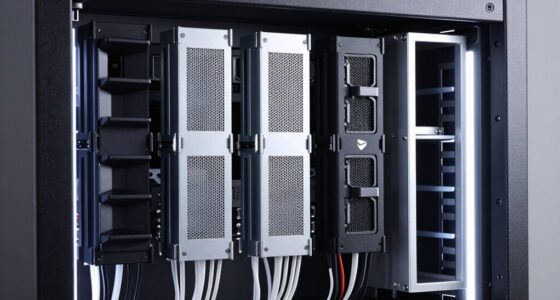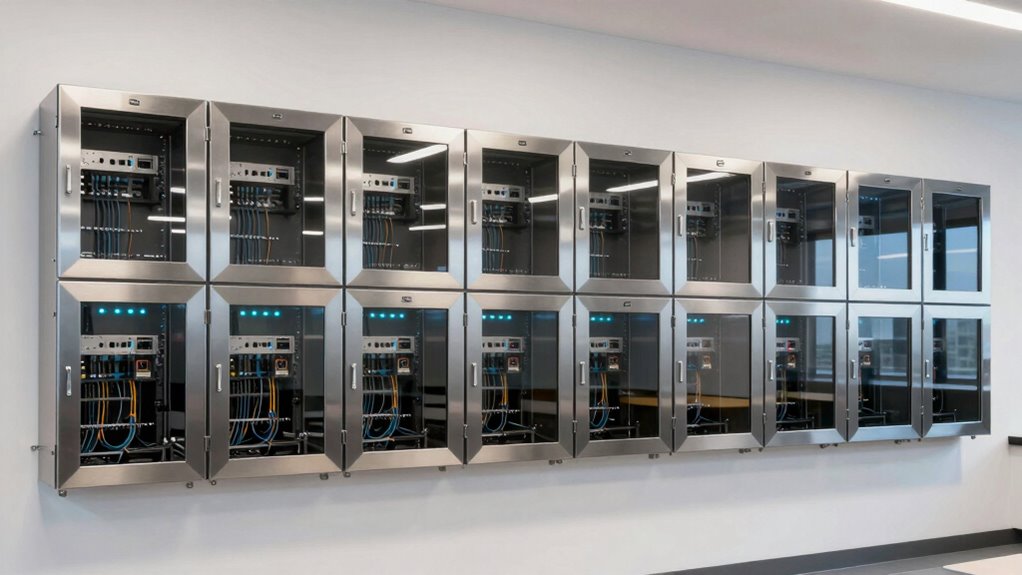

When selecting wall mount enclosures for school networks, durability, security, and ease of access are key. The VEVOR 6U Wall Mount Network Server Cabinet stands out as the overall best for its robust build and high load capacity. For those prioritizing visibility and monitoring, the NavePoint 12U Wall Mount Network Cabinet offers a glass door with excellent cooling options. Meanwhile, the Aeons 12U Signature Double Section Wall Mount Cabinet is ideal for larger setups needing double sections. The main tradeoffs in this category involve balancing size, security features, ventilation, and budget. Continue reading for a detailed breakdown of each option and how they compare.

Get business pricing on networking and server gear
- Business-only prices and quantity discounts
- Tax-exempt purchasing
- Multiple users, one account, clear invoices
Key Takeaways
- Larger enclosures (12U) provide more space but tend to cost more and require more wall space.
- Glass doors enhance visibility but can compromise security without proper locks or reinforcement.
- Cooling features like fans are critical for high-density networks, especially in school environments.
- Ease of access, such as swing-out doors or removable panels, simplifies maintenance but may add cost or complexity.
- Price varies significantly, with premium models offering advanced security and cooling, while budget options focus on basic containment.



| wall mount enclosures for school network | Material |
|---|---|
| VEVOR 6U Wall Mount Network Se | Welded steel |
| 4U Wall Mount Server Rack Cabi | Cold-rolled iron and glass |
| Aeons 12U Signature Double Sec | — |
| NavePoint 9U Wall Mount Server | Cold-rolled steel |
| 6U Wall Mount Network Server C | SPCC cold-rolled steel |
| Navepoint 9U Deluxe IT Wallmou | Welded steel |
| NavePoint 12U Wall Mount Netwo | Cold rolled steel |
| AEONS 9U Swing-Out Wall Mount | SPCC cold-rolled steel |
| 4U Wall Mount Server Cabinet | Cold-rolled steel |
More Details on Our Top Picks
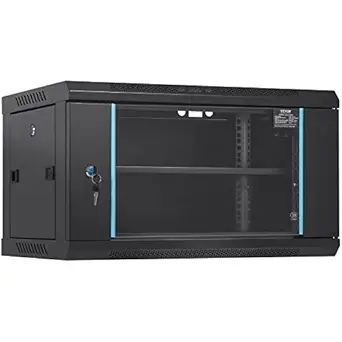
VEVOR 6U Wall Mount Network Server Cabinet, 14.8” Deep, Locking Glass Door, Side Panels, 200 lbs Max Load
This model stands out for its compact, wall-mounted design that efficiently saves space while accommodating essential network equipment. Compared with larger options like the Aeons 12U cabinet, the VEVOR 6U offers a lighter footprint, making it ideal for restricted areas. Its robust welded steel construction and locking glass door provide a good balance of security and durability, though its 6U capacity limits the size and number of devices you can install. The adjustable rails and vents for heat dissipation support stable operation, but the heavy weight (200 lbs) may require reinforced wall support, and the lack of included mounting hardware could add to setup time.
Pros:- Space-saving wall mount design maximizes limited areas
- Good heat dissipation with vents and heat sink holes
- Secure locking glass door for equipment safety
- Adjustable mounting rails for flexible installation
Cons:- Limited to 6U capacity, restricting larger setups
- Heavy weight (200 lbs) may require sturdy wall support
- No included mounting hardware
Best for: IT managers in small classrooms or limited-space areas needing secure, space-efficient enclosures.
Not ideal for: Schools with expanding networks or larger equipment needs, as its 6U capacity is restrictive.
- Depth:14.8 inches
- Max Load Capacity:200 lbs
- Number of U:6U
- Material:Welded steel
- Security:Locking glass door
Our verdict“This cabinet is ideal for schools with tight spaces that need secure, compact network housing for small setups.”
4U Wall Mount Server Rack Cabinet Enclosure with Glass Locking Door, 23.62″x17.72″x9.45″
This 4U enclosure excels in environments where visibility and security are priorities, thanks to its clear glass door that allows quick equipment checks without opening. Compared to the Navepoint 12U cabinet, this unit is smaller and more suited for lighter setups or offices needing quick access. Its sturdy iron frame and lockable door provide security, but the moderate customer rating (3.8/5) suggests some users may find its features or build quality lacking. The limited ventilation details raise concerns about heat management in high-density setups, and its weight might challenge wall mounting stability. Still, its cable management features and secure lock make it a practical choice for monitoring sensitive equipment.
Pros:- Sturdy construction with high-quality materials
- Secure locking door enhances data and equipment safety
- Clear glass door allows easy equipment monitoring
- Designed for efficient cable management
Cons:- Moderate customer rating indicates potential quality issues
- Limited ventilation features could cause overheating
- Potentially heavy for wall mounting
Best for: School offices or small labs requiring secure, visible network equipment with easy access.
Not ideal for: Heavy or high-density network environments where cooling and larger capacity are needed.
- Dimensions:23.62″ x 17.72″ x 9.45″
- Material:Cold-rolled iron and glass
- Load Capacity:110 lbs
- Locking Door:Yes
Our verdict“Best suited for secure, accessible setups in small school offices or labs where visibility matters.”
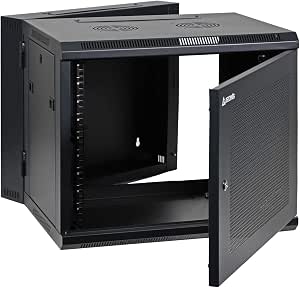
Aeons 12U Signature Double Section Wall Mount Network Cabinet Enclosure
This 12U cabinet offers a substantial capacity with a double-section swing-out design, which sets it apart from smaller enclosures like the NavePoint 9U. Its sturdy welded frame supports extensive equipment, and the swing-out feature simplifies access to both front and rear sides, ideal for complex network setups. The lockable glass door adds security, but the absence of ventilation features might lead to cooling challenges in high-heat environments. Although its 12U capacity suits larger networks, the weight and size could limit wall support options, and the limited color choices may not suit all aesthetics. Still, its flexibility in access makes it a strong choice for expanding or evolving network systems.
Pros:- Durable welded frame construction for longevity
- Swing-out double-section design for front and rear access
- Includes lockable glass door for security
- Adjustable mounting rails and removable side panels for flexibility
Cons:- No mention of ventilation or cooling features
- Heavy and large, requiring strong wall support
- Limited color options
Best for: IT teams managing growing network infrastructures with multiple devices needing frequent access.
Not ideal for: Schools with very limited space or minimal equipment, as its size may be excessive.
- Dimensions:25″ H x 23.5″ W x 23.5″ D
- Load Capacity:200 lbs
- Fits Equipment Depth:up to 22″
- Color:Black
Our verdict“This cabinet is best for schools with evolving networks that need flexible, easy-to-access enclosures for multiple devices.”
NavePoint 9U Wall Mount Server Cabinet Enclosure with 2 Fans, Locking Glass Door, Removable Side Panels
This 9U enclosure combines security with active cooling, making it a solid choice for moderate-density environments. Its built-in fans help manage heat better than options like the Aeons 12U, which lack ventilation. The durable steel construction with a protective coating ensures longevity, and the lockable tempered glass door enhances security. The removable side panels facilitate easy customization, but assembly is required upon delivery, and its wall-mounting limits mobility. The depth of 17.7 inches might not accommodate larger equipment, which could be a drawback for schools with bigger devices. Overall, this model balances cooling, security, and accessibility for mid-sized setups.
Pros:- Durable steel construction with protective coating
- Includes two built-in fans for effective ventilation
- Lockable tempered glass door for security
- Removable side panels for customization
Cons:- Requires assembly upon delivery
- Wall mounting limits mobility
- Depth may be insufficient for larger equipment
Best for: Schools needing secure, ventilated enclosures for moderate-sized network or AV equipment.
Not ideal for: High-density setups requiring extensive cooling or larger equipment capacity, due to its limited depth and ventilation.
- U Size:9U
- Depth:17.7 inches
- Width:19 inches
- Supports:up to 130 lbs
- Material:Cold-rolled steel
Our verdict“Ideal for schools seeking a secure, ventilated enclosure for medium-sized network or multimedia equipment.”
6U Wall Mount Network Server Cabinet Enclosure with Removable Side Panels, 14.5-inch Depth
This 6U enclosure emphasizes durability and security in a compact size, suitable for tight spaces with moderate equipment needs. Its cold-rolled steel and powder coating resist scratches and rust, making it suitable for long-term use. The removable, lockable side panels facilitate easy maintenance and security, while the ventilation holes support airflow in limited spaces. Compared with larger cabinets like the Aeons 12U, this model focuses on essential features without excess capacity, making it ideal for smaller network setups. However, its 6U capacity may be limiting for future expansion, and wall mounting requires adequate wall strength. It does not specify locking mechanisms in detail, which could be a concern for sensitive equipment.
Pros:- Durable construction with rust and scratch resistance
- Removable and lockable side panels for easy access and security
- Good ventilation through mesh panels for airflow
- Adjustable rails for versatile equipment installation
Cons:- Limited to 6U size, restricting larger setups
- Wall mounting may need strong wall support
- Lack of detailed locking mechanism information
Best for: Schools with small, fixed network setups needing secure, space-efficient enclosures.
Not ideal for: Growing networks or larger equipment, as capacity and depth are limited.
- Size:6U
- Depth:14.5 inches
- Material:SPCC cold-rolled steel
- Finish:Black powder coat
- Features:Removable side panels, lockable doors, adjustable rails
Our verdict“This cabinet suits schools with small, secure network needs in tight spaces, with limited future expansion potential.”
Navepoint 9U Deluxe IT Wallmount Cabinet Enclosure, 19-Inch Server Network Rack, Black
This 9U wallmount cabinet stands out for its combination of security and durability, making it ideal for schools needing a robust enclosure for critical network gear. Compared to the NavePoint 12U model, it offers a smaller, more manageable size but sacrifices some expandability. Its welded steel frame and locking glass door ensure equipment safety, though its weight—over 50 pounds—may complicate installation. The adjustable rails provide flexibility for standard 19-inch rack equipment, but the limited depth might restrict larger devices. This pick makes the most sense for schools prioritizing security and sturdy construction in a space-efficient form.
Pros:- Secure locking glass door enhances safety and access control
- Sturdy welded steel construction provides durability
- Adjustable rails support standard 19-inch rack setups
Cons:- Heavy weight may require multiple people to install safely
- Limited depth restricts larger or bulkier equipment
Best for: Schools seeking a secure, durable enclosure for standard network hardware with manageable size
Not ideal for: Large school networks with extensive equipment needs or requiring deep cabinets for larger devices
- Dimensions:19.5″H x 24″W x 24″D
- Weight Capacity:132 lbs
- Rack Size:19 inches
- Material:Welded steel
- Features:Locking glass door, adjustable rails
Our verdict“This cabinet is best for schools needing a secure, durable enclosure for standard-sized network gear, but less suited for expanding setups.”
NavePoint 12U Wall Mount Network Cabinet with Glass Door, Cooling Fans, Locks, and Removable Side Panels
This 12U model offers a larger capacity and added cooling with built-in fans, making it suitable for schools with more equipment or higher heat output. Unlike the 9U NavePoint cabinet, it provides more space, but its compact design may be tight for very large setups. Its durable cold-rolled steel ensures longevity, while the tempered glass lockable door secures valuable gear. The removable side panels improve accessibility and flexibility for maintenance, although the cabinet’s size may still limit some very bulky hardware. This makes sense for schools that need a balance of security, capacity, and active cooling.
Pros:- High-quality steel construction ensures durability
- Lockable tempered glass door increases security
- Built-in cooling fans prevent overheating
Cons:- Limited to 12U capacity, may not accommodate larger systems
- Design may be too tight for some larger hardware setups
- Lack of dedicated cable management features
Best for: Schools with moderate to high-density network setups requiring increased capacity and cooling
Not ideal for: Institutions with very limited space or equipment exceeding 12U capacity
- Capacity:12U
- Material:Cold rolled steel
- Front Door:Tempered glass with lock
- Depth:17.7 inches
- Supports:Up to 110 lbs
Our verdict“This cabinet suits schools needing increased capacity and active cooling, but might be restrictive for very large or bulky equipment.”
AEONS 9U Swing-Out Wall Mount Network Cabinet with Vented Door, 22″ Depth
This 9U cabinet emphasizes ease of maintenance with its swing-out rear door and generous 22-inch depth, ideal for tight spaces requiring frequent access. Compared to the Navepoint 9U, it offers more depth, making it suitable for slightly larger equipment or better cable management, though it lacks specific cable management features. Its durable steel construction and lockable vented door provide security and ventilation, while the swing-out design simplifies maintenance. However, its weight capacity of 200 lbs is high, but the absence of included cable management accessories limits its usability for complex setups. This model is tailored for environments where quick access outweighs other features.
Pros:- Swing-out rear door simplifies maintenance
- Deep 22-inch design accommodates larger equipment
- Lockable vented door ensures security and airflow
Cons:- No cable management accessories included, limiting organization
- Limited to 200 lbs capacity despite high weight support
Best for: Schools needing frequent equipment access and larger depth for cable routing in space-limited environments
Not ideal for: Settings with very heavy equipment or requiring integrated cable management systems
- Dimensions:22″ D x 23.5″ W x 20″ H
- Maximum Mounting Depth:20″
- Weight Capacity:200 lbs
- Material:SPCC cold-rolled steel
Our verdict“Ideal for schools prioritizing easy access and larger equipment clearance over integrated cable management features.”
4U Wall Mount Server Cabinet, 19-Inch IT Network Rack Enclosure with Locking Glass Door & 110 lbs Load Capacity
This 4U cabinet delivers essential security and a compact footprint, making it suitable for small spaces or specific equipment needs. Compared with larger models like NavePoint 12U or AEONS 9U, it offers less capacity but excels in tight environments. Its sturdy cold-rolled steel body and locking tempered glass door provide security, while passive ventilation and a removable side panel facilitate maintenance. The limited 110 lbs support and small size mean it’s best for small to medium-sized equipment, but it might fall short for high-performance hardware or larger setups. This is a practical pick for schools with limited space requiring secure, smaller enclosures.
Pros:- Compact, space-saving design fits small environments
- Secure locking glass door protects equipment
- Easy to install with complete hardware kit
Cons:- Limited to small to medium-sized hardware
- No adjustable rack height or advanced cable management
Best for: Small schools or classrooms with space constraints needing secure, smaller network enclosures
Not ideal for: Larger networks or schools with extensive equipment that exceeds 4U capacity
- Size:4U
- Material:Cold-rolled steel
- Load Capacity:110 lbs
- Door Type:Tempered glass with lock
- Ventilation:Passive airflow vents
Our verdict“This cabinet is perfect for limited spaces needing secure, small-scale network equipment storage, but not suitable for larger setups.”
How We Picked
The products were evaluated based on their build quality, capacity, security features, cooling options, ease of installation, and value for money. We prioritized models designed specifically for wall mounting in school network environments—focusing on durability, accessibility, and safety. The ranking reflects a balance between features and affordability, with top picks offering reliable performance in typical school settings. Products with flexible configurations or added features like fans and removable panels earned higher scores, as these improve long-term usability and maintenance.| wall mount enclosures for school network | Material |
|---|---|
| VEVOR 6U Wall Mount Network Se | Welded steel |
| 4U Wall Mount Server Rack Cabi | Cold-rolled iron and glass |
| Aeons 12U Signature Double Sec | — |
| NavePoint 9U Wall Mount Server | Cold-rolled steel |
| 6U Wall Mount Network Server C | SPCC cold-rolled steel |
| Navepoint 9U Deluxe IT Wallmou | Welded steel |
| NavePoint 12U Wall Mount Netwo | Cold rolled steel |
| AEONS 9U Swing-Out Wall Mount | SPCC cold-rolled steel |
| 4U Wall Mount Server Cabinet | Cold-rolled steel |
Factors to Consider When Choosing Wall Mount Enclosures For School Networks
Choosing the right wall mount enclosure for a school network involves understanding several key factors. Schools require enclosures that are not only secure but also easily accessible for maintenance and equipped with proper cooling to prevent overheating. Size matters: too small, and it limits future expansion; too large, and it may be unnecessary or harder to install. Security features like locks are vital, but so is ventilation—overheating can damage equipment and disrupt service. Consider your budget carefully, but remember that investing in quality often reduces long-term costs and headaches. Lastly, compatibility with existing infrastructure and ease of mounting should guide your decision to ensure a smooth installation process.Size and Capacity
Matching the enclosure size to your current and future network needs is essential. Larger units, like 12U enclosures, support more equipment and allow for future expansion but may be bulkier and more expensive. Smaller options, such as 4U or 6U, are suitable for limited setups or temporary installations. Evaluate your equipment’s dimensions and consider potential growth to avoid frequent upgrades. Remember, a slightly larger enclosure can make maintenance easier and accommodate additional accessories like cooling fans or mounting brackets.
Security Features
Schools must prioritize security to prevent unauthorized access to sensitive network equipment. Lockable doors—preferably with high-quality locks—are standard, but some enclosures also include locking side panels or reinforced glass. Think about whether you need tempered or reinforced glass for durability. For high-risk areas, models with tamper-proof locks or reinforced construction provide added peace of mind. Balancing security with accessibility is key; look for enclosures that allow easy maintenance without sacrificing safety.
Ventilation and Cooling
Overheating can damage network hardware and cause performance issues, especially in environments with high equipment density. Enclosures with built-in cooling fans or vented doors help maintain optimal temperatures. Some models, like the NavePoint 12U, include multiple fans and vented panels for enhanced airflow. For smaller setups, passive ventilation may suffice, but larger or densely populated enclosures benefit from active cooling. Consider your climate and equipment load; investing in good ventilation reduces downtime and equipment replacement costs over time.
Ease of Installation and Maintenance
Ease of access during installation and regular maintenance can save significant time and effort. Features like swing-out doors, removable side panels, or front-loading designs make servicing hardware more straightforward. Look for adjustable or modular components that allow flexible configurations. Installation complexity varies; some enclosures require wall reinforcement or specialized mounting hardware. Prioritize models that offer straightforward mounting instructions and maintenance access to minimize disruption during upgrades or troubleshooting.
Budget and Value
Budget constraints influence the range of options available, but it’s important to consider long-term value. Cheaper models may lack security features, cooling, or durability, leading to higher replacement or repair costs later. Conversely, investing in a higher-quality enclosure with robust security, cooling, and easy maintenance features can reduce ongoing expenses. Balance your immediate budget against future needs, and consider whether features like added cooling or security justify a higher upfront cost. Remember, a reliable enclosure safeguards your network equipment and minimizes downtime.
Frequently Asked Questions
Can I install a larger enclosure in a small classroom or hallway?
While larger enclosures offer more space for equipment and future expansion, they require sufficient wall space and proper mounting support. In small classrooms or hallways, it’s important to measure available wall area carefully. If space is limited, consider a compact 4U or 6U model with removable panels that can be expanded later. Proper installation also involves reinforcing the wall if necessary to support the weight of larger enclosures, especially when fully loaded. Balancing size with accessibility is key to ensuring maintenance remains manageable in tight spaces.
Are glass doors secure enough for school environments?
Glass doors can offer excellent visibility for monitoring equipment, but their security depends on the type and locking mechanism. Tempered or reinforced glass enhances durability, but it’s essential to pair the door with a high-quality lock to prevent tampering. For schools with higher security needs, consider enclosures with reinforced glass or additional security features like tamper-proof locks. If vandalism or unauthorized access is a concern, choosing models with solid doors or reinforced materials may provide better peace of mind while still allowing for easy inspection of equipment.
How important is cooling in school network enclosures?
Cooling is vital in environments with dense network equipment, especially in warmer climates or rooms without climate control. Overheating can cause hardware failures leading to costly repairs and network downtime. Enclosures with built-in fans or vented doors improve airflow and temperature regulation. For high-density setups, active cooling systems are recommended to ensure equipment runs reliably. Skipping proper cooling can result in overheating, reduced hardware lifespan, and increased maintenance costs, making this an essential factor to consider.
What security features should I look for in a school network enclosure?
Security features like lockable doors, tamper-proof locks, and reinforced materials are important to safeguard school network equipment. Locking mechanisms should be sturdy enough to resist tampering, and some models include keyed locks or electronic access. Reinforced doors or anti-tamper glass add extra protection against vandalism. Also, consider enclosures with vents or fans that are secured to prevent unauthorized access through cooling openings. Prioritizing security helps prevent theft, vandalism, and unauthorized access that could compromise your network.
Is it better to buy a ready-made enclosure or customize one?
Pre-made enclosures are designed for quick installation and typically meet standard security and cooling needs, making them ideal for most school settings. Custom enclosures can be tailored to specific space constraints, aesthetic preferences, or unique security requirements, but they often come with higher costs and longer lead times. For most schools, off-the-shelf options provide a good balance of features, quality, and affordability. Custom solutions are suitable when standard models do not fit particular architectural or operational constraints, but they should be selected carefully to ensure compatibility and security.
Conclusion
For schools seeking a reliable and versatile solution, the VEVOR 6U Wall Mount Network Server Cabinet offers a solid balance of size, security, and value, making it the best overall choice. Budget-conscious buyers or smaller setups will find the 4U Wall Mount Server Rack Cabinet sufficient for their needs. For those requiring maximum security and visibility, the NavePoint 12U with Glass Door excels. Schools with high-density equipment or future expansion plans should consider the Aeons 12U Double Section Cabinet or models with advanced cooling features. Ultimately, your selection should reflect your specific space, security, and maintenance priorities to ensure a stable, secure, and accessible network environment.
Fall Picks
fall essentials
As an affiliate, we earn on qualifying purchases.