
The best business VPN router in this roundup is the TP-Link Omada ER7412-M2, a strong fit for offices that want multi-gigabit routing and centralized network management. The TRENDnet TWG-431BR stands out for multi-WAN flexibility, while the TP-Link ER605 is a practical entry point for smaller wired networks. Choosing among business VPN routers means balancing VPN and WAN capacity against Wi-Fi needs, port count, management complexity, and room to grow. Read on for the full comparison and guidance on matching a router to your business network.

Get business pricing on networking and server gear
- Business-only prices and quantity discounts
- Tax-exempt purchasing
- Multiple users, one account, clear invoices
Key Takeaways
- Multi-gigabit wired routing separates the growth-focused picks. The TP-Link Omada ER7412-M2, TP-Link Omada ER707-M2, and Omada Fusion 2.5G are better suited to faster LAN and WAN links than the gigabit-focused ER605 and ER7206.
- Multi-WAN matters most when internet continuity is a business requirement. The TRENDnet TWG-431BR, Omada Fusion, ER7206, and ER7412-M2 give buyers more room to plan around multiple connections than a basic single-uplink setup.
- Router and Wi-Fi duties do not always belong in one box. The TP-Link ER706W and GL.iNet Flint models add wireless networking, while wired Omada and TRENDnet options make more sense when access points are managed separately.
- Port count can matter as much as throughput. Grandstream GWN7003’s 11 ports and dual PoE outputs suit equipment-heavy small networks, but its specialized role differs from the compact ER605.
- Wi-Fi 7 is a forward-looking feature, not a substitute for business routing needs. The GL.iNet Flint 3 and Flint 3e bring newer wireless capability, while multi-WAN support, centralized management, and wired capacity may matter more to offices with demanding VPN traffic.
| TP-Link Omada ER7412-M2 Multi-Gigabit VPN Router |  | Best for Multi-WAN and High-Capacity Offices | WAN/LAN ports: 2 × 2.5G RJ45; 10 × Gigabit (2 × SFP, 8 × RJ45) | WAN load balancing: Up to 11 WAN ports | VPN protocols: SSL, IPSec, GRE, WireGuard, PPTP, L2TP, OpenVPN | VIEW LATEST PRICE | See Our Full Breakdown |
| GL.iNet Flint 2 Wi-Fi 6 Gaming Router |  | Best for VPN-Friendly Wi-Fi | Wi-Fi: Wi-Fi 6 (802.11ax), dual-band | Maximum data rate: Up to 6 Gbps | Streams: 8 | VIEW LATEST PRICE | See Our Full Breakdown |
| TRENDnet TWG-431BR Gigabit Multi-WAN VPN Business Router |  | Best for Rack-Mounted WAN Redundancy | Ethernet ports: 5 Gigabit ports, configurable as 4 WAN/1 LAN or 1 WAN/4 LAN | WAN connections: Up to 4 | VPN protocols: IPSec, PPTP, L2TP with IPsec, SSL VPN | VIEW LATEST PRICE | See Our Full Breakdown |
| TP-Link Omada ER706W Gigabit AX3000 Wi-Fi 6 VPN Router | 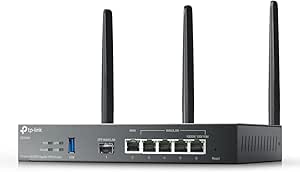 | Best for Omada Offices Needing Built-In Wi-Fi | Wi-Fi standard: Wi-Fi 6 (802.11ax) | Wireless speed: Up to 3000 Mbps: 2402 Mbps on 5 GHz; 574 Mbps on 2.4 GHz | Ports: 1 Gigabit SFP slot; 5 Gigabit RJ45; 1 USB 3.0 | VIEW LATEST PRICE | See Our Full Breakdown |
| TP-Link ER605 Wired Gigabit VPN Router |  | Best Value for a Compact Omada Office | Ethernet ports: 5 Gigabit: 1 WAN, 2 WAN/LAN, 2 LAN | WAN connections: Up to 3 Ethernet WAN connections for load balancing | VPN capacity: Up to 20 IPsec, 16 OpenVPN, 16 L2TP, and 16 PPTP connections | VIEW LATEST PRICE | See Our Full Breakdown |
| GL.iNet GL-BE9300 Flint 3 Tri-Band Wi-Fi 7 VPN Router |  | Best for Tri-Band Wi-Fi 7 | Wi-Fi standard: Wi-Fi 7 | Frequency bands: Tri-band, including 6 GHz | Maximum wireless speed: Up to 9 Gbps | VIEW LATEST PRICE | See Our Full Breakdown |
| Omada Fusion 2.5G Multi-WAN Wired VPN Router |  | Best for Multi-WAN Failover | Network type: Wired | Ports: 5 | Port bandwidth: 2.5 Gbps | VIEW LATEST PRICE | See Our Full Breakdown |
| TP-Link ER7206 Multi-WAN Gigabit VPN Router |  | Best for Protocol Variety | WAN configuration: 1 Gigabit SFP WAN, 1 Gigabit WAN, and 2 Gigabit WAN/LAN | Maximum WAN ports: 4 | LAN ports: 1 Gigabit LAN | VIEW LATEST PRICE | See Our Full Breakdown |
| GL.iNet Flint 3e Wi-Fi 7 Router with VPN |  | Best for Higher Stated VPN Throughput | Wi-Fi standard: Wi-Fi 7 (802.11be) | Frequency bands: Dual-band, 2.4 GHz and 5 GHz | Maximum Wi-Fi speed: Up to 6.5 Gbps | VIEW LATEST PRICE | See Our Full Breakdown |
| Grandstream GWN7003 11-Port Wired Gigabit VPN Router with Dual PoE Output |  | Best for PoE Device Connections | Number of ports: 11 | LAN port bandwidth: 1 Gbps | PoE output: 2 GbE ports with 48V passive PoE or IEEE 802.3af | VIEW LATEST PRICE | See Our Full Breakdown |
| TP-Link Omada ER707-M2 Multi-Gigabit VPN Router |  | Best for Multi-Gigabit Omada Networks | Model: ER707-M2 | Ports: 2 × 2.5GbE WAN/WAN-LAN, 4 × Gigabit WAN/LAN, 1 × Gigabit SFP WAN/LAN, 1 × USB 2.0 | VPN connections: Up to 100 IPsec, 66 OpenVPN, 60 L2TP, and 60 PPTP connections | VIEW LATEST PRICE | See Our Full Breakdown |
| business VPN router | Ports |
|---|---|
| TP-Link Omada ER7412-M2 Multi- | — |
| GL.iNet Flint 2 Wi-Fi 6 Gaming | 2 × 2.5G; 4 × 1G |
| TRENDnet TWG-431BR Gigabit Mul | — |
| TP-Link Omada ER706W Gigabit A | 1 Gigabit SFP slot; 5 Gigabit RJ45; 1 USB 3.0 |
| TP-Link ER605 Wired Gigabit VP | — |
| GL.iNet GL-BE9300 Flint 3 Tri- | 5 |
| Omada Fusion 2.5G Multi-WAN Wi | 5 |
| TP-Link ER7206 Multi-WAN Gigab | — |
| GL.iNet Flint 3e Wi-Fi 7 Route | 5 |
| Grandstream GWN7003 11-Port Wi | — |
| TP-Link Omada ER707-M2 Multi-G | 2 × 2.5GbE WAN/WAN-LAN, 4 × Gigabit WAN/LAN, 1 × Gigabit SFP WAN/LAN, 1 × USB 2.0 |
More Details on Our Top Picks
TP-Link Omada ER7412-M2 Multi-Gigabit VPN Router
The ER7412-M2 is the strongest fit here for offices that need several wired connections and room to grow beyond basic Gigabit networking. Its two 2.5G ports, ten additional Gigabit ports, and support for load balancing across as many as 11 WAN ports offer more connection flexibility than the TRENDnet TWG-431BR, which supports up to four WAN connections. Omada SDN also gives administrators a centralized way to manage compatible network gear, while IPS/IDS and several VPN protocols cover a broad range of security and remote-access needs. The tradeoff is that this is a wired-only router: unlike the Wi-Fi-equipped ER706W, it needs separate access points for wireless staff and guests. Its port count and management features make more sense for a business with network oversight than for a small office seeking a simple all-in-one setup.
Pros:- Two 2.5G ports alongside ten Gigabit WAN/LAN ports provide flexible wired connectivity.
- Supports WAN load balancing across up to 11 connections.
- Broad VPN protocol support includes WireGuard, OpenVPN, SSL, and IPSec.
- Omada SDN supports centralized management, with IPS/IDS and DPI among the listed security features.
Cons:- No built-in wireless networking; Wi-Fi requires separate access points.
- Its large port count and SDN features may be more involved than a small office needs.
Best for: Small and midsize businesses with multiple internet connections, wired devices, and an Omada-managed network.
Not ideal for: Teams that need built-in Wi-Fi or a straightforward router for a small office without dedicated network management.
- WAN/LAN ports:2 × 2.5G RJ45; 10 × Gigabit (2 × SFP, 8 × RJ45)
- WAN load balancing:Up to 11 WAN ports
- VPN protocols:SSL, IPSec, GRE, WireGuard, PPTP, L2TP, OpenVPN
- Security features:DoS/DDoS protection, IP/MAC/URL filtering, DPI, IPS/IDS
- Processor:Quad-core
- USB:1 × USB 3.0
- Management:Omada SDN; app control
- Warranty:5 years
Our verdict“Choose the ER7412-M2 when multi-WAN capacity, 2.5G connectivity, and centralized wired-network management matter more than built-in Wi-Fi.”
GL.iNet Flint 2 Wi-Fi 6 Gaming Router
The Flint 2 makes the most sense for a small business that wants wireless access and VPN capability in one device, rather than a separate wired gateway and access point. Its Wi-Fi 6 radio, two 2.5G ports, and pre-installed OpenWrt give it more flexibility for local network features than the wired TP-Link ER605. The listed VPN speeds—up to 900 Mbps with WireGuard and 880 Mbps with OpenVPN—are useful guidance, though actual throughput depends on the network and VPN endpoint. AdGuard Home support can add DNS-based ad and tracker filtering, and the router is described as supporting more than 100 devices. The compromise is that its feature set leans toward configurable small-office and power-user use, not managed enterprise deployment; the ER706W is a closer alternative for buyers already building around Omada SDN.
Pros:- Built-in dual-band Wi-Fi 6 avoids the need for a separate wireless access point.
- Supports WireGuard and OpenVPN, with listed VPN speeds up to 900 Mbps and 880 Mbps respectively.
- Two 2.5G ports and four Gigabit ports provide useful wired options.
- OpenWrt and AdGuard Home support offer configuration and DNS-filtering flexibility.
Cons:- The product description recommends a firmware update during initial setup.
- VPN and network throughput can vary with the provider, server, and network conditions.
- It lacks the Omada SDN integration offered by the TP-Link ER605 and ER706W.
Best for: Small offices or remote teams that need Wi-Fi 6, local VPN options, and configurable OpenWrt features in one router.
Not ideal for: Businesses that need Omada SDN integration, rack-oriented wired infrastructure, or a managed enterprise gateway.
- Wi-Fi:Wi-Fi 6 (802.11ax), dual-band
- Maximum data rate:Up to 6 Gbps
- Streams:8
- Ports:2 × 2.5G; 4 × 1G
- VPN speeds:WireGuard up to 900 Mbps; OpenVPN up to 880 Mbps
- Memory and storage:1 GB DDR4 RAM; 8 GB eMMC
- Operating system:Linux with pre-installed OpenWrt
- Features:Multi-WAN, QoS, Guest Mode, Access Point Mode, AdGuard Home support
Our verdict“Pick the Flint 2 for a compact office that wants configurable VPN-capable Wi-Fi rather than centralized Omada management.”
TRENDnet TWG-431BR Gigabit Multi-WAN VPN Business Router
For a business that values WAN failover and rack-ready hardware over wireless convenience, the TWG-431BR has a clear purpose. Its five Gigabit ports can be configured for up to four WAN connections, with load balancing, failover, and high-availability features aimed at keeping business connectivity resilient. That makes it a more direct fit for a rack or network closet than the desktop-oriented TP-Link ER605, which has fewer Ethernet ports and Omada SDN integration instead. The TRENDnet also offers web, CLI, and SSH management, plus VLAN, QoS, and several VPN options. Its ceiling is Gigabit Ethernet, and there is no Wi-Fi, so wireless access requires separate hardware. Content filtering depends on Router Limits, adding a service dependency that the ER605’s listed firewall filtering does not share.
Pros:- Supports up to four WAN connections with load balancing and failover.
- High-availability features suit offices that need connectivity redundancy.
- Rack-mountable metal housing includes mounting brackets.
- CLI, SSH, and browser management offer several administration methods.
Cons:- All Ethernet ports are Gigabit, with no multi-gigabit connectivity.
- No built-in wireless networking is described.
- Content filtering is powered by Router Limits.
Best for: Small businesses or branch offices with a rack or network closet that need multiple WAN links, failover, and remote VPN access.
Not ideal for: Offices seeking built-in Wi-Fi, multi-gigabit ports, or a router managed through TP-Link Omada SDN.
- Ethernet ports:5 Gigabit ports, configurable as 4 WAN/1 LAN or 1 WAN/4 LAN
- WAN connections:Up to 4
- VPN protocols:IPSec, PPTP, L2TP with IPsec, SSL VPN
- Network features:Load balancing, failover, high availability, QoS, VLAN, inter-VLAN routing, dynamic routing
- Additional ports:1 × USB 3.0; 1 × RJ-45 console
- Management:Web browser, CLI, SSH, Telnet
- Housing:Black metal; rack-mount brackets included
- Warranty:3 years of TRENDnet manufacturer protection
Our verdict“Choose the TWG-431BR for a rack-mounted business network where multi-WAN failover matters more than Wi-Fi or Omada integration.”
TP-Link Omada ER706W Gigabit AX3000 Wi-Fi 6 VPN Router
The ER706W is the practical middle ground for a business that wants Omada management and wireless coverage without adding a separate access point at the outset. Its AX3000 Wi-Fi 6, five Gigabit RJ45 ports, and SFP slot give it a broader all-in-one role than the wired ER605. It also supports up to five WAN ports and a wide selection of VPN protocols, while Omada Mesh and centralized SDN management can help it fit into a larger TP-Link network. The USB 3.0 port adds storage sharing and LTE backup with a compatible dongle, but the backup modem is not included in the stated features. Compared with the multi-gigabit ER7412-M2, this model trades faster wired ports and extensive WAN capacity for built-in Wi-Fi. Its fixed antennas and listed WPA2 security are worth weighing against newer wireless-security needs.
Pros:- Built-in dual-band Wi-Fi 6 provides wireless coverage without a separate access point.
- Omada Mesh and centralized SDN management support a coordinated network setup.
- Five Gigabit RJ45 ports and an SFP slot offer flexible wired connections.
- Supports up to five WAN ports and multiple VPN protocols.
Cons:- LTE backup requires a compatible dongle.
- Fixed antennas limit physical adjustment or replacement.
- The listed wireless security is WPA2, while the Flint 2 lists WPA3.
Best for: Small offices using or planning an Omada network that want a single device for Wi-Fi 6, VPN access, and multi-WAN routing.
Not ideal for: Businesses that need 2.5G wired ports, removable antennas, or LTE backup without sourcing a compatible dongle.
- Wi-Fi standard:Wi-Fi 6 (802.11ax)
- Wireless speed:Up to 3000 Mbps: 2402 Mbps on 5 GHz; 574 Mbps on 2.4 GHz
- Ports:1 Gigabit SFP slot; 5 Gigabit RJ45; 1 USB 3.0
- WAN load balancing:Supports up to 5 WAN ports
- VPN protocols:SSL, IPSec, GRE, WireGuard, PPTP, L2TP, OpenVPN
- Memory:512 MB RAM
- Antennas:3 fixed antennas
- Security:WPA2
Our verdict“Choose the ER706W if you want an Omada-managed business router with built-in Wi-Fi and do not need multi-gigabit Ethernet.”
TP-Link ER605 Wired Gigabit VPN Router
The ER605 is the straightforward choice for a small business that wants wired multi-WAN and VPN features without the port scale of the ER7412-M2. Its five Gigabit Ethernet ports include one WAN, two WAN/LAN, and two LAN connections, letting an office configure up to three WAN connections for load balancing. Omada SDN integration gives it a path into centralized management, while its firewall filtering and support for several VPN types cover common small-office needs. The USB port can provide 4G/3G modem backup, though that depends on a compatible modem. Compared with the TRENDnet TWG-431BR, the ER605 is a more compact fit for an Omada network, but it does not list rack-mount hardware or high-availability features. It is also wired only, so Wi-Fi needs a separate access point.
Pros:- Five Gigabit ports allow up to three WAN Ethernet connections for load balancing.
- Omada SDN integration supports centralized management.
- Supports multiple VPN protocols and up to 20 IPsec connections.
- USB WAN supports backup through a compatible 4G/3G modem.
Cons:- No built-in Wi-Fi; wireless coverage requires a separate access point.
- USB cellular backup depends on a compatible modem.
- Gigabit ports and a five-port layout offer less headroom than the ER7412-M2.
Best for: Small offices already using Omada, or planning to add an access point, that need basic multi-WAN routing and remote VPN support.
Not ideal for: Businesses requiring built-in Wi-Fi, rack-mount redundancy features, or multi-gigabit ports and a high WAN-port count.
- Ethernet ports:5 Gigabit: 1 WAN, 2 WAN/LAN, 2 LAN
- WAN connections:Up to 3 Ethernet WAN connections for load balancing
- VPN capacity:Up to 20 IPsec, 16 OpenVPN, 16 L2TP, and 16 PPTP connections
- USB WAN:Supports 4G/3G modem backup
- Firewall features:SPI firewall, DoS defense, IP/MAC/URL filtering
- Network type:Wired
- Dimensions:6.22 × 3.98 × 0.98 in
- Warranty:5-year manufacturer warranty
Our verdict“Pick the ER605 for a compact Omada-based office that needs wired VPN and multi-WAN basics, not built-in wireless or larger-scale port capacity.”
GL.iNet GL-BE9300 Flint 3 Tri-Band Wi-Fi 7 VPN Router
I’d pick the Flint 3 for a small office that needs fast wireless networking alongside built-in VPN support. Its tri-band Wi-Fi 7 design includes the 6 GHz band and MLO, giving compatible devices more room to share busy networks. WireGuard and OpenVPN speeds are listed up to 680 Mbps, a useful balance for remote access, though the Flint 3e specifies higher VPN throughput. Compared with the wired Omada Fusion 2.5G, this GL.iNet model can provide office Wi-Fi without a separate access point; the Omada is better suited to wired multi-WAN management. AdGuard Home and Bark parental controls add filtering options, but they may matter less in a business than VLAN, policy, and centralized-management tools. I’d also plan to update the firmware during setup and treat listed coverage and VPN speeds as dependent on the environment.
Pros:- Tri-band Wi-Fi 7 includes 6 GHz and MLO for compatible clients.
- Supports both WireGuard and OpenVPN, with stated speeds up to 680 Mbps.
- Five ports include 2.5 Gbps LAN bandwidth.
- AdGuard Home and Bark parental controls provide filtering options.
Cons:- Its stated VPN speed is lower than the Flint 3e’s listed maximum.
- Firmware updating is recommended during initial setup.
- Actual coverage and VPN throughput vary with placement, network conditions, and VPN server.
Best for: Small offices with Wi-Fi 7 client devices that want tri-band wireless, VPN support, and basic network filtering in one router.
Not ideal for: Businesses prioritizing centralized Omada management, extensive wired multi-WAN controls, or higher stated VPN throughput; the Omada Fusion 2.5G or Flint 3e may fit better.
- Wi-Fi standard:Wi-Fi 7
- Frequency bands:Tri-band, including 6 GHz
- Maximum wireless speed:Up to 9 Gbps
- VPN protocols and speed:WireGuard and OpenVPN, up to 680 Mbps
- Ports:5
- LAN port bandwidth:2,500 Mbps
- Memory and storage:1 GB DDR4 RAM; 8 GB eMMC
- Coverage:Up to 2,000 square feet
Our verdict“Choose the Flint 3 if tri-band Wi-Fi 7 and built-in VPN matter more to your office than centralized wired-network management.”
Omada Fusion 2.5G Multi-WAN Wired VPN Router
For a business where internet continuity matters more than built-in Wi-Fi, I’d put the Omada Fusion 2.5G near the top of the shortlist. It combines four-WAN load balancing and automatic failover with five 2.5G ports, so teams can spread traffic across connections and keep a backup line ready. Its built-in Omada controller and touchscreen make it more self-contained for on-site monitoring than the TP-Link ER7206, which offers flexible WAN ports and VPN protocol support but relies on a separate controller or standalone management. The Fusion’s wired-only design means wireless devices need access points, and initial app setup uses Bluetooth. I’d favor it for offices with multiple internet services and wired equipment; a smaller site needing an integrated wireless router may find the extra network-management focus unnecessary.
Pros:- Supports up to four WAN connections with load balancing and automatic failover.
- Five 2.5 Gbps ports accommodate high-speed wired links.
- Built-in Omada controller supports management without a separate controller device.
- Touchscreen displays network status and traffic information on site.
Cons:- No built-in Wi-Fi, so wireless coverage requires separate access points.
- On-site app setup uses Bluetooth.
- Its wired multi-WAN feature set may be more than a single-connection office needs.
Best for: Small and midsize offices with multiple internet connections, wired workstations, and a need for automatic WAN failover and local status checks.
Not ideal for: Businesses seeking an all-in-one Wi-Fi router or relying on a wireless-first setup; this model is wired and requires separate access points.
- Network type:Wired
- Ports:5
- Port bandwidth:2.5 Gbps
- WAN support:Up to four WAN connections
- Processor:Quad-core CPU
- Management features:Built-in Omada controller and remote access
- Security and traffic tools:QoS, ACL, IPS/IDS
- Setup and monitoring:Bluetooth app setup and touchscreen
Our verdict“Choose the Fusion 2.5G for a wired business network that needs multi-WAN failover and on-device monitoring, not integrated Wi-Fi.”
TP-Link ER7206 Multi-WAN Gigabit VPN Router
The ER7206 is a practical fit for offices that want a wired gateway with several VPN options and flexible WAN connections, rather than a built-in wireless network. It supports up to four WAN ports and lists capacity for multiple simultaneous VPN connections across IPsec, OpenVPN, L2TP, and PPTP. That range gives administrators more options for matching remote access to existing equipment, while the Omada Fusion 2.5G is the more compelling choice when 2.5G ports, a built-in controller, and touchscreen monitoring matter. The ER7206 has gigabit ports, so it is less suited to offices upgrading their internal links beyond 1 Gbps. Its Omada cloud management can help centralize administration, but using the SDN approach calls for compatible devices and controllers. I’d choose it for a managed gigabit network, not as an all-in-one Wi-Fi solution.
Pros:- Configurable WAN ports support up to four internet connections.
- Supports IPsec, OpenVPN, L2TP, and PPTP VPN connections.
- Can be managed through Omada hardware, software, cloud, an app, or standalone mode.
- Includes firewall policies, DoS defense, and IP, MAC, and URL filtering.
Cons:- No built-in wireless connectivity.
- Gigabit ports limit suitability for faster-than-gigabit office links.
- Omada SDN management requires compatible devices and controllers.
Best for: Businesses with gigabit wired networks that need multiple VPN protocols, flexible WAN assignments, and the option of Omada or standalone management.
Not ideal for: Offices needing built-in Wi-Fi, 2.5 Gbps wired links, or Omada SDN features without compatible devices and a controller.
- WAN configuration:1 Gigabit SFP WAN, 1 Gigabit WAN, and 2 Gigabit WAN/LAN
- Maximum WAN ports:4
- LAN ports:1 Gigabit LAN
- VPN protocols:IPsec, OpenVPN, L2TP, and PPTP
- Listed VPN connection capacity:Up to 100 IPsec, 50 OpenVPN, 50 L2TP, and 50 PPTP connections
- Data transfer rate:1 Gbps
- Memory:512 MB RAM
- Security features:Firewall policies, DoS defense, IP/MAC/URL filtering
Our verdict“Choose the ER7206 for a gigabit wired office that values VPN protocol choice and flexible management over Wi-Fi or 2.5G ports.”
GL.iNet Flint 3e Wi-Fi 7 Router with VPN
The Flint 3e stands out among these wireless picks for its stated VPN throughput: up to 1,100 Mbps with WireGuard and OpenVPN. That makes it a better match than the tri-band Flint 3 for businesses whose priority is VPN traffic over a Wi-Fi 7 network, although real results depend on the connection and VPN server. The tradeoff is dual-band Wi-Fi rather than the Flint 3’s tri-band layout, including its 6 GHz band. The Flint 3e lists coverage up to 2,500 square feet and support for more than 100 devices, which may suit a small office with broad wireless needs, but coverage figures aren’t a substitute for a site plan or additional access points. AdGuard Home and parental controls add filtering tools; this is still not the same management model as an Omada business gateway.
Pros:- Lists WireGuard and OpenVPN speeds up to 1,100 Mbps.
- Wi-Fi 7 supports features including MLO and 4K-QAM.
- Dual-band design covers 2.4 GHz and 5 GHz devices.
- Includes AdGuard Home and parental-control features.
Cons:- Dual-band Wi-Fi lacks the Flint 3’s tri-band 6 GHz option.
- Setup requires an Ethernet connection or following the setup tutorial.
- Actual Wi-Fi and VPN speeds depend on the network environment and VPN server.
Best for: Small offices that want Wi-Fi 7, WireGuard or OpenVPN, and a higher stated VPN speed than the Flint 3 provides.
Not ideal for: Businesses that need tri-band 6 GHz Wi-Fi, centralized Omada network management, or a dedicated multi-WAN wired gateway.
- Wi-Fi standard:Wi-Fi 7 (802.11be)
- Frequency bands:Dual-band, 2.4 GHz and 5 GHz
- Maximum Wi-Fi speed:Up to 6.5 Gbps
- VPN support:WireGuard and OpenVPN, up to 1,100 Mbps
- Coverage:Up to 2,500 square feet
- Ports:5
- LAN port bandwidth:2,500 Mbps
- Memory and antennas:1 GB DDR4 RAM; 4 antennas
Our verdict“Choose the Flint 3e when higher stated VPN throughput and Wi-Fi 7 matter more than the Flint 3’s extra band.”
Grandstream GWN7003 11-Port Wired Gigabit VPN Router with Dual PoE Output
I’d consider the Grandstream GWN7003 when a business needs many wired connections and wants to power compatible devices directly from the router. Its 11 ports and dual PoE outputs can simplify a small deployment with supported access points or other powered equipment, while built-in VPN and firewall capabilities support secure remote access. Compared with the Omada Fusion 2.5G, the Grandstream offers PoE output and Wi-Fi 6, but its listed wired bandwidth is gigabit rather than 2.5G and its wireless specification is limited to a single 2.4 GHz band. That band restriction is a notable compromise for offices with modern 5 GHz clients. I’d check the power requirements of every PoE device before buying, since passive PoE compatibility can vary. This is a specialized connectivity choice, not a strong pick for high-capacity business Wi-Fi.
Pros:- Eleven ports provide extensive wired connectivity.
- Two PoE output ports can power compatible network devices.
- Built-in VPN and firewall support secure remote access.
- Includes Wi-Fi 6 and WPA3 security support.
Cons:- Wireless is single-band 2.4 GHz, with no listed 5 GHz capability.
- Gigabit port bandwidth does not match the Fusion 2.5G’s 2.5 Gbps ports.
- Passive PoE output may not suit every powered device.
Best for: Small offices deploying compatible PoE devices that need numerous wired connections, basic Wi-Fi, and VPN access in one unit.
Not ideal for: Businesses relying on 5 GHz wireless, 2.5 Gbps links, or broad compatibility with PoE devices that may not accept passive PoE.
- Number of ports:11
- LAN port bandwidth:1 Gbps
- PoE output:2 GbE ports with 48V passive PoE or IEEE 802.3af
- PoE input:1 GbE RJ45 with IEEE 802.3af/at
- Wireless:Wi-Fi 6, single-band 2.4 GHz
- Security protocols:WPA2-PSK and WPA3
- Memory:512 MB RAM
- Operating system:Grandstream GWN
Our verdict“Choose the GWN7003 for a wired deployment that benefits from its port count and compatible PoE outputs, not for fast dual-band Wi-Fi.”
TP-Link Omada ER707-M2 Multi-Gigabit VPN Router
The ER707-M2 suits a small business that needs wired VPN routing with room for faster-than-Gigabit links. Its two 2.5GbE ports can serve multi-gigabit WAN or LAN connections, while the additional Gigabit WAN/LAN ports and SFP slot give network managers flexibility for multiple internet links or fiber. Compared with the TP-Link ER605, it offers more multi-gigabit capacity and more extensive port options; it also brings Omada cloud management for centralized oversight across sites.
That flexibility comes with a clear boundary: this is a wired-only router, unlike the Wi-Fi-equipped Omada ER706W. It also lacks built-in cellular backup; LTE failover needs a compatible dongle connected to USB. Choose it for a managed office network, not as an all-in-one wireless gateway.
Pros:- Two 2.5GbE ports support faster WAN or LAN links than Gigabit-only models such as the ER605.
- Multiple Gigabit WAN/LAN ports and a Gigabit SFP WAN/LAN port allow flexible uplink and network layouts.
- Omada cloud access and app support centralized management across multiple sites.
- Supports load balancing, an SPI firewall, multiple VPN protocols, and USB storage or dongle-based LTE backup.
Cons:- Provides no built-in Wi-Fi, so wireless access requires separate access points.
- LTE backup requires a compatible LTE dongle rather than an integrated cellular modem.
- The range of VPN protocols and port choices may be more than a single-location business with basic routing needs requires.
Best for: Small and midsize businesses already using Omada that need multi-gigabit wired routing, multiple WAN/LAN options, and centralized management.
Not ideal for: Businesses needing built-in Wi-Fi or ready-to-use cellular failover, since it is wired-only and LTE backup requires a separate compatible dongle.
- Model:ER707-M2
- Ports:2 × 2.5GbE WAN/WAN-LAN, 4 × Gigabit WAN/LAN, 1 × Gigabit SFP WAN/LAN, 1 × USB 2.0
- VPN connections:Up to 100 IPsec, 66 OpenVPN, 60 L2TP, and 60 PPTP connections
- Security protocols:SSL, IPSec, GRE, SSH, IKEv1/v2, PPTP, L2TP, OpenVPN
- Maximum concurrent sessions:500,000
- Maximum clients:1,000+
- Management:Omada cloud access and app
- USB functions:Storage and LTE backup with compatible LTE dongle
- Dimensions and weight:12.9 × 9.5 × 3.1 in; 1.1 kg
Our verdict“Choose the ER707-M2 for an Omada-managed business that needs multi-gigabit wired VPN routing, but skip it if you want Wi-Fi or cellular backup built in.”

How We Picked
I ranked these business VPN routers by how well their stated features address real office needs: secure remote connectivity, reliable WAN options, wired and wireless capacity, straightforward deployment, and room to expand. I also weighed whether a model is best as an all-in-one router or as the gateway in a network with separate access points and switches. Those distinctions affect total setup effort and usefulness more than a headline speed or a long feature list alone.
The ordering favors routers with a balanced mix of business-oriented management, multi-WAN flexibility, and capacity, followed by more specialized wireless, compact, or port-dense choices. The ER7412-M2 leads for its multi-gigabit focus and Omada ecosystem fit; the TRENDnet TWG-431BR earns a strong place for multi-WAN use, and the ER605 ranks as a simpler wired entry option. I treat gaming or consumer-oriented wireless features as useful for some small offices, but not a replacement for the management and connection planning that business networks may need.
Factors to Consider When Choosing Business VPN Routers
Before choosing a router, I would map the network it must support rather than shop by a single speed figure. The number of VPN users, internet links, wired devices, access points, and people who will manage the system can change which feature is worth paying for. These factors help avoid buying an undersized gateway—or paying for capacity your office cannot use.
Match VPN capacity to real remote-work demand
VPN performance depends on more than the router’s advertised connection speed. Encryption, the number of simultaneous tunnels, traffic patterns, and the internet connection all affect the experience users see. Estimate peak concurrent remote users and identify whether they need access to office applications, large file transfers, or only a few internal services. A router that handles light remote access may struggle when many employees send traffic through the office at once. Avoid sizing only for today’s headcount if the business is adding staff or cloud-based workflows. For heavy remote use, compare published VPN throughput and tunnel limits where available, and leave capacity for busy periods.
Choose multi-WAN for a clear continuity or load-sharing need
A second WAN connection can support failover when a primary connection drops, or it can help distribute traffic across links, depending on the router’s capabilities and configuration. Those are different goals: failover prioritizes continuity, while load balancing aims to use multiple connections. Neither feature makes an unstable backup line useful, and failover behavior may not preserve every active session. Check how the router handles link detection, policy rules, and recovery after an outage before treating dual-WAN as automatic protection. A single reliable connection can be the simpler choice for a small office with low downtime costs. For operations that depend on being online, budget for a genuinely independent secondary service as well as a router that supports the needed WAN behavior.
Decide whether Wi-Fi belongs in the gateway
All-in-one wireless routers reduce the number of devices to install, which can suit a small office or temporary workspace. A separate gateway and managed access points provide more flexibility when coverage, roaming, or wireless client capacity becomes a larger concern. A common mistake is to assume that a newer Wi-Fi generation will fix weak coverage through walls or crowded rooms; access-point placement and building materials still matter. Consider where the router will sit, how many users connect wirelessly, and whether the office expects to expand to multiple access points. If the network already uses dedicated Wi-Fi hardware, paying extra for built-in wireless may add little value. If simplicity is the priority, an integrated model can reduce setup overhead.
Plan ports, PoE, and network segmentation together
Count the devices that need wired connections, including switches, servers, access points, cameras, phones, and printers. A router with many ports can simplify a small installation, while PoE outputs may power compatible devices without separate injectors. Do not assume every port provides PoE or that the available power budget covers every connected device; check the specifications and plan for peak draw. Businesses that handle guest traffic, payment systems, or sensitive internal data should also think about network segmentation before installation. VLAN support and firewall policy controls can help separate traffic, but they require a configuration plan and ongoing maintenance. Buying extra ports without mapping device needs can be less useful than choosing a smaller gateway and a suitable managed switch.
Weigh centralized management against setup simplicity
Centralized management can save time when a business has several network devices or locations, but it adds value only if someone will use it. Check whether the router’s management approach fits the team’s skills, preferred monitoring tools, and plans for adding access points or switches. A standalone interface may be easier for a small office that changes settings rarely. An ecosystem-based platform can make a growing network more consistent, yet it may take more planning to configure and maintain. Before buying, identify who will apply firmware updates, review alerts, and troubleshoot outages. The lowest-effort choice is not always the least expensive to operate if routine network tasks become difficult.
Pay for headroom only when the network can use it
Multi-gigabit ports and newer Wi-Fi standards can extend a router’s useful life, but they do not speed up an internet plan, client device, or switch that remains limited to gigabit connections. Map the entire path from the service provider through the router to the devices that need faster transfers. If most work happens in cloud applications over a modest broadband link, better failover or easier management may have more practical value than unused port capacity. On the other hand, local file servers, fast internet service, and planned network growth can justify paying for multi-gigabit capability. The common mistake is comparing one headline specification instead of checking the slowest link in the network.
Frequently Asked Questions
Should I choose the TP-Link ER605 or pay for a multi-gigabit router?
I would choose the ER605 when a small wired network uses gigabit connections and does not need extra headroom for faster links. A multi-gigabit option makes more sense if the internet service, local server, or network backbone already exceeds gigabit speeds, or if an upgrade is planned soon. Check every link in the path: a faster router port cannot raise the speed of a gigabit switch or client. Also compare management and WAN needs rather than treating port speed as the only difference. If there is no clear use for multi-gigabit capacity, the simpler gigabit router may be the more sensible fit.
Is multi-WAN worth it for a small business?
Multi-WAN is most useful when losing internet access would interrupt sales, communications, or access to essential systems. A backup connection can reduce downtime, but it needs to come from a service that does not share the same failure point as the primary line. Check whether the router supports the specific failover or load-sharing behavior you need, since those functions are not interchangeable. Some connections may also change public IP addresses during failover, which can affect services that depend on fixed addressing. If brief outages are manageable, a single connection and a simpler router may be easier to support.
Do I need a separate VPN router if my business uses a VPN service?
Not automatically. A business router with VPN functions can support secure links between locations or remote access, while a commercial VPN service may route general internet traffic through its own servers; these solve different problems. Start by identifying whether staff need access to internal resources, privacy for outbound traffic, or both. Then check which protocols, user controls, and VPN throughput the router supports for that use. A router feature list alone does not establish that the setup meets your organization’s security requirements. For regulated or sensitive work, have the configuration reviewed by a qualified network or security professional.
Should I buy a router with built-in Wi-Fi or use separate access points?
Built-in Wi-Fi can keep a small office installation simple when one router location can cover the workspace. Separate access points are a better fit when the space has multiple rooms, dense client traffic, or a need for broader placement options. A router’s Wi-Fi generation does not guarantee good coverage throughout a building, particularly where walls or interference are factors. Consider whether access points are already installed and whether they can be managed alongside the gateway. If Wi-Fi is likely to grow, a wired router with a planned access-point setup can be easier to scale than replacing an all-in-one device.
What should I verify before relying on a router for business VPN access?
Check the supported VPN protocols, the number of simultaneous connections or tunnels, and the available throughput for the specific VPN mode you intend to use. Confirm how users are authenticated and whether the router supports the access controls your organization requires. Plan who will apply firmware updates, review configuration changes, and respond if remote access stops working. Test the setup with representative users and workloads before making it the only route into business systems. A router can be a capable gateway, but good VPN security also depends on account practices, network rules, and ongoing maintenance.
Conclusion
For most offices seeking a balance of multi-gigabit capacity and business-oriented management, I would start with the TP-Link Omada ER7412-M2. The best value for a simpler wired setup is the TP-Link ER605, while the TRENDnet TWG-431BR is a strong choice for buyers prioritizing multi-WAN flexibility. For beginners who want an easier all-in-one wireless arrangement, the TP-Link Omada ER706W is a more direct fit than a wired gateway paired with separate access points. Buyers with specific needs should look at the Grandstream GWN7003 for port density and PoE, or the GL.iNet Flint 3 and Flint 3e for newer Wi-Fi features. For a more demanding multi-gigabit network, compare the ER7412-M2, ER707-M2, and Omada Fusion against the exact WAN, port, and management requirements before deciding.