
If your network camera suddenly loses power during a critical moment, you might suspect PoE issues. These problems can be frustrating and hard to diagnose without the right approach. Understanding the common causes and solutions can help you restore reliable power. But where do you start, and what steps are most effective in fixing PoE power problems before they impact your setup?
Key Takeaways
- Verify device compatibility with the switch’s PoE standards (e.g., IEEE 802.3af, 802.3at).
- Check and ensure the switch’s total power capacity isn’t exceeded by connected devices.
- Inspect and replace damaged or low-quality Ethernet cables that may impact power delivery.
- Monitor switch port power status and adjust settings or prioritize critical devices if possible.
- Upgrade to a higher-capacity switch or add PoE injectors if power shortages persist.

Power over Ethernet (PoE) is a convenient way to supply power and data to network devices, but it can sometimes encounter issues that disrupt your setup. When your PoE devices aren’t powering up properly, the problem often lies in power management or device compatibility. Understanding these factors helps you troubleshoot more effectively and guarantees your network runs smoothly.
PoE issues often stem from power management or device compatibility problems.
First, consider power management. PoE relies on the switch or injector to deliver adequate power to each device. If one device isn’t receiving enough power, it might not turn on or operate correctly. Check the power budget of your PoE switch; some models have a limited total power capacity, which means connecting multiple high-power devices can cause insufficiency. When this happens, disconnect unnecessary devices or upgrade to a switch with a higher power capacity. Also, verify that the power settings are correctly configured. Some switches allow you to prioritize certain devices or limit power to others, so reviewing these settings guarantees your critical devices get the necessary power.
Device compatibility is equally vital. Not all network devices support PoE, and even among those that do, compatibility can vary. Before connecting a device, confirm that it’s PoE-compatible and aligns with the PoE standard your switch supports, such as IEEE 802.3af, 802.3at, or 802.3bt. Using incompatible devices can lead to power issues since the switch might not recognize the device or may not supply power efficiently. Additionally, ensure your cables meet the required specifications. For example, Cat5e or higher-rated Ethernet cables are recommended for PoE, especially for higher power standards, to prevent voltage drops that could impair device operation.
If you’re experiencing power issues, start by inspecting your cables and connections. Damaged or low-quality cables can hinder power delivery. Test the connection with a different cable or port to rule out cable faults. Next, examine the switch’s configuration. Many switches have a management interface where you can monitor power distribution and see if any ports are not delivering power as expected. If a port shows no power, try resetting the switch or updating its firmware, as software issues can sometimes interfere with proper power management. Additionally, reviewing power management settings can help identify misconfigurations that might cause issues.
In cases where troubleshooting doesn’t resolve the problem, consider compatibility or hardware limitations as the cause. Upgrading your switch or ensuring your devices support the same PoE standards can resolve persistent issues. Sometimes, using a PoE splitter or injector tailored for specific devices can also help if compatibility remains a concern.
Ultimately, addressing power management and guaranteeing device compatibility are key steps in fixing PoE power issues. By systematically checking these factors, you can restore reliable power to your network devices and maintain a stable, efficient setup.

TP-Link LS108GP | 8 Port PoE Gigabit Ethernet Switch | 8 PoE+ Port @ 62W | Plug & Play | Extend Mode | PoE Auto Recovery | Desktop/Wall Mount | Silent Operation
𝗙𝘂𝗹𝗹 𝗚𝗶𝗴𝗮𝗯𝗶𝘁 𝟴-𝗣𝗼𝗿𝘁 𝗣𝗼𝗘 𝗖𝗼𝗻𝗳𝗶𝗴𝘂𝗿𝗮𝘁𝗶𝗼𝗻 – 8 PoEplus (802.3at/af) Gigabit RJ45 providing up to 30W per port and…
As an affiliate, we earn on qualifying purchases.
As an affiliate, we earn on qualifying purchases.
Frequently Asked Questions
Can Poe Power Issues Damage My Connected Devices?
Yes, PoE power issues can damage your connected devices if there’s a power surge or unstable supply. Poor quality PoE switches or injectors may not provide proper device protection, risking hardware damage. To avoid this, make certain you use reliable equipment with built-in device protection features. Regularly check connections and avoid overloading ports, which helps maintain safe PoE power levels and protects your devices from potential harm.
How Do I Identify if Poe Power Is the Problem?
A problem shared is a problem halved, so start by checking your power indicator on the device. If it’s off or blinking, that’s a sign of power issues. Next, inspect the cable for damage or loose connections, as faulty cables can cause power problems. If everything looks good but issues persist, try replacing the cable or testing with a different port. These steps help you identify if Poe power is the culprit.
Are There Safety Precautions for Handling Poe Power Faults?
Yes, there are Poe safety precautions you should follow when handling Poe power faults. Always turn off power before working on the equipment to prevent electrical hazards. Use insulated tools and wear protective gear to avoid shocks. Never bypass safety features or overload the system. Regularly inspect cables and connectors for damage, and guarantee proper grounding. Following Poe safety guidelines protects you from electrical hazards and ensures safe troubleshooting and repairs.
What Tools Are Needed to Troubleshoot Poe Power?
To troubleshoot PoE power, you need a multimeter for power measurement and a cable tester to verify connections. While a multimeter helps you detect voltage issues, a cable tester reveals faulty wiring that could cause power faults. Don’t forget to use a PoE injector or switch to isolate the problem. Together, these tools help you pinpoint whether the issue lies in power delivery or cabling.
How Long Does It Typically Take to Fix Poe Power Issues?
Fixing PoE power issues usually takes about 15 to 30 minutes. You start by power cycling the affected device, which often resolves minor glitches. If that doesn’t work, check the firmware update to verify your device is running the latest version. These steps help identify and resolve common problems quickly, but more complex issues might require additional troubleshooting or replacing hardware, extending the repair time.
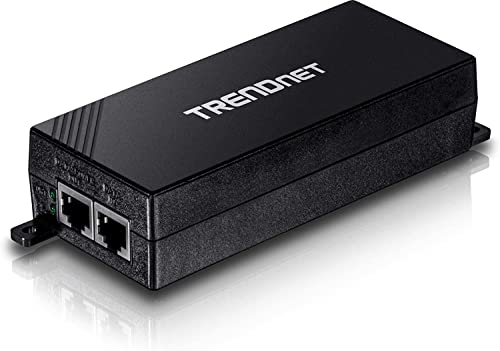
TRENDnet Gigabit Power Over Ethernet Plus Injector, PoE+ (30W) Power Network Distances Up to 100M (328 ft.), Metal Housing, Black, TPE-115GI (Pack of 1)
GIGABIT PORTS: 1 x Gigabit Ethernet port and 1 x PoE plus Gigabit Ethernet port. Integrated power supply.
As an affiliate, we earn on qualifying purchases.
As an affiliate, we earn on qualifying purchases.
Conclusion
Remember, a chain is only as strong as its weakest link. By verifying your switch’s power support, checking cables, and managing device load, you can resolve PoE power issues effectively. Don’t forget to update firmware and confirm compatibility. If problems persist, consider upgrading your equipment. Staying proactive ensures a stable network, because as the saying goes, “An ounce of prevention is worth a pound of cure.” Keep your network reliable and running smoothly.

Cat5e Ethernet Cable 25 FT, Long Cat 5e Internet Cable, Black Snagless Patch Cord, Flexible, Network, LAN, PoE, Standard RJ45 Connector for PC, Server, Router, Modem, TV, PS5 – with 15 Cable Ties
【High Speed Data Transfer】: Cat5e ethernet patch cables support Lag-free data transfer speeds of up to 1.0Gpbs and…
As an affiliate, we earn on qualifying purchases.
As an affiliate, we earn on qualifying purchases.

PoE Detector for IEEE 802.3 or Passive PoE – Quickly Identify Power Over Ethernet; Display Indicates Passive or 802.3af/at; 24v, 48v, or 56v; and Mode B Reverse Polarity
A quick, easy on site tester for power over the ethernet cable that's a must-have for every tech's…
As an affiliate, we earn on qualifying purchases.
As an affiliate, we earn on qualifying purchases.