
The best network infrastructure tools help identify wiring faults, verify finished runs, and complete clean cable installations without adding equipment a buyer will rarely use. I rank the Klein Tools Scout Pro 3 VDV501-851 as the best overall pick because its Ethernet, coax, video, and phone support gives it the broadest practical appeal. The Cable Matters 7-in-1 Network Tool Kit offers stronger value for installation work, while the tester with IP scan, ping, PoE, and fiber functions is the more capable choice for advanced diagnostics. The main tradeoffs are diagnostic depth versus simplicity, tester quality versus accessory count, and higher upfront cost versus room to handle more network types. Continue reading for my full breakdown of which option fits each buyer and which features are worth paying for.

Get business pricing on networking and server gear
- Business-only prices and quantity discounts
- Tax-exempt purchasing
- Multiple users, one account, clear invoices
Key Takeaways
- Klein Tools Scout Pro 3 VDV501-851 earns my best overall position because it covers more cable types than the simpler LAN Scout models without shifting entirely toward specialist network administration.
- The tester with IP scan, ping, PoE detection, and fiber checking has the deepest diagnostic scope, but its added complexity is unnecessary for buyers who only need wire-map and continuity checks.
- The Cable Matters 7-in-1, Gaobige, Hi-Spec, and ZOERAX bundles favor installation breadth over advanced fault analysis; accessory counts alone do not indicate tester capability.
- Basic testers such as the Klein VDV526-100 and TLP-123A make more sense for occasional cable verification than feature-heavy models, provided the buyer does not need PoE analysis or network-layer tests.
- The Klein 80072 and ZOERAX kit stand apart for termination-focused work because they pair testing tools with connectors or pass-through supplies, reducing the number of separate purchases.
| Klein Tools VDV526-200 LAN Scout Jr. 2 | 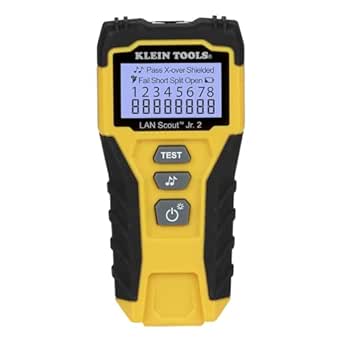 | Best Dedicated Ethernet Tester | Cable categories: CAT 5e, CAT 6, CAT 6A | Connector type: RJ45 | Display: Large backlit LCD | VIEW LATEST PRICE | See Our Full Breakdown |
| Klein Tools VDV501-851 Scout Pro 3 Tester Starter Kit |  | Best Overall | Cable formats: Voice, data, and video | Supported connectors: RJ11, RJ12, RJ45, and coax F-connector | Maximum length measurement: 2,000 feet (610 meters) | VIEW LATEST PRICE | See Our Full Breakdown |
| Network Cable Tester with IP Scan, Ping Test, PoE Detection, and Fiber Check |  | Best for Advanced Diagnostics | Supported cable categories: CAT5, CAT6, CAT7, and CAT8 | Network diagnostics: IP scan and ping test | Cable functions: Continuity, wire tracing, and length measurement | VIEW LATEST PRICE | See Our Full Breakdown |
| Klein Tools 80085 VDV LAN Cable and Wire Tester Kit |  | Best Installation Kit | Number of pieces: 6 | Cable tester: Single-button voice and data tester | Compatible connectors: RJ11, RJ12, and RJ45 | VIEW LATEST PRICE | See Our Full Breakdown |
| Klein Tools VDV526-100 Network LAN Cable Tester with Remote |  | Best for Beginners | Supported connectors: RJ11, RJ12, and RJ45 | Supported cable categories: CAT3, CAT5e, CAT6, and CAT6A | User interface: Single-button control | VIEW LATEST PRICE | See Our Full Breakdown |
| Cable Matters 7-in-1 Network Tool Kit with RJ45 Crimping Tool |  | Best All-in-One Starter Kit | Brand: Cable Matters | Model: 180108 | UPC: 818707020715 | VIEW LATEST PRICE | See Our Full Breakdown |
| Gaobige Network Tool Kit for Cat5, Cat5e, and Cat6 – 11 in 1 Ethernet Crimper Kit |  | Best Budget Multipiece Kit | Brand: Gaobige | Model: CJ-08-WLGJ | UPC: 766330621130 | VIEW LATEST PRICE | See Our Full Breakdown |
| InstallerParts Professional Network Tool Kit 15-in-1 |  | Best for Field Maintenance | Brand: InstallerParts | Model: 22811 | UPC: 045079444386 | VIEW LATEST PRICE | See Our Full Breakdown |
| NoyaFA NF-8209 Network Cable Tester with PoE and NCV |  | Best Advanced Diagnostic Tester | Model: NF-8209 | Supported Cable Categories: Cat5 and Cat6 | Length Measurement Range: 1.5–200 m | VIEW LATEST PRICE | See Our Full Breakdown |
| Klein Tools 80072 RJ45 Cable Tester Kit with LAN Scout Jr. 2 |  | Best Premium Termination Kit | Brand: Klein Tools | Model: 80072 | UPC: 092644800726 | VIEW LATEST PRICE | See Our Full Breakdown |
| Hi-Spec Network Cable Tester Tool Kit |  | Best Starter Kit | Kit size: 9 pieces | Supported cable categories: CAT5 and CAT6 | Supported connectors: RJ11 and RJ45 | VIEW LATEST PRICE | See Our Full Breakdown |
| ZOERAX Professional Network Tool Kit 14-in-1 |  | Best Installation Bundle | Brand: ZOERAX | Kit configuration: 14-in-1 | Crimping tool: Adjustable RJ45 crimper | VIEW LATEST PRICE | See Our Full Breakdown |
| TLP-123A Network Cable Tester |  | Best Compact Basic Tester | Supported connectors: RJ45 and RJ11 | Ethernet cable categories: CAT5, CAT5E, CAT6, CAT6A, and CAT7 | Cable construction: UTP and STP | VIEW LATEST PRICE | See Our Full Breakdown |
More Details on Our Top Picks
Klein Tools VDV526-200 LAN Scout Jr. 2
I rank the Klein Tools LAN Scout Jr. 2 as the strongest dedicated Ethernet tester here because it pairs detailed fault identification with a readable backlit screen and simple controls. Unlike the Klein Tools VDV526-100, which relies on basic LEDs, this model identifies split pairs, crossovers, shielding faults, opens, shorts, and miswires, giving installers more useful direction when a run fails. It is also smaller and less complicated than the Network Cable Tester with IP Scan, making it better suited to routine CAT 5e through CAT 6A checks. The tradeoff is specialization: RJ45 testing only means it cannot handle phone or coax lines, and using its tone generator for tracing requires a separately purchased probe. I place it below the Scout Pro 3 because that kit covers more cable formats.
Pros:- Detects opens, shorts, miswires, split pairs, crossovers, and shielding faults
- Backlit LCD presents more detail than a basic LED tester
- Simple controls suit frequent field checks
- Compact body is easy to carry between network closets
Cons:- Restricted to Ethernet cables with RJ45 connectors
- Cable tracing requires a separate probe
- Does not provide the IP, ping, PoE, or fiber functions of the advanced diagnostic pick
Best for: Ethernet installers and IT technicians who need clear fault details on CAT 5e, CAT 6, and CAT 6A runs without advanced network diagnostics
Not ideal for: Telecom or multi-format cabling crews that also need RJ11, RJ12, coax, PoE, or live-network analysis
- Cable categories:CAT 5e, CAT 6, CAT 6A
- Connector type:RJ45
- Display:Large backlit LCD
- Wiring faults detected:Open, short, miswire, split-pair, and crossover
- Shield testing:Supported
- Power management:Selectable auto-off after 10 to 60 minutes
- Tone generation:Multiple tone styles; tracing probe sold separately
- Form factor:Compact and portable
Our verdict“I recommend this model for buyers who want informative Ethernet fault testing without paying for broad network-analysis functions.”
Klein Tools VDV501-851 Scout Pro 3 Tester Starter Kit
I put the Klein Tools Scout Pro 3 Starter Kit at the head of this group because its voice, data, and coax support serves a wider range of infrastructure jobs than the RJ45-only LAN Scout Jr. 2. Length measurement up to 2,000 feet helps locate faults rather than merely confirm them, while five remotes make multi-run mapping far quicker in offices and structured-wiring projects. That versatility earns the top position, but the kit is not a live-network analyzer: this SKU lacks PoE testing, works only on unenergized cables, and needs a separate probe for tracing generated tones. Compared with the Network Cable Tester with IP Scan, it gives up ping, IP, PoE, and fiber checks in exchange for better multi-format cable coverage and an established mapping workflow. I see it as the most balanced choice for mixed low-voltage installations.
Pros:- Tests RJ11, RJ12, RJ45, and coax connections
- Measures cable length up to 2,000 feet
- Five included locator remotes speed up multi-run identification
- Backlit LCD remains readable in dim wiring areas
Cons:- This starter-kit SKU does not test PoE
- Testing is limited to unenergized cables
- A separate probe is required for tone-based tracing
Best for: Low-voltage contractors maintaining office, residential, or commercial installations containing Ethernet, telephone, and coax cable runs
Not ideal for: Network engineers who need live PoE validation, IP scanning, ping tests, or fiber inspection from the same device
- Cable formats:Voice, data, and video
- Supported connectors:RJ11, RJ12, RJ45, and coax F-connector
- Maximum length measurement:2,000 feet (610 meters)
- Fault detection:Open, short, miswire, and split-pair
- Display:Backlit LCD
- Included locator remotes:5
- Mapping systems:LanMap and CoaxMap
- Tone generator:Included; separate tracing probe required
- Testing condition:Unenergized cables
Our verdict“I would choose the Scout Pro 3 for mixed-cable installations where mapping range and format flexibility matter more than live-network diagnostics.”
Network Cable Tester with IP Scan, Ping Test, PoE Detection, and Fiber Check
I reserve the advanced-diagnostics role for this all-in-one network cable tester, since IP scanning, ping testing, PoE detection, and fiber checking move it well beyond the continuity-focused Klein Tools VDV526-100. Support for CAT5 through CAT8 also gives it the broadest Ethernet-category range in this batch. For technicians investigating both cabling and network-service failures, length measurement and live diagnostics can reduce the number of separate tools carried to a job. Those extra functions also create its main drawback: the interface and test choices demand more networking knowledge than the single-button Klein models. It cannot match the Scout Pro 3 for phone and coax work, and the supplied information does not establish a clear price. I rank it behind the Scout Pro 3 overall because it is more specialized, but ahead for PoE and IP troubleshooting.
Pros:- Combines continuity, tracing, length, PoE, IP, ping, and fiber checks
- Supports Ethernet categories from CAT5 through CAT8
- Rechargeable transmitter and receiver provide extended field runtime
- PoE detection covers multiple IEEE power standards
Cons:- Broader functions require more technical knowledge than single-button testers
- Does not cover the voice and coax formats supported by the Scout Pro 3
- Available product data does not provide clear pricing
Best for: Network technicians troubleshooting Ethernet continuity, PoE delivery, IP connectivity, and fiber links across modern CAT5-to-CAT8 installations
Not ideal for: Occasional home users wanting a basic pass-or-fail check, or installers who routinely test telephone and coax cabling
- Supported cable categories:CAT5, CAT6, CAT7, and CAT8
- Network diagnostics:IP scan and ping test
- Cable functions:Continuity, wire tracing, and length measurement
- Power testing:PoE detection for multiple IEEE standards
- Fiber function:Fiber check
- Battery:Rechargeable 3.7V 1500mAh lithium
- Transmitter runtime:More than 5 hours
- Receiver runtime:More than 9 hours
- Operating range:-10°C to 45°C; DC 100V resistance
Our verdict“I recommend this tester to technicians who need network-layer and PoE diagnostics alongside cable checks, rather than a simple wiring verifier.”
Klein Tools 80085 VDV LAN Cable and Wire Tester Kit
I choose the Klein Tools 80085 kit for installers who need to build and trace cables, not merely diagnose finished runs. Its crimper, Pass-Thru connectors, strain-relief boots, tone generator, and tracing probe create a start-to-finish termination kit that the Scout Pro 3 and LAN Scout Jr. 2 do not provide by themselves. The single-button tester also covers RJ11, RJ12, and RJ45, so it spans phone and Ethernet work without adding much operating complexity. Yet its testing depth is modest: there is no digital display, cable-length measurement, PoE validation, or network-layer diagnosis. Buyers who already own termination tools will get more troubleshooting value from the LAN Scout Jr. 2, while crews identifying many long runs should favor the Scout Pro 3. I rank this kit for hands-on connector installation, where included fabrication tools outweigh advanced measurements.
Pros:- Combines cable testing, crimping, tone generation, and wire tracing
- Works with RJ11, RJ12, and RJ45 voice and data cables
- Pass-Thru connectors support flush conductor trimming
- Single-button tester keeps basic verification straightforward
Cons:- No digital display or advanced fault measurements
- No PoE, IP, ping, fiber, or coax testing
- Part of the purchase value is wasted if the buyer already owns termination tools
Best for: Residential cabling installers, apprentices, and maintenance crews that need one kit for terminating, tracing, and checking RJ11, RJ12, and RJ45 cables
Not ideal for: Experienced network technicians who already own crimping tools and need digital fault detail, length measurements, or PoE analysis
- Number of pieces:6
- Cable tester:Single-button voice and data tester
- Compatible connectors:RJ11, RJ12, and RJ45
- Termination tool:Compact paired-conductor crimper with trimming capability
- Tracing tools:Tone generator and wire tracing probe
- Connector system:Pass-Thru connectors with strain-relief boots
Our verdict“I favor this kit for buyers assembling and repairing copper connections who value an integrated tool set more than detailed diagnostics.”
Klein Tools VDV526-100 Network LAN Cable Tester with Remote
I assign the beginner pick to the Klein Tools VDV526-100 because its single-button operation and clear LED status indicators answer the basic question—whether a voice or data cable is wired correctly—without presenting layers of diagnostic menus. It also supports RJ11 and RJ12, giving it more phone-cable flexibility than the RJ45-only LAN Scout Jr. 2, while the remote clips securely into the tester for transport. Simplicity limits what it can reveal, though. The LAN Scout Jr. 2 offers a backlit screen and more explicit fault reporting, and the Network Cable Tester with IP Scan can examine PoE and connectivity issues that this model cannot address. A replaceable 9V battery also brings recurring upkeep compared with rechargeable alternatives. I rank it as the most approachable field checker, not the best choice for complex troubleshooting.
Pros:- Single-button control is easy for new users to learn
- Tests RJ11, RJ12, and RJ45 voice and data cables
- LED indicators provide quick wiring-status feedback
- Integrated remote storage reduces the chance of misplacing a component
Cons:- LED output provides less diagnostic detail than an LCD-based tester
- Replaceable 9V battery creates ongoing upkeep
- No cable-length, PoE, IP, coax, or fiber testing
Best for: Home network owners, junior installers, and maintenance staff who need fast pass-or-fail checks on common phone and Ethernet cables
Not ideal for: Network specialists who need precise fault location, cable-length measurement, PoE testing, IP diagnostics, coax support, or fiber checks
- Supported connectors:RJ11, RJ12, and RJ45
- Supported cable categories:CAT3, CAT5e, CAT6, and CAT6A
- User interface:Single-button control
- Status display:LED indicators
- Power source:9V battery included
- Power features:Auto power-off and low-battery indicator
- Remote:Included with secure onboard storage
- Form factor:Compact and portable
Our verdict“I would buy this model for quick, uncomplicated cable checks, but choose the LAN Scout Jr. 2 when detailed fault reporting is worth the added cost.”
Cable Matters 7-in-1 Network Tool Kit with RJ45 Crimping Tool
I rank the Cable Matters 7-in-1 Network Tool Kit as the strongest starting point for buyers who want to build, terminate, and test Ethernet runs without assembling a tool collection piece by piece. Its keystone jack tool and punch-down tool make it better suited to structured home or small-office wiring than the Gaobige 11-in-1 kit, which leans more heavily on quantity and budget appeal. The included tester also lets a buyer check basic wiring before deploying a cable. Compared with the InstallerParts 15-in-1 kit, this set is less bulky and easier to organize, but it offers fewer auxiliary hand tools. I would not choose it solely for troubleshooting existing networks: the NoyaFA NF-8209 provides far richer diagnostics. The main compromise is a steeper learning curve for newcomers unfamiliar with termination standards.
Pros:- Covers cable construction, termination, punch-down work, and basic testing
- Keystone jack tool supports structured wall-jack installations
- Carrying case keeps several specialized tools organized
- Useful balance between DIY accessibility and job-site capability
Cons:- Basic tester cannot match the diagnostic depth of the NoyaFA NF-8209
- New users may need guidance on crimping and punch-down procedures
- Fewer auxiliary tools than the InstallerParts 15-in-1 set
Best for: I recommend it for home-network builders and junior IT technicians who need one organized kit for terminating, punching down, and checking Ethernet cabling.
Not ideal for: I would skip it for technicians focused on PoE faults, cable-length measurement, or live-network diagnostics because its tester is comparatively basic.
- Brand:Cable Matters
- Model:180108
- UPC:818707020715
- Primary Tool:RJ45 crimper
- Termination Tools:Punch-down tool and keystone jack tool
- Testing Equipment:Cable tester
- Included Supplies:Cable boots and connectors
- Storage:Carrying case
Our verdict“This is my pick for buyers who want a well-organized first toolkit for complete Ethernet installation work.”
Gaobige Network Tool Kit for Cat5, Cat5e, and Cat6 – 11 in 1 Ethernet Crimper Kit
The Gaobige 11-in-1 Ethernet Crimper Kit earns its place by packing the core tools and several useful extras into an affordable, portable set. Compared with the Cable Matters 7-in-1 kit, it supplies more individual pieces, including a screwdriver and wire stripper, making it a practical choice for occasional repairs and straightforward cable assembly. Its LED cable tester provides quick continuity feedback, though it lacks the length, PoE, and port-flashing functions of the NoyaFA NF-8209. The largest limitation is connector compatibility: the crimper is designed for standard RJ45 plugs rather than pass-through plugs. That makes conductor alignment less forgiving than with the Klein Tools 80072 kit. I would rank Gaobige below those options for frequent field work, but its price-minded tool selection suits light use well.
Pros:- Broad tool selection for cable assembly and basic repairs
- Supports Cat5, Cat5e, and Cat6 installation work
- LED tester provides quick pin-continuity checks
- Tool bag makes the set easy to transport
Cons:- Crimper does not support pass-through RJ45 connectors
- Included connectors are conventional plugs that require careful wire alignment
- Tester battery must be purchased separately
Best for: I recommend it for budget-conscious DIY installers and small-office staff making occasional Cat5, Cat5e, or Cat6 cable repairs.
Not ideal for: I would skip it for installers committed to pass-through RJ45 termination or buyers who need advanced fault-location features.
- Brand:Gaobige
- Model:CJ-08-WLGJ
- UPC:766330621130
- Set Size:11-in-1
- Supported Cable Categories:Cat5, Cat5e, and Cat6
- Connector Compatibility:Standard RJ45 connectors; not pass-through
- Tester Display:LED indicators
- Included Hand Tools:Crimper, wire stripper, screwdriver, and punch-down tool
- Battery:Not included
Our verdict“This kit makes the most sense when I prioritize a low entry price and broad basic coverage over pass-through termination and advanced diagnostics.”
InstallerParts Professional Network Tool Kit 15-in-1
I place the InstallerParts 15-in-1 Network Tool Kit ahead of smaller multipiece sets for technicians who face varied installation and maintenance jobs. The crimper, tester, punch-down tool, stripper, screwdriver, and utility knife cover more day-to-day tasks than the Cable Matters 7-in-1 kit, while ergonomic tools and safety features support longer work sessions. That breadth also creates its main weakness: the loaded case is bulkier than necessary for a single cable repair or a tightly packed service bag. The Gaobige kit offers a cheaper route to similar basic functions, but InstallerParts has the stronger professional-work positioning and a more substantial case. It still cannot replace the advanced diagnostic functions of the NoyaFA NF-8209, and the cable tester arrives without batteries. I see it as a versatile work kit, not a specialized network analyzer.
Pros:- Fifteen-piece selection covers varied installation and repair tasks
- Ergonomic hand tools are suited to repeated field work
- Utility knife and screwdriver reduce the need for a second tool pouch
- Durable case protects and organizes the full set
Cons:- Bulky for quick repairs or space-limited service bags
- Tester batteries are not supplied
- Cable tester offers less diagnostic detail than a dedicated analyzer
Best for: I recommend it for field technicians and maintenance teams that need assorted cable-preparation and termination tools in one transportable case.
Not ideal for: I would skip it for minimalist service kits and troubleshooting specialists who need PoE analysis, cable ranging, or network-port identification.
- Brand:InstallerParts
- Model:22811
- UPC:045079444386
- Set Size:15-in-1
- Primary Tools:RJ45 crimper, cable tester, and punch-down tool
- Preparation Tools:Wire stripper and utility knife
- Additional Tool:Screwdriver
- Case:Durable lightweight carrying case
- Tester Batteries:Not included
Our verdict“This is my choice for technicians who value broad field-maintenance coverage more than compactness or sophisticated network analysis.”
NoyaFA NF-8209 Network Cable Tester with PoE and NCV
The NoyaFA NF-8209 ranks highest here for diagnosing installed cabling rather than building new patch leads. It combines continuity checks with cable-length measurement, PoE detection, port flashing, and NCV sensing, giving repair technicians more ways to locate faults and identify live infrastructure. Its stated 1.5-to-200-meter measurement range and 99% accuracy are especially useful when estimating where a break sits inside a long run. The Klein Tools 80072 offers termination tools and pass-through plugs that NoyaFA omits, while the Cable Matters 7-in-1 kit is better for constructing a network from scratch. In return, neither matches this model’s diagnostic range. I would hesitate to give it to a casual user who only needs a pin-sequence check: the added modes require more learning, and the 420-gram body is less convenient in confined areas.
Pros:- Measures cable length across a stated 1.5-to-200-meter range
- Combines continuity, PoE, NCV, and port-flashing functions
- Claimed 99% length-measurement accuracy aids fault location
- Built-in LED light supports work in dim wiring areas
Cons:- Does not include the termination tools found in multipiece kits
- Advanced modes bring a steeper learning curve
- Bulky body and replaceable-battery power are less convenient for tight spaces
Best for: I recommend it for cabling professionals and facilities technicians tracing faults, checking PoE, and identifying network ports across installed Cat5 or Cat6 runs.
Not ideal for: I would skip it for occasional home users who only need continuity testing or anyone seeking crimping and termination tools in the same purchase.
- Model:NF-8209
- Supported Cable Categories:Cat5 and Cat6
- Length Measurement Range:1.5–200 m
- Claimed Length Accuracy:99%
- Diagnostic Functions:Continuity, PoE detection, port flashing, and NCV detection
- Power Source:Battery powered
- Weight:420 g
- Dimensions:5 x 3.5 x 9 inches
- Specification:PSE standards
Our verdict“This is my diagnostic pick for technicians who need to locate and identify network problems rather than terminate new cables.”
Klein Tools 80072 RJ45 Cable Tester Kit with LAN Scout Jr. 2
I rank the Klein Tools 80072 as the premium choice for installers handling both Ethernet and coax work. Its LAN Scout Jr. 2 supports Cat5e, Cat6, and Cat6A, while the backlit LCD presents test results more clearly than the simple LED indicators supplied with the Gaobige kit. Fifty pass-through modular plugs also reduce the fiddly conductor-alignment work associated with standard RJ45 connectors, and the matched cutter, stripper, and crimper create a more efficient termination setup. Compared with the NoyaFA NF-8209, Klein supplies better installation hardware but fewer diagnostic modes; buyers seeking PoE detection or cable-length measurement should favor NoyaFA. The other tradeoff is cost. This set asks more than a basic tester or budget toolkit, and its mix of coax and data tools only pays off when both cable types are part of the workload.
Pros:- Pass-through plugs simplify conductor placement and visual verification
- Backlit LCD is easier to read than basic LED-only testers
- Supports Cat5e, Cat6, and Cat6A cabling
- Includes dedicated tools for both Ethernet and coax work
Cons:- Higher purchase price than basic tester-and-crimper kits
- Lacks the advanced PoE and length-measurement functions of the NoyaFA NF-8209
- Coax tools add limited value for Ethernet-only installers
Best for: I recommend it for professional low-voltage installers who regularly terminate Cat5e through Cat6A Ethernet and also service coaxial cabling.
Not ideal for: I would skip it for home users needing only occasional continuity checks or technicians whose main priority is PoE and cable-length diagnostics.
- Brand:Klein Tools
- Model:80072
- UPC:092644800726
- Cable Tester:LAN Scout Jr. 2
- Supported Ethernet Categories:Cat5e, Cat6, and Cat6A
- Tester Display:Large backlit LCD
- Included Data Plugs:50 pass-through modular RJ45 plugs
- Coax Tools:Crimper, stripper, and cutter
- Termination Type:Pass-through RJ45
Our verdict“This is my premium recommendation for working installers who will benefit from pass-through Ethernet termination and bundled coax capability.”
Hi-Spec Network Cable Tester Tool Kit
I rank the Hi-Spec Network Cable Tester Tool Kit as the best starter kit because it combines cable testing, crimping, stripping, and punchdown work in one organized case. That breadth gives a new installer a usable bench-to-wall workflow without buying each tool separately. Compared with the Cable Matters 7-in-1 Network Tool Kit, Hi-Spec supplies a larger nine-piece setup, while its splash-proof zip case suits work across apartments and offices. It is less elaborate than the ZOERAX 14-in-1, which includes pass-through connectors and boots. The tradeoff is extra bulk for quick repairs, and the battery-powered wire tracer cannot replace equipment offering IP scans, PoE detection, or fiber checks. I would choose it for general copper-cabling setup, not higher-level network diagnosis.
Pros:- Nine-piece selection covers testing, crimping, stripping, and punchdown work
- Splash-proof zipper case keeps the tools organized during transport
- Supports common Ethernet and telephone connector formats
- Broad enough for apartment and small-office installation jobs
Cons:- The 11.22-inch case is cumbersome for a single connector repair
- The basic wire-tracing capability lacks IP, PoE, and fiber diagnostics
Best for: First-time installers and property-maintenance workers who need one kit for building, terminating, and checking CAT5 or CAT6 cable runs
Not ideal for: Network technicians diagnosing PoE, IP, or fiber faults, since the included tester focuses on basic wire tracing
- Kit size:9 pieces
- Supported cable categories:CAT5 and CAT6
- Supported connectors:RJ11 and RJ45
- Measurement type:Wire tracer
- Power source:Battery powered
- Minimum operating voltage:9 volts
- Dimensions:11.22 x 7.01 x 2.6 inches
- Weight:16 ounces
Our verdict“I recommend this kit to new installers who want broad termination capability in one case and can accept a basic tester.”
ZOERAX Professional Network Tool Kit 14-in-1
I place the ZOERAX 14-in-1 Network Tool Kit at the top for full installation projects, where connectors and termination tools matter as much as fault checking. Its adjustable crimper, stripper, punchdown tool, tester, Cat6 pass-through connectors, and boots let a buyer start assembling runs immediately. Compared with the Hi-Spec nine-piece kit, ZOERAX offers more accessories and a stronger fit for server-room or multi-drop office work. It also does far more installation work than the test-only TLP-123A. That versatility brings a steeper learning curve, however, and the sturdy case can feel excessive for occasional patch-cable checks. There is also limited evidence about long-term durability, which makes established Klein kits more reassuring for daily trade use. I see this as a high-utility project bundle rather than a proven lifetime tool set.
Pros:- Fourteen-in-one bundle covers cable preparation, termination, punchdown, and testing
- Includes Cat6 pass-through connectors and protective boots
- Adjustable crimping tool accommodates multiple connector jobs
- Sturdy carrying case supports organized transport between work areas
Cons:- More cumbersome than a handheld tester for isolated troubleshooting
- Using every included tool requires familiarity with cable termination
- Long-term durability is less documented than with established trade-tool brands
Best for: Home-network builders, office installers, and engineering students who need tools plus Cat6 pass-through connectors for multi-cable projects
Not ideal for: Occasional users who only need to identify a broken cable, since the larger kit costs space and requires termination knowledge
- Brand:ZOERAX
- Kit configuration:14-in-1
- Crimping tool:Adjustable RJ45 crimper
- Included tester:Network cable tester
- Cable preparation tools:Cutter and wire stripper
- Termination tool:Ethernet punchdown tool
- Included consumables:Cat6 pass-through connectors and boots
- Intended applications:Home, office, server-room, engineering, and network installations
Our verdict“I would pick ZOERAX for a planned home, office, or server-room cabling project where an accessory-rich installation bundle saves separate purchases.”
TLP-123A Network Cable Tester
I choose the TLP-123A Network Cable Tester as the best compact basic tester for buyers who already own termination tools. One-button operation and LED indicators simplify checks for open circuits, shorts, miswiring, and shield continuity across RJ45 and RJ11 cables. Its detachable remote also lets one person test opposite ends of an installed run. Compared with the ZOERAX 14-in-1 and Hi-Spec kits, this model is much easier to carry but cannot crimp, strip, or punch down cable. It supports categories through CAT7, yet that means wiring continuity rather than bandwidth certification. The Noyafa NF-8209 remains better for PoE and more involved troubleshooting. Batteries are another small burden because the required pair is not supplied. I favor the TLP-123A for fast wiring checks, while buyers tracing complex network faults need deeper diagnostic functions.
Pros:- Detects open circuits, shorts, miswiring, and shielding status
- Detachable main and remote units support installed cable runs
- One-button controls and LED indicators keep operation approachable
- Handles RJ45, RJ11, UTP, and STP cables across several categories
Cons:- Cannot certify cable bandwidth or provide advanced network diagnostics
- Required AAA batteries are not included
- Supplied troubleshooting guidance is limited
Best for: Home users, field technicians, and maintenance staff who already own cable tools and need a portable RJ45/RJ11 continuity checker
Not ideal for: Installers who need cable certification, PoE analysis, IP scanning, fault-distance measurement, or termination tools
- Supported connectors:RJ45 and RJ11
- Ethernet cable categories:CAT5, CAT5E, CAT6, CAT6A, and CAT7
- Cable construction:UTP and STP
- Detected faults:Open circuits, shorts, and miswiring
- Additional check:Shielding status
- Unit design:Detachable main and remote
- Interface:One-button operation with LED indicators
- Power source:2 AAA batteries, not included
Our verdict“I recommend the TLP-123A as a portable wiring checker for existing LAN and telephone cables, not as an installation kit or advanced analyzer.”
How We Picked
I ranked these products by how well they serve real network installation and troubleshooting jobs, rather than by the number of pieces printed on the case. My main criteria were diagnostic depth, supported cable and connector types, installation capability, ease of interpretation, and suitability for repeated field work. I also separated simple continuity testers from tools offering PoE, IP, ping, fiber, or non-contact voltage functions, since those categories solve different problems.
Placement reflects the balance between capability and likely buyer value. Products moved higher when their functions addressed several common jobs without creating excessive cost or complexity, while specialized options ranked according to the narrower audience they serve. For tool kits, I gave more weight to useful workflow coverage than raw accessory count, including whether the bundle supports cutting, stripping, crimping, punching down, and checking the finished cable. I also accounted for maintenance and replacement needs, connector compatibility, portability, and the risk that a basic included tester may become the limiting part of an otherwise large kit.
Factors to Consider When Choosing Network Infrastructure Tools
I would choose network infrastructure tools by starting with the faults and installation tasks that must be handled, then matching those jobs to the tester or kit. A larger bundle is not automatically the better purchase, and a sophisticated diagnostic unit can be wasteful for occasional home cabling. The sections below explain where buyers commonly overspend, where low-cost tools fall short, and which capabilities have lasting value.
Match Diagnostic Depth to the Work
A basic wire-map and continuity tester can reveal opens, shorts, crossed conductors, and incorrect pin order, which covers many home installation failures. It cannot tell a buyer whether a live network has an addressing problem, whether a switch port responds, or how PoE is being delivered. For those jobs, I would pay for ping testing, IP scanning, and PoE detection. Fiber checking belongs in the same specialist tier because copper-only households and small offices may never use it. Buyers often overpay by selecting every available diagnostic function when their actual task is confirming newly crimped patch cables. The opposite mistake is expecting a low-cost continuity tester to explain network performance problems that occur above the physical wiring layer.
Separate Cable Verification From Certification
The word tester covers tools with very different levels of authority. Most products in this roundup perform connection and fault checks, but that does not make them laboratory-grade cable certifiers. A cable may pass a simple wire map and still suffer from poor termination, excessive untwisting, interference, or length-related performance loss. I would not treat a CAT 6 or CAT 6A label on a basic tester as proof that an installed run meets every bandwidth standard. Buyers bidding on regulated or contractually certified work may need a calibrated certification platform outside this lineup. For home networks, repair calls, and pre-checking installations, the less costly products can still provide the right level of evidence.
Choose the Media and Connectors Before the Brand
Network work may involve RJ45 Ethernet, RJ11 or RJ12 phone wiring, coax, or fiber, and support for one does not imply support for the others. I would list every cable type already installed at the site before choosing a tool. A multi-format model such as the Scout Pro 3 family is easier to justify in mixed residential or commercial systems, while an Ethernet-only tester is usually smaller and less expensive. Coax support matters most when network, television, camera, or modem wiring shares the same service visit. Fiber checking pays off only when the tool’s connector support and test method match the installed plant. Buying a broad kit without checking its actual port and adapter compatibility can leave the central job unsupported.
Decide Whether the Priority Is Installation or Troubleshooting
A tester answers whether a connection is wired correctly, while an installation kit supplies the crimper, stripper, cutter, and punch-down tools needed to build or repair it. Buyers starting from bare cable usually gain more from a balanced kit than from a premium tester alone. Service technicians who encounter finished networks may prefer deeper diagnostics and carry trusted hand tools separately. I pay close attention to the punch-down and crimping workflow because weak mechanical terminations create faults that no tester can repair. Included plugs and boots add immediate convenience, but they also tie the buyer to a particular standard or pass-through connector style. A high piece count offers little value when several accessories duplicate tools already owned.
Judge Long-Term Value by Workflow, Not Piece Count
The least expensive purchase can become costly if it requires a replacement once the network adds PoE devices, coax runs, or more remote locations. I would compare the jobs completed per service visit, not just the price or the number of accessories. Clear fault indicators, detachable remotes, durable ports, available consumables, and a case that keeps small parts organized all save time over repeated use. Batteries and specialty connectors also add ownership costs that are easy to miss at checkout. Professionals may benefit from paying more for faster fault isolation, while occasional users are better served by a simple device that is easy to interpret after months in storage. The best value point sits where the tool covers likely future work without charging for specialist functions that will remain unused.
Frequently Asked Questions
Do I Need a Standalone Cable Tester or a Complete Network Tool Kit?
I would choose a standalone tester when the cables are already installed and the main task is finding wiring faults or checking completed runs. A full kit makes more sense when the job includes cutting cable, attaching plugs, terminating jacks, or repairing damaged ends. New installers often save money with a bundle, but they should check whether its included tester covers the required fault types. Experienced technicians may prefer a better diagnostic unit paired with separately chosen hand tools. The decision rests on whether most of the work happens before or after the connector is attached.
Is It Worth Paying More for IP Scan, Ping, PoE, and Fiber Functions?
Those functions are worth the premium when the job extends beyond passive cable wiring. IP scanning and ping testing help separate a physical cable problem from a device, address, or connectivity issue, while PoE detection is useful around access points, cameras, and VoIP phones. Fiber checking adds value for mixed-media sites but may never repay its cost in a copper-only home. I would choose the advanced tester for regular service calls or varied commercial environments. For occasional patch-cable checks, a simple wire-map tester is easier to operate and usually better value.
Can an Inexpensive Tester Prove That a CAT 6 or CAT 6A Run Meets Its Rated Speed?
No basic continuity tester can fully prove category-level performance. It may verify pin order, continuity, shorts, and some wiring faults, yet a passing result does not measure every source of signal loss or interference. Formal proof of CAT 6 or CAT 6A performance generally calls for a specialized certifier with calibrated measurements and report generation. I would use the products here to catch installation errors and confirm basic connectivity before commissioning. Buyers who must provide contractual test records should budget for professional cable certification equipment or hire a qualified testing service.
Which Features Matter Most for PoE Cameras, Access Points, and VoIP Phones?
For powered network devices, I would prioritize PoE detection, clear identification of powered pairs, and a way to confirm that the network link is active. A continuity check alone may show that the conductors are connected while revealing nothing about available power. Ping capability can also help determine whether the powered device is reachable after installation. Non-contact voltage detection is a useful safety aid around crowded service areas, but it does not replace proper electrical practices. The NoyaFA NF-8209 and the multi-function IP, ping, PoE, and fiber tester fit this work better than the basic Klein or TLP-123A models.
Should I Choose Pass-Through RJ45 Tools or Standard Crimping Tools?
Pass-through RJ45 systems let the conductors extend through the plug before trimming, which can make wire order easier to inspect and reduce beginner termination errors. They require compatible plugs and a crimper designed to cut the protruding conductors cleanly. Standard plugs can cost less and remain common in established tool inventories, but arranging and trimming conductors takes more care. I would pick pass-through equipment for frequent new terminations or a beginner-focused workflow, provided replacement connectors are easy to source. The Klein 80072 and ZOERAX bundles are attractive here because their included pass-through supplies create a more coherent starting setup.
Conclusion
For the broadest mix of common network and low-voltage work, my best overall recommendation is the Klein Tools VDV501-851 Scout Pro 3 kit; it offers a stronger balance of cable coverage, usability, and room for varied jobs than the simpler testers. The Cable Matters 7-in-1 kit is my best-value choice for buyers who need installation tools as much as testing, while the Klein VDV526-200 LAN Scout Jr. 2 is the better beginner pick for straightforward Ethernet checks. I would choose the tester with IP scan, ping, PoE detection, and fiber checking as the best premium option for advanced diagnostics. For specific needs, the NoyaFA NF-8209 suits PoE and NCV work, the Klein 80072 targets coax and pass-through termination, and the Klein VDV526-100 fits occasional basic verification. Buyers should pay for the level of fault information and media support their work demands, rather than choosing the largest accessory count.
Fall Picks
fall essentials
As an affiliate, we earn on qualifying purchases.