

Wireless mesh network extenders solve the most common home WiFi complaint: dead zones. After comparing nine TP-Link options, the Deco X55 AX3000 (3-Pack) stands out as the best overall pick for most homes thanks to its balance of WiFi 6 speed, gigabit Ethernet backhaul, and coverage up to 6,500 square feet. Budget shoppers get more per dollar from the Deco S4 (3-Pack), while buyers wanting room to grow should look at the Deco 7 WiFi 7 system. The main tradeoff in this category is between true mesh systems (seamless roaming, easier expansion) and single-node range extenders (cheaper, but create separate network names and halve speeds). Pack size matters too — a 3-pack covers more, but overbuying wastes money in smaller homes. Read on for the full breakdown, including which models deserve your money and which to skip.

Get business pricing on networking and server gear
- Business-only prices and quantity discounts
- Tax-exempt purchasing
- Multiple users, one account, clear invoices
Key Takeaways
- True mesh systems (Deco line) beat standalone extenders (RE615X, RE515X, AX3000 extender) for seamless roaming — extenders force devices onto a second network name and cut throughput roughly in half.
- The Deco X55 is the sweet spot of the lineup: AX3000 WiFi 6 with gigabit Ethernet backhaul beats cheaper AX1500 models (Deco X15, RE515X) when you have internet plans above 300 Mbps.
- Buying a 1-pack Deco X55 now and adding nodes later is a smarter entry point than a 3-pack for homes under 2,000 square feet — the mesh expands without replacing hardware.
- WiFi 7 (Deco 7) only pays off if your devices and internet plan support it; otherwise you are paying a premium for headroom most homes cannot use yet.
- The Deco S4 remains the best pure value: AC1900 speeds cover typical internet plans at a fraction of WiFi 6 pricing, but it lacks WiFi 6 device efficiency in crowded wireless environments.
| TP-Link Deco S4 Mesh AC1900 WiFi System (3-Pack) |  | Best Value Mesh Kit | Wi-Fi Standard: AC1900 (Wi-Fi 5) | Mesh Technology: Deco Mesh with seamless roaming | Coverage: Up to 5,500 sq ft | VIEW LATEST PRICE | See Our Full Breakdown |
| TP-Link RE615X AX1800 WiFi 6 Range Extender with Ethernet Port |  | Best Budget Extender for Dead Zones | Wi-Fi Standard: Wi-Fi 6 (AX1800) | Bands: Dual-band 2.4 GHz and 5 GHz | Maximum Speed: 1201 Mbps (5 GHz), 574 Mbps (2.4 GHz) | VIEW LATEST PRICE | See Our Full Breakdown |
| TP-Link RE515X AX1500 WiFi 6 Range Extender with Ethernet Port |  | Best Single-Room Fix | Wi-Fi Standard: Wi-Fi 6 (AX1500) | Bands: Dual-band 2.4 GHz and 5 GHz | Maximum Speed: 1201 Mbps (5 GHz), 300 Mbps (2.4 GHz) | VIEW LATEST PRICE | See Our Full Breakdown |
| TP-Link Deco X55 AX3000 WiFi 6 Mesh System (3-Pack) |  | Best Overall | Wi-Fi Standard: Wi-Fi 6 (AX3000) | Coverage: 6,500 sq ft | Number of Units: 3 | VIEW LATEST PRICE | See Our Full Breakdown |
| Deco 7 Dual-Band WiFi 7 Mesh System with 4 Streams and 5 Gbps Speed |  | Best Premium / Future-Proof Pick | Wi-Fi Standard: Wi-Fi 7, 4 streams | Total Speed: 5 Gbps (4324 Mbps 5 GHz, 688 Mbps 2.4 GHz) | Coverage: Up to 6,600 sq ft | VIEW LATEST PRICE | See Our Full Breakdown |
| TP-Link Deco X55 AX3000 WiFi 6 Mesh System (1-Pack) | 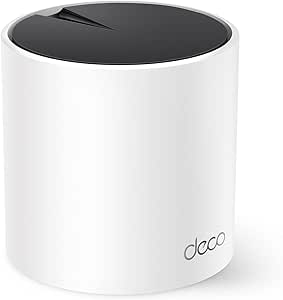 | Best Starter Node for Small Homes | WiFi Standard: WiFi 6 (AX3000) | Coverage: Up to 2,500 sq ft | Units Included: 1 | VIEW LATEST PRICE | See Our Full Breakdown |
| TP-Link Deco X15 Dual-Band AX1500 WiFi 6 Mesh Wi-Fi System (3-Pack) |  | Best Value for Whole-Home Coverage | WiFi Standard: WiFi 6 (AX1500) | Bands: Dual-band | Max Speed: 1,201 Mbps (5 GHz) / 300 Mbps (2.4 GHz) | VIEW LATEST PRICE | See Our Full Breakdown |
| TP-Link AX3000 WiFi 6 Dual-Band Range Extender with Gigabit Port |  | Best Plug-In Fix for One Dead Zone | WiFi Standard: WiFi 6 (802.11ax) | Bands: Dual-band | Max Speed: 2,404 Mbps (5 GHz) / 574 Mbps (2.4 GHz) | VIEW LATEST PRICE | See Our Full Breakdown |
| TP-Link Deco X55 AX3000 WiFi 6 Mesh System (2-Pack) |  | Best Overall for Most Homes | WiFi Standard: WiFi 6 (AX3000) | Coverage: Up to 4,500 sq ft | Units Included: 2 | VIEW LATEST PRICE | See Our Full Breakdown |
| wireless mesh network extender | Coverage | Wi-Fi Standard | Security |
|---|---|---|---|
| TP-Link Deco S4 Mesh AC1900 Wi | Up to 5,500 sq ft | AC1900 (Wi-Fi 5) | — |
| TP-Link RE615X AX1800 WiFi 6 R | — | Wi-Fi 6 (AX1800) | — |
| TP-Link RE515X AX1500 WiFi 6 R | Up to 1,800 sq ft | Wi-Fi 6 (AX1500) | — |
| TP-Link Deco X55 AX3000 WiFi 6 | 6,500 sq ft | Wi-Fi 6 (AX3000) | TP-Link HomeShield |
| Deco 7 Dual-Band WiFi 7 Mesh S | Up to 6,600 sq ft | Wi-Fi 7, 4 streams | TP-Link HomeShield (basic tier) |
| TP-Link Deco X55 AX3000 WiFi 6 | Up to 2,500 sq ft | — | TP-Link HomeShield |
| TP-Link Deco X15 Dual-Band AX1 | Up to 5,600 sq ft | — | TP-Link HomeShield |
| TP-Link AX3000 WiFi 6 Dual-Ban | — | — | — |
| TP-Link Deco X55 AX3000 WiFi 6 | Up to 4,500 sq ft | — | TP-Link HomeShield |
More Details on Our Top Picks
TP-Link Deco S4 Mesh AC1900 WiFi System (3-Pack)
True mesh performance at a budget price is what separates the Deco S4 from single-unit extenders like the RE615X. Because it’s a genuine three-node mesh system rather than a plug-in repeater, you get seamless roaming — your phone switches nodes automatically instead of dropping and reconnecting to a second network name. Coverage of up to 5,500 sq ft and support for 100 devices means it handles a full family household without breaking a sweat.
The tradeoff is aging Wi-Fi 5 hardware. Compared with the Deco X55’s Wi-Fi 6 radios, the S4 will feel slower in dense device environments, and the 2 Gigabit ports per unit are fewer. Still, for shoppers who want whole-home coverage without paying a Wi-Fi 6 premium, this pick makes the most sense for stretching a dollar.
Pros:- True mesh system with seamless roaming across three units
- Up to 5,500 sq ft of coverage for the price of many single extenders
- Wired Ethernet backhaul support improves node-to-node speeds
- Parental controls and app-based setup included at no extra cost
Cons:- Wi-Fi 5 standard lags behind the Wi-Fi 6 Deco X55 for crowded networks
- No advanced security suite beyond basic parental controls
- Requires a separate modem for most providers
Best for: Budget-conscious households in larger homes who want true mesh roaming without paying Wi-Fi 6 prices
Not ideal for: Homes with gigabit internet plans or heavy smart-home loads — Wi-Fi 5 radios and the 100-device ceiling will bottleneck performance
- Wi-Fi Standard:AC1900 (Wi-Fi 5)
- Mesh Technology:Deco Mesh with seamless roaming
- Coverage:Up to 5,500 sq ft
- Number of Units:3
- Ethernet:2 Gigabit ports per unit (6 total)
- Wired Backhaul:Yes
- Devices Supported:Up to 100
- Setup:Deco app (Android/iOS)
Our verdict“The most sensible entry point for buyers who want real whole-home mesh coverage on a tight budget.”
TP-Link RE615X AX1800 WiFi 6 Range Extender with Ethernet Port
Not everyone needs a three-unit mesh system — and that’s exactly where the RE615X earns its spot. If your problem is one stubborn dead zone rather than whole-house coverage, this plug-in extender costs far less than a Deco S4 three-pack while still bringing Wi-Fi 6 to the party. Its 574 Mbps on the 2.4 GHz band actually beats the RE515X’s 300 Mbps, which matters for smart-home devices stuck on the slower band.
The catch is inherent to the category: it extends coverage, not bandwidth, and it won’t join a Deco mesh network. Buyers who later want seamless roaming will have to start over. But for a quick, app-guided fix to a single weak spot — with a Gigabit Ethernet port for a wired device like a smart TV — this model is better suited than any full mesh kit.
Pros:- Wi-Fi 6 support at a much lower price than any mesh kit here
- Strong 574 Mbps 2.4 GHz band for smart-home and IoT devices
- Gigabit Ethernet port for wiring a TV, console, or desktop
- EasyMesh compatibility works with routers from other brands
Cons:- Not compatible with Deco mesh networks — no seamless roaming
- Only extends coverage; it cannot increase your actual internet speed
- No 6 GHz band for future Wi-Fi 6E/7 devices
Best for: Renters or apartment dwellers fixing one dead zone who want Wi-Fi 6 speeds without buying a full mesh system
Not ideal for: Owners of TP-Link Deco systems — it won’t integrate with their mesh, creating a second network name instead
- Wi-Fi Standard:Wi-Fi 6 (AX1800)
- Bands:Dual-band 2.4 GHz and 5 GHz
- Maximum Speed:1201 Mbps (5 GHz), 574 Mbps (2.4 GHz)
- Ethernet:1 Gigabit port
- Antennas:2 high-gain directional with beamforming
- Mesh Compatibility:EasyMesh (not Deco-compatible)
- Setup:TP-Link Tether app
Our verdict“The right call when one room needs help and a full mesh system would be overkill.”
TP-Link RE515X AX1500 WiFi 6 Range Extender with Ethernet Port
The RE515X plays a narrower role than its sibling, the RE615X. Both are Wi-Fi 6 plug-in extenders with Gigabit Ethernet ports and EasyMesh compatibility, but the RE515X’s weaker 300 Mbps 2.4 GHz band positions it as the cheapest credible option for a single room — a home office or bedroom where the signal barely reaches. If your dead zone only hosts a laptop and a streaming stick, paying more for the RE615X’s stronger 2.4 GHz performance is money spent on capacity you won’t use.
Its limits are real, though. Like all extenders here, it boosts coverage rather than raw speed, and mesh functionality only activates with a compatible router. Compared with the Deco X55’s whole-home approach, it’s a bandage rather than a rebuild — but sometimes a bandage is all you need.
Pros:- Lowest-cost Wi-Fi 6 coverage boost in this lineup
- Gigabit Ethernet port for a reliable wired connection in a weak-signal room
- Fast setup through the Tether app in minutes
- Works with routers from most brands, not just TP-Link
Cons:- Weak 300 Mbps 2.4 GHz band trails the RE615X noticeably for IoT devices
- Mesh mode requires a compatible EasyMesh router to function
- Coverage tops out around 1,800 sq ft — a fraction of any Deco kit
Best for: Buyers on the tightest budget who need to strengthen Wi-Fi in one specific room or office
Not ideal for: Large multi-story homes — a single extender can’t replicate the roaming coverage of even the entry-level Deco S4
- Wi-Fi Standard:Wi-Fi 6 (AX1500)
- Bands:Dual-band 2.4 GHz and 5 GHz
- Maximum Speed:1201 Mbps (5 GHz), 300 Mbps (2.4 GHz)
- Coverage:Up to 1,800 sq ft
- Ethernet:1 Gigabit port
- Antennas:2 high-gain directional with beamforming
- Setup:TP-Link Tether app
Our verdict“A targeted, inexpensive patch for one weak room rather than a whole-home solution.”
TP-Link Deco X55 AX3000 WiFi 6 Mesh System (3-Pack)
This is the pick I’d point most buyers toward, because it hits the best balance of speed, capacity, and price in the lineup. The AX3000 radios roughly double the throughput of the Deco S4, and the jump to 150 supported devices makes it genuinely future-proof for smart-home-heavy households. Coverage of 6,500 sq ft from three units edges out both the S4 and the Deco 7 for most practical layouts.
Where it concedes ground is at the extremes. The Deco 7’s Wi-Fi 7 radios and 2.5G Ethernet backhaul outclass it for multi-gig internet plans, and the HomeShield security suite’s best features sit behind a subscription — a recurring cost the sticker price hides. But for anyone on a typical 300 Mbps to 1 Gbps connection, spending more buys capability most homes can’t exploit.
Pros:- AX3000 Wi-Fi 6 speeds roughly double the budget Deco S4
- Supports 150 devices — headroom for serious smart-home setups
- 6,500 sq ft of coverage with 6 Gigabit Ethernet ports total
- HomeShield security and intuitive Deco app management included
Cons:- Advanced HomeShield features require a paid subscription
- Standard Gigabit ports limit wired backhaul speed versus the Deco 7’s 2.5G option
- Requires a separate modem for most internet providers
Best for: Families in large homes with many connected devices who want fast, reliable mesh without overspending
Not ideal for: Households with multi-gig internet plans — the lack of a 2.5G backhaul port means the Deco 7 is the better fit
- Wi-Fi Standard:Wi-Fi 6 (AX3000)
- Coverage:6,500 sq ft
- Number of Units:3
- Devices Supported:Up to 150
- Ethernet:3 Gigabit ports per unit (6 total)
- Security:TP-Link HomeShield
- Mesh System:Yes, with seamless roaming
Our verdict“The all-around sweet spot for large households that need speed and capacity today without paying for Wi-Fi 7 they can’t use yet.”
Deco 7 Dual-Band WiFi 7 Mesh System with 4 Streams and 5 Gbps Speed
Sitting at the top of the stack, the Deco 7 justifies its premium with hardware nothing else here matches. Wi-Fi 7 with 4 streams, a 2.5G Ethernet backhaul option, and 5 Gbps of total wireless throughput make it the only pick built for multi-gig fiber — the Deco X55’s Gigabit ports become the bottleneck the moment your internet plan exceeds 1 Gbps. Backward compatibility means older devices still connect without fuss.
Be honest about whether you need it, though. On a typical 500 Mbps connection, this system performs nearly identically to the X55 while costing considerably more, and the best HomeShield security features and advanced controls sit behind subscriptions. Achieving full coverage may also demand careful backhaul placement or extra units. This pick makes the most sense for enthusiasts building a network to last five-plus years.
Pros:- Wi-Fi 7 with 4 streams for the fastest throughput in this roundup
- 2.5G Ethernet backhaul supports multi-gig internet and wired node links
- 6,600 sq ft coverage with support for over 150 devices
- Backward compatible with every previous Wi-Fi generation
Cons:- Substantially more expensive than the equally capable (for most homes) Deco X55
- Advanced security and management features require subscription payments
- Optimal backhaul performance may demand careful placement or additional units
Best for: Early adopters and multi-gig fiber subscribers who want a network that stays current for years
Not ideal for: Households on sub-gigabit internet plans — the premium buys speed they physically cannot use
- Wi-Fi Standard:Wi-Fi 7, 4 streams
- Total Speed:5 Gbps (4324 Mbps 5 GHz, 688 Mbps 2.4 GHz)
- Coverage:Up to 6,600 sq ft
- Devices Supported:Over 150
- Backhaul:Wi-Fi 7 or 2.5G Ethernet
- Security:TP-Link HomeShield (basic tier)
- VPN Support:Yes
- Compatibility:All Wi-Fi generations
Our verdict“The buy-once choice for multi-gig households that refuse to upgrade again in five years.”
TP-Link Deco X55 AX3000 WiFi 6 Mesh System (1-Pack)
Buying a single Deco X55 node is the smartest way to dip a toe into mesh networking without paying for coverage you don’t need. At AX3000 speeds with three gigabit ports on the unit, it works as a standalone WiFi 6 router for apartments or homes up to roughly 2,500 sq ft, and it can be expanded later by adding nodes — which is exactly why this makes sense over the TP-Link AX3000 range extender, which only repeats an existing signal rather than replacing your router. The tradeoff is straightforward: if your home is larger than 2,000 sq ft, the Deco X55 2-Pack delivers far better value per square foot. Setup through the Deco app and HomeShield security come standard across the Deco line, so you’re not sacrificing features by starting small.
Pros:- Full AX3000 WiFi 6 speeds that outperform most budget routers
- Three gigabit Ethernet ports per unit for wired backhaul or devices
- Expandable mesh — add Deco nodes later without replacing anything
- HomeShield security and simple Deco app management included
Cons:- Single unit covers only 2,500 sq ft, so larger homes need additional nodes
- Requires a separate modem for most internet providers
Best for: Apartment dwellers and small-home owners who want to replace an aging router with a mesh-ready system they can expand later
Not ideal for: Multi-story homes over 2,500 sq ft — a single node will leave dead zones, and adding nodes piecemeal costs more than a multi-pack
- WiFi Standard:WiFi 6 (AX3000)
- Coverage:Up to 2,500 sq ft
- Units Included:1
- Ethernet Ports:3 per unit
- Mesh Expandable:Yes
- Security:TP-Link HomeShield
Our verdict“This is the right pick if you want one solid mesh-capable router now and the option to grow your network node by node.”
TP-Link Deco X15 Dual-Band AX1500 WiFi 6 Mesh Wi-Fi System (3-Pack)
Three nodes for a lower price than most AX3000 multi-packs makes the Deco X15 the coverage-per-dollar winner in this lineup. Covering up to 5,600 sq ft and handling 120 simultaneous devices, it beats the similarly sized Deco X55 2-Pack on raw footprint while costing less. The catch is speed: AX1500 is roughly half the throughput of the X55’s AX3000, so each node is slower and the dual-band design forces wireless backhaul to share bandwidth with devices. Compared with the plug-in extender approach of the RE615X, though, the X15 still wins — dedicated mesh nodes hand off devices more smoothly than any repeater. Homes with gigabit internet will feel the ceiling; homes with plans under 500 Mbps likely won’t notice at all.
Pros:- Three-node coverage up to 5,600 sq ft at an aggressive price
- Supports up to 120 connected devices for smart-home-heavy households
- AI-driven mesh optimizes node placement and routing over time
- Works with Alexa and Google Assistant for voice control
Cons:- AX1500 speeds are roughly half the X55’s AX3000, capping fast connections
- Only 2 Ethernet ports per unit limits wired backhaul and device options
- Dual-band design shares backhaul bandwidth when nodes are wireless
Best for: Owners of large single- or two-story homes with internet plans under 500 Mbps who prioritize coverage over raw speed
Not ideal for: Gigabit-fiber households — the AX1500 radios will bottleneck speeds well below what you’re paying for
- WiFi Standard:WiFi 6 (AX1500)
- Bands:Dual-band
- Max Speed:1,201 Mbps (5 GHz) / 300 Mbps (2.4 GHz)
- Coverage:Up to 5,600 sq ft
- Units Included:3
- Ethernet Ports:2 Gigabit per unit (6 total)
- Device Support:Up to 120 devices
- Security:TP-Link HomeShield
Our verdict“The X15 trades speed for square footage and wins — grab it if blanketing a big house matters more than topping out speed tests.”
TP-Link AX3000 WiFi 6 Dual-Band Range Extender with Gigabit Port
When your existing router is fine but one corner of the house isn’t, this plug-in extender is the cheapest path to a fix — no replacing hardware you already own. Unlike the Deco X15 3-Pack, which rebuilds your whole network, the AX3000 extender just amplifies what’s already there, matching the AX3000 speeds of the Deco X55 line on paper. Reality check: extenders repeat signal, so expect roughly half the speed at the extended edge. Its EasyMesh and OneMesh compatibility lets it form a proper mesh with matching TP-Link routers, but — and this is the key limitation — it won’t mesh with Deco units, so existing Deco owners should skip it and buy another node instead. The gigabit port and two directional antennas make it genuinely useful for a wired device in a far room.
Pros:- Cheapest way to extend coverage without replacing your router
- EasyMesh/OneMesh support creates true roaming with compatible TP-Link routers
- Gigabit Ethernet port lets you wire a smart TV or console at the far end
- Two high-gain directional antennas focus signal where it’s needed
Cons:- Halves wireless speeds at the extended edge — it repeats, it doesn’t boost
- Incompatible with Deco mesh systems, limiting expansion options
- Performance drops considerably through walls and floors
Best for: Renters or budget-conscious users with a healthy router and exactly one or two stubborn dead zones
Not ideal for: Existing Deco owners — it’s incompatible with Deco mesh systems, so adding a Deco node is the better fix
- WiFi Standard:WiFi 6 (802.11ax)
- Bands:Dual-band
- Max Speed:2,404 Mbps (5 GHz) / 574 Mbps (2.4 GHz)
- Ethernet Port:1 Gigabit
- Antennas:2 high-gain directional
- Mesh Compatibility:OneMesh and EasyMesh (not Deco)
Our verdict“A targeted bandage for a single dead zone — buy it if you love your router, skip it if you’re building a full mesh.”
TP-Link Deco X55 AX3000 WiFi 6 Mesh System (2-Pack)
This is the configuration most buyers should land on: full AX3000 speeds across 4,500 sq ft, three gigabit ports per node, and a 150-device ceiling that comfortably absorbs a modern smart home. Compared with the Deco X15 3-Pack, the 2-Pack trades one node for double the per-node throughput — a smart exchange for typical 2,000–4,000 sq ft homes where speed at range matters more than a third node in a closet. Against the single-unit X55, the second node is what actually eliminates the dead zone that made you shop for mesh in the first place, and wired Ethernet backhaul between the two units keeps speeds near-full even at the far end. The only real frustration is that HomeShield’s better security features sit behind a subscription, and there’s no built-in modem, so you’ll keep your existing one.
Pros:- Full AX3000 throughput on both nodes, double the X15’s speed
- 6 total gigabit ports enable wired backhaul for near-lossless mesh performance
- Handles up to 150 devices without choking
- AI-driven mesh plus simple Deco app setup and management
Cons:- Best security features require a paid HomeShield subscription
- No built-in modem — a separate one is required
- Homes over 4,500 sq ft will need a third node, eroding the value
Best for: Families in 2,500–4,500 sq ft homes with multiple simultaneous streamers, gamers, and smart devices who want speed and coverage balanced
Not ideal for: Homes larger than 4,500 sq ft or anyone wanting an all-in-one modem/router — add a third node or look elsewhere
- WiFi Standard:WiFi 6 (AX3000)
- Coverage:Up to 4,500 sq ft
- Units Included:2
- Device Capacity:Up to 150 devices
- Ethernet Ports:3 per unit (6 total)
- Mesh Technology:AI-Driven Mesh
- Security:TP-Link HomeShield
Our verdict“For most households, this two-node setup hits the sweet spot of speed, coverage, and price — it’s the default recommendation unless your home is unusually large or small.”

How We Picked
I ranked these nine products by asking what actually determines satisfaction with a wireless mesh network extender: real-world throughput, coverage per node, backhaul quality, and how gracefully the system grows. True mesh systems scored higher than single extenders because they deliver seamless roaming — one network name across the whole house — while extenders split your network and sacrifice speed at every hop. Within the mesh category, I weighed WiFi generation (6 versus legacy AC), Ethernet port speed (gigabit versus 100 Mbps), and cost per square foot of coverage.
Pack configuration also shaped the ranking. The same hardware sold as a 1-pack, 2-pack, or 3-pack serves very different buyers, so I treated those as distinct picks rather than duplicates and matched each to a home size and budget. Finally, I penalized models whose specs promise more than typical homes can use — a key reason the mid-range Deco X55 outranked both the budget floor and the WiFi 7 flagship for most readers.
| wireless mesh network extender | Wi-Fi Standard | Security |
|---|---|---|
| TP-Link Deco S4 Mesh AC1900 Wi | AC1900 (Wi-Fi 5) | — |
| TP-Link RE615X AX1800 WiFi 6 R | Wi-Fi 6 (AX1800) | — |
| TP-Link RE515X AX1500 WiFi 6 R | Wi-Fi 6 (AX1500) | — |
| TP-Link Deco X55 AX3000 WiFi 6 | Wi-Fi 6 (AX3000) | TP-Link HomeShield |
| Deco 7 Dual-Band WiFi 7 Mesh S | Wi-Fi 7, 4 streams | TP-Link HomeShield (basic tier) |
| TP-Link Deco X55 AX3000 WiFi 6 | — | TP-Link HomeShield |
| TP-Link Deco X15 Dual-Band AX1 | — | TP-Link HomeShield |
| TP-Link AX3000 WiFi 6 Dual-Ban | — | — |
| TP-Link Deco X55 AX3000 WiFi 6 | — | TP-Link HomeShield |
Factors to Consider When Choosing Wireless Mesh Network Extenders
Choosing between these nine options comes down to a handful of decisions that have nothing to do with spec sheets. Before you buy, work through the factors below — they will narrow the field faster than any comparison chart.Mesh System or Single Extender?
This is the single biggest fork in the road, and many buyers get it wrong. A single-node extender like the RE615X rebroadcasts your existing router’s signal, which works for one weak room but creates a second network name (or a clunky band-steering setup) and can cut speeds by half. A true mesh system replaces or wraps around your router, giving every device one seamless network as you move through the house. The common mistake is buying an extender for a whole-home problem — you end up chaining two or three extenders and managing a patchwork of networks. If more than one area of your home struggles, a mesh system is almost always the better purchase.
Match Pack Size to Square Footage, Not Ambition
Manufacturers quote optimistic coverage figures — often assuming open floor plans and ideal node placement. In practice, plan on roughly 1,500 to 2,000 square feet of realistic coverage per mesh node once walls, floors, and appliances absorb signal. A 3,000-square-foot two-story home usually needs a 3-pack placed strategically, while a 1,200-square-foot apartment is over-served by anything more than a single node. The smart move with expandable systems like the Deco X55 is starting with a 1-pack or 2-pack and adding nodes only if measured speeds disappoint. Overbuying upfront is the most common wasted dollar in this category.
WiFi 6, WiFi 5, or WiFi 7 — What Your Plan Actually Needs
The WiFi generation matters less than your internet plan and your devices. AX1500-class hardware suits plans up to a few hundred megabits; AX3000 models like the Deco X55 make sense for gigabit plans or households with 20-plus connected devices. WiFi 7 (the Deco 7) currently benefits almost nobody — few phones and laptops support it, and its 5 Gbps ceiling exceeds nearly every residential internet plan. Where newer standards genuinely help is device efficiency: WiFi 6 handles crowded airwaves better in apartments and dense neighborhoods, even at modest speeds. Buy one generation ahead of your needs at most; two generations ahead is paying for marketing.
Ethernet Backhaul: The Spec Everyone Ignores
Every Deco and extender in this lineup includes Ethernet ports, and using them changes everything. A wired connection between nodes (called backhaul) dedicates the wireless radios entirely to your devices instead of splitting them between rebroadcasting and serving, which typically restores near-full speed at distant nodes. Even one Ethernet run to a far node can double its performance. The mistake to avoid: buying gigabit-capable units like the X55 and then running them purely wireless when your home has existing Ethernet or coax you could use. If your home is pre-wired, prioritize models with multiple gigabit ports — it is cheaper than any speed-tier upgrade.
Total Cost of Ownership and Ecosystem Lock-In
The sticker price is only part of the math. Some features on TP-Link hardware sit behind optional subscription tiers for things like advanced parental controls and security, so decide whether the free feature set covers your needs before assuming the shelf price is the whole cost. Ecosystem lock-in is another factor: once you buy into Deco, adding nodes from other brands later is difficult, so your second and third purchases are effectively decided by your first. This is another argument for the start-small approach — a 1-pack commitment lets you evaluate the app, controls, and performance before going all-in on a 3-pack ecosystem.
Placement and Setup Realities
Even the best mesh system fails when nodes are placed poorly. Nodes need to sit where they still receive a strong signal from the main unit — usually halfway between your router and the dead zone, not inside it. The classic error is tucking a node in a basement corner and expecting it to serve the second floor. All the Deco models here include app-guided placement hints that show signal quality between nodes; use them during setup rather than guessing. Also account for the 2.4 GHz versus 5 GHz reality: distant smart-home devices will ride the slower band no matter how fast your hardware is, so position nodes with your cameras and thermostats in mind, not just your laptop.
Frequently Asked Questions
Can I mix the TP-Link Deco X55 1-pack with a 2-pack I buy later?
Yes, and that is one of the strongest arguments for the X55 family. Deco units of the same model form a single mesh network regardless of how they were originally packaged, so a 1-pack plus a 2-pack behaves identically to a factory 3-pack. The one caveat is placement logic: each added node should sit within strong signal range of another node, so adding a third unit to cover a detached garage only works if an intermediate node bridges the gap. Buying the smaller pack first also lets you confirm the app and feature set suit you before committing more money to the ecosystem. Just avoid mixing different Deco models in the same network, as that can limit features and complicate firmware behavior.
Is a WiFi 6 range extender like the RE615X a cheaper alternative to a full mesh system?
It can be, but only for a very specific problem: one weak room near your existing router. The RE615X costs far less than a 3-pack mesh system and its gigabit Ethernet port lets you wire a stationary device like a desktop or smart TV directly. The tradeoff is fundamental, though — an extender rebroadcasts rather than coordinates, so devices connecting through it lose roughly half their throughput, and roaming between the router and extender ranges can force awkward reconnections. If your complaint is buffering on one TV across the house, the extender is a sensible budget fix. If phones drop calls while walking between rooms, that is a mesh problem, and no extender solves it well.
Do I actually need the Deco 7 with WiFi 7, or is that overspending in 2026?
For most homes, it is overspending — but not for everyone. WiFi 7’s 5 Gbps ceiling only translates into real speed if your internet plan exceeds gigabit AND your devices include WiFi 7 support, which still applies to a minority of phones and laptops in 2026. Where it does earn its price: very dense device households, multi-gig internet subscribers, and buyers who want hardware to stay current for five or more years without upgrading. The subtler benefit is reduced latency for gaming and video calls, which WiFi 7 handles more gracefully even at moderate speeds. If none of those describe you, the Deco X55 delivers about 90% of the experience for considerably less money.
What is the difference between the Deco X15 and the Deco X55 if both are WiFi 6 mesh systems?
The difference is bandwidth class, and it maps directly to your internet plan. The X15 is AX1500-class, which roughly suits plans up to 300–500 Mbps and everyday browsing, streaming, and smart-home traffic. The X55 is AX3000-class with higher total throughput and better headroom, so gigabit-plan households and homes with 25-plus devices will notice the X15 becoming a bottleneck at peak times. There is also a backhaul consideration: the X55’s extra capacity means distant nodes hold their speed better when nodes communicate wirelessly. If your plan is modest and your budget is tight, the X15 is a legitimate value pick — it is slower, not bad. The mistake would be pairing an X15 with gigabit internet and wondering why speed tests never hit what you pay for.
Is the older Deco S4 still worth buying, or is it obsolete?
It depends on your wireless environment more than its age. The S4 uses WiFi 5 (AC1900), which still comfortably handles typical streaming, browsing, and video calls on most internet plans, and its 3-pack pricing undercuts every WiFi 6 option here. Where it shows its age is efficiency: WiFi 6’s ability to manage many simultaneous devices means the S4 suffers more in apartments and neighborhoods crowded with competing networks, and it lacks the AX-band efficiency that smart homes with dozens of gadgets benefit from. If you live in a detached house with a sub-300 Mbps plan and want maximum coverage per dollar, the S4 is still a smart buy. In a dense apartment building, spending up to WiFi 6 will feel like a bigger upgrade than the speed numbers suggest.
Conclusion
The right pick here depends less on specs and more on your home and habits. For most buyers, the Deco X55 (3-Pack) is the best overall choice — gigabit Ethernet backhaul, AX3000 speeds, and coverage for large homes at a mid-range price. The Deco S4 (3-Pack) takes best value for budget-conscious households with modest internet plans, while the Deco 7 earns best premium for multi-gig subscribers and buyers planning to keep hardware for years. Best for beginners goes to the Deco X15 (3-Pack): simple app setup, forgiving performance, and a low price make it an easy first mesh system. For specific needs, the Deco X55 1-pack is the smart expandable starter for small homes, the 2-pack suits mid-size two-bedrooms, and the RE615X or RE515X extenders are the right call when you only need to fix one weak room or wire a single device cheaply. Whatever you choose, buy for the home you have, place nodes thoughtfully, and let the mesh grow with you.
Halloween Picks
halloween
As an affiliate, we earn on qualifying purchases.