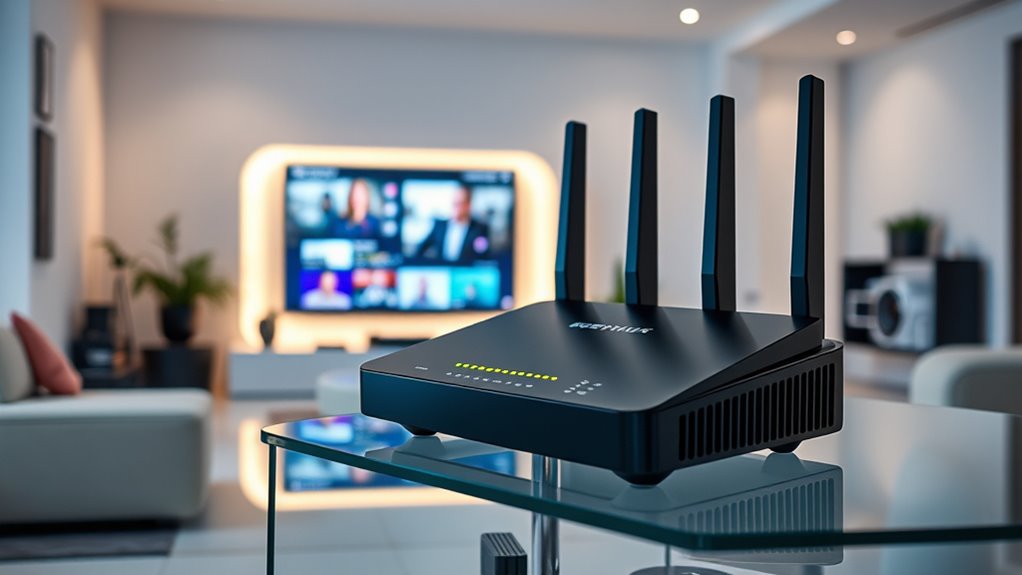

For anyone seeking reliable, high-speed internet, a highspeed modem router combo simplifies setup and reduces clutter. The Motorola MG8702 stands out as the best overall choice, offering DOCSIS 3.1 compatibility and strong Wi-Fi coverage. The NETGEAR Nighthawk CAX30 impresses with WiFi 6 support for future-proofing, while the ARRIS Surfboard G54 delivers multi-gig speeds with Wi-Fi 7, ideal for heavy users. However, tradeoffs include price, compatibility, and future readiness. Continue reading for a full breakdown of these options and how to choose the best fit for your needs.

Get business pricing on networking and server gear
- Business-only prices and quantity discounts
- Tax-exempt purchasing
- Multiple users, one account, clear invoices
Key Takeaways
- DOCSIS 3.1 models generally provide faster, more future-proof internet, but at a higher cost.
- Wi-Fi 6 and Wi-Fi 7 support are key for maximizing network efficiency and accommodating multiple devices.
- Compatibility with major cable providers varies; checking provider support is essential before buying.
- The best value combines solid performance with affordability, often found in models with Wi-Fi 5 or 6.
- Ease of setup and user interface can significantly impact satisfaction, especially for non-technical users.


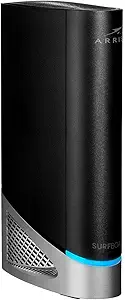

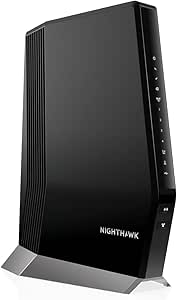


| highspeed modem router combo | Ethernet Ports | Compatibility |
|---|---|---|
| Motorola MG8702 DOCSIS 3.1 Cab | — | — |
| NETGEAR Nighthawk CAX30 Modem | 4 Gigabit | Xfinity, Spectrum, Cox |
| NETGEAR Nighthawk Cable Modem | — | Xfinity, Cox |
| ARRIS Surfboard G20 DOCSIS 3.1 | — | — |
| ARRIS Surfboard G34 DOCSIS 3.1 | 4 | Cox, Xfinity, Spectrum |
| ARRIS Surfboard G54 DOCSIS 3.1 | 4 x 1-Gigabit, 1 x 10-Gigabit | — |
| Motorola MG7550 Modem Wi-Fi Ro | 4 Gigabit | Xfinity, Cox, Charter Spectrum, and others |
| NETGEAR Nighthawk Cable Modem | 4 x 1 Gig, 1 x 2.5 Multi-gig LAN | Xfinity, Spectrum, Cox |
| NETGEAR Nighthawk Cable Modem | 4 Gigabit LAN | — |
| NETGEAR Nighthawk Modem Router | 4 x 1 Gigabit | Xfinity, Spectrum, Cox |
| NETGEAR Nighthawk Cable Modem | 4 Gigabit LAN, 1 2.5G Multi-Gig port | Xfinity, Spectrum, Cox; Plans up to 10 Gbps |
More Details on Our Top Picks
Motorola MG8702 DOCSIS 3.1 Cable Modem + Wi-Fi Router (AC3200) High Speed Combo
The Motorola MG8702 stands out for combining a high-speed DOCSIS 3.1 cable modem with a robust AC3200 Wi-Fi router, making it a versatile choice for those seeking both speed and reliability. Compared with the ARRIS G20 or G34, it offers similar gigabit-level performance but with a more user-friendly app for setup and management. While its bulky design may be a concern for tight spaces, its compatibility with major cable providers like Xfinity, Cox, and Spectrum ensures wide usability. The device’s advanced Wi-Fi features like Beamforming improve coverage, but it doesn’t include Wi-Fi 6, limiting future wireless upgrades. This pick suits users who prioritize a reliable, high-speed connection and don’t mind a larger device for a long-term investment.
Pros:- Supports DOCSIS 3.1 for future-proof internet speeds
- Built-in AC3200 Wi-Fi with Beamforming for broad coverage
- Mobile app controls for easy setup and security
- Compatible with major cable providers
Cons:- Bulky design may not fit in tight spaces
- Limited to specific cable providers, not universal
Best for: Tech-savvy households needing a future-proof, high-speed cable modem/router combo with easy management.
Not ideal for: Small apartments or spaces where bulky hardware could be a problem, or users on ISPs not supported by this model.
- Brand:Motorola
- Model Number:MG8702
- Modem Type:Cable
- Wi-Fi Speed:AC3200
- Supported Providers:Xfinity, Cox, Spectrum
- Weight:2.2 pounds
- Warranty:2 years
Our verdict“This modem-router combo is best suited for users who want high speed and advanced Wi-Fi features in a reliable, future-ready device.”
NETGEAR Nighthawk CAX30 Modem Router Combo, DOCSIS 3.1, WiFi 6, AX2700, 2.7 Gbps, Compatible with Xfinity, Spectrum, Cox
The NETGEAR Nighthawk CAX30 excels by blending DOCSIS 3.1 technology with WiFi 6, making it ideal for homes with many connected devices. Compared with the ARRIS G20, it offers faster wireless throughput (up to 2.7 Gbps) and better device management via the Nighthawk app. Its four Gigabit Ethernet ports provide wired flexibility, but it’s not compatible with Verizon or AT&T, limiting its reach for some users. Activation with ISPs can be a hurdle, and some security features require a subscription after a trial period. This device makes the most sense for busy households seeking seamless, high-speed Wi-Fi across multiple devices without separate equipment.
Pros:- Supports WiFi 6 for faster, more efficient wireless connections
- Combines modem and router in a single device for convenience
- Four Ethernet ports for wired devices
- Compatible with major cable providers like Xfinity, Spectrum, and Cox
Cons:- Not compatible with Verizon, AT&T, or CenturyLink
- Requires ISP activation and potentially a subscription for security features
Best for: Large families or remote workers needing reliable WiFi 6 performance and multiple wired connections.
Not ideal for: Users with ISPs outside Xfinity, Spectrum, or Cox, or those seeking a device without subscription-based security features.
- Model:CAX30
- Technology:DOCSIS 3.1
- WiFi Standard:WiFi 6 (AX2700)
- Max Speed:2.7 Gbps
- Coverage:Up to 2,000 sq ft
- Ethernet Ports:4 Gigabit
- Compatibility:Xfinity, Spectrum, Cox
Our verdict“This model is ideal for households prioritizing the latest WiFi standard and multiple wired connections in a single device.”
NETGEAR Nighthawk Cable Modem and WiFi 5 Router Combo (C7000) – AC1900, DOCSIS 3.0, Compatible with Major Cable Providers
The NETGEAR Nighthawk C7000 offers a solid balance of performance and affordability by combining DOCSIS 3.0 modem with WiFi 5 technology. Compared with newer WiFi 6 models like the CAX30 or G20, it provides less future-proof wireless speeds but remains effective for plans up to 800Mbps. Its coverage of around 1800 sq ft and support for up to 30 devices make it suitable for smaller households with moderate connectivity needs. However, it’s incompatible with fiber or DSL providers and may require a new purchase if your internet speed exceeds 800Mbps. It’s a good choice for users on a budget who want to avoid rental fees for basic cable plans but are okay with slightly outdated wireless tech.
Pros:- Affordable price point for basic internet needs
- Combines modem and router in one device, saving space
- Supports cable plans up to 800Mbps with reliable WiFi performance
- Supports up to 30 devices
Cons:- Limited to DOCSIS 3.0, not future-proof for gigabit plans
- Incompatible with fiber or DSL providers
Best for: Small households or apartments on cable plans up to 800Mbps seeking an affordable, reliable combo with basic WiFi performance.
Not ideal for: Power users with gigabit plans or those needing WiFi 6 support, or users with fiber or DSL providers.
- Model:C7000
- Compatibility:Xfinity, Cox
- Max Cable Speed:800Mbps
- WiFi Speed:AC1900 (up to 1900 Mbps)
- Coverage:1800 sq ft
- Device Connections:30
Our verdict“This combo makes the most sense for budget-conscious users with moderate internet plans and smaller living spaces.”
ARRIS Surfboard G20 DOCSIS 3.1 Cable Modem & Wi-Fi 6 Router | AX3000
The ARRIS Surfboard G20 pairs a DOCSIS 3.1 modem with Wi-Fi 6, making it a strong choice for large households or those with gigabit internet plans. Its coverage of up to 2,500 sq ft and support of speeds up to 1 Gbps set it apart from models like the C7000 or MG8702, which lack Wi-Fi 6. While it supports multiple devices and enhances security, it’s limited to certain ISPs like Xfinity, Spectrum, and Cox. It’s ideal for tech-savvy users who want extensive coverage and high-speed Wi-Fi, but they should be prepared for some technical setup challenges.
Pros:- Supports gigabit internet plans with DOCSIS 3.1
- Includes Wi-Fi 6 for faster, more efficient wireless connections
- Coverage area up to 2,500 sq ft
- Enhanced security features
Cons:- Customer ratings are only moderate, indicating potential reliability issues
- Limited ISP compatibility
Best for: Large households needing gigabit speeds and Wi-Fi 6 coverage for a multitude of devices.
Not ideal for: Less technical users or those with ISPs outside Xfinity, Spectrum, or Cox, due to setup complexity.
- Modem Type:Cable
- Wi-Fi Standard:Wi-Fi 6 (AX3000)
- Max Download Speed:Up to 1 Gbps
- Coverage Area:Up to 2,500 sq ft
- Number of Ethernet Ports:2
- Supported ISPs:Xfinity, Spectrum, Cox
Our verdict“Best suited for tech-savvy households with large spaces and gigabit plans seeking Wi-Fi 6 performance.”
ARRIS Surfboard G34 DOCSIS 3.1 Cable Modem & Wi-Fi 6 Router | AX3000
The ARRIS Surfboard G34 delivers blazing-fast internet speeds up to 2.5 Gbps with DOCSIS 3.1 and Wi-Fi 6, making it the top choice for users with multi-gig plans. Its four Ethernet ports and support for extensive coverage up to 2,500 sq ft position it ahead of models like the G20 for ultra-fast wired and wireless connectivity. However, setup can be complex, and activation requires compatibility checks with your cable provider, mainly Cox, Xfinity, or Spectrum. It’s not compatible with fiber or satellite services, which limits its scope. This device makes the most sense for demanding users who need maximum speed, wired flexibility, and Wi-Fi 6 support in a modern, streamlined package.
Pros:- Supports internet speeds up to 2.5 Gbps
- Includes Wi-Fi 6 for optimal wireless performance
- Multiple Ethernet ports for wired devices
- Designed for large coverage areas
Cons:- Requires activation and compatibility checks with cable providers
- Higher price point compared to lower-speed models
Best for: Power users with multi-gig internet plans and large homes seeking maximum wired and wireless performance.
Not ideal for: Casual users or those with fiber or satellite services, due to incompatibility and high-cost nature.
- Technology:DOCSIS 3.1
- Wi-Fi Standard:Wi-Fi 6 (AX3000)
- Max Internet Speed:2.5 Gbps
- Wireless Performance:Up to 3 Gbps
- Ethernet Ports:4
- Compatibility:Cox, Xfinity, Spectrum
Our verdict“This model is ideal for ultra-fast multi-gig internet users needing extensive wired and wireless coverage in large homes.”
ARRIS Surfboard G54 DOCSIS 3.1 Multi-Gig Modem & Wi-Fi 7 Router
This model stands out for combining a DOCSIS 3.1 modem with Wi-Fi 7, delivering speeds up to 18 Gbps and covering large homes up to 5,000 sq ft. Compared with the NETGEAR CAX80, it supports higher speeds and more extensive coverage, making it ideal for large households or those planning for future upgrades. Its multiple Ethernet ports add wired flexibility, but the setup may be complex for less tech-savvy users. The price isn’t specified, which could be a consideration for budget-conscious buyers. This pick makes the most sense for users who demand maximum speed and coverage now and anticipate high data needs down the line.
Pros:- Supports internet speeds up to 18 Gbps with Wi-Fi 7 technology
- Large coverage area of 5,000 sq ft, ideal for big homes
- Multiple Ethernet ports for wired device connections
Cons:- Setup complexity might be daunting for non-technical users
- Price information not provided, which could impact budget planning
Best for: Large households or tech enthusiasts seeking maximum speed and coverage with future-proof technology
Not ideal for: Casual users with modest internet needs or small apartments, due to its complexity and likely higher cost
- Brand:ARRIS
- Model Number:G54
- Modem Type:Cable
- Supported Speed:up to 10 Gbps
- Wi-Fi Standard:Wi-Fi 7
- Coverage:5,000 sq ft
- Ethernet Ports:4 x 1-Gigabit, 1 x 10-Gigabit
- Weight:3.1 pounds
- Warranty:1 year
Our verdict“Best suited for users who want top-tier speed, coverage, and future-ready Wi-Fi 7 technology in a single device.”
Motorola MG7550 Modem Wi-Fi Router Combo with Power Boost, Approved by Comcast Xfinity, Cox, Charter Spectrum – AC1900 Wi-Fi Speed (16×4 DOCSIS 3.0) – Renewed
Compared with the NETGEAR C7000, the Motorola MG7550 offers a reliable, budget-friendly option that supports internet plans up to 375 Mbps with dual-band AC1900 Wi-Fi. Its integrated design simplifies setup, making it suitable for users who prefer an all-in-one solution without fuss. However, it’s limited to DOCSIS 3.0 and 16×4 channel bonding, which may fall short for future speed demands or very large households. The refurbished status can be a plus for savings but might concern those wary of minor cosmetic imperfections or shorter warranties. Still, for users who need dependable performance on a mid-tier plan, this model offers solid value without sacrificing essential features.
Pros:- Supports high-speed plans up to 375 Mbps
- Dual-band AC1900 Wi-Fi for better coverage and performance
- Easy to install with integrated design
Cons:- Limited to DOCSIS 3.0 and 16×4 channel bonding, restricting future speed upgrades
- Refurbished units may have minor cosmetic issues or shorter warranty
Best for: Small families or individuals with internet plans up to 375 Mbps seeking a straightforward, affordable combo
Not ideal for: Power users or households planning to upgrade to gigabit speeds, due to its limited DOCSIS 3.0 support
- Model:MG7550
- Type:Modem Wi-Fi Router Combo
- Cable Modem Speed:16×4 DOCSIS 3.0
- Wi-Fi Speed:AC1900
- Wireless Bands:2.4 GHz and 5 GHz
- Ethernet Ports:4 Gigabit
- Recommended Speed:up to 375 Mbps
- Certification:Certified Refurbished
- Compatibility:Xfinity, Cox, Charter Spectrum, and others
Our verdict“A practical choice for small households needing reliable internet at moderate speeds on a budget.”
NETGEAR Nighthawk Cable Modem with Built-in WiFi 6 Router (CAX80) – Compatible with Major Cable Providers
This pick excels for users who need blazing-fast speeds up to 6 Gbps and extensive device support, outpacing the NETGEAR C7000 and the ARRIS Surfboard G54 in network capacity. Its WiFi 6 standard ensures better speed, efficiency, and multiple device handling, making it perfect for streaming, gaming, or a smart home with many connected devices. Yet, its 90-day warranty and compatibility limits—excluding Verizon, AT&T, and DSL—may restrict some buyers. Installation via app can be straightforward but might pose a learning curve. For those who demand robust, future-ready wireless connectivity in a single device, this model provides a compelling balance of speed and capacity.
Pros:- Supports cable plans up to 6 Gbps for future-proofing
- WiFi 6 offers faster speeds and better device capacity
- Includes multiple Ethernet ports and USB for flexibility
Cons:- Limited to a 90-day warranty, which might concern some buyers
- Not compatible with Verizon, AT&T, or DSL services, restricting options
Best for: Large smart home users or tech-savvy households with high bandwidth needs and multiple devices
Not ideal for: Users on limited internet plans below 1 Gbps or with non-compatible cable providers
- Compatibility:Xfinity, Spectrum, Cox
- Modem Type:Cable
- WiFi Standard:WiFi 6 (AX6000)
- Max Speed:Up to 6Gbps
- Coverage:2,500 sq. ft.
- Ethernet Ports:4 x 1 Gig, 1 x 2.5 Multi-gig LAN
- USB Ports:1 x USB 3.0
- Channel Bonding:32×8
- Standards:DOCSIS 3.1
Our verdict“Ideal for users seeking top-tier speeds and extensive device support in a single, future-ready device.”
NETGEAR Nighthawk Cable Modem and WiFi 5 Router Combo (C7000)
This device hits a sweet spot for households with moderate internet needs, supporting cable plans up to 800 Mbps and WiFi 5 speeds up to 1.9 Gbps. In comparison to the CAX80, it offers a more affordable option suitable for streaming, gaming, and general browsing. The setup via the Nighthawk app is straightforward, and its wired connection capacity is solid with four Gigabit Ethernet ports. However, it lacks the latest WiFi 6 features and doesn’t support gigabit plans, limiting future speed upgrades. Its compatibility is broad with major providers, but the device isn’t suitable for those seeking the highest speeds or planning to upgrade to fiber or gigabit internet. Still, for mid-tier plans, it balances affordability and performance well.
Pros:- Supports cable plans up to 800 Mbps
- Easy to set up and manage via the Nighthawk app
- Includes four Gigabit Ethernet ports for wired devices
Cons:- Does not support WiFi 6, limiting future speed and device capacity
- Not compatible with fiber, DSL, or satellite internet
Best for: Mid-range internet users who prioritize reliable WiFi 5 speeds for streaming and gaming
Not ideal for: Gigabit broadband subscribers or smart home setups with many devices demanding WiFi 6
- Model:C7000
- WiFi Standard:WiFi 5 (802.11ac)
- Max Speed:1.9Gbps
- Cable Compatibility:Xfinity, Cox
- Supported Plans:Up to 800Mbps
- Ethernet Ports:4 Gigabit LAN
- USB Ports:1 USB 2.0
- Security:WPA/WPA2, Firewall, NETGEAR Armor trial
Our verdict“A dependable, mid-range combo suitable for households on moderate plans seeking straightforward setup and reliable WiFi 5 performance.”
NETGEAR Nighthawk Modem Router Combo (CAX30S) DOCSIS 3.1 Cable Modem and WiFi 6 Router – AX2700 6.0 Gbps
Compared to the CAX80, the CAX30S offers a more compact design with similar WiFi 6 capabilities supporting speeds up to 6 Gbps. It’s well-suited for busy households with many devices, providing fast wireless speeds and coverage up to 2,000 sq ft. Its security features include WPA3 and a 90-day trial of NETGEAR Armor, adding peace of mind for connected smart devices. However, it’s not compatible with DSL or fiber, and the setup process through the app might be challenging for some. It also has a shorter security trial period, which could be a drawback for those seeking ongoing protection. This device is tailored for users who want high-speed WiFi 6 in a smaller footprint, ideal for streaming and gaming on multiple devices.
Pros:- Supports cable plans up to 6 Gbps for fast speeds
- WiFi 6 provides better device capacity and speed
- Compact design suitable for smaller spaces
Cons:- Limited to a 90-day trial of NETGEAR Armor, shorter than some competitors
- Not compatible with DSL or fiber services
Best for: Families with many smart devices and high-speed internet needs in a limited space
Not ideal for: Users with DSL or fiber services outside of cable providers, or those requiring longer security trials
- Compatibility:Xfinity, Spectrum, Cox
- WiFi Standard:WiFi 6 (AX2700)
- Maximum Speed:6.0 Gbps
- Coverage Area:Up to 2,000 sq. ft.
- Concurrent Devices:25
- Ethernet Ports:4 x 1 Gigabit
- USB Ports:1 USB 3.0
- Security Protocols:WPA/WPA2/WPA3
- Includes:90-day trial of NETGEAR Armor
Our verdict“Ideal for busy households needing fast WiFi 6 coverage in a space-efficient design with multiple device support.”
NETGEAR Nighthawk Cable Modem and WiFi 6 Router Combo (CAX80)
The NETGEAR Nighthawk CAX80 excels as a comprehensive solution for large households or those with demanding internet needs, combining a DOCSIS 3.1 cable modem with a WiFi 6 router that can reach speeds up to 6 Gbps. Compared with the Motorola MG8702, it supports higher plans and offers more advanced security features, including a free trial of NETGEAR Armor. Its coverage area of 2,500 sq. ft. and multi-gig Ethernet port make it ideal for multi-device environments that require both speed and reliability. However, its lack of compatibility with fiber or DSL limits its use to cable-based providers, and the activation process can involve provider-specific steps that might frustrate some users. The 30-day Armor trial adds value but ultimately requires a subscription for ongoing security. Overall, this device makes the most sense for users seeking a future-proof, high-speed, all-in-one home network solution with robust security.
Pros:- Supports high-speed plans up to 10 Gbps for future-proofing
- WiFi 6 technology delivers faster, more reliable wireless connections
- All-in-one design simplifies setup and reduces clutter
- Includes advanced security features with a free Armor trial
Cons:- Not compatible with fiber, DSL, or satellite internet services
- Activation may involve provider-specific steps that can delay setup
- The Armor trial requires a paid subscription after the initial 30 days
Best for: Large households or gamers who need fast, reliable WiFi 6 coverage across a sizable home with multiple devices.
Not ideal for: Users with fiber, DSL, or satellite internet, since it’s incompatible with those connection types and requires cable service.
- Modem Standard:DOCSIS 3.1
- WiFi Standard:WiFi 6 (AX6000)
- Max Speed:6 Gbps
- Coverage Area:2,500 sq. ft.
- Ethernet Ports:4 Gigabit LAN, 1 2.5G Multi-Gig port
- USB Port:1 USB 3.0
- Compatibility:Xfinity, Spectrum, Cox; Plans up to 10 Gbps
- Not Compatible With:Fiber, DSL, satellite
- Activation:ISP activation required
Our verdict“This pick is ideal for households requiring high-speed, secure, and extensive WiFi coverage where cable plans support DOCSIS 3.1.”

How We Picked
These products were evaluated based on performance, compatibility, future-proofing, build quality, and user experience. Performance was measured through maximum speed capabilities and Wi-Fi standards, while compatibility ensured they work seamlessly with major cable providers. Future-proofing involved Wi-Fi 6 and Wi-Fi 7 support, and build quality considered durability and ease of setup. User experience factors like interface clarity and setup simplicity played a role in rankings. The final list balances speed, value, and usability to suit different buyer needs, with higher-end models positioned for users demanding the most advanced technology.| highspeed modem router combo | Compatibility |
|---|---|
| Motorola MG8702 DOCSIS 3.1 Cab | — |
| NETGEAR Nighthawk CAX30 Modem | Xfinity, Spectrum, Cox |
| NETGEAR Nighthawk Cable Modem | Xfinity, Cox |
| ARRIS Surfboard G20 DOCSIS 3.1 | — |
| ARRIS Surfboard G34 DOCSIS 3.1 | Cox, Xfinity, Spectrum |
| ARRIS Surfboard G54 DOCSIS 3.1 | — |
| Motorola MG7550 Modem Wi-Fi Ro | Xfinity, Cox, Charter Spectrum, and others |
| NETGEAR Nighthawk Cable Modem | Xfinity, Spectrum, Cox |
| NETGEAR Nighthawk Cable Modem | — |
| NETGEAR Nighthawk Modem Router | Xfinity, Spectrum, Cox |
| NETGEAR Nighthawk Cable Modem | Xfinity, Spectrum, Cox; Plans up to 10 Gbps |
Factors to Consider When Choosing Highspeed Modem Router Combo
Choosing the right highspeed modem router combo involves understanding key factors that impact your internet experience. Beyond raw speed, consider compatibility, future-proofing, ease of setup, and overall value. A mismatch in any of these areas can lead to frustration or additional costs down the line. Here are some factors to guide your decision-making process, helping you avoid common pitfalls and get the best bang for your buck.Compatibility with Your Internet Service Provider
Not all modem router combos work with every cable provider. Checking compatibility before purchase can save you from the hassle of returns or service issues. Major providers like Xfinity, Spectrum, and Cox have specific requirements, especially around DOCSIS standards. Investing in a device that’s not supported may result in needing to replace it sooner than expected, negating potential savings.
Future-Proofing with Wi-Fi Standards
Wi-Fi 6 and Wi-Fi 7 are the latest standards, offering faster speeds and better device management. As more gadgets support these standards, choosing a combo with Wi-Fi 6 or 7 can extend the device’s relevance. However, these models tend to be pricier, so consider whether your current or planned device ecosystem warrants the investment. For most users, Wi-Fi 6 strikes a good balance of speed and affordability.
Speed and Performance Capabilities
Look beyond advertised maximum speeds. Real-world performance depends on your plan, network congestion, and device placement. DOCSIS 3.1 models typically offer higher speeds and better handling of multiple devices compared to DOCSIS 3.0. If your internet plan is gigabit or higher, prioritizing a model supporting DOCSIS 3.1 or Wi-Fi 6/7 ensures you won’t bottleneck your connection.
Ease of Setup and User Experience
A user-friendly interface and straightforward setup process can make or break your experience. Some brands offer mobile apps for quick configuration, while others require a more technical approach. Consider your comfort level with technology; opting for a model with clear instructions and responsive customer support can reduce frustration and save time.
Value and Long-Term Investment
Higher upfront costs often mean better performance and longer relevance, but not always. Balance your immediate budget with anticipated future needs. If you plan to upgrade your internet plan or add many smart devices, investing in a higher-tier model might be worthwhile. Conversely, if your usage is light and your plan slow, a more affordable, basic combo may suffice.
Frequently Asked Questions
Can I replace my separate modem and router with a combo instead?
Yes, a highspeed modem router combo can replace separate devices, saving space and simplifying your setup. However, ensure the combo supports your internet plan’s speed and your coverage needs. Some combos may not offer the same customization as separate units, so if you need advanced features or extensive coverage, separate devices might still be preferable.
Is Wi-Fi 6 worth it over Wi-Fi 5 in a modem router combo?
Wi-Fi 6 offers faster speeds, better device management, and improved efficiency, especially in busy households with many connected gadgets. If your devices support Wi-Fi 6, choosing a combo with this standard can future-proof your network. For basic internet use or fewer devices, Wi-Fi 5 may still meet your needs at a lower price.
How do I know if a modem router combo is compatible with my cable provider?
Check the manufacturer’s compatibility list for your provider. Many models specify support for major companies like Xfinity, Spectrum, and Cox. Additionally, verify the device’s DOCSIS standard; DOCSIS 3.1 is more universally future-proof, but some providers still support DOCSIS 3.0. Contact your provider if unsure to avoid incompatible hardware.
Will a higher-priced combo always give better performance?
Not necessarily. While higher prices often reflect newer standards and better hardware, some premium models may have features you don’t need. Carefully compare specs like Wi-Fi standard support, speed ratings, and provider compatibility to ensure the extra cost translates into tangible benefits for your specific use case.
Is it better to buy a combo from a well-known brand or a lesser-known brand?
Reputable brands typically offer better reliability, customer support, and firmware updates. Well-known brands like NETGEAR, ARRIS, and Motorola tend to have more proven track records. Lesser-known brands might offer cheaper options but could lack long-term support or have inconsistent performance, so consider your comfort with potential tradeoffs.
Conclusion
For most users seeking an all-in-one solution, the Motorola MG8702 offers the best overall blend of speed, compatibility, and ease of use. The NETGEAR Nighthawk CAX30 shines as the top choice for those prioritizing Wi-Fi 6 and future-proofing. If budget is a primary concern, models like the ARRIS Surfboard G20 provide solid performance without breaking the bank. Heavy internet users or smart home enthusiasts should consider premium options like the ARRIS G54 with Wi-Fi 7 for maximum future readiness. Your ideal pick depends on your current plans and future needs, but this roundup aims to make that decision clearer.