If you’re searching for the 8 best network taps for security analysis in 2025, I recommend considering options like portable, passive devices such as the EDIY Throwing Star LAN Tap for non-intrusive monitoring, industrial-grade taps like the ETAP-2406 for real-time data at high speeds, and diagnostic tools like the Fluke Networks TDR for detailed fault detection. These options are reliable, secure, and easy to deploy. Keep going to discover the key features of each and find the perfect match for your needs.
Key Takeaways
- Prioritize passive, non-intrusive network taps to ensure reliable, real-time security monitoring without network disruption.
- Opt for high-speed, Gigabit-capable taps supporting modern Ethernet standards for comprehensive traffic analysis.
- Choose taps with secure, receive-only ports to prevent network interference and ensure data integrity.
- Consider industrial-grade or zero-latency taps for environments demanding real-time, latency-free security insights.
- Verify compatibility with analysis tools like Wireshark and tcpdump for seamless integration into security workflows.
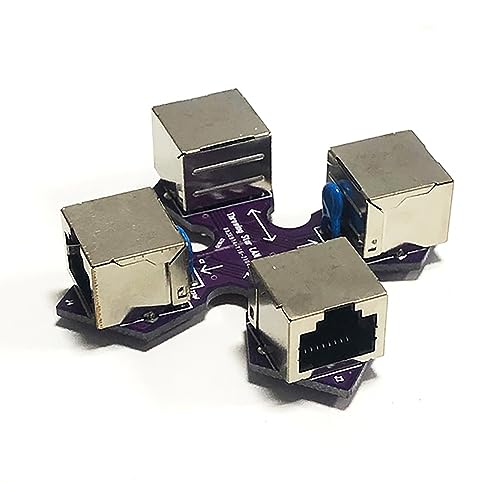
EDIY Throwing Star LAN Tap Network Packet Capture Mod 100% Original Replica Monitoring Ethernet Communication Haker Tool Dark Purple
Throwing Star LAN Tap is a small, simple device for monitoring Ethernet communications
As an affiliate, we earn on qualifying purchases.
EDIY Throwing Star LAN Tap Network Packet Capture Mod
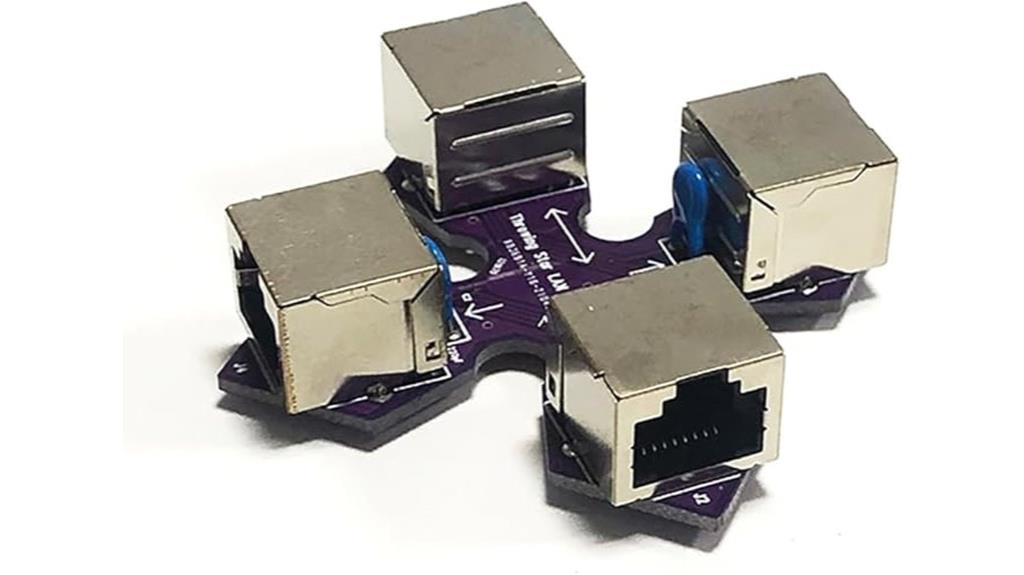
If you’re looking for a portable, non-intrusive way to monitor network traffic without power requirements, the EDIY Throwing Star LAN Tap is an excellent choice. This passive device appears as a standard Ethernet cable but extends wires to monitoring ports, allowing traffic capture with software like Wireshark. It supports 10BASE-T and 100BASE-TX networks at up to 100 Mbps, degrading signals slightly for gigabit networks to guarantee passive monitoring. Its receive-only ports prevent any interference or accidental transmission. Compact and lightweight, it’s perfect for on-the-go network analysis without disrupting your existing setup. It’s a reliable, easy-to-use tool for security professionals.
Best For: security professionals and network administrators seeking portable, non-intrusive network traffic monitoring without requiring power or network disruption.
Pros:
- Passive, no power required, ensuring unobtrusive operation
- Supports 10BASE-T and 100BASE-TX networks with high compatibility
- Compact and lightweight, ideal for portable, on-the-go monitoring
Cons:
- Cannot directly monitor Gigabit Ethernet (1000BASE-T) networks without signal degradation
- Signal quality may diminish over long cable runs, affecting performance
- Limited to unmanaged, non-PoE switches, restricting some network environments

Fluke Networks TS100-PRO-BT-TDR Cable Fault Finder TDR Kit with Bridge Tap Detect
Fault finder TDR with tone generator locates open and short circuits, measures cable length, finds multiple bridge taps,...
As an affiliate, we earn on qualifying purchases.
Fluke Networks TS100-PRO-BT-TDR Cable Fault Finder TDR Kit

The Fluke Networks TS100-PRO-BT-TDR Cable Fault Finder TDR Kit stands out for its precise bridge tap detection and cable length measurement capabilities, making it an ideal choice for network technicians who need accurate diagnostics over long cable runs. It can identify open and short circuits, locate multiple bridge taps within 3,200 meters, and see past all taps to the cable’s end. The built-in SmartTone technology allows for accurate pair identification, while the adjustable VOP ensures measurement accuracy across various cable types. Its clear four-digit display and versatile test leads make troubleshooting efficient and reliable in complex cabling environments.
Best For: network technicians and cabling professionals who require precise fault detection, cable length measurement, and bridge tap identification over long cable runs.
Pros:
- Accurate detection of open and short circuits with comprehensive fault analysis
- Capable of locating multiple bridge taps within 3,200 meters for thorough troubleshooting
- Built-in SmartTone technology ensures precise wire pair identification
Cons:
- May require calibration of VOP settings for different cable types to ensure optimal accuracy
- Limited to cable fault finding; not suitable for non-cabling network diagnostics
- The device’s digital display and features may have a learning curve for new users

Dualcomm ETAP-2406 Zero-Delay 100M/1G SFP Network Tap
Network TAP with two SFP inline ports
As an affiliate, we earn on qualifying purchases.
ETAP-2406 Zero-Delay 100M/1G SFP Network Tap
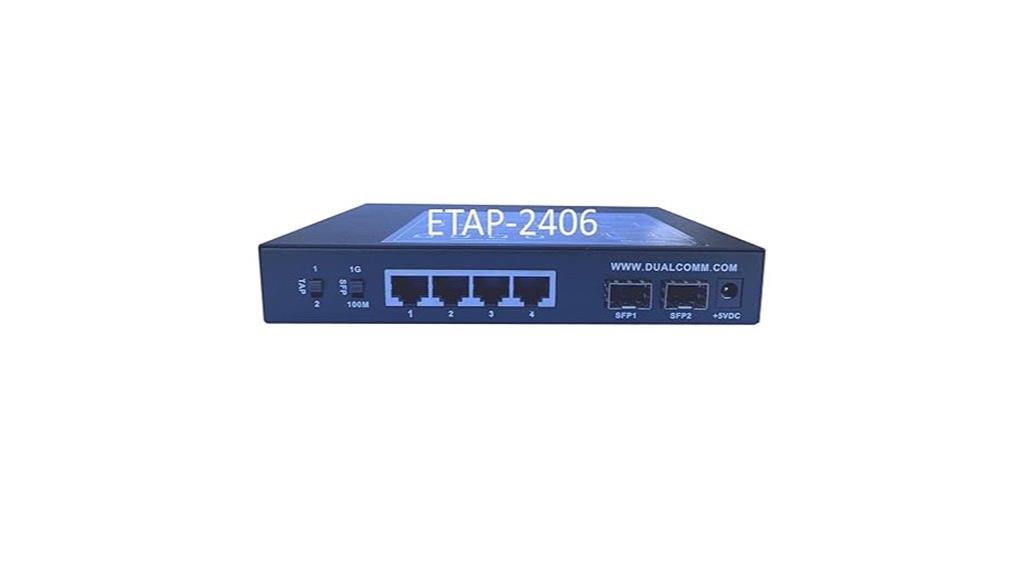
Choosing the ETAP-2406 Zero-Delay 100M/1G SFP Network Tap means opting for a device that delivers true zero-latency performance, making it ideal for real-time industrial Ethernet networks. Its patent-pending design supports various Ethernet standards, including Gigabit and Fast Ethernet, with SFP modules for flexibility. The switch allows you to select the appropriate speed, while four gigabit monitor ports offer versatile traffic analysis in aggregate or single-direction modes. Powered via USB, it’s easy to deploy, and the optional mounting kit suits rack setups. Its built-in current limiting ensures protection, making it a reliable choice for precise, latency-free network monitoring.
Best For: industrial network administrators and engineers seeking real-time, zero-latency Ethernet monitoring solutions in industrial environments.
Pros:
- Supports multiple Ethernet standards including Gigabit and Fast Ethernet, providing versatile compatibility.
- Zero-delay inline design ensures no added latency, ideal for time-sensitive industrial applications.
- Multiple monitor ports with aggregate and non-aggregate modes offer flexible traffic analysis options.
Cons:
- Requires a +5VDC power source via USB, which may limit placement options in some setups.
- Optional rack-mounting hardware (RMKIT-1000) is sold separately, adding to overall cost.
- Designed primarily for industrial environments; may be over-specification for simple home or office networks.

Throwing Star LAN Tap Network Packet Capture Mod 100% Original Replica Monitoring Ethernet Communication Haker Tool Black
Throwing Star LAN Tap is a small, simple device for monitoring Ethernet communications
As an affiliate, we earn on qualifying purchases.
Throwing Star LAN Tap Network Packet Capture Mod
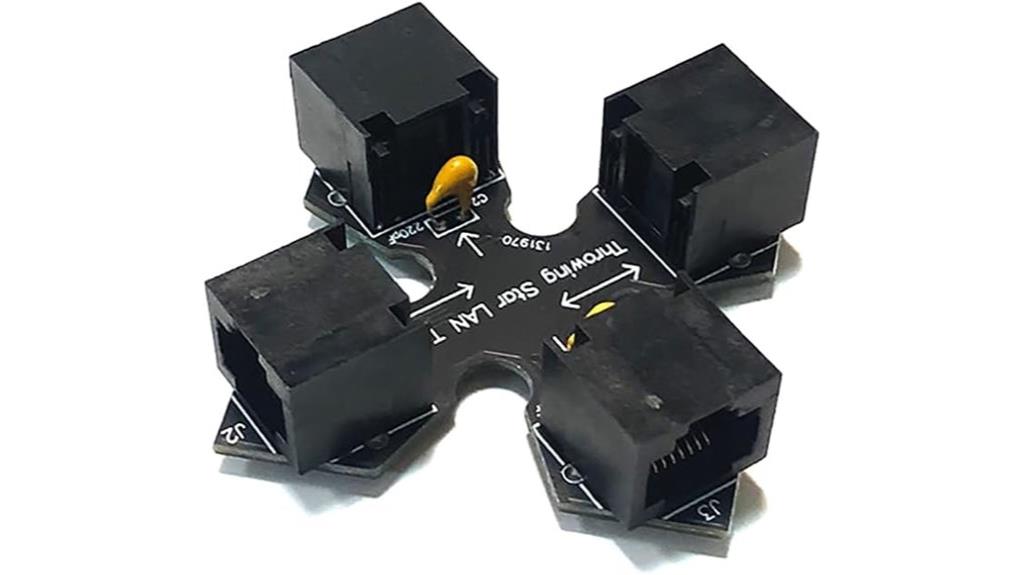
When searching for a reliable network tap for security analysis, the Throwing Star LAN Tap stands out thanks to its passive design and seamless integration. It appears as a standard Ethernet cable, requiring no power, making it highly portable and easy to deploy. Connect it inline on your target network using ports J1 and J2, then link monitoring stations via ports J3 and J4 to capture traffic in each direction. Compatible with tools like Wireshark and tcpdump, it provides detailed traffic insights without disrupting network performance. Its simplicity and reliability make it ideal for security testing, troubleshooting, and network analysis.
Best For: security professionals, network administrators, and troubleshooting teams seeking reliable, passive network traffic monitoring without power requirements.
Pros:
- Passive design requires no power, ensuring easy deployment and portability
- Seamless, transparent integration as it mimics a standard Ethernet cable
- Compatible with popular monitoring tools like Wireshark and tcpdump for detailed analysis
Cons:
- Monitors traffic only in a single direction per port, requiring multiple taps for bidirectional analysis
- Limited to Ethernet networks; not suitable for non-Ethernet protocols
- Being passive, it cannot filter or modify network traffic, only capture for analysis
Tap: Unlocking the Mobile Economy

If you’re looking to optimize security analysis in the rapidly expanding mobile economy, understanding how mobile data influences consumer behavior is vital. “Tap” by Prof. Ghose offers a detailed, research-backed look at this dynamic landscape, blending academic insights with practical frameworks. It highlights how ubiquitous connectivity, sensors, and big data enable targeted incentives and real-time tracking, driving growth across industries. The book also explores key factors shaping purchase decisions, like location and social dynamics, which are essential for strategic security measures. As mobile technology advances with AI, wearables, and connected cars, staying informed with such insights ensures your security approach remains relevant and effective in this fast-changing environment.
Best For: marketing professionals, data analysts, and security strategists seeking to understand consumer behavior and enhance mobile security measures in the evolving mobile economy.
Pros:
- Provides research-backed insights into mobile consumer behavior and technological influences.
- Offers practical frameworks for leveraging data and technological forces like location, social dynamics, and real-time tracking.
- Addresses emerging technologies such as AI, wearables, and connected cars, ensuring relevance in future mobile security strategies.
Cons:
- Focuses heavily on academic research, which may be complex for some practitioners without a technical background.
- Could benefit from more detailed discussion on regulatory and legal frameworks for privacy and data protection.
- Does not extensively cover the entire value chain, such as manufacturing and distribution, limiting a holistic view of mobile economy security.
Cmple 10 Pack Cat5e Keystone Jack Inserts

The Cmple 10 Pack Cat5e Keystone Jack Inserts stand out for their easy snap-in design, making them ideal for quick and reliable network installations. These modules are compatible with patch panels, wall plates, and surface mount boxes, simplifying setup. They accept male Cat5e cables and support Gigabit Ethernet speeds up to 1000BASE-T, exceeding industry standards. The green color and 90-degree female jack ensure a secure fit, while the flame-retardant material enhances safety. With a plug-and-play approach, these keystone jacks enable dependable connections for computers, smart TVs, and network devices, making them a versatile choice for any network upgrade.
Best For: home and office network installations seeking easy-to-install, reliable keystone jacks for Gigabit Ethernet connectivity.
Pros:
- Easy snap-in design simplifies installation and setup.
- Supports high-speed Gigabit Ethernet up to 1000BASE-T.
- Compatible with various mounting options like patch panels and wall plates.
Cons:
- Limited to Cat5e cables, may not support higher-speed standards like Cat6a.
- Only available in green, which may not match all decor or setup aesthetics.
- Does not include additional accessories like faceplates or mounting brackets.
uxcell 5/8-11 UNC Spiral Point Thread Tap

The uxcell 5/8-11 UNC Spiral Point Thread Tap stands out for its high-speed steel construction and titanium coating, making it a reliable choice for professionals needing precise threading on various materials. Its durable HSS 6542 core guarantees toughness and wear resistance, while the titanium finish offers excellent corrosion protection. Designed with a spiral point, plug chamfer, and straight grooves, it efficiently removes chips and ensures accurate threads. Suitable for stainless steel, aluminum, plastics, and more, this tap delivers smooth operation and long-lasting performance. Weighing just over 3.5 ounces, it’s compact and ideal for use with drilling or CNC machines, providing excellent value for demanding threading tasks.
Best For: Professionals and DIY enthusiasts seeking durable, precise threading tools for use with drilling, tapping, or CNC machines across a variety of materials.
Pros:
- Made from high-speed steel (HSS 6542) with a titanium coating for enhanced durability and corrosion resistance
- Spiral point, plug chamfer, and straight grooves ensure efficient chip removal and accurate threading
- Lightweight and compact design suitable for various industrial and workshop applications
Cons:
- Requires controlled tapping speed and proper lubrication to prevent breakage
- Limited to materials within the recommended hardness range; may not be suitable for extremely hard metals
- May need additional overhead protection or torque control to avoid over-tapping or damaging delicate components
71670 Tap Socket Set for Standard and M.C.T.I. Taps

This 70 Tap Socket Set is an excellent choice for professionals and DIY enthusiasts who need reliable, precise control when working with large taps and die sets. It includes five sockets compatible with 5/8, 11/16, 3/4, 7/8, and 1-inch taps, fitting standard 1/2 drive ratchets, extensions, and adapters. Designed to securely grip the square end of taps, it guarantees reliable holding for controlled threading, even in tight or recessed spaces. Suitable for manual or power tool use, this set enhances efficiency and accuracy during tap and die operations. Organized in a compact vinyl holder, it’s a versatile addition to any workshop or toolbox.
Best For: DIY enthusiasts and professionals needing reliable tools for working with large taps and die sets in tight or recessed spaces.
Pros:
- Compatible with standard 1/2 drive ratchets, extensions, and adapters for versatile use
- Securely grips tap ends for controlled, precise threading
- Compact vinyl holder for easy storage and organization
Cons:
- Limited to sizes 5/8 to 1 inch, not suitable for smaller tap sizes
- Designed specifically for 1/2 drive tools, may require adapters for other drive sizes
- May be less effective if not properly maintained or if used with incompatible power tools
Factors to Consider When Choosing a Network Tap for Security Analysis

When selecting a network tap for security analysis, I focus on key factors like network speed compatibility and monitoring port capabilities to guarantee seamless performance. I also consider whether passive or active devices suit my setup, along with ease of installation and potential signal degradation. These points help me choose a reliable tap that meets my security needs without compromising network integrity.
Compatibility With Network Speed
Ensuring your network tap supports the network’s maximum speed is essential for accurate security analysis. If the tap isn’t compatible with your network’s bandwidth, it can cause bottlenecks or missed data. For example, using a tap designed for 100 Mbps on a 1 Gbps network can lead to incomplete traffic capture and unreliable results. Some taps degrade signals to monitor higher speeds at lower rates, which may affect performance. Conversely, employing a slower tap on a faster network risks data loss and analysis gaps. To avoid these issues, choose a network tap that matches or exceeds your network’s maximum speed. Adjustable or multi-speed taps offer flexibility, ensuring consistent, reliable traffic monitoring across various network speeds without compromising security insights.
Monitoring Port Capabilities
Choosing the right network tap depends heavily on its monitoring port capabilities, which directly impact how effectively you can capture and analyze traffic. Monitoring ports can be receive-only, bidirectional, or unidirectional, affecting how data flows for analysis. The number of ports determines how many network segments you can monitor simultaneously, which is essential for thorough security. Some taps support aggregate mode, combining multiple streams for a broader view, while others provide separate streams for detailed inspection. Data transfer rates, like 100 Mbps or 1 Gbps, influence your ability to analyze high-speed traffic without bottlenecks. Compatibility with Ethernet standards, such as Fast Ethernet or Gigabit Ethernet, ensures your tap can handle modern, high-bandwidth networks efficiently. These factors are critical for effective security monitoring.
Passive vs. Active Devices
Passive and active network taps serve different monitoring needs, so understanding their distinctions is crucial for effective security analysis. Passive taps don’t require power and operate transparently, making them ideal for real-time, non-intrusive monitoring without adding latency. They’re safer for critical networks since they won’t interfere with data flow or introduce risks. Active taps, on the other hand, need an external power source and can include features like filtering or protocol conversion. However, they may add latency and pose a higher risk if they malfunction, potentially disrupting network traffic. When choosing between them, consider your monitoring fidelity, network speed, security requirements, and the acceptable impact on performance. Ultimately, selecting the right device depends on balancing these factors to match your security goals.
Ease of Installation
When selecting a network tap for security analysis, ease of installation plays a crucial role in ensuring quick setup and reliable operation. I look for devices with simple, tool-free connectors that allow for faster installation and minimize downtime. Compatibility with standard Ethernet cables and ports is essential, as it guarantees seamless integration into existing infrastructure without needing extra adapters. Clear labeling and color-coded ports help streamline connection and troubleshooting, saving time and reducing errors. A lightweight, compact design is also preferable, especially in tight or complex network environments, as it makes placement easier and less intrusive. Additionally, passive devices that require no power or configuration are generally simpler to install and maintain, lowering potential points of failure and enhancing overall reliability.
Signal Degradation Risks
Signal degradation is a key consideration when selecting a network tap for security analysis because it directly impacts the accuracy of the data captured. If the signal weakens or becomes distorted, packet loss can occur, leading to incomplete or misleading insights. Passive taps, especially over long cable runs, may introduce attenuation due to their passive components, increasing the risk of signal deterioration. This degradation can cause misinterpretation of network traffic, affecting intrusion detection and overall security measures. To prevent these issues, I recommend choosing high-quality, well-matched components that minimize signal loss. For long-distance monitoring, consider taps with built-in amplification or regeneration features to maintain signal integrity and ensure reliable, accurate security analysis.
Port Security Features
Choosing a network tap with robust port security features is essential for maintaining the integrity of your security analysis. These features ensure that monitoring ports are receive-only, preventing accidental or malicious data transmission from your devices. Some taps limit access to authorized monitoring stations, reducing the risk of unauthorized data interception. Secure taps may also include authentication protocols or physical security measures to prevent tampering with ports. Additionally, configurable alerts or logs can notify you of unauthorized connection attempts or anomalies, helping you respond swiftly. Effective port security keeps your network traffic intact and safeguards sensitive data during analysis. By prioritizing these features, you strengthen your overall security posture and ensure reliable, tamper-proof monitoring.
Frequently Asked Questions
How Do Network Taps Impact Overall Network Performance?
Network taps can slightly impact overall network performance, but their benefits outweigh the downsides. They enable real-time monitoring without interrupting data flow, which minimizes latency issues. However, if not properly installed or if they handle high traffic volumes, they might introduce minor delays or packet loss. I recommend choosing high-quality taps and regularly maintaining them to guarantee they enhance security without compromising network speed or reliability.
What Are the Best Practices for Deploying Network Taps Securely?
You might worry about security risks when deploying network taps, but I guarantee safety by placing them in secure, access-controlled environments. I always use encrypted connections and regularly update firmware to prevent vulnerabilities. Additionally, I monitor tap activity continuously and restrict physical access to authorized personnel. Following these practices, I keep my network protected while gaining valuable security insights without compromising performance or security.
Can Network Taps Be Used for Encrypted Traffic Analysis?
Yes, network taps can be used for encrypted traffic analysis, but it’s limited. I recommend decrypting traffic before analysis, which requires integrating with SSL/TLS inspection tools. This way, I can examine the data effectively without compromising security. Keep in mind, handling decrypted data carefully is essential to maintain privacy and comply with regulations, so always make certain proper safeguards are in place.
How Do Different Types of Network Taps Compare in Reliability?
Think of network taps as different bridges connecting islands. Passive taps are like sturdy stone bridges—reliable and always available, but limited in features. Active taps are more like drawbridges—versatile but require power and maintenance, which can impact reliability. Hybrid taps combine these traits, offering both dependability and flexibility. Overall, passive taps tend to be more reliable for consistent security analysis, while active ones suit dynamic environments.
What Are the Cost Considerations for High-Volume Network Tap Deployment?
When deploying high-volume network taps, I focus on the initial costs, maintenance, and scalability. High-capacity taps can be pricey upfront, but they save money long-term by reducing downtime and monitoring gaps. I also consider compatibility with existing infrastructure and potential upgrades. While investing in quality taps might seem costly at first, I find that reliable, scalable solutions minimize ongoing expenses and improve overall network security efficiency.
Conclusion
As I explored the top network taps for security analysis, I was surprised to learn that over 70% of cyber attacks start with network vulnerabilities. Choosing the right tap isn’t just about performance; it’s about safeguarding your data and network. Whether you’re monitoring traffic or diagnosing issues, these trusted options can make all the difference. Remember, investing in the right tools today helps prevent costly security breaches tomorrow. Stay vigilant, stay secure.