Remember the early days of networking when choosing the right cable made all the difference? Cross-over and straight-through cables each serve distinct purposes, yet understanding which to use can be tricky. Your choice affects the reliability and efficiency of your connections, especially when setting up networks or troubleshooting issues. So, knowing how these cables differ might just save you time and frustration—if you know what to look for, you’ll be surprised how much it impacts your network.
Key Takeaways
- Straight-through cables connect identical device types, like a computer to a switch, using the same wiring standard on both ends.
- Cross-over cables connect similar devices, such as computer to computer, with transmit and receive wires crossed.
- Modern devices often support auto-MDI/MDIX, reducing the need for crossover cables.
- Proper use of each cable type ensures reliable network connections and prevents communication issues.
- Correct wiring standards (T568A or T568B) are essential for verifying cable type and functionality.
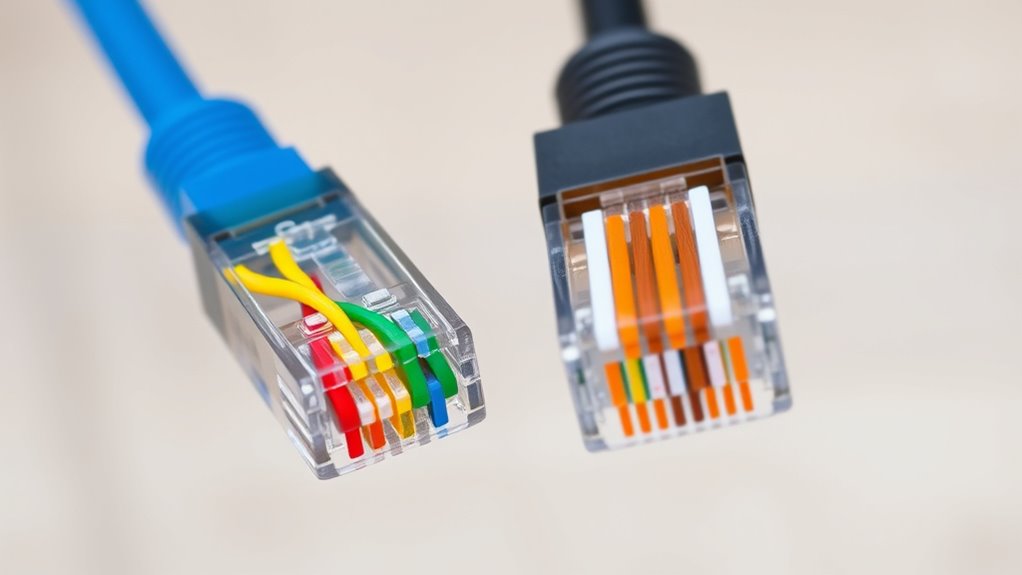
When setting up a network, understanding the difference between cross-over and straight-through cables is essential. These cables are critical for connecting different devices, and knowing which one to use can save you time and prevent connection issues. The key lies in the wiring configurations defined by Ethernet standards. Straight-through cables are wired identically at both ends, making them ideal for connecting different types of devices, such as a computer to a switch or a router. Conversely, cross-over cables have their transmit and receive wires crossed, enabling direct device-to-device connections like connecting two computers or switches without a hub. Recognizing this distinction allows you to select the right cable for the task, guaranteeing optimal network performance.
Understanding Ethernet standards is imperative because they specify how wires are arranged within the cable. For instance, the T568A and T568B wiring schemes are common standards that determine the pinouts for Ethernet cables. When creating or troubleshooting cables, adhering to these standards guarantees compatibility and reliable transmission. Cable testing becomes a necessary step to verify the integrity and correct wiring of your cables. Using a cable tester, you can quickly identify issues such as miswiring, broken conductors, or poor connections. Proper cable testing helps prevent network downtime and guarantees your setup meets Ethernet standards for optimal data transfer.
If you’re working with straight-through cables, guarantee both ends follow the same wiring scheme, like T568A on one end and T568A on the other. For cross-over cables, one end should follow T568A and the other T568B, crossing the transmit and receive pairs. Cable testing can confirm that your cables are wired correctly before deployment, saving you from troubleshooting connectivity problems later. It’s also worth noting that modern devices often support auto-MDI/MDIX, which automatically detects and adjusts for crossover wiring, reducing the importance of using crossover cables in some cases. However, understanding the difference remains essential, especially when dealing with legacy equipment or performing manual setup.
![BENFEI USB 3.0 to Ethernet Adapter, USB C to RJ45 Gigabit LAN (1000Mbps) Network Adapter, Compatible with MacBook/Pro/Air, Surface Pro, Windows 11/10/8/7, Mac OS [Aluminium Shell&Nylon Cable]](https://m.media-amazon.com/images/I/41fk9DHmdwL._SL500_.jpg)
BENFEI USB 3.0 to Ethernet Adapter, USB C to RJ45 Gigabit LAN (1000Mbps) Network Adapter, Compatible with MacBook/Pro/Air, Surface Pro, Windows 11/10/8/7, Mac OS [Aluminium Shell&Nylon Cable]
- Compact and Portable Design: Connects devices to network easily
- Stable Network Connection: Built-in advanced IC chip for reliability
- Driver-Free Installation: Supports Chrome, Mac, Windows OS
As an affiliate, we earn on qualifying purchases.
Frequently Asked Questions
Can Crossover Cables Be Used With Modern Ethernet Devices?
Yes, crossover cables can be used with modern Ethernet devices, but they’re often unnecessary. Thanks to Ethernet standards like Auto-MDIX, many devices now automatically detect and adjust for cable types, reflecting the cable evolution. This means you typically don’t need a crossover cable for device-to-device connections anymore, as most equipment can handle straight-through cables and adapt accordingly, simplifying network setup and maintenance.
How Do I Identify if My Device Requires a Crossover or Straight-Through Cable?
You can identify if your device needs a crossover or straight-through cable by checking the port indicator lights and cable color coding. If the port lights blink differently when connected, you might need a crossover cable. Also, compare the cable’s wiring order; straight-through cables follow the same wiring on both ends, while crossover cables swap transmit and receive wires. Consult your device’s manual for specific port requirements.
Are There Any Compatibility Issues Between Different Cable Types?
Ever wonder if your cables will get along? Compatibility issues can arise if cable standards aren’t matched properly. Different cable types, like crossover and straight-through, follow specific wiring standards that guarantee devices communicate correctly. Mixing incompatible cables may cause network problems or failures. To avoid these issues, always check device requirements and use the correct cable type, securing seamless connections and maximum performance across your network.
Do Crossover Cables Support Gigabit or Higher Network Speeds?
You’ll find that crossover cables generally support gigabit speeds, but their effectiveness depends on the network equipment’s gigabit compatibility. If your devices are gigabit-enabled, a crossover cable can handle those speeds; however, network interference and cable quality can impact performance. For maximum results, verify that both devices and cables are rated for gigabit use, and minimize interference sources to maintain high-speed data transfer without issues.
What Are the Best Practices for Cable Management and Labeling?
You should prioritize cable organization and clear labeling standards to keep your setup efficient. Use cable ties or Velcro straps to prevent tangles, and color-code cables for easy identification. Label both ends with consistent, legible tags that follow your chosen standard. This way, you’ll quickly troubleshoot, upgrade, or expand your network without the stress of lost connections or confusion—making your network both reliable and easy to manage.

TP-Link USB to Ethernet Adapter (UE306), Supports Nintendo Switch, 1Gbps Gigabit RJ45 to USB 3.0 Network Adapter, Foldable & Portable Design, Plug and Play, Compatible with Windows, macOS, and Linux
- High-Speed USB Ethernet: Supports 10/100/1000 Mbps connections
- USB 3.0 for Fast Data Transfer: Provides high-speed Gigabit Ethernet via USB 3.0
- Plug and Play Compatibility: Works with Windows, macOS, Linux, and Nintendo Switch
As an affiliate, we earn on qualifying purchases.
Conclusion
Understanding the difference between cross-over and straight-through cables helps you connect devices correctly, troubleshoot effectively, and guarantee your network runs smoothly. Whether you’re wiring a new setup or fixing an issue, knowing when to use each cable type saves time and prevents headaches. Remember, straight-throughs connect unlike devices, while cross-overs link similar ones. Mastering these connections makes you confident, prepared, and capable of building a reliable, efficient network every time.

UGREEN USB C to Ethernet Adapter, Plug and Play 1Gbps Ethernet Adapter, Aluminum Case, (Thunderbolt 4/3 Compatible) to RJ45 Network Dongle, Compatible for MacBook Pro/Air, iPhone 17 Pro/Max, iPad, XPS
- Fast 1Gbps Ethernet Speeds: Supports up to 1000Mbps for quick data transfer
- Extends Ethernet Connectivity: Adds Gigabit RJ45 port to your device
- Plug and Play Compatibility: Driver-free for most modern OS, easy setup
As an affiliate, we earn on qualifying purchases.

UGREEN USB C to Ethernet Adapter 2.5G, Ethernet Adapter for Laptop, Aluminum, Type C (Thunderbolt 4/3 Compatible) to RJ45 Network Internet, Compatible for NAS, MacBook Air/Pro, XPS, iPhone 17 Pro/Max
- Supports 2.5Gb Ethernet Speed: Fast internet for downloads and streaming
- Enhanced Performance with Realtek Chip: Stable, low-power, heat-efficient connection
- Upgrade from 1Gb to 2.5Gb Network: Boosts existing network speeds easily
As an affiliate, we earn on qualifying purchases.




![Paged Out #9 [Pdf]](https://cables-and-networks.com/wp-content/uploads/2026/07/paged-out-9-pdf-featured-260x140.jpg)